
實戰(zhàn)|教你用Python+PyQt5制作一款視頻數(shù)據(jù)下載小工具!
前言
大家好,我是早起。?
目前,市場上有大量 Python圖形用戶界面(GUI)開發(fā)框架可供選擇,如wxpython 、pyqt5、Gtk、Tk等。本文將用Python結(jié)合PyQt5制作一款B站視頻數(shù)據(jù)下載器,可以通過輸入關(guān)鍵字、頁碼以及選擇存儲路徑后,下載相應(yīng)的數(shù)據(jù),演示效果如下:
以下將詳細(xì)介紹這個GUI工具的制作方法,如需本文完整代碼,可以在公眾號「早起Python」后臺回復(fù)1116獲取。
開發(fā)環(huán)境
Python3
Pycharm
PyQt5
Qt Designer
requests
準(zhǔn)備工作
首先,新建一個bilibili.py文件。獲取B站視頻數(shù)據(jù)的爬蟲代碼相對簡單,只要設(shè)置好url的keyword和page參數(shù),即可輕松獲取數(shù)據(jù)。以下貼出完整代碼:
# -*- coding = uft-8 -*-
# @Time : 2020-11-11
# @Author : 「菜J學(xué)Python」J哥

import requests
from lxml import etree
import time
import random
import csv

def get_target(keyword,page):
    for i in range(1,page + 1):
        headers = {'User-Agent':'Mozilla/5.0 (Macintosh; Intel Mac OS X 10_14_6) AppleWebKit/537.36 (KHTML, like Gecko) Chrome/83.0.4103.116 Safari/537.36'}
        url = 'https://search.bilibili.com/all?keyword={0}&from_source=nav_suggest_new0&page={1}'.format(keyword,page)
        html = requests.get(url.format(i),headers = headers)
        bs = etree.HTML(html.text)
            items = bs.xpath('//li[@class = "video-item matrix"]')
            for item in items:
                title = item.xpath('div[@class = "info"]/div/a/@title')[0]
                click = item.xpath('div[@class = "info"]/div[3]/span[1]/text()')[0].strip('\n        ').replace("萬","")
                danmu = item.xpath('div[@class = "info"]/div[3]/span[2]/text()')[0].strip('\n        ')
                date = item.xpath('div[@class = "info"]/div[3]/span[3]/text()')[0].strip('\n        ')
                up = item.xpath('div[@class = "info"]/div[3]/span[4]/a/text()')[0].strip('\n        ')
                data = {'標(biāo)題': title, '播放量(萬)': click, '彈幕': danmu, '日期': date, 'UP主': up}
            with open('B站數(shù)據(jù).csv', 'a+', encoding='utf_8_sig', newline='') as fp:
                fieldnames = ['標(biāo)題', '播放量(萬)', '彈幕', '日期', 'UP主']
                writer = csv.DictWriter(fp, fieldnames=fieldnames)
                writer.writerow(data)
        time.sleep(random.random() + 1)
        print('已經(jīng)完成b站第 {} 頁爬取'.format(i))

if __name__ == "__main__":
    keyword = input("請輸入要搜索的關(guān)鍵詞:")
    page = int(input("請輸入要爬取的頁數(shù):"))
    get_target(keyword,page)
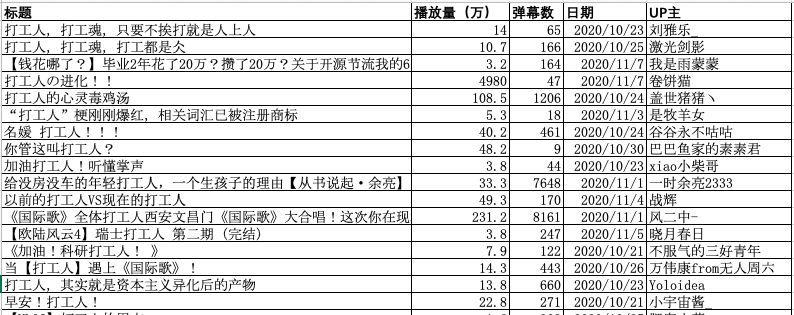
比如keyword輸入"打工人",page輸入5,運行爬蟲代碼,即可生成打工人相關(guān)的B站視頻數(shù)據(jù)csv文件,數(shù)據(jù)預(yù)覽如下:
UI設(shè)計
這里用到一款好用的工具——Qt Designer,通過它用"鼠標(biāo)拖拽"就能完成窗體設(shè)計。
安裝Qt Designer
pip3 install PyQt5
pip3 install PyQt5-tools
配置開發(fā)工具
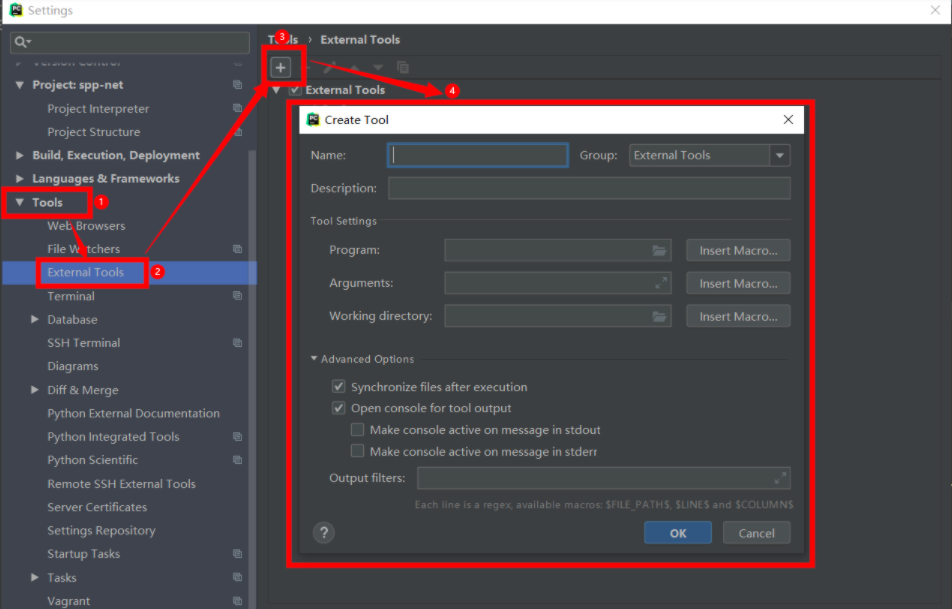
安裝完Qt Designer后,我們利用PyCharm進行界面開發(fā),下面進行Qt開發(fā)工具的配置:Files —> Settings —> Tools —> External Tools —> 點擊"+"
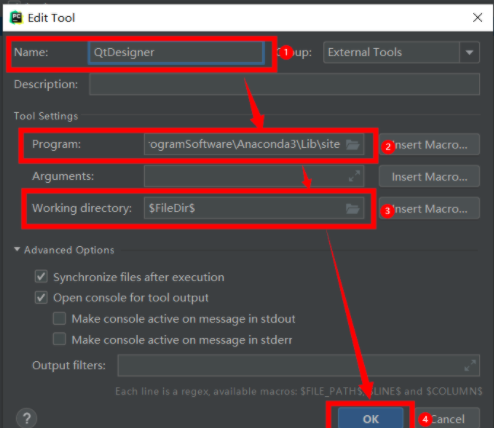
Name: QT Designer
Program: designer.exe所在的路徑  # 注意:該路徑為你Python安裝路徑下Lib\site-packages\pyqt5_tools文件夾里
Working directory: $FileDir$
添加Py UIC
Name: Py UIC
Program: pyuic5.exe所在路徑  #該路徑為你Python安裝路徑下Scripts文件夾里
Arguments: $FileName$ -o $FileNameWithoutExtension$.py;Working directory: $FileDir$Qt Designer設(shè)計界面
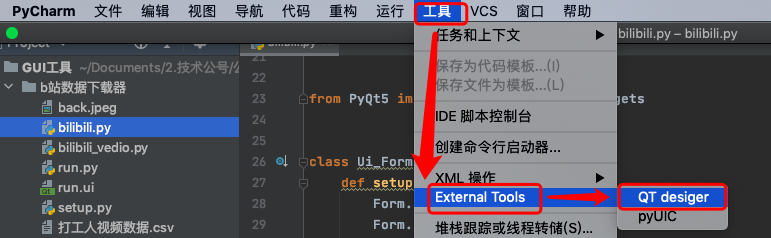
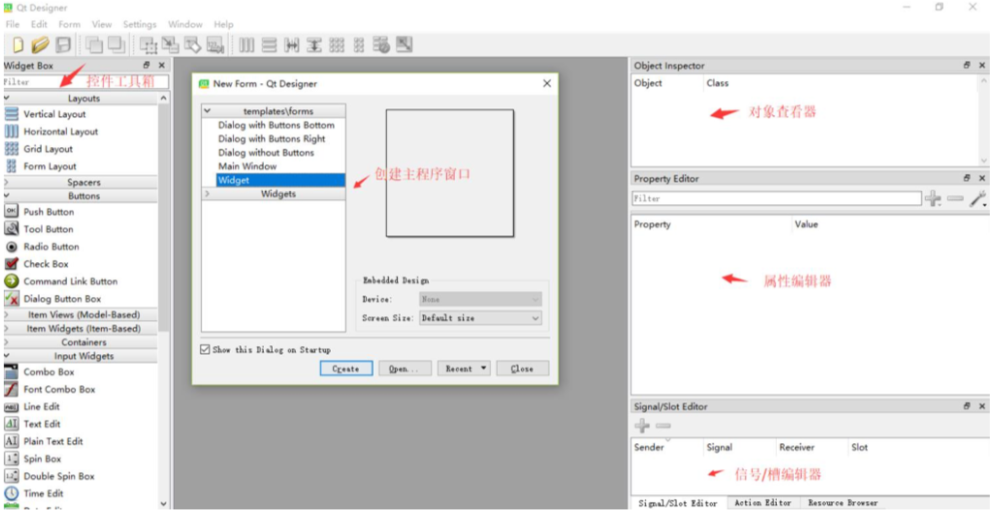
在PyCharm中創(chuàng)建一個項目,然后點擊“Tools”--“External Tools”--“QT Desinger”打開QT Desinger,如下圖:
工具箱區(qū)域:提供GUI界面開發(fā)使用的各種基本控件,如單選框、文本框等。可以拖動到新 創(chuàng)建的主程序界面。
主界面區(qū)域:用戶放置各種從工具箱拖過來的各種控件。模板選項中最常用的就是 Widget(通用窗口)。
對象查看器區(qū)域:查看主窗口放置的對象列表。屬性編輯器區(qū)域: 提供對窗口、控件、布局的屬性編輯功能。比如修改控件的顯示文本、對 象名、大小等。
信號/槽編輯器區(qū)域:編輯控件的信號和槽函數(shù),也可以添加自定義的信號和槽函數(shù)。
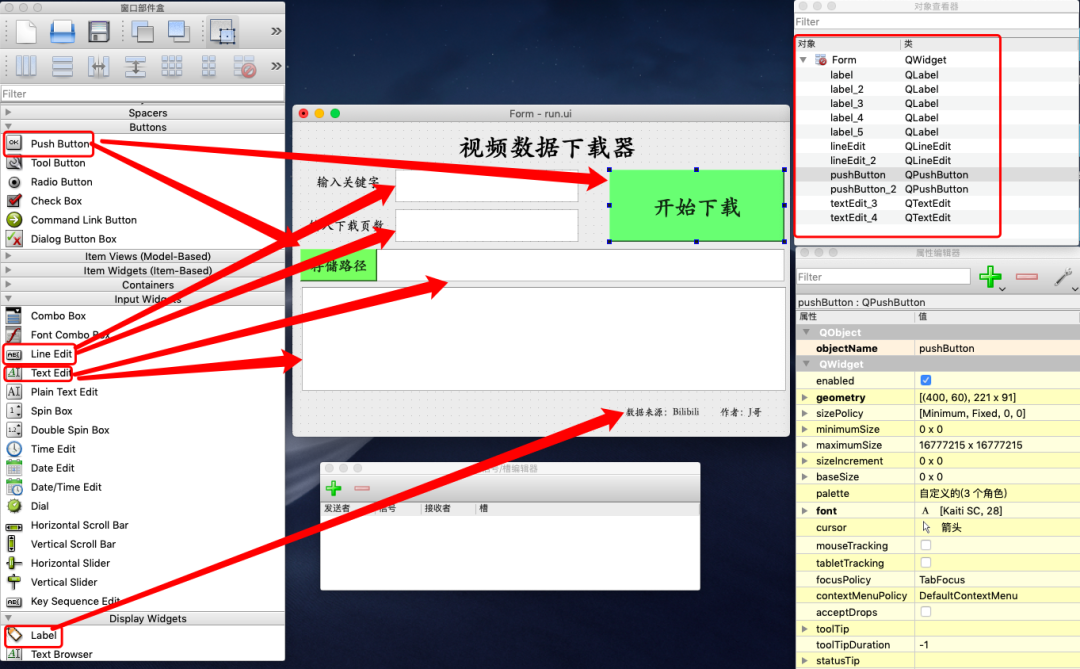
本文以創(chuàng)建Widget窗口為例,通過簡單的拖拽,字體和顏色的配置,即可輕松完成如下界面的設(shè)計:
將ui文件轉(zhuǎn)為py代碼
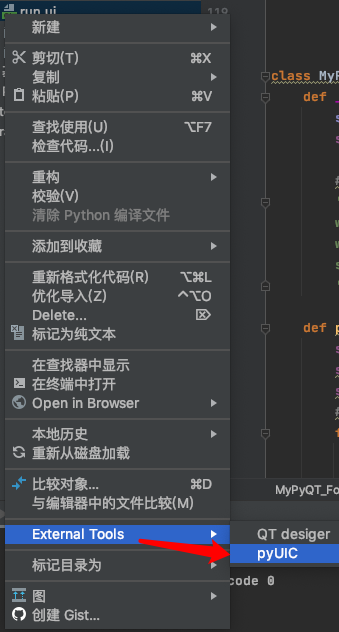
界面設(shè)計好以后,保存為run.ui文件,選中“run.ui”,在其上點擊鼠標(biāo)右鍵,到“External Tools”中點擊“PyUIC”,即可生成run.py文件:
爬蟲代碼與界面相結(jié)合
完善run.py,賦給“開始下載”按鈕以‘pushButton_click’函數(shù),賦給“存儲路徑”按鈕以‘setBrowerPath’函數(shù):
self.pushButton.clicked.connect(Form.pushButton_click)
self.pushButton_2.clicked.connect(Form.setBrowerPath)
完善爬蟲代碼,將界面整體框架融入其中:
import sys
from run import Ui_Form  #繼承run.py
from PyQt5.QtWidgets import *
from PyQt5 import QtCore, QtGui, QtWidgets

class MyPyQT_Form(QWidget, Ui_Form):
    def __init__(self):
        super(MyPyQT_Form, self).__init__()
        self.setupUi(self)

    def pushButton_click(self):
    ······
    def setBrowerPath(self):
    ······

if __name__ == '__main__':
    app = QApplication(sys.argv)
    my_pyqt_form = MyPyQT_Form()
    my_pyqt_form.show()
    sys.exit(app.exec_())
然后在pushButton_click函數(shù)中添加代碼, 接收界面輸入的keyword和page參數(shù),導(dǎo)入接口url中,代碼如下:
def pushButton_click(self):
   self.textEdit_4.setText("下載中......")
   self.keyword = self.lineEdit.text()  #關(guān)鍵字
   self.page = int(self.lineEdit_2.text()) #頁數(shù)
   #result = pd.DataFrame()
   for i in range(1,self.page + 1):
       time.sleep(random.random() + 0.5)
       headers = {'User-Agent':'Mozilla/5.0 (Macintosh; Intel Mac OS X 10_14_6) AppleWebKit/537.36 (KHTML, like Gecko) Chrome/83.0.4103.116 Safari/537.36'}
       url = 'https://search.bilibili.com/all?keyword={0}&from_source=nav_suggest_new0&page={1}'.format(self.keyword,self.page)
       html = requests.get(url.format(i),headers = headers)
       bs = etree.HTML(html.text)
       items = bs.xpath('//li[@class = "video-item matrix"]')
       for item in items:
           title = item.xpath('div[@class = "info"]/div/a/@title')[0]
           click = item.xpath('div[@class = "info"]/div[3]/span[1]/text()')[0].strip('\n        ').replace("萬","")
           danmu = item.xpath('div[@class = "info"]/div[3]/span[2]/text()')[0].strip('\n        ')
           date = item.xpath('div[@class = "info"]/div[3]/span[3]/text()')[0].strip('\n        ')
           up = item.xpath('div[@class = "info"]/div[3]/span[4]/a/text()')[0].strip('\n        ')
           data = {'標(biāo)題': title, '播放量(萬)': click, '彈幕': danmu, '日期': date, 'UP主': up}
           with open('{0}/{1}視頻數(shù)據(jù).csv'.format(self.download_path,self.keyword),'a+', encoding='utf_8_sig', newline='') as fp:
               fieldnames = ['標(biāo)題', '播放量(萬)', '彈幕', '日期', 'UP主']
               writer = csv.DictWriter(fp, fieldnames=fieldnames)
               writer.writerow(data)
       self.textEdit_4.append("第{0}頁下載完成".format(i))
       self.textEdit_4.append("保存路徑:{}".format(self.download_path))
       self.textEdit_4.append( "文件名稱:{}".format('{0}共{1}個視頻數(shù)據(jù).csv'.format(self.keyword,self.page*20)))
充實setBrowerPath函數(shù),獲取數(shù)據(jù)存儲路徑,將路徑在輸出框顯示出來:
def setBrowerPath(self):
    self.download_path = QFileDialog.getExistingDirectory(self)
    self.textEdit_3.setText(self.download_path)
工具打包
在cmd控制臺使用cd進入py文件所在目錄:
cd D:\菜J學(xué)Python\GUI工具\B站視頻數(shù)據(jù)下載器
使用pyinstaller打包:
pyinstaller -F -w bilibili.py
運行完成后,會在當(dāng)前目錄下生成1個dist文件夾和build文件夾,打開dist文件夾,雙擊bilibili.exe,工具即可運行。如果是mac環(huán)境可以使用py2app進行打包。
-END-
掃碼添加早小起,進入Python技術(shù)交流群