
史上最全的Excel導入導出(EasyExcel版)
點擊下方“IT牧場”,選擇“設為星標”

來源:blog.csdn.net/qq_32258777/article/details/89031479
喝水不忘挖井人,感謝阿里巴巴項目組提供了easyexcel工具類,github地址:
https://github.com/alibaba/easyexcel
文章目錄
環(huán)境搭建 讀取excel文件 默認讀取 指定讀取 默認讀取 指定讀取 小于1000行數據 大于1000行數據 導出excle 無模型映射導出 模型映射導出 單個Sheet導出 多個Sheet導出 工具類 測試類
環(huán)境搭建
easyexcel 依賴(必須) springboot (不是必須) lombok (不是必須)
?<dependency>
???<groupId>com.alibabagroupId>
???<artifactId>easyexcelartifactId>
???<version>1.1.2-beat1version>
?dependency>
??
?<dependency>
???<groupId>org.projectlombokgroupId>
???<artifactId>lombokartifactId>
???<version>1.18.2version>
?dependency>
讀取excel文件
小于1000行數據
默認讀取
讀取Sheet1的全部數據
?String?filePath?=?"/home/chenmingjian/Downloads/學生表.xlsx";
?List指定讀取
下面是學生表.xlsx中Sheet1,Sheet2的數據
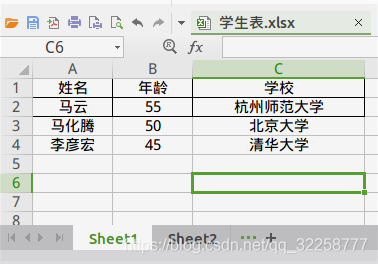
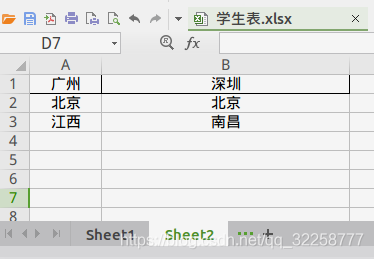
獲取Sheet1表頭以下的信息
String?filePath?=?"/home/chenmingjian/Downloads/學生表.xlsx";
//第一個1代表sheet1,?第二個1代表從第幾行開始讀取數據,行號最小值為0
Sheet?sheet?=?new?Sheet(1,?1);
List獲取Sheet2的所有信息
?String?filePath?=?"/home/chenmingjian/Downloads/學生表.xlsx";
?Sheet?sheet?=?new?Sheet(2,?0);
?List大于1000行數據
默認讀取
String?filePath?=?"/home/chenmingjian/Downloads/學生表.xlsx";
List指定讀取
String?filePath?=?"/home/chenmingjian/Downloads/學生表.xlsx";
Sheet?sheet?=?new?Sheet(1,?2);
List導出excle
單個Sheet導出
無模型映射導出
String?filePath?=?"/home/chenmingjian/Downloads/測試.xlsx";
List>?data?=?new?ArrayList<>();
data.add(Arrays.asList("111","222","333"));
data.add(Arrays.asList("111","222","333"));
data.add(Arrays.asList("111","222","333"));
List?head?=?Arrays.asList("表頭1",?"表頭2",?"表頭3");
ExcelUtil.writeBySimple(filePath,data,head);
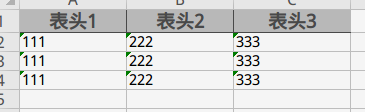
結果
模型映射導出
1、定義好模型對象
package?com.springboot.utils.excel.test;

import?com.alibaba.excel.annotation.ExcelProperty;
import?com.alibaba.excel.metadata.BaseRowModel;
import?lombok.Data;
import?lombok.EqualsAndHashCode;

/**
?*?@description:
?*?@author:?chenmingjian
?*?@date:?19-4-3?14:44
?*/
@EqualsAndHashCode(callSuper?=?true)
@Data
public?class?TableHeaderExcelProperty?extends?BaseRowModel?{

????/**
?????*?value:?表頭名稱
?????*?index:?列的號,?0表示第一列
?????*/
????@ExcelProperty(value?=?"姓名",?index?=?0)
????private?String?name;

????@ExcelProperty(value?=?"年齡",index?=?1)
????private?int?age;

????@ExcelProperty(value?=?"學校",index?=?2)
????private?String?school;
}
2、調用方法
String?filePath?=?"/home/chenmingjian/Downloads/測試.xlsx";
ArrayList?data?=?new?ArrayList<>();
??for(int?i?=?0;?i?4;?i++){
??????TableHeaderExcelProperty?tableHeaderExcelProperty?=?new?TableHeaderExcelProperty();
??????tableHeaderExcelProperty.setName("cmj"?+?i);
??????tableHeaderExcelProperty.setAge(22?+?i);
??????tableHeaderExcelProperty.setSchool("清華大學"?+?i);
??????data.add(tableHeaderExcelProperty);
??}

??ExcelUtil.writeWithTemplate(filePath,data);
多個Sheet導出
1、定義好模型對象
package?com.springboot.utils.excel.test;

import?com.alibaba.excel.annotation.ExcelProperty;
import?com.alibaba.excel.metadata.BaseRowModel;
import?lombok.Data;
import?lombok.EqualsAndHashCode;

/**
?*?@description:
?*?@author:?chenmingjian
?*?@date:?19-4-3?14:44
?*/
@EqualsAndHashCode(callSuper?=?true)
@Data
public?class?TableHeaderExcelProperty?extends?BaseRowModel?{

????/**
?????*?value:?表頭名稱
?????*?index:?列的號,?0表示第一列
?????*/
????@ExcelProperty(value?=?"姓名",?index?=?0)
????private?String?name;

????@ExcelProperty(value?=?"年齡",index?=?1)
????private?int?age;

????@ExcelProperty(value?=?"學校",index?=?2)
????private?String?school;
}
2、調用方法
?ArrayList?list1?=?new?ArrayList<>();
?for(int?j?=?1;?j?4;?j++){
??????ArrayList?list?=?new?ArrayList<>();
??????for(int?i?=?0;?i?4;?i++){
??????????TableHeaderExcelProperty?tableHeaderExcelProperty?=?new?TableHeaderExcelProperty();
??????????tableHeaderExcelProperty.setName("cmj"?+?i);
??????????tableHeaderExcelProperty.setAge(22?+?i);
??????????tableHeaderExcelProperty.setSchool("清華大學"?+?i);
??????????list.add(tableHeaderExcelProperty);
??????}

??????Sheet?sheet?=?new?Sheet(j,?0);
??????sheet.setSheetName("sheet"?+?j);

??????ExcelUtil.MultipleSheelPropety?multipleSheelPropety?=?new?ExcelUtil.MultipleSheelPropety();
??????multipleSheelPropety.setData(list);
??????multipleSheelPropety.setSheet(sheet);

??????list1.add(multipleSheelPropety);

??}

??ExcelUtil.writeWithMultipleSheel("/home/chenmingjian/Downloads/aaa.xlsx",list1);
工具類
package?com.springboot.utils.excel;
import?com.alibaba.excel.EasyExcelFactory;
import?com.alibaba.excel.ExcelWriter;
import?com.alibaba.excel.context.AnalysisContext;
import?com.alibaba.excel.event.AnalysisEventListener;
import?com.alibaba.excel.metadata.BaseRowModel;
import?com.alibaba.excel.metadata.Sheet;
import?lombok.Data;
import?lombok.Getter;
import?lombok.Setter;
import?lombok.extern.slf4j.Slf4j;
import?org.springframework.util.CollectionUtils;
import?org.springframework.util.StringUtils;
import?java.io.*;
import?java.util.ArrayList;
import?java.util.Collections;
import?java.util.List;
/**
?*?@description:
?*?@author:?chenmingjian
?*?@date:?19-3-18?16:16
?*/
@Slf4j
public?class?ExcelUtil?{
???private?static?Sheet?initSheet;
???static?{
??????initSheet?=?new?Sheet(1,?0);
??????initSheet.setSheetName("sheet");
??????//設置自適應寬度
??????initSheet.setAutoWidth(Boolean.TRUE);
???}
???/**
????*?讀取少于1000行數據
????*?@param?filePath?文件絕對路徑
????*?@return
????*/
???public?static?List{
??????return?readLessThan1000RowBySheet(filePath,null);
???}
???/**
????*?讀小于1000行數據,?帶樣式
????*?filePath?文件絕對路徑
????* initSheet :
????*??????sheetNo:?sheet頁碼,默認為1
????*??????headLineMun:?從第幾行開始讀取數據,默認為0,?表示從第一行開始讀取
????*??????clazz:?返回數據List
???public?static?List{
??????if(!StringUtils.hasText(filePath)){
?????????return?null;
??????}
??????sheet?=?sheet?!=?null???sheet?:?initSheet;
??????InputStream?fileStream?=?null;
??????try?{
?????????fileStream?=?new?FileInputStream(filePath);
?????????return?EasyExcelFactory.read(fileStream,?sheet);
??????}?catch?(FileNotFoundException?e)?{
?????????log.info("找不到文件或文件路徑錯誤, 文件:{}",?filePath);
??????}finally?{
?????????try?{
????????????if(fileStream?!=?null){
???????????????fileStream.close();
????????????}
?????????}?catch?(IOException?e)?{
????????????log.info("excel文件讀取失敗, 失敗原因:{}",?e);
?????????}
??????}
??????return?null;
???}
???/**
????*?讀大于1000行數據
????*?@param?filePath?文件覺得路徑
????*?@return
????*/
???public?static?List{
??????return?readMoreThan1000RowBySheet(filePath,null);
???}
???/**
????*?讀大于1000行數據,?帶樣式
????*?@param?filePath?文件覺得路徑
????*?@return
????*/
???public?static?List{
??????if(!StringUtils.hasText(filePath)){
?????????return?null;
??????}
??????sheet?=?sheet?!=?null???sheet?:?initSheet;
??????InputStream?fileStream?=?null;
??????try?{
?????????fileStream?=?new?FileInputStream(filePath);
?????????ExcelListener?excelListener?=?new?ExcelListener();
?????????EasyExcelFactory.readBySax(fileStream,?sheet,?excelListener);
?????????return?excelListener.getDatas();
??????}?catch?(FileNotFoundException?e)?{
?????????log.error("找不到文件或文件路徑錯誤, 文件:{}",?filePath);
??????}finally?{
?????????try?{
????????????if(fileStream?!=?null){
???????????????fileStream.close();
????????????}
?????????}?catch?(IOException?e)?{
????????????log.error("excel文件讀取失敗, 失敗原因:{}",?e);
?????????}
??????}
??????return?null;
???}
???/**
????*?生成excle
????*?@param?filePath ?絕對路徑, 如:/home/chenmingjian/Downloads/aaa.xlsx
????*?@param?data?數據源
????*?@param?head?表頭
????*/
???public?static?void?writeBySimple(String?filePath,?List>?data,?List?head) {
??????writeSimpleBySheet(filePath,data,head,null);
???}
???/**
????*?生成excle
????*?@param?filePath 絕對路徑, 如:/home/chenmingjian/Downloads/aaa.xlsx
????*?@param?data?數據源
????*?@param?sheet?excle頁面樣式
????*?@param?head?表頭
????*/
???public?static?void?writeSimpleBySheet(String?filePath,?List>?data,?List?head,?Sheet?sheet) {
??????sheet?=?(sheet?!=?null)???sheet?:?initSheet;
??????if(head?!=?null){
?????????List>?list?=?new?ArrayList<>();
?????????head.forEach(h?->?list.add(Collections.singletonList(h)));
?????????sheet.setHead(list);
??????}
??????OutputStream?outputStream?=?null;
??????ExcelWriter?writer?=?null;
??????try?{
?????????outputStream?=?new?FileOutputStream(filePath);
?????????writer?=?EasyExcelFactory.getWriter(outputStream);
?????????writer.write1(data,sheet);
??????}?catch?(FileNotFoundException?e)?{
?????????log.error("找不到文件或文件路徑錯誤, 文件:{}",?filePath);
??????}finally?{
?????????try?{
????????????if(writer?!=?null){
???????????????writer.finish();
????????????}
????????????if(outputStream?!=?null){
???????????????outputStream.close();
????????????}
?????????}?catch?(IOException?e)?{
????????????log.error("excel文件導出失敗, 失敗原因:{}",?e);
?????????}
??????}
???}
???/**
????*?生成excle
????*?@param?filePath 絕對路徑, 如:/home/chenmingjian/Downloads/aaa.xlsx
????*?@param?data?數據源
????*/
???public?static?void?writeWithTemplate(String?filePath,?List?data){
??????writeWithTemplateAndSheet(filePath,data,null);
???}
???/**
????*?生成excle
????*?@param?filePath 絕對路徑, 如:/home/chenmingjian/Downloads/aaa.xlsx
????*?@param?data?數據源
????*?@param?sheet?excle頁面樣式
????*/
???public?static?void?writeWithTemplateAndSheet(String?filePath,?List?data,?Sheet?sheet){
??????if(CollectionUtils.isEmpty(data)){
?????????return;
??????}
??????sheet?=?(sheet?!=?null)???sheet?:?initSheet;
??????sheet.setClazz(data.get(0).getClass());
??????OutputStream?outputStream?=?null;
??????ExcelWriter?writer?=?null;
??????try?{
?????????outputStream?=?new?FileOutputStream(filePath);
?????????writer?=?EasyExcelFactory.getWriter(outputStream);
?????????writer.write(data,sheet);
??????}?catch?(FileNotFoundException?e)?{
?????????log.error("找不到文件或文件路徑錯誤, 文件:{}",?filePath);
??????}finally?{
?????????try?{
????????????if(writer?!=?null){
???????????????writer.finish();
????????????}
????????????if(outputStream?!=?null){
???????????????outputStream.close();
????????????}
?????????}?catch?(IOException?e)?{
????????????log.error("excel文件導出失敗, 失敗原因:{}",?e);
?????????}
??????}
???}
???/**
????*?生成多Sheet的excle
????*?@param?filePath 絕對路徑, 如:/home/chenmingjian/Downloads/aaa.xlsx
????*?@param?multipleSheelPropetys
????*/
???public?static?void?writeWithMultipleSheel(String?filePath,List?multipleSheelPropetys) {
??????if(CollectionUtils.isEmpty(multipleSheelPropetys)){
?????????return;
??????}
??????OutputStream?outputStream?=?null;
??????ExcelWriter?writer?=?null;
??????try?{
?????????outputStream?=?new?FileOutputStream(filePath);
?????????writer?=?EasyExcelFactory.getWriter(outputStream);
?????????for?(MultipleSheelPropety?multipleSheelPropety?:?multipleSheelPropetys)?{
????????????Sheet?sheet?=?multipleSheelPropety.getSheet()?!=?null???multipleSheelPropety.getSheet()?:?initSheet;
????????????if(!CollectionUtils.isEmpty(multipleSheelPropety.getData())){
???????????????sheet.setClazz(multipleSheelPropety.getData().get(0).getClass());
????????????}
????????????writer.write(multipleSheelPropety.getData(),?sheet);
?????????}
??????}?catch?(FileNotFoundException?e)?{
?????????log.error("找不到文件或文件路徑錯誤, 文件:{}",?filePath);
??????}finally?{
?????????try?{
????????????if(writer?!=?null){
???????????????writer.finish();
????????????}
????????????if(outputStream?!=?null){
???????????????outputStream.close();
????????????}
?????????}?catch?(IOException?e)?{
????????????log.error("excel文件導出失敗, 失敗原因:{}",?e);
?????????}
??????}
???}
???/*********************匿名內部類開始,可以提取出去******************************/
???@Data
???public?static?class?MultipleSheelPropety{
??????private?List?data;
??????private?Sheet?sheet;
???}
???/**
????*?解析監(jiān)聽器,
????*?每解析一行會回調invoke()方法。
????*?整個excel解析結束會執(zhí)行doAfterAllAnalysed()方法
????*
????*?@author:?chenmingjian
????*?@date:?19-4-3?14:11
????*/
???@Getter
???@Setter
???public?static?class?ExcelListener?extends?AnalysisEventListener?{
??????private?List 測試類
package?com.springboot.utils.excel;
import?com.alibaba.excel.annotation.ExcelProperty;
import?com.alibaba.excel.metadata.BaseRowModel;
import?com.alibaba.excel.metadata.Sheet;
import?lombok.Data;
import?lombok.EqualsAndHashCode;
import?org.junit.runner.RunWith;
import?org.springframework.boot.test.context.SpringBootTest;
import?org.springframework.test.context.junit4.SpringRunner;
import?java.util.ArrayList;
import?java.util.Arrays;
import?java.util.List;
/**
?*?@description:?測試類
?*?@author:?chenmingjian
?*?@date:?19-4-4?15:24
?*/
@SpringBootTest
@RunWith(SpringRunner.class)
public?class?Test?{
????/**
?????*?讀取少于1000行的excle
?????*/
????@org.junit.Test
????public?void?readLessThan1000Row(){
????????String?filePath?=?"/home/chenmingjian/Downloads/測試.xlsx";
????????List干貨分享
最近將個人學習筆記整理成冊,使用PDF分享。關注我,回復如下代碼,即可獲得百度盤地址,無套路領取!
?001:《Java并發(fā)與高并發(fā)解決方案》學習筆記;?002:《深入JVM內核——原理、診斷與優(yōu)化》學習筆記;?003:《Java面試寶典》?004:《Docker開源書》?005:《Kubernetes開源書》?006:《DDD速成(領域驅動設計速成)》?007:全部?008:加技術群討論
加個關注不迷路
喜歡就點個"在看"唄^_^
評論
圖片
表情