
史上最全的Excel導(dǎo)入導(dǎo)出(easyexcel版)

作者 | 沖奶粉的奶爸
喝水不忘挖井人,感謝阿里巴巴項(xiàng)目組提供了easyexcel工具類,github地址:
https://github.com/alibaba/easyexcel
文章目錄
環(huán)境搭建
讀取excel文件
默認(rèn)讀取 指定讀取 默認(rèn)讀取 指定讀取 小于1000行數(shù)據(jù) 大于1000行數(shù)據(jù) 導(dǎo)出excle
無模型映射導(dǎo)出 模型映射導(dǎo)出 單個(gè)Sheet導(dǎo)出 多個(gè)Sheet導(dǎo)出 工具類
測(cè)試類
環(huán)境搭建
easyexcel 依賴(必須) springboot (不是必須) lombok (不是必須)
 <dependency>
   <groupId>com.alibaba</groupId>
   <artifactId>easyexcel</artifactId>
   <version>1.1.2-beat1</version>
 </dependency>

 <dependency>
   <groupId>org.projectlombok</groupId>
   <artifactId>lombok</artifactId>
   <version>1.18.2</version>
 </dependency>
讀取excel文件
小于1000行數(shù)據(jù)
默認(rèn)讀取
讀取Sheet1的全部數(shù)據(jù)
 String filePath = "/home/chenmingjian/Downloads/學(xué)生表.xlsx";
 List<Object> objects = ExcelUtil.readLessThan1000Row(filePath);
如果您正在學(xué)習(xí)Spring Boot,推薦一個(gè)連載多年還在繼續(xù)更新的免費(fèi)教程:http://blog.didispace.com/spring-boot-learning-2x/
下面是學(xué)生表.xlsx中Sheet1,Sheet2的數(shù)據(jù)
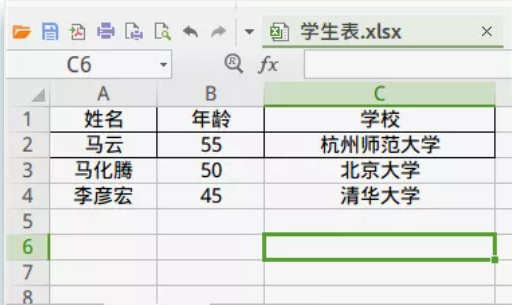
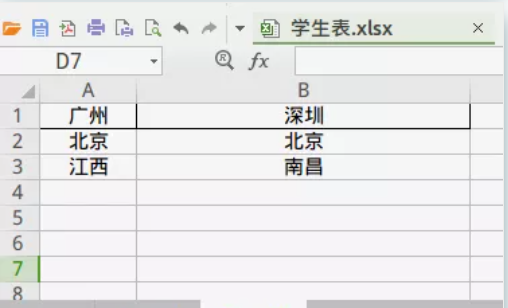
獲取Sheet1表頭以下的信息
String filePath = "/home/chenmingjian/Downloads/學(xué)生表.xlsx";
//第一個(gè)1代表sheet1, 第二個(gè)1代表從第幾行開始讀取數(shù)據(jù),行號(hào)最小值為0
Sheet sheet = new Sheet(1, 1);
List<Object> objects = ExcelUtil.readLessThan1000Row(filePath,sheet);
獲取Sheet2的所有信息
 String filePath = "/home/chenmingjian/Downloads/學(xué)生表.xlsx";
 Sheet sheet = new Sheet(2, 0);
 List<Object> objects = ExcelUtil.readLessThan1000Row(filePath,sheet);
大于1000行數(shù)據(jù)
默認(rèn)讀取
String filePath = "/home/chenmingjian/Downloads/學(xué)生表.xlsx";
List<Object> objects = ExcelUtil.readMoreThan1000Row(filePath);
指定讀取
String filePath = "/home/chenmingjian/Downloads/學(xué)生表.xlsx";
Sheet sheet = new Sheet(1, 2);
List<Object> objects = ExcelUtil.readMoreThan1000Row(filePath,sheet);
導(dǎo)出excle
單個(gè)Sheet導(dǎo)出
無模型映射導(dǎo)出
String filePath = "/home/chenmingjian/Downloads/測(cè)試.xlsx";
List<List<Object>> data = new ArrayList<>();
data.add(Arrays.asList("111","222","333"));
data.add(Arrays.asList("111","222","333"));
data.add(Arrays.asList("111","222","333"));
List<String> head = Arrays.asList("表頭1", "表頭2", "表頭3");
ExcelUtil.writeBySimple(filePath,data,head);
結(jié)果
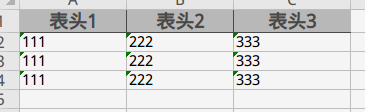
模型映射導(dǎo)出
1、定義好模型對(duì)象
package com.springboot.utils.excel.test;

import com.alibaba.excel.annotation.ExcelProperty;
import com.alibaba.excel.metadata.BaseRowModel;
import lombok.Data;
import lombok.EqualsAndHashCode;

/**
 * @description:
 * @author: chenmingjian
 * @date: 19-4-3 14:44
 */
@EqualsAndHashCode(callSuper = true)
@Data
public class TableHeaderExcelProperty extends BaseRowModel {

    /**
     * value: 表頭名稱
     * index: 列的號(hào), 0表示第一列
     */
    @ExcelProperty(value = "姓名", index = 0)
    private String name;

    @ExcelProperty(value = "年齡",index = 1)
    private int age;

    @ExcelProperty(value = "學(xué)校",index = 2)
    private String school;
}
2、調(diào)用方法
String filePath = "/home/chenmingjian/Downloads/測(cè)試.xlsx";
ArrayList<TableHeaderExcelProperty> data = new ArrayList<>();
  for(int i = 0; i < 4; i++){
      TableHeaderExcelProperty tableHeaderExcelProperty = new TableHeaderExcelProperty();
      tableHeaderExcelProperty.setName("cmj" + i);
      tableHeaderExcelProperty.setAge(22 + i);
      tableHeaderExcelProperty.setSchool("清華大學(xué)" + i);
      data.add(tableHeaderExcelProperty);
  }

  ExcelUtil.writeWithTemplate(filePath,data);
多個(gè)Sheet導(dǎo)出
1、定義好模型對(duì)象
package com.springboot.utils.excel.test;

import com.alibaba.excel.annotation.ExcelProperty;
import com.alibaba.excel.metadata.BaseRowModel;
import lombok.Data;
import lombok.EqualsAndHashCode;

/**
 * @description:
 * @author: chenmingjian
 * @date: 19-4-3 14:44
 */
@EqualsAndHashCode(callSuper = true)
@Data
public class TableHeaderExcelProperty extends BaseRowModel {

    /**
     * value: 表頭名稱
     * index: 列的號(hào), 0表示第一列
     */
    @ExcelProperty(value = "姓名", index = 0)
    private String name;

    @ExcelProperty(value = "年齡",index = 1)
    private int age;

    @ExcelProperty(value = "學(xué)校",index = 2)
    private String school;
}
2、調(diào)用方法
 ArrayList<ExcelUtil.MultipleSheelPropety> list1 = new ArrayList<>();
 for(int j = 1; j < 4; j++){
      ArrayList<TableHeaderExcelProperty> list = new ArrayList<>();
      for(int i = 0; i < 4; i++){
          TableHeaderExcelProperty tableHeaderExcelProperty = new TableHeaderExcelProperty();
          tableHeaderExcelProperty.setName("cmj" + i);
          tableHeaderExcelProperty.setAge(22 + i);
          tableHeaderExcelProperty.setSchool("清華大學(xué)" + i);
          list.add(tableHeaderExcelProperty);
      }

      Sheet sheet = new Sheet(j, 0);
      sheet.setSheetName("sheet" + j);

      ExcelUtil.MultipleSheelPropety multipleSheelPropety = new ExcelUtil.MultipleSheelPropety();
      multipleSheelPropety.setData(list);
      multipleSheelPropety.setSheet(sheet);

      list1.add(multipleSheelPropety);

  }

  ExcelUtil.writeWithMultipleSheel("/home/chenmingjian/Downloads/aaa.xlsx",list1);
工具類
另外,如果您正在學(xué)習(xí)Spring Cloud,推薦一個(gè)連載多年還在繼續(xù)更新的免費(fèi)教程:https://blog.didispace.com/spring-cloud-learning/
package com.springboot.utils.excel;

import com.alibaba.excel.EasyExcelFactory;
import com.alibaba.excel.ExcelWriter;
import com.alibaba.excel.context.AnalysisContext;
import com.alibaba.excel.event.AnalysisEventListener;
import com.alibaba.excel.metadata.BaseRowModel;
import com.alibaba.excel.metadata.Sheet;
import lombok.Data;
import lombok.Getter;
import lombok.Setter;
import lombok.extern.slf4j.Slf4j;
import org.springframework.util.CollectionUtils;
import org.springframework.util.StringUtils;

import java.io.*;
import java.util.ArrayList;
import java.util.Collections;
import java.util.List;

/**
 * @description:
 * @author: chenmingjian
 * @date: 19-3-18 16:16
 */
@Slf4j
public class ExcelUtil {

   private static Sheet initSheet;

   static {
      initSheet = new Sheet(1, 0);
      initSheet.setSheetName("sheet");
      //設(shè)置自適應(yīng)寬度
      initSheet.setAutoWidth(Boolean.TRUE);
   }

   /**
    * 讀取少于1000行數(shù)據(jù)
    * @param filePath 文件絕對(duì)路徑
    * @return
    */
   public static List<Object> readLessThan1000Row(String filePath){
      return readLessThan1000RowBySheet(filePath,null);
   }

   /**
    * 讀小于1000行數(shù)據(jù), 帶樣式
    * filePath 文件絕對(duì)路徑
    * initSheet :
    *      sheetNo: sheet頁碼,默認(rèn)為1
    *      headLineMun: 從第幾行開始讀取數(shù)據(jù),默認(rèn)為0, 表示從第一行開始讀取
    *      clazz: 返回?cái)?shù)據(jù)List<Object> 中Object的類名
    */
   public static List<Object> readLessThan1000RowBySheet(String filePath, Sheet sheet){
      if(!StringUtils.hasText(filePath)){
         return null;
      }

      sheet = sheet != null ? sheet : initSheet;

      InputStream fileStream = null;
      try {
         fileStream = new FileInputStream(filePath);
         return EasyExcelFactory.read(fileStream, sheet);
      } catch (FileNotFoundException e) {
         log.info("找不到文件或文件路徑錯(cuò)誤, 文件:{}", filePath);
      }finally {
         try {
            if(fileStream != null){
               fileStream.close();
            }
         } catch (IOException e) {
            log.info("excel文件讀取失敗, 失敗原因:{}", e);
         }
      }
      return null;
   }

   /**
    * 讀大于1000行數(shù)據(jù)
    * @param filePath 文件覺得路徑
    * @return
    */
   public static List<Object> readMoreThan1000Row(String filePath){
      return readMoreThan1000RowBySheet(filePath,null);
   }

   /**
    * 讀大于1000行數(shù)據(jù), 帶樣式
    * @param filePath 文件覺得路徑
    * @return
    */
   public static List<Object> readMoreThan1000RowBySheet(String filePath, Sheet sheet){
      if(!StringUtils.hasText(filePath)){
         return null;
      }

      sheet = sheet != null ? sheet : initSheet;

      InputStream fileStream = null;
      try {
         fileStream = new FileInputStream(filePath);
         ExcelListener excelListener = new ExcelListener();
         EasyExcelFactory.readBySax(fileStream, sheet, excelListener);
         return excelListener.getDatas();
      } catch (FileNotFoundException e) {
         log.error("找不到文件或文件路徑錯(cuò)誤, 文件:{}", filePath);
      }finally {
         try {
            if(fileStream != null){
               fileStream.close();
            }
         } catch (IOException e) {
            log.error("excel文件讀取失敗, 失敗原因:{}", e);
         }
      }
      return null;
   }

   /**
    * 生成excle
    * @param filePath  絕對(duì)路徑, 如:/home/chenmingjian/Downloads/aaa.xlsx
    * @param data 數(shù)據(jù)源
    * @param head 表頭
    */
   public static void writeBySimple(String filePath, List<List<Object>> data, List<String> head){
      writeSimpleBySheet(filePath,data,head,null);
   }

   /**
    * 生成excle
    * @param filePath 絕對(duì)路徑, 如:/home/chenmingjian/Downloads/aaa.xlsx
    * @param data 數(shù)據(jù)源
    * @param sheet excle頁面樣式
    * @param head 表頭
    */
   public static void writeSimpleBySheet(String filePath, List<List<Object>> data, List<String> head, Sheet sheet){
      sheet = (sheet != null) ? sheet : initSheet;

      if(head != null){
         List<List<String>> list = new ArrayList<>();
         head.forEach(h -> list.add(Collections.singletonList(h)));
         sheet.setHead(list);
      }

      OutputStream outputStream = null;
      ExcelWriter writer = null;
      try {
         outputStream = new FileOutputStream(filePath);
         writer = EasyExcelFactory.getWriter(outputStream);
         writer.write1(data,sheet);
      } catch (FileNotFoundException e) {
         log.error("找不到文件或文件路徑錯(cuò)誤, 文件:{}", filePath);
      }finally {
         try {
            if(writer != null){
               writer.finish();
            }

            if(outputStream != null){
               outputStream.close();
            }

         } catch (IOException e) {
            log.error("excel文件導(dǎo)出失敗, 失敗原因:{}", e);
         }
      }

   }

   /**
    * 生成excle
    * @param filePath 絕對(duì)路徑, 如:/home/chenmingjian/Downloads/aaa.xlsx
    * @param data 數(shù)據(jù)源
    */
   public static void writeWithTemplate(String filePath, List<? extends BaseRowModel> data){
      writeWithTemplateAndSheet(filePath,data,null);
   }

   /**
    * 生成excle
    * @param filePath 絕對(duì)路徑, 如:/home/chenmingjian/Downloads/aaa.xlsx
    * @param data 數(shù)據(jù)源
    * @param sheet excle頁面樣式
    */
   public static void writeWithTemplateAndSheet(String filePath, List<? extends BaseRowModel> data, Sheet sheet){
      if(CollectionUtils.isEmpty(data)){
         return;
      }

      sheet = (sheet != null) ? sheet : initSheet;
      sheet.setClazz(data.get(0).getClass());

      OutputStream outputStream = null;
      ExcelWriter writer = null;
      try {
         outputStream = new FileOutputStream(filePath);
         writer = EasyExcelFactory.getWriter(outputStream);
         writer.write(data,sheet);
      } catch (FileNotFoundException e) {
         log.error("找不到文件或文件路徑錯(cuò)誤, 文件:{}", filePath);
      }finally {
         try {
            if(writer != null){
               writer.finish();
            }

            if(outputStream != null){
               outputStream.close();
            }
         } catch (IOException e) {
            log.error("excel文件導(dǎo)出失敗, 失敗原因:{}", e);
         }
      }

   }

   /**
    * 生成多Sheet的excle
    * @param filePath 絕對(duì)路徑, 如:/home/chenmingjian/Downloads/aaa.xlsx
    * @param multipleSheelPropetys
    */
   public static void writeWithMultipleSheel(String filePath,List<MultipleSheelPropety> multipleSheelPropetys){
      if(CollectionUtils.isEmpty(multipleSheelPropetys)){
         return;
      }

      OutputStream outputStream = null;
      ExcelWriter writer = null;
      try {
         outputStream = new FileOutputStream(filePath);
         writer = EasyExcelFactory.getWriter(outputStream);
         for (MultipleSheelPropety multipleSheelPropety : multipleSheelPropetys) {
            Sheet sheet = multipleSheelPropety.getSheet() != null ? multipleSheelPropety.getSheet() : initSheet;
            if(!CollectionUtils.isEmpty(multipleSheelPropety.getData())){
               sheet.setClazz(multipleSheelPropety.getData().get(0).getClass());
            }
            writer.write(multipleSheelPropety.getData(), sheet);
         }

      } catch (FileNotFoundException e) {
         log.error("找不到文件或文件路徑錯(cuò)誤, 文件:{}", filePath);
      }finally {
         try {
            if(writer != null){
               writer.finish();
            }

            if(outputStream != null){
               outputStream.close();
            }
         } catch (IOException e) {
            log.error("excel文件導(dǎo)出失敗, 失敗原因:{}", e);
         }
      }

   }


   /*********************匿名內(nèi)部類開始,可以提取出去******************************/

   @Data
   public static class MultipleSheelPropety{

      private List<? extends BaseRowModel> data;

      private Sheet sheet;
   }

   /**
    * 解析監(jiān)聽器,
    * 每解析一行會(huì)回調(diào)invoke()方法。
    * 整個(gè)excel解析結(jié)束會(huì)執(zhí)行doAfterAllAnalysed()方法
    *
    * @author: chenmingjian
    * @date: 19-4-3 14:11
    */
   @Getter
   @Setter
   public static class ExcelListener extends AnalysisEventListener {

      private List<Object> datas = new ArrayList<>();

      /**
       * 逐行解析
       * object : 當(dāng)前行的數(shù)據(jù)
       */
      @Override
      public void invoke(Object object, AnalysisContext context) {
         //當(dāng)前行
         // context.getCurrentRowNum()
         if (object != null) {
            datas.add(object);
         }
      }


      /**
       * 解析完所有數(shù)據(jù)后會(huì)調(diào)用該方法
       */
      @Override
      public void doAfterAllAnalysed(AnalysisContext context) {
         //解析結(jié)束銷毀不用的資源
      }

   }

   /************************匿名內(nèi)部類結(jié)束,可以提取出去***************************/

}
package com.springboot.utils.excel;

import com.alibaba.excel.annotation.ExcelProperty;
import com.alibaba.excel.metadata.BaseRowModel;
import com.alibaba.excel.metadata.Sheet;
import lombok.Data;
import lombok.EqualsAndHashCode;
import org.junit.runner.RunWith;
import org.springframework.boot.test.context.SpringBootTest;
import org.springframework.test.context.junit4.SpringRunner;

import java.util.ArrayList;
import java.util.Arrays;
import java.util.List;

/**
 * @description: 測(cè)試類
 * @author: chenmingjian
 * @date: 19-4-4 15:24
 */
@SpringBootTest
@RunWith(SpringRunner.class)
public class Test {

    /**
     * 讀取少于1000行的excle
     */
    @org.junit.Test
    public void readLessThan1000Row(){
        String filePath = "/home/chenmingjian/Downloads/測(cè)試.xlsx";
        List<Object> objects = ExcelUtil.readLessThan1000Row(filePath);
        objects.forEach(System.out::println);
    }

    /**
     * 讀取少于1000行的excle,可以指定sheet和從幾行讀起
     */
    @org.junit.Test
    public void readLessThan1000RowBySheet(){
        String filePath = "/home/chenmingjian/Downloads/測(cè)試.xlsx";
        Sheet sheet = new Sheet(1, 1);
        List<Object> objects = ExcelUtil.readLessThan1000RowBySheet(filePath,sheet);
        objects.forEach(System.out::println);
    }

    /**
     * 讀取大于1000行的excle
     * 帶sheet參數(shù)的方法可參照測(cè)試方法readLessThan1000RowBySheet()
     */
    @org.junit.Test
    public void readMoreThan1000Row(){
        String filePath = "/home/chenmingjian/Downloads/測(cè)試.xlsx";
        List<Object> objects = ExcelUtil.readMoreThan1000Row(filePath);
        objects.forEach(System.out::println);
    }


    /**
     * 生成excle
     * 帶sheet參數(shù)的方法可參照測(cè)試方法readLessThan1000RowBySheet()
     */
    @org.junit.Test
    public void writeBySimple(){
        String filePath = "/home/chenmingjian/Downloads/測(cè)試.xlsx";
        List<List<Object>> data = new ArrayList<>();
        data.add(Arrays.asList("111","222","333"));
        data.add(Arrays.asList("111","222","333"));
        data.add(Arrays.asList("111","222","333"));
        List<String> head = Arrays.asList("表頭1", "表頭2", "表頭3");
        ExcelUtil.writeBySimple(filePath,data,head);
    }


    /**
     * 生成excle, 帶用模型
     * 帶sheet參數(shù)的方法可參照測(cè)試方法readLessThan1000RowBySheet()
     */
    @org.junit.Test
    public void writeWithTemplate(){
        String filePath = "/home/chenmingjian/Downloads/測(cè)試.xlsx";
        ArrayList<TableHeaderExcelProperty> data = new ArrayList<>();
        for(int i = 0; i < 4; i++){
            TableHeaderExcelProperty tableHeaderExcelProperty = new TableHeaderExcelProperty();
            tableHeaderExcelProperty.setName("cmj" + i);
            tableHeaderExcelProperty.setAge(22 + i);
            tableHeaderExcelProperty.setSchool("清華大學(xué)" + i);
            data.add(tableHeaderExcelProperty);
        }
        ExcelUtil.writeWithTemplate(filePath,data);
    }


    /**
     * 生成excle, 帶用模型,帶多個(gè)sheet
     */
    @org.junit.Test
    public void writeWithMultipleSheel(){
        ArrayList<ExcelUtil.MultipleSheelPropety> list1 = new ArrayList<>();
        for(int j = 1; j < 4; j++){
            ArrayList<TableHeaderExcelProperty> list = new ArrayList<>();
            for(int i = 0; i < 4; i++){
                TableHeaderExcelProperty tableHeaderExcelProperty = new TableHeaderExcelProperty();
                tableHeaderExcelProperty.setName("cmj" + i);
                tableHeaderExcelProperty.setAge(22 + i);
                tableHeaderExcelProperty.setSchool("清華大學(xué)" + i);
                list.add(tableHeaderExcelProperty);
            }

            Sheet sheet = new Sheet(j, 0);
            sheet.setSheetName("sheet" + j);

            ExcelUtil.MultipleSheelPropety multipleSheelPropety = new ExcelUtil.MultipleSheelPropety();
            multipleSheelPropety.setData(list);
            multipleSheelPropety.setSheet(sheet);

            list1.add(multipleSheelPropety);

        }

        ExcelUtil.writeWithMultipleSheel("/home/chenmingjian/Downloads/aaa.xlsx",list1);

    }


    /*******************匿名內(nèi)部類,實(shí)際開發(fā)中該對(duì)象要提取出去**********************/


    /**
     * @description:
     * @author: chenmingjian
     * @date: 19-4-3 14:44
     */
    @EqualsAndHashCode(callSuper = true)
    @Data
    public static class TableHeaderExcelProperty extends BaseRowModel {

        /**
         * value: 表頭名稱
         * index: 列的號(hào), 0表示第一列
         */
        @ExcelProperty(value = "姓名", index = 0)
        private String name;

        @ExcelProperty(value = "年齡",index = 1)
        private int age;

        @ExcelProperty(value = "學(xué)校",index = 2)
        private String school;
    }

    /*******************匿名內(nèi)部類,實(shí)際開發(fā)中該對(duì)象要提取出去**********************/

}
往期推薦
 技術(shù)交流群
最近有很多人問,有沒有讀者交流群,想知道怎么加入。加入方式很簡單,有興趣的同學(xué),只需要點(diǎn)擊下方卡片,回復(fù)“加群“,即可免費(fèi)加入我們的高質(zhì)量技術(shù)交流群!
點(diǎn)擊閱讀原文,送你免費(fèi)Spring Boot教程!
評(píng)論
圖片
表情