Elasticsearch 如何實現(xiàn)時間差查詢?
1、Elasticsearch 線上實戰(zhàn)問題
問個問題啊,es能通過兩個字段差值進行查詢嗎?類似select * from myindex where endtimes- starttime > 10這種?
——問題來源:死磕Elasticsearch 知識星球
那么問題來了,Elasticsearch 如何實現(xiàn)時間差的查詢呢?
2、先說一下 MySQL 實現(xiàn)
2.1 MySQL 表結(jié)構(gòu)

2.2 MySQL 樣例數(shù)據(jù)

2.3 MySQL 計算時間差?
select timestampdiff(MINUTE, start_time, end_time) as span from test;
結(jié)果如下:
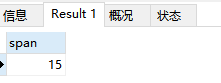
結(jié)果 15 代表 15 分鐘的意思。
3、Elasticsearch 實現(xiàn)拆解
3.1 創(chuàng)建索引
PUT test-index-001
{
  "mappings": {
    "properties": {
      "starttime": {
        "type": "date"
      },
      "endtime": {
        "type": "date"
      }
    }
  }
}
3.2 插入數(shù)據(jù)
POST test-index-001/_bulk
{"index":{"_id":1}}
{"starttime":"2022-06-08T10:00:00Z","endtime":"2022-06-08T10:15:00Z"}
3.3 方案一:直接類MySQL 查詢實現(xiàn)
POST test-index-001/_search
{
  "query": {
    "bool": {
      "filter": {
        "script": {
          "script": {
            "source": "doc['endtime'].date.minuteOfDay - doc['starttime'].date.minuteOfDay >= 15",
            "lang": "expression"
          }
        }
      }
    }
  }
}
解讀一下:
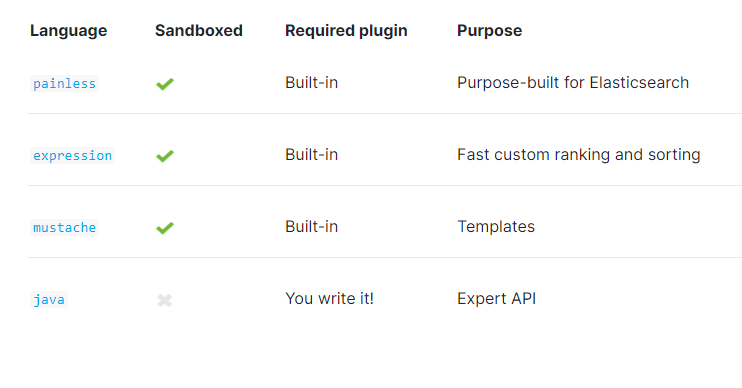
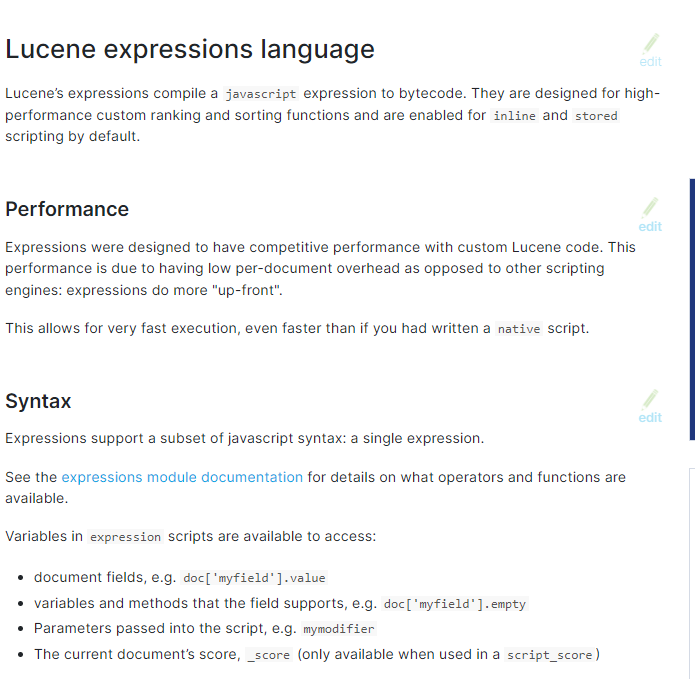
lang 指的是腳本語言,這里使用的是:expression,不是 painless 無痛腳本,所以寫法和往常會不同。
更多推薦查看:
3.4 方案二:ingest 預(yù)處理空間換時間實現(xiàn)
核心使用的是:painless 無痛腳本。在對時間的腳本處理上略顯笨拙(大家有好的方法可以交流)。
步驟1:時間字段轉(zhuǎn)成字符串; 步驟2:字符串轉(zhuǎn)成 ZonedDateTime字段類型;步驟3:ZonedDateTime 字段類型轉(zhuǎn)成 long長整形。步驟4:求解兩個整形之差就可以了。
實現(xiàn)如下代碼所示:
PUT _ingest/pipeline/my_pipeline_20220618
{
  "processors": [
    {
      "script": {
        "lang": "painless",
        "source": """

        String start_datetime = ctx.starttime;
        ZonedDateTime start_zdt = ZonedDateTime.parse(start_datetime);

        String end_datetime =ctx.endtime;
        ZonedDateTime end_zdt = ZonedDateTime.parse(end_datetime);

        long start_millisDateTime = start_zdt.toInstant().toEpochMilli();
        long end_millisDateTime = end_zdt.toInstant().toEpochMilli();
        long elapsedTime = end_millisDateTime - start_millisDateTime;

        ctx.span = elapsedTime/1000/60;

        """
      }
    }
  ]
}

POST test-index-001/_update_by_query?pipeline=my_pipeline_20220618
{
  "query": {
    "match_all": {}
  }
}

POST test-index-001/_search
{
  "query": {
    "range": {
      "span": {
        "gte": 15
      }
    }
  }
}
如上 update_by_query 的實現(xiàn)完全可以轉(zhuǎn)換為預(yù)處理+setting環(huán)節(jié)的 default_pipeline 方式實現(xiàn),確保寫入環(huán)節(jié)直接生成span字段值,確保候選實現(xiàn)空間換時間,提高檢索效率。
default_pipeline 實現(xiàn)如下:
PUT test-20220619-10-02
{
  "settings": {
    "default_pipeline": "my_pipeline_20220618"
  },
  "mappings": {
    "properties": {
      "start_time": {
        "type": "date"
      },
      "end_time": {
        "type": "date"
      }
    }
  }
}


### 步驟2:導(dǎo)入數(shù)據(jù)
PUT test-20220619-10-02/_doc/1
{
  "start_time": "2022-01-01T12:00:30Z",
  "end_time": "2022-01-01T12:15:30Z"
}

### 方案二優(yōu)勢地方:時間差值已經(jīng)成為我們新的字段,直接用這個字段
POST test-20220619-10-02/_search
{
  "query": {
    "range": {
      "span": {
        "gte": 15
      }
    }
  }
}
如上實現(xiàn),更簡潔寫法如下:
PUT _ingest/pipeline/my_pipeline_20220618_03
{
  "processors": [
    {
      "script": {
        "lang": "painless",
        "source": """

          // create a Instant object
        Instant start_instant = Instant.parse(ctx.starttime);

        // get millisecond value using toEpochMilli()
        long start_millisDateTime = start_instant.toEpochMilli();

        // create a Instant object
        Instant end_instant= Instant.parse(ctx.endtime);

        // get millisecond value using toEpochMilli()
        long end_millisDateTime = end_instant.toEpochMilli();
        long elapsedTime = end_millisDateTime - start_millisDateTime;
        ctx.span = elapsedTime/1000/60;

        """
      }
    }
  ]
}
3.5 方案三:runtime_field 實時檢索實現(xiàn)
POST test-index-001/_search
{
  "fields": [
    "*"
  ],
  "runtime_mappings": {
    "span_value": {
      "type": "long",
      "script": {
        "source": "emit((doc['endtime'].getValue().toInstant().toEpochMilli() - doc['starttime'].getValue().toInstant().toEpochMilli())/60000)"
      }
    }
  }
}
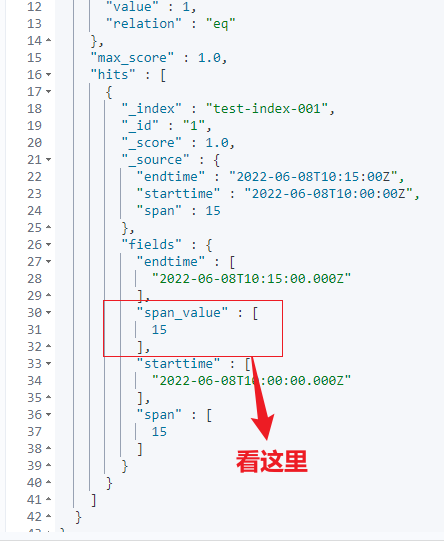
核心:同樣是轉(zhuǎn)化為毫秒,然后做的計算。
注意:fields 要設(shè)置,否則數(shù)據(jù) _source 下不顯示。
4、小結(jié)
關(guān)于 Elasticsearch 實現(xiàn)時間差查詢,本文給出三種不同方案實現(xiàn),視頻解讀如下。
從簡潔程度推薦方案 1 或者方案 3。
從性能角度推薦方案 2 ——空間換時間,方案 2 可以優(yōu)化為寫入的時候指定 default_pipeline 全部預(yù)處理實現(xiàn)。
你的業(yè)務(wù)環(huán)境有沒有遇到類似問題,你是如何實現(xiàn)的呢?
參考
https://www.elastic.co/guide/en/elasticsearch/reference/current/modules-scripting-expression.html
https://www.elastic.co/guide/en/elasticsearch/reference/5.0/modules-scripting-expression.html#datefield_api
https://www.elastic.co/guide/en/elasticsearch/painless/master/painless-datetime.html#_datetime_input_from_an_indexed_document
https://www.elastic.co/guide/en/elasticsearch/painless/current/painless-api-reference-shared-java-time.html
推薦閱讀
更短時間更快習(xí)得更多干貨!
和全球 1600+ Elastic 愛好者一起精進!