
SpringBoot集成ElasticSearch,實現(xiàn)模糊查詢,批量CRUD,排序,分...
 程序員的成長之路互聯(lián)網(wǎng)/程序員/技術/資料共享?
關注
程序員的成長之路互聯(lián)網(wǎng)/程序員/技術/資料共享?
關注
閱讀本文大概需要 5.5?分鐘。
來自:https://blog.csdn.net/qq_52355487/article/details/123805713
# 導入elasticsearch依賴
          <dependency>


                <groupId>org.springframework.boot</groupId>


                <artifactId>spring-boot-starter-data-elasticsearch</artifactId>


          </dependency>
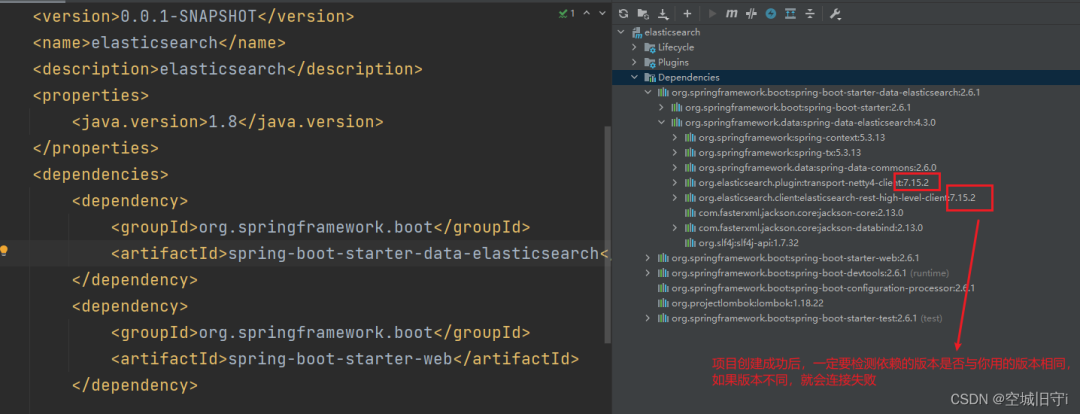
非常重要:檢查依賴版本是否與你當前所用的版本是否一致,如果不一致,會連接失敗!!!!!!!!
# 創(chuàng)建高級客戶端
import org.apache.http.HttpHost;
import org.elasticsearch.client.RestClient;
import org.elasticsearch.client.RestHighLevelClient;
import org.springframework.context.annotation.Bean;
import org.springframework.context.annotation.Configuration;
@Configuration
public class ElasticSearchClientConfig {
public RestHighLevelClient restHighLevelClient(){
RestHighLevelClient client = new RestHighLevelClient(
RestClient.builder(
new HttpHost("服務器IP", 9200, "http")));
return client;
}
}
# 基本用法
1.創(chuàng)建、判斷存在、刪除索引
          import?org.elasticsearch.action.admin.indices.delete.DeleteIndexRequest;


          import org.elasticsearch.action.support.master.AcknowledgedResponse;


          import org.elasticsearch.client.RequestOptions;


          import org.elasticsearch.client.RestHighLevelClient;


          import org.elasticsearch.client.indices.CreateIndexRequest;


          import org.elasticsearch.client.indices.CreateIndexResponse;


          import org.elasticsearch.client.indices.GetIndexRequest;


          import org.junit.jupiter.api.Test;


          import org.springframework.beans.factory.annotation.Autowired;


          import org.springframework.boot.test.context.SpringBootTest;


          import java.io.IOException;


          @SpringBootTest


          class ElasticsearchApplicationTests {


            @Autowired


            private RestHighLevelClient restHighLevelClient;


            @Test


            void testCreateIndex() throws IOException {


              //1.創(chuàng)建索引請求


              CreateIndexRequest request = new CreateIndexRequest("ljx666");


              //2.客戶端執(zhí)行請求IndicesClient,執(zhí)行create方法創(chuàng)建索引,請求后獲得響應


              CreateIndexResponse response=


                  restHighLevelClient.indices().create(request, RequestOptions.DEFAULT);


              System.out.println(response);


            }


            @Test


            void testExistIndex() throws IOException {


                  //1.查詢索引請求


              GetIndexRequest request=new GetIndexRequest("ljx666");


                  //2.執(zhí)行exists方法判斷是否存在


              boolean exists=restHighLevelClient.indices().exists(request,RequestOptions.DEFAULT);


              System.out.println(exists);


            }


            @Test


            void testDeleteIndex() throws IOException {


                  //1.刪除索引請求


              DeleteIndexRequest request=new DeleteIndexRequest("ljx666");


                  //執(zhí)行delete方法刪除指定索引


              AcknowledgedResponse delete = restHighLevelClient.indices().delete(request, RequestOptions.DEFAULT);


              System.out.println(delete.isAcknowledged());


            }


          }
2.對文檔的CRUD
創(chuàng)建文檔: 注意:如果添加時不指定文檔ID,他就會隨機生成一個ID,ID唯一。 創(chuàng)建文檔時若該ID已存在,發(fā)送創(chuàng)建文檔請求后會更新文檔中的數(shù)據(jù)。
          @Test


          void testAddUser() throws IOException {


            //1.創(chuàng)建對象


            User user=new User("Go",21,new String[]{"內卷","吃飯"});


            //2.創(chuàng)建請求


            IndexRequest request=new IndexRequest("ljx666");


            //3.設置規(guī)則 PUT /ljx666/_doc/1


            //設置文檔id=6,設置超時=1s等,不設置會使用默認的


            //同時支持鏈式編程如 request.id("6").timeout("1s");


            request.id("6");


            request.timeout("1s");


            //4.將數(shù)據(jù)放入請求,要將對象轉化為json格式


              //XContentType.JSON,告訴它傳的數(shù)據(jù)是JSON類型


            request.source(JSONValue.toJSONString(user), XContentType.JSON);


            //5.客戶端發(fā)送請求,獲取響應結果


            IndexResponse indexResponse=restHighLevelClient.index(request,RequestOptions.DEFAULT);


            System.out.println(indexResponse.toString());


            System.out.println(indexResponse.status());


          }
獲取文檔中的數(shù)據(jù):
          @Test


          void testGetUser() throws IOException {


            //1.創(chuàng)建請求,指定索引、文檔id


            GetRequest request=new GetRequest("ljx666","1");


            GetResponse getResponse=restHighLevelClient.get(request,RequestOptions.DEFAULT);


            System.out.println(getResponse);//獲取響應結果


            //getResponse.getSource() 返回的是Map集合


            System.out.println(getResponse.getSourceAsString());//獲取響應結果source中內容,轉化為字符串


          }
更新文檔數(shù)據(jù):
注意:需要將User對象中的屬性全部指定值,不然會被設置為空,如User只設置了名稱,那么只有名稱會被修改成功,其他會被修改為null。
          @Test


          void testUpdateUser() throws IOException {


            //1.創(chuàng)建請求,指定索引、文檔id


            UpdateRequest request=new UpdateRequest("ljx666","6");


            User user =new User("GoGo",21,new String[]{"內卷","吃飯"});


            //將創(chuàng)建的對象放入文檔中


            request.doc(JSONValue.toJSONString(user),XContentType.JSON);


            UpdateResponse updateResponse=restHighLevelClient.update(request,RequestOptions.DEFAULT);


            System.out.println(updateResponse.status());//更新成功返回OK


          }
刪除文檔:
          @Test


          void testDeleteUser() throws IOException {


            //創(chuàng)建刪除請求,指定要刪除的索引與文檔ID


            DeleteRequest request=new DeleteRequest("ljx666","6");


            DeleteResponse updateResponse=restHighLevelClient.delete(request,RequestOptions.DEFAULT);


            System.out.println(updateResponse.status());//刪除成功返回OK,沒有找到返回NOT_FOUND


          }
3.批量CRUD數(shù)據(jù)
這里只列出了批量插入數(shù)據(jù),其他與此類似。
注意:hasFailures()方法是返回是否失敗,即它的值為false時說明上傳成功。
          @Test


          void testBulkAddUser() throws IOException {


            BulkRequest bulkRequest=new BulkRequest();


            //設置超時


            bulkRequest.timeout("10s");


            ArrayList<User> list=new ArrayList<>();


            list.add(new User("Java",25,new String[]{"內卷"}));


            list.add(new User("Go",18,new String[]{"內卷"}));


            list.add(new User("C",30,new String[]{"內卷"}));


            list.add(new User("C++",26,new String[]{"內卷"}));


            list.add(new User("Python",20,new String[]{"內卷"}));


            int id=1;


            //批量處理請求


            for (User u :list){


              //不設置id會生成隨機id


              bulkRequest.add(new IndexRequest("ljx666")


                  .id(""+(id++))


                  .source(JSONValue.toJSONString(u),XContentType.JSON));


            }


            BulkResponse bulkResponse=restHighLevelClient.bulk(bulkRequest,RequestOptions.DEFAULT);


            System.out.println(bulkResponse.hasFailures());//是否執(zhí)行失敗,false為執(zhí)行成功


          }
4.查詢所有、模糊查詢、分頁查詢、排序、高亮顯示
          @Test


          void testSearch() throws IOException {


            SearchRequest searchRequest=new SearchRequest("ljx666");//里面可以放多個索引


            SearchSourceBuilder sourceBuilder=new SearchSourceBuilder();//構造搜索條件


            //此處可以使用QueryBuilders工具類中的方法


            //1.查詢所有


            sourceBuilder.query(QueryBuilders.matchAllQuery());


            //2.查詢name中含有Java的


            sourceBuilder.query(QueryBuilders.multiMatchQuery("java","name"));


            //3.分頁查詢


            sourceBuilder.from(0).size(5);


            //4.按照score正序排列


            //sourceBuilder.sort(SortBuilders.scoreSort().order(SortOrder.ASC));


            //5.按照id倒序排列(score會失效返回NaN)


            //sourceBuilder.sort(SortBuilders.fieldSort("_id").order(SortOrder.DESC));


            //6.給指定字段加上指定高亮樣式


            HighlightBuilder highlightBuilder=new HighlightBuilder();


            highlightBuilder.field("name").preTags("<span style='color:red;'>").postTags("</span>");


            sourceBuilder.highlighter(highlightBuilder);


            searchRequest.source(sourceBuilder);


            SearchResponse searchResponse=restHighLevelClient.search(searchRequest,RequestOptions.DEFAULT);


            //獲取總條數(shù)


            System.out.println(searchResponse.getHits().getTotalHits().value);


            //輸出結果數(shù)據(jù)(如果不設置返回條數(shù),大于10條默認只返回10條)


            SearchHit[] hits=searchResponse.getHits().getHits();


            for(SearchHit hit :hits){


              System.out.println("分數(shù):"+hit.getScore());


              Map<String,Object> source=hit.getSourceAsMap();


              System.out.println("index->"+hit.getIndex());


              System.out.println("id->"+hit.getId());


              for(Map.Entry<String,Object> s:source.entrySet()){


                System.out.println(s.getKey()+"--"+s.getValue());


              }


            }


          }
# 總結
1.大致流程
創(chuàng)建對應的請求 --> 設置請求(添加規(guī)則,添加數(shù)據(jù)等) --> 執(zhí)行對應的方法(傳入請求,默認請求選項)–> 接收響應結果(執(zhí)行方法返回值)–> 輸出響應結果中需要的數(shù)據(jù)(source,status等)
2.注意事項
- 如果不指定id,會自動生成一個隨機id
- 正常情況下,不應該這樣使用new IndexRequest(“l(fā)jx777”),如果索引發(fā)生改變了,那么代碼都需要修改,可以定義一個枚舉類或者一個專門存放常量的類,將變量用final static等進行修飾,并指定索引值。其他地方引用該常量即可,需要修改也只需修改該類即可。
- elasticsearch相關的東西,版本都必須一致,不然會報錯
- elasticsearch很消耗內存,建議在內存較大的服務器上運行elasticsearch,否則會因為內存不足導致elasticsearch自動killed
推薦閱讀:
SpringBoot 中的自帶工具類,開發(fā)效率增加一倍!
互聯(lián)網(wǎng)初中高級大廠面試題(9個G)
內容包含Java基礎、JavaWeb、MySQL性能優(yōu)化、JVM、鎖、百萬并發(fā)、消息隊列、高性能緩存、反射、Spring全家桶原理、微服務、Zookeeper......等技術棧!
?戳閱讀原文領取!
? ? ? ? ? ? ? ? ? ? ? ? ? ? ? ? ??朕已閱?

評論
圖片
表情