
如何使用 Pinia ORM 管理 Vue 中的狀態(tài)

狀態(tài)管理是構(gòu)建任何Web應(yīng)用程序的重要組成部分。雖然Vue提供了管理簡(jiǎn)單狀態(tài)的技術(shù),但隨著應(yīng)用程序復(fù)雜性的增加,處理狀態(tài)可能變得更具挑戰(zhàn)性。這就是為什么像Pinia這樣的庫(kù)被創(chuàng)建出來,以增強(qiáng)Vue的基本狀態(tài)管理能力。然而,在大型應(yīng)用程序中使用Pinia可能會(huì)帶來挑戰(zhàn),這就是為什么建議使用ORM庫(kù)來處理大型項(xiàng)目中狀態(tài)管理的復(fù)雜性。
Pinia ORM包通過與Vue狀態(tài)有效地配合工作,幫助防止單樹狀態(tài)(single-tree state)的缺點(diǎn)。本教程將探討Pinia ORM的特性以及如何在您的Vue應(yīng)用程序中使用它們。
在開始本教程之前,我假設(shè)你已經(jīng)熟悉Vue.js和Pinia,并且在你的電腦上已經(jīng)安裝了Node.js。
Pinia ORM 概述
ORM(對(duì)象關(guān)系映射)是一種通過將Vue應(yīng)用中的狀態(tài)數(shù)據(jù)視為代碼中的對(duì)象而不是手動(dòng)處理來管理和組織數(shù)據(jù)的方法。它使您可以以模型的方式思考應(yīng)用程序狀態(tài),將典型的數(shù)據(jù)庫(kù)CRUD操作帶入您的Vue應(yīng)用程序中,使其更加熟悉。
Pinia ORM是Pinia狀態(tài)管理庫(kù)的抽象,它允許開發(fā)者將Pinia存儲(chǔ)庫(kù)視為數(shù)據(jù)庫(kù)對(duì)象而不是普通狀態(tài)。它允許開發(fā)者以一種能提高應(yīng)用性能的方式來操作和查詢數(shù)據(jù)。
在Vue項(xiàng)目中設(shè)置Pinia ORM
本節(jié)將介紹如何在新的Vue項(xiàng)目中配置Pinia ORM。打開終端,導(dǎo)航到您想要安裝項(xiàng)目的目錄,并運(yùn)行以下命令。
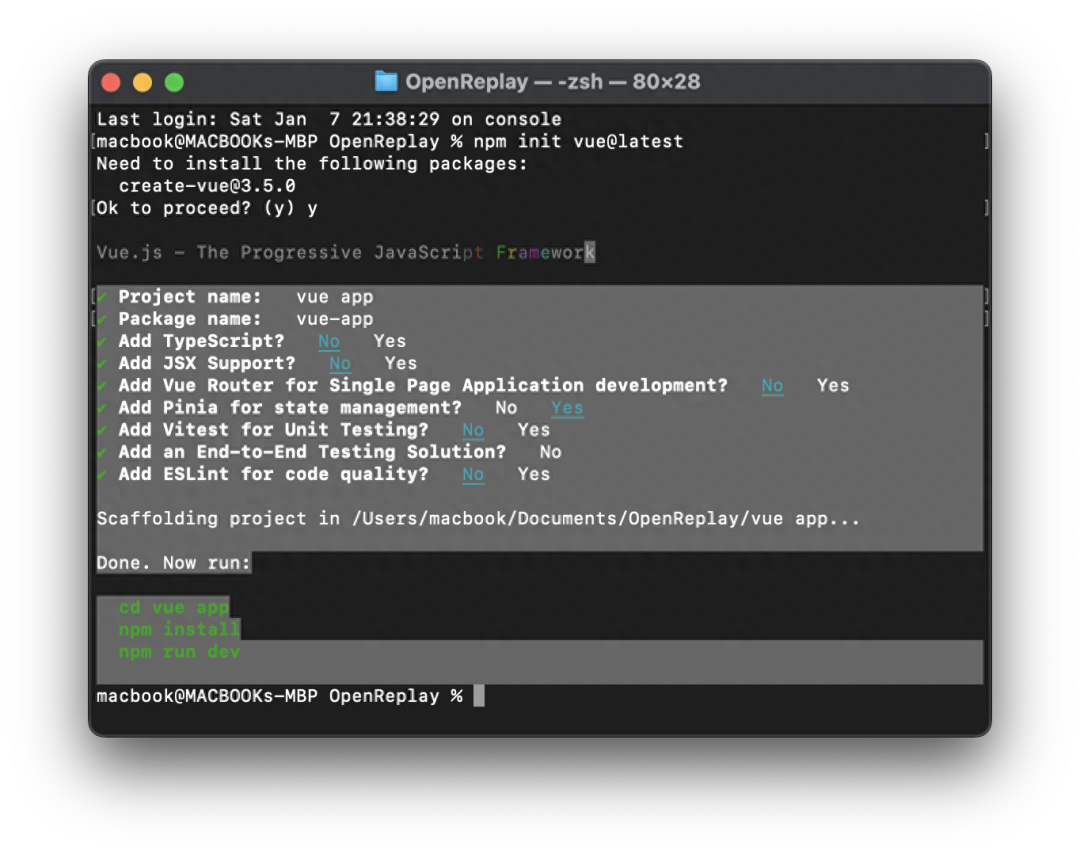
npm init vue@latest運(yùn)行上述命令將提示您選擇應(yīng)用程序功能。我將為本教程設(shè)置應(yīng)用程序功能,如下面的屏幕截圖所示。選擇應(yīng)用程序功能后,請(qǐng)輸入以下命令。
cd vue-app
npm install
npm run dev
現(xiàn)在你應(yīng)該已經(jīng)啟動(dòng)并運(yùn)行了你的應(yīng)用程序,如下所示:

Pinia ORM 安裝
您可以使用NPM包安裝Pinia ORM。在終端中,導(dǎo)航到項(xiàng)目文件夾并輸入以下命令以安裝Pinia ORM。
npm install pinia pinia-orm --save創(chuàng)建Pinia數(shù)據(jù)庫(kù)模型
Pinia ORM模型代表應(yīng)用程序的數(shù)據(jù)結(jié)構(gòu)。模型用于定義數(shù)據(jù)庫(kù)表和列,以及它們的初始值和數(shù)據(jù)類型。
https://pinia-orm.codedredd.de/guide/model/getting-started
讓我們通過創(chuàng)建一個(gè)簡(jiǎn)單的數(shù)據(jù)庫(kù)(friendship)來演示Pinia ORM模型的工作原理。該數(shù)據(jù)庫(kù)將包含一個(gè)表(friends)和五個(gè)列(id、username、fullname、age和email)。
在您的項(xiàng)目根目錄中,導(dǎo)航到 src 目錄,創(chuàng)建一個(gè) friendship.js 文件,并添加以下代碼。
// friendship.js
// Friend Model

import { Model } from "pinia-orm";

export default class Friend extends Model {
  // entity is a required property for all models.
  static entity = "friends";

  static fields() {
    return {
      id: this.uid(),
      Username: this.string(""),
      Fullname: this.string(""),
      Age: this.string(""),
      Email: this.string(""),
    };
  }
}
從上面的代碼中,實(shí)體是數(shù)據(jù)庫(kù)表名 friends ,而表列被傳遞到fields方法中。
Pinia ORM數(shù)據(jù)庫(kù)注冊(cè)
現(xiàn)在我們已經(jīng)成功創(chuàng)建了數(shù)據(jù)庫(kù)的表格,在訪問Pinia ORM功能之前,我們需要在組件中注冊(cè)數(shù)據(jù)庫(kù)。在 src 文件夾內(nèi),創(chuàng)建一個(gè) Myfriends.vue 文件的新組件,并添加以下代碼。
// src/components/Myfriends.vue
<script>
  import { useRepo } from "pinia-orm";
  import { createPinia } from "pinia";
  import { createORM } from "pinia-orm";
  import Friend from "../stores/friendship";
  const pinia = createPinia().use(createORM());
  const useRepo1 = useRepo(Friend, pinia);
</script>
在上面的代碼中,我們導(dǎo)入了: useRepo , createPinia , createORM 和 Friend 。接下來,我們創(chuàng)建了一個(gè)Pinia ORM的實(shí)例,并使用useRepo方法注冊(cè)了數(shù)據(jù)庫(kù),該方法接受兩個(gè)參數(shù): Friend 和 Pinia 。
插入數(shù)據(jù)到數(shù)據(jù)庫(kù)中
Pinia ORM 使用 save() 方法將新記錄添加到數(shù)據(jù)庫(kù)表中。Pinia ORM 的 save() 語(yǔ)法如下:
useRepo(Friend, pinia).save({
   column1: “data 1”,
   column2: “data 2”,
   // ...
   columnN: “data n”,
});
以上代碼將向表中插入一條新記錄( Friend )。如果有任何表列被省略,將會(huì)將該列的初始值添加到數(shù)據(jù)庫(kù)中。
在 Myfriends.vue 組件中,我們可以要求用戶輸入他們朋友的詳細(xì)信息,并使用Pinia ORM的save()方法將數(shù)據(jù)保存到數(shù)據(jù)庫(kù)中。為了實(shí)現(xiàn)這一點(diǎn),請(qǐng)使用以下代碼更新 Myfriends.vue 。
// src/components/Myfriends.vue
<script>
import { useRepo } from "pinia-orm";
import { createPinia } from "pinia";
import { createORM } from "pinia-orm";
import Friend from "../stores/friendship";
const pinia = createPinia().use(createORM());

const useRepo1 = useRepo(Friend, pinia);

export default {
  data() {
    return {
      form: {
        username: "",
        fullname: "",
        age: "",
        email: "",
      },
    };
  },

  methods: {
    addfriend() {
      useRepo1.save({
        Username: this.form.username,
        Fullname: this.form.fullname,
        Age: this.form.age,
        Email: this.form.email,
      });
      console.log(useRepo1.all());
    },
  },
};
</script>
<template>
  <div>
    <link
      href="https://cdn.jsdelivr.net/npm/[email protected]/dist/css/bootstrap.min.css"
      rel="stylesheet"
    />
    <center>
      <div
        style="
          width: 100%;
          height: 60px;
          margin-bottom: 20px;
          margin-top: 100px;
        "
      >
        <div>
          <label for="">Username</label>
          <input v-model="form.username" />
          <label for="">Fullname</label>
          <input v-model="form.fullname" /> <br />
          <br />
          <label for="">Age</label>
          <input v-model="form.age" />
          <label for="">Email</label>
          <input v-model="form.email" />
          <br /><br />
          <button @click="addfriend" class="btn-link">Add Friend</button>
        </div>
        <br /><br /><br />
      </div>
    </center>
  </div>
</template>
在您的瀏覽器中刷新應(yīng)用程序;您應(yīng)該看到以下輸出:

從數(shù)據(jù)庫(kù)獲取數(shù)據(jù)
Pinia ORM 使用 all() 方法從數(shù)據(jù)庫(kù)中檢索數(shù)據(jù),該方法將獲取數(shù)據(jù)庫(kù)中的所有數(shù)據(jù)。可以按照以下方式使用 all() 方法:
const useRepo1 = useRepo(Friend, pinia).all()上面的代碼將按升序從數(shù)據(jù)庫(kù)中獲取所有記錄。然而,我們可以使用Pinia ORM模塊中的useCollect來對(duì)數(shù)據(jù)進(jìn)行排序并執(zhí)行一些操作,如下所示。
import { useCollect } from 'pinia-orm/dist/helpers' //.. const useRepo1 =
useRepo(Friend, pinia).all() // sort the record by 'Username' attributes
useCollect(useRepo1).orderBy('Username') // get the min of the 'age' attribute
useCollect(useRepo1).min('age') // get the max of the 'age' attribute
useCollect(useRepo1).max('age') // get the sum of the 'age' attribute
useCollect(useRepo1).sum('age') // sort by 'age' attribute
useCollect(useRepo1).sortBy('age') // get all values in 'age' attribute
useCollect(useRepo1).pluck('age') // get all primary keys
useCollect(useRepo1).keys()
在 Myfriends.vue 組件中,讓我們使用 all() 方法從數(shù)據(jù)庫(kù)中獲取所有記錄,并在我們的應(yīng)用界面中顯示更新。將以下代碼添加到 Myfriends.vue 腳本中:
// src/components/Myfriends.vue
// . . .
export default {
  computed: {
    friend_list: () => useRepo1.all(),
  },
  // . . .
接下來,我們可以通過將以下代碼添加到 Myfriends.vue 模板中來顯示記錄。
<!-- . . . -->
<div class="container">
  <h2>My Friend List</h2>
  <table class="table table-striped">
    <thead>
      <tr>
        <th>Username</th>
        <th>Fullname</th>
        <th>Age</th>
        <th>Email</th>
      </tr>
    </thead>
    <tbody>
      <tr v-for="friend in friend_list">
        <td>{{ friend.Username }}</td>
        <td>{{ friend.Fullname }}</td>
        <td>{{ friend.Age }}</td>
        <td>{{ friend.Email }}</td>
      </tr>
    </tbody>
  </table>
</div>
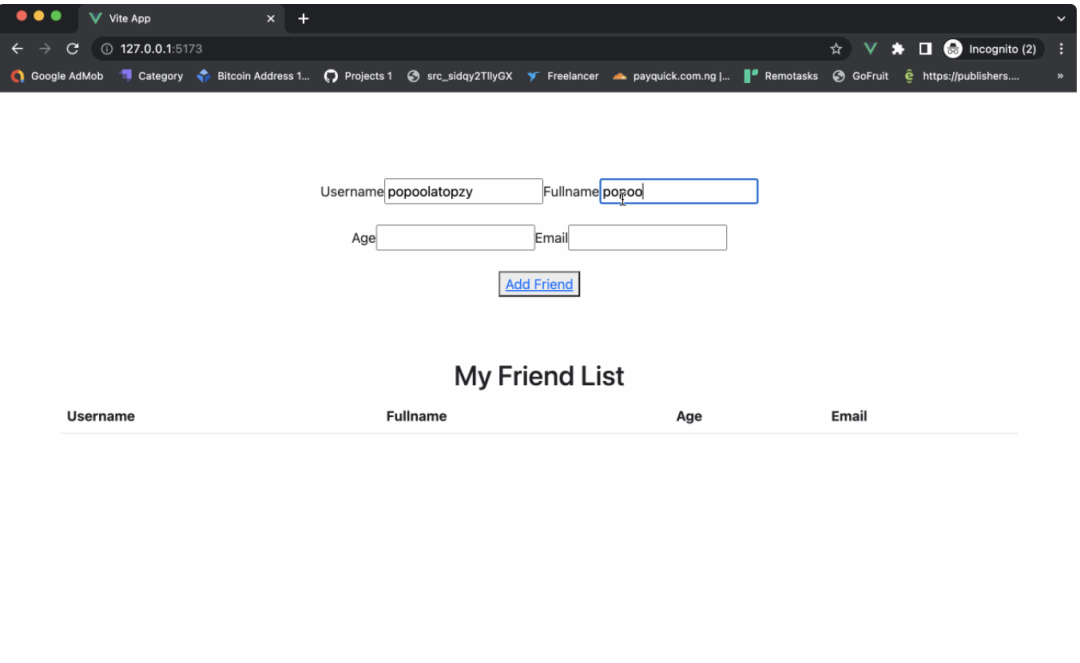
在瀏覽器中刷新應(yīng)用程序,并獲得以下輸出。
從數(shù)據(jù)庫(kù)中刪除數(shù)據(jù)
Pina ORM提供了兩種從數(shù)據(jù)庫(kù)中刪除記錄的方法。第一種方法使用delete()查詢,用于刪除具有指定條件的記錄。delete()查詢的使用方法如下。
const useRepo1 = useRepo(Friend, pinia)
useRepo1.where('Username', 'John').delete()
上述代碼將刪除表中用戶名為 John 的記錄。
第二種方法使用destroy()查詢從數(shù)據(jù)庫(kù)中刪除記錄;它接受記錄的ID作為參數(shù)。destroy()查詢可以按以下方式使用。
const useRepo1 = useRepo(Friend, pinia)
useRepo1.destroy(1) // delete record id 1
useRepo1.destroy([1,4,5]) // delete record id 2,4,5
Pinia ORM表關(guān)系
Pinia ORM提供了一種獨(dú)特的方法來處理數(shù)據(jù)庫(kù)中表之間的連接,使得可以在數(shù)據(jù)庫(kù)模型類中定義各種關(guān)系類型,包括一對(duì)一、一對(duì)多和多對(duì)多。
一對(duì)一關(guān)系
Pinia ORM的一對(duì)一關(guān)系是一種關(guān)系,其中表中的每個(gè)記錄與另一個(gè)表中的一個(gè)記錄相關(guān)聯(lián)。當(dāng)存在唯一約束或需要將特定數(shù)據(jù)隔離到單獨(dú)的表中時(shí),通常使用這種類型的關(guān)系。例如,一個(gè) Users 表可能與一個(gè)“Profile”表具有一對(duì)一的關(guān)系,其中每個(gè)用戶都有一個(gè)唯一的個(gè)人資料。讓我們創(chuàng)建兩個(gè)表(Users和Profile)來演示一對(duì)一關(guān)系的工作原理。在 store 文件夾中,創(chuàng)建一個(gè)User.js文件并添加以下代碼。
// User Model
import { Model } from "pinia-orm";
import Profile from "./Profile";
export default class User extends Model {
  // entity is a required property for all models.
  static entity = "users";
  static fields() {
    return {
      id: this.uid(2),
      name: this.attr(""),
      email: this.string(""),
      profile: this.hasOne(Profile, "userID"),
    };
  }
}
在上面的代碼中,通過將Profile類作為第一個(gè)參數(shù)和“userID”作為“hasOne”方法的外鍵來定義一對(duì)一關(guān)系,創(chuàng)建User和Profile表之間的唯一關(guān)聯(lián),將Profile表中的“userID”字段與User表中的“id”字段鏈接起來。接下來,讓我們創(chuàng)建Profile表。在 stores 文件夾中,創(chuàng)建一個(gè)Profile.js文件并添加以下代碼。
// Profile Model
import { Model } from "pinia-orm";
export default class Profile extends Model {
    // entity is a required property for all models.
    static entity = "profiles";
    static fields() {
        return {
            id: this.uid(),
            userID: this.attr(""),
            bio: this.attr(""),
            job: this.string(""),
        };
    }
}
一旦您在組件中注冊(cè)了這兩個(gè)數(shù)據(jù)庫(kù),您可以使用以下代碼訪問一對(duì)一關(guān)系記錄。
const userinfo = User.query().with('profile').first()一對(duì)多
在ORM關(guān)系中,一對(duì)多關(guān)系是指一個(gè)表中的單個(gè)記錄與另一個(gè)表中的多個(gè)記錄相關(guān)聯(lián)。這種類型的關(guān)系通常用于建模父子關(guān)系,其中一個(gè)父對(duì)象可以有多個(gè)子對(duì)象。
在我們之前的例子中,假設(shè)一個(gè)用戶可以擁有多個(gè)個(gè)人資料。我們可以使用一對(duì)多的關(guān)系,通過將 this.hasOne 替換為 this.hasMany 來將用戶與個(gè)人資料記錄關(guān)聯(lián)起來,如下所示。
static fields() {
  return {
    id: this.uid(2),
    name: this.attr(""),
    email: this.string(""),
    profile: this.hasMany(Profile, "userID"),
    };
}
結(jié)束
Pinia ORM是Vue應(yīng)用程序中管理狀態(tài)的重要工具。它提供了一種靈活的方式來處理狀態(tài),允許開發(fā)人員使用數(shù)據(jù)庫(kù)模型和關(guān)系模式來處理數(shù)據(jù)。
由于文章內(nèi)容篇幅有限,今天的內(nèi)容就分享到這里,文章結(jié)尾,我想提醒您,文章的創(chuàng)作不易,如果您喜歡我的分享,請(qǐng)別忘了點(diǎn)贊和轉(zhuǎn)發(fā),讓更多有需要的人看到。同時(shí),如果您想獲取更多前端技術(shù)的知識(shí),歡迎關(guān)注我,您的支持將是我分享最大的動(dòng)力。我會(huì)持續(xù)輸出更多內(nèi)容,敬請(qǐng)期待。