
【Python】詳解pandas缺失值處理
本篇詳解pandas中缺失值(Missing data handling)處理常用操作。缺失值處理常用于數(shù)據(jù)分析數(shù)據(jù)清洗階段;Pandas中將如下類(lèi)型定義為缺失值:NaN: ‘’, ‘#N/A’, ‘#N/A N/A’, ‘#NA’, ‘-1.#IND’, ‘-1.#QNAN’,‘-NaN’, ‘-nan’, ‘1.#IND’, ‘1.#QNAN’, ‘<NA>’, ‘N/A’, ‘NA’,‘NULL’, ‘NaN’, ‘n/a’, ‘nan’, ‘null’,None
1、pandas中缺失值注意事項(xiàng)
pandas和numpy中任意兩個(gè)缺失值不相等(np.nan != np.nan)
下圖中兩個(gè)NaN不相等: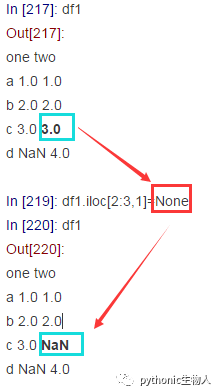
In [224]: df1.iloc[3:,0].values#取出'one'列中的NaN
Out[224]: array([nan])

In [225]: df1.iloc[2:3,1].values#取出'two'列中的NaN
Out[225]: array([nan])

In [226]: df1.iloc[3:,0].values == df1.iloc[2:3,1].values#兩個(gè)NaN值不相等
Out[226]: array([False])
pandas讀取文件時(shí)那些值被視為缺失值
NaN: ‘’, ‘#N/A’, ‘#N/A N/A’, ‘#NA’, ‘-1.#IND’, ‘-1.#QNAN’,‘-NaN’, ‘-nan’, ‘1.#IND’, ‘1.#QNAN’, ‘<NA>’, ‘N/A’, ‘NA’,‘NULL’, ‘NaN’, ‘n/a’, ‘nan’, ‘null’,None
2、pandas缺失值操作
pandas.DataFrame中判斷那些值是缺失值:isna方法
#定義一個(gè)實(shí)驗(yàn)DataFrame
In [47]: d = {'one': pd.Series([1., 2., 3.], index=['a', 'b', 'c']),'two': pd.Series([1., 2., 3., 4.], index=['a', 'b', 'c', 'd'])}

In [48]: df = pd.DataFrame(d)
In [49]: df
Out[49]:
   one  two
a  1.0  1.0
b  2.0  2.0
c  3.0  3.0
d  NaN  4.0

In [120]: df.isna()#返回形狀一樣的bool值填充DataFrame
Out[120]:
     one    two
a  False  False
b  False  False
c  False  False
d   True  False
pandas.DataFrame中刪除包含缺失值的行:dropna(axis=0)
In [67]: df
Out[67]:
   one  two
a  1.0  1.0
b  2.0  2.0
c  3.0  3.0
d  NaN  4.0

In [68]: df.dropna()#默認(rèn)axis=0
Out[68]:
   one  two
a  1.0  1.0
b  2.0  2.0
c  3.0  3.0
pandas.DataFrame中刪除包含缺失值的列:dropna(axis=1)
In [72]: df.dropna(axis=1)
Out[72]:
   two
a  1.0
b  2.0
c  3.0
d  4.0
pandas.DataFrame中刪除包含缺失值的列和行:dropna(how='any')
In [97]: df['three']=np.nan#新增一列全為NaN
In [98]: df
Out[98]:
   one  two  three
a  1.0  1.0    NaN
b  2.0  2.0    NaN
c  3.0  3.0    NaN
d  NaN  4.0    NaN

In [99]: df.dropna(how='any')
Out[99]:
Empty DataFrame#全刪除了
Columns: [one, two, three]
Index: []
pandas.DataFrame中刪除全是缺失值的行:dropna(axis=0,how='all')
In [101]: df.dropna(axis=0,how='all')
Out[101]:
   one  two  three
a  1.0  1.0    NaN
b  2.0  2.0    NaN
c  3.0  3.0    NaN
d  NaN  4.0    NaN
pandas.DataFrame中刪除全是缺失值的列:dropna(axis=1,how='all')
In [102]: df.dropna(axis=1,how='all')
Out[102]:
   one  two
a  1.0  1.0
b  2.0  2.0
c  3.0  3.0
d  NaN  4.0
pandas.DataFrame中使用某個(gè)值填充缺失值:fillna(某個(gè)值)
In [103]: df.fillna(666)#使用666填充
Out[103]:
     one  two  three
a    1.0  1.0  666.0
b    2.0  2.0  666.0
c    3.0  3.0  666.0
d  666.0  4.0  666.0
pandas.DataFrame中使用前一列的值填充缺失值:fillna(axis=1,method='ffill')
#后一列填充為fillna(axis=1,method=bfill')
In [109]: df.fillna(axis=1,method='ffill')
Out[109]:
   one  two  three
a  1.0  1.0    1.0
b  2.0  2.0    2.0
c  3.0  3.0    3.0
d  NaN  4.0    4.0
pandas.DataFrame中使用前一行的值填充缺失值:fillna(axis=0,method='ffill')
#后一行填充為fillna(axis=1,method=bfill')
In [110]: df.fillna(method='ffill')
Out[110]:
   one  two  three
a  1.0  1.0    NaN
b  2.0  2.0    NaN
c  3.0  3.0    NaN
d  3.0  4.0    NaN
pandas.DataFrame中使用字典傳值填充指定列的缺失值
In [112]: df.fillna({'one':666})#填充one列的NaN值
Out[112]:
     one  two  three
a    1.0  1.0    NaN
b    2.0  2.0    NaN
c    3.0  3.0    NaN
d  666.0  4.0    NaN

In [113]: df.fillna({'three':666})
Out[113]:
   one  two  three
a  1.0  1.0  666.0
b  2.0  2.0  666.0
c  3.0  3.0  666.0
d  NaN  4.0  666.0
3、參考資料
https://pandas.pydata.org/pandas-docs/stable/reference/frame.html?highlight=missing
-END-
往期精彩回顧
評(píng)論
圖片
表情