
使用 Node Exporter 自定義監(jiān)控指標(biāo)
node_exporter 除了本身可以收集系統(tǒng)指標(biāo)之外,還可以通過 textfile 模塊來采集我們自定義的監(jiān)控指標(biāo),這對于系統(tǒng)監(jiān)控提供了更靈活的使用空間,比如我們通過腳本采集的監(jiān)控?cái)?shù)據(jù)就可以通過該模塊暴露出去,用于 Prometheus 進(jìn)行監(jiān)控報(bào)警。默認(rèn)情況下 node_exporter 會啟用 textfile 組建,但是需要使用 --collector.textfile.directory 參數(shù)設(shè)置一個(gè)用于采集的路徑,所有生成的監(jiān)控指標(biāo)將放在該目錄下,并以 .prom 文件名后綴結(jié)尾。
所有自定義生成的監(jiān)控指標(biāo)需要按照如下所示的方式進(jìn)行存儲,比如我們使用 shell 或者 python 腳本寫入的文件:
#?HELP?example_metric?Metric?read?from?/some/path/textfile/example.prom
#?TYPE?example_metric?untyped
example_metric?1
這其實(shí)就是一個(gè)標(biāo)準(zhǔn)的 metrics 接口內(nèi)容格式,這里如果沒有加上 HELP 信息的話,系統(tǒng)會幫助生成一個(gè)簡單的描述信息,但是如果有多個(gè)文件中出現(xiàn)了相同的指標(biāo)名稱,那么需要保證這些指標(biāo)的 HELP 和 TYPE 要一致,否則采集會出錯(cuò)。
一般來說輸出指標(biāo)到 .prom 文件的腳本任務(wù)會放入到 crontab 中去執(zhí)行,按照需求設(shè)置采集指標(biāo)的時(shí)間,但是如果 node_exporter 采集的時(shí)候正好文件在執(zhí)行寫入操作,可能會導(dǎo)致文件出現(xiàn)問題,我們可以將任務(wù)先轉(zhuǎn)移到一個(gè)臨時(shí)文件,然后通過臨時(shí)文件的重命名進(jìn)行操作,降低風(fēng)險(xiǎn),如下所示:
*/5?*?*?*?*?$TEXTFILE/printMetrics.sh?>?/path/to/directory/metrics.prom.$$?&&?mv?/path/to/directory/metrics.prom.$$?/path/to/directory/metrics.prom
對于 .prom 文件的采集,系統(tǒng)會自動(dòng)的加入采集文件的修改時(shí)間,通過該指標(biāo)我們可以設(shè)置告警用于判斷是否文件發(fā)生了變化,比如采集指標(biāo)時(shí)間為每 10 分鐘一次,那么修改時(shí)間應(yīng)該 <15 分鐘,否則就應(yīng)該報(bào)警上次的采集未成功,指標(biāo)名稱為 node_textfile_mtime_seconds,指標(biāo)收集時(shí)間為 unixtime 格式時(shí)間。
同時(shí)除了加載一些探測信息,使用該方式還可以用于靜態(tài)信息的收集,比如定義的系統(tǒng)角色信息,或者服務(wù)器特殊的配置信息等等,這些也都可以通過 metrics 的方式進(jìn)行傳遞。
echo?'role{role="application_server"}?1'?>?/path/to/directory/role.prom.$$
mv?/path/to/directory/role.prom.$$?/path/to/directory/role.prom
這里我們以官方提供的一個(gè)腳本用于采集文件夾目錄大小的 shell 腳本為例進(jìn)行說明,腳本地址為:https://github.com/prometheus-community/node-exporter-textfile-collector-scripts/blob/master/directory-size.sh,內(nèi)容如下所示:
#!/bin/sh
#
#?Expose?directory?usage?metrics,?passed?as?an?argument.
#
#?Usage:?add?this?to?crontab:
#
#?*/5?*?*?*?*?prometheus?directory-size.sh?/var/lib/prometheus?|?sponge?/var/lib/node_exporter/directory_size.prom
#
#?sed?pattern?taken?from?https://www.robustperception.io/monitoring-directory-sizes-with-the-textfile-collector/
#
#?Author:?Antoine?Beaupré?
echo?"#?HELP?node_directory_size_bytes?Disk?space?used?by?some?directories"
echo?"#?TYPE?node_directory_size_bytes?gauge"
du?--block-size=1?--summarize?"$@"?\
??|?sed?-ne?'s/\\/\\\\/;s/"/\\"/g;s/^\([0-9]\+\)\t\(.*\)$/node_directory_size_bytes{directory="\2"}?\1/p'
首先需要在 node_exporter 啟動(dòng)程序中指定 textfile 采集器目錄,我們這里指定的目錄為 /root/p8strain/textfile:
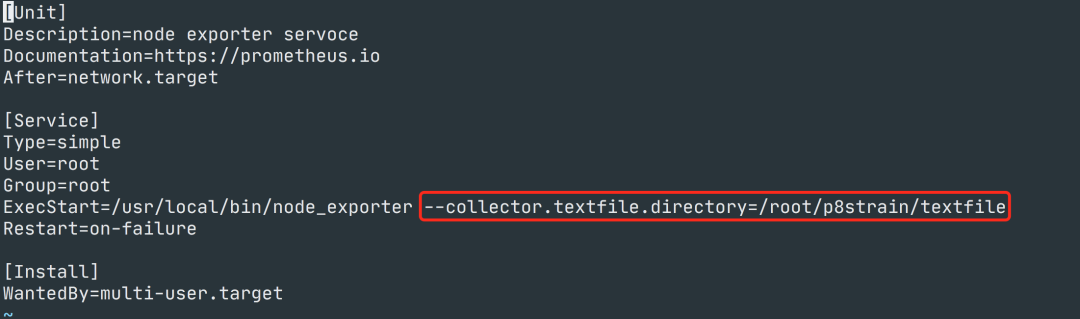
然后重新啟動(dòng) node_exporter:
????systemctl?daemon-reload
????systemctl?restart?node_exporter
這樣 node_exporter 就會開始去收集我們指定有的 textfile 目錄里面的自定義指標(biāo)數(shù)據(jù)了。為了使用上面的測試腳本,我們可以將生成的文件放入臨時(shí)文件,然后重新命令,另外一種方式就是可以使用 sponge 命令來保證以原子方式寫入內(nèi)容
????yum?-y?install?epel-release
????yum?-y?install?moreutils
將上面的示例腳本保存為 directory-size.sh,放入 /root/p8strain 目錄下面,然后在 crontab 中加入如下命令來統(tǒng)計(jì)該目錄的大小:
????crontab?-e
#?加入如下所示定時(shí)任務(wù)
????crontab?-l
*/5?*?*?*?*??/root/p8strain/directory-size.sh?/root/p8strain?|?sponge?/root/p8strain/textfile/directory_size.prom
正常就會在 /root/p8strain/textfile 目錄下面生成上面指定的 directory_size.prom 指標(biāo)文件,內(nèi)容如下所示:
#?HELP?node_directory_size_bytes?Disk?space?used?by?some?directories
#?TYPE?node_directory_size_bytes?gauge
node_directory_size_bytes{directory="/root/p8strain"}?459378688
正常該指標(biāo)就已經(jīng)被 Prometheus 采集了,我們可以直接去查詢該指標(biāo)獲取相關(guān)信息:

