
如何在 Asp.Net Core 中對(duì)請(qǐng)求進(jìn)行限流
譯文鏈接:https://www.infoworld.com/article/3442946/how-to-implement-rate-limiting-in-aspnet-core.html
在應(yīng)用程序開發(fā)時(shí),或許你有這樣的想法,控制用戶的請(qǐng)求頻率來防止一些用戶的惡意攻擊,具體的說就是:為了預(yù)防有名的 拒絕服務(wù) 攻擊,限制某一個(gè)ip在一段時(shí)間內(nèi)的訪問次數(shù),要解決這個(gè)問題,就要用到限流機(jī)制。
限流能夠很好的控制住一個(gè)客戶端訪問服務(wù)器資源地址的請(qǐng)求次數(shù),在 asp.net core 之前,要實(shí)現(xiàn)限流機(jī)制,你可能要自定義 module 或者 handler,太繁瑣了,不過很開心的是,在 asp.net core 里,可以很輕松的實(shí)現(xiàn)限流功能,這得益于 asp.net core 特有的 pipeline 機(jī)制,接下來,我們一起研究一下如何在 asp.net core 中實(shí)現(xiàn)限流機(jī)制。
安裝 限流中間件
為了能夠?qū)崿F(xiàn)限流功能,可以使用第三方提供的限流中間件,利用這個(gè)中間件給多個(gè)場(chǎng)景進(jìn)行限流,比如:允許某一個(gè) ip 或者 ip段 在指定的時(shí)間周期內(nèi)訪問某一個(gè)資源的次數(shù),這個(gè)周期可以是:每秒,每分鐘,每 n 分鐘,等等。
在 Visual Studio 中創(chuàng)建好 ASP.NET Core API 之后,下一步就是安裝 限流包 AspNetCoreRateLimit,你可以在 NuGet Package Manager 可視化工具上安裝,也可以在 .NET CLI 命令行中安裝,語(yǔ)句如下:
dotnet?add?package?AspNetCoreRateLimit
如果想了解限流包 AspNetCoreRateLimit ?的更多知識(shí),參考 github:https://github.com/stefanprodan/AspNetCoreRateLimit
配置 AspNetCoreRateLimit
現(xiàn)在 AspNetCoreRateLimit 已經(jīng)引用到我們項(xiàng)目中了,接下來在 ConfigureServices 方法中追加如下代碼,最終將請(qǐng)求追加到 request-response pipeline 管道中。
????public?class?Startup
????{
????????//?This?method?gets?called?by?the?runtime.?Use?this?method?to?add?services?to?the?container.
????????public?void?ConfigureServices(IServiceCollection?services)
????????{
????????????services.AddMvc().SetCompatibilityVersion
????????????????????????(CompatibilityVersion.Version_2_2);
????????????services.AddOptions();
????????????services.AddMemoryCache();
????????????services.Configure
????????????(Configuration.GetSection("IpRateLimit"));
????????????services.AddSingleton????????????MemoryCacheIpPolicyStore>();
????????????services.AddSingleton????????????MemoryCacheRateLimitCounterStore>();
????????????services.AddSingleton????????????RateLimitConfiguration>();
????????????services.AddHttpContextAccessor();
????????}
????}
上面代碼 Configuration.GetSection("IpRateLimit") 需要注意一下, 節(jié)點(diǎn) IpRateLimit 的具體限流信息是配在 appsettings.json 中的。
接下來在 Configure 方法中使用限流中間件。
????public?class?Startup
????{
????????//?This?method?gets?called?by?the?runtime.?Use?this?method?to?configure?the?HTTP?request?pipeline.
????????public?void?Configure(IApplicationBuilder?app,?IWebHostEnvironment?env)
????????{
????????????if?(env.IsDevelopment())
????????????{
????????????????app.UseDeveloperExceptionPage();
????????????}

????????????app.UseRouting();

????????????app.UseIpRateLimiting();

????????????app.UseAuthorization();

????????????app.UseEndpoints(endpoints?=>
????????????{
????????????????endpoints.MapControllers();
????????????});
????????}
????}
最后再來看一下 appsettings.json 文件,著重看一下 限流規(guī)則 是怎么配置的,可以看出一個(gè)限流規(guī)則是由 端點(diǎn) + 周期 + 次數(shù) 3個(gè)元素組成的,完整的 appsettings.json 配置如下:
{
??"Logging":?{
????"LogLevel":?{
??????"Default":?"Information",
??????"Microsoft":?"Warning",
??????"Microsoft.Hosting.Lifetime":?"Information"
????}
??},
??"AllowedHosts":?"*",
??"IpRateLimit":?{
????"EnableEndpointRateLimiting":?true,
????"StackBlockedRequests":?false,
????"RealIPHeader":?"X-Real-IP",
????"ClientIdHeader":?"X-ClientId",
????"HttpStatusCode":?429,
????"GeneralRules":?[
??????{
????????"Endpoint":?"*/weatherforecast",
????????"Period":?"1m",
????????"Limit":?5
??????}
????]
??}
}
上面的限流規(guī)則可以確保:含有 "/api" 的 url 鏈接在任何分鐘周期內(nèi)最多有5次訪問。
測(cè)試 AspNetCoreRateLimit
下面就可以按下 Ctrl + F5 把應(yīng)用程序跑起來,默認(rèn)情況下請(qǐng)求會(huì)訪問 ValueController 的 Get 方法,然后刷新頁(yè)面5次,會(huì)看到頁(yè)面出現(xiàn)如下信息。
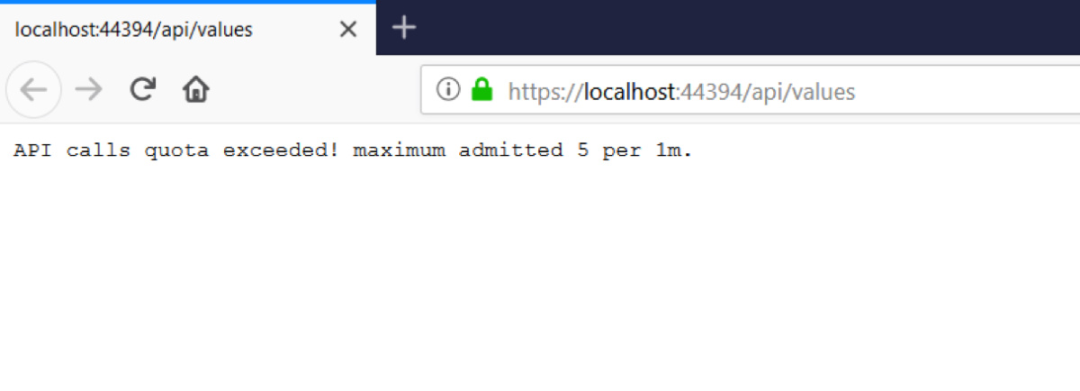
因?yàn)槭茄菔灸康模赃@里我配置成了5次,實(shí)際開發(fā)中,大家可以根據(jù)項(xiàng)目的具體情況來設(shè)置這個(gè)限流閾值,當(dāng)然更靈活的做法就是將 限流次數(shù) 保存在 數(shù)據(jù)庫(kù) 或者緩存中,這樣可以在程序運(yùn)行過程中動(dòng)態(tài)的修改這個(gè)閾值,太強(qiáng)大了。