
分享30個超級好用的Pandas實戰(zhàn)技巧
↑?關(guān)注 + 星標(biāo)?,每天學(xué)Python新技能
后臺回復(fù)【大禮包】送你Python自學(xué)大禮包
今天小編來和大家分享幾個Pandas實戰(zhàn)技巧,相信大家看了之后肯定會有不少的收獲。
讀取數(shù)據(jù)
read_csv()用來讀取csv格式的數(shù)據(jù)集,當(dāng)然我們這其中還是有不少玄機在其中的
pd.read_csv("data.csv")
只讀取數(shù)據(jù)集當(dāng)中的某幾列
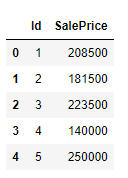
我們只是想讀取數(shù)據(jù)集當(dāng)中的某幾列,就可以調(diào)用其中的usecols參數(shù),代碼如下
df?=?pd.read_csv("house_price.csv",?usecols=["Id",?"SalePrice"])
df.head()
output
時間類型的數(shù)據(jù)解析
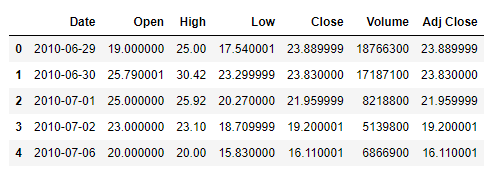
主要用到的是parse_dates參數(shù),代碼如下
df?=?pd.read_csv("Tesla.csv",?parse_dates=["Date"])
df.head()
output
對于數(shù)據(jù)類型加以設(shè)定
主要調(diào)用的是dtype這個參數(shù),同時合適的數(shù)據(jù)類型能夠為數(shù)據(jù)集節(jié)省不少的內(nèi)存空間,代碼如下
df?=?pd.read_csv("data.csv",?dtype={"house_type":?"category"})
設(shè)置索引
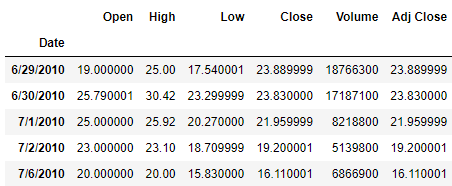
用到的是index_col這個參數(shù),代碼如下
df?=?pd.read_csv("Tesla.csv",?index_col="Date")
df.head()
output
只讀取部分讀取
用到的是nrows參數(shù),代碼如下
df?=?pd.read_csv("Tesla.csv",?nrows=100)
df.shape
output
(100,?7)
跳過某些行
要是數(shù)據(jù)集當(dāng)中存在著一些我們并不想包括在內(nèi)的內(nèi)容,可以直接跳過,skiprows參數(shù),代碼如下
pd.read_csv("data.csv",?skiprows=[1,?5])??#?跳過第一和第五行
pd.read_csv("data.csv",?skiprows=100)??#?跳過前100行
pd.read_csv("data.csv",?skiprows=lambda?x:?x?>?0?and?np.random.rand()?>?0.1)?#?抽取10%的數(shù)據(jù)
遇到了空值咋辦呢?
要是遇到了空值,我們可以將空值用其他的值來代替,代碼如下
df?=?pd.read_csv("data.csv",?na_values=["?"])
那么布爾值呢?
對于布爾值而言,我們也可以設(shè)定換成是其他的值來代替,代碼如下
df?=?pd.read_csv("data.csv",?true_values=["yes"],?false_values=["no"])
從多個csv文件中讀取數(shù)據(jù)
還可以從多個csv文件當(dāng)中來讀取數(shù)據(jù),通過glob模塊來實現(xiàn),代碼如下
import?glob
import?os

files?=?glob.glob("file_*.csv")

result?=?pd.concat([pd.read_csv(file)?for?file?in?files],?ignore_index=True)
要是從PDF文件當(dāng)中來讀取數(shù)據(jù)
我們的表格數(shù)據(jù)存在于pdf文件當(dāng)中,需要從pdf文件當(dāng)中來讀取數(shù)據(jù),代碼如下
#?安裝tabula-py模塊
#?%pip?install?tabula-py?

from?tabula?import?read_pdf
df?=?read_pdf('test.pdf',?pages='all')
探索性數(shù)據(jù)分析
三行代碼直接生成
通過調(diào)用pandas_profilling模塊,三行代碼直接生成數(shù)據(jù)分析的報告,代碼如下
#?安裝pandas-profilling模塊
#?%pip?install?pandas-profiling

import?pandas_profiling

df?=?pd.read_csv("data.csv")
profile?=?df.profile_report(title="Pandas?Profiling?Report")
profile.to_file(output_file="output.html")
基于數(shù)據(jù)類型的操作
pandas能夠表示的數(shù)據(jù)類型有很多
基于數(shù)據(jù)類型來篩選數(shù)據(jù)
我們希望篩選出來的數(shù)據(jù)包含或者是不包含我們想要的數(shù)據(jù)類型的數(shù)據(jù),代碼如下
#?篩選數(shù)據(jù)
df.select_dtypes(include="number")
df.select_dtypes(include=["category",?"datetime"])

#?排除數(shù)據(jù)
df.select_dtypes(exclude="object")
推斷數(shù)據(jù)類型
主要調(diào)用的是infer_objects()方法,代碼如下
df.infer_objects().dtypes
手動進行數(shù)據(jù)類型的轉(zhuǎn)換
我們手動地進行數(shù)據(jù)類型的轉(zhuǎn)換,要是遇到不能轉(zhuǎn)換的情況時,errors='coerce'將其換轉(zhuǎn)成NaN,代碼如下
#?針對整個數(shù)據(jù)集都有效
df?=?df.apply(pd.to_numeric,?errors="coerce")

#?將空值用零來填充
pd.to_numeric(df.numeric_column,?errors="coerce").fillna(0)
一次性完成數(shù)據(jù)類型的轉(zhuǎn)換
用到的是astype方法,代碼如下
df?=?df.astype(
????{
????????"date":?"datetime64[ns]",
????????"price":?"int",
????????"is_weekend":?"bool",
????????"status":?"category",
????}
)
列的操作
重命名
rename()方法進行列的重命名,代碼如下
df?=?df.rename({"PRICE":?"price",?"Date?(mm/dd/yyyy)":?"date",?"STATUS":?"status"},?axis=1)
添加前綴或者是后綴
add_prefix()方法以及add_suffix()方法,代碼如下
df.add_prefix("pre_")
df.add_suffix("_suf")
新建一個列
調(diào)用的是assign方法,當(dāng)然除此之外還有其他的方法可供嘗試,代碼如下
#?攝氏度與華氏度之間的數(shù)制轉(zhuǎn)換
df.assign(temp_f=lambda?x:?x.temp_c?*?9?/?5?+?32)
在指定的位置插入新的一列
同樣也是用到insert方法,代碼如下
random_col?=?np.random.randint(10,?size=len(df))
df.insert(3,?'random_col',?random_col)?#?在第三列的地方插入
if-else邏輯判斷
df["price_high_low"]?=?np.where(df["price"]?>?5,?"high",?"low")
去掉某些列
調(diào)用的是drop()方法,代碼如下
df.drop('col1',?axis=1,?inplace=True)
df?=?df.drop(['col1','col2'],?axis=1)
df.drop(df.columns[0],?inplace=True)
字符串的操作
列名的操作
要是我們想要對列名做出一些改變,代碼如下
#?對于列名的字符串操作
df.columns?=?df.columns.str.lower()
df.columns?=?df.columns.str.replace('?',?'_')
Contains()方法
##?是否包含了某些字符串
df['name'].str.contains("John")
##?里面可以放置正則表達式
df['phone_num'].str.contains('...-...-....',?regex=True)??#?regex
findall()方法
##?正則表達式
pattern?=?'([A-Z0-9._%+-]+)@([A-Z0-9.-]+)\\.([A-Z]{1,9})'
df['email'].str.findall(pattern,?flags=re.IGNORECASE)
缺失值
查看空值的比例
我們要是想要查看在數(shù)據(jù)集當(dāng)中空值所占的比例,代碼如下
def?missing_vals(df):
????"""空值所占的百分比"""
????missing?=?[
????????(df.columns[idx],?perc)
????????for?idx,?perc?in?enumerate(df.isna().mean()?*?100)
????????if?perc?>?0
????]

????if?len(missing)?==?0:
????????return?"沒有空值數(shù)據(jù)的存在"
????????
????#?排序
????missing.sort(key=lambda?x:?x[1],?reverse=True)

????print(f"總共有?{len(missing)}?個變量存在空值\n")

????for?tup?in?missing:
????????print(str.ljust(f"{tup[0]:<20}?=>?{round(tup[1],?3)}%",?1))
output
總共有?19?個變量存在空值

PoolQC???????????????=>?99.521%
MiscFeature??????????=>?96.301%
Alley????????????????=>?93.767%
Fence????????????????=>?80.753%
FireplaceQu??????????=>?47.26%
LotFrontage??????????=>?17.74%
GarageType???????????=>?5.548%
GarageYrBlt??????????=>?5.548%
GarageFinish?????????=>?5.548%
GarageQual???????????=>?5.548%
GarageCond???????????=>?5.548%
BsmtExposure?????????=>?2.603%
BsmtFinType2?????????=>?2.603%
BsmtQual?????????????=>?2.534%
BsmtCond?????????????=>?2.534%
BsmtFinType1?????????=>?2.534%
MasVnrType???????????=>?0.548%
MasVnrArea???????????=>?0.548%
Electrical???????????=>?0.068%
空值的處理方式
我們可以選擇將空值去除掉,或者用平均值或者其他數(shù)值來進行填充,代碼如下
#?去除掉空值?
df.dropna(axis=0)
df.dropna(axis=1)

#?換成其他值來填充
df.fillna(0)
df.fillna(method="ffill")
df.fillna(method='bfill')

#?取代為其他的數(shù)值
df.replace(?-999,?np.nan)
df.replace("?",?np.nan)

#?推測其空值應(yīng)該為其他什么數(shù)值
ts.interpolate()?#?time?series
df.interpolate()?#?fill?all?consecutive?values?forward
df.interpolate(limit=1)?#?fill?one?consecutive?value?forward
df.interpolate(limit=1,?limit_direction="backward")
df.interpolate(limit_direction="both")
日期格式的數(shù)據(jù)處理
獲取指定時間的數(shù)據(jù)
#?從今天開始算,之后的N天或者N個禮拜或者N個小時
date.today()?+?datetime.timedelta(hours=30)
date.today()?+?datetime.timedelta(days=30)
date.today()?+?datetime.timedelta(weeks=30)

#?過去的一年
date.today()?-?datetime.timedelta(days=365)
通過日期時間來獲取數(shù)據(jù)
df[(df["Date"]?>?"2015-10-01")?&?(df["Date"]?"2018-01-05")]
通過指定日期來獲取數(shù)據(jù)
#?篩選出某一天的數(shù)據(jù)
df[df["Date"].dt.strftime("%Y-%m-%d")?==?"2022-03-05"]

#?篩選出某一個月的數(shù)據(jù)
df[df["Date"].dt.strftime("%m")?==?"12"]

#?篩選出每一年的數(shù)據(jù)
df[df["Date"].dt.strftime("%Y")?==?"2020"]
將格式化數(shù)據(jù)集
保留指定位數(shù)
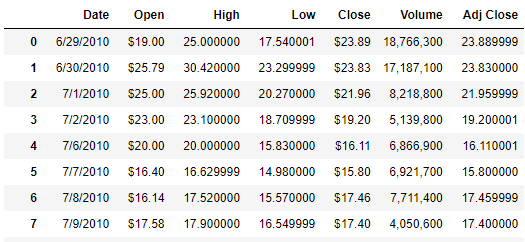
對于一些浮點數(shù)的數(shù)據(jù),我們希望可以保留小數(shù)點后的兩位或者是三位,代碼如下
format_dict?=?{
????"Open":?"${:.2f}",
????"Close":?"${:.2f}",
????"Volume":?"{:,}",
}

df.style.format(format_dict)
output
高亮顯示數(shù)據(jù)
對于指定的一些數(shù)據(jù),我們希望是高亮顯示,代碼如下
(
????df.style.format(format_dict)
????.hide_index()
????.highlight_min(["Open"],?color="blue")
????.highlight_max(["Open"],?color="red")
????.background_gradient(subset="Close",?cmap="Greens")
????.bar('Volume',?color='lightblue',?align='zero')
????.set_caption('Tesla?Stock?Prices?in?2017')
)
output


