來(lái),通過(guò) Excel 來(lái)認(rèn)識(shí)神器——POI

Java技術(shù)棧
www.javastack.cn
關(guān)注閱讀更多優(yōu)質(zhì)文章
1、POI是什么
Apache POI - the Java API for Microsoft Documents,顧名思義,Apache的三方包,用來(lái)操作微軟office文檔的,多數(shù)時(shí)候用來(lái)操作excel,所以這里就以excel方面來(lái)說(shuō)明。
需要引入兩個(gè)包,maven地址如下(version 3.9):
????org.apache.poi
????poi
????3.9


????org.apache.poi
????poi-ooxml
????3.9
POI的組件列表中,針對(duì)excel的主要是HSSF和XSSF組件,前者針對(duì)97-2007的通用版excel,即后綴xls;后者針對(duì)2007或更高版的excel,即后綴xlsx。
官方概要如下:
HSSF?is?the?POI?Project's?pure?Java?implementation?of?the?Excel?'97(-2007)?file?format.?
XSSF?is?the?POI?Project's?pure?Java?implementation?of?the?Excel?2007?OOXML?(.xlsx)?file?format.
2、POI核心類(lèi)
面向?qū)ο竺嫦驅(qū)ο螅热蝗绱耍匀蝗フ艺乙恍┠鼙硎緀xcel中內(nèi)容的類(lèi)。
2.1 工作簿 Workbook
創(chuàng)建或維護(hù)Excel工作簿的所有類(lèi)的超接口,Workbook,屬于org.apache.poi.ss.usermodel包。
其下有兩個(gè)實(shí)現(xiàn)類(lèi):
HSSFWorkbook : 有讀取.xls 格式和寫(xiě)入Microsoft Excel文件的方法。它與微軟Office97-2003版本兼容 XSSFWorkbook : 有讀寫(xiě)Microsoft Excel和OpenOffice的XML文件的格式.xls或.xlsx的方法。它與MS-Office版本2007或更高版本兼容
所以在針對(duì)不同版本的excel時(shí),需要對(duì)應(yīng)以上使用不同的Workbook。構(gòu)造函數(shù)中,常用的:
HSSFWorkbook
HSSFWorkbook()
HSSFWorkbook(java.io.InputStream?s)
XSSFWorkbook
XSSFWorkbook()
XSSFWorkbook(java.io.File?file)
XSSFWorkbook(java.io.InputStream?is)
2.2 標(biāo)簽頁(yè) Sheet
HSSFSheet 和 XSSFSheet 都是Sheet接口的實(shí)現(xiàn)類(lèi),Sheet可以使用Workbook的兩個(gè)方法獲得:
workbook.createSheet();
workbook.createSheet(String?sheetName);
2.3 行 Row
同理,Row是 HSSFRow 和 XSSFRow 的接口,通過(guò)Sheet獲取:
sheet.createRow(int?rownum);
2.4 單元格 Cell
同理,Cell是 HSSFCell 和 XSSFCell 的接口,通過(guò)Row獲取:
row.createCell(int?column);
row.createCell(int?column,?int?type);
3、創(chuàng)建和讀取
其實(shí)如果能理解面向?qū)ο螅秃芎?jiǎn)單了,另外包括字體,公式,超鏈接等,都有對(duì)應(yīng)的封裝類(lèi),此處只提出了核心的幾個(gè),需要了解更多的需要自行展開(kāi)。
例子的話(huà),直接從別人教程里摘出來(lái)吧,另,讀取的workbook,可以debug瞅瞅內(nèi)容。關(guān)注公從號(hào)Java技術(shù)棧,回復(fù):工具,可以獲取更多工具系列干貨。
3.1 創(chuàng)建空白工作簿
import?java.io.*;
import?org.apache.poi.xssf.usermodel.*;
public?class?CreateWorkBook?
{
???public?static?void?main(String[]?args)throws?Exception?
???{
??????
??????XSSFWorkbook?workbook?=?new?XSSFWorkbook();?
??????
??????FileOutputStream?out?=?new?FileOutputStream(
??????new?File("createworkbook.xlsx"));
??????
??????workbook.write(out);
??????out.close();
??????System.out.println("
??????createworkbook.xlsx?written?successfully");
???}
}
3.2 打開(kāi)現(xiàn)有的工作簿
import?java.io.*;
import?org.apache.poi.xssf.usermodel.*;
public?class?OpenWorkBook
{
???public?static?void?main(String?args[])throws?Exception
???{?
??????File?file?=?new?File("openworkbook.xlsx");
??????FileInputStream?fIP?=?new?FileInputStream(file);
??????
??????XSSFWorkbook?workbook?=?new?XSSFWorkbook(fIP);
??????if(file.isFile()?&&?file.exists())
??????{
?????????System.out.println(
?????????"openworkbook.xlsx?file?open?successfully.");
??????}
??????else
??????{
?????????System.out.println(
?????????"Error?to?open?openworkbook.xlsx?file.");
??????}
???}
}
3.3、任意對(duì)象List轉(zhuǎn)至為Excel文檔
可用注解定義標(biāo)簽名和列名,寫(xiě)了個(gè)方法,可以將某個(gè)類(lèi)的List轉(zhuǎn)換為對(duì)應(yīng)的Excel文檔,列名如果在不使用注解的情況下默認(rèn)為屬性名:
推薦閱讀:Java 中初始化 List 集合的 6 種方式!
類(lèi):
@Excel(name?=?"學(xué)生標(biāo)簽頁(yè)")
public?class?Student?{

????@Excel(name?=?"姓名")
????private?String?name;

????private?boolean?male;

????@Excel(name?=?"身高")
????private?int?height;

????public?String?getName()?{
????????return?name;
????}

????public?void?setName(String?name)?{
????????this.name?=?name;
????}

????public?boolean?isMale()?{
????????return?male;
????}

????public?void?setMale(boolean?male)?{
????????this.male?=?male;
????}

????public?int?getHeight()?{
????????return?height;
????}

????public?void?setHeight(int?height)?{
????????this.height?=?height;
????}
}
測(cè)試方法:
public?static?void?main(String[]?args)?{
????List?list?=?new?ArrayList();
????Student?student1?=?new?Student();
????student1.setName("小紅");
????student1.setMale(false);
????student1.setHeight(167);

????Student?student2?=?new?Student();
????student2.setName("小明");
????student2.setMale(true);
????student2.setHeight(185);

????list.add(student1);
????list.add(student2);

????File?file?=?new?File("C:/Users/Dulk/Desktop/1314.xls");
????createExcel(list,?file);
}
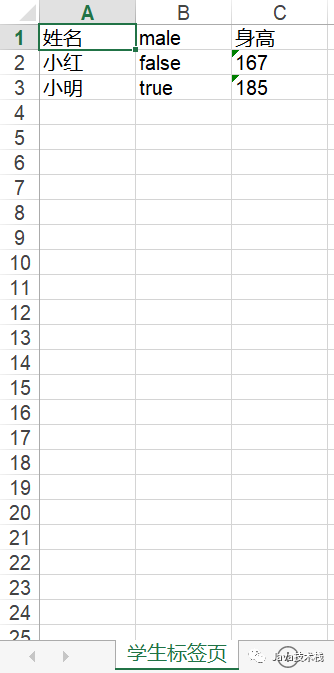
輸出結(jié)果:
注解:
import?java.lang.annotation.Retention;
import?java.lang.annotation.RetentionPolicy;


@Retention(RetentionPolicy.RUNTIME)
public?@interface?Excel?{
????
????public?String?name()?default?"";
}
方法:
import?org.apache.log4j.Logger;
import?org.apache.poi.hssf.usermodel.HSSFWorkbook;
import?org.apache.poi.ss.usermodel.Cell;
import?org.apache.poi.ss.usermodel.Row;
import?org.apache.poi.ss.usermodel.Sheet;
import?org.apache.poi.ss.usermodel.Workbook;
import?org.apache.poi.xssf.usermodel.XSSFWorkbook;

import?java.io.File;
import?java.io.FileInputStream;
import?java.io.FileNotFoundException;
import?java.io.FileOutputStream;
import?java.io.IOException;
import?java.io.InputStream;
import?java.io.OutputStream;
import?java.lang.reflect.Field;
import?java.lang.reflect.InvocationTargetException;
import?java.lang.reflect.Method;
import?java.util.ArrayList;
import?java.util.List;


public?class?ExcelUtil?{
????private?static?Logger?log?=?Logger.getLogger(ExcelUtil.class);

????
????public?static?Workbook?gainWorkbook(File?file)?throws?ExcelException?{
????????if?(!isExcel(file))?{
????????????throw?new?ExcelException("文件不是Excel類(lèi)型");
????????}
????????
????????if?(!file.exists())?{
????????????try?{
????????????????OutputStream?os?=?new?FileOutputStream(file);
????????????????Workbook?workbook?=?isOlderEdition(file)???new?HSSFWorkbook()?:?new?XSSFWorkbook();
????????????????workbook.write(os);
????????????????log.debug("文件不存在,新建該Excel文件");
????????????????os.close();

????????????}?catch?(FileNotFoundException?e)?{
????????????????e.printStackTrace();
????????????}?catch?(IOException?e)?{
????????????????e.printStackTrace();
????????????}
????????}

????????try?{
????????????InputStream?is?=?new?FileInputStream(file);
????????????return?isOlderEdition(file)???new?HSSFWorkbook(is)?:?new?XSSFWorkbook(is);

????????}?catch?(FileNotFoundException?e)?{
????????????e.printStackTrace();
????????}?catch?(IOException?e)?{
????????????e.printStackTrace();
????????}

????????return?null;
????}

????
????private?static?boolean?isOlderEdition(File?file)?{
????????return?file.getName().matches(".+\\.(?i)xls");
????}

????
????private?static?boolean?isExcel(File?file)?{
????????String?fileName?=?file.getName();
????????String?regXls?=?".+\\.(?i)xls";
????????String?regXlsx?=?".+\\.(?i)xlsx";
????????return?fileName.matches(regXls)?||?fileName.matches(regXlsx);
????}

????
????public?static??Workbook?createExcel(List?list,?File?file)?{
????????String?sheetName?=?"default";
????????if?(list.size()?==?0)?{
????????????return?null;
????????}

????????Workbook?workbook?=?null;
????????try?{
????????????Class?clazz?=?list.get(0).getClass();
????????????Field[]?fields?=?clazz.getDeclaredFields();
????????????if?(clazz.isAnnotationPresent(Excel.class))?{
????????????????Excel?excel?=?(Excel)?clazz.getAnnotation(Excel.class);
????????????????sheetName?=?excel.name();
????????????}

????????????workbook?=?gainWorkbook(file);
????????????Sheet?sheet?=?workbook.createSheet(sheetName);
????????????
????????????Row?line?=?sheet.createRow(0);
????????????for?(int?k?=?0;?k?????????????????Cell?cell?=?line.createCell(k);
????????????????String?columnName?=?fields[k].getName();
????????????????if?(fields[k].isAnnotationPresent(Excel.class))?{
????????????????????Excel?excel?=?fields[k].getAnnotation(Excel.class);
????????????????????columnName?=?excel.name();
????????????????}
????????????????cell.setCellValue(columnName);
????????????}
????????????
????????????for?(int?i?=?1;?i?<=?list.size();?i++)?{
????????????????Row?row?=?sheet.createRow(i);
????????????????for?(int?j?=?1;?j?<=?fields.length;?j++)?{
????????????????????Cell?cell?=?row.createCell(j?-?1);
????????????????????String?fieldName?=?fields[j?-?1].getName();
????????????????????String?fieldFirstLetterUpper?=?fieldName.substring(0,?1).toUpperCase();
????????????????????String?prefix?=?"get";
????????????????????if?("boolean".equals(fields[j?-?1].getType().getName()))?{
????????????????????????prefix?=?"is";
????????????????????}
????????????????????String?methodName?=?prefix?+?fieldFirstLetterUpper?+?fieldName.substring(1);
????????????????????Method?method?=?clazz.getMethod(methodName);
????????????????????cell.setCellValue(String.valueOf(method.invoke(list.get(i?-?1))));
????????????????}
????????????}
????????????log.debug("List讀入完畢");
????????????OutputStream?os?=?new?FileOutputStream(file);
????????????workbook.write(os);
????????????os.close();

????????}?catch?(ExcelException?e)?{
????????????e.printStackTrace();
????????}?catch?(InvocationTargetException?e)?{
????????????e.printStackTrace();
????????}?catch?(NoSuchMethodException?e)?{
????????????e.printStackTrace();
????????}?catch?(IllegalAccessException?e)?{
????????????e.printStackTrace();
????????}?catch?(FileNotFoundException?e)?{
????????????e.printStackTrace();
????????}?catch?(IOException?e)?{
????????????e.printStackTrace();
????????}
????????return?workbook;
????}
}
參考鏈接:www.yiibai.com/apache_poi/apache_poi_core_classes.html
作者:Dulk
來(lái)源:www.cnblogs.com/deng-cc/p/7443192.html







關(guān)注Java技術(shù)棧看更多干貨