
(重磅來襲)react-router-dom 簡明教程
react-router-dom 簡明教程
我們需要?jiǎng)?chuàng)建 react-pro 項(xiàng)目
create-react-app?react-pro

cd?react-pro

yarn?add?react-router-dom
我們看到的目錄如下:
在 src 下新建一個(gè) HelloRouter.js,代碼如下:
import?React,?{?PureComponent?}?from?'react';
import?{
????BrowserRouter?as?Router,
????Switch,
????Route,
????Link
}?from?"react-router-dom";
//?將路由拆分成數(shù)組的形式,有點(diǎn)像?vue?路由配置
const?routes?=?[
????{
????????to:?'/',
????????content:?'Home'
????},
????{
????????to:?'/about',
????????content:?'About'
????},
????{
????????to:?'/users',
????????content:?'Users'
????}
]
//?創(chuàng)建組件的一種形式,變量的形式
const?lis?=?routes.map((item,?index)?=>?{
????return?(
????????<li?key={index}>
????????????<Link?to={item.to}>
????????????????{item.content}
????????????Link>
????????li>
????)
})
//?類組件的形式
class?Home?extends?PureComponent?{
????render()?{
????????return?<h2>Homeh2>;
????}
}
class?About?extends?PureComponent?{
????render()?{
????????return?<h2>Abouth2>;
????}
}
class?Users?extends?PureComponent?{
????render()?{
????????return?<h2>Usersh2>;
????}
}
//?這里的?Switch?Route?有點(diǎn)類似?js?中的?switch?case?表示精準(zhǔn)匹配
export?default?class?HelloRouter?extends?PureComponent?{
????render()?{
????????return?(
????????????
????????????????
????????????????????
????????????????????{/*?A??looks?through?its?children?s?and
????????????????renders?the?first?one?that?matches?the?current?URL.?*/}
????????????????????
????????????????????????
????????????????????????
????????????????????????
????????????????????
????????????????
????????????
????????);
????}
}
效果如下:
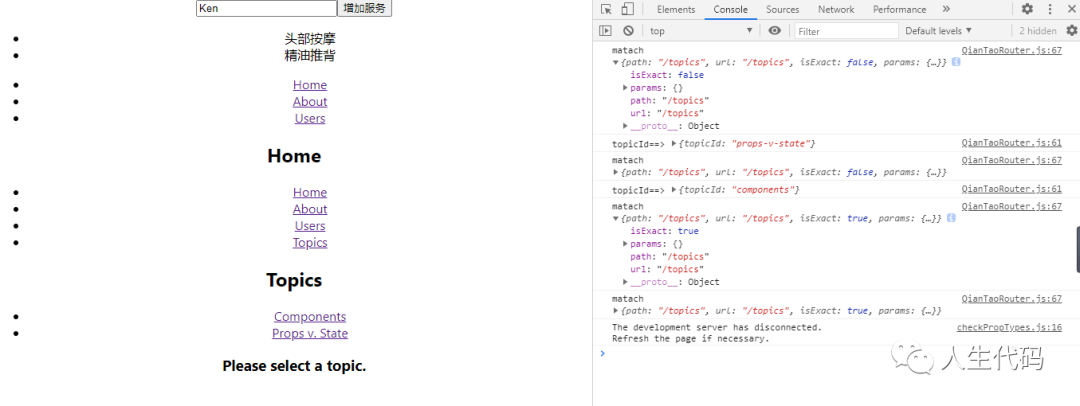
嵌套路由
接下來我們就來寫寫 react 的嵌套路由;
首先我們?cè)?src 下新建一個(gè) QianTaoRouter.js,具體代碼如下:
import?React,?{?PureComponent?}?from?'react';
import?{
????BrowserRouter?as?Router,
????Switch,
????Route,
????Link,
????useParams,
????useRouteMatch
}?from?"react-router-dom";
const?routes?=?[
????{
????????to:?'/',
????????content:?'Home'
????},
????{
????????to:?'/about',
????????content:?'About'
????},
????{
????????to:?'/users',
????????content:?'Users'
????},
????{
????????to:?'/topics',
????????content:?'Topics'
????}
]
const?lis?=?routes.map((item,?index)?=>?{
????return?(
????????<li?key={index}>
????????????<Link?to={item.to}>
????????????????{item.content}
????????????Link>
????????li>
????)
})
class?Home?extends?PureComponent?{
????render()?{
????????return?<h2>Homeh2>;
????}
}
class?About?extends?PureComponent?{
????render()?{
????????return?<h2>Abouth2>;
????}
}
class?Users?extends?PureComponent?{
????render()?{
????????return?<h2>Usersh2>;
????}
}
function?Topic()?{
????let?{?topicId?}?=?useParams();
????return?<h3>Requested?topic?ID:?{topicId}h3>;
}
function?Topics()?{
????let?match?=?useRouteMatch();
????console.log("matach",?match)
????return?(
????????
??????????Topics
????
??????????
????????????
??????????????Components
????????????
????????????
??????????????
????????????????Props?v.?State
??????????????
????????????
??????????
????
??????????{/*?The?Topics?page?has?its?own??with?more?routes
??????????????that?build?on?the?/topics?URL?path.?You?can?think?of?the
??????????????2nd??here?as?an?"index"?page?for?all?topics,?or
??????????????the?page?that?is?shown?when?no?topic?is?selected?*/}
??????????
????????????
??????????????
????????????
????????????
??????????????Please?select?a?topic.
????????????
??????????
????????
??????);
}
export?default?class?HelloRouter?extends?PureComponent?{
????render()?{
????????return?(
????????????
????????????????
????????????????????
????????????????????{/*?A??looks?through?its?children?s?and
????????????????renders?the?first?one?that?matches?the?current?URL.?*/}
????????????????????
????????????????????????
????????????????????????
????????????????????????
????????????????????????
????????????????????
????????????????
????????????
????????);
????}
}
其中引人注意的是
useRouteMatch 用于解析路由對(duì)象 useParams 用于解析路由參數(shù)
主要組件
路由組件: BrowserRouter和HashRouter
BrowserRouter使用瀏覽器的History API來管理url及與瀏覽器進(jìn)行交互, 需要服務(wù)器增加配置以讓所有的url請(qǐng)求返回同一個(gè)頁面
HashRouter將頁面當(dāng)前位置存儲(chǔ)在url的hash部分(http://example.com/#/your/page.),不需要服務(wù)器增加特殊配置
路由匹配組件Route和Switch
Switch組件搜索其下路由Route組件,渲染第一個(gè)匹配到的路由而忽略其他 Route為視圖渲染出口
??<Route?path={`${match.path}/:topicId`}>
????<Topic?/>
??Route>
??<Route?path={match.path}>
????<h3>Please?select?a?topic.h3>
??Route>
</Switch>
導(dǎo)航組件Link,NavLink和Redirect
Link組件用來在應(yīng)用中創(chuàng)建鏈接。Link會(huì)被渲染成a標(biāo)簽
??<li>
????<Link?to={`${match.url}/components`}>ComponentsLink>
??li>
??<li>
????<Link?to={`${match.url}/props-v-state`}>
??????Props?v.?State
????Link>
??li>
</ul>
NavLink是一種特殊類型的Link,支持自動(dòng)添加active class
"/react"?activeClassName="hurray">
??React
</NavLink>

//?When?the?URL?is?/react,?this?renders:
//?React

//?When?it's?something?else:
//?React
任何時(shí)候你想強(qiáng)制導(dǎo)航,你可以渲染一個(gè)Redirect組件。當(dāng)渲染時(shí),它將使用其來支持導(dǎo)航
"/login"?/>
代碼分割
即code-splitting, 網(wǎng)頁的增量下載, 未使用到的包不會(huì)加載 我們使用webpack, @babel/plugin-syntax-dynamic-import, 和 loadable-components來實(shí)現(xiàn)代碼分割 首先安裝依賴包
yarn?add?@babel/preset-react?@babel/plugin-syntax-dynamic-import?loadable-components?--dev
配置.babelrc文件(沒有的話在項(xiàng)目根目錄下新建一個(gè))
{
??"presets":?["@babel/preset-react"],
??"plugins":?["@babel/plugin-syntax-dynamic-import"]
}
修改App.js
import?React?from?"react";
import?{?BrowserRouter?as?Router,?Route,?Switch?}?from?"react-router-dom";
import?loadable?from?"@loadable/component";
import?Loading?from?"../components/Loading";
import?"./App.css";

const?Counter?=?loadable(()?=>?import("../features/counter/Counter"),?{
??fallback:?<Loading?/>,
});
const?Book?=?loadable(()?=>?import("../features/book/Book"),?{
??fallback:?<Loading?/>,
});

function?App()?{
??return?(
????<Router>
??????<Switch>
????????<Route?exact?path="/"?component={Counter}?/>
????????<Route?path="/book"?component={Book}?/>
??????Switch>
????Router>
??);
}

export?default?App;
滾動(dòng)狀態(tài)恢復(fù)
當(dāng)路由切換時(shí)候頁面自動(dòng)滾動(dòng)到頂部或者恢復(fù)滾動(dòng)位置
import?{?useEffect?}?from?"react";
import?{?useLocation?}?from?"react-router-dom";

export?default?function?ScrollToTop()?{
??const?{?pathname?}?=?useLocation();

??useEffect(()?=>?{
????window.scrollTo(0,?0);
??},?[pathname]);

??return?null;
}
不使用Hook(v16.8以上才能夠使用), 可以使用react-router-dom提供的withRouter高階函數(shù)
import?React?from?"react";
import?{?withRouter?}?from?"react-router-dom";

class?ScrollToTop?extends?React.Component?{
??componentDidUpdate(prevProps)?{
????if?(
??????this.props.location.pathname?!==?prevProps.location.pathname
????)?{
??????window.scrollTo(0,?0);
????}
??}

??render()?{
????return?null;
??}
}

export?default?withRouter(ScrollToTop);
重要API的適應(yīng)
BrowserRouter
基于H5 History接口的路由
??basename={optionalString}????
??forceRefresh={optionalBool}???
??getUserConfirmation={optionalFunc}
??keyLength={optionalNumber}???
>
??<App?/>
</BrowserRouter>
HashRouter
使用URL的哈希部分(例如window.location.hash)來保持你的UI與URL同步。
??basename={optionalString}??
??getUserConfirmation={optionalFunc}
??hashTpe={optionalString}??
>
??<App?/>
</HashRouter>
Link
聲明式路由組件
"/about">About</Link>
to 導(dǎo)向哪個(gè)路由,可以為字符串,也可以為一個(gè)對(duì)象或者函數(shù)
"/courses?sort=name"?/>
???to={{
?????pathname:?"/courses",????//?路徑
?????search:?"?sort=name",??//?查詢參數(shù)
?????hash:?"#the-hash",???//?hash值
?????state:?{?fromDashboard:?true?}??//?持久化到location的狀態(tài)數(shù)據(jù)
???}}
?/>
一個(gè)函數(shù),當(dāng)前位置作為參數(shù)傳遞給它,并且應(yīng)該以字符串或?qū)ο蟮男问椒祷匚恢帽硎?/p>
?({?...location,?pathname:?"/courses"?})}?/>
?`${location.pathname}?sort=name`}?/>
其他可用屬性
replace: 當(dāng)為true時(shí),單擊該鏈接將替換歷史堆棧中的當(dāng)前條目,而不是添加一個(gè)新條目。 innerRef 值為函數(shù)
??to="/"
??innerRef={node?=>?{
????//?node指向掛載的dom元素,?卸載時(shí)候?yàn)閚ull
??}}
/>
值為Ref對(duì)象
let?anchorRef?=?React.createRef()

"/"?innerRef={anchorRef}?/>
component 定制化自己的導(dǎo)航組件
const?FancyLink?=?React.forwardRef((props,?ref)?=>?(
??<a?ref={ref}?{...props}>???{props.children}a>
))

"/"?component={FancyLink}?/>
title, id, className等a標(biāo)簽接受的屬性
NavLink
是 Link 的一個(gè)特殊版本,當(dāng)呈現(xiàn)的元素與當(dāng)前URL匹配時(shí),它將向該元素添加樣式屬性。
activeClassName 當(dāng)元素處于active狀態(tài)時(shí),類將提供該class。默認(rèn)的給定class是active。這將與className樣式疊加
activeStyle 內(nèi)嵌方式聲明active狀態(tài)樣式
exact 布爾類型, 為true是路徑完全匹配才會(huì)添加active class
strict 路徑匹配是否嚴(yán)格, 為true的話結(jié)尾的斜杠會(huì)被考慮
isActive函數(shù), 可以自定義active class添加邏輯
??to="/events/123"
??isActive={(match,?location)?=>?{
????if?(!match)?{
??????return?false;
????}

????//?only?consider?an?event?active?if?its?event?id?is?an?odd?number
????const?eventID?=?parseInt(match.params.eventID);
????return?!isNaN(eventID)?&&?eventID?%?2?===?1;
??}}
>
??Event?123
</NavLink>
Redirect
重定向
"/">
??{loggedIn???<Redirect?to="/dashboard"?/>?:?<PublicHomePage?/>}
</Route>
to也可以為對(duì)象
??to={{
????pathname:?"/login",
????search:?"?utm=your+face",
????state:?{?referrer:?currentLocation?}
??}}
/>
push屬性: 當(dāng)為真時(shí),重定向?qū)岩粋€(gè)新的條目推送到歷史中,而不是取代當(dāng)前的條目。from屬性: 要重定向的路徑名。路徑-regexp@^1.7.0能夠理解的任何有效URL路徑。在to中為模式提供了所有匹配的URL參數(shù)。必須包含to中使用的所有參數(shù)。不被to使用的其他參數(shù)將被忽略。
??<Redirect?from="/old-path"?to="/new-path"?/>
??<Route?path="/new-path">
????<Place?/>
??Route>
</Switch>

//?Redirect?with?matched?parameters

??sers/:id"?to="/users/profile/:id"?/>
??/users/profile/:id">
????
??
exact屬性, 路徑是否完全匹配
strict屬性:路徑匹配是否嚴(yán)格,區(qū)分斜杠
sensitive屬性: 路徑匹配是否大小寫敏感
Route
路由組件可能是反應(yīng)路由器中最重要的組件,了解和學(xué)習(xí)使用好。它最基本的職責(zé)是在路徑與當(dāng)前URL匹配時(shí)呈現(xiàn)某個(gè)UI
route component
只有路由匹配才會(huì)掛載component指定的組件
ReactDOM.render(
??<Router>
????<Route?path="/user/:username"?component={User}?/>
??Router>,
??node
);
render func
路由匹配函數(shù)就會(huì)調(diào)用
ReactDOM.render(
??<Router>
????<Route?path="/home"?render={()?=>?<div>Homediv>}?/>
??Router>,
??node
);
children func
不管路由是否匹配都會(huì)渲染對(duì)應(yīng)組件
import?React?from?"react";
import?ReactDOM?from?"react-dom";
import?{
??BrowserRouter?as?Router,
??Link,
??Route
}?from?"react-router-dom";

function?ListItemLink({?to,?...rest?})?{
??return?(
????<Route
??????path={to}
??????children={({?match?})?=>?(
????????<li?className={match???"active"?:?""}>
??????????<Link?to={to}?{...rest}?/>
????????li>
??????)}
????/>
??);
}

ReactDOM.render(
??<Router>
????<ul>
??????<ListItemLink?to="/somewhere"?/>
??????<ListItemLink?to="/somewhere-else"?/>
????ul>
??Router>,
??node
);
上面的例子中如果路徑匹配的話會(huì)渲染帶有active class的li 當(dāng)添加動(dòng)畫過渡效果時(shí)候children屬性也很有用
??children={({?match,?...rest?})?=>?(
????{/*?Animate?will?always?render,?so?you?can?use?lifecycles
????????to?animate?its?child?in?and?out?*/}
????
??????{match?&&?<Something?{...rest}/>}
????</Animate>
??)}
/>
幾個(gè)重要變量
location
{
??key:?'ac3df4',?//?not?with?HashHistory!
??pathname:?'/somewhere',
??search:?'?some=search-string',
??hash:?'#howdy',
??state:?{
????[userDefined]:?true
??}
}
location會(huì)出現(xiàn)在下面幾個(gè)地方
Route component(路由組件)中使用 this.props.location Route組件的 render函數(shù) as ({ location }) => () Route組件的children屬性 as ({ location }) => () withRouter高階函數(shù)包裹的組件中使用 as this.props.location
match
一個(gè)說明路由為何匹配的對(duì)象,包含路由跳轉(zhuǎn)參數(shù)params, 是否精確匹配isExact, 路徑path, url
路由組件(Route component)中使用this.props.match 路由render函數(shù)中解構(gòu)出match對(duì)象Route render as ({ match }) => () 路由children函數(shù)中解構(gòu)出match對(duì)象Route children as ({ match }) => () withRouter高階函數(shù)包裹組件中使用 this.props.match matchPath useRouteMatch
可以基于此來實(shí)現(xiàn)路由嵌套
import?{?Link,?Switch,?Route?}?from?"react-router-dom";
import?{?useRouteMatch?}?from?"@/utils";
export?default?function?NestRoute()?{
??const?{?path,?url?}?=?useRouteMatch("/demo");
??return?(
????<>
??????<h3>路由嵌套h3>
??????<ul>
????????<li>
??????????<Link?to={`${url}/demo1`}>demo1Link>
????????li>
????????<li>
??????????<Link?to={`${url}/demo2`}>demo2Link>
????????li>
??????ul>
??????<Switch>
????????<Route?path="/demo"?exact>
??????????請(qǐng)選擇一個(gè)實(shí)例
????????Route>
????????<Route
??????????path={`${path}/:demoId`}
??????????render={({?match?})?=>?<h1>{match.params.demoId}h1>}
????????>Route>
??????Switch>
????
??);
}
history
路由歷史對(duì)象,包含以下屬性
length - (number) 歷史堆棧中的條目數(shù) action - (string) 當(dāng)前動(dòng)作類型 (PUSH, REPLACE, or POP) location - (object) 當(dāng)前的location對(duì)象,可能包含以下屬性: pathname - (string) URL的path部分 search - (string) URL的query部分 hash - (string) URL hash部分 state - (object)位置特定的狀態(tài),當(dāng)此位置被推入堆棧時(shí)提供的推入狀態(tài)(路徑、狀態(tài))。僅在瀏覽器和內(nèi)存歷史中可用. push(path, [state]) - (function) 將新條目推入歷史堆棧 replace(path, [state]) - (function)替換歷史堆棧上的當(dāng)前條目 go(n) - (function) 在歷史堆棧中移動(dòng)n(可正可負(fù),即向前或者向后)個(gè)條目的指針 goBack() - (function) 等價(jià)于go(-1), 后退一頁 goForward() - (function) 等價(jià)于 go(1), 前進(jìn)一頁
歷史對(duì)象是可變的。因此,建議從渲染道具
常用Hooks
react >= 16.8
useHistory
import?{?useHistory?}?from?"react-router-dom";

function?HomeButton()?{
??let?history?=?useHistory();

??function?handleClick()?{
????history.push("/home");
??}

??return?(
????<button?type="button"?onClick={handleClick}>
??????Go?home
????button>
??);
}
useLocation
獲取位置對(duì)象
??let?location?=?useLocation();
useParams
useParams返回一個(gè)包含URL參數(shù)的鍵/值對(duì)的對(duì)象。使用它來訪問match。當(dāng)前
import?React?from?"react";
import?ReactDOM?from?"react-dom";
import?{
??BrowserRouter?as?Router,
??Switch,
??Route,
??useParams
}?from?"react-router-dom";

function?BlogPost()?{
??let?{?slug?}?=?useParams();
??return?<div>Now?showing?post?{slug}div>;
}

ReactDOM.render(
??<Router>
????<Switch>
??????<Route?exact?path="/">
????????<HomePage?/>
??????Route>
??????<Route?path="/blog/:slug">
????????<BlogPost?/>
??????Route>
????Switch>
??Router>,
??node
);
useRouteMatch
useRouteMatch鉤子嘗試以與相同的方式匹配當(dāng)前URL。它主要用于在不實(shí)際呈現(xiàn)
import?{?Route?}?from?"react-router-dom";

function?BlogPost()?{
??return?(
????<Route
??????path="/blog/:slug"
??????render={({?match?})?=>?{
????????//?Do?whatever?you?want?with?the?match...
????????return?<div?/>;
??????}}
????/>
??);
}
使用useRouteMatch的話就可以不實(shí)際渲染出了
import?{?useRouteMatch?}?from?"react-router-dom";

function?BlogPost()?{
??let?match?=?useRouteMatch("/blog/:slug");

??//?Do?whatever?you?want?with?the?match...
??return?<div?/>;
}?
路由傳參
通配符傳參
Route定義方式:
'/path/:name'?component={Path}/>???
Link組件:
"/path/通過通配符傳參">通配符</Link>???
參數(shù)獲取:
this.props.match.params.name???
優(yōu)點(diǎn):簡單快捷,并且,在刷新頁面的時(shí)候,參數(shù)不會(huì)丟失。
缺點(diǎn):只能傳字符串,并且,如果傳的值太多的話,url會(huì)變得長而丑陋。
如果,你想傳對(duì)象的話,可以用JSON.stringify(),想將其轉(zhuǎn)為字符串,然后另外的頁面接收后,用JSON.parse()轉(zhuǎn)回去。
query
Route定義方式:
'/query'?component={Query}/>???
Link組件:
var?query?=?{
??pathname:?'/query',
??querthis.props.location.query
y:?'我是通過query傳值?'
}?
query</Link>
參數(shù)獲取:
this.props.location.query
???
優(yōu)點(diǎn):優(yōu)雅,可傳對(duì)象 缺點(diǎn):刷新頁面,參數(shù)丟失
state傳參
Route定義方式:
state</Link>
???
Link組件:
var?state?=?{
??pathname:?'/state',
??state:?'我是通過state傳值'
?}
?'/state'?component={State}/>
???
參數(shù)獲取:
this.props.location.state???
優(yōu)點(diǎn):優(yōu)雅,可傳對(duì)象 缺點(diǎn):刷新頁面,參數(shù)丟失
參考
https://reactrouter.com/web/guides/quick-start???