
基于Dijkstra算法的武漢地鐵路徑規(guī)劃!
前言
最近爬取了武漢地鐵線路的信息,通過調(diào)用高德地圖的api 獲得各個站點的進度和緯度信息,使用Dijkstra算法對路徑進行規(guī)劃。
1.數(shù)據(jù)爬取
首先是需要獲得武漢各個地鐵的地鐵站信息,通過爬蟲爬取武漢各個地鐵站點的信息,并存儲到xlsx文件中
武漢地鐵線路圖,2021最新武漢地鐵線路圖,武漢地鐵地圖-武漢本地寶wh.bendibao.com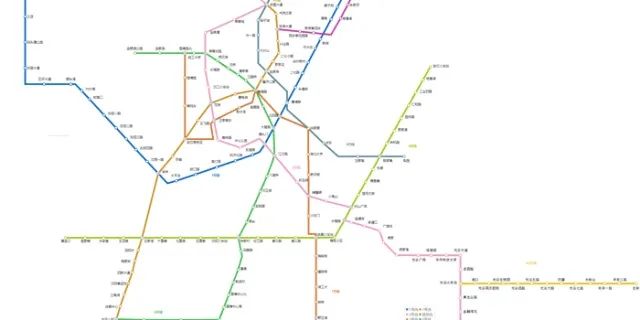
方法:requests、BeautifulSoup、pandas
import requests
from bs4 import BeautifulSoup
import pandas as pd

def spyder():
    #獲得武漢的地鐵信息
    url='http://wh.bendibao.com/ditie/linemap.shtml'
    user_agent='Mozilla/5.0 (Macintosh; U; Intel Mac OS X 10_6_8; en-us) AppleWebKit/534.50 (KHTML, like Gecko) Version/5.1 Safari/534.50'
    headers = {'User-Agent': user_agent}
    r = requests.get(url, headers=headers)
    r.encoding = r.apparent_encoding
    soup = BeautifulSoup(r.text, 'lxml')
    all_info = soup.find_all('div', class_='line-list')
    df=pd.DataFrame(columns=['name','site'])
    for info in all_info:
        title=info.find_all('div',class_='wrap')[0].get_text().split()[0].replace('線路圖','')
        station_all=info.find_all('a',class_='link')
        for station in station_all:
            station_name=station.get_text()
            temp={'name':station_name,'site':title}
            df =df.append(temp,ignore_index=True)
    df.to_excel('./subway.xlsx',index=False)
我們將爬取的地鐵信息保存到excel文件中
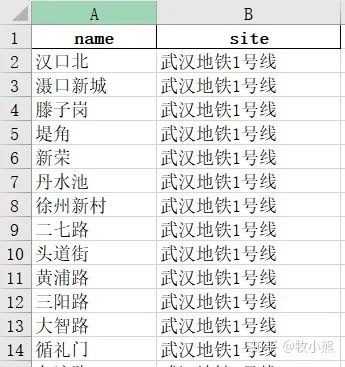
如果要做路徑規(guī)劃的話,我們還需要知道地鐵站的位置信息
因此我們選擇了高德地圖的api接口
2.高德地圖api接口配置
高德開放平臺 | 高德地圖 APIlbs.amap.com? 鏈接:https://link.zhihu.com/?target=https%3A//lbs.amap.com/%3Fref%3Dhttps%3A//console.amap.com)
首先我們注冊賬號
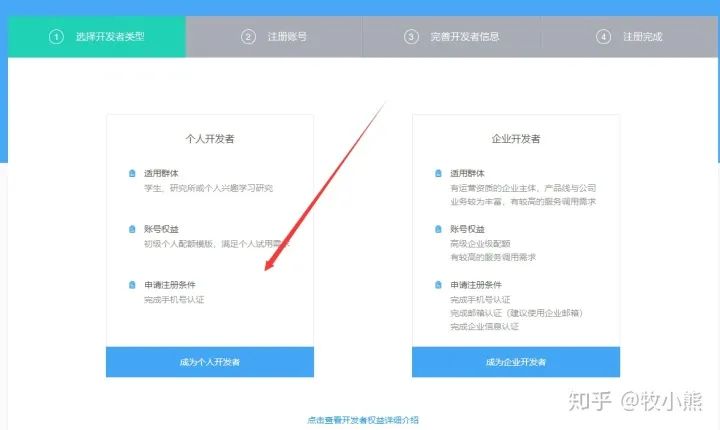
選擇為個人開發(fā)者
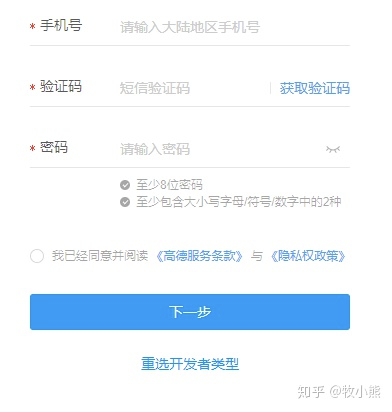
填寫個人信息...
注冊成功后,我們來登陸高德地圖api
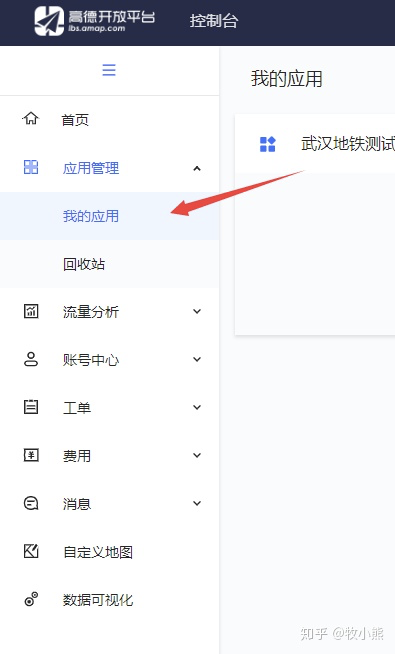
選擇我的應用

創(chuàng)建新應用
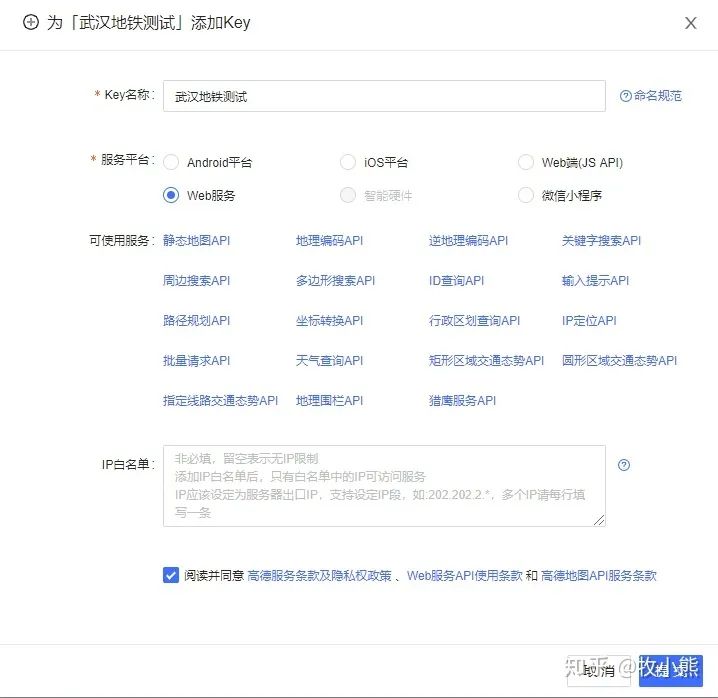
選擇web服務

這個時候高德地圖就給你了一個key
3.得到地鐵站的經(jīng)度和緯度
配置一個get_location函數(shù)區(qū)訪問高德地圖的api 然后返回經(jīng)度和緯度
def get_location(keyword,city):
    #獲得經(jīng)緯度
    user_agent='Mozilla/5.0 (Macintosh; U; Intel Mac OS X 10_6_8; en-us) AppleWebKit/534.50 (KHTML, like Gecko) Version/5.1 Safari/534.50'
    headers = {'User-Agent': user_agent}
    url='http://restapi.amap.com/v3/place/text?key='+keynum+'&keywords='+keyword+'&types=&city='+city+'&children=1&offset=1&page=1&extensions=all'
    data = requests.get(url, headers=headers)
    data.encoding='utf-8'
    data=json.loads(data.text)
    result=data['pois'][0]['location'].split(',')
    return result[0],result[1]
keyword是你要查詢的地址,city代表城市
我們這里city就設(shè)置為武漢
我們邊爬取地鐵站信息 邊獲得經(jīng)度和緯度
于是得到了改進版的爬蟲
def spyder():
    #獲得武漢的地鐵信息
    print('正在爬取武漢地鐵信息...')
    url='http://wh.bendibao.com/ditie/linemap.shtml'
    user_agent='Opera/9.80 (Macintosh; Intel Mac OS X 10.6.8; U; en) Presto/2.8.131 Version/11.11'
    headers = {'User-Agent': user_agent}
    r = requests.get(url, headers=headers)
    r.encoding = r.apparent_encoding
    soup = BeautifulSoup(r.text, 'lxml')
    all_info = soup.find_all('div', class_='line-list')
    df=pd.DataFrame(columns=['name','site'])
    for info in tqdm(all_info):
        title=info.find_all('div',class_='wrap')[0].get_text().split()[0].replace('線路圖','')
        station_all=info.find_all('a',class_='link')
        for station in station_all:
            station_name=station.get_text()
            longitude,latitude=get_location(station_name,'武漢')
            temp={'name':station_name,'site':title,'longitude':longitude,'latitude':latitude}
            df =df.append(temp,ignore_index=True)
    df.to_excel('./subway.xlsx',index=False)
4.得到地鐵站之間的距離并構(gòu)建圖
計算各個地鐵站的信息,并生成地鐵站網(wǎng)絡(luò)
現(xiàn)在我們得到了地鐵站的經(jīng)度和緯度 可以通過geopy.distance這個包來計算2點之間的距離
from geopy.distance import geodesic
print(geodesic((緯度,經(jīng)度), (緯度,經(jīng)度)).m) #計算兩個坐標直線距離
當然高德地圖api也同樣提供了計算距離的接口
我們來配置計算距離的函數(shù)
輸入經(jīng)度和緯度就可以計算距離
def compute_distance(longitude1,latitude1,longitude2,latitude2):
    #計算2點之間的距離
    user_agent='Mozilla/5.0 (Macintosh; U; Intel Mac OS X 10_6_8; en-us) AppleWebKit/534.50 (KHTML, like Gecko) Version/5.1 Safari/534.50'
    headers = {'User-Agent': user_agent}
    url='http://restapi.amap.com/v3/distance?key='+keynum+'&origins='+str(longitude1)+','+str(latitude1)+'&destination='+str(longitude2)+','+str(latitude2)+'&type=1'
    data=requests.get(url,headers=headers)
    data.encoding='utf-8'
    data=json.loads(data.text)
    result=data['results'][0]['distance']
    return result
那么接下來就構(gòu)建地鐵站之間的圖網(wǎng)絡(luò)
因為爬取地鐵站信息比較耗時,我們將制作好的圖網(wǎng)絡(luò)保存為pickle文件方便以后使用
def get_graph():
    print('正在創(chuàng)建pickle文件...')
    data=pd.read_excel('./subway.xlsx')
    #創(chuàng)建點之間的距離
    graph=defaultdict(dict)
    for i in range(data.shape[0]):
        site1=data.iloc[i]['site']
        if i0]-1:
            site2=data.iloc[i+1]['site']
            #如果是共一條線
            if site1==site2:
                longitude1,latitude1=data.iloc[i]['longitude'],data.iloc[i]['latitude']
                longitude2,latitude2=data.iloc[i+1]['longitude'],data.iloc[i+1]['latitude']
                name1=data.iloc[i]['name']
                name2=data.iloc[i+1]['name']
                distance=compute_distance(longitude1,latitude1,longitude2,latitude2)
                graph[name1][name2]=distance
                graph[name2][name1]=distance
    output=open('graph.pkl','wb')
    pickle.dump(graph,output)
5.得到當前位置距離最近的地鐵站
我們要去找距離最近的地鐵站 首先是獲得位置的坐標
然后將當前的坐標遍歷所有地鐵站 找到最近的地鐵站
longitude1,latitude1=get_location(site1,'武漢')
longitude2,latitude2=get_location(site2,'武漢')
data=pd.read_excel('./subway.xlsx')
定義get_nearest_subway函數(shù)來尋找最近的地鐵站
def get_nearest_subway(data,longitude1,latitude1):
    #找最近的地鐵站
    longitude1=float(longitude1)
    latitude1=float(latitude1)
    distance=float('inf')
    nearest_subway=None
    for i in range(data.shape[0]):
        site1=data.iloc[i]['name']
        longitude=float(data.iloc[i]['longitude'])
        latitude=float(data.iloc[i]['latitude'])
        temp=geodesic((latitude1,longitude1), (latitude,longitude)).m
        if temp            distance=temp
            nearest_subway=site1
    return nearest_subway
通過遍歷地鐵站的距離找到了最近的上車點和下車點
6.使用Dijkstra算法對地鐵線路進行規(guī)劃
Dijkstra算法是求最短路徑的經(jīng)典算法
Dijkstra算法主要特點是從起始點開始,采用貪心算法的策略,每次遍歷到始點距離最近且未訪問過的頂點的鄰接節(jié)點,直到擴展到終點為止。
首先是讀取構(gòu)建的圖信息
def subway_line(start,end):
    file=open('graph.pkl','rb')
    graph=pickle.load(file)
    #創(chuàng)建點之間的距離
    #現(xiàn)在我們有了各個地鐵站之間的距離存儲在graph
    #創(chuàng)建節(jié)點的開銷表,cost是指從start到該節(jié)點的距離
    costs={}
    parents={}
    parents[end]=None
    for node in graph[start].keys():
        costs[node]=float(graph[start][node])
        parents[node]=start
    #終點到起始點距離為無窮大
    costs[end]=float('inf')
    #記錄處理過的節(jié)點list
    processed=[]
    shortest_path=dijkstra(start,end,graph,costs,processed,parents)
    return shortest_path
構(gòu)建dijkstra算法
#計算圖中從start到end的最短路徑
def dijkstra(start,end,graph,costs,processed,parents):
    #查詢到目前開銷最小的節(jié)點
    node=find_lowest_cost_node(costs,processed)
    #使用找到的開銷最小節(jié)點,計算它的鄰居是否可以通過它進行更新
    #如果所有的節(jié)點都在processed里面 就結(jié)束
    while node is not None:
        #獲取節(jié)點的cost
        cost=costs[node]  #cost 是從node 到start的距離
        #獲取節(jié)點的鄰居
        neighbors=graph[node]
        #遍歷所有的鄰居,看是否可以通過它進行更新
        for neighbor in neighbors.keys():
            #計算鄰居到當前節(jié)點+當前節(jié)點的開銷
            new_cost=cost+float(neighbors[neighbor])
            if neighbor not in costs or new_cost                costs[neighbor]=new_cost
                #經(jīng)過node到鄰居的節(jié)點,cost最少
                parents[neighbor]=node
        #將當前節(jié)點標記為已處理
        processed.append(node)
        #下一步繼續(xù)找U中最短距離的節(jié)點  costs=U,processed=S
        node=find_lowest_cost_node(costs,processed)

    #循環(huán)完成 說明所有節(jié)點已經(jīng)處理完
    shortest_path=find_shortest_path(start,end,parents)
    shortest_path.reverse()
    return shortest_path

#找到開銷最小的節(jié)點
def find_lowest_cost_node(costs,processed):
    #初始化數(shù)據(jù)
    lowest_cost=float('inf') #初始化最小值為無窮大
    lowest_cost_node=None
    #遍歷所有節(jié)點
    for node in costs:
        #如果該節(jié)點沒有被處理
        if not node in processed:
            #如果當前的節(jié)點的開銷比已經(jīng)存在的開銷小,那么久更新該節(jié)點為最小開銷的節(jié)點
            if costs[node]                lowest_cost=costs[node]
                lowest_cost_node=node
    return lowest_cost_node

#找到最短路徑
def find_shortest_path(start,end,parents):
    node=end
    shortest_path=[end]
    #最終的根節(jié)點為start
    while parents[node] !=start:
        shortest_path.append(parents[node])
        node=parents[node]
    shortest_path.append(start)
    return shortest_path
7.將所有的函數(shù)封裝
構(gòu)建main文件將整個流程封裝起來
def main(site1,site2):
    if not os.path.exists('./subway.xlsx'):
        spyder()
    if not os.path.exists('./graph.pkl'):
        get_graph()
    longitude1,latitude1=get_location(site1,'武漢')
    longitude2,latitude2=get_location(site2,'武漢')
    data=pd.read_excel('./subway.xlsx')
    #求最近的地鐵站
    start=get_nearest_subway(data,longitude1,latitude1)
    end=get_nearest_subway(data,longitude2,latitude2)
    shortest_path=subway_line(start,end)
    if site1 !=start:
        shortest_path.insert(0,site1)
    if site2 !=end:
        shortest_path.append(site2)
    print('路線規(guī)劃為:','-->'.join(shortest_path))

if __name__ == '__main__':
    global keynum
    keynum='' #輸入自己的key
    main('華中農(nóng)業(yè)大學','東亭')
比方我想去東亭,想坐地鐵過去
我們看看通過規(guī)劃的地鐵線路
路線規(guī)劃為:華中農(nóng)業(yè)大學-->野芷湖-->板橋-->湖工大-->建安街-->瑞安街-->武昌火車站-->梅苑小區(qū)-->中南路-->洪山廣場-->楚河漢街-->青魚嘴-->東亭
我們來看看高德地圖給我們的規(guī)劃
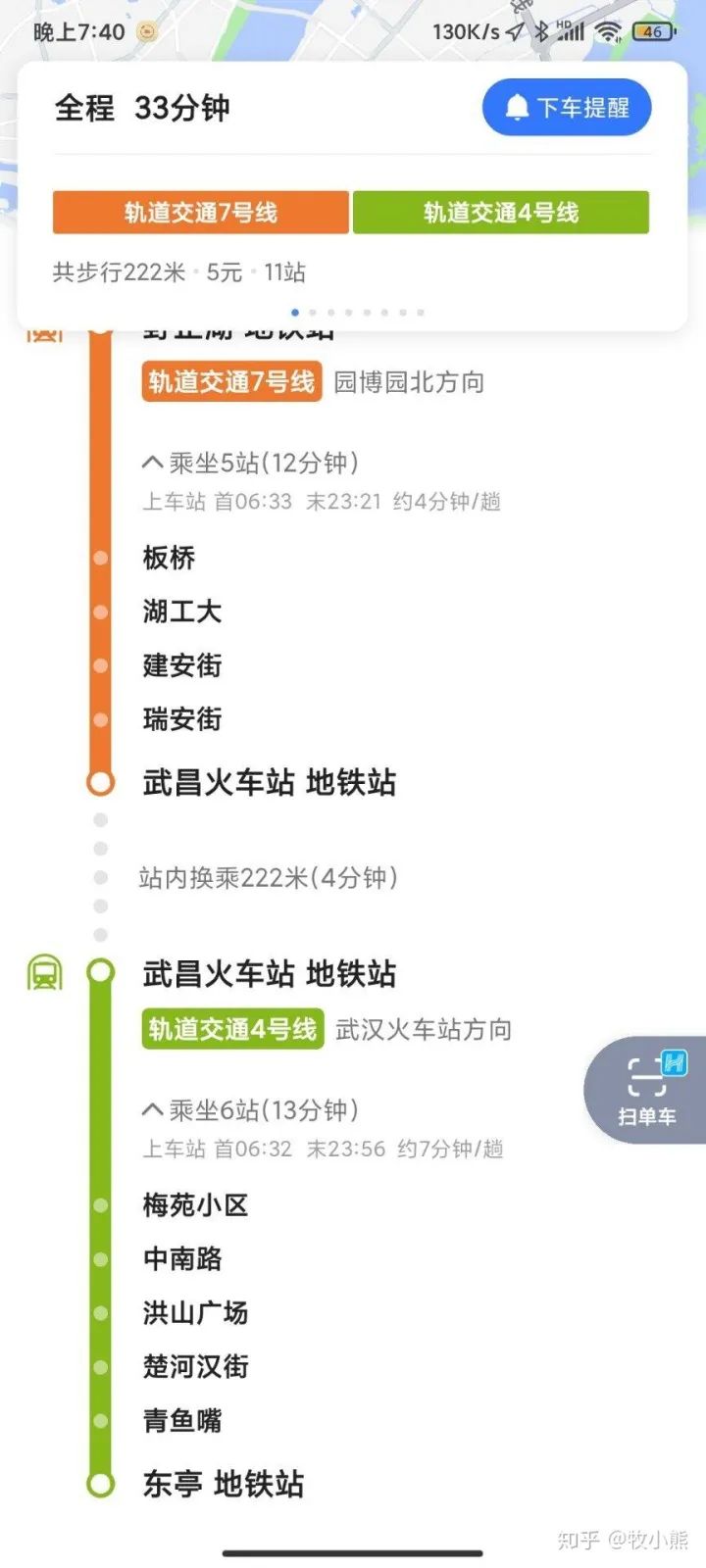
不得了,一模一樣~
8.可以繼續(xù)完善的點
這個項目我們只做了地鐵的相關(guān)信息,沒有引入公交的信息加入道路線規(guī)劃中,因此后續(xù)可以爬取武漢的公交線路進行地鐵、公交混合線路規(guī)劃
同時給出的規(guī)劃信息只有文字描述,沒有顯示在地圖上不夠直觀,我們可以進行flask的部署將規(guī)劃的線路顯示在地圖上,更加不容易出錯~
9.項目源碼
https://pan.baidu.com/s/1dmstu7PlF12Bdgk9QTjsPA??提取碼:r8es
關(guān)于本文的實踐交流,后臺回復【數(shù)據(jù)項目】可進Datawhale項目實踐專欄群。