
用 Python 把你的朋友變成表情包

來(lái)源:
https://blog.csdn.net/qq_36758914/article/details/106303928
一、項(xiàng)目說(shuō)明
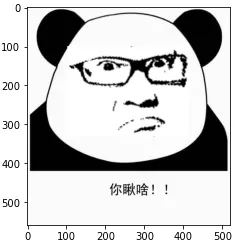
在日常生活中,我們經(jīng)常會(huì)存取一些朋友們的丑照,在這個(gè)項(xiàng)目中,我們以萌萌噠的熊貓頭作為背景,然后試著在背景圖上加入朋友們的照片。效果如下圖所示:
二、實(shí)現(xiàn)步驟
導(dǎo)入朋友的照片(前景照片);
處理前景照片(縮放、旋轉(zhuǎn),填充);
導(dǎo)入熊貓頭照片(背景照片);
將前景和背景拼接起來(lái)形成表情包;
在表情包下面添加文字。
三、Python 實(shí)現(xiàn)
1、導(dǎo)入需要的庫(kù)
import cv2
import numpy as mp
import matplotlib.pyplot as plt
from PIL import Image, ImageDraw, ImageFont
這個(gè)項(xiàng)目主要是通過(guò) opencv 完成,但如果要在表情包下面寫(xiě)中文的話,PIL(pillow)庫(kù)是必不可少的。
2、繪圖函數(shù)
這里寫(xiě)一個(gè)繪圖函數(shù),方便繪圖操作。
def plt_show(img):
    imageRGB = cv2.cvtColor(img, cv2.COLOR_BGR2RGB)
    plt.imshow(imageRGB)
    plt.show()
3、導(dǎo)入前景照片
image = cv2.imread('SXC.jpg', 0)  # 導(dǎo)入灰度圖即可
plt_show(image)
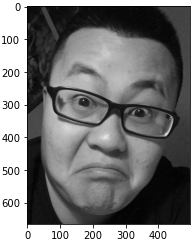
4、等比例縮放前景照片
因?yàn)槲覀儼l(fā)現(xiàn)前景照片的尺寸比背景尺寸還要大,這顯然是不合適的,所以要先對(duì)其進(jìn)行等比例(0.3)縮放。
image_resize = cv2.resize(image, None, fx=0.3, fy=0.3, interpolation = cv2.INTER_CUBIC)
plt_show(image_resize)
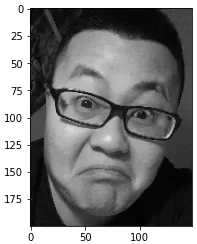
5、對(duì)前景照片進(jìn)行二值化處理
在這里,我們將像素值大于 80 的區(qū)域設(shè)置為 255;小于 80 的區(qū)域設(shè)置成 0。
ret, image_binary = cv2.threshold(image_resize, 80, 255, cv2.THRESH_BINARY)
plt_show(image_binary)
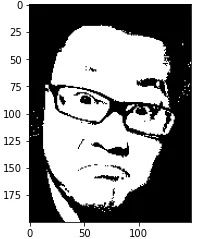
6、提取出感興趣區(qū)域
image_roi = image_binary[74: 185, 0: 150]
plt_show(image_roi)
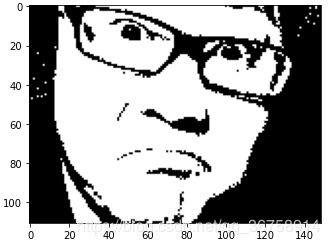
7、旋轉(zhuǎn)圖片
因?yàn)槲覀兊谋尘皥D片(熊貓頭)是正的,而前景圖片有些向右傾斜,所以要先對(duì)其進(jìn)行旋轉(zhuǎn)操作(大概逆時(shí)針旋轉(zhuǎn) 15 度即可)。
rows, cols = image_roi.shape
M = cv2.getRotationMatrix2D(((cols-1)/2.0, (rows-1)/2.0), 15, 1)  # (旋轉(zhuǎn)中心,逆時(shí)針旋轉(zhuǎn)角度,各個(gè)方向同等擴(kuò)大比例)
image_rotate = cv2.warpAffine(image_roi, M, (140, 130))  # (140, 130) 是指旋轉(zhuǎn)后的畫(huà)布大小
plt_show(image_rotate)
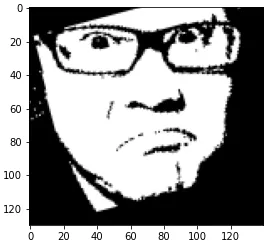
8、將一些不需要的黑色區(qū)域刪除掉
在這里我們使用 cv2.fillPoly 函數(shù)對(duì)不需要的區(qū)域用白色進(jìn)行填充。
h, w = image_rotate.shape

image_rotate_copy = image_rotate.copy()
pts1 = np.array([[0, 20],  [64, 0], [0, 0]], np.int32)
pts2 = np.array([[0, 18],  [0, h], [80, h]], np.int32)
pts3 = np.array([[0, 100],  [0, h], [w, h], [w, 100]], np.int32)
pts4 = np.array([[111, 0],  [w, 0], [w, 30]], np.int32)
pts5 = np.array([[124, 0],  [115, h], [w, h]], np.int32)
pts6 = np.array([[120, 40],  [95, 100], [120, 100]], np.int32)
foreground = cv2.fillPoly(image_rotate_copy, [pts1], (255, 255, 255))  # (圖片,填充區(qū)域,填充顏色)
foreground = cv2.fillPoly(image_rotate_copy, [pts2], (255, 255, 255))
foreground = cv2.fillPoly(image_rotate_copy, [pts3], (255, 255, 255))
foreground = cv2.fillPoly(image_rotate_copy, [pts4], (255, 255, 255))
foreground = cv2.fillPoly(image_rotate_copy, [pts5], (255, 255, 255))
foreground = cv2.fillPoly(image_rotate_copy, [pts6], (255, 255, 255))

plt_show(foreground)
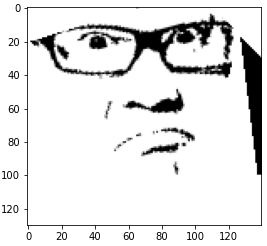
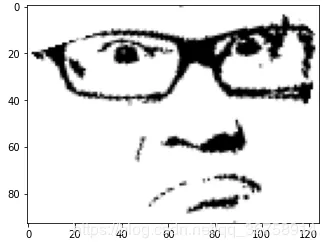
9、再次提取感興趣區(qū)域并縮放
foreground_roi = foreground[0: 93, 0: 125]
plt_show(foreground_roi)

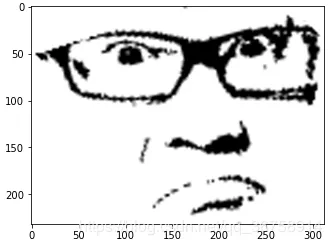
foreground_roi_resize = cv2.resize(foreground_roi, None, fx=2.5, fy=2.5, interpolation = cv2.INTER_CUBIC)
plt_show(foreground_roi_resize)
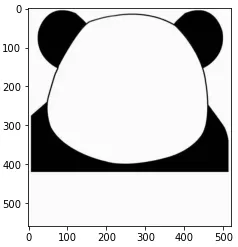
10、導(dǎo)入背景圖片
background = cv2.imread('back.jpg', 0)
plt_show(background)
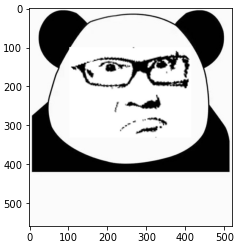
11、組合兩張圖片成表情包
h_f, w_f = foreground.shape
h_b, w_b = background.shape

left = (w_b - w_f)//2  # 前景圖片在背景圖片中的左邊的橫坐標(biāo)
right = left + w_f  # 前景圖片在背景圖片中的右邊的橫坐標(biāo)
top = 100  # 前景圖片在背景圖片中的上邊的縱坐標(biāo)
bottom = top + h_f  # 前景圖片在背景圖片中的下邊的縱坐標(biāo)

emoji = background
emoji[top: bottom, left: right] = foreground
plt_show(emoji)
12、在表情包下面添加文本
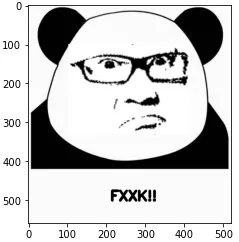
12.1 添加英文文本
如果只是要添加英文文本,用 opencv 就可以解決:
emoji_copy = emoji.copy()
# (圖片,文本,位置,字體,文本大小,文本顏色,文本粗細(xì))
cv2.putText(emoji_copy, "FXXK!!", (210, 500), cv2.FONT_HERSHEY_SIMPLEX, 1.2, (0, 0, 0), 5)
plt_show(emoji_copy)
12.2 添加中文文本
如果要添加中文文本,我們需要借助 PIL 庫(kù)來(lái)實(shí)現(xiàn)。
PilImg = Image.fromarray(emoji)  # cv2 轉(zhuǎn) PIL
draw = ImageDraw.Draw(PilImg)  # 創(chuàng)建畫(huà)筆
ttfront = ImageFont.truetype('simhei.ttf', 34)  # 設(shè)置字體
draw.text((210, 450),"你瞅啥!!",fill=0, font=ttfront)  # (位置,文本,文本顏色,字體)
emoji_text = cv2.cvtColor(np.array(PilImg),cv2.COLOR_RGB2BGR)  # PIL 轉(zhuǎn)回 cv2
plt_show(emoji_text)
13、保存表情包
cv2.imwrite('./emoji.png', np.array(emoji_text))
四、完整代碼
import cv2
import numpy as mp
import matplotlib.pyplot as plt
from PIL import Image, ImageDraw, ImageFont

def plt_show(img):
    imageRGB = cv2.cvtColor(img, cv2.COLOR_BGR2RGB)
    plt.imshow(imageRGB)
    plt.show()

image = cv2.imread('SXC.jpg', 0)  # 導(dǎo)入前景圖片

image_resize = cv2.resize(image, None, fx=0.3, fy=0.3, interpolation = cv2.INTER_CUBIC)  # 縮放

ret, image_binary = cv2.threshold(image_resize, 80, 255, cv2.THRESH_BINARY)  # 圖片二值化

image_roi = image_binary[74: 185, 0: 150]  # 感興趣區(qū)域

rows, cols = image_roi.shape
# 旋轉(zhuǎn)
M = cv2.getRotationMatrix2D(((cols-1)/2.0, (rows-1)/2.0), 15, 1)
image_rotate = cv2.warpAffine(image_roi, M, (140, 130))
# 填充不需要的區(qū)域
h, w = image_rotate.shape
image_rotate_copy = image_rotate.copy()
pts1 = np.array([[0, 20],  [64, 0], [0, 0]], np.int32)
pts2 = np.array([[0, 18],  [0, h], [80, h]], np.int32)
pts3 = np.array([[0, 100],  [0, h], [w, h], [w, 100]], np.int32)
pts4 = np.array([[111, 0],  [w, 0], [w, 30]], np.int32)
pts5 = np.array([[124, 0],  [115, h], [w, h]], np.int32)
pts6 = np.array([[120, 40],  [95, 100], [120, 100]], np.int32)
foreground = cv2.fillPoly(image_rotate_copy, [pts1], (255, 255, 255))
foreground = cv2.fillPoly(image_rotate_copy, [pts2], (255, 255, 255))
foreground = cv2.fillPoly(image_rotate_copy, [pts3], (255, 255, 255))
foreground = cv2.fillPoly(image_rotate_copy, [pts4], (255, 255, 255))
foreground = cv2.fillPoly(image_rotate_copy, [pts5], (255, 255, 255))
foreground = cv2.fillPoly(image_rotate_copy, [pts6], (255, 255, 255))

foreground_roi = foreground[0: 93, 0: 125]
foreground_roi_resize = cv2.resize(foreground_roi, None, fx=2.5, fy=2.5, interpolation = cv2.INTER_CUBIC)

background = cv2.imread('back.jpg', 0)  # 導(dǎo)入背景圖片
# 拼接兩張圖片
h_f, w_f = foreground_roi_resize.shape
h_b, w_b = background.shape
left = (w_b - w_f)//2
right = left + w_f
top = 80
bottom = top + h_f
emoji = background
emoji[top: bottom, left: right] = foreground_roi_resize

PilImg = Image.fromarray(emoji)  # cv2 轉(zhuǎn) PIL
draw = ImageDraw.Draw(PilImg)  # 創(chuàng)建畫(huà)筆
ttfront = ImageFont.truetype('simhei.ttf', 34)  # 設(shè)置字體
draw.text((210, 450),"你瞅啥!!",fill=0, font=ttfront)  # (位置,文本,文本顏色,字體)
emoji_text = cv2.cvtColor(np.array(PilImg),cv2.COLOR_RGB2BGR)  # PIL 轉(zhuǎn)回 cv2

cv2.imwrite('./emoji.png', np.array(emoji_text))  # 保存表情包
(完)
評(píng)論
圖片
表情