
你還在手動(dòng)部署埋點(diǎn)嗎?從0到1開發(fā)Babel埋點(diǎn)自動(dòng)植入插件!
前言
本文由網(wǎng)易的?Pluto Lam?大神投稿,授權(quán)本公眾號(hào)發(fā)表。
在各種大型項(xiàng)目中,流量統(tǒng)計(jì)是一項(xiàng)重要工程,統(tǒng)計(jì)點(diǎn)擊量可以在后端進(jìn)行監(jiān)控,但是這局限于調(diào)用接口時(shí)才能統(tǒng)計(jì)到用戶點(diǎn)擊,而前端埋點(diǎn)監(jiān)控也是一個(gè)統(tǒng)計(jì)流量的手段,下面就基于百度統(tǒng)計(jì)來完成以下需求
在 html頁面中插入特定的script標(biāo)簽,src為可選值在全局 window植入可選的函數(shù)解析特定格式的 excel表,里面包含埋點(diǎn)的id和參數(shù)值(傳遞給上面的函數(shù))找到項(xiàng)目中所有帶有表示的行級(jí)注釋,并將其替換成執(zhí)行 2中函數(shù)的可執(zhí)行語句,并傳入excel表對應(yīng)的參數(shù)
可能有些讀者看到這里就有點(diǎn)蒙了,這到底是個(gè)啥,別急,跟著我一步一步做下去就清楚了,接下來我會(huì)以一個(gè)babel初學(xué)者的身份帶你邊學(xué)邊做
那就讓我們從最難搞定的最后一步開始,這也是比較麻煩的babel操作
babel前置知識(shí)
很多讀者估計(jì)知識(shí)配置過babel,但是并不知道它具體是干啥事的,只是依稀記得AST抽象語法樹、深度優(yōu)先遍歷、babel-loader等詞語
在我們?nèi)粘5拈_發(fā)中,確實(shí)是使用babel-loader比較多,這是babel為webpack開發(fā)的一個(gè)插件,如果沒有任何配置,它將不會(huì)對代碼做任何修改,只是遍歷AST,在webpack構(gòu)建階段收集依賴并生成module,我們比較常用的是將ES6轉(zhuǎn)為ES5,只需在preset使用babel官方提供的相關(guān)即可,在這就不贅述。
在babel進(jìn)行深度優(yōu)先遍歷時(shí),會(huì)調(diào)用我們配置好的plugin,在不同的plugin里面都可以對遍歷過程進(jìn)行監(jiān)聽和操作。
{
??"presets":?[
????"@babel/preset-env"?//?提供ES6轉(zhuǎn)ES5功能
??],
????"plugins":?[
??????"xxx-plugin"
????]
}
既然是初學(xué)者,那就先來搭建測試環(huán)境吧,下面都是使用yarn裝包
測試環(huán)境
創(chuàng)建一個(gè)空文件,執(zhí)行命令npm init -y,如下圖創(chuàng)建文件
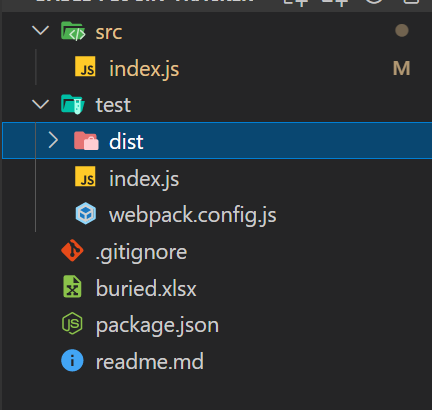
測試環(huán)境在test文件中,index.js中可以放主要的測試代碼
//?test/index.js
class?App?{

}
安裝webpack,由于我們的webpack和webpack-cli只有開發(fā)時(shí)測試會(huì)用到,所以加上-D,表示開發(fā)依賴
yarn?add?webpack?webpack-cli?-D
配置好webpack.config.js
const?path?=?require("path");

module.exports?=?{
??mode:?"development",?//?開發(fā)模式
??entry:?{
????main:?path.resolve(__dirname,?"./index.js")?//?入口文件
??},
??output:?{
????filename:?"main.js",
????path:?path.resolve(__dirname,?"./dist")?//?出口文件
??}
}
在/package.json里配置打包命令
//?package.json
"scripts":?{
???"dev":?"webpack?--config?test/webpack.config.js"?//?指向test目錄下的配置文件
},
運(yùn)行yarn dev即打包,此時(shí)會(huì)出現(xiàn)/test/dist/main.js文件,里面為打包好的代碼,babel plugin處理過的代碼可以在這里校驗(yàn)是否正確
確保可以運(yùn)行后,安裝babel-loader、@babel/core和@babel/preset-env,添加如下配置
@babel/core里面包含babel的常用方法,其中babel-loader和@babel/preset-env都是依賴于@babel/core的
const?path?=?require("path");

module.exports?=?{
??...
??module:?{
????rules:?[
??????{
????????test:?/.js$/,
????????exclude:?/node_modules/,
????????loader:?"babel-loader",
????????options:?{
??????????presets:?[
????????????"@babel/preset-env"
??????????]
????????}
??????}
????]
??}
};
yarn dev后可以看看main.js,如果class被轉(zhuǎn)為ES5語法表示,則babel-loader是配置成功的
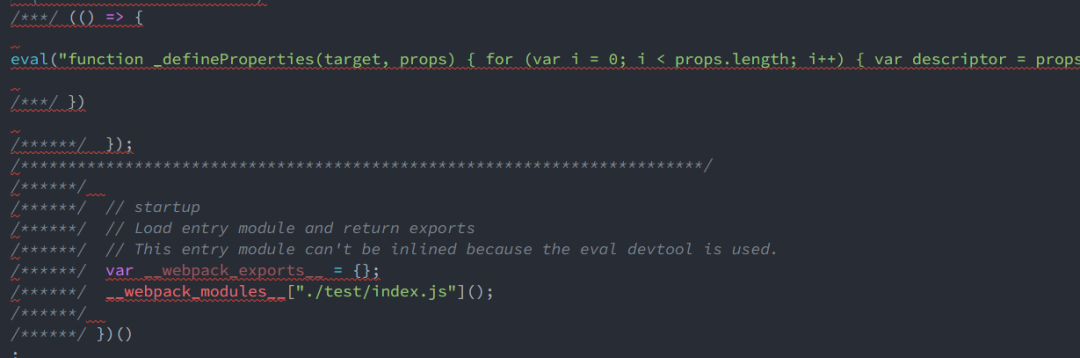
接下來就可以配置插件了,在options里添加plugins,通過path.resolve()生成絕對路徑, 指向/src/index.js
options:?{
??presets:?[
????"@babel/preset-env"
??],
????plugins:?[
??????[
????????path.resolve(__dirname,?"../src/index.js"),
??????]
????]
}
在/src/index.js里寫plugin相關(guān)代碼
module.exports?=?function()?{
??return?{
????visitor:?{
??????Program:?{
????????enter(path)?{
??????????console.log("enter");
????????},
????????exit(path)?{
??????????console.log("exit");
????????}
??????},
??????FunctionDeclaration(path,?state){
????????...
??????}
??????}
????};
};
babel-plugin在基本結(jié)構(gòu)如上,導(dǎo)出一個(gè)函數(shù),函數(shù)里面返回一個(gè)對象,對象里面就是plugin的相關(guān)配置。
我們這個(gè)插件主要使用visitor(訪問者),顧名思義,在AST遍歷時(shí),我們能訪問到遍歷時(shí)訪問的每個(gè)節(jié)點(diǎn),在visitor里面,我們可以將節(jié)點(diǎn)類型抽象成方法,簡單點(diǎn)說,只要訪問到這種類型的節(jié)點(diǎn),就會(huì)執(zhí)行對應(yīng)的方法,而且會(huì)傳入兩個(gè)參數(shù),其中path表示改節(jié)點(diǎn)的路徑,可以對該節(jié)點(diǎn)進(jìn)行操作,state是一個(gè)全局的變量,從進(jìn)入visitor開始就存在,里面常用的東西不多,稍后再說。
AST節(jié)點(diǎn)
節(jié)點(diǎn)的類型非常之多,下面只介紹一些需要用到的,如果有需要可以訪問AST node types進(jìn)行學(xué)習(xí)。
Programs
官方的解釋是這樣的
A complete program source tree.
Parsers must specify sourceType as "module" if the source has been parsed as an ES6 module. Otherwise, sourceType must be "script".
通俗點(diǎn)來說,它就是抽象樹的最頂端的節(jié)點(diǎn),里面包含整棵樹,遍歷開始與結(jié)束時(shí)分別會(huì)進(jìn)入enter方法和exit方法,這樣單純用文字描述讀者可能還對抽象樹的結(jié)構(gòu)云里霧里,下面我們通過一個(gè)網(wǎng)站和控制臺(tái)打印來看一下具體的節(jié)點(diǎn)長什么樣
我們可以訪問https://astexplorer.net/這個(gè)網(wǎng)址,在左邊輸入想要解析的代碼,右邊就會(huì)對應(yīng)的AST樹,不過這個(gè)樹有點(diǎn)刪減,要詳細(xì)一點(diǎn)的樹可以點(diǎn)擊“JSON”查看JSON格式的AST樹
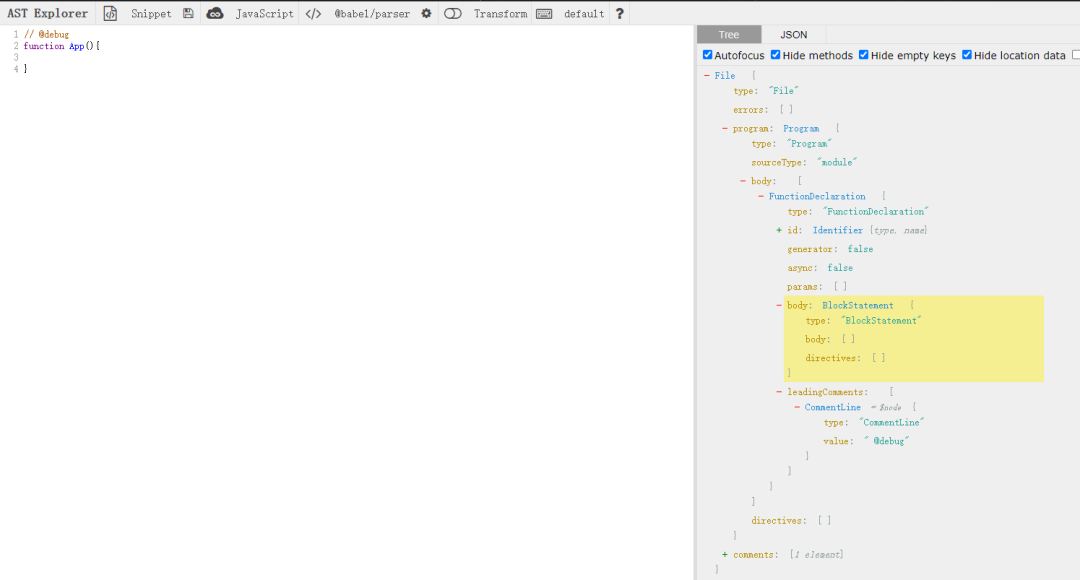
我將JSON去除一些目前不需要用到的屬性展示出來
{
??"type":?"File",
??"start":?0,
??"end":?30,
??"loc":?{...},
??"errors":?[],
??"program":?{
????"type":?"Program",
????"start":?0,
????"end":?30,
????"loc":?{...},
????"sourceType":?"module",
????"interpreter":?null,
????"body":?[
??????{
????????"type":?"FunctionDeclaration",
????????"start":?10,
????????"end":?30,
????????"loc":?{...},
????????"id":?{...},
????????"generator":?false,
????????"async":?false,
????????"params":?[],
????????"body":?{...},
????????"leadingComments":?[
??????????{
????????????"type":?"CommentLine",
????????????"value":?"?@debug",
????????????"start":?0,
????????????"end":?9,
????????????"loc":?{...}
??????????}
????????]
??????}
????],
????"directives":?[]
??},
??"comments":?[
????{
??????"type":?"CommentLine",
??????"value":?"?@debug",
??????"start":?0,
??????"end":?9,
??????"loc":?{
????????"start":?{
??????????"line":?1,
??????????"column":?0
????????},
????????"end":?{
??????????"line":?1,
??????????"column":?9
????????}
??????}
????}
??]
}
可以看到有很多很多屬性,但是我們不能拿這個(gè)來開發(fā),只能作為參考,要真正操作節(jié)點(diǎn)還是需要在控制臺(tái)打印或者debug查看AST的結(jié)構(gòu),下面我將控制臺(tái)打印的節(jié)點(diǎn)結(jié)構(gòu)刪減后帖出來,可以和上面對比一下。
?NodePath?{
??contexts:?[
????TraversalContext?{
??????queue:?[Array],
??????priorityQueue:?[],
??????parentPath:?undefined,
??????scope:?[Scope],
??????state:?undefined,
??????opts:?[Object]
????}
??],
??state:?undefined,
??opts:?{
????Program:?{?enter:?[Array],?exit:?[Array]?},
????_exploded:?{},
????_verified:?{},
????ClassBody:?{?enter:?[Array]?},
????...
??},
??_traverseFlags:?0,
??skipKeys:?null,
??parentPath:?null,
??container:?Node?{
????type:?'File',
????start:?0,
????end:?16,
????loc:?SourceLocation?{
??????start:?[Position],
??????end:?[Position],
??????filename:?undefined,
??????identifierName:?undefined
????},
????errors:?[],
????program:?Node?{
??????type:?'Program',
??????start:?0,
??????end:?16,
??????loc:?[SourceLocation],
??????sourceType:?'module',
??????interpreter:?null,
??????body:?[Array],
??????directives:?[],
??????leadingComments:?undefined,
??????innerComments:?undefined,
??????trailingComments:?undefined
????},
????comments:?[],
????leadingComments:?undefined,
????innerComments:?undefined,
????trailingComments:?undefined
??},
??listKey:?undefined,
??key:?'program',
??node:?Node?{
????type:?'Program',
????start:?0,
????end:?16,
????loc:?SourceLocation?{
??????start:?[Position],
??????end:?[Position],
??????filename:?undefined,
??????identifierName:?undefined
????},
????sourceType:?'module',
????interpreter:?null,
????body:?[?[Node]?],
????directives:?[],
????leadingComments:?undefined,
????innerComments:?undefined,
????trailingComments:?undefined
??},
??type:?'Program',
??parent:?Node?{
????type:?'File',
????start:?0,
????end:?16,
????loc:?SourceLocation?{
??????start:?[Position],
??????end:?[Position],
??????filename:?undefined,
??????identifierName:?undefined
????},
????errors:?[],
????program:?Node?{
??????type:?'Program',
??????start:?0,
??????end:?16,
??????loc:?[SourceLocation],
??????sourceType:?'module',
??????interpreter:?null,
??????body:?[Array],
??????directives:?[],
??????leadingComments:?undefined,
??????innerComments:?undefined,
??????trailingComments:?undefined
????},
????comments:?[],
????leadingComments:?undefined,
????innerComments:?undefined,
????trailingComments:?undefined
??},
??hub:??{
????file:?File?{
??????...
??????code:?'class?App?{\r\n\r\n}',
??????inputMap:?null,
??????hub:?[Circular?*2]
????},
????...
??},
??data:?null,
??context:?TraversalContext?{
???...
??},
??scope:?Scope?{
????...
??}
}
可以看到總體上結(jié)構(gòu)時(shí)差不多的,在真實(shí)結(jié)構(gòu)中一般就比網(wǎng)頁版多套一層node( path.node ),所以一般參照網(wǎng)頁版后直接path.node就可以取到想要的屬性。而且是沒有最外層的File結(jié)構(gòu)的,只在Program的parent中。
FunctionDeclaration,ClassDeclaration,ArrowFunctionExpression
我們?nèi)粘懙拇a一定是在普通函數(shù)、類、箭頭函數(shù)里面的,所以在這外面的注釋我們一律不管,所以這三個(gè)節(jié)點(diǎn)分別是函數(shù)聲明、類聲明、箭頭函數(shù)聲明。在遍歷過程中凡是遇到這三個(gè)節(jié)點(diǎn)就會(huì)進(jìn)去對應(yīng)的方法。
注釋
眼尖的朋友可能發(fā)現(xiàn)了,在上面打印出來的一堆屬性中,有comments、leadingComments等單詞出現(xiàn),沒錯(cuò),這就是我們需要關(guān)注的行級(jí)注釋,我們下面實(shí)驗(yàn)一下。
function?App(){
??//?這是innerComments注釋
}

function?fn()?{
?//?這是const的前置注釋
??const?a?=?1;
?function?inFn()?{
??//?這是inFn的inner注釋
?}
??//?這是inFn的后置注釋(trailingComments)
}
對應(yīng)的AST樹結(jié)構(gòu)(網(wǎng)頁版)
{
??...
??"program":?{
????"type":?"Program",
????...
????"body":?[
??????{
????????...
????????"id":?{
??????????...
??????????"name":?"fn"
????????},
????????"generator":?false,
????????"async":?false,
????????"params":?[],
????????"body":?{
??????????"type":?"BlockStatement",
??????????...
??????????"body":?[
????????????{
??????????????"type":?"VariableDeclaration",
??????????????...
??????????????"declarations":?[
??????????????????{
????????????????????...
????????????????????"id":?{
??????????????????????...
??????????????????????"identifierName":?"a"
????????????????????},
????????????????????"name":?"a"
??????????????????},
??????????????????"init":?{
??????????????????...
??????????????????"value":?1
??????????????????}
????????????????}
??????????????],
??????????????"kind":?"const",
??????????????"leadingComments":?[
????????????????{
??????????????????"type":?"CommentLine",
??????????????????"value":?"?fn",??//?是const的前置注釋
??????????????????...
????????????????}
??????????????]
????????????},
????????????{
??????????????"type":?"FunctionDeclaration",
??????????????...
??????????????"id":?{
????????????????"type":?"Identifier",
????????????????...
????????????????"name":?"inFn"
??????????????},
??????????????...
??????????????"body":?{
????????????????"type":?"BlockStatement",
????????????????...
????????????????"innerComments":?[??//?inner注釋
??????????????????{
????????????????????"type":?"CommentLine",
????????????????????"value":?"?inFn",
????????????????????...
????????????????????}
??????????????????}
????????????????]
??????????????},
??????????????"trailingComments":?[??//?inFn的后置注釋
????????????????{
??????????????????"type":?"CommentLine",
??????????????????"value":?"?abc",
??????????????????...
????????????????}
??????????????]
????????????}
??????????],
??????????"directives":?[]
????????}
??????}
????],
????"directives":?[]
??},
??"comments":?[
????{
??????"type":?"CommentLine",
??????"value":?"?fn",
??????...
????},
????...其他注釋
??]
}
可以發(fā)現(xiàn)一共有三種注釋類型
leadingComments前置注釋innerComments內(nèi)置注釋trailingComments后置注釋
這三個(gè)屬性都對應(yīng)一個(gè)數(shù)組,每個(gè)元素都是一個(gè)對象,一個(gè)對象對應(yīng)一個(gè)注釋
前置和后置注釋很好理解,即存在于某個(gè)節(jié)點(diǎn)的前面或者后面,innerComments呢,只存在于BlockStatement(也就是函數(shù)用的大括號(hào))里面,當(dāng)一個(gè)BlockStatement里面有其他語句的時(shí)候,這個(gè)innerComments又會(huì)變成其他語句的前置或后置注釋
下面舉個(gè)例子
function?App(){
??//?這是innerComments注釋
}

function?App(){
??const?a?=?2
??//?這是trailingComments注釋
}
除了上述三個(gè)屬性外,在最外的File層還有一個(gè)comments屬性,這里存放著里面所有注釋,但是只是可以看,并不能對其進(jìn)行操作,因?yàn)槲覀兪且獎(jiǎng)h除注釋后插入對應(yīng)代碼的,在這里操作后就不知道去哪里注入代碼了
手寫plugin
確定結(jié)構(gòu)
分析完行級(jí)注釋后,接下來就要確定plugin的基本結(jié)構(gòu),既然我們只在函數(shù)里面操作,那肯定要有一個(gè)函數(shù)的入口,可以寫如下代碼
Program:?{
??enter(path)?{
????console.log("enter");
????console.log("path:?",?path);
??},
??exit(path)?{
????console.log("exit");
??}
},
FunctionDeclaration(path,?state)?{

},
ClassDeclaration(path,?state)?{

},
ArrowFunctionExpression(path,?state)?{

}
但是我們在這三個(gè)節(jié)點(diǎn)里面進(jìn)行的操作都是一樣的,解決辦法就是把方法名用|分割成xxx|xxx形式的字符串
"FunctionDeclaration|ClassDeclaration|ArrowFunctionExpression"(path,?state)?{}
進(jìn)入函數(shù)以后,還需要對函數(shù)里面的節(jié)點(diǎn)進(jìn)行遍歷,我們可以調(diào)用traverse方法
traverse
traverse方法是@babel/traverse里默認(rèn)導(dǎo)出的方法,使用traverse可以手動(dòng)遍歷ast樹
//?示例代碼
import?*?as?babylon?from?"babylon";
import?traverse?from?"@babel/traverse";

const?code?=?`console.log("test")`;

const?ast?=?babylon.parse(code);?//?babylon是babel的解析器,將代碼轉(zhuǎn)為ast樹

traverse(ast,?{
??enter(path)?{
????...
??}
});
但是我們在visitor里面可以直接使用path.traverse方法,在traverse方法里傳入一個(gè)對象,不同于visitor,對象里面直接可以放enter方法,也可以放其他節(jié)點(diǎn)方法。注釋可能在每一個(gè)節(jié)點(diǎn)旁邊,所以我們需要觀察每一個(gè)節(jié)點(diǎn),所以我們接下來的操作全部都在enter里面。
"FunctionDeclaration|ClassDeclaration|ArrowFunctionExpression"(path,?state)?{
??path.traverse({
????enter(path)?{
??????//?操作注釋
????}
??})
}
這時(shí)候有同學(xué)就有疑問了,我們所有的操作都在path.traverse里面,那如果是外層函數(shù)的innerComments怎么辦。現(xiàn)實(shí)是innerComments是在BlockStatement里面的,而不是在聲明語句里面的,所以我們進(jìn)來后并沒有錯(cuò)過任何在函數(shù)內(nèi)的comment。
獲取注釋
下面就是根據(jù)ast結(jié)構(gòu)獲取comment了,我們先拿leadingComments試試水
const?leadingComments?=?path.node.leadingComments;
if?(leadingComments?.length)?{
??for?(const?comment?of?leadingComments)?{
????if?(comment?.type?===?"CommentLine")?{?//?只替換行級(jí)
??????console.log("待更換的注釋是",?comment.value);
????}
??}
}
我們給plugin換個(gè)“惡劣”一點(diǎn)的測試代碼
//?@debug
class?App?{
?//?inner
?/*?塊級(jí)?*/
?//?123
?inClass()?{
??//?buried-0
??console.log(213);
??//?afterConsole
??const?b?=?2;
?}
}
//?外邊的猴嘴

function?fn()?{?//?fn右邊
?//?buried-1
?const?a?=?1;
?//?猴嘴
}
fn();

const?a?=?()?=>?{
?//?buried-7
};
a();
運(yùn)行打包后打印
$?webpack?--config?test/webpack.config.js
enter
待更換的注釋是??inner
待更換的注釋是??123
待更換的注釋是??buried-0
待更換的注釋是??afterConsole
待更換的注釋是??fn右邊
待更換的注釋是??buried-1
exit
可以看到從上到下打印出了leadingComments,非常成功,這下子就有信心了,趕緊加上另外兩種注釋
handleComments(innerComments,?"innerComments");
handleComments(trailingComments,?"trailingComments");
handleComments(leadingComments,?"leadingComments");
function?handleComments(comments,?commentName)?{
??if?(!comments?.length)?return;
??for?(const?comment?of?comments)?{
????if?(comment?.type?===?"CommentLine")?{?//?只替換行級(jí)
??????console.log("待更換的注釋是",?commentName,?comment.value);
????}
??}
}
另外把處理注釋的代碼抽離出去,沒有人想寫三次不是嗎
打印出來
$?webpack?--config?test/webpack.config.js
enter
待更換的注釋是?leadingComments??inner
待更換的注釋是?leadingComments??123
待更換的注釋是?trailingComments??afterConsole
待更換的注釋是?leadingComments??buried-0
待更換的注釋是?leadingComments??afterConsole
待更換的注釋是?trailingComments??猴嘴
待更換的注釋是?leadingComments??fn右邊
待更換的注釋是?leadingComments??buried-1
待更換的注釋是?innerComments??buried-7
exit
感覺非常完美,但是,怎么感覺有一個(gè)注釋重復(fù)打出來了,嚇得我趕緊看看ast樹
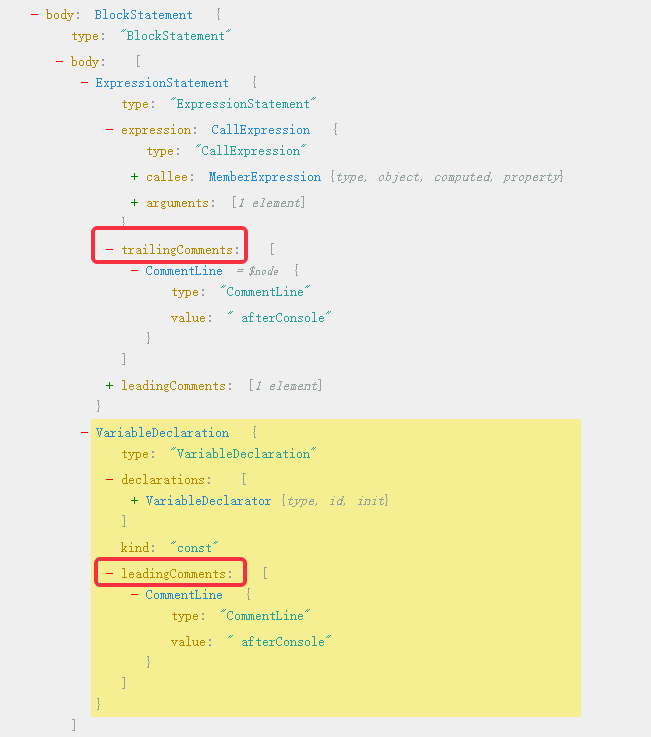
破案了,原來afterConsole既是console.log(123)的trailComment,又是const b=2的leadingComment,這里我稱這種注釋為“雙重注釋”,這就需要我們進(jìn)行去重了,我們先來看看path有哪些屬性可以用來去重
去重
使用 path.key獲取路徑所在容器的索引
path.key可以獲得元素的索引,那用這個(gè)屬性去重好像行得通,下面舉個(gè)例子演示一下
const?a?=?1;?//??path.key?=?0?
//?注釋
const?b?=?2;?//??path.key?=?1?
const?c?=?3;?//??path.key?=?2
思路:以上面的a、b、c舉例,給一個(gè)全局的duplicationKey如果注釋在a和b中間,當(dāng)要處理b的leading時(shí),如果有key-1 === duplicationKey,就是如果b的前面有節(jié)點(diǎn)存在,則只刪除comment,但不注入代碼片段
下面我們就來在實(shí)際的代碼實(shí)現(xiàn)一下,我們直接打印出path.key即可
enter(path)?{
??console.log("pathKey:?",?path.key);
??...
}
對應(yīng)代碼片段以及運(yùn)行結(jié)果:
//?buried-0
console.log(213);
//?afterConsole
const?b?=?2;
pathKey:??0
待更換的注釋是?trailingComments??afterConsole
待更換的注釋是?leadingComments??buried-0?????
pathKey:??expression
pathKey:??callee
pathKey:??object
pathKey:??property
pathKey:??0
pathKey:??1
待更換的注釋是?leadingComments??afterConsole
可以看到前一個(gè)節(jié)點(diǎn)的key確實(shí)是后面的key-1,但是這樣又要維護(hù)一個(gè)全局變量又要判斷key是不是數(shù)字,特別麻煩,我們可以使用另一個(gè)屬性
使用 path.getSibling(index)來獲得同級(jí)路徑
使用path.getSibling(path.key - 1)獲取上一個(gè)兄弟節(jié)點(diǎn)即可,如果存在則只刪除但不注入代碼片段(如果只刪除一邊,是沒有效果的,編譯出來的文件還是會(huì)有注釋)
const?isSiblingTrailExit?=?!path.getSibling(path.key?-?1)?.node?.trailingComments;
handleComments(path,?leadingComments,?"leadingComments",?path.parent.body,?state.buriedInfo,?isSiblingTrailExit)
我們再將測試用例寫復(fù)雜點(diǎn)
function?fn()?{?//?fn右邊
?function?abc()?{
??//?abcInner
?}
?//?猴嘴
}
打包輸出
$?webpack?--config?test/webpack.config.js
enter
...
待更換的注釋是?innerComments??abcInner
待更換的注釋是?innerComments??abcInner
exit
發(fā)現(xiàn)abc函數(shù)里面的注釋被遍歷了兩次
我們再套一層,發(fā)現(xiàn)被遍歷了三次
function?fn()?{?//?fn右邊
?function?abcd()?{
??function?abc()?{
???//?abcInner
??}
?}
?//?猴嘴
}

$?webpack?--config?test/webpack.config.js
enter
...
待更換的注釋是?innerComments??abcInner
待更換的注釋是?innerComments??abcInner
待更換的注釋是?innerComments??abcInner
exit
細(xì)心的同學(xué)可能已經(jīng)發(fā)現(xiàn)問題了,visitor中每次進(jìn)入函數(shù)都會(huì)調(diào)用目前的這個(gè)方法,但是path.traverse的enter里面也包含函數(shù)里面的函數(shù),除了最外一層函數(shù),里面的函數(shù)都是重復(fù)遍歷的,這樣時(shí)間復(fù)雜度會(huì)呈指數(shù)級(jí)增加,這當(dāng)然是不能忍的。要解決這個(gè)bug,遍歷時(shí)每個(gè)函數(shù)只需要進(jìn)入一次就夠了,那我們在enter里面碰到函數(shù)節(jié)點(diǎn)進(jìn)來時(shí)直接跳過不就行了嗎。
跳出遍歷
path里面每個(gè)節(jié)點(diǎn)都有對應(yīng)的一個(gè)判斷方法,判斷當(dāng)前節(jié)點(diǎn)是否是對應(yīng)類型,一般形式是path.isxxx(),xxx為節(jié)點(diǎn)類型名,所以FunctionDeclaration、ClassDeclaration、ArrowFunctionExpression對應(yīng)的判斷方法為isFunctionDeclaration、isArrowFunctionExpression、isClassDeclaration。判斷以后我們還需調(diào)用path.skip(),該方法能跳過當(dāng)前遍歷到的節(jié)點(diǎn)
if?(path.isFunctionDeclaration()?||?path.isArrowFunctionExpression()?||?path.isClassDeclaration())?{
??path.skip();
}
再次打包輸出
$?webpack?--config?test/webpack.config.js
enter
待更換的注釋是?leadingComments??fn右邊
待更換的注釋是?trailingComments??猴嘴
待更換的注釋是?innerComments??abcInner
exit
插入注釋
現(xiàn)在我們已經(jīng)可以順利地拿到項(xiàng)目中所有的行級(jí)注釋了,接下來我們先將所有注釋都替換成固定的語句,如果是塊級(jí)注釋,我們可以將節(jié)點(diǎn)使用某些方法替換掉,但是對于行級(jí)注釋,我們需要分成兩步處理
插入需要的代碼片段 刪除注釋
在我們的enter里面,我們是同時(shí)處理三種注釋,但是在插入代碼片段時(shí),leadingComments和trailComments對應(yīng)的作用域是在上一層節(jié)點(diǎn)的,所以需要使用path.parent找到父級(jí)節(jié)點(diǎn)。
想要插入代碼片段,必須使用template解析字符串形式的語句,將其轉(zhuǎn)為ast節(jié)點(diǎn),此方法來自@babel/template,在這里因?yàn)榇撕瘮?shù)是作為一個(gè)插件函數(shù)導(dǎo)出,所以babel的一些方法會(huì)傳入這個(gè)函數(shù),我們通過解構(gòu)獲得template,在babel底層還是調(diào)用@babel/core的,所以這個(gè)方法的實(shí)例是在@babel/core上面
module.exports?=?function({?template?}){
??function?handleComments(path,?comments,?commentName,?pathBody,?isAdd)?{
??if?(!comments?.length)?return;
??for?(let?i?=?comments.length?-?1;?i?>=?0;?i--)?{
???const?comment?=?comments[i];
???if?(comment?.type?===?"CommentLine")?{?//?只替換行級(jí)
????const?commentArr?=?comment.value.split("-");
????if?(commentArr?&&?commentArr[0]?.trim()?===?"buried")?{
?????if?(isAdd)?{
??????console.log("待更換的注釋是",?commentName,?comment.value);
?????}

?????path.node[commentName].splice(i,?1);
????}
???}
??}
?}
...
enter(path){
??...
??handleComments(path,?innerComments,?"innerComments",?path.node.body,?true);
??const?isSiblingTrailExit?=?!path.getSibling(path.key?-?1)?.node?.trailingComments;
??handleComments(path,?leadingComments,?"leadingComments",?path.parent.body,?isSiblingTrailExit);
??handleComments(path,?trailingComments,?"trailingComments",?path.parent.body,?true);
}
如果要對path下面的注釋進(jìn)行操作,一定要用path找到對應(yīng)comment進(jìn)行操作,所以一定要把path傳過去。
因?yàn)槭褂?code style="overflow-wrap: break-word;padding: 2px 4px;border-radius: 4px;margin-right: 2px;margin-left: 2px;font-family: "Operator Mono", Consolas, Monaco, Menlo, monospace;word-break: break-all;color: rgb(145, 109, 213);font-weight: bolder;background-image: none;background-position: initial;background-size: initial;background-repeat: initial;background-attachment: initial;background-origin: initial;background-clip: initial;">splice刪除數(shù)組中的元素,所以倒序遍歷
插入注釋就直接在pathbody里面push即可,如何找到pathBody,就直接在ast樹上尋找即可,這里就省略此過程
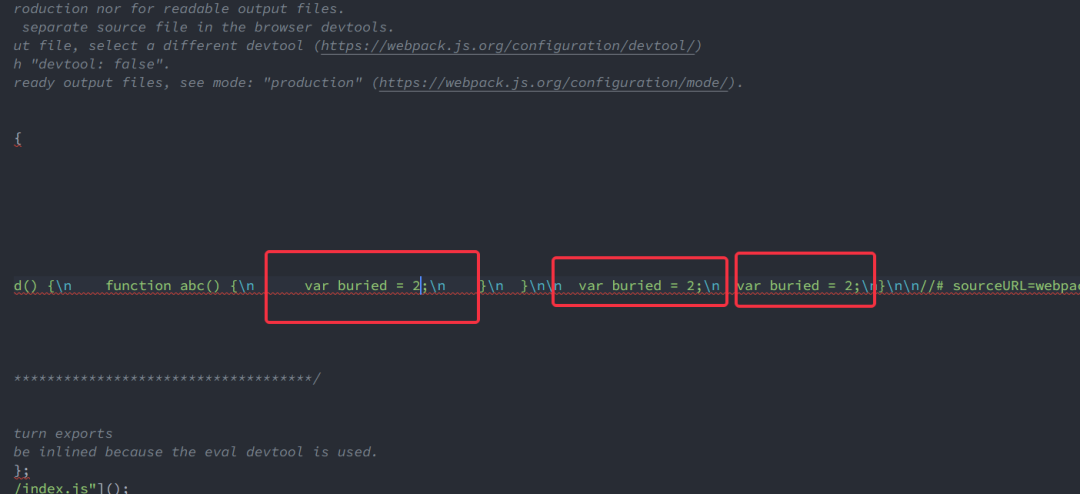
運(yùn)行輸出,查看main.js,可以看到全部注釋已經(jīng)被替換
處理Excel表
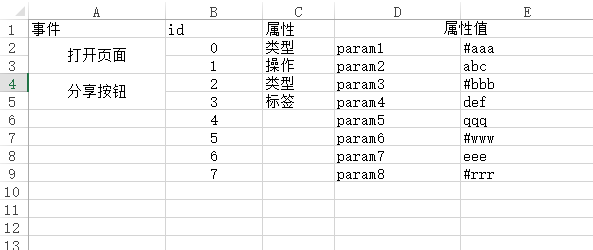
到此為止最麻煩的部分已經(jīng)解決,接下來就要替換帶有標(biāo)志的注釋了,首先要建立注釋標(biāo)志對應(yīng)的代碼片段的映射,我們的方案是讀取一個(gè)Excel表,這也是為了給不懂代碼配置的人(策劃、運(yùn)營)來填寫。
首先確定Excel表的格式,id作為標(biāo)識(shí),屬性值是需要傳入全局函數(shù)的,我們將全局函數(shù)命名為AddStatistic,屬性值中帶有#的是變量,不帶#的是字符串
安裝node-xlsx,運(yùn)行yarn add node-xlsx
封裝一個(gè)解析函數(shù)
function?parseXlsx(excelFilePath)?{
??//?解析excel,?獲取到所有sheets
??const?sheets?=?xlsx.parse(excelFilePath);
??const?sheet?=?sheets[0];
??return?sheet.data.reduce((v,?t)?=>?{
????if?(t[1]?===?"id")?return?v;
????const?paramsArr?=?[];
????for?(let?i?=?3;?i???????paramsArr.push(t[i]);
????}
????v[t[1]]?=?paramsArr;
????return?v;
??},?{});
}
返回的數(shù)據(jù)格式如下
{
??'0':?[?'param1',?'#aaa'?],
??'1':?[?'param2',?'abc'?],?
??'2':?[?'param3',?'#bbb'?],
??'3':?[?'param4',?'def'?],?
??'4':?[?'param5',?'qqq'?],?
??'5':?[?'param6',?'#www'?],
??'6':?[?'param7',?'eee'?],?
??'7':?[?'param8',?'#rrr'?]?
}
處理注釋
這個(gè)函數(shù)在Program調(diào)用,將得到的buriedInfo存儲(chǔ)在state里面
state是存儲(chǔ)著一些全局(AST遍歷的時(shí)候所有入口都能拿到)的屬性,作為vistor的全局屬性,它可以用來存儲(chǔ)一些全局變量,我們將buriedInfo放到state里面,然后傳入path.traverse里面的handleComments
Program:?{
??enter(path,?state)?{
????state.buriedInfo?=?parseXlsx("./buried.xlsx");
??},
},
在handleComments里加一些東西,這些東西就不贅述了
function?handleComments(path,?comments,?commentName,?pathBody,?buriedInfo,?isAdd)?{
??if?(!comments?.length)?return;
??for?(let?i?=?comments.length?-?1;?i?>=?0;?i--)?{
????const?comment?=?comments[i];
????if?(comment?.type?===?"CommentLine")?{?//?只替換行級(jí)
??????const?commentArr?=?comment.value.split("-");
??????if?(commentArr?&&?commentArr[0]?.trim()?===?"buried")?{
????????if?(isAdd)?{
??????????const?id?=?commentArr[1].trim();
??????????console.log("buriedInfo[id]",?id,?buriedInfo[id]);
??????????const?params?=?buriedInfo[id]?===?undefined???undefined?:?buriedInfo[id].map(v?=>?{
????????????return?v?&&?v[0]?===?"#"???v.slice(1,?v.length)?:?`"${v}"`;
??????????});
??????????const?pointAST?=?template(`window.AddStatistic(${params[0]},${params[1]});`)();
??????????pathBody.push(pointAST);
????????}

????????path.node[commentName].splice(i,?1);
??????}
????}
??}
}
我們拿最開始的測試用例進(jìn)行測試
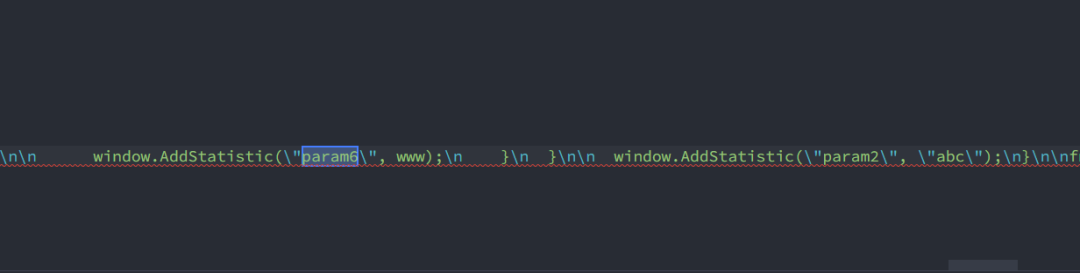
可以看到成功替換掉標(biāo)志的注釋,而且全部標(biāo)志注釋已經(jīng)刪掉
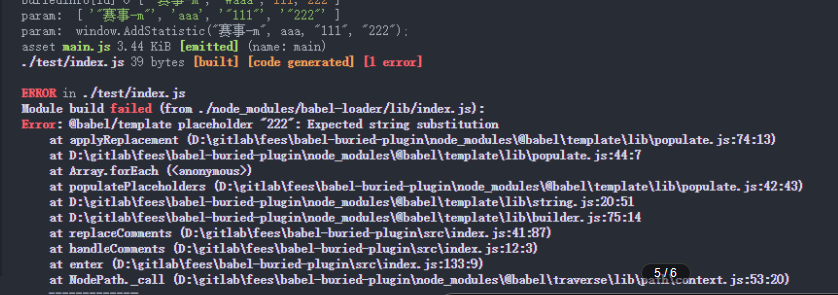
現(xiàn)在只能往AddStatistic加入兩個(gè)參數(shù),我曾想根據(jù)Excel表動(dòng)態(tài)加入?yún)?shù),使用Array.prototype.join()形成參數(shù),但是總是報(bào)錯(cuò),如果有大佬知道怎么處理可以評(píng)論一下
注入全局函數(shù)
我們已經(jīng)把調(diào)用AddStatistic的語句插入到項(xiàng)目中,接下來將AddStatistic掛載到全局中,直接在Program的enter里面插入即可
Program:?{
??enter(path,?state)?{
????const?globalNode?=?template(`window.AddStatistic?=?${func}`)();
????path.node.body.unshift(globalNode);
??}
},
注入script
還有我們要把對應(yīng)的script插入到html中,同樣還是在入口處插入一段代碼
//?注入添加script代碼
const?addSctipt?=?`(function()?{
???const?script?=?document.createElement("script");
???script.type?=?"text/javascript";
???script.src?=?"${script}";
???document.getElementsByTagName("head")[0].appendChild(script);
????})();`;
const?addSctiptNode?=?template(addSctipt)();
path.node.body.unshift(addSctiptNode);
這里的func和script變量都是可以自定義的,在webpack.config.js里配置
plugins:?[
??[
????path.resolve(__dirname,?"../src/index.js"),
????{
??????xlsxPath:?path.resolve(__dirname,?"../buried.xlsx"),
??????func:?`function(category,?action)?{
?????????window._hmt?&&?window._hmt.push(["_trackEvent",?category,?action]);
????????};
????????`,
??????script:?"https://test.js"
????}
??]
]
這里傳進(jìn)去的對象可以在state.opts中獲得
Program:?{
??enter(path,?state)?{
????const?{?xlsxPath,?func,?script?}?=?state.opts;
??}
}
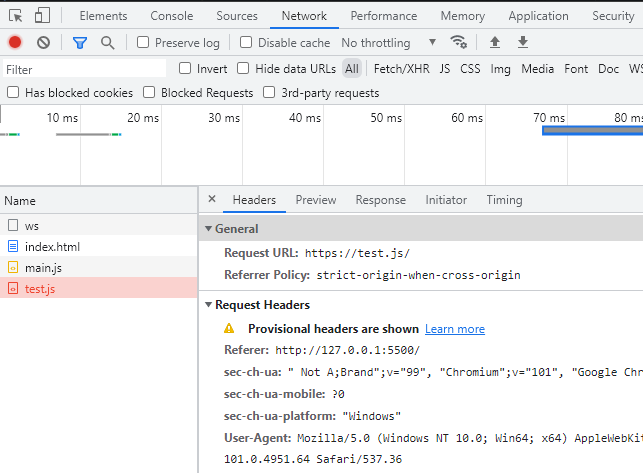
測試一下,在dist目錄下面新建一個(gè)index.html,引入main.js
發(fā)布
在package.json中寫好配置
{
??"name":?"babel-plugin-tracker",
??"version":?"0.0.1",
??"description":?"一個(gè)用于統(tǒng)計(jì)埋點(diǎn)的babel插件",
??"main":?"./src/index.js",
??"scripts":?{
????"test":?"echo?"Error:?no?test?specified"?&&?exit?1",
????"dev":?"webpack?--config?test/webpack.config.js"
??},
??"keywords":?[
????"webpack",
????"plugin",
????"babel",
????"babel-loader",
????"前端",
????"工具",
????"babel-plugin",
????"excel",
????"AST",
????"埋點(diǎn)"
??],
??"author":?"plutoLam",
??"license":?"MIT",
????...
}
將main指向剛剛的index.js,直接運(yùn)行npm publish即可,沒有配置npm的小伙伴可以看看其他教程
尾聲
babel埋點(diǎn)插件的開發(fā)到這里就完成啦,希望大家可以學(xué)到一些東西
npm地址:https://www.npmjs.com/package/babel-plugin-tracker
GitHub地址:https://github.com/plutoLam/babel-plugin-tracker
結(jié)語
「??關(guān)注+點(diǎn)贊+收藏+評(píng)論+轉(zhuǎn)發(fā)??」,原創(chuàng)不易,鼓勵(lì)筆者創(chuàng)作更多高質(zhì)量文章
最近「JowayYoung」上新了一本新小冊「從 0 到 1 落地前端工程化」,對前端工程化感興趣的可以掃碼了解下!