
SpringBoot四大核心組件,你了解多少
點(diǎn)擊下方“IT牧場”,選擇“設(shè)為星標(biāo)”

來源:blog.csdn.net/u011909918/article/details/109647196
前言 一、Spring Boot Starter 二、Spring Boot Autoconfigure 三、Spring Boot CLI 四、Spring Boot actuator 總結(jié)
前言
先透露一下,四大組件分別是:starter, autoconfigure, CLI 以及actuator。下面我們就來詳細(xì)介紹一些他們有什么用。
推薦下自己做的 Spring Boot 的實(shí)戰(zhàn)項(xiàng)目:
https://github.com/YunaiV/ruoyi-vue-pro
一、Spring Boot Starter
1.1 Starter的應(yīng)用示例
<dependency>
    <groupId>org.springframework.boot</groupId>
    <artifactId>spring-boot-starter-thymeleaf</artifactId>
</dependency>

<dependency>
    <groupId>org.mybatis.spring.boot</groupId>
    <artifactId>mybatis-spring-boot-starter</artifactId>
    <version>1.3.2</version>
</dependency>
在我們的Spring Boot項(xiàng)目種的POM文件中總會看到這兩種依賴:
spring-boot-starter-xxx 和 xxx-spring-boot-starter。
這就是spring boot的四大組件之一的starter。
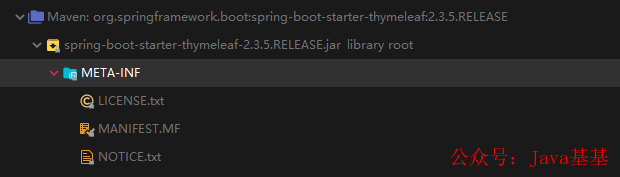
a、spring-boot-starter-thymeleaf
b、mybatis-spring-boot-starter
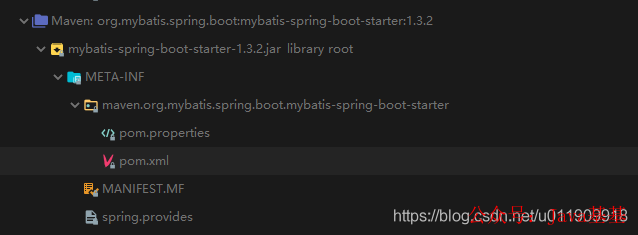
兩種starter的區(qū)別就是 >>
官方提供的starter是這樣的:spring-boot-starter-xxx 非官方的starter是這樣的:xxx-spring-boot-starter
其中xxx就是我們想要依賴的組件或者jar包。上例就是我們spring boot用來引入thymeleaf引擎和mybatis框架所配置的依賴。引入之后通過簡單的約定配置就可以正常使用。比如:
Thymeleaf引擎約定配置:
##前端引擎配置
spring:
  thymeleaf:
    enabled: true
    servlet:
      content-type: text/html
    mode: HTML
    # 頁面前綴
    prefix: classpath:/templates/
    # 后綴
    suffix: .html
Mybatis約定配置:
mybatis:
  mapper-locations: classpath:mapper/*.xml  #注意:一定要對應(yīng)mapper映射xml文件的所在路徑
  type-aliases-package: com.hi.ld.vo.system  # 注意:對應(yīng)實(shí)體類的路徑
  configuration:
    log-impl: org.apache.ibatis.logging.stdout.StdOutImpl
下面讓我們來看看以前怎么配置thymeleaf。
1.2 Spring Boot之前的Thymeleaf和Mybatis應(yīng)用
廢話不多說,直接上代碼:
1.2.1 Thymeleaf配置
a. 添加對應(yīng)依賴:
<dependency>
  <groupId>org.thymeleaf</groupId>
  <artifactId>thymeleaf-spring5</artifactId>
  <version>3.0.11.RELEASE</version>
</dependency>
<dependency>
  <groupId>org.thymeleaf.extras</groupId>
  <artifactId>thymeleaf-extras-java8time</artifactId>
  <version>3.0.4.RELEASE</version>
</dependency>
b. bean配置
<bean id="templateResolver"
       class="org.thymeleaf.templateresolver.ServletContextTemplateResolver">
  <property name="prefix" value="/WEB-INF/templates/" />
  <property name="suffix" value=".html" />
  <property name="templateMode" value="HTML5" />
</bean>

<bean id="templateEngine"
      class="org.thymeleaf.spring4.SpringTemplateEngine">
  <property name="templateResolver" ref="templateResolver" />
</bean>

<bean class="org.thymeleaf.spring4.view.ThymeleafViewResolver">
  <property name="templateEngine" ref="templateEngine" />
</bean>
1.2.2 Mybatis配置
a. 添加對應(yīng)依賴:
 <dependency>
   <groupId>org.springframework.boot</groupId>
   <artifactId>spring-boot-starter-jdbc</artifactId>
 </dependency>
 <dependency>
   <groupId>org.mybatis</groupId>
   <artifactId>mybatis</artifactId>
 </dependency>
 <dependency>
   <groupId>org.mybatis</groupId>
   <artifactId>mybatis-spring</artifactId>
 </dependency>
b. bean配置
下面的第3, 4步驟就是Mybatis相關(guān)配置。第一步是引入資源配置。第二步是配置數(shù)據(jù)源
<?xml version="1.0" encoding="UTF-8"?>
<beans xmlns="http://www.springframework.org/schema/beans"
 xmlns:xsi="http://www.w3.org/2001/XMLSchema-instance" xmlns:context="http://www.springframework.org/schema/context"
 xsi:schemaLocation="http://www.springframework.org/schema/beans
 http://www.springframework.org/schema/beans/spring-beans.xsd
 http://www.springframework.org/schema/context
 http://www.springframework.org/schema/context/spring-context.xsd">
 <!-- 配置整合mybatis過程 -->
 <!-- 1.配置數(shù)據(jù)庫相關(guān)參數(shù)properties的屬性:${url} -->
 <context:property-placeholder location="classpath:jdbc.properties" />

 <!-- 2.數(shù)據(jù)庫連接池 -->
 <bean id="dataSource" class="com.mchange.v2.c3p0.ComboPooledDataSource">
  <!-- 配置連接池屬性 -->
  <property name="driverClass" value="${jdbc.driver}" />
  <property name="jdbcUrl" value="${jdbc.url}" />
  <property name="user" value="${jdbc.username}" />
  <property name="password" value="${jdbc.password}" />

  <!-- c3p0連接池的私有屬性 -->
  <property name="maxPoolSize" value="30" />
  <property name="minPoolSize" value="10" />
  <!-- 關(guān)閉連接后不自動commit -->
  <property name="autoCommitOnClose" value="false" />
  <!-- 獲取連接超時時間 -->
  <property name="checkoutTimeout" value="10000" />
  <!-- 當(dāng)獲取連接失敗重試次數(shù) -->
  <property name="acquireRetryAttempts" value="2" />
 </bean>

 <!-- 3.配置SqlSessionFactory對象 -->
 <bean id="sqlSessionFactory" class="org.mybatis.spring.SqlSessionFactoryBean">
  <!-- 注入數(shù)據(jù)庫連接池 -->
  <property name="dataSource" ref="dataSource" />
  <!-- 配置MyBaties全局配置文件:mybatis-config.xml -->
  <property name="configLocation" value="classpath:mybatis-config.xml" />
  <!-- 掃描entity包 使用別名 -->
  <property name="typeAliasesPackage" value="com.soecode.lyf.entity" />
  <!-- 掃描sql配置文件:mapper需要的xml文件 -->
  <property name="mapperLocations" value="classpath:mapper/*.xml" />
 </bean>

 <!-- 4.配置掃描Dao接口包,動態(tài)實(shí)現(xiàn)Dao接口,注入到spring容器中 -->
 <bean class="org.mybatis.spring.mapper.MapperScannerConfigurer">
  <!-- 注入sqlSessionFactory -->
  <property name="sqlSessionFactoryBeanName" value="sqlSessionFactory" />
  <!-- 給出需要掃描Dao接口包 -->
  <property name="basePackage" value="com.soecode.lyf.dao" />
 </bean>
</beans>
1.2.3 小結(jié)
a、Starter 幫我們封裝好了所有需要的依賴,避免我們自己添加導(dǎo)致的一些Jar包沖突或者缺少包的情況;
b、Starter幫我們自動注入了需要的Bean實(shí)例到Spring 容器中,不需要我們手動配置(這個可以說是starter干的,實(shí)際上并不是,這里埋個坑,下面解答);
所以: starter包的內(nèi)容就是pom文件,就是一個依賴傳遞包。
推薦下自己做的 Spring Cloud 的實(shí)戰(zhàn)項(xiàng)目:
https://github.com/YunaiV/onemall
二、Spring Boot Autoconfigure
2.1 autoconfigure 簡介
autoconfigure在我們的開發(fā)中并不會被感知,因?yàn)樗谴嬖谂c我們的starter中的。所以我們的每個starter都是依賴autoconfigure的:
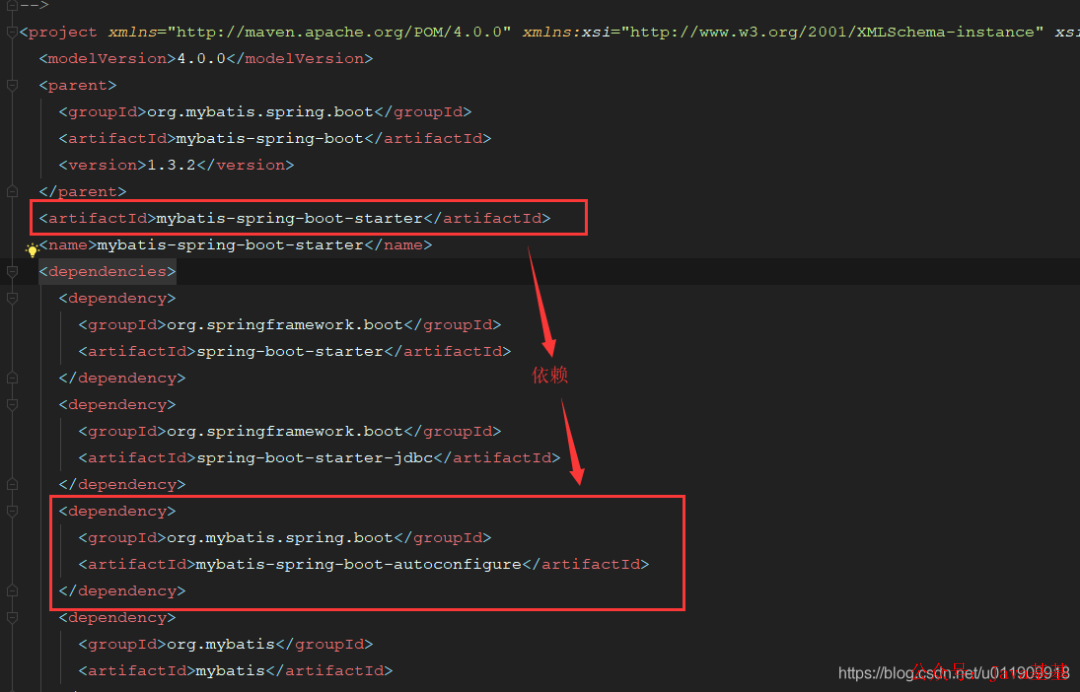
當(dāng)然我們也可以把a(bǔ)utoconfig的內(nèi)容直接放在starter包里邊。
a. spring-boot-autoconfigure:
注意:這里有個點(diǎn),就是官網(wǎng)提供的configure大多數(shù)在spring-boot-autoconfigure包里邊,并沒有單獨(dú)創(chuàng)建新包。
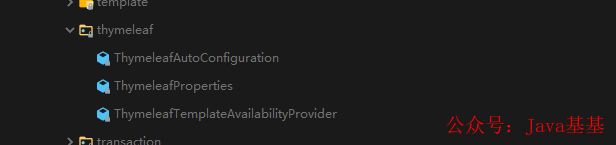
b、mybatis-spring-boot-autoconfigure
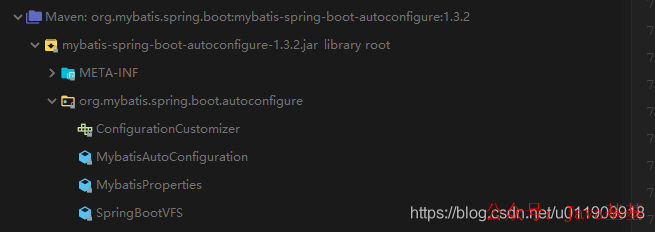
2.2 小結(jié)
autoconfigure內(nèi)容是配置Bean實(shí)例到Spring容器的實(shí)際代碼實(shí)現(xiàn)包,然后提供給starter依賴。所以說1.2.3中的b項(xiàng)所說的配置Bean實(shí)例到Spring容器中實(shí)際是autoconfigure做的,因?yàn)槭莝tarter依賴它,所以也可以說是starter干的。
所以:autocinfigure是starter體現(xiàn)出來的能力的代碼實(shí)現(xiàn)
三、Spring Boot CLI
Spring Boot CLI是一個命令行使用Spring Boot的客戶端工具;主要功能如下:
運(yùn)行g(shù)roovy腳本 => 官網(wǎng)2.1 打包groovy文件到j(luò)ar => 官網(wǎng)2.3 初始化Spring Boot項(xiàng)目 => 官網(wǎng)2.4 其他
先上個官網(wǎng)文檔:
https://docs.spring.io/spring-boot/docs/current/reference/html/spring-boot-cli.html
因?yàn)檫@個我們用的比較少,所以就不多贅述了。個人感覺比較流脾的功能就是命令行直接執(zhí)行g(shù)roovy腳本了。
四、Spring Boot Actuator
actuator是Spring Boot的監(jiān)控插件,本身提供了很多接口可以獲取當(dāng)前項(xiàng)目的各項(xiàng)運(yùn)行狀態(tài)指標(biāo)。
官網(wǎng)文檔:
https://docs.spring.io/spring-boot/docs/2.4.0/reference/html/production-ready-features.html#production-ready
名詞解釋:
Endpoints: 需要監(jiān)控的端點(diǎn)。參考官網(wǎng)第二節(jié)官網(wǎng)文檔
可用的端點(diǎn):
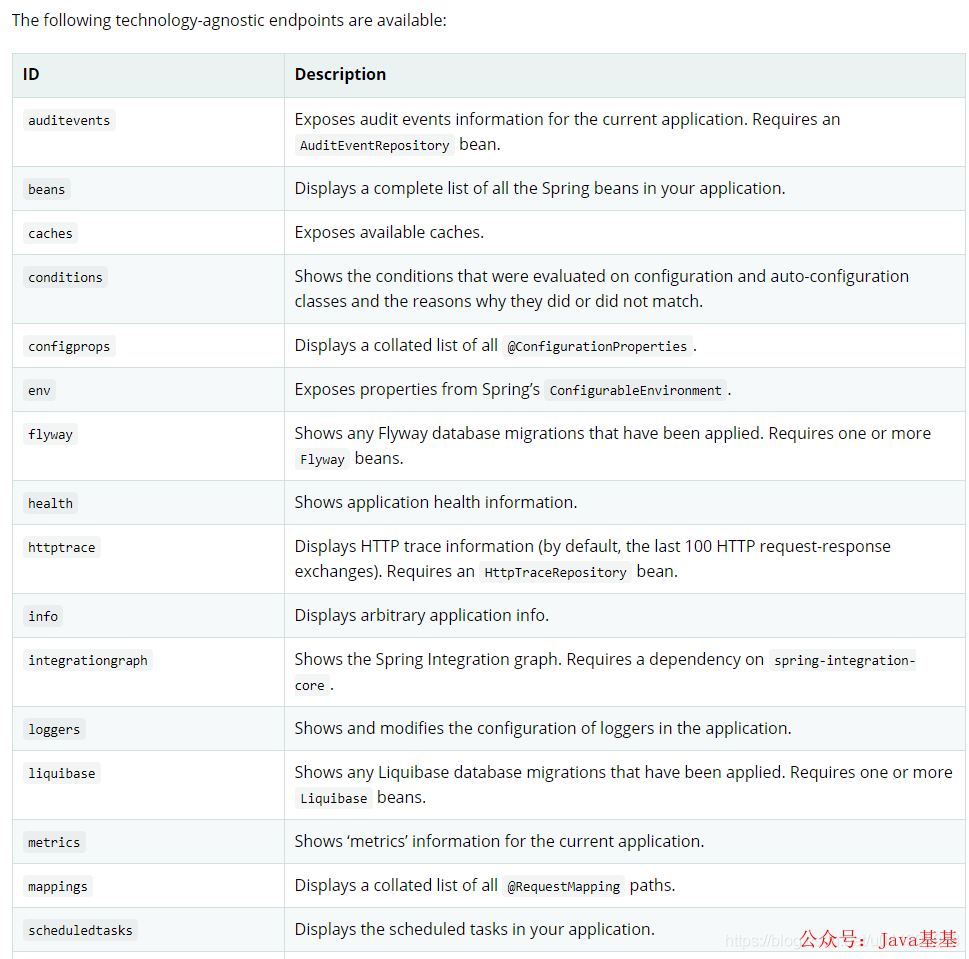
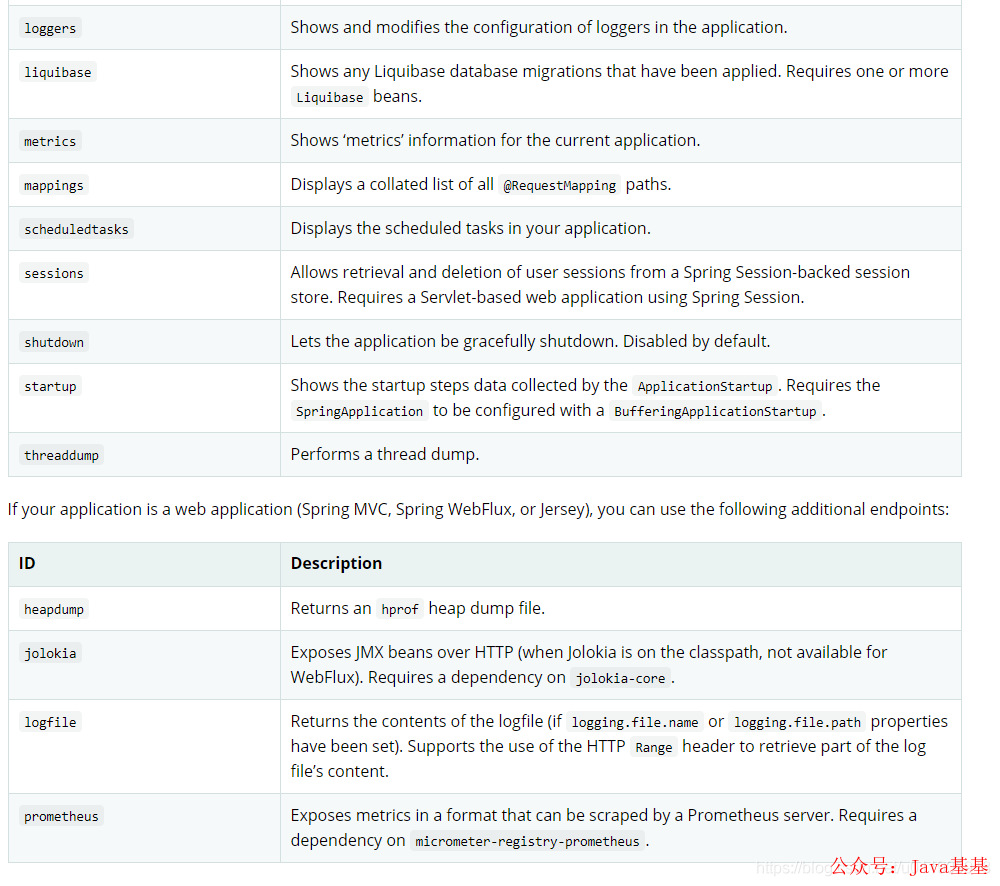
下方的是web工程的端點(diǎn)。
使用方法如下:
4.1 添加依賴
<dependency>
    <groupId>org.springframework.boot</groupId>
    <artifactId>spring-boot-starter-actuator</artifactId>
</dependency>
4.2 配置需要開啟監(jiān)控的端點(diǎn)
management:
  endpoint:
    health: # 開啟健康監(jiān)控端點(diǎn)
      enabled: true
    beans: # 開啟Bean實(shí)例監(jiān)控端點(diǎn)
      enabled: true
4.3 啟動服務(wù)并驗(yàn)證
4.3.1 啟動結(jié)果
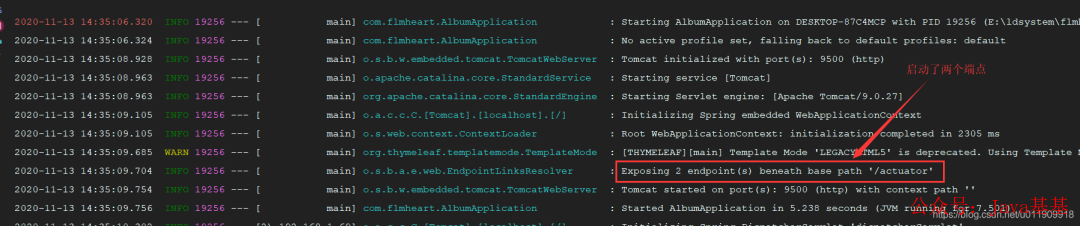
4.3.2 查看各個監(jiān)控信息
瀏覽器訪問(查看監(jiān)控信息地址):http://localhost:9500/actuator
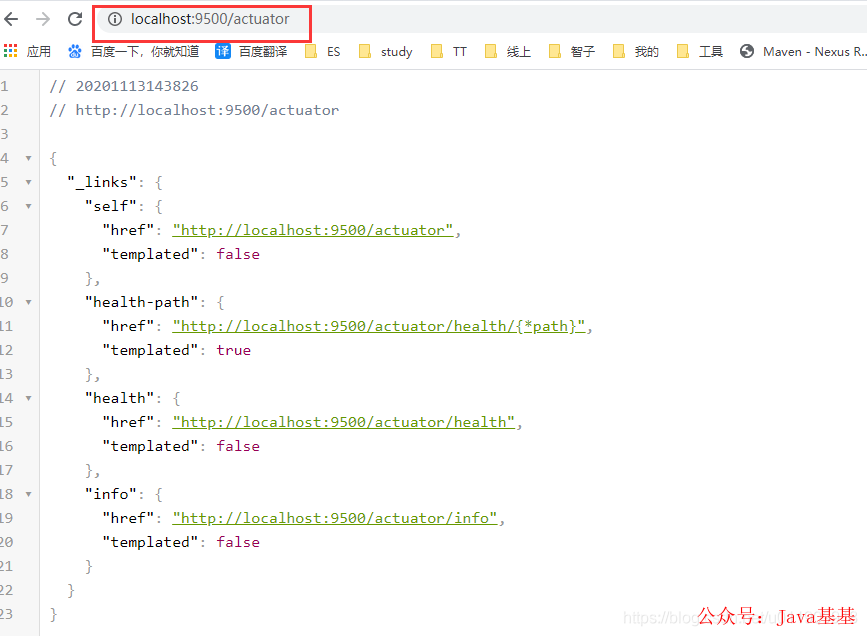
查看服務(wù)健康狀態(tài):
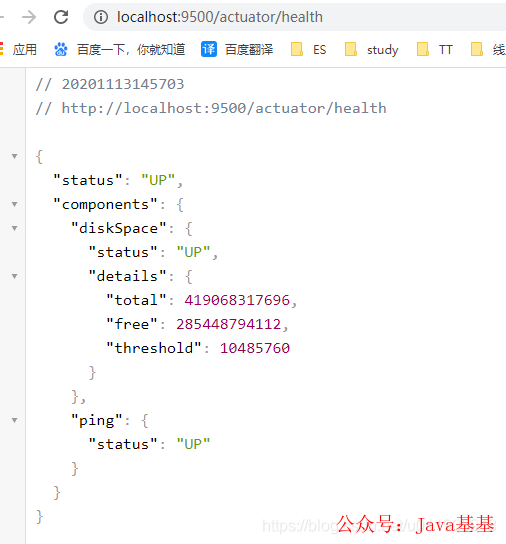
其他API查看官方文檔了解或者留言一起研究一下,厚著臉皮我也沒怎么用過這個。不過下一章介紹了starter和autoconfigure之后我們就可以去研究actuator的源碼了。。。。
總結(jié)
本章主要介紹了Spring Boot的四大組件的作用,其中主要是starter和autoconfigure,另外的CLI和actuator用的并不多,所以沒有仔細(xì)介紹。
干貨分享
最近將個人學(xué)習(xí)筆記整理成冊,使用PDF分享。關(guān)注我,回復(fù)如下代碼,即可獲得百度盤地址,無套路領(lǐng)取!
?001:《Java并發(fā)與高并發(fā)解決方案》學(xué)習(xí)筆記;?002:《深入JVM內(nèi)核——原理、診斷與優(yōu)化》學(xué)習(xí)筆記;?003:《Java面試寶典》?004:《Docker開源書》?005:《Kubernetes開源書》?006:《DDD速成(領(lǐng)域驅(qū)動設(shè)計(jì)速成)》?007:全部?008:加技術(shù)群討論
加個關(guān)注不迷路
喜歡就點(diǎn)個"在看"唄^_^