教你優(yōu)雅的實現(xiàn) SpringBoot 并行任務
不點藍字關(guān)注,我們哪來故事?
第一種:把參數(shù)配置到.properties文件中: 第二種定時任務:單線程和多線程 1、創(chuàng)建定時任務: 2、開啟定時任務: 3、執(zhí)行結(jié)果(單線程) 4、多線程處理定時任務: 5、執(zhí)行結(jié)果(并發(fā))
Spring Boot 的定時任務:
第一種:把參數(shù)配置到.properties文件中:
代碼:
package com.accord.task;

import java.text.SimpleDateFormat;
import java.util.Date;

import org.springframework.scheduling.annotation.Scheduled;
import org.springframework.stereotype.Component;

/**
 * 從配置文件加載任務信息
 * @author 王久印
 */
@Component
public class ScheduledTask {

  private static final SimpleDateFormat dateFormat = new SimpleDateFormat("HH:mm:ss");

  //@Scheduled(fixedDelayString = "${jobs.fixedDelay}")
  @Scheduled(fixedDelayString = "2000")
  public void getTask1() {
    System.out.println("任務1,從配置文件加載任務信息,當前時間:" + dateFormat.format(new Date()));
  }

  @Scheduled(cron = "${jobs.cron}")
  public void getTask2() {
    System.out.println("任務2,從配置文件加載任務信息,當前時間:" + dateFormat.format(new Date()));
  }
}
application.properties文件:
jobs.fixedDelay=5000
jobs.cron=0/5 * *  * * ?
SpringBootCron2Application.java中:
package com.accord;

import org.springframework.boot.SpringApplication;
import org.springframework.boot.autoconfigure.SpringBootApplication;
import org.springframework.scheduling.annotation.EnableScheduling;

@SpringBootApplication
@EnableScheduling
public class SpringBootCron2Application {
 public static void main(String[] args) {
  SpringApplication.run(SpringBootCron2Application.class, args);
 }
}
注:@EnableScheduling 這個一定要加上;否則,不會定時啟動任務!
@Scheduled中的參數(shù)說明:
@Scheduled(fixedRate=2000):上一次開始執(zhí)行時間點后2秒再次執(zhí)行;@Scheduled(fixedDelay=2000):上一次執(zhí)行完畢時間點后2秒再次執(zhí)行;@Scheduled(initialDelay=1000, fixedDelay=2000):第一次延遲1秒執(zhí)行,然后在上一次執(zhí)行完畢時間點后2秒再次執(zhí)行;@Scheduled(cron="* * * * * ?"):按cron規(guī)則執(zhí)行。
在線Cron表達式生成器:http://cron.qqe2.com/
基于 Spring Boot + MyBatis Plus + Vue & Element 實現(xiàn)的后臺管理系統(tǒng) + 用戶小程序,支持 RBAC 動態(tài)權(quán)限、多租戶、數(shù)據(jù)權(quán)限、工作流、三方登錄、支付、短信、商城等功能。
項目地址:https://github.com/YunaiV/ruoyi-vue-pro
第二種定時任務:單線程和多線程
1、創(chuàng)建定時任務:
package com.accord.task;

import org.slf4j.Logger;
import org.slf4j.LoggerFactory;
import org.springframework.scheduling.annotation.Scheduled;
import org.springframework.stereotype.Component;

/**
 * 構(gòu)建執(zhí)行定時任務
 * @author 王久印
 * TODO
 */
@Component
public class ScheduledTask2 {

    private Logger logger = LoggerFactory.getLogger(ScheduledTask2.class);

    private int fixedDelayCount = 1;
    private int fixedRateCount = 1;
    private int initialDelayCount = 1;
    private int cronCount = 1;

    @Scheduled(fixedDelay = 5000)        //fixedDelay = 5000表示當前方法執(zhí)行完畢5000ms后,Spring scheduling會再次調(diào)用該方法
    public void testFixDelay() {
        logger.info("===fixedDelay: 第{}次執(zhí)行方法", fixedDelayCount++);
    }

    @Scheduled(fixedRate = 5000)        //fixedRate = 5000表示當前方法開始執(zhí)行5000ms后,Spring scheduling會再次調(diào)用該方法
    public void testFixedRate() {
        logger.info("===fixedRate: 第{}次執(zhí)行方法", fixedRateCount++);
    }

    @Scheduled(initialDelay = 1000, fixedRate = 5000)   //initialDelay = 1000表示延遲1000ms執(zhí)行第一次任務
    public void testInitialDelay() {
        logger.info("===initialDelay: 第{}次執(zhí)行方法", initialDelayCount++);
    }

    @Scheduled(cron = "0 0/1 * * * ?")  //cron接受cron表達式,根據(jù)cron表達式確定定時規(guī)則
    public void testCron() {
        logger.info("===initialDelay: 第{}次執(zhí)行方法", cronCount++);
    }

}
使用 @Scheduled來創(chuàng)建定時任務 這個注解用來標注一個定時任務方法。
通過看 @Scheduled源碼可以看出它支持多種參數(shù):
cron:cron表達式,指定任務在特定時間執(zhí)行; fixedDelay:表示上一次任務執(zhí)行完成后多久再次執(zhí)行,參數(shù)類型為long,單位ms; fixedDelayString:與fixedDelay含義一樣,只是參數(shù)類型變?yōu)镾tring; fixedRate:表示按一定的頻率執(zhí)行任務,參數(shù)類型為long,單位ms; fixedRateString: 與fixedRate的含義一樣,只是將參數(shù)類型變?yōu)镾tring; initialDelay:表示延遲多久再第一次執(zhí)行任務,參數(shù)類型為long,單位ms; initialDelayString:與initialDelay的含義一樣,只是將參數(shù)類型變?yōu)镾tring; zone:時區(qū),默認為當前時區(qū),一般沒有用到。
2、開啟定時任務:
package com.accord;

import org.springframework.boot.SpringApplication;
import org.springframework.boot.autoconfigure.SpringBootApplication;
import org.springframework.scheduling.annotation.EnableScheduling;

@SpringBootApplication
@EnableScheduling
public class SpringBootCron2Application {
 public static void main(String[] args) {
  SpringApplication.run(SpringBootCron2Application.class, args);
 }
}
注:這里的 @EnableScheduling 注解,它的作用是發(fā)現(xiàn)注解 @Scheduled的任務并由后臺執(zhí)行。沒有它的話將無法執(zhí)行定時任務。
引用官方文檔原文:
@EnableScheduling ensures that a background task executor is created. Without it, nothing gets scheduled.
3、執(zhí)行結(jié)果(單線程)
就完成了一個簡單的定時任務模型,下面執(zhí)行springBoot觀察執(zhí)行結(jié)果:

從控制臺輸入的結(jié)果中我們可以看出所有的定時任務都是在同一個線程池用同一個線程來處理的,那么我們?nèi)绾蝸聿l(fā)的處理各定時任務呢,請繼續(xù)向下看。
4、多線程處理定時任務:
看到控制臺輸出的結(jié)果,所有的定時任務都是通過一個線程來處理的,我估計是在定時任務的配置中設(shè)定了一個SingleThreadScheduledExecutor,于是我看了源碼,從ScheduledAnnotationBeanPostProcessor類開始一路找下去。果然,在ScheduledTaskRegistrar(定時任務注冊類)中的ScheduleTasks中又這樣一段判斷:
if (this.taskScheduler == null) {
 this.localExecutor = Executors.newSingleThreadScheduledExecutor();
 this.taskScheduler = new ConcurrentTaskScheduler(this.localExecutor);
}
這就說明如果taskScheduler為空,那么就給定時任務做了一個單線程的線程池,正好在這個類中還有一個設(shè)置taskScheduler的方法:
public void setScheduler(Object scheduler) {
 Assert.notNull(scheduler, "Scheduler object must not be null");
 if (scheduler instanceof TaskScheduler) {
  this.taskScheduler = (TaskScheduler) scheduler;
 }
 else if (scheduler instanceof ScheduledExecutorService) {
  this.taskScheduler = new ConcurrentTaskScheduler(((ScheduledExecutorService) scheduler));
 }
 else {
  throw new IllegalArgumentException("Unsupported scheduler type: " + scheduler.getClass());
 }
}
這樣問題就很簡單了,我們只需用調(diào)用這個方法顯式的設(shè)置一個ScheduledExecutorService就可以達到并發(fā)的效果了。我們要做的僅僅是實現(xiàn)SchedulingConfigurer接口,重寫configureTasks方法就OK了;
package com.accord.task;

import org.springframework.context.annotation.Configuration;
import org.springframework.scheduling.annotation.SchedulingConfigurer;
import org.springframework.scheduling.config.ScheduledTaskRegistrar;

import java.util.concurrent.Executors;

/**
 * 多線程執(zhí)行定時任務
 * @author 王久印
 */
@Configuration
//所有的定時任務都放在一個線程池中,定時任務啟動時使用不同都線程。
public class ScheduleConfig implements SchedulingConfigurer {
    @Override
    public void configureTasks(ScheduledTaskRegistrar taskRegistrar) {
        //設(shè)定一個長度10的定時任務線程池
        taskRegistrar.setScheduler(Executors.newScheduledThreadPool(10));
    }
}
5、執(zhí)行結(jié)果(并發(fā))
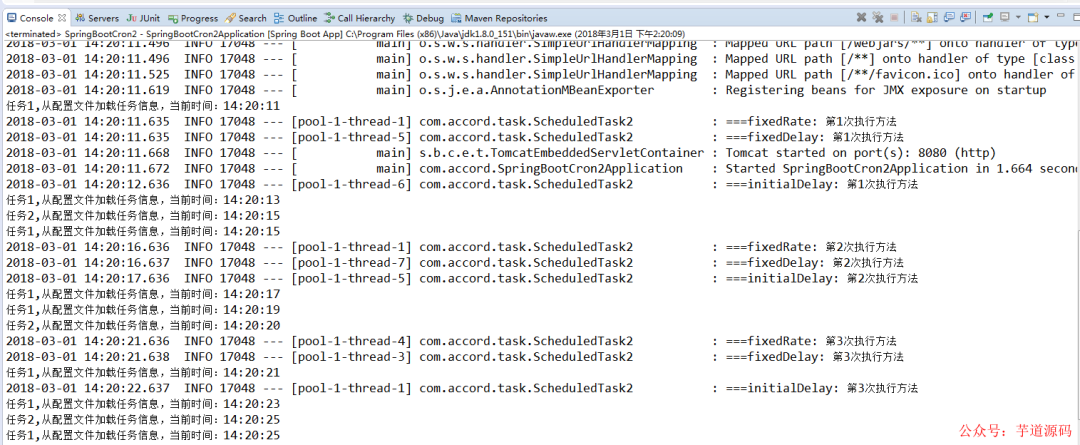
通過控制臺輸出的結(jié)果看出每個定時任務都是在通過不同的線程來處理了。