
Android仿微信實(shí)現(xiàn)安全數(shù)字鍵盤功能
背景
大部分的金融App會(huì)對(duì)默認(rèn)的數(shù)字鍵盤進(jìn)行處理,以實(shí)現(xiàn)自定義的數(shù)字安全鍵盤。基于此,本文對(duì)對(duì)微信數(shù)字鍵盤樣式進(jìn)行了仿寫,實(shí)現(xiàn)了一套自定義的數(shù)字安全鍵盤(支持隨機(jī)數(shù)字分布)。
一、圖示效果
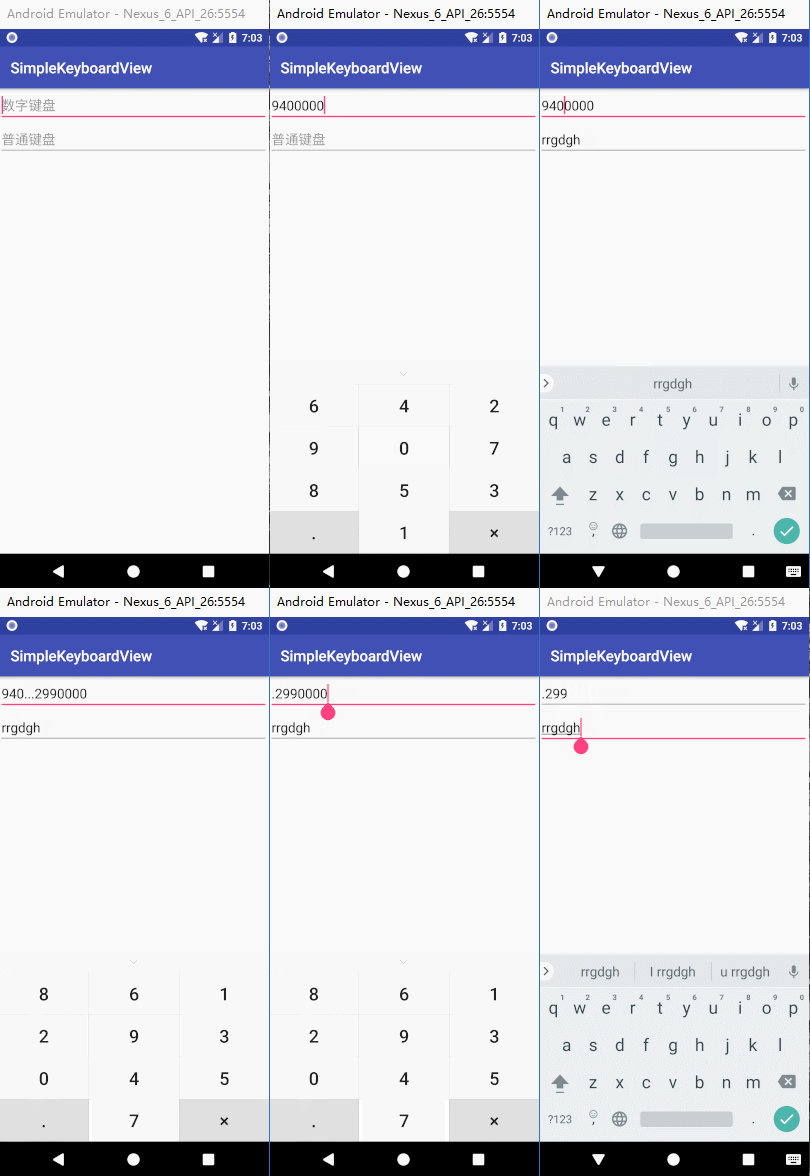
二、需要考慮的問題
布局的實(shí)現(xiàn)方式;
demo中使用了popupwindow,通過xml文件進(jìn)行Tablayout布局。禁掉EditText默認(rèn)軟鍵盤的彈出,替換為自定義的數(shù)字鍵盤及與其它EditText切換焦點(diǎn)時(shí)的彈出效果;
刪除和增加字符時(shí)需要同步更新光標(biāo)的位置;
隨機(jī)數(shù)字分布的實(shí)現(xiàn);
三、實(shí)現(xiàn)代碼
1.MainActivity調(diào)用處代碼:
public class MainActivity extends AppCompatActivity {private static final String TAG = "MainActivity";private EditText numberEt;private KeyboardPopupWindow keyboardPopupWindow;private boolean isUiCreated = false;@Overrideprotected void onCreate(Bundle savedInstanceState) {super.onCreate(savedInstanceState);setContentView(R.layout.activity_main);initView();}private void initView() {numberEt = findViewById(R.id.numberEt);keyboardPopupWindow = new KeyboardPopupWindow(MainActivity.this, getWindow().getDecorView(), numberEt,true);// numberEt.setInputType(InputType.TYPE_NULL);//該設(shè)置會(huì)導(dǎo)致光標(biāo)不可見numberEt.setOnClickListener(new View.OnClickListener() {@Overridepublic void onClick(View v) {if (keyboardPopupWindow != null) {keyboardPopupWindow.show();}}});numberEt.setOnFocusChangeListener(new View.OnFocusChangeListener() {@Overridepublic void onFocusChange(View v, boolean hasFocus) {if (keyboardPopupWindow != null && isUiCreated) {//isUiCreated 很重要,Unable to add window -- token null is not valid; is your activity running?keyboardPopupWindow.refreshKeyboardOutSideTouchable(!hasFocus);// 需要等待頁(yè)面創(chuàng)建完成后焦點(diǎn)變化才去顯示自定義鍵盤}if (hasFocus) {//隱藏系統(tǒng)軟鍵盤InputMethodManager imm = (InputMethodManager) getSystemService(Context.INPUT_METHOD_SERVICE);imm.hideSoftInputFromWindow(numberEt.getWindowToken(), 0);}}});}@Overridepublic void onWindowFocusChanged(boolean hasFocus) {super.onWindowFocusChanged(hasFocus);isUiCreated = true;}@Overrideprotected void onDestroy() {if (keyboardPopupWindow != null) {keyboardPopupWindow.releaseResources();}super.onDestroy();}}
可以看到,這塊的代碼實(shí)現(xiàn)很簡(jiǎn)單,主要是通過KeyboardPopupWindow 這個(gè)自定義的View來實(shí)現(xiàn)鍵盤彈出及按鍵點(diǎn)擊效果。需要注意的是isUiCreated 這個(gè)標(biāo)志位,需要通過onWindowFocusChanged等方法來確定當(dāng)前頁(yè)面加載完畢后去刷新自定義鍵盤的狀態(tài),否則會(huì)報(bào)錯(cuò)。
2.自定義數(shù)字鍵盤的代碼:
public class KeyboardPopupWindow extends PopupWindow {private static final String TAG = "KeyboardPopupWindow";private Context context;private View anchorView;private View parentView;private EditText editText;private boolean isRandomSort = false;//數(shù)字是否隨機(jī)排序private List<Integer> list = new ArrayList<>();private int[] commonButtonIds = new int[]{R.id.button00, R.id.button01, R.id.button02, R.id.button03,R.id.button04, R.id.button05, R.id.button06, R.id.button07, R.id.button08, R.id.button09};/*** @param context* @param anchorView* @param editText* @param isRandomSort 數(shù)字是否隨機(jī)排序*/public KeyboardPopupWindow(Context context, View anchorView, EditText editText, boolean isRandomSort) {this.context = context;this.anchorView = anchorView;this.editText = editText;this.isRandomSort = isRandomSort;if (context == null || anchorView == null) {return;}initConfig();initView();}private void initConfig() {setOutsideTouchable(false);setFocusable(false);setBackgroundDrawable(new ColorDrawable(Color.TRANSPARENT));forbidDefaultSoftKeyboard();}/*** 禁止系統(tǒng)默認(rèn)的軟鍵盤彈出*/private void forbidDefaultSoftKeyboard() {if (editText == null) {return;}if (android.os.Build.VERSION.SDK_INT > 10) {//4.0以上,使用反射的方式禁止系統(tǒng)自帶的軟鍵盤彈出try {Class<EditText> cls = EditText.class;Method setShowSoftInputOnFocus;setShowSoftInputOnFocus = cls.getMethod("setShowSoftInputOnFocus", boolean.class);setShowSoftInputOnFocus.setAccessible(true);setShowSoftInputOnFocus.invoke(editText, false);} catch (Exception e) {e.printStackTrace();}}}/*** 刷新自定義的popupwindow是否outside可觸摸反應(yīng):如果是不可觸摸的,則顯示該軟鍵盤view** @param isTouchable*/public void refreshKeyboardOutSideTouchable(boolean isTouchable) {setOutsideTouchable(isTouchable);if (!isTouchable) {show();} else {dismiss();}}private void initView() {parentView = LayoutInflater.from(context).inflate(R.layout.keyboadview, null);initKeyboardView(parentView);setWidth(ViewGroup.LayoutParams.MATCH_PARENT);setHeight(ViewGroup.LayoutParams.WRAP_CONTENT);setContentView(parentView);}private void initKeyboardView(View view) {LinearLayout dropdownLl = view.findViewById(R.id.dropdownLl);dropdownLl.setOnClickListener(new View.OnClickListener() {@Overridepublic void onClick(View v) {dismiss();}});//①給數(shù)字鍵設(shè)置點(diǎn)擊監(jiān)聽for (int i = 0; i < commonButtonIds.length; i++) {final Button button = view.findViewById(commonButtonIds[i]);button.setOnClickListener(new View.OnClickListener() {@Overridepublic void onClick(View v) {int curSelection = editText.getSelectionStart();int length = editText.getText().toString().length();if (curSelection < length) {String content = editText.getText().toString();editText.setText(content.substring(0, curSelection) + button.getText() + content.subSequence(curSelection, length));editText.setSelection(curSelection + 1);} else {editText.setText(editText.getText().toString() + button.getText());editText.setSelection(editText.getText().toString().length());}}});}//②給小數(shù)點(diǎn)按鍵設(shè)置點(diǎn)擊監(jiān)聽view.findViewById(R.id.buttonDot).setOnClickListener(new View.OnClickListener() {@Overridepublic void onClick(View v) {int curSelection = editText.getSelectionStart();int length = editText.getText().toString().length();if (curSelection < length) {String content = editText.getText().toString();editText.setText(content.substring(0, curSelection) + "." + content.subSequence(curSelection, length));editText.setSelection(curSelection + 1);} else {editText.setText(editText.getText().toString() + ".");editText.setSelection(editText.getText().toString().length());}}});//③給叉按鍵設(shè)置點(diǎn)擊監(jiān)聽view.findViewById(R.id.buttonCross).setOnClickListener(new View.OnClickListener() {@Overridepublic void onClick(View v) {int length = editText.getText().toString().length();int curSelection = editText.getSelectionStart();if (length > 0 && curSelection > 0 && curSelection <= length) {String content = editText.getText().toString();editText.setText(content.substring(0, curSelection - 1) + content.subSequence(curSelection, length));editText.setSelection(curSelection - 1);}}});}public void show() {if (!isShowing() && anchorView != null) {doRandomSortOp();this.showAtLocation(anchorView, Gravity.BOTTOM, 0, 0);}}/*** 隨機(jī)分布數(shù)字*/private void doRandomSortOp() {if (parentView == null) {return;}if (!isRandomSort) {for (int i = 0; i < commonButtonIds.length; i++) {final Button button = parentView.findViewById(commonButtonIds[i]);button.setText("" + i);}} else {list.clear();Random ran = new Random();while (list.size() < commonButtonIds.length) {int n = ran.nextInt(commonButtonIds.length);if (!list.contains(n))list.add(n);}for (int i = 0; i < commonButtonIds.length; i++) {final Button button = parentView.findViewById(commonButtonIds[i]);button.setText("" + list.get(i));}}}public void releaseResources() {this.dismiss();context = null;anchorView = null;if (list != null) {list.clear();list = null;}}}
代碼實(shí)現(xiàn)的邏輯相對(duì)簡(jiǎn)單:
通過給popupwindow設(shè)置contentView、彈出位置、邊界外觸摸參數(shù)等數(shù)值,實(shí)現(xiàn)大體樣式上的效果;
給contentView中的每個(gè)button設(shè)置點(diǎn)擊事件,并處理傳遞的EditText數(shù)值及焦點(diǎn)變化情況;
設(shè)置隨機(jī)標(biāo)志位,進(jìn)行數(shù)值鍵盤數(shù)值隨機(jī)的分布;
forbidDefaultSoftKeyboard中處理:禁止EditText默認(rèn)的軟鍵盤彈出。因?yàn)橐獙?shí)現(xiàn)EditText焦點(diǎn)仍舊可見的效果,目前試過的其它集中方式仍有較大的缺陷,所以是通過反射的方法來達(dá)到目的。
四.小結(jié)
當(dāng)然,除了以上方式,還可以使用系統(tǒng)的KeyboardView和Keyboard來實(shí)現(xiàn)相應(yīng)的效果。
在仿寫的過程中會(huì)發(fā)現(xiàn),實(shí)現(xiàn)這一效果會(huì)涉及到一些體驗(yàn)性的細(xì)節(jié)點(diǎn),而微信正是做到了這一點(diǎn),所以在使用層面上會(huì)很方便。有些細(xì)節(jié)點(diǎn)會(huì)可能會(huì)比實(shí)現(xiàn)整個(gè)大致效果更為麻煩,但有時(shí)候恰巧這些很容易被忽視的小九九是與眾不同的地方。
源碼地址:
https://github.com/ganshenml/KeyboardPopupWindow
到這里就結(jié)束啦。