
Android仿微信朋友圈點(diǎn)贊評(píng)論彈框效果
最近在做類似微信朋友圈點(diǎn)贊評(píng)論的功能,有個(gè)點(diǎn)贊評(píng)論彈框交互,感覺效果很好,點(diǎn)擊評(píng)論按鈕彈框從按鈕左邊彈出,遇到了3個(gè)問題(彈出動(dòng)畫不對、彈框布局沒有適配、彈出的位置顯示不對),動(dòng)畫和布局好解決,彈出的位置調(diào)試了半天,下面給出解決方法.
1.彈出動(dòng)畫
push_botton_in.xml代碼:
<?xml version="1.0" encoding="utf-8"?><set xmlns:android="http://schemas.android.com/apk/res/android"><scaleandroid:duration="180"android:fromXScale="0"android:fromYScale="1"android:toYScale="1"android:pivotX="100%"android:pivotY="50%"android:toXScale="1" /></set>
push_bottom_out.xml代碼
<?xml version="1.0" encoding="utf-8"?><set xmlns:android="http://schemas.android.com/apk/res/android"><scaleandroid:duration="180"android:fromXScale="1"android:pivotX="100%"android:fromYScale="1"android:toYScale="1"android:pivotY="50%"android:toXScale="0" /></set>
style樣式代碼:
<style name="anim_push_bottom" parent="@android:style/Animation"><item name="android:windowEnterAnimation">@anim/push_bottom_in</item><item name="android:windowExitAnimation">@anim/push_bottom_out</item></style>
Activity的代碼:
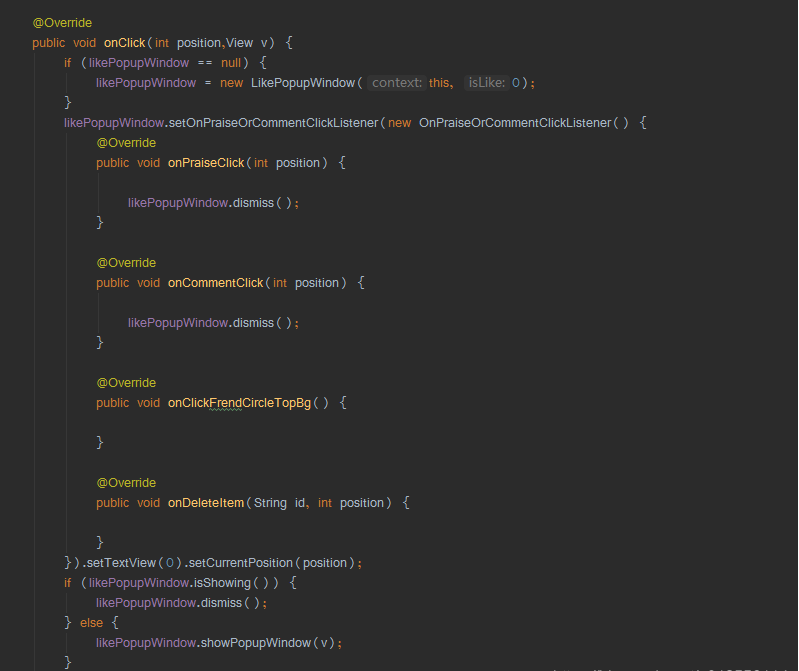
完整的Activity代碼:
/*** @描述: 仿微信朋友圈文本顯示全文與收起*/public class MainActivity extends AppCompatActivity implements CircleAdapter.MyClickListener{private RecyclerView recyclerView;private CircleAdapter circleAdapter;private String content = "茫茫的長白大山,浩瀚的原始森林,大山腳下,原始森林環(huán)抱中散落著幾十戶人家的" +"一個(gè)小山村,茅草房,對面炕,煙筒立在屋后邊。在村東頭有一個(gè)獨(dú)立的房子,那就是青年點(diǎn)," +"窗前有一道小溪流過。學(xué)子在這里吃飯,由這里出發(fā)每天隨社員去地里干活。干的活要么上山伐" +"樹,抬樹,要么砍柳樹毛子開荒種地。在山里,可聽那吆呵聲:“順山倒了!”放樹謹(jǐn)防回頭棒!" +"樹上的枯枝打到別的樹上再蹦回來,這回頭棒打人最厲害。";private List<String> strings;private LikePopupWindow likePopupWindow;private int page = 1;@Overrideprotected void onCreate(Bundle savedInstanceState) {super.onCreate(savedInstanceState);setContentView(R.layout.activity_main);initViews();initData();initAdapter();setListener();}private void setListener() {}/*** 初始化控件*/private void initViews() {recyclerView = findViewById(R.id.recyclerView);}/*** 初始化數(shù)據(jù)* @param*/private void initData() {strings = new ArrayList<>();for (int i = 0; i < 14; i++) {strings.add(content);}}/*** 設(shè)置adapter*/private void initAdapter() {circleAdapter = new CircleAdapter(this, strings,this);recyclerView.setLayoutManager(new LinearLayoutManager(this));recyclerView.addItemDecoration(new SpaceDecoration(this));recyclerView.setAdapter(circleAdapter);}@Overridepublic void onClick(int position,View v) {if (likePopupWindow == null) {likePopupWindow = new LikePopupWindow(this, 0);}likePopupWindow.setOnPraiseOrCommentClickListener(new OnPraiseOrCommentClickListener() {@Overridepublic void onPraiseClick(int position) {likePopupWindow.dismiss();}@Overridepublic void onCommentClick(int position) {likePopupWindow.dismiss();}@Overridepublic void onClickFrendCircleTopBg() {}@Overridepublic void onDeleteItem(String id, int position) {}}).setTextView(0).setCurrentPosition(position);if (likePopupWindow.isShowing()) {likePopupWindow.dismiss();} else {likePopupWindow.showPopupWindow(v);}}}
彈框代碼:
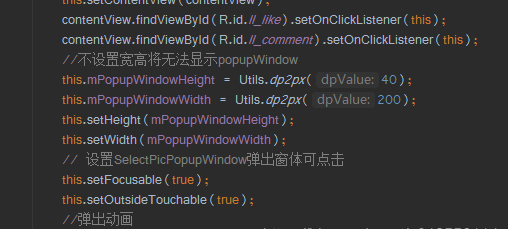
*** @描述: 點(diǎn)贊評(píng)論popup*/public class LikePopupWindow extends PopupWindow implements View.OnClickListener {private Context mContext;private OnPraiseOrCommentClickListener mOnPraiseOrCommentClickListener;private int mPopupWindowHeight;private int mPopupWindowWidth;private int mCurrentPosition;private TextView commentPopupText;public LikePopupWindow(android.content.Context context, int isLike) {View contentView = LayoutInflater.from(context).inflate(R.layout.dialog_like, null);this.setContentView(contentView);contentView.findViewById(R.id.ll_like).setOnClickListener(this);contentView.findViewById(R.id.ll_comment).setOnClickListener(this);//不設(shè)置寬高將無法顯示popupWindowthis.mPopupWindowHeight = Utils.dp2px(40);this.mPopupWindowWidth = Utils.dp2px(200);this.setHeight(mPopupWindowHeight);this.setWidth(mPopupWindowWidth);// 設(shè)置SelectPicPopupWindow彈出窗體可點(diǎn)擊this.setFocusable(true);this.setOutsideTouchable(true);//彈出動(dòng)畫this.setAnimationStyle(R.style.anim_push_bottom);// 刷新狀態(tài)this.update();// 實(shí)例化一個(gè)ColorDrawable顏色為半透明ColorDrawable dw = new ColorDrawable(0x00000000);this.setBackgroundDrawable(dw);commentPopupText = contentView.findViewById(R.id.tv_like);setTextView(isLike);}public LikePopupWindow setCurrentPosition(int currentPosition) {mCurrentPosition = currentPosition;return this;}public LikePopupWindow setTextView(int isLike) {commentPopupText.setText(isLike == 0 ? "點(diǎn)贊" : "取消點(diǎn)贊");return this;}public LikePopupWindow setOnPraiseOrCommentClickListener(OnPraiseOrCommentClickListener onPraiseOrCommentClickListener) {mOnPraiseOrCommentClickListener = onPraiseOrCommentClickListener;return this;}public void showPopupWindow(View anchor) {if (anchor == null) {return;}int[] location = new int[2];anchor.getLocationOnScreen(location);int xOffset = location[0] - mPopupWindowWidth - Utils.dp2px(10f);int yOffset = location[1] + (anchor.getHeight() - mPopupWindowHeight) / 2;showAtLocation(anchor, Gravity.NO_GRAVITY, xOffset, yOffset);}@Overridepublic void onClick(View v) {dismiss();int i = v.getId();if (i == R.id.ll_like) {if (mOnPraiseOrCommentClickListener != null) {mOnPraiseOrCommentClickListener.onPraiseClick(mCurrentPosition);}} else if (i == R.id.ll_comment) {if (mOnPraiseOrCommentClickListener != null) {mOnPraiseOrCommentClickListener.onCommentClick(mCurrentPosition);}}}}
2.Adapter的代碼:
/*** @描述: 朋友圈適配器*/public class CircleAdapter extends RecyclerView.Adapter<CircleAdapter.CircleViewHolder>{private Context context;private List<String> list;private LayoutInflater layoutInflater;private MyClickListener myClickListener;public CircleAdapter(Context context, List<String> list,MyClickListener myClickListener) {this.context = context;this.list = list;this.layoutInflater = LayoutInflater.from(context);this.myClickListener = myClickListener;}@NonNull@Overridepublic CircleViewHolder onCreateViewHolder(@NonNull ViewGroup parent, int viewType) {View view = LayoutInflater.from(parent.getContext()).inflate(R.layout.item_circle,parent, false);CircleViewHolder circleViewHolder = new CircleViewHolder(view);return circleViewHolder;}@Overridepublic void onBindViewHolder(@NonNull CircleViewHolder holder, final int position) {holder.expandTextView.setText(list.get(position));holder.ivComment.setOnClickListener(new View.OnClickListener() {@Overridepublic void onClick(View view) {if(myClickListener != null){myClickListener.onClick(position,view);}}});}@Overridepublic int getItemCount() {return list.size();}public class CircleViewHolder extends RecyclerView.ViewHolder {ExpandTextView expandTextView;ImageView ivComment;ImageView ivPhoto;public CircleViewHolder(@NonNull View itemView) {super(itemView);expandTextView = itemView.findViewById(R.id.expand_textView);ivComment = itemView.findViewById(R.id.iv_edit);ivPhoto = itemView.findViewById(R.id.iv_photo);}}//點(diǎn)擊事件接口回調(diào)public interface MyClickListener{void onClick(int position,View v);}}
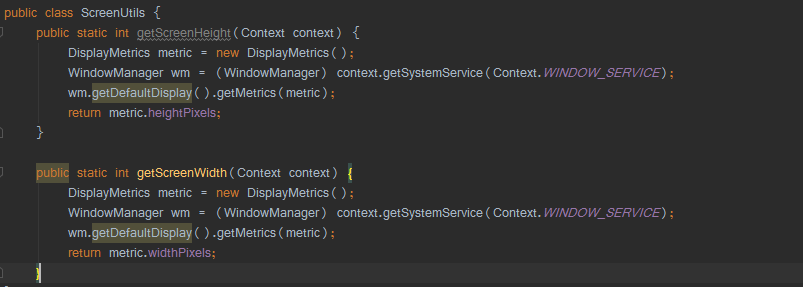
3.工具類代碼:
4.布局代碼
activity_main.xml
<?xml version="1.0" encoding="utf-8"?><androidx.constraintlayout.widget.ConstraintLayout xmlns:android="http://schemas.android.com/apk/res/android"xmlns:app="http://schemas.android.com/apk/res-auto"xmlns:tools="http://schemas.android.com/tools"android:layout_width="match_parent"android:layout_height="match_parent"><androidx.recyclerview.widget.RecyclerViewandroid:id="@+id/recyclerView"android:layout_width="match_parent"android:layout_height="match_parent"app:layout_constraintLeft_toLeftOf="parent"app:layout_constraintRight_toRightOf="parent" /></androidx.constraintlayout.widget.ConstraintLayout>
item_circle
<?xml version="1.0" encoding="utf-8"?><androidx.constraintlayout.widget.ConstraintLayout xmlns:android="http://schemas.android.com/apk/res/android"xmlns:app="http://schemas.android.com/apk/res-auto"xmlns:tools="http://schemas.android.com/tools"android:layout_width="match_parent"android:layout_height="wrap_content"android:orientation="vertical"android:padding="10dp"tools:ignore="ResourceName"><ImageViewandroid:id="@+id/iv_photo"android:layout_width="40dp"android:layout_height="40dp"android:scaleType="fitXY"android:src="@mipmap/timg" /><TextViewandroid:id="@+id/tv_name"android:layout_width="wrap_content"android:layout_height="wrap_content"android:layout_marginLeft="10dp"android:text="一笑的小館子"android:textColor="@color/color_8290AF"android:textSize="14sp"app:layout_constraintLeft_toRightOf="@+id/iv_photo" /><com.example.expandtextview.view.ExpandTextViewandroid:id="@+id/expand_textView"android:layout_width="0dp"android:layout_height="wrap_content"android:layout_marginLeft="10dp"android:ellipsize="end"android:lineSpacingExtra="3dp"android:maxLines="5"android:textSize="16sp"app:layout_constraintLeft_toRightOf="@+id/iv_photo"app:layout_constraintRight_toRightOf="parent"app:layout_constraintTop_toBottomOf="@+id/tv_name" /><ImageViewandroid:id="@+id/video_view"android:layout_width="120dp"android:layout_height="180dp"android:layout_marginLeft="10dp"android:layout_marginTop="4dp"android:background="@color/colorAccent"app:layout_constraintLeft_toRightOf="@+id/iv_photo"app:layout_constraintTop_toBottomOf="@+id/expand_textView" /><ImageViewandroid:id="@+id/videoViewBf"android:layout_width="50dp"android:layout_height="50dp"android:src="@mipmap/bf"app:layout_constraintBottom_toTopOf="@+id/video_view"app:layout_constraintLeft_toRightOf="@+id/video_view"app:layout_constraintRight_toLeftOf="@+id/video_view"app:layout_constraintTop_toBottomOf="@+id/video_view" /><TextViewandroid:id="@+id/tv_time"android:layout_width="wrap_content"android:layout_height="wrap_content"android:layout_marginLeft="10dp"android:layout_marginTop="15dp"android:text="16小時(shí)前"android:textColor="@color/black"android:textSize="12sp"app:layout_constraintLeft_toRightOf="@+id/iv_photo"app:layout_constraintTop_toBottomOf="@+id/video_view" /><TextViewandroid:id="@+id/tv_delete"android:layout_width="wrap_content"android:layout_height="wrap_content"android:layout_marginLeft="10dp"android:layout_marginTop="15dp"android:text="刪除"android:textColor="@color/black"android:textSize="12sp"app:layout_constraintLeft_toRightOf="@+id/tv_time"app:layout_constraintTop_toBottomOf="@+id/video_view" /><ImageViewandroid:id="@+id/iv_edit"android:layout_width="20dp"android:layout_height="20dp"android:layout_marginTop="15dp"android:src="@drawable/comments_drawable_blue"app:layout_constraintEnd_toEndOf="parent"app:layout_constraintTop_toBottomOf="@+id/video_view" /></androidx.constraintlayout.widget.ConstraintLayout>
dialog_like.xml
<?xml version="1.0" encoding="utf-8"?><LinearLayout xmlns:android="http://schemas.android.com/apk/res/android"xmlns:app="http://schemas.android.com/apk/res-auto"android:layout_width="match_parent"android:layout_height="38dp"android:background="@drawable/shape_remind"android:gravity="center"android:orientation="horizontal"><LinearLayoutandroid:id="@+id/ll_like"android:layout_width="0dp"android:layout_height="wrap_content"android:layout_weight="1"android:background="@drawable/selector_praise_or_comment_left_bg"android:gravity="center"android:orientation="horizontal"><ImageViewandroid:layout_width="20dp"android:layout_height="wrap_content"app:srcCompat="@drawable/heart_drawable_white" /><TextViewandroid:id="@+id/tv_like"android:layout_width="wrap_content"android:layout_height="wrap_content"android:layout_marginLeft="6dp"android:text="贊"android:textColor="@color/white"android:textSize="14sp" /></LinearLayout><LinearLayoutandroid:id="@+id/ll_comment"android:layout_width="0dp"android:layout_height="wrap_content"android:layout_weight="1"android:background="@drawable/selector_praise_or_comment_right_bg"android:gravity="center"android:orientation="horizontal"><ImageViewandroid:layout_width="20dp"android:layout_height="wrap_content"app:srcCompat="@drawable/comments_drawable_white" /><TextViewandroid:id="@+id/tv_comment"android:layout_width="wrap_content"android:layout_height="wrap_content"android:layout_marginLeft="6dp"android:text="評(píng)論"android:textColor="@color/white" /></LinearLayout></LinearLayout>
selector_praise_or_comment_right_bg.xml
<?xml version="1.0" encoding="utf-8"?><selector xmlns:android="http://schemas.android.com/apk/res/android"><item android:state_pressed="false"><shape><corners android:topRightRadius="2dp" android:bottomRightRadius="2dp" /><solid android:color="#222230" /></shape></item><item android:state_pressed="true"><shape><corners android:topRightRadius="2dp" android:bottomRightRadius="2dp" /><solid android:color="#000000" /></shape></item></selector>
selector_praise_or_comment_left_bg.xml
<?xml version="1.0" encoding="utf-8"?><selector xmlns:android="http://schemas.android.com/apk/res/android"><item android:state_pressed="false"><shape><corners android:bottomLeftRadius="2dp" android:topLeftRadius="2dp" /><solid android:color="#222230" /></shape></item><item android:state_pressed="true"><shape><corners android:bottomLeftRadius="2dp" android:topLeftRadius="2dp" /><solid android:color="#000000" /></shape></item></selector>
shape_remind.xml
<?xml version="1.0" encoding="utf-8"?><shape xmlns:android="http://schemas.android.com/apk/res/android" android:shape="rectangle"><corners android:radius="2dp" /><solid android:color="#222230" /></shape>
5.動(dòng)畫很簡單就不分析了,布局適配的代碼核心:
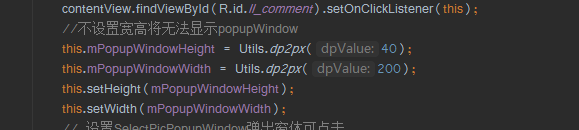
根據(jù)屏幕大小動(dòng)態(tài)適配布局,這里的寬高不是固定的,小伙伴們可以根據(jù)自己的需求進(jìn)行自定義設(shè)置.
彈窗顯示的位置:
兩種方法:showAtLocation和showAsDropDown
1.showAtLocation,例如:
showAtLocation(findViewById(R.id.search_ib), Gravity.TOP | Gravity.RIGHT,10, 10);第一個(gè)參數(shù):這個(gè)view是要能獲取到window唯一標(biāo)示的(也就是只要能獲取到window 標(biāo)示,view是什么控件都可以),應(yīng)該是標(biāo)示這個(gè)pw添加到哪個(gè)window里面,對控制pw出現(xiàn)位置沒有影響;
第二個(gè)參數(shù):請記住屏幕原點(diǎn)是屏幕的左上角。Gravity.TOP | Gravity.RIGHT指的就是屏幕的右上角,那么pw的中心點(diǎn)坐標(biāo)是(屏幕寬,0)。pw默認(rèn)是在屏幕的中間,也就是Gravity.LEFT表示pw的中心點(diǎn)坐標(biāo)是(0,1/2屏幕高);
第三、四個(gè)參數(shù):偏移量的方向與第二個(gè)參數(shù)有關(guān)。Gravity.TOP | Gravity.RIGHT,以屏幕右上角為原點(diǎn),pw往X軸負(fù)方向偏移10個(gè)像素,往Y軸正方向偏移10個(gè)像素;如果是Gravity.BOTTOM| Gravity.LEFT,以屏幕左下角為原點(diǎn),pw往X軸正方向偏移10個(gè)像素,往Y軸正方向偏移10個(gè)像素。設(shè)置Gravity.NO_GRAVITY的話,就相對屏幕左上角作為參照(即原點(diǎn)[0,0]是屏幕左上角),若設(shè)置Gravity.LEFT的話,則原點(diǎn)為 [0,1/2屏幕高],即[x=0,y=1/2屏幕高度];
注意:這個(gè)偏移量可以是正的,也可以是負(fù)的。無論偏移多大,pw是不會(huì)跑出屏幕。具體往軸的那個(gè)方向偏移,跟第二個(gè)參數(shù)有關(guān),對于Gravity.CENTER的情況,偏移量負(fù)表示往軸的負(fù)方向,正往軸的正方向
2.showAsDropDown,例如:
showAsDropDown(MainActivity.this.findViewById(R.id.logo_iv),100,0),以R.id.logo_iv的左下角為原點(diǎn),向X軸正方向偏移100個(gè)像素,Y軸方向偏移0個(gè)像素。
注意:這個(gè)偏移量可以是正的,也可以是負(fù)的。無論偏移多大,pw是不會(huì)跑出屏幕。
第一種方法的代碼如下:
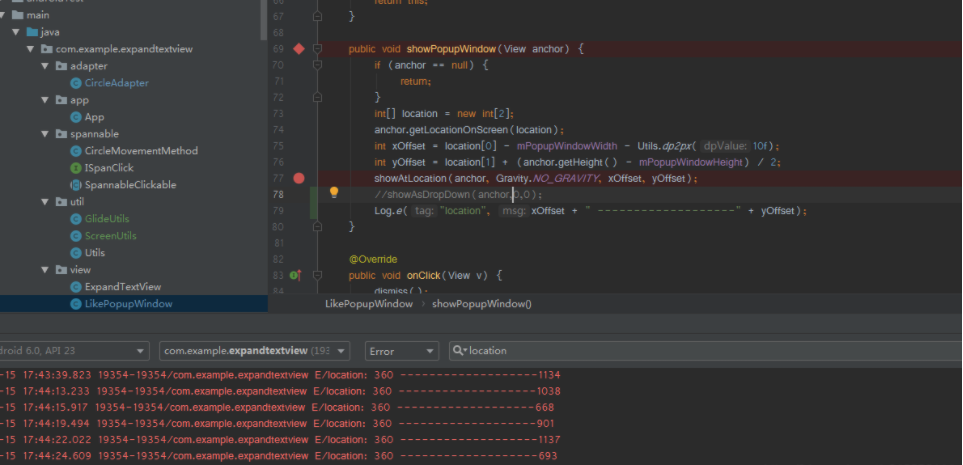
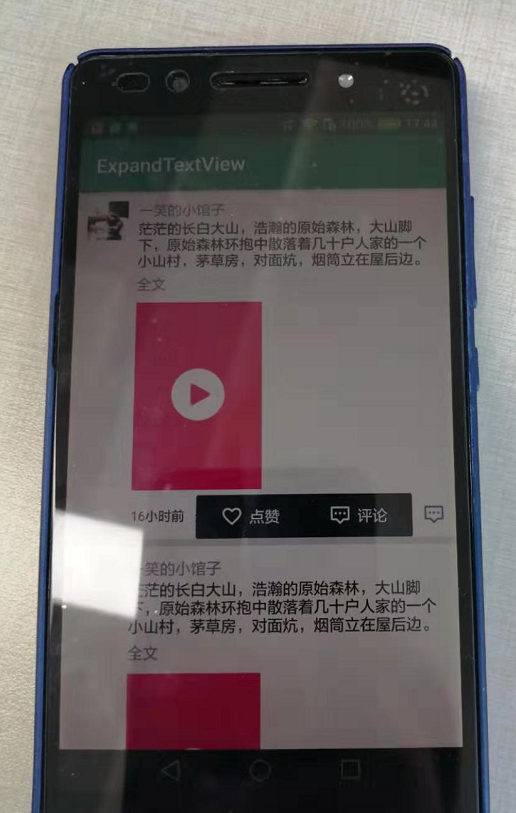
效果圖如下:
第2種方法代碼如下:
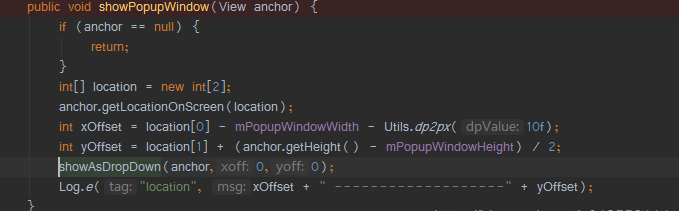
效果圖如下:
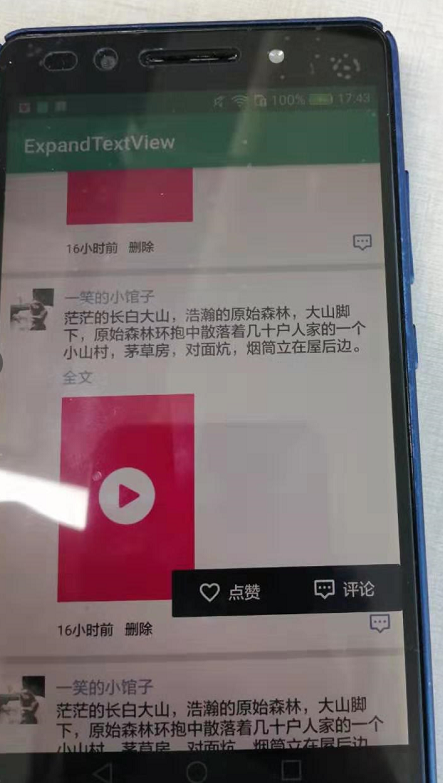
從以上兩個(gè)圖可以明顯看出,第2個(gè)位置顯示不對,微信的點(diǎn)贊評(píng)論彈框應(yīng)該是和評(píng)論按鈕平行并在左側(cè)彈出顯示,以上就是大致步驟。
源碼地址:
https://gitee.com/jackning_admin/ExpandTextView
到這里就結(jié)束啦.