
SpringBoot集成Swagger-Bootstrap-UI,頁面更清爽!
作者:youcongtech
segmentfault.com/a/1190000038170506
之前在創(chuàng)業(yè)公司待的時候,用過swagger,因為我第一天來這家公司工作,第一個任務就是做接口文檔自動化。
后來覺得它不太好用,在瀏覽技術(shù)網(wǎng)站的時候,偶然發(fā)現(xiàn)swagger-bootstrap-ui,于是便重構(gòu)了,把swagger-bootstrap-ui整合進來,后來發(fā)現(xiàn)不僅僅對我們后端有幫助,主要方便我們將接口進行歸類,同樣對安卓小伙伴也有幫助,他們可以看這個接口文檔進行聯(lián)調(diào)。當初我使用swagger-boostrap-ui的時候,那個時候還是1.x版本,如今swagger-bootsrap-ui到2.x,同時也更改名字knife4j,適用場景從過去的單體到微服務。也算是見證咱們國人自己的開源項目從小到大。
該開源項目GitHub地址:
https://github.com/xiaoymin/Swagger-Bootstrap-UI
該開源項目中文文檔地址:
https://doc.xiaominfo.com/
一、添加Maven依賴
<dependency>
????<groupId>io.springfoxgroupId>
????<artifactId>springfox-swagger2artifactId>
????<version>2.9.2version>
dependency>
<dependency>
????<groupId>com.github.xiaoymingroupId>
????<artifactId>swagger-bootstrap-uiartifactId>
????<version>1.9.6version>
dependency>
二、添加配置類
package?com.blog.tutorial.config;
import?com.github.xiaoymin.swaggerbootstrapui.annotations.EnableSwaggerBootstrapUI;
import?org.springframework.context.annotation.Bean;
import?org.springframework.context.annotation.Configuration;
import?springfox.documentation.builders.ApiInfoBuilder;
import?springfox.documentation.builders.PathSelectors;
import?springfox.documentation.builders.RequestHandlerSelectors;
import?springfox.documentation.service.ApiInfo;
import?springfox.documentation.spi.DocumentationType;
import?springfox.documentation.spring.web.plugins.Docket;
import?springfox.documentation.swagger2.annotations.EnableSwagger2;
/**
?*?@description:
?*?@author:?youcong
?*?@time:?2020/11/14?15:46
?*/@Configuration
@EnableSwagger2
@EnableSwaggerBootstrapUI
public?class?SwaggerConfiguration?{
????@Bean
?public?Docket?createRestApi()?{
????????return?new?Docket(DocumentationType.SWAGGER_2)
????????????????.apiInfo(apiInfo())
????????????????.select()
????????????????.apis(RequestHandlerSelectors.basePackage("com.blog.tutorial.controller"))
????????????????.paths(PathSelectors.any())
????????????????.build();
????}
????private?ApiInfo?apiInfo()?{
????????return?new?ApiInfoBuilder()
????????????????.title("swagger-bootstrap-ui?RESTful?APIs")
????????????????.description("swagger-bootstrap-ui")
????????????????.termsOfServiceUrl("http://localhost:5050/")
????????????????.contact("[email protected]")
????????????????.version("1.0")
????????????????.build();
????}
}
三、啟動項目
啟動項目,不報錯,然后訪問地址:
http://ip:port/doc.html 即可
效果圖,如下: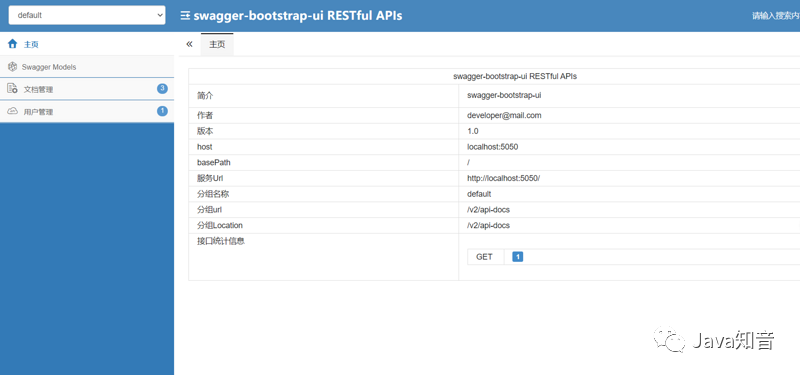
測試接口,效果圖如下: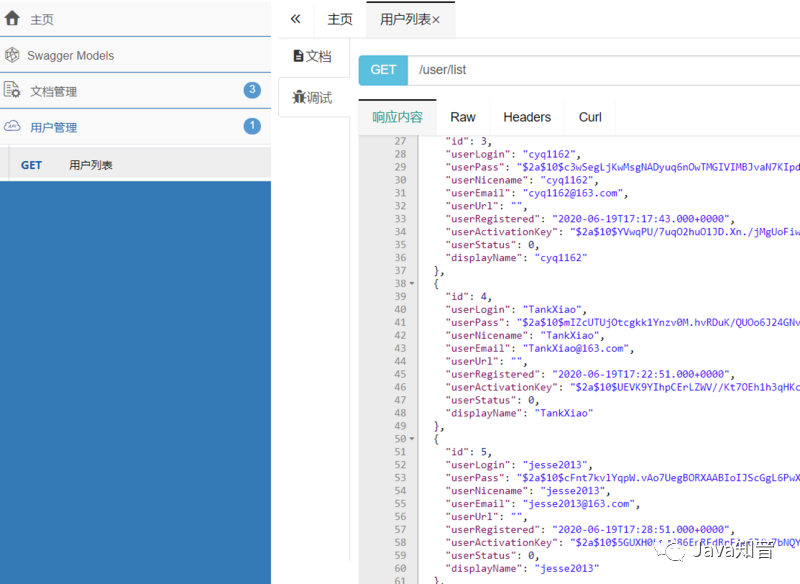
調(diào)式相當于用PostMan測試接口。
四、常用注解
和swagger一樣,swagger用的注解,swagger-bootstrap-ui仍能用。
不過結(jié)合我的開發(fā)經(jīng)驗來看,最常用的也就兩個,@Api和@ApiOperation。
@Api的效果,如圖: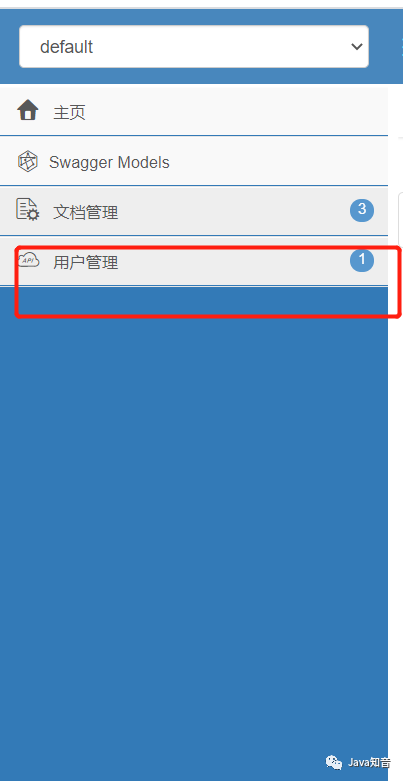
@ApiOperation的效果,如圖: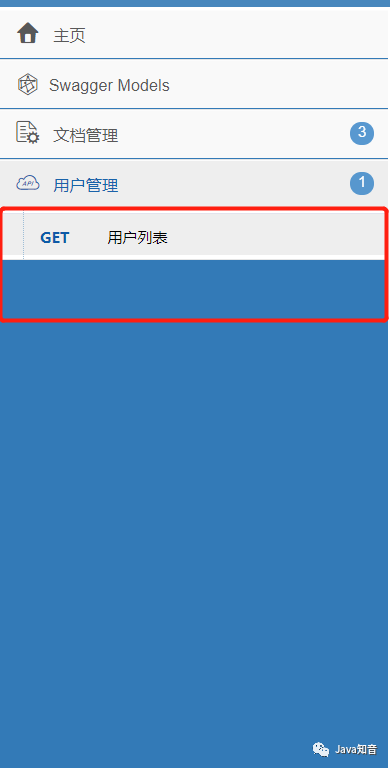
由此,我們很容易就看出來,它們的含義是什么,一個是接口分類說明,一個是接口方法說明。
例子中的Controller代碼:
package?com.blog.tutorial.controller;
import?com.blog.tutorial.entity.Users;
import?com.blog.tutorial.service.UsersService;
import?io.swagger.annotations.Api;
import?io.swagger.annotations.ApiOperation;
import?org.springframework.beans.factory.annotation.Autowired;
import?org.springframework.web.bind.annotation.GetMapping;
import?org.springframework.web.bind.annotation.RequestMapping;
import?org.springframework.web.bind.annotation.RestController;
import?java.util.List;
/**
?*?@description:
?*?@author:?youcong
?*?@time:?2020/11/14?13:27
?*/@RestController
@RequestMapping("/user")
@Api(tags?=?{"用戶管理"},?description?=?"用戶管理")
public?class?UserController?{
????@Autowired
?private?UsersService?usersService;
????@GetMapping("/list")
????@ApiOperation(value?=?"用戶列表")
????public?List?list()? {
????????return?usersService.list();
????}
}
五、其它
關于swagger整合系列,可以參考如下:
https://www.cnblogs.com/youcong/p/9011302.html
關于swagger-bootstrap整合系列,可以參考:
https://www.cnblogs.com/youcong/p/9196157.html
https://www.cnblogs.com/youcong/p/10786371.html
六、可能遇到的問題
1.訪問不到接口文檔界面白版
一般是被攔截了(shiro或springsecurity機制)或者是配置錯誤。
2.訪問接口文檔界面出來了,但掃描不到接口
主要是配置類的緣故,配置類有個包掃描,必須配置為controller路徑。
如圖所示: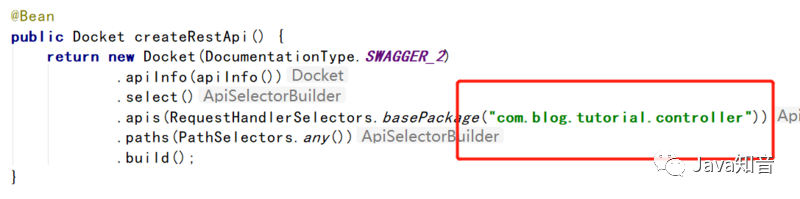
如果還有其它問題,可以去官方文檔上找,官方文檔有一個常規(guī)問題列表和解決方案,如圖所示: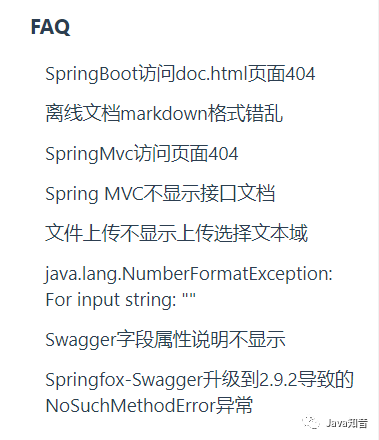
如果問題非常奇葩的話,實在解決不了(在參考官方文檔說明和搜索的前提下,仍解決不了,把問題詳細描述和關鍵性代碼提到該開源項目的issue上,向創(chuàng)造者求助)。