
輕松學(xué)pytorch – 使用多標(biāo)簽損失函數(shù)訓(xùn)練卷積網(wǎng)絡(luò)
點(diǎn)擊上方“小白學(xué)視覺(jué)”,選擇加"星標(biāo)"或“置頂”
重磅干貨,第一時(shí)間送達(dá)

大家好,我還在堅(jiān)持繼續(xù)寫(xiě),如果我沒(méi)有記錯(cuò)的話,這個(gè)是系列文章的第十五篇,pytorch中有很多非常方便使用的損失函數(shù),本文就演示了如何通過(guò)多標(biāo)簽損失函數(shù)訓(xùn)練驗(yàn)證碼識(shí)別網(wǎng)絡(luò),實(shí)現(xiàn)驗(yàn)證碼識(shí)別。
這個(gè)數(shù)據(jù)是來(lái)自Kaggle上的一個(gè)驗(yàn)證碼識(shí)別例子,作者采用的是遷移學(xué)習(xí),基于ResNet18做到的訓(xùn)練。
https://www.kaggle.com/anjalichoudhary12/captcha-with-pytorch這個(gè)數(shù)據(jù)集總計(jì)有1070張驗(yàn)證碼圖像,我把其中的1040張用作訓(xùn)練,30張作為測(cè)試,使用pytorch自定義了一個(gè)數(shù)據(jù)集類,代碼如下:
 1import torch
 2import numpy as np
 3from torch.utils.data import Dataset, DataLoader
 4from torchvision import transforms
 5import os
 6import cv2 as cv
 7
 8NUMBER = ['0', '1', '2', '3', '4', '5', '6', '7', '8', '9']
 9ALPHABET = ['a', 'b', 'c', 'd', 'e', 'f', 'g', 'h', 'i', 'j', 'k', 'l', 'm', 'n', 'o', 'p', 'q', 'r', 's', 't', 'u', 'v', 'w', 'x', 'y', 'z']
10ALL_CHAR_SET = NUMBER + ALPHABET
11ALL_CHAR_SET_LEN = len(ALL_CHAR_SET)
12MAX_CAPTCHA = 5
13
14
15def output_nums():
16    return MAX_CAPTCHA * ALL_CHAR_SET_LEN
17
18
19def encode(a):
20    onehot = [0]*ALL_CHAR_SET_LEN
21    idx = ALL_CHAR_SET.index(a)
22    onehot[idx] += 1
23    return onehot
24
25
26class CapchaDataset(Dataset):
27    def __init__(self, root_dir):
28        self.transform = transforms.Compose([transforms.ToTensor()])
29        img_files = os.listdir(root_dir)
30        self.txt_labels = []
31        self.encodes = []
32        self.images = []
33        for file_name in img_files:
34            label = file_name[:-4]
35            label_oh = []
36            for i in label:
37                label_oh += encode(i)
38            self.images.append(os.path.join(root_dir, file_name))
39            self.encodes.append(np.array(label_oh))
40            self.txt_labels.append(label)
41
42    def __len__(self):
43        return len(self.images)
44
45    def num_of_samples(self):
46        return len(self.images)
47
48    def __getitem__(self, idx):
49        if torch.is_tensor(idx):
50            idx = idx.tolist()
51            image_path = self.images[idx]
52        else:
53            image_path = self.images[idx]
54        img = cv.imread(image_path)  # BGR order
55        h, w, c = img.shape
56        # rescale
57        img = cv.resize(img, (128, 32))
58        img = (np.float32(img) /255.0 - 0.5) / 0.5
59        # H, W C to C, H, W
60        img = img.transpose((2, 0, 1))
61        sample = {'image': torch.from_numpy(img), 'encode': self.encodes[idx], 'label': self.txt_labels[idx]}
62        return sample
基于ResNet的block結(jié)構(gòu),我實(shí)現(xiàn)了一個(gè)比較簡(jiǎn)單的殘差網(wǎng)絡(luò),最后加一個(gè)全連接層輸出多個(gè)標(biāo)簽。驗(yàn)證碼是有5個(gè)字符的,每個(gè)字符的是小寫(xiě)26個(gè)字母加上0~9十個(gè)數(shù)字,總計(jì)36個(gè)類別,所以5個(gè)字符就有5x36=180個(gè)輸出,其中每個(gè)字符是獨(dú)熱編碼,這個(gè)可以從數(shù)據(jù)集類的實(shí)現(xiàn)看到。模型的輸入與輸出格式:
輸入:NCHW=Nx3x32x128
卷積層最終輸出:NCHW=Nx256x1x4
全連接層:Nx(256x4)
最終輸出層:Nx180
代碼實(shí)現(xiàn)如下:
 1class CapchaResNet(torch.nn.Module):
 2    def __init__(self):
 3        super(CapchaResNet, self).__init__()
 4        self.cnn_layers = torch.nn.Sequential(
 5            # 卷積層 (128x32x3)
 6            ResidualBlock(3, 32, 1),
 7            ResidualBlock(32, 64, 2),
 8            ResidualBlock(64, 64, 2),
 9            ResidualBlock(64, 128, 2),
10            ResidualBlock(128, 256, 2),
11            ResidualBlock(256, 256, 2),
12        )
13
14        self.fc_layers = torch.nn.Sequential(
15            torch.nn.Linear(256 * 4, output_nums()),
16        )
17
18    def forward(self, x):
19        # stack convolution layers
20        x = self.cnn_layers(x)
21        out = x.view(-1, 4 * 256)
22        out = self.fc_layers(out)
23        return out
使用多標(biāo)簽損失函數(shù),Adam優(yōu)化器,代碼實(shí)現(xiàn)如下:
 1model = CapchaResNet()
 2print(model)
 3
 4# 使用GPU
 5if train_on_gpu:
 6    model.cuda()
 7
 8ds = CapchaDataset("D:/python/pytorch_tutorial/capcha/samples")
 9num_train_samples = ds.num_of_samples()
10bs = 16
11dataloader = DataLoader(ds, batch_size=bs, shuffle=True)
12
13# 訓(xùn)練模型的次數(shù)
14num_epochs = 25
15# optimizer = torch.optim.SGD(model.parameters(), lr=0.001)
16optimizer = torch.optim.Adam(model.parameters(), lr=1e-2)
17model.train()
18
19# 損失函數(shù)
20mul_loss = torch.nn.MultiLabelSoftMarginLoss()
21index = 0
22for epoch in range(num_epochs):
23    train_loss = 0.0
24    for i_batch, sample_batched in enumerate(dataloader):
25        images_batch, oh_labels = \
26            sample_batched['image'], sample_batched['encode']
27        if train_on_gpu:
28            images_batch, oh_labels= images_batch.cuda(), oh_labels.cuda()
29        optimizer.zero_grad()
30
31        # forward pass: compute predicted outputs by passing inputs to the model
32        m_label_out_ = model(images_batch)
33        oh_labels = torch.autograd.Variable(oh_labels.float())
34
35        # calculate the batch loss
36        loss = mul_loss(m_label_out_, oh_labels)
37
38        # backward pass: compute gradient of the loss with respect to model parameters
39        loss.backward()
40
41        # perform a single optimization step (parameter update)
42        optimizer.step()
43
44        # update training loss
45        train_loss += loss.item()
46        if index % 100 == 0:
47            print('step: {} \tTraining Loss: {:.6f} '.format(index, loss.item()))
48        index += 1
49
50        # 計(jì)算平均損失
51    train_loss = train_loss / num_train_samples
52
53    # 顯示訓(xùn)練集與驗(yàn)證集的損失函數(shù)
54    print('Epoch: {} \tTraining Loss: {:.6f} '.format(epoch, train_loss))
55
56# save model
57model.eval()
58torch.save(model, 'capcha_recognize_model.pt')
調(diào)用保存之后的模型,對(duì)圖像測(cè)試代碼如下:
 1cnn_model = torch.load("./capcha_recognize_model.pt")
 2root_dir = "D:/python/pytorch_tutorial/capcha/testdata"
 3files = os.listdir(root_dir)
 4one_hot_len = ALL_CHAR_SET_LEN
 5for file in files:
 6    if os.path.isfile(os.path.join(root_dir, file)):
 7        image = cv.imread(os.path.join(root_dir, file))
 8        h, w, c = image.shape
 9        img = cv.resize(image, (128, 32))
10        img = (np.float32(img) /255.0 - 0.5) / 0.5
11        img = img.transpose((2, 0, 1))
12        x_input = torch.from_numpy(img).view(1, 3, 32, 128)
13        probs = cnn_model(x_input.cuda())
14        mul_pred_labels = probs.squeeze().cpu().tolist()
15        c0 = ALL_CHAR_SET[np.argmax(mul_pred_labels[0:one_hot_len])]
16        c1 = ALL_CHAR_SET[np.argmax(mul_pred_labels[one_hot_len:one_hot_len*2])]
17        c2 = ALL_CHAR_SET[np.argmax(mul_pred_labels[one_hot_len*2:one_hot_len*3])]
18        c3 = ALL_CHAR_SET[np.argmax(mul_pred_labels[one_hot_len*3:one_hot_len*4])]
19        c4 = ALL_CHAR_SET[np.argmax(mul_pred_labels[one_hot_len*4:one_hot_len*5])]
20        pred_txt = '%s%s%s%s%s' % (c0, c1, c2, c3, c4)
21        cv.putText(image, pred_txt, (10, 20), cv.FONT_HERSHEY_PLAIN, 1.5, (0, 0, 255), 2)
22        print("current code : %s, predict code : %s "%(file[:-4], pred_txt))
23        cv.imshow("capcha predict", image)
24        cv.waitKey(0)
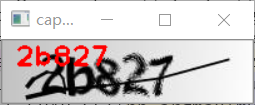
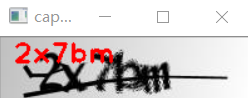
其中對(duì)輸入結(jié)果,要根據(jù)每個(gè)字符的獨(dú)熱編碼,截取成五個(gè)獨(dú)立的字符分類標(biāo)簽,然后使用argmax獲取index根據(jù)index查找類別標(biāo)簽,得到最終的驗(yàn)證碼預(yù)測(cè)字符串,代碼運(yùn)行結(jié)果如下:
好消息!
小白學(xué)視覺(jué)知識(shí)星球
開(kāi)始面向外開(kāi)放啦??????
下載1:OpenCV-Contrib擴(kuò)展模塊中文版教程 在「小白學(xué)視覺(jué)」公眾號(hào)后臺(tái)回復(fù):擴(kuò)展模塊中文教程,即可下載全網(wǎng)第一份OpenCV擴(kuò)展模塊教程中文版,涵蓋擴(kuò)展模塊安裝、SFM算法、立體視覺(jué)、目標(biāo)跟蹤、生物視覺(jué)、超分辨率處理等二十多章內(nèi)容。 下載2:Python視覺(jué)實(shí)戰(zhàn)項(xiàng)目52講 在「小白學(xué)視覺(jué)」公眾號(hào)后臺(tái)回復(fù):Python視覺(jué)實(shí)戰(zhàn)項(xiàng)目,即可下載包括圖像分割、口罩檢測(cè)、車道線檢測(cè)、車輛計(jì)數(shù)、添加眼線、車牌識(shí)別、字符識(shí)別、情緒檢測(cè)、文本內(nèi)容提取、面部識(shí)別等31個(gè)視覺(jué)實(shí)戰(zhàn)項(xiàng)目,助力快速學(xué)校計(jì)算機(jī)視覺(jué)。 下載3:OpenCV實(shí)戰(zhàn)項(xiàng)目20講 在「小白學(xué)視覺(jué)」公眾號(hào)后臺(tái)回復(fù):OpenCV實(shí)戰(zhàn)項(xiàng)目20講,即可下載含有20個(gè)基于OpenCV實(shí)現(xiàn)20個(gè)實(shí)戰(zhàn)項(xiàng)目,實(shí)現(xiàn)OpenCV學(xué)習(xí)進(jìn)階。 交流群
歡迎加入公眾號(hào)讀者群一起和同行交流,目前有SLAM、三維視覺(jué)、傳感器、自動(dòng)駕駛、計(jì)算攝影、檢測(cè)、分割、識(shí)別、醫(yī)學(xué)影像、GAN、算法競(jìng)賽等微信群(以后會(huì)逐漸細(xì)分),請(qǐng)掃描下面微信號(hào)加群,備注:”昵稱+學(xué)校/公司+研究方向“,例如:”張三 + 上海交大 + 視覺(jué)SLAM“。請(qǐng)按照格式備注,否則不予通過(guò)。添加成功后會(huì)根據(jù)研究方向邀請(qǐng)進(jìn)入相關(guān)微信群。請(qǐng)勿在群內(nèi)發(fā)送廣告,否則會(huì)請(qǐng)出群,謝謝理解~