
如何在 ASP.Net Core 中使用 MiniProfiler

web應(yīng)用程序的性能相信是大家普遍關(guān)心的一個(gè)問(wèn)題,也相信大家有很多工具可用來(lái)分析應(yīng)用程序的性能并能夠找到其中的瓶頸,MiniProfiler 就是這個(gè)領(lǐng)域中的一款產(chǎn)品,它是一款簡(jiǎn)單的,功能強(qiáng)大的web應(yīng)用分析工具,MiniProfiler 可用來(lái)幫助我們找到 慢查詢(xún), 慢響應(yīng) 等問(wèn)題。
MiniProfiler 可用在 Asp.Net 和 ASP.Net Core 中,這篇文章將會(huì)討論如何使用 MiniProfiler,并通過(guò)它找到應(yīng)用程序的性能問(wèn)題。
安裝 MiniProfiler
要想使用 MiniProfiler,需要通過(guò) nuget 引用 MiniProfiler.AspNetCore.Mvc 包,可以通過(guò) Visual Studio 2019 的 NuGet package manager 可視化界面安裝 或者 通過(guò) NuGet package manager 命令行工具輸入以下命令:
dotnet add package MiniProfiler.AspNetCore.Mvc
安裝好之后,接下來(lái)就要將 MiniProfiler 注入到 ServiceCollection 容器中,如下代碼所示:
        // This method gets called by the runtime. Use this method to add services to the container.
        public void ConfigureServices(IServiceCollection services)
        {
            services.AddControllersWithViews();

            services.AddMiniProfiler(options => options.RouteBasePath = "/profiler");
        }
注入好之后,接下來(lái)就需要使用 UseMiniProfiler 擴(kuò)展方法將其注入到 Request Pipeline 管道中,如下代碼所示:
        public void Configure(IApplicationBuilder app, IWebHostEnvironment env, ILoggerFactory loggerFactory)
        {
            app.UseMiniProfiler();

            app.UseEndpoints(endpoints =>
            {
                endpoints.MapControllerRoute(
                    name: "default",
                    pattern: "{controller=Home}/{action=Index}/{id?}");
            });
        }
然后在 _Layout.cshtml 頁(yè)面中增加如下兩行命令。
@using StackExchange.Profiling
@addTagHelper *, MiniProfiler.AspNetCore.Mvc
最后需要在 WebPage 中指定 MiniProfiler 分析窗口應(yīng)該顯示的位置,那如何做呢?在 body 標(biāo)簽內(nèi)使用 mini-profiler 標(biāo)記,如下代碼所示:
<mini-profiler position="@RenderPosition.Right" max-traces="5" />
在 ASP.Net Core MVC 中使用 MiniProfiler
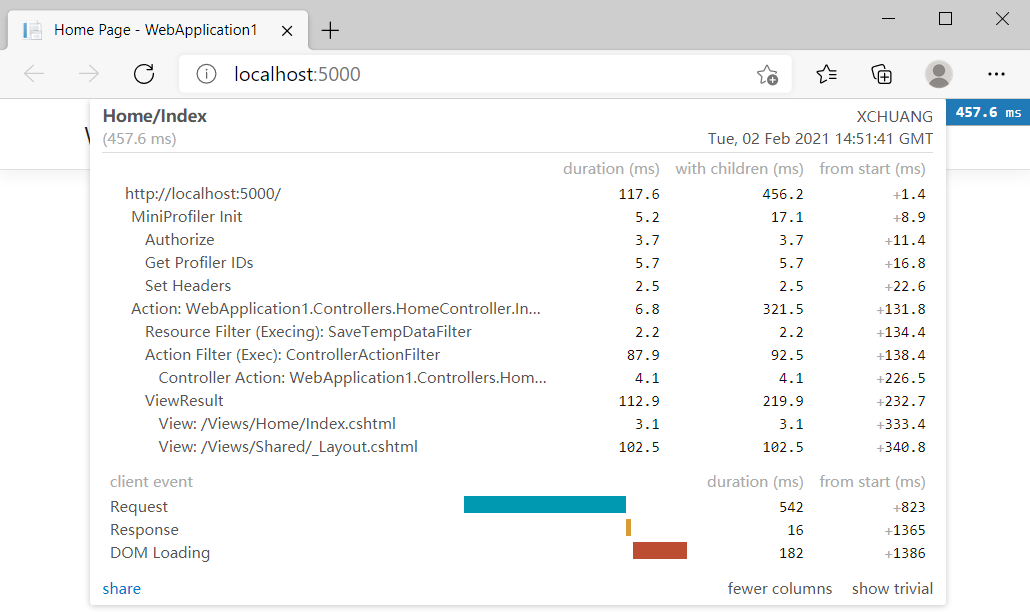
MiniProfiler 會(huì)提供 頁(yè)面加載時(shí)間 和 數(shù)據(jù)庫(kù)查詢(xún)性能指標(biāo),接下來(lái)把程序跑起來(lái),你會(huì)看到如下的性能指標(biāo)圖。
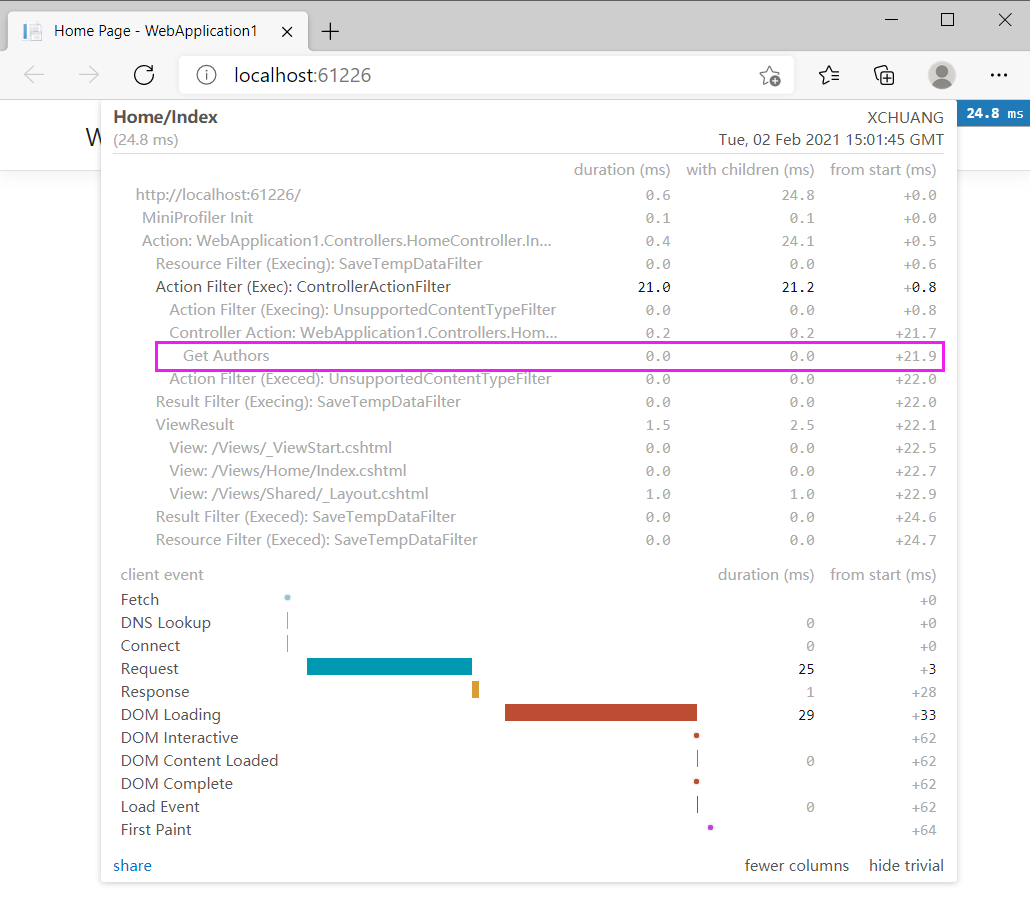
有些朋友可能就要問(wèn)了,大體時(shí)間我是知道了,那如果我只想獲取某一指定代碼塊的執(zhí)行時(shí)間呢?當(dāng)然也是可以的,下面的代碼展示了如何去實(shí)現(xiàn)。
    public class HomeController : Controller
    {
        ILogger<HomeController> logger;

        public HomeController(ILogger<HomeController> logger)
        {
            this.logger = logger;
        }

        public IActionResult Index()
        {
            var miniProfiler = MiniProfiler.Current;
            List<Author> authors = new List<Author>();

            miniProfiler.RenderIncludes(this.HttpContext);

            using (miniProfiler.Step("Get Authors"))
            {
                authors.Add(new Author() { Id = 1, FirstName = "Joydip", LastName = "Kanjilal", Address = "Hyderabad, India" });
                authors.Add(new Author() { Id = 2, FirstName = "Stephen", LastName = "Smith", Address = "NY, USA" });
                authors.Add(new Author() { Id = 3, FirstName = "Anand", LastName = "Narayanan", Address = "Chennai, India" });
                authors.Add(new Author() { Id = 4, FirstName = "Steve", LastName = "Jones", Address = "London, UK" });
            }
            return View(authors);
        }
    }

    public class Author
    {
        public int Id { get; set; }
        public string FirstName { get; set; }
        public string LastName { get; set; }
        public string Address { get; set; }
    }
從上面的代碼中可以看到,我用 using (miniProfiler.Step("Get Authors")) 做了語(yǔ)句塊標(biāo)記,理論上 mini-profile 窗口上應(yīng)該有類(lèi)似 Get Authors 指標(biāo)欄,接下來(lái)把程序跑起來(lái),一起來(lái)看看效果。
除了順向操作,你也可以指定讓某些代碼塊不要顯示在 mini-profile 中,需要做的是調(diào)用 Ignore() 即可,如下代碼所示:
using (MiniProfiler.Current.Ignore())
{
  // Write code here that you don't
  // want MiniProfiler to profile
}
使用 MiniProfile 分析 ADO.NET 查詢(xún)
除了做一些常規(guī)的頁(yè)面分析,還可以直接對(duì) ADO.NET 查詢(xún)性能進(jìn)行分析,這就????了,要這么做的話(huà),需要使用 ProfileDbConnection 和 ProfileDbCommand 即可,如下代碼所示:
        public IActionResult Index()
        {
            using (SqlConnection connection = new SqlConnection(@"Data Source=.; Initial Catalog=PYZ_L; Trusted_Connection=Yes"))
            {
                using (ProfiledDbConnection profiledDbConnection = new ProfiledDbConnection(connection, MiniProfiler.Current))
                {
                    if (profiledDbConnection.State != System.Data.ConnectionState.Open)
                    {
                        profiledDbConnection.Open();
                    }

                    using (SqlCommand command = new SqlCommand("Select * From Clothes", connection))
                    {
                        using (ProfiledDbCommand profiledDbCommand = new ProfiledDbCommand(command, connection, MiniProfiler.Current))
                        {
                            var data = profiledDbCommand.ExecuteReader();
                            //Write code here to populate the list of Authors
                        }
                    }
                }
            }

            return View();
        }
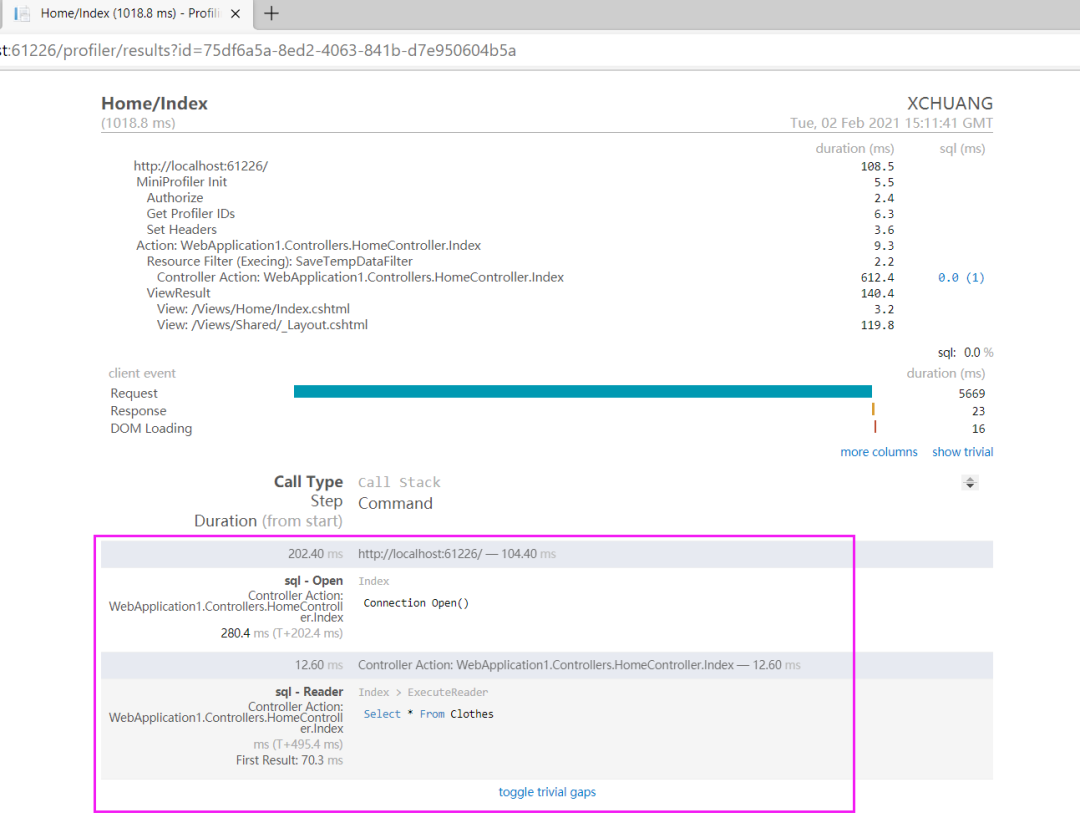
從上圖可以看到,確實(shí)對(duì) ADO.NET 查詢(xún)有著清晰的分析,相信在幫助大家分析問(wèn)題時(shí)很有幫助。
MiniProfiler 是一個(gè)可應(yīng)用于 .NET, Ruby, Go 和 Node.js 的性能分析工具,你可以使用 MiniProfiler 去分析 Dapper,Linq2SQL,Entity Framework 所使用的sql的查詢(xún)性能,此外 MimiProfile 之所以 Mini,意味著它介入到你的應(yīng)用程序中所帶來(lái)的性能開(kāi)銷(xiāo)微乎其微,所以大家可放心的丟到生產(chǎn)上去吧!
譯文鏈接:https://www.infoworld.com/article/3330560/how-to-use-miniprofiler-in-aspnet-core.html
【推薦】.NET Core開(kāi)發(fā)實(shí)戰(zhàn)視頻課程 ★★★
.NET Core實(shí)戰(zhàn)項(xiàng)目之CMS 第一章 入門(mén)篇-開(kāi)篇及總體規(guī)劃
【.NET Core微服務(wù)實(shí)戰(zhàn)-統(tǒng)一身份認(rèn)證】開(kāi)篇及目錄索引
Redis基本使用及百億數(shù)據(jù)量中的使用技巧分享(附視頻地址及觀看指南)
.NET Core中的一個(gè)接口多種實(shí)現(xiàn)的依賴(lài)注入與動(dòng)態(tài)選擇看這篇就夠了
10個(gè)小技巧助您寫(xiě)出高性能的ASP.NET Core代碼
用abp vNext快速開(kāi)發(fā)Quartz.NET定時(shí)任務(wù)管理界面
在ASP.NET Core中創(chuàng)建基于Quartz.NET托管服務(wù)輕松實(shí)現(xiàn)作業(yè)調(diào)度
現(xiàn)身說(shuō)法:實(shí)際業(yè)務(wù)出發(fā)分析百億數(shù)據(jù)量下的多表查詢(xún)優(yōu)化