
【深入淺出】Vue3 虛擬 DOM
關(guān)注并將「趣談前端」設(shè)為星標(biāo)
每日定時(shí)推送技術(shù)干貨/優(yōu)秀開源/技術(shù)思維
序言
首發(fā)在我的博客 深入 Vue3 虛擬 DOM
譯自:diving-into-the-vue-3s-virtual-dom-medium
作者:Lachlan Miller
此篇我們將深入 Vue3 虛擬 DOM,以及了解它是如何遍歷找到對(duì)應(yīng) vnode 的。
多數(shù)情況下我們不需要考慮 Vue 組件內(nèi)部是如何構(gòu)成的。但有一些庫會(huì)幫助我們理解,比如 Vue Test Utils 的 findComponent 函數(shù)。還有一個(gè)我們都應(yīng)該很熟悉的 Vue 開發(fā)工具 —— Vue DevTools,它顯示了應(yīng)用的組件層次結(jié)構(gòu),并且我們可以對(duì)它進(jìn)行編輯操作等。
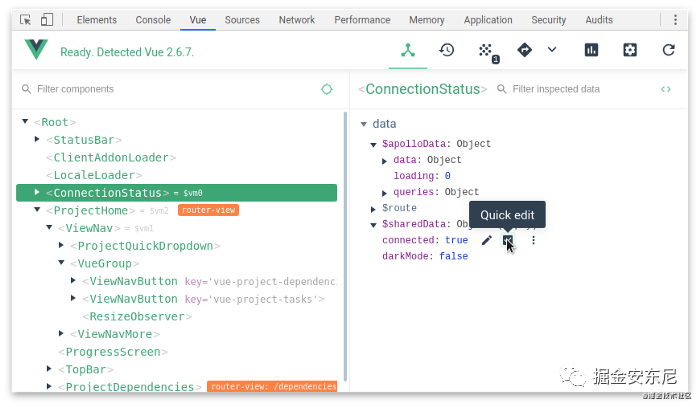
我們本篇要做的是:實(shí)現(xiàn) Vue Test Utils API 的一部分,即 findComponent 函數(shù)。
設(shè)計(jì) findComponent
首先,我們都知道虛擬 DOM 是基于“提升性能”提出的,當(dāng)數(shù)據(jù)發(fā)生變化時(shí),Vue 會(huì)判斷此是否需要進(jìn)行更新、或進(jìn)行表達(dá)式的計(jì)算、或進(jìn)行最終的 DOM 更新。
比如這樣:
- div
  - span (show: true)
    - 'Visible'
它的內(nèi)部層次關(guān)系是:
HTMLDivElement -> HTMLSpanElement -> TextNode
如果 show 屬性變成 false。Vue 虛擬 DOM 會(huì)進(jìn)行如下更新:
- div
  - span (show: false)
    - 'Visible'
接著,Vue 會(huì)更新 DOM,移除'span' 元素。
那么,我們?cè)O(shè)想一下,findComponent 函數(shù),它的調(diào)用可能會(huì)是類似這樣的結(jié)構(gòu):
const { createApp } = require('vue')

const App = {
  template: `
    <C>
      <B>
        <A />
      </B>
    </C>
  `
}

const app = createApp(App).mount('#app')

const component = findComponent(A, { within: app })

// 我們通過 findComponent 方法找到了 <A/> 標(biāo)簽。
打印 findComponent
接著,我們先寫幾個(gè)簡單組件,如下:
// import jsdom-global. We need a global `document` for this to work.
require('jsdom-global')()
const { createApp, h } = require('vue')

// some components
const A = {
  name: 'A',
  data() {
    return { msg: 'msg' }
  },
  render() {
    return h('div', 'A')
  }
}

const B = {
  name: 'B',
  render() {
    return h('span', h(A))
  }
}

const C = {
  name: 'C',
  data() {
    return { foo: 'bar' }
  },
  render() {
    return h('p', { id: 'a', foo: this.foo }, h(B))
  }
}

// mount the app!
const app = createApp(C).mount(document.createElement('div'))
我們需要在 Node.js v14+ 環(huán)境,因?yàn)槲覀円玫?nbsp;可選鏈。且需要安裝 Vue、jsdom 和 jsdom-global。
我們可以看到 A , B , C 三個(gè)組件,其中 A , C 組件有 data 屬性,它會(huì)幫助我們深入研究 VDOM。
你可以打印試試:
console.log(app)
console.log(Object.keys(app))
結(jié)果為 {},因?yàn)?nbsp;Object.keys 只會(huì)顯示可枚舉的屬性。
我們可以嘗試打印隱藏的不可枚舉的屬性:
console.log(app.$)
可以得到大量輸出信息:
<ref *1> {
  uid: 0,
  vnode: {
    __v_isVNode: true,
    __v_skip: true,
    type: {
      name: 'C',
      data: [Function: data],
      render: [Function: render],
      __props: []
  }, // hundreds of lines ...
再打印:
console.log(Object.keys(app.$))
輸出:
Press ENTER or type command to continue
[
'uid', 'vnode', 'type', 'parent', 'appContext', 'root', 'next', 'subTree', 'update', 'render', 'proxy', 'withProxy', 'effects', 'provides', 'accessCache', 'renderCache', 'ctx', 'data', 'props', 'attrs', 'slots', 'refs', 'setupState', 'setupContext', 'suspense', 'asyncDep', 'asyncResolved', 'isMounted', 'isUnmounted', 'isDeactivated', 'bc', 'c', 'bm', 'm', 'bu', 'u', 'um', 'bum', 'da', 'a', 'rtg', 'rtc', 'ec', 'emit', 'emitted'
]
我們可以看到一些很熟悉的屬性:比如 slots、data,suspense 是一個(gè)新特性,emit 無需多言。還有比如 attrs、bc、 c、bm 這些是生命周期鉤子:bc 是 beforeCreate, c 是 created。也有一些內(nèi)部唯一的生命周期鉤子,如 rtg,也就是 renderTriggered, 當(dāng) props 或 data 發(fā)生變化時(shí),用于更新操作,從而再渲染。
本篇我們需要特別關(guān)注的是:
vnode、subTree、component、type和children。
匹配 findComponent
來先看 vnode,它有很多屬性,我們需要關(guān)注的是 type 和 component 這兩個(gè)。
// 打印 console.log(app.$.vnode.component)
console.log(app.$.vnode.component)
<ref *1> {
  uid: 0,
  vnode: {
    __v_isVNode: true,
    __v_skip: true,
    type: {
      name: 'C',
      data: [Function: data],
      render: [Function: render],
      __props: []
  }, // ... many more things ... } }
type 很有意思!它與我們之前定義的 C 組件一樣,我們可以看到它也有 [Function: data](我們?cè)谇懊娑x了一個(gè) msg 數(shù)據(jù)是我們的查找目標(biāo))。實(shí)際上我們嘗試可以做以下打印:
console.log(C === app.$.vnode.component.type) //=> true
天吶!二者竟然是相等的!??
console.log(C === app.$.vnode.type) //=> true
這樣也是相等的!??
(你是否會(huì)疑問這兩個(gè)屬性為什么會(huì)指向同一個(gè)對(duì)象?這里先暫且按下不表、自行探索。)
無論如何,我們算是得到了尋找到組件的途徑。
通過這里的找尋過程,我們還能再進(jìn)一步得到以下相等關(guān)系:
console.log(
  app.$
  .subTree.children[0].component
  .subTree.children[0].component.type === A) //=> true
在本例中,div 節(jié)點(diǎn)的 subTree.children 數(shù)組長度是 2 。我們知道了虛擬 DOM 的遞歸機(jī)制,就可以沿著這個(gè)方向:subTree -> children -> component 來給出我們的遞歸解決方案。
實(shí)現(xiàn) findComponent
我們首先實(shí)現(xiàn) matches 函數(shù),用于判斷是當(dāng)前 vnode 節(jié)點(diǎn)和目標(biāo)是否相等。
function matches(vnode, target) {
  return vnode?.type === target
}
然后是 findComponent 函數(shù),它是我們調(diào)用并查找內(nèi)部遞歸函數(shù)的公共 API。
function findComponent(comp, { within }) {
  const result = find([within.$], comp)
  if (result) {
    return result
  }
}
此處的 find 方法的實(shí)現(xiàn)是我們要重點(diǎn)討論的。
我們知道寫遞歸,最重要的是判斷什么時(shí)候結(jié)束 loop,所以 find 函數(shù)應(yīng)該先是這樣的:
function find(vnodes, target) {
  if (!Array.isArray(vnodes)) {
    return
  }
}
然后,在遍歷 vnode 時(shí),如果找到匹配的組件,則將其返回。如果找不到匹配的組件,則可能需要檢查 vnode.subTree.children 是否已定義,從而更深層次的查詢及匹配。最后,如果都沒有,我們則返回累加器 acc。所以,代碼如下:
function find(vnodes, target) {
  if (!Array.isArray(vnodes)) {
    return
  }

  return vnodes.reduce((acc, vnode) => {
    if (matches(vnode, target)) {
      return vnode
    }

    if (vnode?.subTree?.children) {
      return find(vnode.subTree.children, target)
    }

    return acc
  }, {})
}
如果你在 if (vnode?.subTree?.children) { 這里進(jìn)行一個(gè)打印 console.log,你能找到 B 組件,但是我們的目標(biāo) A 組件的路徑如下:
app.$
  .subTree.children[0].component
  .subTree.children[0].component.type === A) //=> true
所以我們?cè)俅握{(diào)用了 find 方法:find(vnode.subTree.children, target),在下一次迭代中查找的第一個(gè)參數(shù)將是app.$.subTree.children,它是 vnode 的數(shù)組。我們不僅需要檢查vnode.subTree.children,還需要檢查vnode.component.subTree。
所以,最后 find 方法如下:
function find(vnodes, target) {
  if (!Array.isArray(vnodes)) {
    return
  }

  return vnodes.reduce((acc, vnode) => {
    if (matches(vnode, target)) {
      return vnode
    }

    if (vnode?.subTree?.children) {
      return find(vnode.subTree.children, target)
    }

    if (vnode?.component?.subTree) {
      return find(vnode.component.subTree.children, target)
    }

    return acc
  }, {})
}
然后我們?cè)僬{(diào)用它:
const result = findComponent(A, { within: app })

console.log( result.component.proxy.msg ) // => 'msg'
我們成功了!通過 findComponent,找到了 msg!
如果你以前使用過 Vue Test Utils,可能見過類似的東西 wrapper.vm.msg,它實(shí)際上是在內(nèi)部訪問 proxy(對(duì)于Vue 3)或 vm(對(duì)于Vue 2)。
小結(jié)
本篇的實(shí)現(xiàn)并非完美,現(xiàn)實(shí)實(shí)現(xiàn)上還需要執(zhí)行更多檢查。例如,如果使用 template或 Suspense組件時(shí),需要作更多判斷。不過這些你可以在 Vue Test Utils 源碼 中可以看到,希望能幫助你進(jìn)一步理解虛擬 DOM。
?? 看完三件事
如果你覺得這篇內(nèi)容對(duì)你挺有啟發(fā),我想邀請(qǐng)你幫我三個(gè)小忙:
點(diǎn)個(gè)【在看】,或者分享轉(zhuǎn)發(fā),讓更多的人也能看到這篇內(nèi)容 關(guān)注公眾號(hào)【趣談前端】,定期分享 工程化 / 可視化 / 低代碼 / 優(yōu)秀開源。

Dooring可視化搭建平臺(tái)數(shù)據(jù)源設(shè)計(jì)剖析
基于Koa + React + TS從零開發(fā)全棧文檔編輯器(進(jìn)階實(shí)戰(zhàn))
點(diǎn)個(gè)在看你最好看
