
SpringBoot+Vue項(xiàng)目實(shí)戰(zhàn)之前后端開(kāi)發(fā)實(shí)現(xiàn)增刪改查
場(chǎng)景:公司要開(kāi)發(fā)一個(gè)新的項(xiàng)目,但是我們的前端就一個(gè),還要忙著維護(hù)處理其他的項(xiàng)目,但是后端人員比較多,所以就要求后臺(tái)管理系統(tǒng)的頁(yè)面由后端人員開(kāi)發(fā),實(shí)在不會(huì)的找前端協(xié)助,這就沒(méi)辦法了,只能自己上了!
前言:登錄頁(yè)面實(shí)現(xiàn)好后,這次實(shí)現(xiàn)和后端的交互,實(shí)現(xiàn)我們經(jīng)常使用的增刪改查,其實(shí)就是簡(jiǎn)單的實(shí)現(xiàn)發(fā)送請(qǐng)求調(diào)用后端編寫(xiě)好的接口,再根據(jù)返回的結(jié)果動(dòng)態(tài)渲染頁(yè)面。本次代碼有點(diǎn)多,粘貼主要部分,需要的可在文章末尾下載項(xiàng)目
前端項(xiàng)目
先看下這次實(shí)現(xiàn)主要用到的頁(yè)面
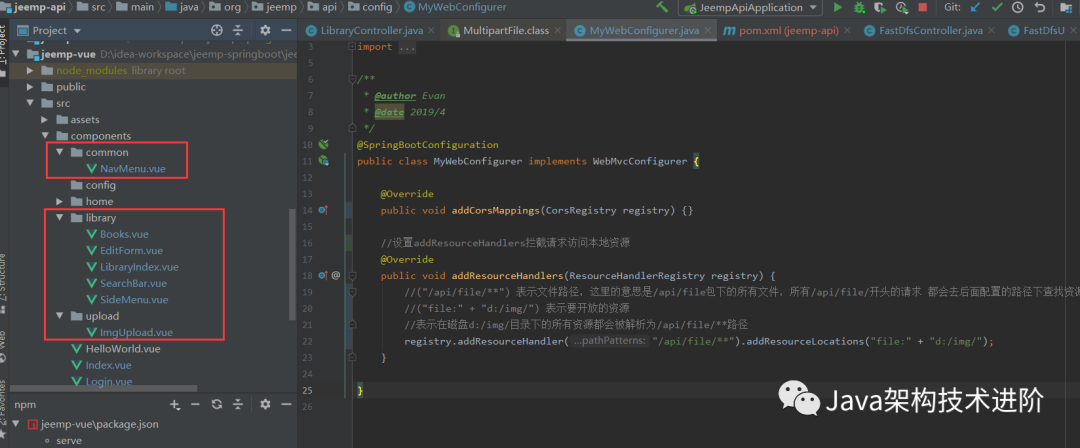
接下來(lái)就是粘貼主要代碼
EditForm.vue
<template>
    <div>
        <i class="el-icon-circle-plus-outline"  @click="dialogFormVisible = true"></i>
        <el-dialog
                title="添加/修改圖書(shū)"
                :visible.sync="dialogFormVisible"
                @close="clear">
            <el-form v-model="form" style="text-align: left" ref="dataForm">
                <el-form-item label="書(shū)名" :label-width="formLabelWidth" prop="title">
                    <el-input v-model="form.title" autocomplete="off" placeholder="不加《》"></el-input>
                </el-form-item>
                <el-form-item label="作者" :label-width="formLabelWidth" prop="author">
                    <el-input v-model="form.author" autocomplete="off"></el-input>
                </el-form-item>
                <el-form-item label="出版日期" :label-width="formLabelWidth" prop="date">
                    <el-input v-model="form.date" autocomplete="off"></el-input>
                </el-form-item>
                <el-form-item label="出版社" :label-width="formLabelWidth" prop="press">
                    <el-input v-model="form.press" autocomplete="off"></el-input>
                </el-form-item>
                <el-form-item label="封面" :label-width="formLabelWidth" prop="cover">
                    <el-input v-model="form.cover" autocomplete="off" placeholder="圖片 URL"></el-input>
                    <img-upload @onUpload="uploadImg" ref="imgUpload"></img-upload>
                </el-form-item>
                <el-form-item label="簡(jiǎn)介" :label-width="formLabelWidth" prop="abs">
                    <el-input type="textarea" v-model="form.abs" autocomplete="off"></el-input>
                </el-form-item>
                <el-form-item label="分類(lèi)" :label-width="formLabelWidth" prop="cid">
                    <el-select v-model="form.category.id" placeholder="請(qǐng)選擇分類(lèi)">
                        <el-option label="文學(xué)" value="1"></el-option>
                        <el-option label="流行" value="2"></el-option>
                        <el-option label="文化" value="3"></el-option>
                        <el-option label="生活" value="4"></el-option>
                        <el-option label="經(jīng)管" value="5"></el-option>
                        <el-option label="科技" value="6"></el-option>
                    </el-select>
                </el-form-item>
                <el-form-item prop="id" style="height: 0">
                    <el-input type="hidden" v-model="form.id" autocomplete="off"></el-input>
                </el-form-item>
            </el-form>
            <div slot="footer" class="dialog-footer">
                <el-button @click="dialogFormVisible = false">取 消</el-button>
                <el-button type="primary" @click="onSubmit">確 定</el-button>
            </div>
        </el-dialog>
    </div>
</template>

<script>
    import ImgUpload from '../upload/ImgUpload'
    export default {
        name: 'EditForm',
        components: {ImgUpload},
        data () {
            return {
                dialogFormVisible: false,
                form: {
                    id: '',
                    title: '',
                    author: '',
                    date: '',
                    press: '',
                    cover: '',
                    abs: '',
                    category: {
                        id: '',
                        name: ''
                    }
                },
                formLabelWidth: '120px'
            }
        },
        methods: {
            clear () {
                this.form = {
                    id: '',
                    title: '',
                    author: '',
                    date: '',
                    press: '',
                    cover: '',
                    abs: '',
                    category: ''
                }
            },
            onSubmit () {
                this.$axios
                    .post('/books', {
                        id: this.form.id,
                        cover: this.form.cover,
                        title: this.form.title,
                        author: this.form.author,
                        date: this.form.date,
                        press: this.form.press,
                        abs: this.form.abs,
                        category: this.form.category
                    }).then(resp => {
                    if (resp && resp.status === 200) {
                        this.dialogFormVisible = false
                        this.$emit('onSubmit')
                    }
                })
            },
            uploadImg () {
                this.form.cover = this.$refs.imgUpload.url
            }
        }
    }
</script>

<style scoped>
    .el-icon-circle-plus-outline {
        margin: 50px 0 0 20px;
        font-size: 100px;
        float: left;
        cursor: pointer;
    }
</style>
LibraryIndex.vue
<template>
    <el-container>
        <el-aside style="width: 200px;margin-top: 20px">
            <switch></switch>
            <SideMenu @indexSelect="listByCategory" ref="sideMenu"></SideMenu>
        </el-aside>
        <el-main>
            <books class="books-area" ref="booksArea"></books>
        </el-main>
    </el-container>
</template>

<script>
    import SideMenu from './SideMenu'
    import Books from './Books'
    export default {
        name: "LibraryIndex",
        components: {SideMenu,Books},
        methods: {
            listByCategory () {
                var _this = this
                var cid = this.$refs.sideMenu.cid
                var url = 'categories/' + cid + '/books'
                this.$axios.get(url).then(resp => {
                    if (resp && resp.status === 200) {
                        _this.$refs.booksArea.books = resp.data
                    }
                })
            }
        }
    }
</script>

<style scoped>
    .books-area {
        width: 990px;
        margin-left: auto;
        margin-right: auto;
    }
</style>
后端
LibraryController
package org.jeemp.api.controller;

import org.jeemp.api.pojo.Book;
import org.jeemp.api.service.BookService;
import org.jeemp.api.util.StringUtils;
import org.springframework.beans.factory.annotation.Autowired;
import org.springframework.web.bind.annotation.*;
import org.springframework.web.multipart.MultipartFile;

import java.io.File;
import java.io.IOException;
import java.util.List;

/**
 * @author JackRen
 * @date 2021-03-07 17:17
 * @description:
 */
@RestController
public class LibraryController {

    @Autowired
    BookService bookService;

    @GetMapping("/api/books")
    public List<Book> list() throws Exception {
        return bookService.list();
    }

    @PostMapping("/api/books")
    public Book addOrUpdate(@RequestBody Book book) throws Exception {
        bookService.addOrUpdate(book);
        return book;
    }

    @PostMapping("/api/delete")
    public void delete(@RequestBody Book book) throws Exception {
        bookService.deleteById(book.getId());
    }

    @GetMapping("/api/categories/{cid}/books")
    public List<Book> listByCategory(@PathVariable("cid") int cid) throws Exception {
        if (0 != cid) {
            return bookService.listByCategory(cid);
        } else {
            return list();
        }
    }

    @GetMapping("/api/search")
    public List<Book> searchResult(@RequestParam("keywords") String keywords) {
        // 關(guān)鍵詞為空時(shí)查詢出所有書(shū)籍
        if ("".equals(keywords)) {
            return bookService.list();
        } else {
            return bookService.Search(keywords);
        }
    }


}
FastDfsController
package org.jeemp.api.controller;

import org.apache.commons.io.IOUtils;
import org.jeemp.api.util.FastDfsUtil;
import org.springframework.beans.factory.annotation.Autowired;
import org.springframework.web.bind.annotation.GetMapping;
import org.springframework.web.bind.annotation.PostMapping;
import org.springframework.web.bind.annotation.RequestMapping;
import org.springframework.web.bind.annotation.RestController;
import org.springframework.web.multipart.MultipartFile;

import javax.servlet.http.HttpServletResponse;
import java.io.ByteArrayInputStream;
import java.io.IOException;
import java.net.URLEncoder;
import java.util.logging.Logger;

/**
 * @author JackRen
 * @date 2021-02-05 16:26
 * @description:
 */
@RestController
@RequestMapping("/fastDfs")
public class FastDfsController {

    private static Logger logger = Logger.getLogger("FastDfsController");

    @Autowired
    private FastDfsUtil fastDfsUtil;

    @PostMapping("/upload")
    public String uploadFile(MultipartFile file) throws IOException {
        String s = fastDfsUtil.uploadFile(file);
        String resAccessUrl = fastDfsUtil.getResAccessUrl(s);
        System.out.println(resAccessUrl);
        return resAccessUrl;
    }

    @GetMapping("/download")
    public void downloadFile(String filePath, HttpServletResponse response) throws IOException {
        byte[] bytes = fastDfsUtil.downloadFile(filePath);
        String fileName = "哈哈.jpg";
        response.setContentType("application/force-download");// 設(shè)置強(qiáng)制下載不打開(kāi)
        //方式一
        // fileName=new String(fileName.getBytes(), "ISO8859-1")
        //方式二
        fileName = URLEncoder.encode(fileName, "utf-8");
        response.setHeader("Content-disposition", "attachment;filename=" + fileName);
        IOUtils.write(bytes, response.getOutputStream());
    }

    /**
     * 流媒體的方式播放視頻,只能從頭看到尾,不能手動(dòng)點(diǎn)擊重新看已經(jīng)看過(guò)的內(nèi)容
     * @param filePath
     * @param response
     * @throws IOException
     */
    @GetMapping("/play")
    public void streamMedia(String filePath, HttpServletResponse response) throws IOException {
        byte[] bytes = fastDfsUtil.downloadFile(filePath);
        IOUtils.copy(new ByteArrayInputStream(bytes), response.getOutputStream());
        response.flushBuffer();
    }

    @GetMapping("/delete")
    public void deleteFile(String filePath) {
        Boolean result = fastDfsUtil.deleteFile(filePath);
    }

}
項(xiàng)目啟動(dòng)后會(huì)出現(xiàn)跨域請(qǐng)求問(wèn)題,加上下面的類(lèi):
CorsConfig
package org.jeemp.api.config;

import org.springframework.core.Ordered;
import org.springframework.core.annotation.Order;
import org.springframework.stereotype.Component;

import javax.servlet.*;
import javax.servlet.http.HttpServletRequest;
import javax.servlet.http.HttpServletResponse;
import java.io.IOException;

/**
 * @author JackRen
 * @date 2021/3/7
 * 解決跨域問(wèn)題
 **/
@Component
@Order(Ordered.HIGHEST_PRECEDENCE)
public class CorsConfig implements Filter {

    @Override
    public void init(FilterConfig filterConfig) throws ServletException {

    }

    @Override
    public void doFilter(ServletRequest req, ServletResponse res, FilterChain chain) throws IOException, ServletException {
        HttpServletResponse response = (HttpServletResponse) res;
        HttpServletRequest request = (HttpServletRequest) req;
        //允許所有的域訪問(wèn)
        response.setHeader("Access-Control-Allow-Origin", "*");
        //允許所有方式的請(qǐng)求
        response.setHeader("Access-Control-Allow-Methods", "*");
        //頭信息緩存有效時(shí)長(zhǎng)(如果不設(shè) Chromium 同時(shí)規(guī)定了一個(gè)默認(rèn)值 5 秒),沒(méi)有緩存將已OPTIONS進(jìn)行預(yù)請(qǐng)求
        response.setHeader("Access-Control-Max-Age", "3600");
        //允許的頭信息
        response.setHeader("Access-Control-Allow-Headers", "*");

        response.setStatus(HttpServletResponse.SC_OK);

        if ("OPTIONS".equalsIgnoreCase(request.getMethod())) {
            response.setStatus(HttpServletResponse.SC_OK);
        } else {
            chain.doFilter(request,response);
        }


    }

    @Override
    public void destroy() {

    }
}
測(cè)試
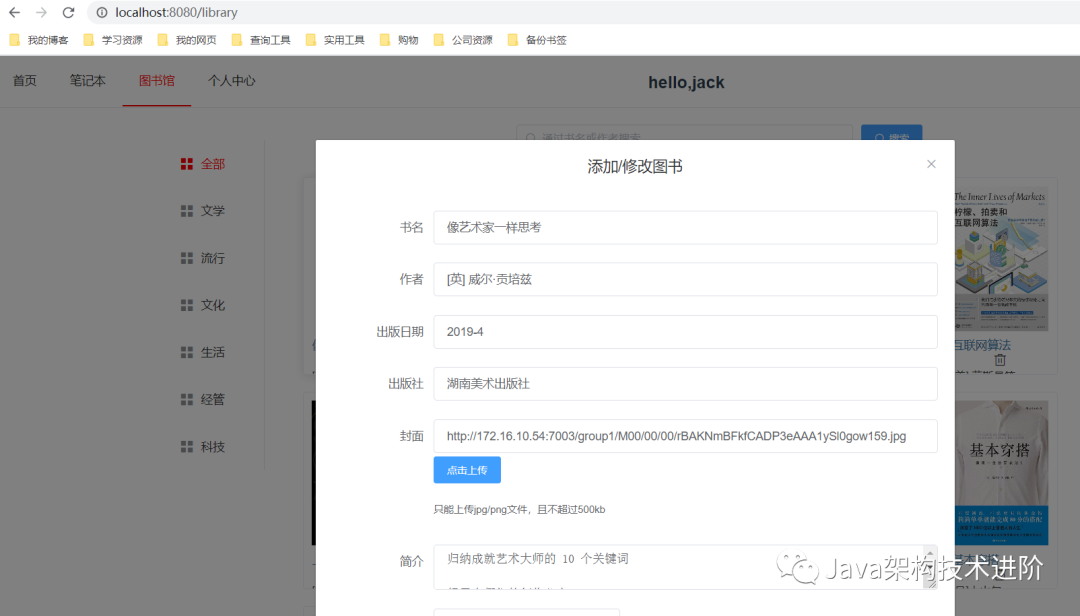
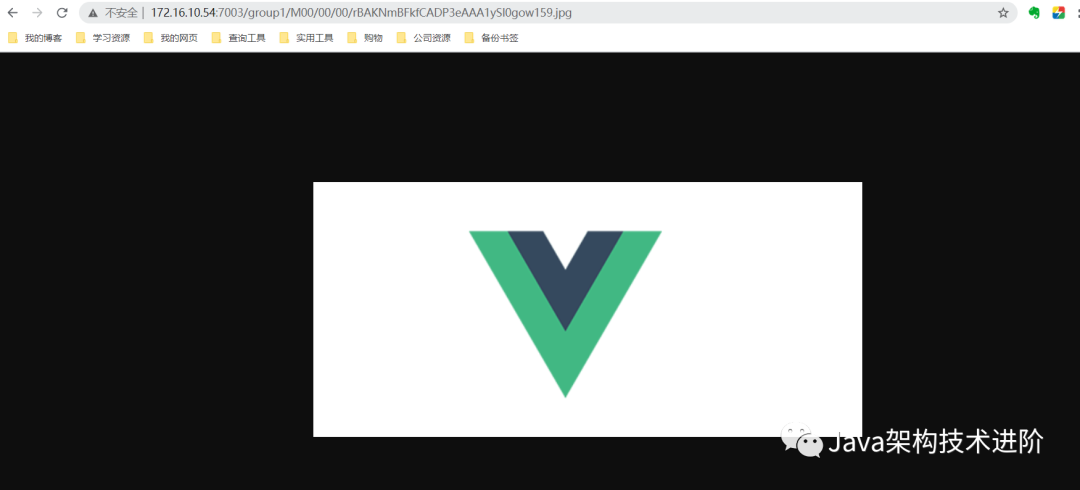
項(xiàng)目下載地址
鏈接:https://pan.baidu.com/s/1VtsiBvkNpicODIHbS_sRIw
提取碼:2gby
復(fù)制這段內(nèi)容后打開(kāi)百度網(wǎng)盤(pán)手機(jī)App,操作更方便哦評(píng)論
圖片
表情