
【Flutter】 五彩紙屑動畫效果

在在這個博客中,我們將「探索 Flutter 中的五彩紙屑動畫」。我們將看到如何實現(xiàn)五彩紙屑動畫的演示程序,并在您的 flutter 應(yīng)用程序中使用 「confetti」 包展示多彩的爆炸效果。
confetti 地址:https://pub.dev/packages/confetti
五彩紙屑是屏幕上隨處可見的彩色五彩紙屑的效果。控制五彩紙屑的速度、角度、重力和尺寸。下面的demo中當(dāng)用戶點(diǎn)擊按鈕時,會出現(xiàn)五顏六色的五彩紙屑。

這個演示視頻展示了如何在Flutter中創(chuàng)建五彩紙屑動畫。它展示了如何在你的 flutter 應(yīng)用程序中使用「confetti」包來制作五彩紙屑動畫。當(dāng)用戶點(diǎn)擊按鈕時,它會顯示五顏六色的五彩紙屑爆炸,然后發(fā)生,用戶可以處理爆炸類型、角度等。
屬性
「ConfettiController」:該屬性不能為空。唯一需要的屬性是 「ConfettiController」. 「blastDirectionality」:這個屬性用于一個枚舉,它采用兩個值之一——方向性或爆炸性。默認(rèn)設(shè)置為定向。 「shouldLoop」:該屬性用于確定emissionDuration 是否會重置,從而導(dǎo)致連續(xù)的粒子被發(fā)射。 「maxBlastForce」:此屬性用于確定在粒子生命的前 5 幀內(nèi)施加到粒子的最大爆炸力。默認(rèn) maxBlastForce 設(shè)置為“20”。 「blastDirection」:該屬性用于徑向值確定粒子發(fā)射方向。默認(rèn)設(shè)置為“PI”(180 度)。 PI的值將發(fā)射到畫布/屏幕的左側(cè)。「numberOfParticles」:此屬性用于每次發(fā)射時發(fā)射。默認(rèn)設(shè)置為“10”。
使用
添加依賴
confetti: ^0.5.5導(dǎo)入
import 'package:confetti/confetti.dart';執(zhí)行 「flutter packages get」 命令
實現(xiàn)
初始化 「ConfettiController」
ConfettiController controllerTopCenter;

@override
void initState() {
  // TODO: implement initState
  super.initState();
  setState(() {
    initController();
  });

}

void initController() {
  controllerTopCenter =
      ConfettiController(duration: const Duration(seconds: 1));
}
創(chuàng)建一個按鈕和獎杯圖片
SafeArea(
  child: Stack(
    children: <Widget>[
      Align(
        alignment: Alignment.center,
        child: Column(
          children: <Widget>[
            Image.asset(
              "assets/trophy.png",
              width: MediaQuery.of(context).size.width*0.5,
              height: MediaQuery.of(context).size.height*0.5,
            ),
          ],
        ),
      ),
      buildButton()
    ],
  ),

  Align buildButton() {
  return Align(
    alignment: Alignment.bottomCenter,
    child: Padding(
      padding: const EdgeInsets.symmetric(vertical: 100),
      child: RaisedButton(
        onPressed: (){},
        shape: RoundedRectangleBorder(borderRadius: BorderRadius.circular(20)),
        color: Colors.red,
        textColor: Colors.white,
        child: Padding(
          padding: const EdgeInsets.all(16.0),
          child: Text(
            "Congratulations!",
            style: TextStyle(
              fontSize: 30,
              color: Colors.white,
            ),
          ),
        ),
      ),
    ),
  );
}
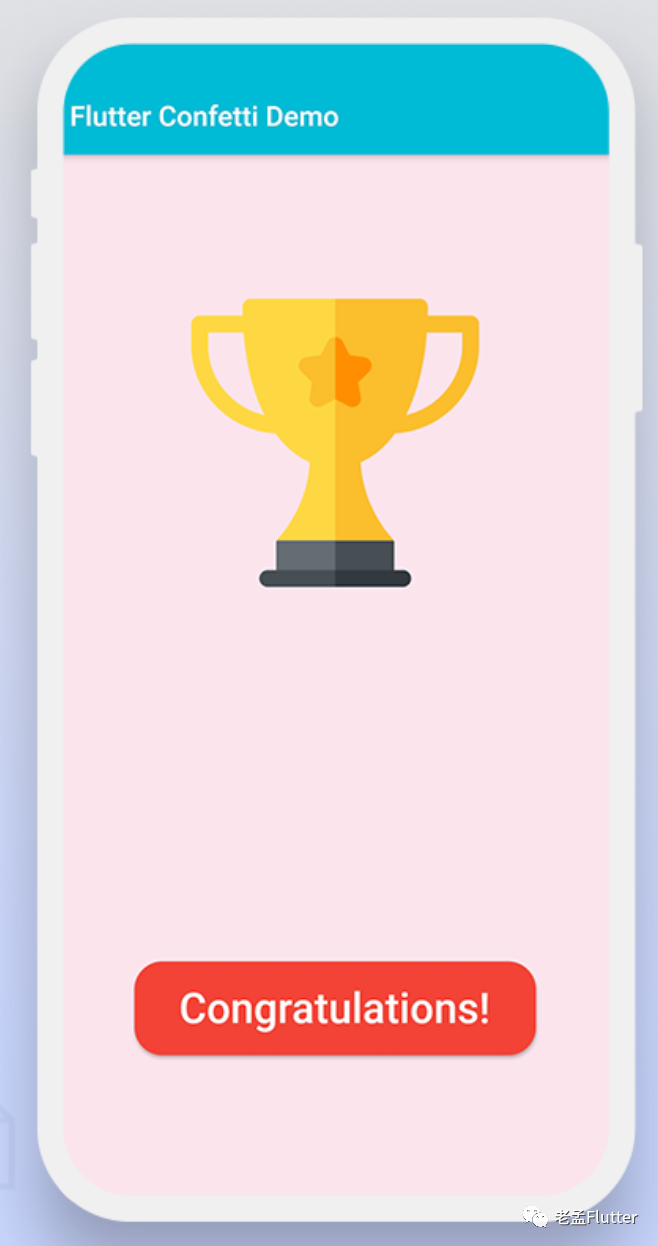
創(chuàng)建 「ConfettiWidget」
Align buildConfettiWidget(controller, double blastDirection) {
  return Align(
    alignment: Alignment.topCenter,
    child: ConfettiWidget(
      maximumSize: Size(30, 30),
      shouldLoop: false,
      confettiController: controller,
      blastDirection: blastDirection,
      blastDirectionality: BlastDirectionality.directional,
      maxBlastForce: 20, // set a lower max blast force
      minBlastForce: 8, // set a lower min blast force
      emissionFrequency: 1,
      minBlastForce: 8, // a lot of particles at once
      gravity: 1,
    ),
  );
}
點(diǎn)擊按鈕播放
onPressed: (){
  controllerTopCenter.play();
},
完整代碼
import 'dart:math';
import 'package:confetti/confetti.dart';
import 'package:flutter/material.dart';


class MyHomePage extends StatefulWidget {
  @override
  _MyHomePageState createState() => _MyHomePageState();
}

class _MyHomePageState extends State<MyHomePage> {
  ConfettiController controllerTopCenter;
  @override
  void initState() {
    // TODO: implement initState
    super.initState();
    setState(() {
      initController();
    });

  }

  void initController() {
    controllerTopCenter =
        ConfettiController(duration: const Duration(seconds: 1));
  }


  @override
  Widget build(BuildContext context) {
    return Scaffold(
      backgroundColor: Colors.pink[50],
      appBar: AppBar(
        backgroundColor: Colors.cyan,
        title: Text("Flutter Confetti Animation Demo"),
        automaticallyImplyLeading: false,
      ),

      body: SafeArea(
        child: Stack(
          children: <Widget>[
            buildConfettiWidget(controllerTopCenter, pi / 1),
            buildConfettiWidget(controllerTopCenter, pi / 4),
            Align(
              alignment: Alignment.center,
              child: Column(
                children: <Widget>[
                  Image.asset(
                    "assets/trophy.png",
                    width: MediaQuery.of(context).size.width*0.5,
                    height: MediaQuery.of(context).size.height*0.5,
                  ),
                ],
              ),
            ),
            buildButton()
          ],
        ),
      ),
    );
  }

  Align buildButton() {
    return Align(
      alignment: Alignment.bottomCenter,
      child: Padding(
        padding: const EdgeInsets.symmetric(vertical: 100),
        child: RaisedButton(
          onPressed: (){
            controllerTopCenter.play();

          },
          shape: RoundedRectangleBorder(borderRadius: BorderRadius.circular(20)),
          color: Colors.red,
          textColor: Colors.white,
          child: Padding(
            padding: const EdgeInsets.all(16.0),
            child: Text(
              "Congratulations!",
              style: TextStyle(
                fontSize: 30,
                color: Colors.white,
              ),
            ),
          ),
        ),
      ),
    );
  }

  Align buildConfettiWidget(controller, double blastDirection) {
    return Align(
      alignment: Alignment.topCenter,
      child: ConfettiWidget(
        maximumSize: Size(30, 30),
        shouldLoop: false,
        confettiController: controller,
        blastDirection: blastDirection,
        blastDirectionality: BlastDirectionality.directional,
        maxBlastForce: 20, // set a lower max blast force
        minBlastForce: 8, // set a lower min blast force
        emissionFrequency: 1,
        numberOfParticles: 8, // a lot of particles at once
        gravity: 1,
      ),
    );
  }
}
原文鏈接:https://medium.com/flutterdevs/explore-confetti-animation-in-flutter-340edbe2951

評論
圖片
表情