
Python接口自動化測試之Requests庫&Pytest框架
來源:https://www.jianshu.com/p/fa1d67ba8d68
發(fā)送get請求
#導包
import requests
#定義一個url
url = "http://xxxxxxx"
#傳遞參數(shù)
payload="{\"head\":{\"accessToken\":\"\",\"lastnotice\":0,\"msgid\":\"\"},\"body\":{\"user_name\":\"super_admin\",\"password\":\"b50c34503a97e7d0d44c38f72d2e91ad\",\"role_type\":1}}"
headers = {
  'Content-Type': 'text/plain',
  'Cookie': 'akpsysessionid=bafc0ad457d5a99f3a4e53a1d4b32519'
}
#發(fā)送get請求
r = requests.get( url=url,headers=headers, data=payload)
#打印結(jié)果
print(r.text)
#解碼
print(r.encoding)
print(r.text.encode('utf-8').decode('unicode_escape'))#先把返回的結(jié)果轉(zhuǎn)換成utf-8,再去解碼成中文的編碼
發(fā)送post請求
#導包
import requests
#定義一個url
url = "http://xxxxxxx"
#傳遞參數(shù)
payload="{\"head\":{\"accessToken\":\"\",\"lastnotice\":0,\"msgid\":\"\"},\"body\":{\"user_name\":\"super_admin\",\"password\":\"b50c34503a97e7d0d44c38f72d2e91ad\",\"role_type\":1}}"
headers = {
 'Content-Type': 'text/plain',
 'Cookie': 'akpsysessionid=bafc0ad457d5a99f3a4e53a1d4b32519'
}
#發(fā)送post請求
r = requests.post( url=url,headers=headers, data=payload)
#打印結(jié)果
print(r.text)
發(fā)送https請求
import requests
url='https://www.ctrip.com/'
#第一種解決方案,發(fā)送請求的時候忽略證書,證書的參數(shù)verify用的比較多
r=requests.post(url=url,verify=False)#verify參數(shù)默認為True,值為False,表示忽略證書
#第二張解決方案,verify里面添加證書的路徑
r=requests.post(url=url,verify='證書的路徑')#verify參數(shù)默認為True,值為False,表示忽略證書
print(r.text)
文件上傳
import requests
file = {
    'filename':open('文件名稱','rb')
}
response = requests.post("網(wǎng)址",file)
print(response.text)
文件下載
#小文件下載
import requests
r = requests.get("https://img.sitven.cn/Tencent_blog_detail.jpg")
with open(r"D:\a.jpg", "wb") as f:
    f.write(r.content)

#大文件下載
import requests
def test_downloads(url, file):
    s = requests.session()
    r = s.get(url, stream=True, verify=False)
    with open(file, "wb") as f:
        for chunk in r.iter_content(chunk_size=512):
            f.write(chunk)
if __name__ == "__main__":
    url = "https://www.url.com/test/export"
    file = "D:\\a.xlsx"
    test_downloads(url=url, file=file)
#轉(zhuǎn)載至:https://blog.csdn.net/weixin_43507959/article/details/107326912
timeout超時
#導包
import requests
#循環(huán)10次
for i in range(0,10):
    try:
        url="http://xxxxxxxxxxxxxxxx"
        data={
            "head":{"lastnotice":0,"msgid":"","accessToken":"89a08bff-15d7-4d7a-9967-0b5f4fb699ce"},
            "body":{"clinicid":"978f661e-1782-43bd-8675-b0ff1138ab7c","deptid":"09b8515b-b01b-4771-9356-aed6b5aa01bf","doctorid":"65ac0251-10ff-473a-af8a-20e8969176f7","registtype":0,"card_num":"","bcc334":"","patientopt":1,"bkc368":"1","patient":{"cardid":"","medicalcardid":"","label":"","sourcetype":1,"nationid":"01","maritalstatus":0,"address":"","company":"","jobname":"","email":"","remark":"","bcc334":"","name":"11","gender":1,"phone":"","birthdate":"2020-03-23","patienttype":1,"szsbcardid":""}}
        }
#發(fā)送post請求,超時時間0.03s
        r=requests.post(url=url,json=data,timeout=0.03)
        print(r.text)
        print(r.cookies)
    except:
        print('error')
#可參考:https://blog.csdn.net/weixin_44350337/article/details/99655387
鑒權
7.1 auth參數(shù)鑒權
import requests
url = 'http://192.168.1.1'
headers = {} # 有的不帶頭也能請求到 不帶頭可以忽略這行 和headers=headers,這兩處
r = requests.get(url, auth=('admin', '123456'), headers=headers, timeout=10)
print(r.text)
7.2 session操作
#實例化session
session = requests.session()
#使用session發(fā)起請求
response = session.post(url,headers=req_header,data=form_data)
7.3 token操作
import requests
url="http://xxxxxxxxxxxxxxx"

json={
    "head":{"accessToken":"","lastnotice":0,"msgid":""},
    "body":{"username":"15623720880","password":"48028d2558577c526a017883211b4066","forceLogin":0}
}
r=requests.post(url=url,json=json)
print(r.text)
print(r.cookies)

#登錄成功后返回token,帶入下一個接口
for i in range(0,1):
    try:
        url="xxxxxxxxxxxxxxxxxx"
        data={
            "head":{"lastnotice":0,"msgid":"","accessToken":"89a08bff-15d7-4d7a-9967-0b5f4fb699ce"},
            "body":{"clinicid":"978f661e-1782-43bd-8675-b0ff1138ab7c","deptid":"09b8515b-b01b-4771-9356-aed6b5aa01bf","doctorid":"65ac0251-10ff-473a-af8a-20e8969176f7","registtype":0,"card_num":"","bcc334":"","patientopt":1,"bkc368":"1","patient":{"cardid":"","medicalcardid":"","label":"","sourcetype":1,"nationid":"01","maritalstatus":0,"address":"","company":"","jobname":"","email":"","remark":"","bcc334":"","name":"11","gender":1,"phone":"","birthdate":"2020-03-23","patienttype":1,"szsbcardid":""}}
        }
        r=requests.post(url=url,json=data,timeout=0.09)
        print(r.text)
        print(r.cookies)
    except:
        print('error')
7.4 sign簽名
# appid:wxd930ea5d5a258f4f
# mch_id:10000100
# device_info:1000
# body:test
# nonce_str:ibuaiVcKdpRxkhJA
import hashlib
#需要加密的字符串
stringA="appid=wxd930ea5d5a258f4f&body=test&device_info=1000&mch_id=10000100&nonce_str=ibuaiVcKdpRxkhJA";
#構(gòu)建一個對象為md
md=hashlib.md5()
#對stringA字符串進行編碼
md.update(stringA.encode())
#生成后的加密值
AES=md.hexdigest()
#把加密的結(jié)果,小寫轉(zhuǎn)大寫 upper函數(shù)
AES=AES.upper()
print(AES)
參考微信支付:https://pay.weixin.qq.com/wiki/doc/api/jsapi.php?chapter=4_3
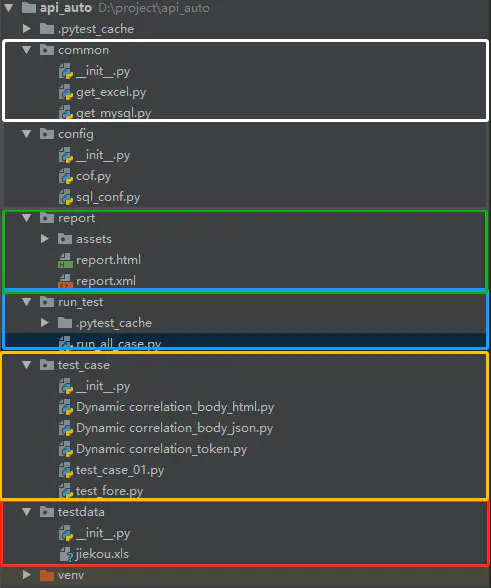
自動化模塊劃分
config 配置文件(python package)#directory和python package大同小異
common 公共的方法(python package)
testdata 測試數(shù)據(jù)(python package)
test_case測試用例(python package)
report 報告(directory)
run_case 測試執(zhí)行(python package)
log 日志
8.1 config配置文件
def server_ip():
    '''
    ait_ip=''開發(fā)環(huán)境的服務器ip
    sit_ip=''測試環(huán)境的服務器ip
    :return: 返回不同服務器的地址
    '''


    server_add={
        'dev_ip' : 'http://his.xxxxxxxxxxx.com',
        'sit_ip' : 'http://his.xxxxxxxxxxxx.comm'
    }
    return server_add['dev_ip']
------------------------------------------------------------------------------------
def sql_conf():
    '''
    host數(shù)據(jù)庫ip
    user數(shù)據(jù)庫用戶名
    password數(shù)據(jù)庫密碼
    database:連接數(shù)據(jù)庫名
    port數(shù)據(jù)庫端口
    chrset數(shù)據(jù)庫字符集 中文utf-8
    :return:
    '''
    host='localhost'
    user='root'
    password='123456'
    database='mysql'
    port=3306
    charset='utf8' #這用utf8,utf-8會報錯
    return host,user,password,database,port,charset
8.2 common 公共的方法
# 封裝一個讀取Excel表格數(shù)據(jù)的函數(shù)
# 對Excel表格數(shù)據(jù)的讀取需要用到一個庫——xlrd庫
import xlrd
def get_excel_value(i):
    '''
    讀取表中一行的數(shù)據(jù)
    :return:返回2,3行數(shù)據(jù)
    '''
    filename = r"../testdata/jiekou.xls" #文件要用相對路徑
    book = xlrd.open_workbook(filename)  # 打開一個工作薄,不需要手動進行關閉
    # sheet = book.sheet_by_name("Sheet1") 根據(jù)工作表的名字,獲取一個工作表對象
    sheet = book.sheet_by_index(0)  # 獲取一個工作表,以index的方式,這里是獲取第1個工作表
    return sheet.cell_value(i,1),sheet.cell_value(i,2)
# print(sheet.nrows) #打印所有行
# print(sheet.ncols) #打印所有列
# print(sheet.row_values(0))  #打印第一行
# print(sheet.col_values(0))  #打印第一列
# print(sheet.cell_value(0,1)) #打印第一行,第二列
# for i in range(1, sheet.nrows):

    # print(sheet.cell_value(i,1),sheet.cell_value(i,2))# 打印單元格[所有數(shù)據(jù)]的值
    # str='(sheet.cell_value(i,1),sheet.cell_value(i,2)))'
    # print(str)
# for i in range(1, sheet.nrows):
#     # for j in range(0, sheet.ncols):
#         print(sheet.cell_value(i,j)) # 打印單元格[i,j]的值
---------------------------------------------------------------------------------------------
import pymysql
from config.sql_conf import *
def get_sql(sql):
    '''
    :param sql:運行查詢的sql語句
    :return:數(shù)據(jù)庫查詢結(jié)果
    '''
    #建立一個連接對象
    host, user, password, database, port, charset=sql_conf()
    db=pymysql.connect(host=host,user=user,password=password,database=database,port=port,charset=charset)
    #建立一個游標
    cursor=db.cursor()
    #執(zhí)行sql語句
    cursor.execute(sql)
    #把sql運行的數(shù)據(jù)保存在data變量里面
    data=cursor.fetchall() #獲取查詢出的所有的值
    cursor.close() #關閉游標
    db.close() #關閉數(shù)據(jù)庫連接
    return data
# print(get_sql("SELECT help_topic_id FROM help_topic WHERE Name='MOD'")) #執(zhí)行sql語句
# print(type(get_sql("SELECT help_topic_id FROM help_topic WHERE Name='MOD'")))
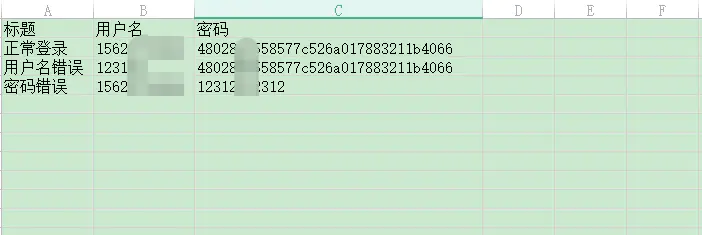
8.3 testdata 測試數(shù)據(jù)
主要存放xls,txt,csv測試數(shù)據(jù)
8.4 test_case測試用例
from common.get_mysql import get_sql
from config.cof import server_ip
from common.get_excel import *
from config.sql_conf import *
import requests
# user_id=get_sql("SELECT help_topic_id FROM help_topic WHERE Name='MOD'")#提取數(shù)據(jù)庫數(shù)據(jù)
# print(user_id)#打印結(jié)果
# assert get_sql("SELECT help_topic_id FROM help_topic WHERE Name='MOD'")#斷言數(shù)據(jù)庫的數(shù)據(jù)是否存在

def test_aokao_login():
     url=server_ip()+'/service/user/login'
     username,password=get_excel_value(1) #讀取文件第二行數(shù)據(jù)
     json={
          "head":{"accessToken":"","lastnotice":0,"msgid":""},
          "body":{"username":username,"password":password,"forceLogin":0}
     }

     # usernamepassword=get_excel_value(4)[0] #讀取文件第二行數(shù)據(jù)
     # print(type(usernamepassword))
     # #把str類型轉(zhuǎn)為字典格式 eval 函數(shù)
     # json=eval(usernamepassword)
     r=requests.post(url=url,json=json)
     print(r.text)
     assert r.status_code==200 #斷言狀態(tài)碼是否等于200
     assert '"accessToken":"89a08bff-15d7-4d7a-9967-0b5f4fb699ce",' in r.text #斷言返回信息是否包含accesstoken

def test_aokao_registadd():
     url = server_ip()+'/service/registration/registadd'
     data = {
          "head": {"lastnotice": 0, "msgid": "", "accessToken": "89a08bff-15d7-4d7a-9967-0b5f4fb699ce"},
          "body": {"clinicid": "978f661e-1782-43bd-8675-b0ff1138ab7c", "deptid": "09b8515b-b01b-4771-9356-aed6b5aa01bf",
                   "doctorid": "65ac0251-10ff-473a-af8a-20e8969176f7", "registtype": 0, "card_num": "", "bcc334": "",
                   "patientopt": 1, "bkc368": "1",
                   "patient": {"cardid": "", "medicalcardid": "", "label": "", "sourcetype": 1, "nationid": "01",
                               "maritalstatus": 0, "address": "", "company": "", "jobname": "", "email": "",
                               "remark": "", "bcc334": "", "name": "11", "gender": 1, "phone": "",
                               "birthdate": "2020-03-23", "patienttype": 1, "szsbcardid": ""}}
     }

     r = requests.post(url=url, json=data, timeout=0.09)
     print(r.text)
     print(r.cookies)
     assert r.status_code == 200  # 斷言狀態(tài)碼是否等于200
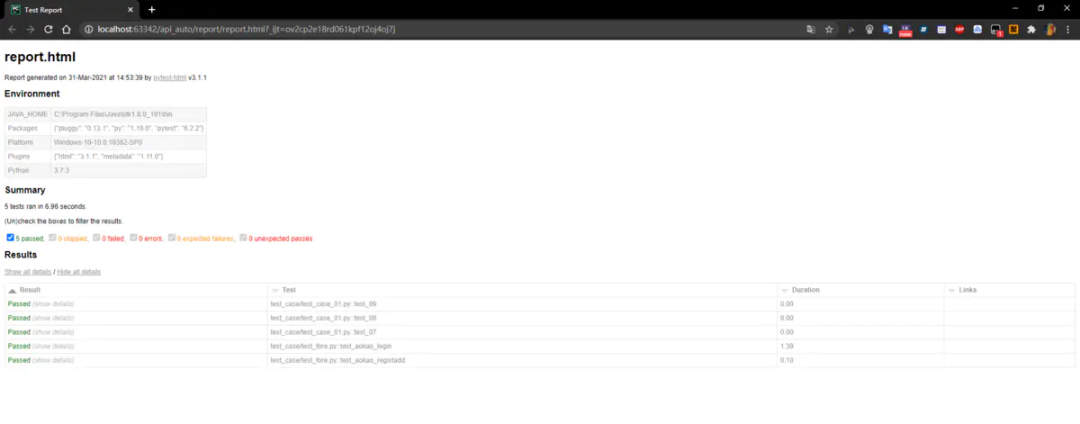
8.5 report 報告
主要存放html,xml報告
8.6 run_case 測試執(zhí)行
import pytest

'''
測試文件以test_開頭,(以—_test結(jié)尾也可以)
測試類以Test開頭,并且不能帶有init 方法
測試函數(shù)以test_開頭
斷言使用基本的assert即可
'''
#如何去運行測試用例,_test開頭的函數(shù)就可以,判斷用例運行是否成功,assert斷言
if __name__=="__main__":
    #單個文件運行,運行添加,對應的文件路徑,路徑要用相對路徑
    # pytest.main(['../test_case//test_case_01.py'])
    #多個文件運行,運行添加多個對應的文件路徑,列表的形式,去添加多個文件的路徑
    # pytest.main(['../test_case/test_fore.py','../test_case/Dynamic correlation_token.py'])
    #運行整個目錄,添加目錄的路徑
    pytest.main(['../test_case/','--html=../report/report.html','--junitxml=../report/report.xml'])

'''
pytest生成報告:
1、生成html報告
'--html=../report/report.html'
2、生成xml報告
'--junitxml=../report/report.xml'
'''
評論
圖片
表情