我用YOLOv5做情感識(shí)別!

極市導(dǎo)讀
今天筆者就教大家如何快速上手目標(biāo)檢測(cè)模型YOLOv5,并將其應(yīng)用到情感識(shí)別中。 >>加入極市CV技術(shù)交流群,走在計(jì)算機(jī)視覺的最前沿
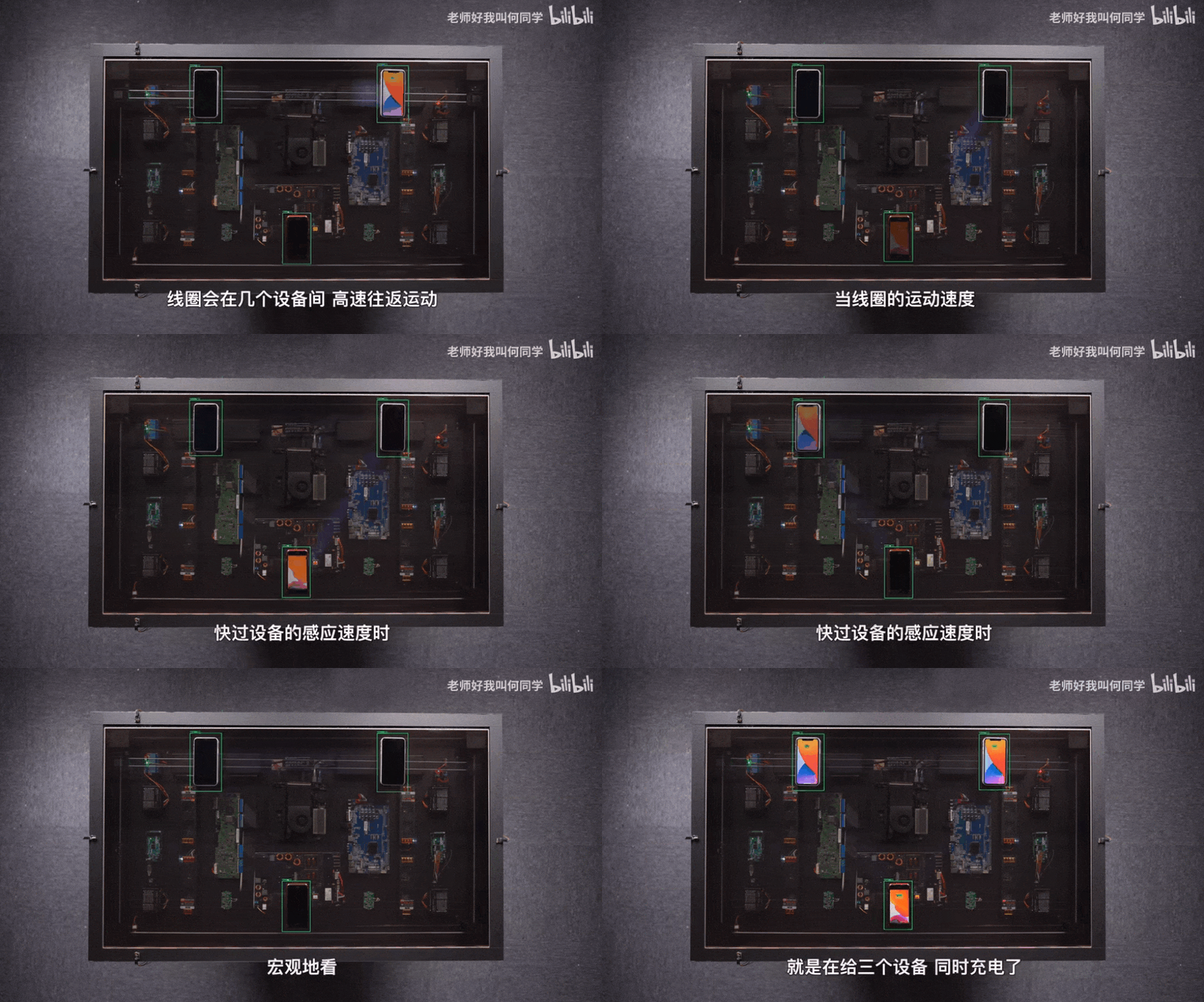
AI技術(shù)已經(jīng)應(yīng)用到了我們生活中的方方面面,而目標(biāo)檢測(cè)是其中應(yīng)用最廣泛的算法之一,疫情測(cè)溫儀器、巡檢機(jī)器人、甚至何同學(xué)的airdesk中都有目標(biāo)檢測(cè)算法的影子。下圖就是airdesk,何同學(xué)通過目標(biāo)檢測(cè)算法定位手機(jī)位置,然后控制無線充電線圈移動(dòng)到手機(jī)下方自動(dòng)給手機(jī)充電。
這看似簡(jiǎn)單的應(yīng)用背后其實(shí)是復(fù)雜的理論和不斷迭代的AI算法,今天筆者就教大家如何快速上手目標(biāo)檢測(cè)模型YOLOv5,并將其應(yīng)用到情感識(shí)別中。
一、背景
今天的內(nèi)容來源于2019年發(fā)表在T-PAMI上的一篇文章[1],在這之前已經(jīng)有大量研究者通過AI算法識(shí)別人類情感,不過本文的作者認(rèn)為,人們的情感不僅與面部表情和身體動(dòng)作等有關(guān),還和當(dāng)前身處的環(huán)境息息相關(guān),比如下圖的男孩應(yīng)該是一個(gè)驚訝的表情:

不過加上周圍環(huán)境后,剛剛我們認(rèn)為的情感就與真實(shí)情感不符:
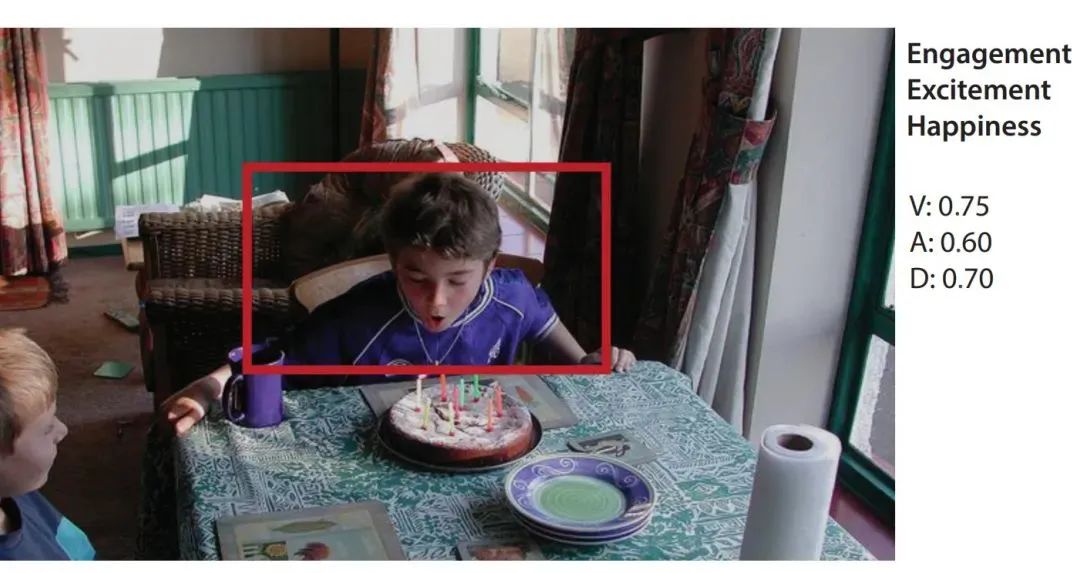
本文的主要思想就是將背景圖片和目標(biāo)檢測(cè)模型檢測(cè)出的人物信息結(jié)合起來識(shí)別情感。
其中,作者將情感分為離散和連續(xù)兩個(gè)維度。下面會(huì)解釋以方便理解,已經(jīng)清楚的同學(xué)可以快劃跳過。
| 連續(xù)情感 | 解釋 |
|---|---|
| Valence (V) | measures how positive or pleasant an emotion is, ranging from negative to positive(高興程度) |
| Arousal (A) | measures the agitation level of the person, ranging from non-active / in calm to agitated / ready to act(激動(dòng)程度) |
| Dominance (D) | measures the level of control a person feels of the situation, ranging from submissive / non-control to dominant / in-control(氣場(chǎng)大小) |
| 離散情感 | 解釋 |
|---|---|
| Affection | fond feelings; love; tenderness |
| Anger | intense displeasure or rage; furious; resentful |
| Annoyance | bothered by something or someone; irritated; impatient; frustrated |
| Anticipation | state of looking forward; hoping on or getting prepared for possible future events |
| Aversion | feeling disgust, dislike, repulsion; feeling hate |
| Confidence | feeling of being certain; conviction that an outcome will be favorable; encouraged; proud |
| Disapproval | feeling that something is wrong or reprehensible; contempt; hostile |
| Disconnection | feeling not interested in the main event of the surrounding; indifferent; bored; distracted |
| Disquietment | nervous; worried; upset; anxious; tense; pressured; alarmed |
| Doubt/Confusion | difficulty to understand or decide; thinking about different options |
| Embarrassment | feeling ashamed or guilty |
| Engagement | paying attention to something; absorbed into something; curious; interested |
| Esteem | feelings of favourable opinion or judgement; respect; admiration; gratefulness |
| Excitement | feeling enthusiasm; stimulated; energetic |
| Fatigue | weariness; tiredness; sleepy |
| Fear | feeling suspicious or afraid of danger, threat, evil or pain; horror |
| Happiness | feeling delighted; feeling enjoyment or amusement |
| Pain | physical suffering |
| Peace | well being and relaxed; no worry; having positive thoughts or sensations; satisfied |
| Pleasure | feeling of delight in the senses |
| Sadness | feeling unhappy, sorrow, disappointed, or discouraged |
| Sensitivity | feeling of being physically or emotionally wounded; feeling delicate or vulnerable |
| Suffering | psychological or emotional pain; distressed; anguished |
| Surprise | sudden discovery of something unexpected |
| Sympathy | state of sharing others emotions, goals or troubles; supportive; compassionate |
| Yearning | strong desire to have something; jealous; envious; lust |
二、準(zhǔn)備工作與模型推理
2.1 快速入門
只需完成下面五步即可識(shí)別情感!
通過克隆或者壓縮包將項(xiàng)目下載到本地:
git clonehttps://github.com/chenxindaaa/emotic.git將解壓后的模型文件放到emotic/debug_exp/models中。(模型文件下載地址:鏈接:https://gas.graviti.com/dataset/datawhale/Emotic/discussion)
新建虛擬環(huán)境(可選):
conda create -n emotic python=3.7
conda activate emotic
環(huán)境配置
python -m pip install -r requirement.txt
cd到emotic文件夾下,輸入并執(zhí)行:
python detect.py
運(yùn)行完后結(jié)果會(huì)保存在emotic/runs/detect文件夾下。
2.2 基本原理
看到這里可能會(huì)有小伙伴問了:如果我想識(shí)別別的圖片該怎么改?可以支持視頻和攝像頭嗎?實(shí)際應(yīng)用中應(yīng)該怎么修改YOLOv5的代碼呢?
對(duì)于前兩個(gè)問題,YOLOv5已經(jīng)幫我們解決,我們只需要修改detect.py中的第158行:
parser.add_argument('--source', type=str, default='./testImages', help='source') # file/folder, 0 for webcam
將'./testImages'改為想要識(shí)別的圖像和視頻的路徑,也可以是文件夾的路徑。對(duì)于調(diào)用攝像頭,只需要將'./testImages'改為'0',則會(huì)調(diào)用0號(hào)攝像頭進(jìn)行識(shí)別。
修改YOLOv5:
在detect.py中,最重要的代碼就是下面幾行:
for *xyxy, conf, cls in reversed(det):
    c = int(cls)  # integer class
    if c != 0:
        continue
    pred_cat, pred_cont = inference_emotic(im0, (int(xyxy[0]), int(xyxy[1]), int(xyxy[2]), int(xyxy[3])))
    if save_img or opt.save_crop or view_img:  # Add bbox to image
        label = None if opt.hide_labels else (names[c] if opt.hide_conf else f'{names[c]} {conf:.2f}')
        plot_one_box(xyxy, im0, pred_cat=pred_cat, pred_cont=pred_cont, label=label, color=colors(c, True), line_thickness=opt.line_thickness)
        if opt.save_crop:
            save_one_box(xyxy, imc, file=save_dir / 'crops' / names[c] / f'{p.stem}.jpg', BGR=True)
其中det是YOLOv5識(shí)別出來的結(jié)果,例如tensor([[121.00000, 7.00000, 480.00000, 305.00000, 0.67680, 0.00000], [278.00000, 166.00000, 318.00000, 305.00000, 0.66222, 27.00000]])就是識(shí)別出了兩個(gè)物體。
xyxy是物體檢測(cè)框的坐標(biāo),對(duì)于上面的例子的第一個(gè)物體,xyxy = [121.00000, 7.00000, 480.00000, 305.00000]對(duì)應(yīng)坐標(biāo)(121, 7)和(480, 305),兩個(gè)點(diǎn)可以確定一個(gè)矩形也就是檢測(cè)框。conf是該物體的置信度,第一個(gè)物體置信度為0.67680。cls則是該物體對(duì)應(yīng)的類別,這里0對(duì)應(yīng)的是“人”,因?yàn)槲覀冎蛔R(shí)別人的情感,所以cls不是0就可以跳過該過程。這里我用了YOLOv5官方給的推理模型,其中包含很多類別,大家也可以自己訓(xùn)練一個(gè)只有“人”這一類別的模型,詳細(xì)過程可以參考:
在識(shí)別出物體坐標(biāo)后輸入emotic模型就可以得到對(duì)應(yīng)的情感,即
pred_cat, pred_cont = inference_emotic(im0, (int(xyxy[0]), int(xyxy[1]), int(xyxy[2]), int(xyxy[3])))
這里我將原來的圖片可視化做了些改變,將emotic的結(jié)果打印到圖片上:
def plot_one_box(x, im, pred_cat, pred_cont, color=(128, 128, 128), label=None, line_thickness=3):
    # Plots one bounding box on image 'im' using OpenCV
    assert im.data.contiguous, 'Image not contiguous. Apply np.ascontiguousarray(im) to plot_on_box() input image.'
    tl = line_thickness or round(0.002 * (im.shape[0] + im.shape[1]) / 2) + 1  # line/font thickness
    c1, c2 = (int(x[0]), int(x[1])), (int(x[2]), int(x[3]))
    cv2.rectangle(im, c1, c2, color, thickness=tl, lineType=cv2.LINE_AA)
    if label:
        tf = max(tl - 1, 1)  # font thickness
        t_size = cv2.getTextSize(label, 0, fontScale=tl / 3, thickness=tf)[0]
        c2 = c1[0] + t_size[0], c1[1] - t_size[1] - 3
        cv2.rectangle(im, c1, c2, color, -1, cv2.LINE_AA)  # filled
        #cv2.putText(im, label, (c1[0], c1[1] - 2), 0, tl / 3, [225, 255, 255], thickness=tf, lineType=cv2.LINE_AA)
        for id, text in enumerate(pred_cat):
            cv2.putText(im, text, (c1[0], c1[1] + id*20), 0, tl / 3, [225, 255, 255], thickness=tf, lineType=cv2.LINE_AA)
運(yùn)行結(jié)果:
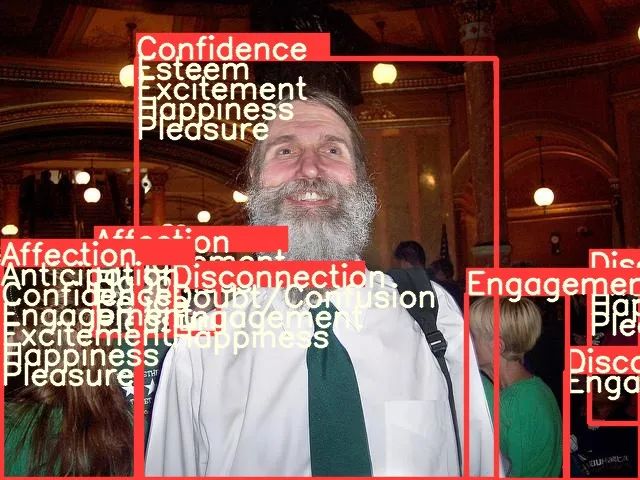
完成了上面的步驟,我們就可以開始整活了。眾所周知,特朗普以其獨(dú)特的演講魅力征服了許多選民,下面我們就看看AI眼中的特朗普是怎么演講的:
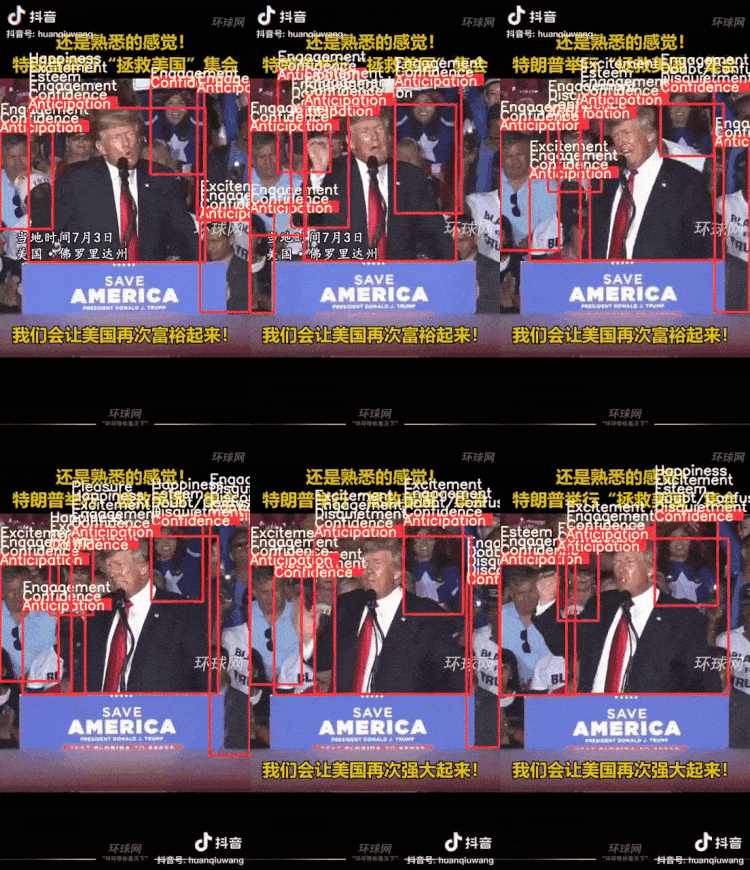
可以看出自信是讓人信服的必備條件之一。
三、模型訓(xùn)練
3.1 數(shù)據(jù)預(yù)處理
首先通過格物鈦進(jìn)行數(shù)據(jù)預(yù)處理,在處理數(shù)據(jù)之前需要先找到自己的accessKey(開發(fā)者工具AccessKey新建AccessKey):

我們可以在不下載數(shù)據(jù)集的情況下,通過格物鈦進(jìn)行預(yù)處理,并將結(jié)果保存在本地(下面的代碼不在項(xiàng)目中,需要自己創(chuàng)建一個(gè)py文件運(yùn)行,記得填入AccessKey):
from tensorbay import GAS
from tensorbay.dataset import Dataset
import numpy as np
from PIL import Image
import cv2
from tqdm import tqdm
import os

def cat_to_one_hot(y_cat):
    cat2ind = {'Affection': 0, 'Anger': 1, 'Annoyance': 2, 'Anticipation': 3, 'Aversion': 4,
               'Confidence': 5, 'Disapproval': 6, 'Disconnection': 7, 'Disquietment': 8,
               'Doubt/Confusion': 9, 'Embarrassment': 10, 'Engagement': 11, 'Esteem': 12,
               'Excitement': 13, 'Fatigue': 14, 'Fear': 15, 'Happiness': 16, 'Pain': 17,
               'Peace': 18, 'Pleasure': 19, 'Sadness': 20, 'Sensitivity': 21, 'Suffering': 22,
               'Surprise': 23, 'Sympathy': 24, 'Yearning': 25}
    one_hot_cat = np.zeros(26)
    for em in y_cat:
        one_hot_cat[cat2ind[em]] = 1
    return one_hot_cat

gas = GAS('填入你的AccessKey')
dataset = Dataset("Emotic", gas)
segments = dataset.keys()
save_dir = './data/emotic_pre'
if not os.path.exists(save_dir):
    os.makedirs(save_dir)
for seg in ['test', 'val', 'train']:
    segment = dataset[seg]
    context_arr, body_arr, cat_arr, cont_arr = [], [], [], []
    for data in tqdm(segment):
        with data.open() as fp:
            context = np.asarray(Image.open(fp))
        if len(context.shape) == 2:
            context = cv2.cvtColor(context, cv2.COLOR_GRAY2RGB)
        context_cv = cv2.resize(context, (224, 224))
        for label_box2d in data.label.box2d:
            xmin = label_box2d.xmin
            ymin = label_box2d.ymin
            xmax = label_box2d.xmax
            ymax = label_box2d.ymax
            body = context[ymin:ymax, xmin:xmax]
            body_cv = cv2.resize(body, (128, 128))
            context_arr.append(context_cv)
            body_arr.append(body_cv)
            cont_arr.append(np.array([int(label_box2d.attributes['valence']), int(label_box2d.attributes['arousal']), int(label_box2d.attributes['dominance'])]))
            cat_arr.append(np.array(cat_to_one_hot(label_box2d.attributes['categories'])))
    context_arr = np.array(context_arr)
    body_arr = np.array(body_arr)
    cat_arr = np.array(cat_arr)
    cont_arr = np.array(cont_arr)
    np.save(os.path.join(save_dir, '%s_context_arr.npy' % (seg)), context_arr)
    np.save(os.path.join(save_dir, '%s_body_arr.npy' % (seg)), body_arr)
    np.save(os.path.join(save_dir, '%s_cat_arr.npy' % (seg)), cat_arr)
    np.save(os.path.join(save_dir, '%s_cont_arr.npy' % (seg)), cont_arr)
等程序運(yùn)行完成后可以看到多了一個(gè)文件夾emotic_pre,里面有一些npy文件則代表數(shù)據(jù)預(yù)處理成功。
3.2 模型訓(xùn)練
打開main.py文件,35行開始是模型的訓(xùn)練參數(shù),運(yùn)行該文件即可開始訓(xùn)練。
四、Emotic模型詳解
4.1 模型結(jié)構(gòu)
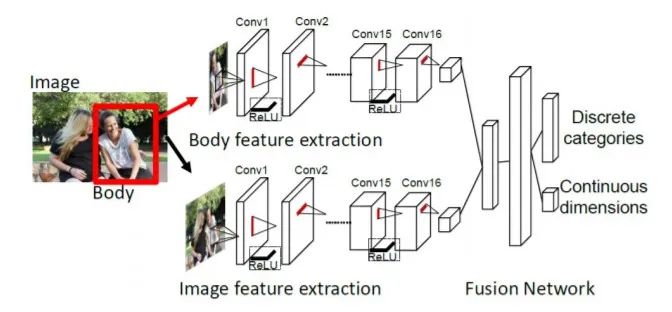
該模型的思想非常簡(jiǎn)單,流程圖中的上下兩個(gè)網(wǎng)絡(luò)其實(shí)就是兩個(gè)resnet18,上面的網(wǎng)絡(luò)負(fù)責(zé)提取人體特征,輸入為的彩色圖片,輸出是512個(gè)的特征圖。下面的網(wǎng)絡(luò)負(fù)責(zé)提取圖像背景特征,預(yù)訓(xùn)練模型用的是場(chǎng)景分類模型places365,輸入是的彩色圖片,輸出同樣是是512個(gè)的特征圖。然后將兩個(gè)輸出flatten后拼接成一個(gè)1024的向量,經(jīng)過兩層全連接層后輸出一個(gè)26維的向量和一個(gè)3維的向量,26維向量處理26個(gè)離散感情的分類任務(wù),3維向量則是3個(gè)連續(xù)情感的回歸任務(wù)。
import torch
import torch.nn as nn

class Emotic(nn.Module):
  ''' Emotic Model'''
  def __init__(self, num_context_features, num_body_features):
    super(Emotic,self).__init__()
    self.num_context_features = num_context_features
    self.num_body_features = num_body_features
    self.fc1 = nn.Linear((self.num_context_features + num_body_features), 256)
    self.bn1 = nn.BatchNorm1d(256)
    self.d1 = nn.Dropout(p=0.5)
    self.fc_cat = nn.Linear(256, 26)
    self.fc_cont = nn.Linear(256, 3)
    self.relu = nn.ReLU()


  def forward(self, x_context, x_body):
    context_features = x_context.view(-1, self.num_context_features)
    body_features = x_body.view(-1, self.num_body_features)
    fuse_features = torch.cat((context_features, body_features), 1)
    fuse_out = self.fc1(fuse_features)
    fuse_out = self.bn1(fuse_out)
    fuse_out = self.relu(fuse_out)
    fuse_out = self.d1(fuse_out)
    cat_out = self.fc_cat(fuse_out)
    cont_out = self.fc_cont(fuse_out)
    return cat_out, cont_out
離散感情是一個(gè)多分類任務(wù),即一個(gè)人可能同時(shí)存在多種感情,作者的處理方法是手動(dòng)設(shè)定26個(gè)閾值對(duì)應(yīng)26種情感,輸出值大于閾值就認(rèn)為該人有對(duì)應(yīng)情感,閾值如下,可以看到engagement對(duì)應(yīng)閾值為0,也就是說每個(gè)人每次識(shí)別都會(huì)包含這種情感:
>>> import numpy as np
>>> np.load('./debug_exp/results/val_thresholds.npy')
array([0.0509765 , 0.02937193, 0.03467856, 0.16765128, 0.0307672 ,
       0.13506265, 0.03581731, 0.06581657, 0.03092133, 0.04115443,
       0.02678059, 0.        , 0.04085711, 0.14374524, 0.03058549,
       0.02580678, 0.23389584, 0.13780132, 0.07401864, 0.08617007,
       0.03372583, 0.03105414, 0.029326  , 0.03418647, 0.03770866,
       0.03943525], dtype=float32)
4.2 損失函數(shù):
對(duì)于分類任務(wù),作者提供了兩種損失函數(shù),一種是普通的均方誤差損失函數(shù)(即self.weight_type == 'mean'),另一種是加權(quán)平方誤差損失函數(shù)(即self.weight_type == 'static‘)。其中,加權(quán)平方誤差損失函數(shù)如下,26個(gè)類別對(duì)應(yīng)的權(quán)重分別為[0.1435, 0.1870, 0.1692, 0.1165, 0.1949, 0.1204, 0.1728, 0.1372, 0.1620, 0.1540, 0.1987, 0.1057, 0.1482, 0.1192, 0.1590, 0.1929, 0.1158, 0.1907, 0.1345, 0.1307, 0.1665, 0.1698, 0.1797, 0.1657, 0.1520, 0.1537]。
class DiscreteLoss(nn.Module):
  ''' Class to measure loss between categorical emotion predictions and labels.'''
  def __init__(self, weight_type='mean', device=torch.device('cpu')):
    super(DiscreteLoss, self).__init__()
    self.weight_type = weight_type
    self.device = device
    if self.weight_type == 'mean':
      self.weights = torch.ones((1,26))/26.0
      self.weights = self.weights.to(self.device)
    elif self.weight_type == 'static':
      self.weights = torch.FloatTensor([0.1435, 0.1870, 0.1692, 0.1165, 0.1949, 0.1204, 0.1728, 0.1372, 0.1620,
         0.1540, 0.1987, 0.1057, 0.1482, 0.1192, 0.1590, 0.1929, 0.1158, 0.1907,
         0.1345, 0.1307, 0.1665, 0.1698, 0.1797, 0.1657, 0.1520, 0.1537]).unsqueeze(0)
      self.weights = self.weights.to(self.device)

  def forward(self, pred, target):
    if self.weight_type == 'dynamic':
      self.weights = self.prepare_dynamic_weights(target)
      self.weights = self.weights.to(self.device)
    loss = (((pred - target)**2) * self.weights)
    return loss.sum()

  def prepare_dynamic_weights(self, target):
    target_stats = torch.sum(target, dim=0).float().unsqueeze(dim=0).cpu()
    weights = torch.zeros((1,26))
    weights[target_stats != 0 ] = 1.0/torch.log(target_stats[target_stats != 0].data + 1.2)
    weights[target_stats == 0] = 0.0001
    return weights
對(duì)于回歸任務(wù),作者同樣提供了兩種損失函數(shù),L2損失函數(shù):
其中, 當(dāng) (默認(rèn)是1) 時(shí), , 否則 。
L1損失函數(shù):
其中,當(dāng) (默認(rèn)是1) 時(shí),, 否則 。
class ContinuousLoss_L2(nn.Module):
  ''' Class to measure loss between continuous emotion dimension predictions and labels. Using l2 loss as base. '''
  def __init__(self, margin=1):
    super(ContinuousLoss_L2, self).__init__()
    self.margin = margin

  def forward(self, pred, target):
    labs = torch.abs(pred - target)
    loss = labs ** 2
    loss[ (labs < self.margin) ] = 0.0
    return loss.sum()


class ContinuousLoss_SL1(nn.Module):
  ''' Class to measure loss between continuous emotion dimension predictions and labels. Using smooth l1 loss as base. '''
  def __init__(self, margin=1):
    super(ContinuousLoss_SL1, self).__init__()
    self.margin = margin

  def forward(self, pred, target):
    labs = torch.abs(pred - target)
    loss = 0.5 * (labs ** 2)
    loss[ (labs > self.margin) ] = labs[ (labs > self.margin) ] - 0.5
    return loss.sum()
數(shù)據(jù)集鏈接:https://gas.graviti.com/dataset/datawhale/Emotic
Kosti R, Alvarez J M, Recasens A, et al. Context based emotion recognition using emotic dataset[J]. IEEE transactions on pattern analysis and machine intelligence, 2019, 42(11): 2755-2766.
YOLOv5項(xiàng)目地址:https://github.com/ultralytics/yolov5
Emotic項(xiàng)目地址:https://github.com/Tandon-A/emotic
如果覺得有用,就請(qǐng)分享到朋友圈吧!
公眾號(hào)后臺(tái)回復(fù)“transformer”獲取最新Transformer綜述論文下載~

# CV技術(shù)社群邀請(qǐng)函 #

備注:姓名-學(xué)校/公司-研究方向-城市(如:小極-北大-目標(biāo)檢測(cè)-深圳)
即可申請(qǐng)加入極市目標(biāo)檢測(cè)/圖像分割/工業(yè)檢測(cè)/人臉/醫(yī)學(xué)影像/3D/SLAM/自動(dòng)駕駛/超分辨率/姿態(tài)估計(jì)/ReID/GAN/圖像增強(qiáng)/OCR/視頻理解等技術(shù)交流群
每月大咖直播分享、真實(shí)項(xiàng)目需求對(duì)接、求職內(nèi)推、算法競(jìng)賽、干貨資訊匯總、與 10000+來自港科大、北大、清華、中科院、CMU、騰訊、百度等名校名企視覺開發(fā)者互動(dòng)交流~