
(附代碼)使用OpenCV實(shí)現(xiàn)攝像頭測距
點(diǎn)擊左上方藍(lán)字關(guān)注我們
作者 |視學(xué)算法
假設(shè)物體的寬度為 W,將其放到離相機(jī)距離為 D 的位置,然后對物體進(jìn)行拍照。在照片上量出物體的像素寬度 P,于是可以得出計算相機(jī)焦距 F 的公式:

比如我在相機(jī)前 24 英寸距離(D=24 inches)的位置橫著放了一張 8.5 x 11 英寸(W=11 inches)的紙,拍照后通過圖像處理得出照片上紙的像素寬度 P=248 pixels。所以焦距 F 等于:

此時移動相機(jī)離物體更近或者更遠(yuǎn),我們可以應(yīng)用相似三角形得到計算物體到相機(jī)的距離的公式:
原理大概就是這樣,接下來使用 OpenCV 來實(shí)現(xiàn)。
# import the necessary packagesfrom imutils import pathsimport numpy as npimport imutilsimport cv2def find_marker(image):# convert the image to grayscale, blur it, and detect edgesgray = cv2.cvtColor(image, cv2.COLOR_BGR2GRAY)gray = cv2.GaussianBlur(gray, (5, 5), 0)edged = cv2.Canny(gray, 35, 125)# find the contours in the edged image and keep the largest one;# we'll assume that this is our piece of paper in the imagecnts = cv2.findContours(edged.copy(), cv2.RETR_LIST, cv2.CHAIN_APPROX_SIMPLE)cnts = imutils.grab_contours(cnts)c = max(cnts, key = cv2.contourArea)# compute the bounding box of the of the paper region and return itreturn cv2.minAreaRect(c)
定義一個 find_marker 函數(shù),接收一個參數(shù) iamge,用來找到要計算距離的物體。這里我們用一張 8.5 x 11 英寸的紙作為目標(biāo)物體。第一個任務(wù)是在圖片中找到目標(biāo)物體。
下面這三行是先將圖片轉(zhuǎn)換為灰度圖,并進(jìn)行輕微模糊處理以去除高頻噪聲,然后進(jìn)行邊緣檢測。
gray = cv2.cvtColor(image, cv2.COLOR_BGR2GRAY)gray = cv2.GaussianBlur(gray, (5, 5), 0)edged = cv2.Canny(gray, 35, 125)
做了這幾步后圖片看起來是這樣的:
現(xiàn)在已經(jīng)可以清晰地看到這張紙的邊緣,接下來需要做的是找出這張紙的輪廓。
cnts = cv2.findContours(edged.copy(), cv2.RETR_LIST, cv2.CHAIN_APPROX_SIMPLE)cnts = imutils.grab_contours(cnts)c = max(cnts, key = cv2.contourArea)
用 cv2.findContours 函數(shù)找到圖片中的眾多輪廓,然后獲取其中面積最大的輪廓,并假設(shè)這是目標(biāo)物體的輪廓。
這種假設(shè)只適用于我們這個場景,在實(shí)際使用時,在圖片中找出目標(biāo)物體的方法與應(yīng)用場景有很大關(guān)系。
我們這個場景用簡單的邊緣檢測并找出最大的輪廓就可以了。當(dāng)然為了使程序更具有魯棒性,也可以用輪廓近似,并剔除不是四個點(diǎn)的輪廓(紙張是一個有四個點(diǎn)的矩形),然后再找出面積最大,具有四個點(diǎn)的輪廓。
注意: 關(guān)于這個方法,詳情可以查看這篇文章,用于構(gòu)建一個移動文本掃描工具。
我們也可以根據(jù)顏色特征在圖片中找到目標(biāo)物體,因?yàn)槟繕?biāo)物體和背景的顏色有著很明顯的不同。還可以應(yīng)用關(guān)鍵點(diǎn)檢測(keypoint detection),局部不變性描述子(local invariant descriptors)和關(guān)鍵點(diǎn)匹配(keypoint matching)來尋找目標(biāo)。但是這些方法不在本文的討論范圍內(nèi),而且高度依賴具體場景。
我們現(xiàn)在得到目標(biāo)物體的輪廓了,find_marker 函數(shù)最后返回的是包含輪廓 (x, y) 坐標(biāo)、像素長度和像素寬度的邊框,
接下來該使用相似三角形計算目標(biāo)到相機(jī)的距離。
def distance_to_camera(knownWidth, focalLength, perWidth):# compute and return the distance from the maker to the camerareturn (knownWidth * focalLength) / perWidth
distance_to_camera 函數(shù)傳入目標(biāo)的實(shí)際寬度,計算得到的焦距和圖片上目標(biāo)的像素寬度,就可以通過相似三角形公式計算目標(biāo)到相機(jī)的距離了。
下面是調(diào)用 distance_to_camera 函數(shù)之前的準(zhǔn)備:
# initialize the known distance from the camera to the object, which# in this case is 24 inchesKNOWN_DISTANCE = 24.0# initialize the known object width, which in this case, the piece of# paper is 12 inches wideKNOWN_WIDTH = 11.0# load the furst image that contains an object that is KNOWN TO BE 2 feet# from our camera, then find the paper marker in the image, and initialize# the focal lengthimage = cv2.imread("images/2ft.jpg")marker = find_marker(image)focalLength = (marker[1][0] * KNOWN_DISTANCE) / KNOWN_WIDTH
首先是測量目標(biāo)物體的寬度,和目標(biāo)物體到相機(jī)的距離,并根據(jù)上面介紹的方法計算相機(jī)的焦距。其實(shí)這些并不是真正的攝像機(jī)標(biāo)定。真正的攝像機(jī)標(biāo)定包括攝像機(jī)的內(nèi)參,相關(guān)知識可以可以查看這里。
使用 cv2.imread 函數(shù)從磁盤加載圖片,然后通過 find_marker 函數(shù)得到圖片中目標(biāo)物體的坐標(biāo)和長寬信息,最后根據(jù)相似三角形計算出相機(jī)的焦距。
現(xiàn)在有了相機(jī)的焦距,就可以計算目標(biāo)物體到相機(jī)的距離了。
# loop over the imagesfor imagePath in sorted(paths.list_images("images")):# load the image, find the marker in the image, then compute the# distance to the marker from the cameraimage = cv2.imread(imagePath)marker = find_marker(image)inches = distance_to_camera(KNOWN_WIDTH, focalLength, marker[1][0])# draw a bounding box around the image and display itbox = cv2.cv.BoxPoints(marker) if imutils.is_cv2() else cv2.boxPoints(marker)box = np.int0(box)cv2.drawContours(image, [box], -1, (0, 255, 0), 2)cv2.putText(image, "%.2fft" % (inches / 12),(image.shape[1] - 200, image.shape[0] - 20), cv2.FONT_HERSHEY_SIMPLEX,2.0, (0, 255, 0), 3)cv2.imshow("image", image)cv2.waitKey(0)
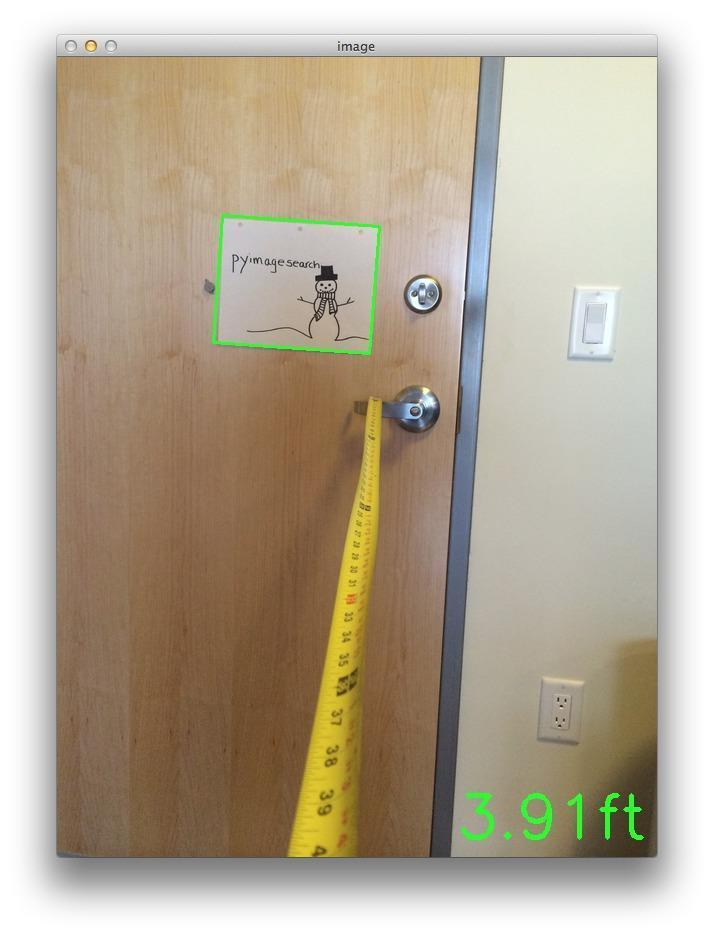
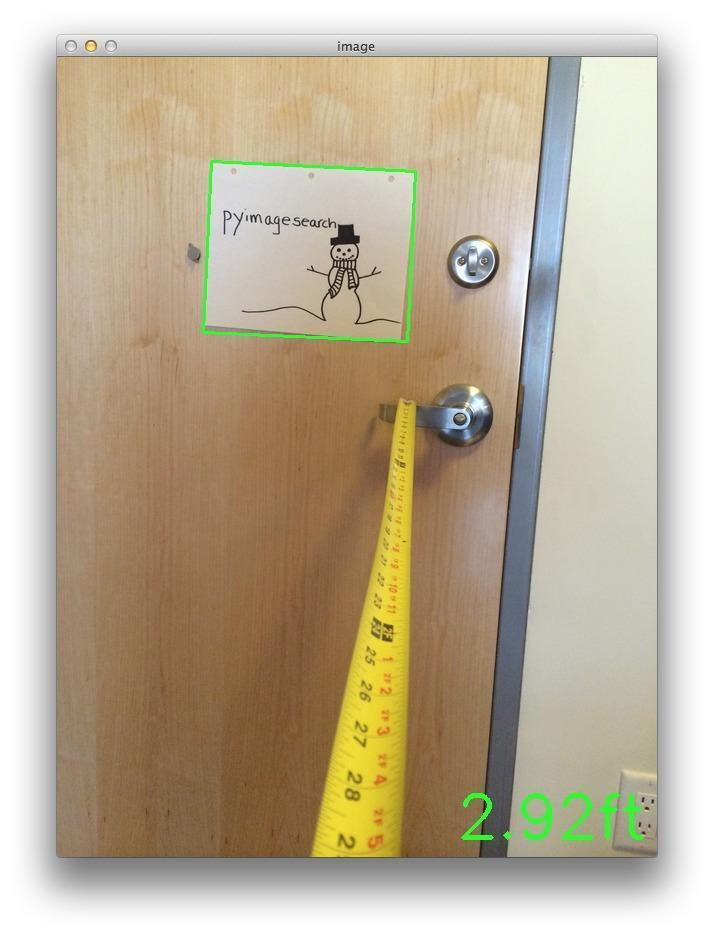
使用 for 循環(huán)遍歷每個圖片,計算每張圖片中目標(biāo)對象到相機(jī)的距離。在結(jié)果中,我們根據(jù)得到的輪廓信息將方框畫了出來,并顯示出了距離。下面是得到的幾個結(jié)果圖:
通過這篇文章,我們學(xué)會了使用相似三角形計算圖片中一個已知物體到相機(jī)的距離。
需要先測量出目標(biāo)物體的實(shí)際寬度和目標(biāo)物體到相機(jī)的距離,然后使用圖像處理的方法自動計算圖片中目標(biāo)物體的像素寬度,并使用相似三角形計算出相機(jī)的焦距。
根據(jù)相機(jī)的焦距就可以計算圖片中的目標(biāo)物體到相機(jī)的距離。
END
整理不易,點(diǎn)贊三連↓