
如何快速實現(xiàn)一個聊天室?
如何快速實現(xiàn)一個聊天室?
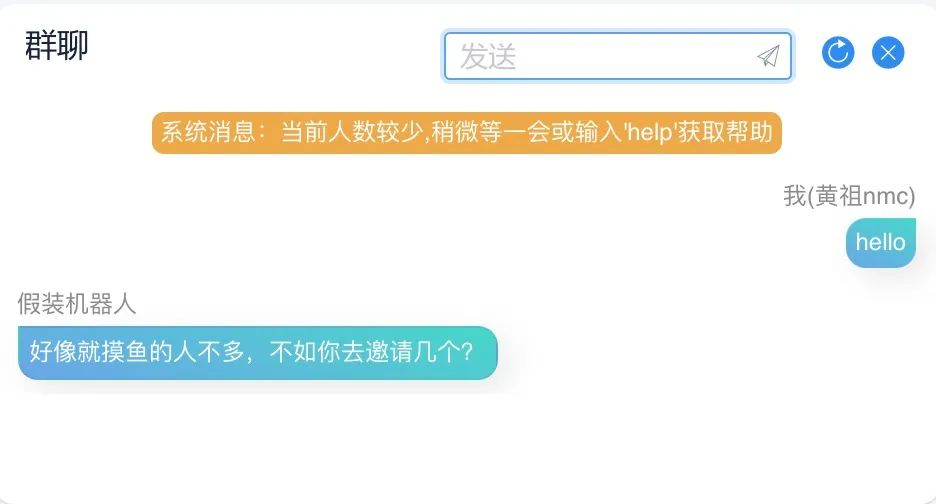
前些天做了一個網(wǎng)站:https://modubox.cn 其中有個群聊插件,許多人問如何實現(xiàn)的。這里簡單說下,為了快速完成群聊功能,我選擇從最簡單的 WebSocket 開始。
什么是WebSocket ?
既然要使用它,就需要了解一下它吧。WebSocket其實也是一種基于TCP的網(wǎng)絡(luò)協(xié)議,它與HTTP協(xié)議最大的不同是:是一種雙向通信協(xié)議,在建立連接后,WebSocket服務(wù)器端和客戶端都能主動向?qū)Ψ桨l(fā)送或接收數(shù)據(jù),而HTTP協(xié)議只能客戶端主動發(fā)起通信。
所以WebSocket能夠用于聊天,當(dāng)然其他地方也能應(yīng)用,如果做客服系統(tǒng)或推送消息都可以從這里開始。
如何實現(xiàn)單聊/群聊?
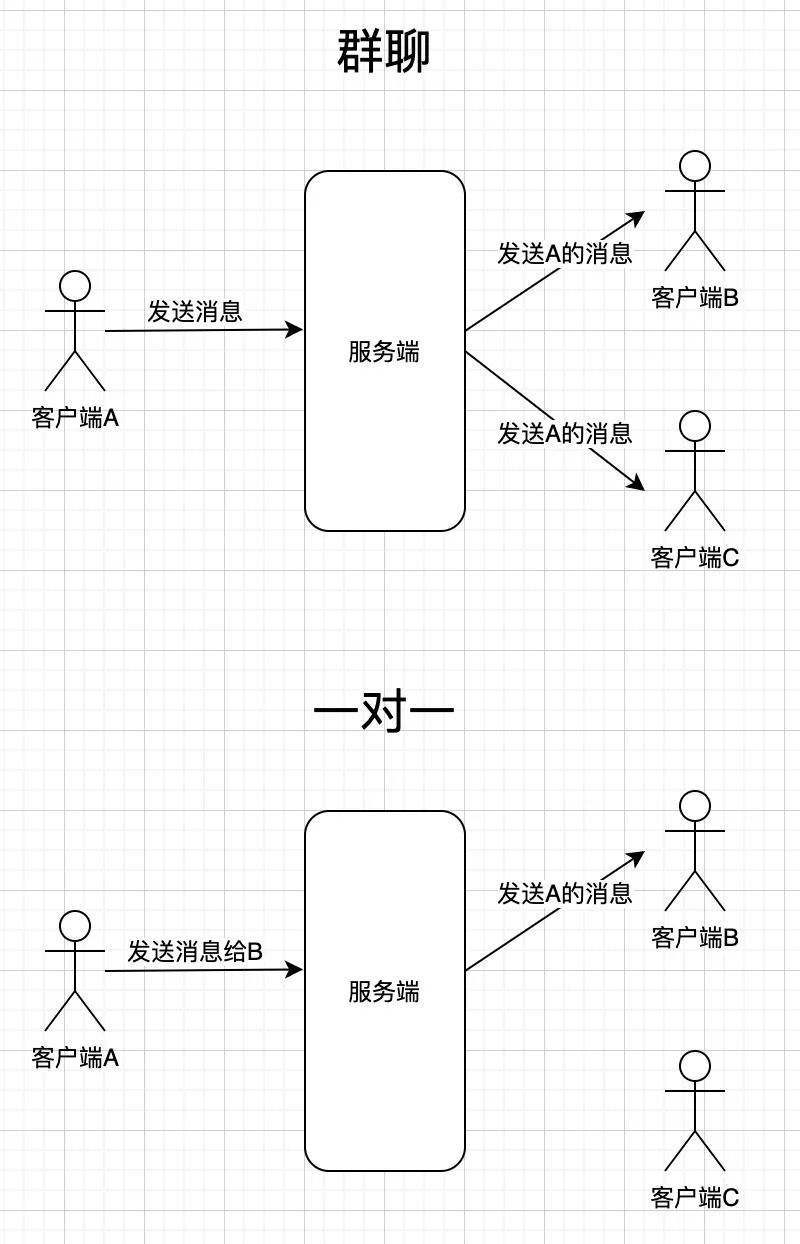
群聊:所有客戶端的消息發(fā)送到服務(wù)器,服務(wù)端將消息發(fā)送給所有客戶端。
單聊:WebSocket客戶端之間是無法直接通信的,想要通信,必須由服務(wù)端轉(zhuǎn)發(fā)。
實現(xiàn)
1. 引入WebSocket的支持
我們使用當(dāng)前最流行的Spring Boot框架構(gòu)建項目,然后引入Spring Boot 對 WebSocket 的支持:
<dependency>
 <groupId>org.springframework.boot</groupId>
 <artifactId>spring-boot-starter-websocket</artifactId>
</dependency>
2. 開啟WebSocket
@Configuration
public class WebSocketConfig {

    @Bean
    public ServerEndpointExporter serverEndpointExporter() {
        return new ServerEndpointExporter();
    }
}
3. 服務(wù)端
這里主要有以下幾點:
聲明服務(wù)端點路徑 存儲所有連接用戶,等待匹配用戶 連接 onOpen,消息OnMessage,關(guān)閉onClose,錯誤onError 方法 發(fā)送消息給特定連接者
@ServerEndpoint(value = "/websocket/random/")
@Component
public class ChatRandomServer {
    //所有連接
    public static ConcurrentHashMap<String, ChatRandomServer> webSocketSet = new ConcurrentHashMap<>();
    //與某個客戶端的連接會話,需要通過它來給客戶端發(fā)送數(shù)據(jù)
    private Session session;
    //所有在配對的ID
    private static List<String> webSocketLiveList = new CopyOnWriteArrayList();
    //自己的id標識
    private String id = "";
    //連接對象的id標識
    private String toUser = "";

    /**
     * 連接建立成功調(diào)用的方法
     */
    @OnOpen
    public void onOpen(Session session) {
        session.setMaxIdleTimeout(3600000);
        this.session = session;
        //獲取用戶ip
        String ip = IpUtil.getRemoteAddress(session);
        this.id = ip;
        ChatRandomServer put = webSocketSet.put(this.id, this);
        //如果已經(jīng)在隊里,就不去找對象
        if (put == null) {
            try {
                if (pair()) {
                    sendMessage("匹配成功");
                }
            } catch (IOException e) {
                e.printStackTrace();
            }
        } else {
            try {
                sendMessage("匹配失敗");
                webSocketSet.remove(this.id);
                session.close();
            } catch (IOException e) {
                e.printStackTrace();
            }

        }
        log.info("用戶{}加入!當(dāng)前在線人數(shù)為: {}", this.id, webSocketSet.size());

    }

    /**
     * 連接關(guān)閉調(diào)用的方法
     */
    @OnClose
    public void onClose() {
        ChatRandomServer UserId = webSocketSet.get(toUser);
        webSocketLiveList.remove(this.id);
        if (UserId != null) {
            try {
                sendToUser(session, "對方已離開", toUser);
            } catch (IOException e) {
                e.printStackTrace();
            }
        }
        webSocketSet.remove(this.id);
        log.info("{}連接關(guān)閉!當(dāng)前在線人數(shù):{}, 當(dāng)前在匹配的人數(shù):{}" ,this.id,webSocketSet.size(), webSocketLiveList.size());
    }

    /**
     * 收到客戶端消息后調(diào)用的方法
     *
     * @param message 客戶端發(fā)送過來的消息
     */
    @OnMessage
    public void onMessage(String message, Session session) {
        log.info("來自 {} 的消息: {}", this.id, message);
        try {
            ChatRandomServer.sendToUser(session, message, toUser, 2);
        } catch (IOException e) {
            e.printStackTrace();
        }

    }

    @OnError
    public void onError(Session session, Throwable error) {
        log.error("發(fā)生錯誤");
        error.printStackTrace();
        try {
            SendSelf(session,"服務(wù)器出現(xiàn)錯誤");
        } catch (IOException e) {
            e.printStackTrace();
        }
    }

    /**
     * 發(fā)送消息給自己
     */
    public void sendMessage(String message) throws IOException {
        SendSelf(this.session, message);
    }
    private static void SendSelf(Session session, String message) throws IOException {
        session.getBasicRemote().sendText(message);
    }

    /**
     * 發(fā)送信息給指定ID用戶
     */
    public static void sendToUser(Session session, String message, String sendUserId) throws IOException {
        ChatRandomServer UserId = webSocketSet.get(sendUserId);
        if (UserId != null) {
            UserId.sendMessage(message);
        } else {
            SendSelf(session, "發(fā)送失敗");
        }
    }

    /**
     * 通知除了自己之外的所有人
     */
    private void sendOnlineCount(String message) {
        for (String key : webSocketSet.keySet()) {
            try {
                if (key.equals(id)) {
                    continue;
                }
                webSocketSet.get(key).sendMessage(message);
            } catch (IOException e) {
                e.printStackTrace();
            }
        }
    }

    /**
     * 發(fā)送信息給所有人
     */
    public void sendToAll(String message) throws IOException {
        for (String key : webSocketSet.keySet()) {
            try {
                webSocketSet.get(key).sendMessage(message);
            } catch (IOException e) {
                e.printStackTrace();
            }
        }
    }

    public synchronized boolean pair() throws IOException {
        //是否存在等待匹配的用戶
        if (webSocketLiveList.size() > 0) {
            //隨機匹配一個
            Random ra = new Random();
            int nextInt = ra.nextInt(webSocketLiveList.size());
            toUser = webSocketLiveList.get(nextInt);

            try {
                ChatRandomServer UserId = webSocketSet.get(toUser);
                UserId.setToUser(id);
                sendToUser(session, "配對成功", toUser);
            } catch (IOException e) {
                e.printStackTrace();
            }
            webSocketLiveList.remove(nextInt);
            return true;
        }
        //沒有匹配的,則將自己加入等待匹配隊列
        webSocketLiveList.add(id);
        return false;
    }
}
4. 前端支持
 start: function () {
        if (typeof (WebSocket) === "undefined") {
          alert("您的瀏覽器不支持socket")
        } else {
          // 實例化socket
          this.socket = new WebSocket(`ws://localhost:8082/websocket/room`);
          // 監(jiān)聽socket連接
          this.socket.onopen = this.open
          // 監(jiān)聽socket錯誤信息
          this.socket.onerror = this.error
          // 監(jiān)聽socket消息
          this.socket.onmessage = this.getMessage
          this.socket.onclose = this.close
        }
      },
      open: function () {
      },
      error: function () {
      },
      getMessage: function (obj) {
        //接收信息后根據(jù)不同情況不同處理方式
        let data = JSON.parse(obj.data);
        if (data.code === 1) {
        } else if (data.code === 2) {
        } else {
        }
      },
      close: function (e) {
      },

      doSend: function () {
        if (that.sendData === '') {
          return;
        }
        this.socket.send(that.sendData);
        that.sendData = '';
      },
以上代碼不完整,如果需要看下完整代碼,聯(lián)系我。

評論
圖片
表情