
100行代碼搞定實(shí)時(shí)視頻人臉表情識(shí)別(附代碼)
點(diǎn)擊上方“小白學(xué)視覺”,選擇加"星標(biāo)"或“置頂”
重磅干貨,第一時(shí)間送達(dá)
本文轉(zhuǎn)自|OpenCV學(xué)堂

好就沒(méi)有寫點(diǎn)OpenCV4 + OpenVINO的應(yīng)用了,前幾天上課重新安裝了一下最新OpenVINO2020.3版本,實(shí)現(xiàn)了一個(gè)基于OpenCV+OpenVINO的Python版本人臉表情識(shí)別。100行代碼以內(nèi),簡(jiǎn)單好用!
人臉檢測(cè)使用了OpenCV中基于深度學(xué)習(xí)的人臉檢測(cè)算法,實(shí)現(xiàn)了一個(gè)實(shí)時(shí)人臉檢測(cè),該模型還支持OpenVINO加速,所以是非常好用的,之前寫過(guò)一篇文章專門介紹OpenCV DNN的人臉檢測(cè)的,直接看這里就可以了解詳情:
OpenCV4.x中請(qǐng)別再用HAAR級(jí)聯(lián)檢測(cè)器檢測(cè)人臉,有更好更準(zhǔn)的方法
使用OpenVINO模型庫(kù)中的emotions-recognition-retail-0003人臉表情模型,該模型是基于全卷積神經(jīng)網(wǎng)絡(luò)訓(xùn)練完成,使用ResNet中Block結(jié)構(gòu)構(gòu)建卷積神經(jīng)網(wǎng)絡(luò)。數(shù)據(jù)集使用了AffectNet表情數(shù)據(jù)集,支持五種表情識(shí)別,分別是:
('neutral', 'happy', 'sad', 'surprise', 'anger')輸入格式:NCHW=1x3x64x64
輸出格式:1x5x1x1
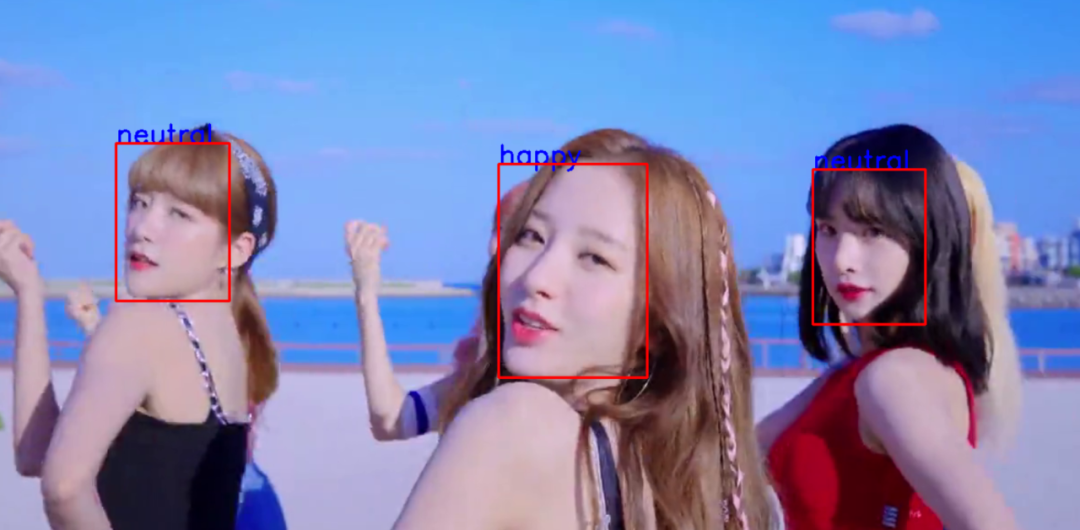
首先基于OpenCV實(shí)現(xiàn)人臉檢測(cè),然后根據(jù)檢測(cè)得到的人臉ROI區(qū)域,調(diào)用表情識(shí)別模型,完成人臉表情識(shí)別,整個(gè)代碼基于Python語(yǔ)言完成。
加載表情識(shí)別模型并設(shè)置輸入與輸出的代碼如下:
 1import cv2 as cv
 2import numpy as np
 3from openvino.inference_engine import IENetwork, IECore
 4
 5weight_pb = "D:/projects/opencv_tutorial/data/models/face_detector/opencv_face_detector_uint8.pb";
 6config_text = "D:/projects/opencv_tutorial/data/models/face_detector/opencv_face_detector.pbtxt";
 7
 8model_xml = "emotions-recognition-retail-0003.xml"
 9model_bin = "emotions-recognition-retail-0003.bin"
10
11labels = ['neutral', 'happy', 'sad', 'surprise', 'anger']
12emotion_labels = ["neutral","anger","disdain","disgust","fear","happy","sad","surprise"]
13
14emotion_net = IENetwork(model=model_xml, weights=model_bin)
15ie = IECore()
16versions = ie.get_versions("CPU")
17input_blob = next(iter(emotion_net.inputs))
18n, c, h, w = emotion_net.inputs[input_blob].shape
19print(emotion_net.inputs[input_blob].shape)
20
21output_info = emotion_net.outputs[next(iter(emotion_net.outputs.keys()))]
22output_info.precision = "FP32"
23exec_net = ie.load_network(network=emotion_net, device_name="CPU")
24root_dir = "D:/facedb/emotion_dataset/"
實(shí)現(xiàn)人臉檢測(cè)與表情識(shí)別的代碼如下:
 1def emotion_detect(frame):
 2    net = cv.dnn.readNetFromTensorflow(weight_pb, config=config_text)
 3    h, w, c = frame.shape
 4    blobImage = cv.dnn.blobFromImage(frame, 1.0, (300, 300), (104.0, 177.0, 123.0), False, False);
 5    net.setInput(blobImage)
 6    cvOut = net.forward()
 7
 8    # 繪制檢測(cè)矩形
 9    for detection in cvOut[0,0,:,:]:
10        score = float(detection[2])
11        if score > 0.5:
12            left = detection[3]*w
13            top = detection[4]*h
14            right = detection[5]*w
15            bottom = detection[6]*h
16
17            # roi and detect landmark
18            y1 = np.int32(top) if np.int32(top) > 0 else 0
19            y2 = np.int32(bottom) if np.int32(bottom) < h else h-1
20            x1 = np.int32(left) if np.int32(left) > 0 else 0
21            x2 = np.int32(right) if np.int32(right) < w else w-1
22            roi = frame[y1:y2,x1:x2,:]
23            image = cv.resize(roi, (64, 64))
24            image = image.transpose((2, 0, 1))  # Change data layout from HWC to CHW
25            res = exec_net.infer(inputs={input_blob: [image]})
26            prob_emotion = res['prob_emotion']
27            probs = np.reshape(prob_emotion, (5))
28            txt = labels[np.argmax(probs)]
29            cv.putText(frame, txt, (np.int32(left), np.int32(top)), cv.FONT_HERSHEY_SIMPLEX, 1.0, (255, 0, 0), 2)
30            cv.rectangle(frame, (np.int32(left), np.int32(top)),
31                         (np.int32(right), np.int32(bottom)), (0, 0, 255), 2, 8, 0)
打開攝像頭或者視頻文件,運(yùn)行人臉表情識(shí)別的:
 1if __name__ == "__main__":
 2    capture = cv.VideoCapture("D:/images/video/Boogie_Up.mp4")
 3    while True:
 4        ret, frame = capture.read()
 5        if ret is not True:
 6            break
 7        emotion_detect(frame)
 8        cv.imshow("emotion-detect-demo", frame)
 9        c = cv.waitKey(1)
10        if c == 27:
11            break
運(yùn)行截圖如下:
交流群
歡迎加入公眾號(hào)讀者群一起和同行交流,目前有SLAM、三維視覺、傳感器、自動(dòng)駕駛、計(jì)算攝影、檢測(cè)、分割、識(shí)別、醫(yī)學(xué)影像、GAN、算法競(jìng)賽等微信群(以后會(huì)逐漸細(xì)分),請(qǐng)掃描下面微信號(hào)加群,備注:”昵稱+學(xué)校/公司+研究方向“,例如:”張三 + 上海交大 + 視覺SLAM“。請(qǐng)按照格式備注,否則不予通過(guò)。添加成功后會(huì)根據(jù)研究方向邀請(qǐng)進(jìn)入相關(guān)微信群。請(qǐng)勿在群內(nèi)發(fā)送廣告,否則會(huì)請(qǐng)出群,謝謝理解~