SpringBoot集成SpringSecurity
點擊上方藍色字體,選擇“標星公眾號”
優(yōu)質(zhì)文章,第一時間送達?
1、安全簡介
在 Web 開發(fā)中,安全一直是非常重要的一個方面。安全雖然屬于應用的非功能性需求,但是應該在應用開發(fā)的初期就考慮進來。如果在應用開發(fā)的后期才考慮安全的問題,就可能陷入一個兩難的境地:一方面,應用存在嚴重的安全漏洞,無法滿足用戶的要求,并可能造成用戶的隱私數(shù)據(jù)被攻擊者竊取;另一方面,應用的基本架構已經(jīng)確定,要修復安全漏洞,可能需要對系統(tǒng)的架構做出比較重大的調(diào)整,因而需要更多的開發(fā)時間,影響應用的發(fā)布進程。因此,從應用開發(fā)的第一天就應該把安全相關的因素考慮進來,并在整個應用的開發(fā)過程中。
市面上存在比較有名的:Shiro,Spring Security !
這里需要闡述一下的是,每一個框架的出現(xiàn)都是為了解決某一問題而產(chǎn)生了,那么Spring Security框架的出現(xiàn)是為了解決什么問題呢?
首先我們看下它的官網(wǎng)介紹:Spring Security官網(wǎng)地址
Spring Security is a powerful and highly customizable authentication and access-control framework. It is the de-facto standard for securing Spring-based applications.
Spring Security is a framework that focuses on providing both authentication and authorization to Java applications. Like all Spring projects, the real power of Spring Security is found in how easily it can be extended to meet custom requirements
Spring Security是一個功能強大且高度可定制的身份驗證和訪問控制框架。它實際上是保護基于spring的應用程序的標準。
Spring Security是一個框架,側重于為Java應用程序提供身份驗證和授權。與所有Spring項目一樣,Spring安全性的真正強大之處在于它可以輕松地擴展以滿足定制需求
從官網(wǎng)的介紹中可以知道這是一個權限框架。想我們之前做項目是沒有使用框架是怎么控制權限的?對于權限 一般會細分為功能權限,訪問權限,和菜單權限。代碼會寫的非常的繁瑣,冗余。
怎么解決之前寫權限代碼繁瑣,冗余的問題,一些主流框架就應運而生而Spring Scecurity就是其中的一種。
Spring 是一個非常流行和成功的 Java 應用開發(fā)框架。Spring Security 基于 Spring 框架,提供了一套 Web 應用安全性的完整解決方案。一般來說,Web 應用的安全性包括用戶認證(Authentication)和用戶授權(Authorization)兩個部分。用戶認證指的是驗證某個用戶是否為系統(tǒng)中的合法主體,也就是說用戶能否訪問該系統(tǒng)。用戶認證一般要求用戶提供用戶名和密碼。系統(tǒng)通過校驗用戶名和密碼來完成認證過程。用戶授權指的是驗證某個用戶是否有權限執(zhí)行某個操作。在一個系統(tǒng)中,不同用戶所具有的權限是不同的。比如對一個文件來說,有的用戶只能進行讀取,而有的用戶可以進行修改。一般來說,系統(tǒng)會為不同的用戶分配不同的角色,而每個角色則對應一系列的權限。
對于上面提到的兩種應用情景,Spring Security 框架都有很好的支持。在用戶認證方面,Spring Security 框架支持主流的認證方式,包括 HTTP 基本認證、HTTP 表單驗證、HTTP 摘要認證、OpenID 和 LDAP 等。在用戶授權方面,Spring Security 提供了基于角色的訪問控制和訪問控制列表(Access Control List,ACL),可以對應用中的領域?qū)ο筮M行細粒度的控制。
2、實戰(zhàn)測試
實驗環(huán)境搭建
1、新建一個初始的springboot項目web模塊,thymeleaf模塊
2、導入靜態(tài)資源
welcome.html
|views
|level1
1.html
2.html
3.html
|level2
1.html
2.html
3.html
|level3
1.html
2.html
3.html
Login.html
3、controller跳轉(zhuǎn)!
package?com.zjl.controller;

import?org.springframework.stereotype.Controller;
import?org.springframework.web.bind.annotation.PathVariable;
import?org.springframework.web.bind.annotation.RequestMapping;

/**
?* Created by zjl
?* 2020/8/18
?**/

@Controller
public?class?RouterController?{

????@RequestMapping({"/","/index"})
????public?String index(){
????????return?"index";
????}

????@RequestMapping("/toLogin")
????public?String toLogin(){
????????return?"/views/login";
????}

????@RequestMapping("/level1/{id}")
????public?String level1(@PathVariable("id")int?id){
????????return?"/views/level1/"?+ id;
????}

????@RequestMapping("/level2/{id}")
????public?String level2(@PathVariable("id")int?id){
????????return?"/views/level2/"?+ id;
????}

????@RequestMapping("/level3/{id}")
????public?String level3(@PathVariable("id")int?id){
????????return?"/views/level3/"?+ id;
????}


}
4、測試實驗環(huán)境是否OK!
認識SpringSecurity
Spring Security 是針對Spring項目的安全框架,也是Spring Boot底層安全模塊默認的技術選型,他可以實現(xiàn)強大的Web安全控制,對于安全控制,我們僅需要引入 spring-boot-starter-security 模塊,進行少量的配置,即可實現(xiàn)強大的安全管理!
記住幾個類:
1、WebSecurityConfigurerAdapter:自定義Security策略
2、AuthenticationManagerBuilder:自定義認證策略
3、@EnableWebSecurity:開啟WebSecurity模式
Spring Security的兩個主要目標是 “認證” 和 “授權”(訪問控制)。
“認證”(Authentication)
身份驗證是關于驗證您的憑據(jù),如用戶名/用戶ID和密碼,以驗證您的身份。
身份驗證通常通過用戶名和密碼完成,有時與身份驗證因素結合使用。
“授權” (Authorization)
授權發(fā)生在系統(tǒng)成功驗證您的身份后,最終會授予您訪問資源(如信息,文件,數(shù)據(jù)庫,資金,位置,幾乎任何內(nèi)容)的完全權限。
這個概念是通用的,而不是只在Spring Security 中存在。
認證和授權
目前,我們的測試環(huán)境,是誰都可以訪問的,我們使用 Spring Security 增加上認證和授權的功能
1、引入 Spring Security 模塊
<dependency>
??<groupId>org.springframework.bootgroupId>
??<artifactId>spring-boot-starter-securityartifactId>
dependency>
2、編寫 Spring Security 配置類
參考官網(wǎng):https://spring.io/projects/spring-security
查看我們自己項目中的版本,找到對應的幫助文檔:
https://docs.spring.io/spring-security/site/docs/5.3.0.RELEASE/reference/html5 #servlet-applications 8.16.4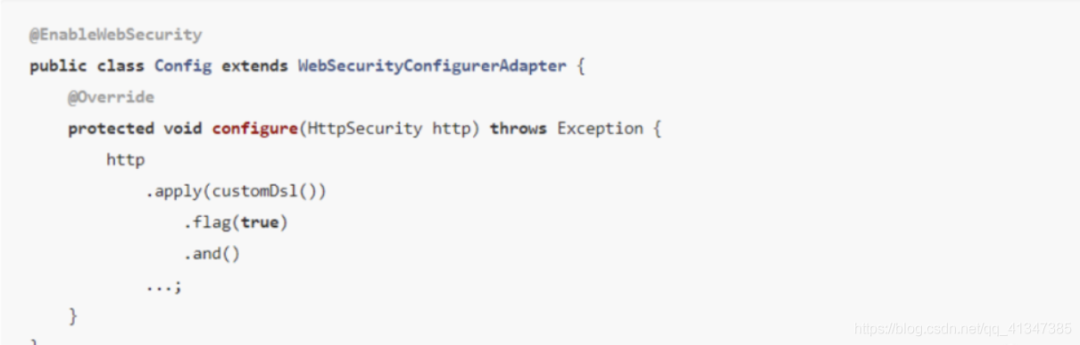
3、編寫基礎配置類
package?com.kuang.config;

import?org.springframework.security.config.annotation.web.builders.HttpSecurity;
import?org.springframework.security.config.annotation.web.configuration.EnableWebSecurity;
import?org.springframework.security.config.annotation.web.configuration.WebSecurityConfigurerAdapter;

@EnableWebSecurity?// 開啟WebSecurity模式
public class SecurityConfig extends WebSecurityConfigurerAdapter {

???@Override
???protected void configure(HttpSecurity http) throws Exception {
???????
??}
}
4、定制請求的授權規(guī)則
@Override
protected void configure(HttpSecurity http) throws Exception {
???// 定制請求的授權規(guī)則
???// 首頁所有人可以訪問
???http.authorizeRequests().antMatchers("/").permitAll()
??.antMatchers("/level1/**").hasRole("vip1")
??.antMatchers("/level2/**").hasRole("vip2")
??.antMatchers("/level3/**").hasRole("vip3");
}
5、測試一下:發(fā)現(xiàn)除了首頁都進不去了!因為我們目前沒有登錄的角色,因為請求需要登錄的角色擁有對應的權限才可以!
6、在configure()方法中加入以下配置,開啟自動配置的登錄功能!
// 開啟自動配置的登錄功能
// /login 請求來到登錄頁
// /login?error 重定向到這里表示登錄失敗
http.formLogin();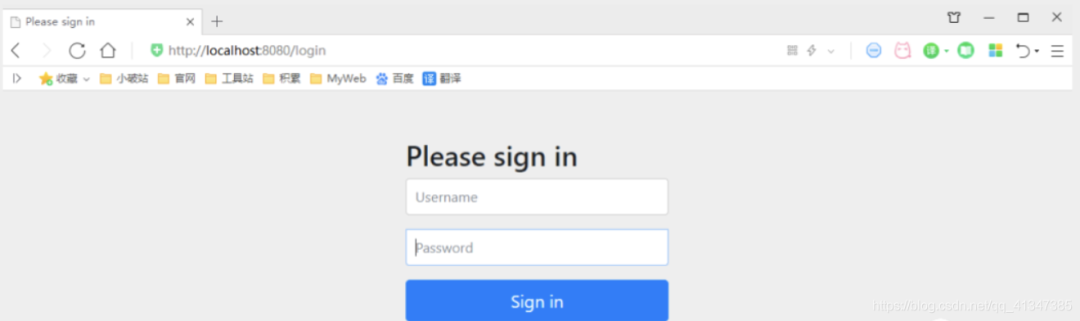
8、查看剛才登錄頁的注釋信息;
我們可以定義認證規(guī)則,重寫configure(AuthenticationManagerBuilder auth)方法
//定義認證規(guī)則
@Override
protected void configure(AuthenticationManagerBuilder auth) throws Exception {
???
???//在內(nèi)存中定義,也可以在jdbc中去拿....
???auth.inMemoryAuthentication()
??????????.withUser("zjl").password("123456").roles("vip2","vip3")
??????????.and()
??????????.withUser("root").password("123456").roles("vip1","vip2","vip3")
??????????.and()
??????????.withUser("guest").password("123456").roles("vip1","vip2");
}
9、測試,我們可以使用這些賬號登錄進行測試!發(fā)現(xiàn)會報錯!
There is no PasswordEncoder mapped for the id “null”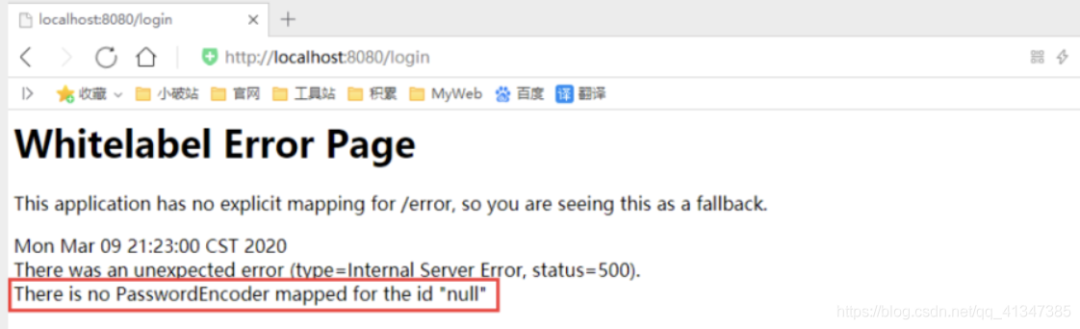
10、原因,我們要將前端傳過來的密碼進行某種方式加密,否則就無法登錄,修改代碼
//定義認證規(guī)則
@Override
protected void configure(AuthenticationManagerBuilder auth) throws Exception {
???//在內(nèi)存中定義,也可以在jdbc中去拿....
???//Spring security 5.0中新增了多種加密方式,也改變了密碼的格式。
???//要想我們的項目還能夠正常登陸,需要修改一下configure中的代碼。我們要將前端傳過來的密碼進行某種方式加密
???//spring security 官方推薦的是使用bcrypt加密方式。
???
???auth.inMemoryAuthentication().passwordEncoder(new BCryptPasswordEncoder())
??????????.withUser("zjl").password(new BCryptPasswordEncoder().encode("123456")).roles("vip2","vip3")
??????????.and()
??????????.withUser("root").password(new BCryptPasswordEncoder().encode("123456")).roles("vip1","vip2","vip3")
??????????.and()
??????????.withUser("guest").password(new BCryptPasswordEncoder().encode("123456")).roles("vip1","vip2");
}
11、測試,發(fā)現(xiàn),登錄成功,并且每個角色只能訪問自己認證下的規(guī)則!搞定
權限控制和注銷
1、開啟自動配置的注銷的功能
//定制請求的授權規(guī)則
@Override
protected?void?configure(HttpSecurity http)?throws?Exception {
???//....
???//開啟自動配置的注銷的功能
??????// /logout 注銷請求
???http.logout();
}
2、我們在前端,增加一個注銷的按鈕,index.html 導航欄中
class="item"?th:href="@{/logout}">
???<i?class="address card icon">i>?注銷
</a>
3、我們可以去測試一下,登錄成功后點擊注銷,發(fā)現(xiàn)注銷完畢會跳轉(zhuǎn)到登錄頁面!
4、但是,我們想讓他注銷成功后,依舊可以跳轉(zhuǎn)到首頁,該怎么處理呢?
// .logoutSuccessUrl("/"); 注銷成功來到首頁
http.logout().logoutSuccessUrl("/");
5、測試,注銷完畢后,發(fā)現(xiàn)跳轉(zhuǎn)到首頁OK
6、我們現(xiàn)在又來一個需求:用戶沒有登錄的時候,導航欄上只顯示登錄按鈕,用戶登錄之后,導航欄可以顯示登錄的用戶信息及注銷按鈕!還有就是,比如zjl這個用戶,它只有 vip2,vip3功能,那么登錄則只顯示這兩個功能,而vip1的功能菜單不顯示!這個就是真實的網(wǎng)站情況了!該如何做呢?
我們需要結合thymeleaf中的一些功能
sec:authorize=“isAuthenticated()”:是否認證登錄!來顯示不同的頁面
Maven依賴
<dependency>
???<groupId>org.thymeleaf.extrasgroupId>
???<artifactId>thymeleaf-extras-springsecurity5artifactId>
???<version>3.0.4.RELEASEversion>
dependency>
7、修改我們的 前端頁面
導入命名空間
xmlns:sec="http://www.thymeleaf.org/thymeleaf-extras-springsecurity5"修改導航欄,增加認證判斷
<div?class="right menu">

???
???<div?sec:authorize="!isAuthenticated()">
???????<a?class="item"?th:href="@{/login}">
???????????<i?class="address card icon">i>?登錄
???????a>
???div>

???
???<div?sec:authorize="isAuthenticated()">
???????<a?class="item">
???????????<i?class="address card icon">i>
??????????用戶名:<span?sec:authentication="principal.username">span>
??????????角色:<span?sec:authentication="principal.authorities">span>
???????a>
???div>

???<div?sec:authorize="isAuthenticated()">
???????<a?class="item"?th:href="@{/logout}">
???????????<i?class="address card icon">i>?注銷
???????a>
???div>
div>
8、重啟測試,我們可以登錄試試看,登錄成功后確實,顯示了我們想要的頁面;
9、如果注銷404了,就是因為它默認防止csrf跨站請求偽造,因為會產(chǎn)生安全問題,我們可以將請求改為post表單提交,或者在spring security中關閉csrf功能;我們試試:在 配置中增加 http.csrf().disable();
http.csrf().disable();//關閉csrf功能:跨站請求偽造,默認只能通過post方式提交logout請求
http.logout().logoutSuccessUrl("/");
10、我們繼續(xù)將下面的角色功能塊認證完成!
<div?class="column"?sec:authorize="hasRole('vip1')">
???<div?class="ui raised segment">
???????<div?class="ui">
???????????<div?class="content">
???????????????<h5?class="content">Level 1h5>
???????????????<hr>
???????????????<div><a?th:href="@{/level1/1}"><i?class="bullhorn icon">i>?Level-1-1a>div>
???????????????<div><a?th:href="@{/level1/2}"><i?class="bullhorn icon">i>?Level-1-2a>div>
???????????????<div><a?th:href="@{/level1/3}"><i?class="bullhorn icon">i>?Level-1-3a>div>
???????????div>
???????div>
???div>
div>

<div?class="column"?sec:authorize="hasRole('vip2')">
???<div?class="ui raised segment">
???????<div?class="ui">
???????????<div?class="content">
???????????????<h5?class="content">Level 2h5>
???????????????<hr>
???????????????<div><a?th:href="@{/level2/1}"><i?class="bullhorn icon">i>?Level-2-1a>div>
???????????????<div><a?th:href="@{/level2/2}"><i?class="bullhorn icon">i>?Level-2-2a>div>
???????????????<div><a?th:href="@{/level2/3}"><i?class="bullhorn icon">i>?Level-2-3a>div>
???????????div>
???????div>
???div>
div>

<div?class="column"?sec:authorize="hasRole('vip3')">
???<div?class="ui raised segment">
???????<div?class="ui">
???????????<div?class="content">
???????????????<h5?class="content">Level 3h5>
???????????????<hr>
???????????????<div><a?th:href="@{/level3/1}"><i?class="bullhorn icon">i>?Level-3-1a>div>
???????????????<div><a?th:href="@{/level3/2}"><i?class="bullhorn icon">i>?Level-3-2a>div>
???????????????<div><a?th:href="@{/level3/3}"><i?class="bullhorn icon">i>?Level-3-3a>div>
???????????div>
???????div>
???div>
div>
11、測試一下!
12、權限控制和注銷搞定!
記住我
現(xiàn)在的情況,我們只要登錄之后,關閉瀏覽器,再登錄,就會讓我們重新登錄,但是很多網(wǎng)站的情況,就是有一個記住密碼的功能,這個該如何實現(xiàn)呢?很簡單
1、開啟記住我功能
//定制請求的授權規(guī)則
@Override
protected?void?configure(HttpSecurity http)?throws?Exception {
//。。。。。。。。。。。
???//記住我
???http.rememberMe();
}
2、我們再次啟動項目測試一下,發(fā)現(xiàn)登錄頁多了一個記住我功能,我們登錄之后關閉 瀏覽器,然后重新打開瀏覽器訪問,發(fā)現(xiàn)用戶依舊存在!
思考:如何實現(xiàn)的呢?其實非常簡單
我們可以查看瀏覽器的cookie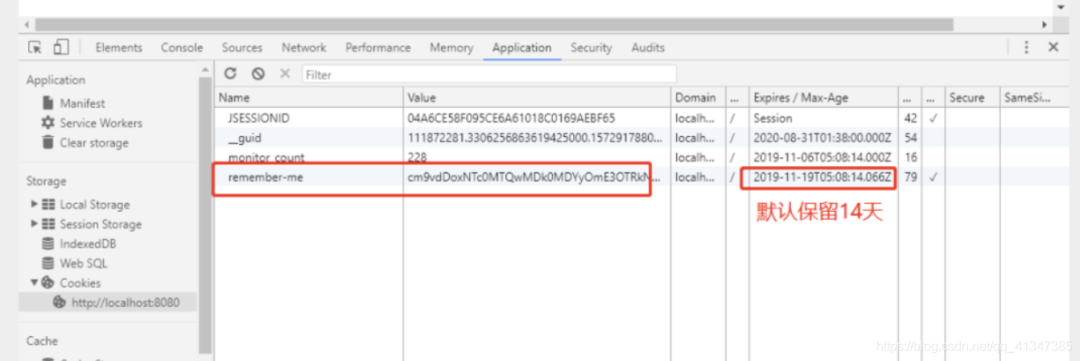
3、我們點擊注銷的時候,可以發(fā)現(xiàn),spring security 幫我們自動刪除了這個 cookie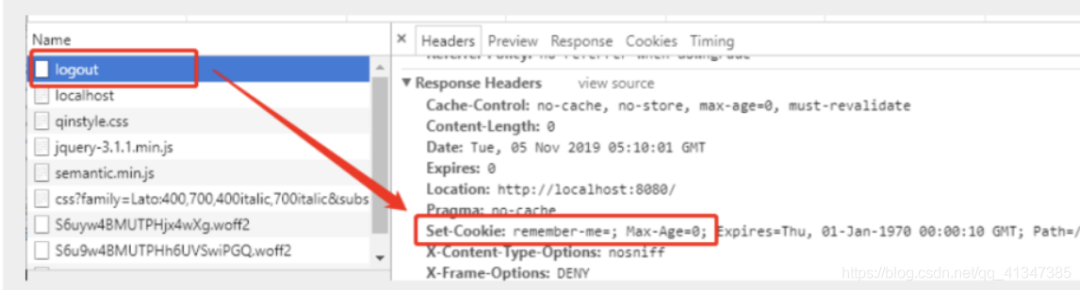
4、結論:登錄成功后,將cookie發(fā)送給瀏覽器保存,以后登錄帶上這個cookie,只要通過檢查就可以免登錄了。如果點擊注銷,則會刪除這個cookie,具體的原理我們在JavaWeb階段都講過了,這里就不在多說了!
定制登錄頁
現(xiàn)在這個登錄頁面都是spring security 默認的,怎么樣可以使用我們自己寫的Login界面呢?
1、在剛才的登錄頁配置后面指定 loginpage
http.formLogin().loginPage("/toLogin");2、然后前端也需要指向我們自己定義的 login請求
class="item"?th:href="@{/toLogin}">
???<i?class="address card icon">i>?登錄
</a>
3、我們登錄,需要將這些信息發(fā)送到哪里,我們也需要配置,login.html 配置提交請求及方式,方式必須為post:
在 loginPage()源碼中的注釋上有寫明:
<form?th:action="@{/login}"?method="post">
???<div?class="field">
???????<label>Usernamelabel>
???????<div?class="ui left icon input">
???????????<input?type="text"?placeholder="Username"?name="username">
???????????<i?class="user icon">i>
???????div>
???div>
???<div?class="field">
???????<label>Passwordlabel>
???????<div?class="ui left icon input">
???????????<input?type="password"?name="password">
???????????<i?class="lock icon">i>
???????div>
???div>
???<input?type="submit"?class="ui blue submit button"/>
form>
4、這個請求提交上來,我們還需要驗證處理,怎么做呢?我們可以查看formLogin()方法的源碼!我們配置接收登錄的用戶名和密碼的參數(shù)!
http.formLogin()
??.usernameParameter("username")
??.passwordParameter("password")
??.loginPage("/toLogin")
??.loginProcessingUrl("/login"); // 登陸表單提交請求
5、在登錄頁增加記住我的多選框
<input?type="checkbox"?name="remember"> 記住我6、后端驗證處理
//定制記住我的參數(shù)!
http.rememberMe().rememberMeParameter("remember");
7、測試,OK
完整配置代碼
package?com.zjl.config;

import?org.springframework.security.config.annotation.authentication.builders.AuthenticationManagerBuilder;
import?org.springframework.security.config.annotation.web.builders.HttpSecurity;
import?org.springframework.security.config.annotation.web.configuration.EnableWebSecurity;
import?org.springframework.security.config.annotation.web.configuration.WebSecurityConfigurerAdapter;
import?org.springframework.security.crypto.bcrypt.BCryptPasswordEncoder;

/**
?* Created by zjl
?* 2020/8/18
?**/
@EnableWebSecurity
public?class?SecurityConfig?extends?WebSecurityConfigurerAdapter?{
????//授權
????//鏈式編程
????@Override
????protected void configure(HttpSecurity http) throws Exception {
????????//首頁所有人可以訪問,功能頁只有對應有權限的人才能訪問
????????//請求授權的規(guī)則
????????http.authorizeRequests()
????????????????.antMatchers("/").permitAll()
????????????????.antMatchers("/level1/**").hasRole("vip1")
????????????????.antMatchers("/level2/**").hasRole("vip2")
????????????????.antMatchers("/level3/**").hasRole("vip3");

????????//沒有權限,會默認跳到登錄頁,需要開啟登錄的頁面
????????????//login
????????????//定制登錄頁 loginPage("/toLogin")
????????http.formLogin().loginPage("/toLogin");

????????//開啟了注銷功能
????????http.logout().logoutSuccessUrl("/");

????????//防止網(wǎng)站攻擊 get,post
????????http.csrf().disable(); //關閉csrf功能

????????//開啟記住我功能
????????http.rememberMe().rememberMeParameter("remember");
????}


????//認證
????//密碼編碼 PasswordEncoder
????//在spring secutiry 5.0+ 新增了很多的加密方法
????@Override
????protected?void?configure(AuthenticationManagerBuilder auth) throws?Exception?{

????????//這些數(shù)據(jù)正常應該從數(shù)據(jù)庫中獲取
????????//Spring security 5.0中新增了多種加密方式,也改變了密碼的格式。
????????//要想我們的項目還能夠正常登陸,需要修改一下configure中的代碼。我們要將前端傳過來的密碼進行某種方式加密
????????//spring security 官方推薦的是使用bcrypt加密方式。
????????auth.inMemoryAuthentication().passwordEncoder(new BCryptPasswordEncoder())
????????????????.withUser("zjl").password(new BCryptPasswordEncoder().encode("123456")).roles("vip2","vip3")
????????????????.and()
????????????????.withUser("root").password(new BCryptPasswordEncoder().encode("123456")).roles("vip1","vip2","vip3")
????????????????.and()
????????????????.withUser("guest").password(new BCryptPasswordEncoder().encode("123456")).roles("vip1");
????}
}版權聲明:本文為博主原創(chuàng)文章,遵循?CC 4.0 BY-SA?版權協(xié)議,轉(zhuǎn)載請附上原文出處鏈接和本聲明。
本文鏈接:
https://blog.csdn.net/qq_41347385/article/details/108193516
粉絲福利:108本java從入門到大神精選電子書領取
???
?長按上方鋒哥微信二維碼?2 秒 備注「1234」即可獲取資料以及 可以進入java1234官方微信群
感謝點贊支持下哈?