SpringBoot集成Elasticsearch
點(diǎn)擊上方藍(lán)色字體,選擇“標(biāo)星公眾號(hào)”
優(yōu)質(zhì)文章,第一時(shí)間送達(dá)
? 作者?|? Zzzkis
來(lái)源 |? ?urlify.cn/RR7fIz
76套java從入門(mén)到精通實(shí)戰(zhàn)課程分享
1. 準(zhǔn)備工作
需要提前安裝好Elasticsearch,訪問(wèn)地址:http://127.0.0.1:9200/?得到以下結(jié)果,得到cluster_name,下面配置使用。
{
??"name"?:?"O8GslS3",
??"cluster_name"?:?"docker-cluster",
??"cluster_uuid"?:?"pviTqfXtR3GtnxF-Po-_aA",
??"version"?:?{
????"number"?:?"6.5.0",
????......
??},
??"tagline"?:?"You?Know,?for?Search"
}
?
2.?使用Maven創(chuàng)建SpringBoot工程
配置Maven的pom.xml文件
????????org.springframework.boot
????????spring-boot-parent
????????2.1.6.RELEASE
????

????
????????
????????????org.springframework.boot
????????????spring-boot-starter-data-elasticsearch
????????
????
注意:spring-boot-starter-data-elasticsearch包,引用的是spring-data-elasticsearch包,而spring-data-elasticsearch包的版本與elasticsearch服務(wù)版本是有兼容性問(wèn)題的。
目前并不支持elasticsearch7.x,參考:https://github.com/spring-projects/spring-data-elasticsearch
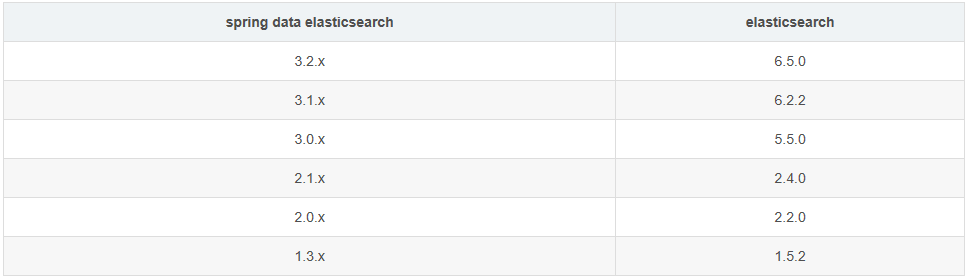
配置application.yml文件
spring:
??data:
????elasticsearch:
??????cluster-name:?docker-cluster
??????cluster-nodes:?127.0.0.1:9300
??????repositories:
????????enabled:?true
3. 代碼
實(shí)體類。使用@Document注解,參數(shù)indexName是索引名稱,type是type名稱。
//?indexName索引名稱,type類型
@Document(indexName?=?"houseindex",?type?=?"house")
public?class?HouseIndexTemplate?{

????@Id
????private?Long?houseId;

????//?使用分詞器
????@Field(type?=?FieldType.Text,?analyzer?=?"ik_max_word",?searchAnalyzer?=?"ik_max_word")
????private?String?title;

????@Field(type?=?FieldType.Keyword)
????private?String?name;

????@Field(type?=?FieldType.Integer)
????private?int?price;


}
訪問(wèn)接口。使用@Repository注解,并繼承ElasticsearchRepository接口,就可以直接訪問(wèn)的。
有兩個(gè)參數(shù):1.返回的對(duì)象,2.ID參數(shù)數(shù)據(jù)類型
@Repository
public?interface?HouseRepository?extends?ElasticsearchRepository<HouseIndexTemplate,?Long>?{

}
測(cè)試用例
@RunWith(SpringRunner.class)
@SpringBootTest(classes?=?Application.class)
public?class?UserServiceTest?{

????@Autowired
????private?HouseRepository?houseRepository;

????@Test
????public?void?selectUser(){????????HouseIndexTemplate?template?=?new?HouseIndexTemplate();????????template.setId(1);????????template.setName("Tom");
????????houseRepository.save(template);
????}

}
4. 異常解釋
問(wèn)題1:NoNodeAvailableException[None of the configured nodes are available: [{#transport#-1}{IVH9QII0QrOU9GkXdsJPiA}{127.0.0.1}{127.0.0.1:9300}]]
原因:這是說(shuō)配置的節(jié)點(diǎn)不可用,原因答題有3種可能:(1)IP地址或端口填寫(xiě)有誤;(2)cluster_name填寫(xiě)有誤;(3)Elasticsearch服務(wù)已關(guān)閉
粉絲福利:Java從入門(mén)到入土學(xué)習(xí)路線圖
??????

??長(zhǎng)按上方微信二維碼?2 秒
感謝點(diǎn)贊支持下哈?