
快速入門OpenCV
OpenCV
先決條件
https://code.visualstudio.com/download
python?-m?venv?env??
env\scripts\activate激活環(huán)境,你會在C:\Users\username\Desktop\opencv之前看到小括號(env)出現(xiàn)。pip?install?opencv-python
我們會在本文中涵蓋7個主題
讀,寫和顯示圖像
img?=?cv2.imread("PATH_TO_IMAGE.jpg/png")
Example
img?=?imread("images/dog0.jpg")
cv2.imshow("WINDOW?NAME",IMG_VAR)
Example
imshow("Dog?Image",img)
cv2.imwrite(FILENAME,?IMAGE)
filename:?A?string?representing?the?file?name.?The?filename?must?include?image?format?like?.jpg,?.png,?etc.
image:?It?is?the?image?that?is?to?be?saved.
Example
cv2.imwrite('images/img',img)
讀取視頻并與網(wǎng)絡攝像頭集成
video?=?cv2.VideoCapture("FILEPATH.mp4")
Example
video?=?cv2.VideoCapture("video/dog/dog.mp4")
while?True:
???success?,?img?=?cap.read()
???cv2.imshow("Video",img)
???if?cv2.waitKey(1)?&?0xff==ord('q'):##key?'q'?will?break?the?loop
???????break
cap?=?cv2.VideoCapture(0)
cap.set(3,640)??##?Frame?width
cap.set(4,480)??##?Frame?Height
cap.set(10,100)?##?Brightness
while?True:
???success,?img?=?cap.read()
???cv2.imshow("Video",img)
???if?cv2.waitKey(1)?&?0xff?==?ord('q'):
????????break
調(diào)整大小和裁剪圖像
cv2.resize(IMG,(WIDTH,HEIGHT))
IMG:?image?which?we?want?to?resize
WIDTH:?new?width?of?the?resize?image
HEIGHT:?new?height?of?the?resize?image
Example
cv2.resize(img,(224,224))
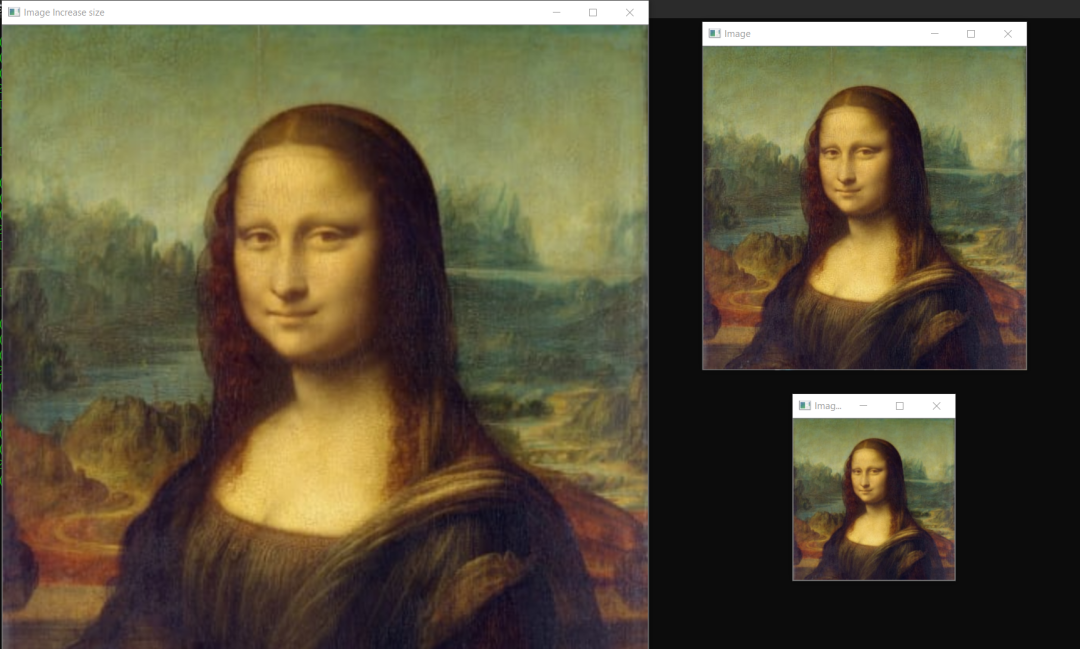
shape來找到任何圖像的形狀,然后根據(jù)圖像形狀,可以增加或減小圖像的大小。讓我們看看示例。import?cv2
img?=?cv2.imread("images/img0.jpg")?##Choose?any?image
print(img.shape)
imgResize?=?cv2.resize(img,(224,224))?##Decrease?size
imgResize2?=?cv2.resize(img,(1024,1024))?##Increase?size
cv2.imshow("Image",img)
cv2.imshow("Image?Resize",imgResize)
cv2.imshow("Image?Increase?size",imgResize2)
print(imgResize.shape)
cv2.waitKey(0)
import?cv2
img?=?cv2.imread("images/img0.jpg")?##Choose?any?image
print(img.shape)
shape?=?img.shape
imgResize?=?cv2.resize(img,(shape[0]//2,shape[1]//2))##Decrease?size
imgResize2?=?cv2.resize(img,(shape[0]*2,shape[1]*2))?##Increase?size
cv2.imshow("Image",img)
cv2.imshow("Image?Resize",imgResize)
cv2.imshow("Image?Increase?size",imgResize2)
print(imgResize.shape)
cv2.waitKey(0)
imgCropped?=?img[y1:y2,?x1:x2]
(x1,y1):?top-left?vertex
(x2,y2):?bottom-right?vertex
Example
imgCropped?=?img[0:100,200:200]
import?cv2
img?=?cv2.imread("images/img0.jpg")
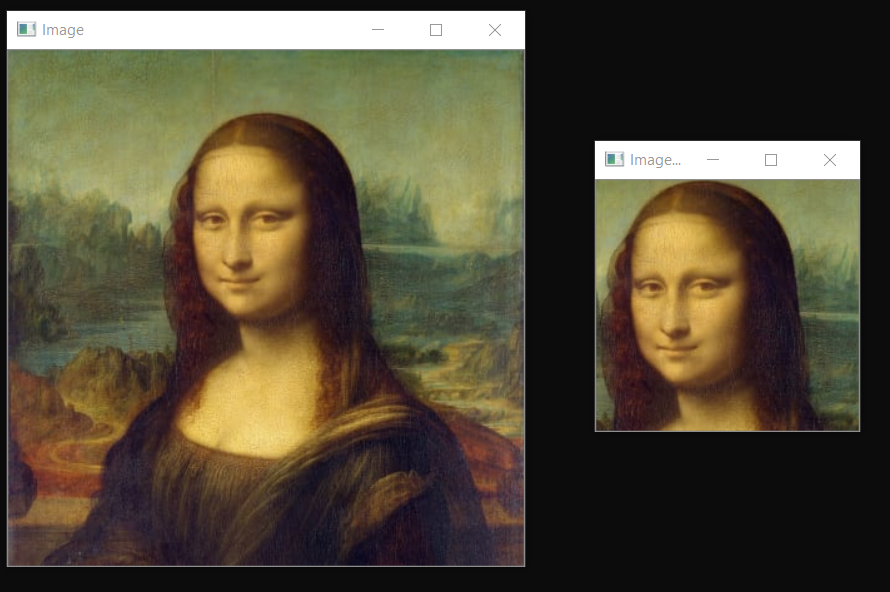
imgCropped?=?img[50:250,120:330]
cv2.imshow("Image?cropped",imgCropped)
cv2.imshow("Image",img)
cv2.waitKey(0)
基本的圖像過濾器使用的函數(shù)
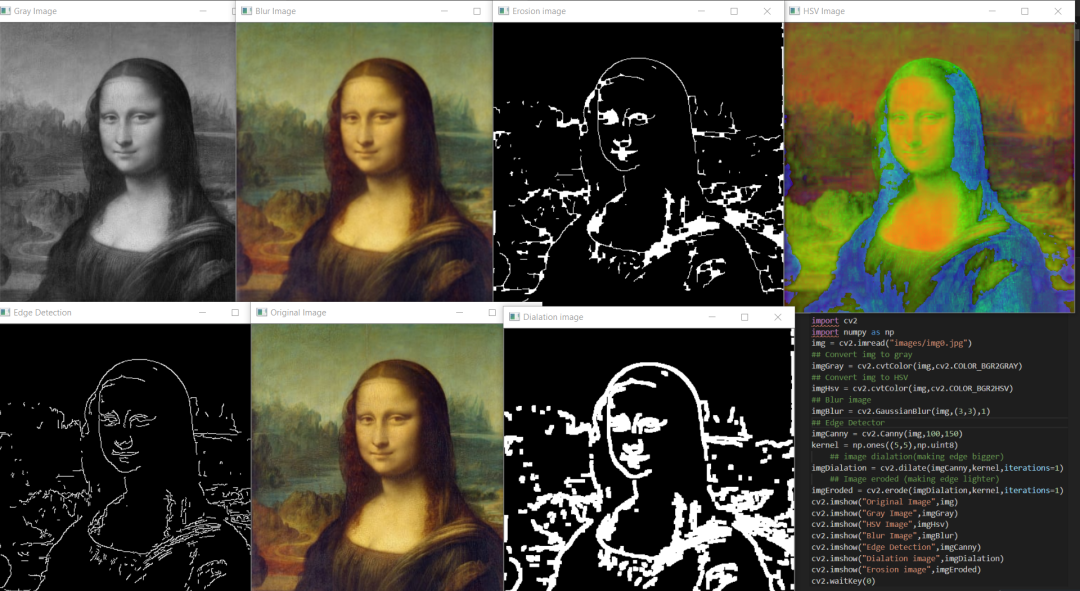
cvtColor,這里我們將cv2.COLOR_BGR2GRAY作為參數(shù)傳遞。imgGray?=?cv2.cvtColor(IMG,cv2.CODE)
IMG:?Original?image
CODE:?Conversion?code?for?Gray(COLOR_BGR2GRAY)
Example
imgGray?=?cv2.cvtColor(img,cv2.COLOR_BGR2GRAY)
cvtColor,這里我們將cv2.COLOR_BGR2HSV作為參數(shù)傳遞。它主要用于對象跟蹤。imgGray?=?cv2.cvtColor(IMG,cv2.CODE)
IMG:?Original?image
CODE:?Conversion?code?for?Gray(COLOR_BGR2HSV)
Example
imgHsv?=?cv2.cvtColor(img,cv2.COLOR_BGR2HSV)
imgBlur?=?cv2.GaussianBlur(img,(sigmaX,sigmaY),kernalSize)
kernalsize???A?Size?object?representing?the?size?of?the?kernel.
sigmaX???A?variable?representing?the?Gaussian?kernel?standard?deviation?in?X?direction.
sigmaY?-?same?as?sigmaX
Exmaple
imgBlur?=?cv2.GaussianBlur(img,(3,3),0)
imgCanny?=?cv2.Canny(img,threshold1,threshold2)
threshold1,threshold2:Different?values?of?threshold?different?for?every?images
Example
imgCanny?=?cv2.Canny(img,100,150)
kernel?=?np.ones((5,5),np.uint8)?##?DEFINING?KERNEL?OF?5x5
imgDialation?=?cv2.dilate(imgCanny,kernel,iterations=1)?##DIALATION
kernel?=?np.ones((5,5),np.uint8)?##?DEFINING?KERNEL?OF?5x5
imgDialation?=?cv2.erode(imgCanny,kernel,iterations=1)?##EROSION
繪制不同的形狀
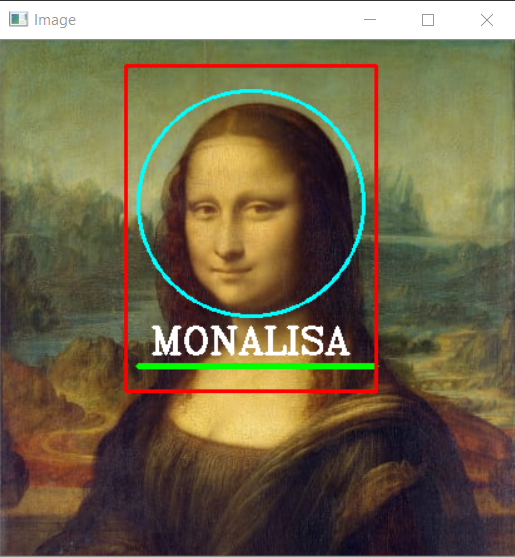
cv2.rectangle(img,(w,h),(x,y),(R,G,B),THICKNESS)
w:?width
h:?height
x:?distance?from?x?axis
y:?distance?from?y?axis
R,G,B:?color?in?RGB?form?(255,255,0)
THICKNESS:?thickness?of?rectangel(integer)
Example
cv2.rectangle(img,(100,300),(200,300),(255,0,255),2)
cv2.circle(img,(x,y),radius,(R,G,B),THICKNESS)
x:?distance?from?x?axis
y:?distance?from?y?axis
radius:?size?of?radius(integer)
R,G,B:?color?in?RGB?form?(255,255,0)
THICKNESS:?thickness?of?rectangel(integer)
Example
cv2.circle(img,(200,130),90,(255,255,0),2)
cv2.line(img,(x1,y1),(x2,y2),(R,G,B),THICKNESS)
x1,y1:?start?point?of?line?(integer)
x2,y2:?end?point?of?line?(integer)
R,G,B:?color?in?RGB?form?(255,255,0)
THICKNESS:?thickness?of?rectangel(integer)
Example
cv2.line(img,(110,260),(300,260),(0,255,0),3)
在圖像上書寫文字
cv2.putText(img,text,(x,y),FONT,FONT_SCALE,(R,G,B),THICKNESS)
img:?image?to?put?text?on
text:?text?to?put?on?image
X:?text?distance?from?X?axis
Y:?text?distance?from?Y?axis
FONT:?Type?of?FONT?(ALL?FONT?TYPES)
FONT_SCALE:?Scale?of?Font(Integer)
R,G,B:?color?in?RGB?form?(255,255,0)
THICKNESS:?thickness?of?rectangel(integer)
Example
cv2.putText(img,"HELLO",(120,250),cv2.FONT_HERSHEY_COMPLEX,1,(255,255,255),2)
檢測并裁剪臉部
https://github.com/opencv/opencv/tree/master/data/haarcascades
import?cv2
#?Load?the?cascade
face_cascade?=?cv2.CascadeClassifier('haarcascade_frontalface_default.xml')
#?Read?the?input?image
img?=?cv2.imread('images/img0.jpg')
#?Convert?into?grayscale
gray?=?cv2.cvtColor(img,?cv2.COLOR_BGR2GRAY)
#?Detect?faces
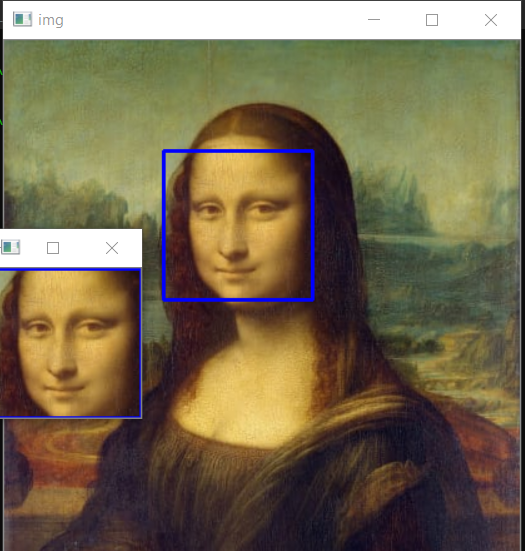
faces?=?face_cascade.detectMultiScale(gray,?1.3,?4)
#?Draw?rectangle?around?the?faces
for?(x,?y,?w,?h)?in?faces:
????cv2.rectangle(img,?(x,?y),?(x+w,?y+h),?(255,?0,?0),?2)
????#?Cropping?Face
????crop_face?=?img[y:y?+?h,?x:x?+?w]
????#Saving?Cropped?Face
????cv2.imwrite(str(w)?+?str(h)?+?'_faces.jpg',?crop_face)
cv2.imshow('img',?img)
cv2.imshow("imgcropped",crop_face)
cv2.waitKey()
學習交流群
↓掃碼關注本號↓
評論
圖片
表情