
用Python制作銷售數(shù)據(jù)可視化看板,展示分析一步到位!
回復(fù)“書籍”即可獲贈(zèng)Python從入門到進(jìn)階共10本電子書
大家好,我是小F~
在數(shù)據(jù)時(shí)代,銷售數(shù)據(jù)分析的重要性已無(wú)需贅言。
只有對(duì)銷售數(shù)據(jù)的準(zhǔn)確分析我們才有可能找準(zhǔn)數(shù)據(jù)變動(dòng)(增長(zhǎng)或下滑)的原因。
然后解決問(wèn)題、發(fā)現(xiàn)新的增長(zhǎng)點(diǎn)才會(huì)成為可能!
今天就給大家介紹一個(gè)用Python制作銷售數(shù)據(jù)大屏的方法。
主要使用Python的Streamlit庫(kù)、Plotly庫(kù)、Pandas庫(kù)進(jìn)行搭建。
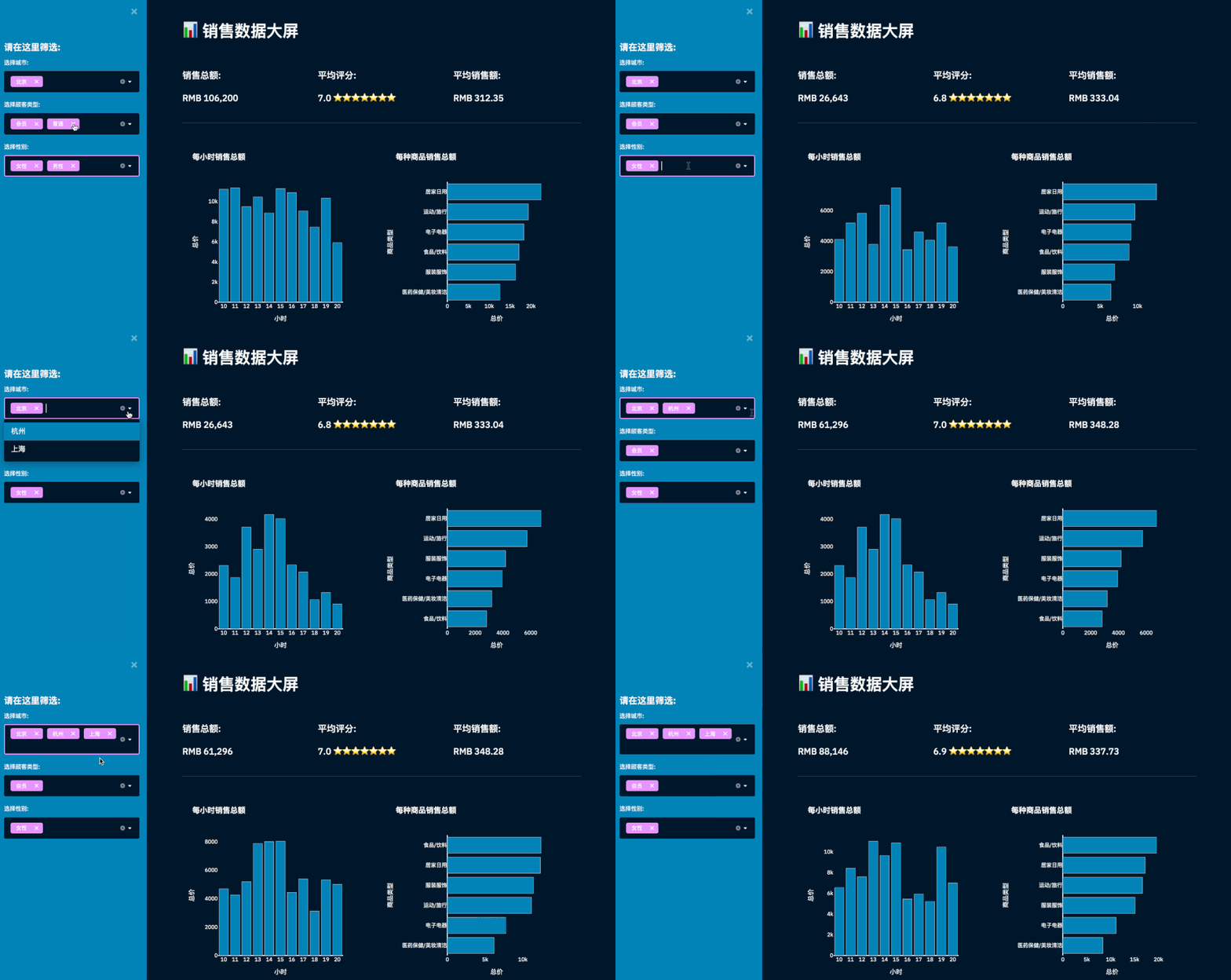
其中Pandas處理數(shù)據(jù),Plotly制作可視化圖表,Streamlit搭建可視化頁(yè)面。
對(duì)于以上三個(gè)庫(kù),Streamlit庫(kù)可能大家會(huì)比較陌生,我簡(jiǎn)單介紹一下。
Streamlit是一個(gè)完全免費(fèi)的開源應(yīng)用程序框架,它能幫你不用懂得復(fù)雜的HTML,CSS等前端技術(shù)就能快速做出來(lái)一個(gè)炫酷的Web頁(yè)面。
文檔地址
https://docs.streamlit.io/
具體的大家可以去看文檔學(xué)習(xí),多動(dòng)手練習(xí)。
下面就給大家講解一下如何搭建銷售數(shù)據(jù)看板~
01. 數(shù)據(jù)
使用的數(shù)據(jù)是虛構(gòu)數(shù)據(jù),某超市2021年銷售訂單數(shù)據(jù),共有1000條的訂單數(shù)據(jù)。
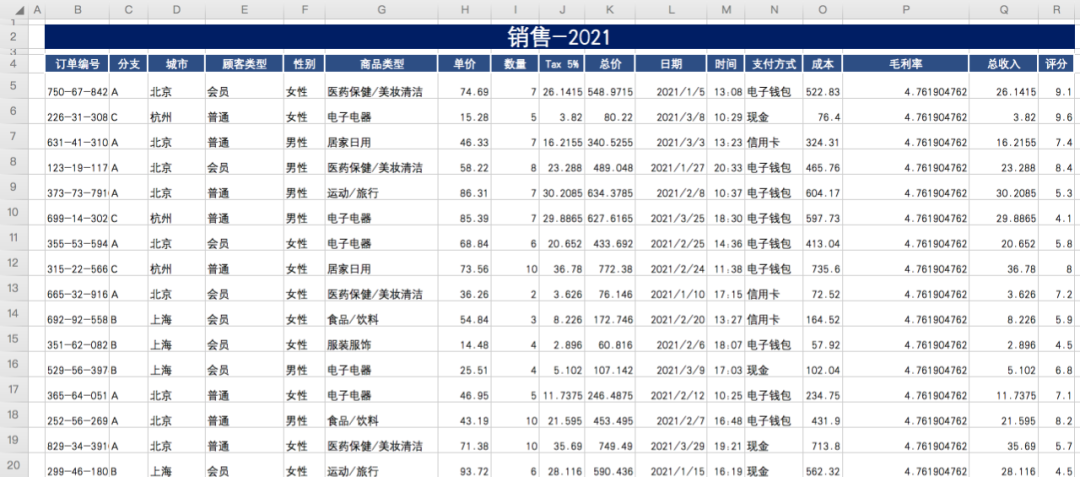
城市有三個(gè),分別為北京、上海、杭州。顧客類型有兩種,為會(huì)員和普通。顧客性別為男性和女性。
剩下還包含訂單編號(hào)、商品類型、單價(jià)、數(shù)量、總價(jià)、日期、時(shí)間、支付方式、成本、毛利率、總收入、評(píng)分等信息。
通用Pandas的read_excel方法讀取數(shù)據(jù)。
跳過(guò)前3行,選取B到R列,1000行數(shù)據(jù)。
def get_data_from_excel():
    df = pd.read_excel(
        io="supermarkt_sales.xlsx",
        engine="openpyxl",
        sheet_name="Sales",
        skiprows=3,
        usecols="B:R",
        nrows=1000,
    )
    # 添加小時(shí)列數(shù)據(jù)
    df["小時(shí)"] = pd.to_datetime(df["時(shí)間"], format="%H:%M:%S").dt.hour
    return df

df = get_data_from_excel()
print(df)
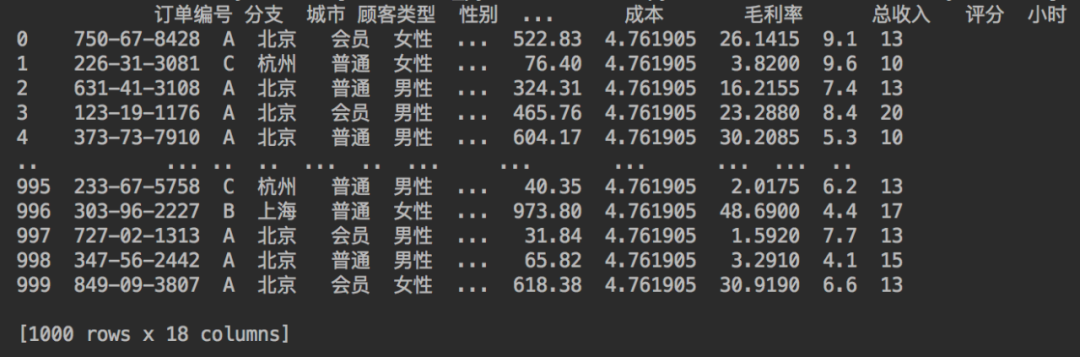
成功讀取數(shù)據(jù),結(jié)果如下。
下面便可以來(lái)編寫頁(yè)面了。
02. 網(wǎng)頁(yè)標(biāo)題和圖標(biāo)
我們都知道當(dāng)瀏覽器打開一個(gè)網(wǎng)頁(yè),會(huì)有標(biāo)題和圖標(biāo)。
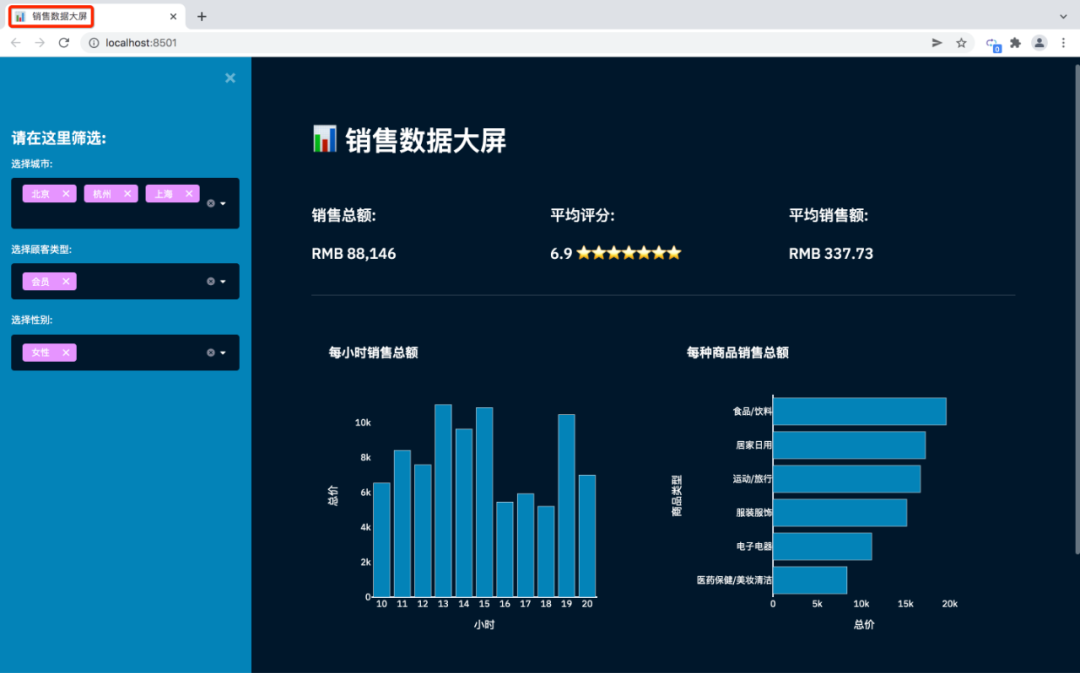
所以我們需先設(shè)置本次網(wǎng)頁(yè)的名稱、圖標(biāo)、布局等。
這也是使用Streamlit搭建頁(yè)面,使用的第一個(gè)Streamlit命令,并且只能設(shè)置一次。
# 設(shè)置網(wǎng)頁(yè)信息
st.set_page_config(page_title="銷售數(shù)據(jù)大屏", page_icon=":bar_chart:", layout="wide")
其中page_icon參數(shù)可以使用表情符號(hào)代碼來(lái)顯示圖標(biāo)。
短代碼可從下方鏈接獲取。
https://www.webfx.com/tools/emoji-cheat-sheet/
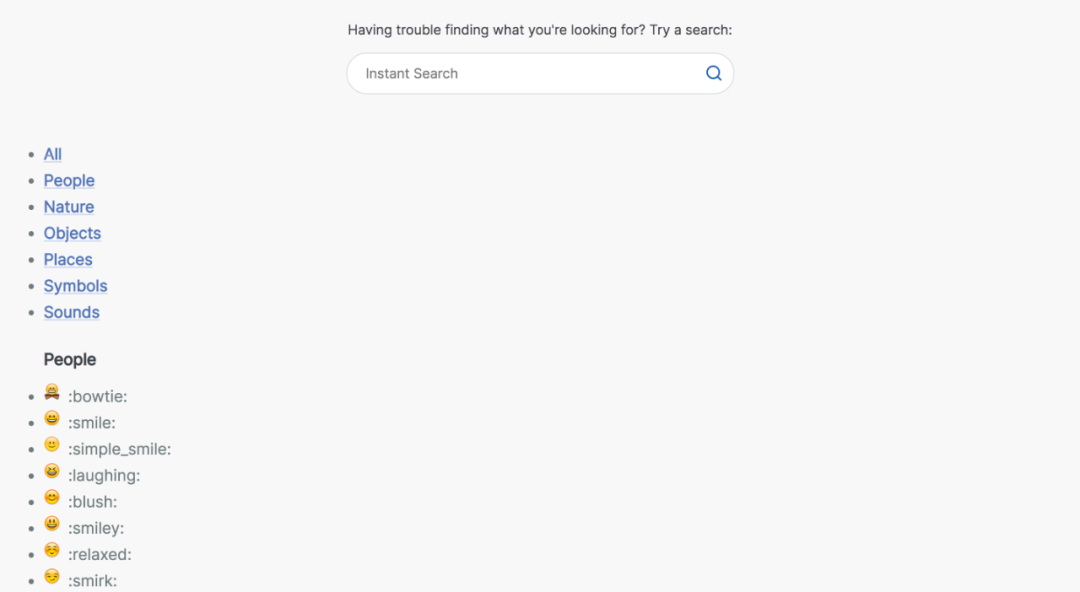
妥妥的表情符號(hào)代碼大全!
03. 側(cè)邊欄和多選框
st.sidebar(側(cè)邊欄),每個(gè)傳遞給st.sidebar的元素都會(huì)被固定在左邊,讓用戶可以專注于主頁(yè)中的內(nèi)容。
multiselect(多選框)是一個(gè)交互性的部件,可以通過(guò)它進(jìn)行數(shù)據(jù)篩選。
# 側(cè)邊欄
st.sidebar.header("請(qǐng)?jiān)谶@里篩選:")
city = st.sidebar.multiselect(
    "選擇城市:",
    options=df["城市"].unique(),
    default=df["城市"].unique()
)

customer_type = st.sidebar.multiselect(
    "選擇顧客類型:",
    options=df["顧客類型"].unique(),
    default=df["顧客類型"].unique(),
)

gender = st.sidebar.multiselect(
    "選擇性別:",
    options=df["性別"].unique(),
    default=df["性別"].unique()
)

df_selection = df.query(
    "城市 == @city & 顧客類型 ==@customer_type & 性別 == @gender"
)
結(jié)合Pandas的query查詢,就能對(duì)數(shù)據(jù)進(jìn)行過(guò)濾。
通過(guò)上述代碼就搭建成功了,如下圖左側(cè)。
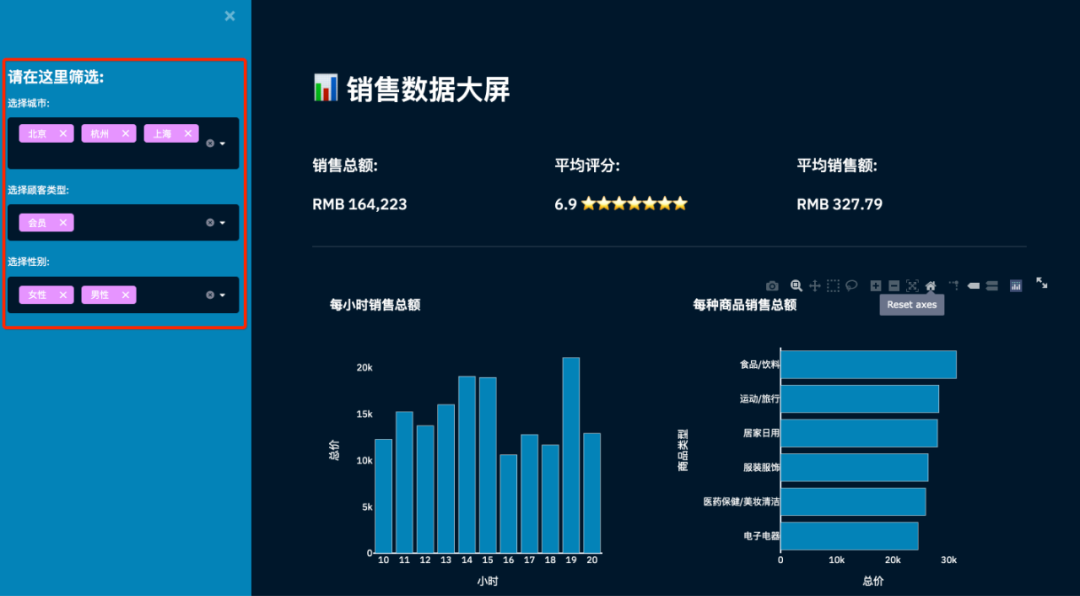
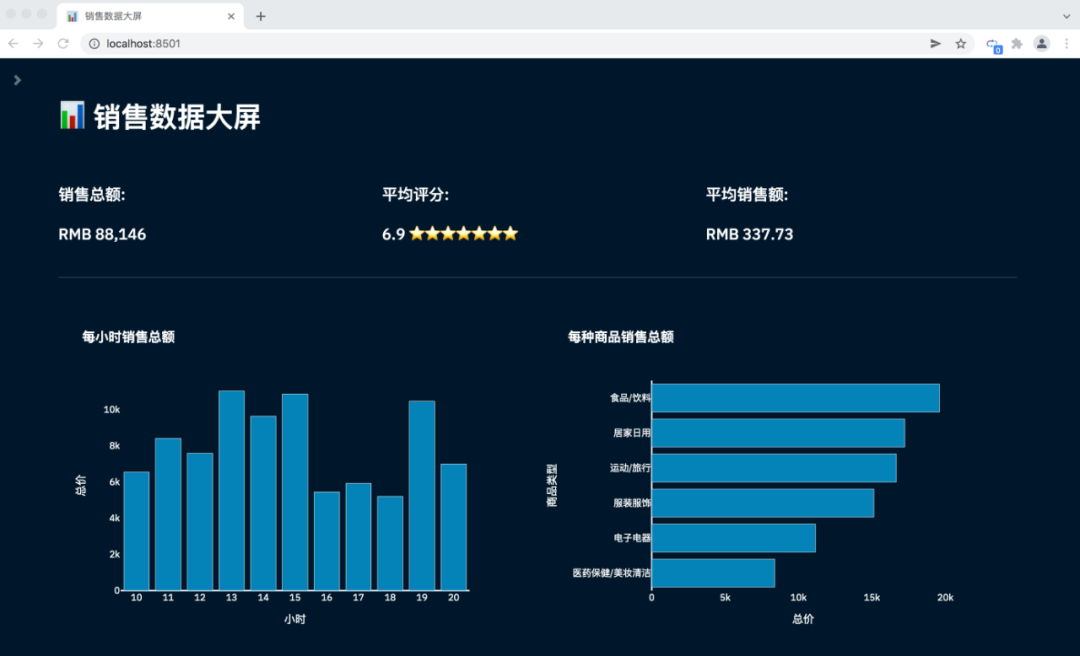
點(diǎn)擊側(cè)邊欄的右上角關(guān)閉符號(hào),側(cè)邊欄即可隱藏。
網(wǎng)頁(yè)將會(huì)展示主頁(yè)面。
04. 主頁(yè)面信息
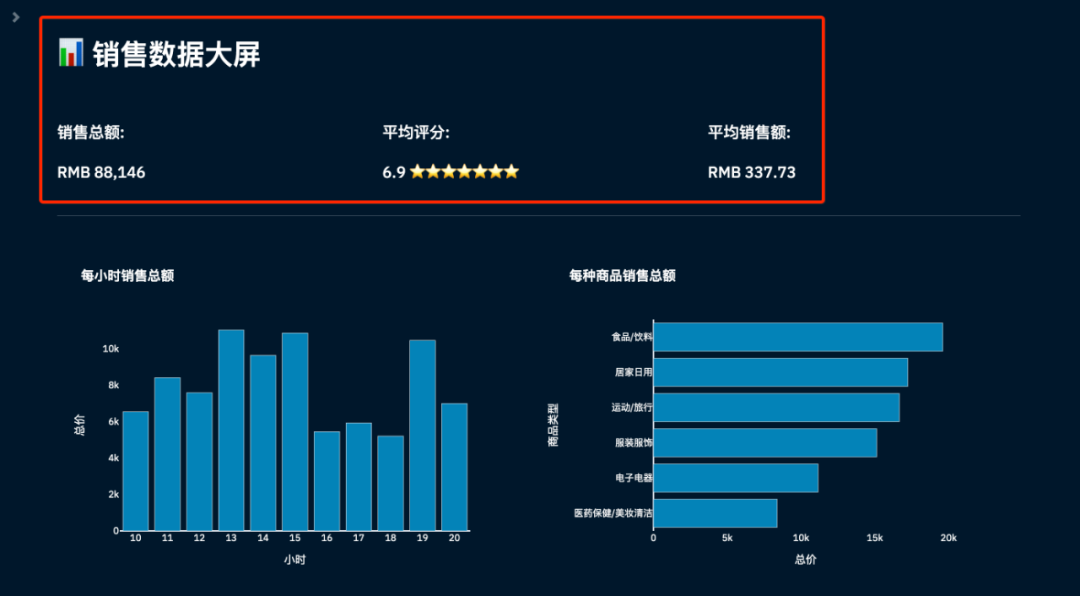
接下來(lái)編寫主頁(yè)面信息,包含主頁(yè)標(biāo)題、銷售總額、平均評(píng)分、平均銷售額信息。
和網(wǎng)頁(yè)的圖標(biāo)一樣,通過(guò)表情符號(hào)代碼實(shí)現(xiàn)。
# 主頁(yè)面
st.title(":bar_chart: 銷售數(shù)據(jù)大屏")
st.markdown("##")

# 核心指標(biāo), 銷售總額、平均評(píng)分、星級(jí)、平均銷售額數(shù)據(jù)
total_sales = int(df_selection["總價(jià)"].sum())
average_rating = round(df_selection["評(píng)分"].mean(), 1)
star_rating = ":star:" * int(round(average_rating, 0))
average_sale_by_transaction = round(df_selection["總價(jià)"].mean(), 2)


# 3列布局
left_column, middle_column, right_column = st.columns(3)

# 添加相關(guān)信息
with left_column:
    st.subheader("銷售總額:")
    st.subheader(f"RMB {total_sales:,}")
with middle_column:
    st.subheader("平均評(píng)分:")
    st.subheader(f"{average_rating} {star_rating}")
with right_column:
    st.subheader("平均銷售額:")
    st.subheader(f"RMB {average_sale_by_transaction}")

# 分隔符
st.markdown("""---""")
完成核心指標(biāo)數(shù)據(jù)的處理,并將其進(jìn)行布局顯示。
05. 主頁(yè)面圖表
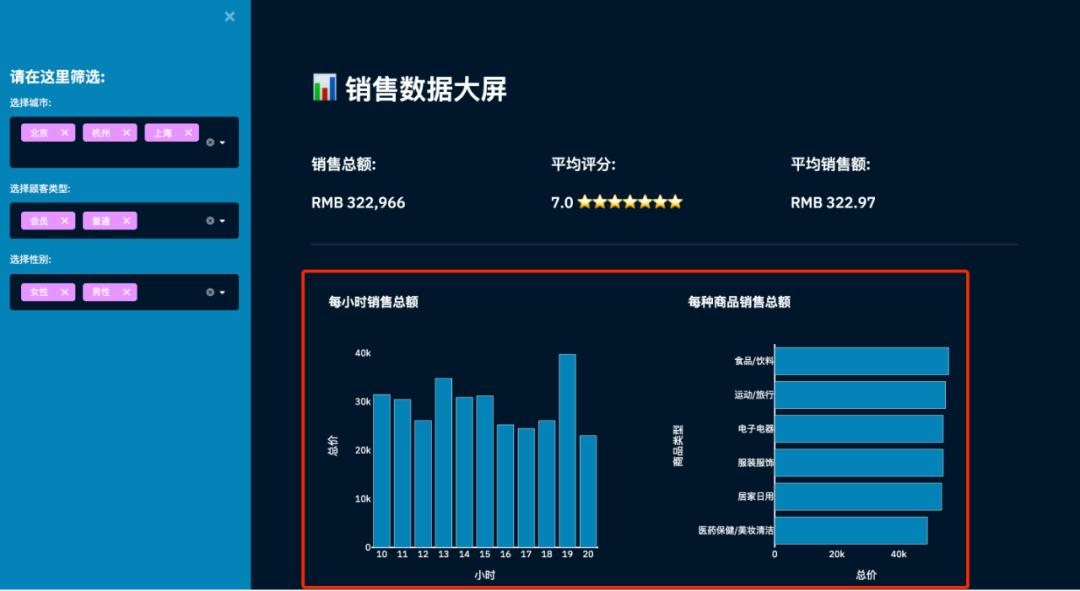
包含了兩個(gè)圖表,一個(gè)是每小時(shí)銷售額,一個(gè)是各類商品銷售總額。通過(guò)Plotly Express完成圖表的繪制。
Plotly Express是一個(gè)新的高級(jí)Python可視化庫(kù),是Plotly.py的高級(jí)封裝,它為復(fù)雜的圖表提供了一個(gè)簡(jiǎn)單的語(yǔ)法。
文檔地址
https://plot.ly/python/plotly-express/
受Seaborn和ggplot2的啟發(fā),它專門設(shè)計(jì)為具有簡(jiǎn)潔,一致且易于學(xué)習(xí)的API。只需一次導(dǎo)入,就可以在一個(gè)函數(shù)調(diào)用中創(chuàng)建豐富的交互式繪圖。
# 各類商品銷售情況(柱狀圖)
sales_by_product_line = (
    df_selection.groupby(by=["商品類型"]).sum()[["總價(jià)"]].sort_values(by="總價(jià)")
)
fig_product_sales = px.bar(
    sales_by_product_line,
    x="總價(jià)",
    y=sales_by_product_line.index,
    orientation="h",
    title="<b>每種商品銷售總額</b>",
    color_discrete_sequence=["#0083B8"] * len(sales_by_product_line),
    template="plotly_white",
)
fig_product_sales.update_layout(
    plot_bgcolor="rgba(0,0,0,0)",
    xaxis=(dict(showgrid=False))
)

# 每小時(shí)銷售情況(柱狀圖)
sales_by_hour = df_selection.groupby(by=["小時(shí)"]).sum()[["總價(jià)"]]
print(sales_by_hour.index)
fig_hourly_sales = px.bar(
    sales_by_hour,
    x=sales_by_hour.index,
    y="總價(jià)",
    title="<b>每小時(shí)銷售總額</b>",
    color_discrete_sequence=["#0083B8"] * len(sales_by_hour),
    template="plotly_white",
)
fig_hourly_sales.update_layout(
    xaxis=dict(tickmode="linear"),
    plot_bgcolor="rgba(0,0,0,0)",
    yaxis=(dict(showgrid=False)),
)


left_column, right_column = st.columns(2)
left_column.plotly_chart(fig_hourly_sales, use_container_width=True)
right_column.plotly_chart(fig_product_sales, use_container_width=True)
添加數(shù)據(jù),設(shè)置圖表配置,以及網(wǎng)頁(yè)布局。
得到結(jié)果如下。
06. 隱藏部件
當(dāng)我們通過(guò)Streamlit搭建一個(gè)界面,默認(rèn)就會(huì)有紅線、菜單、結(jié)尾的"Make with Streamlit"。
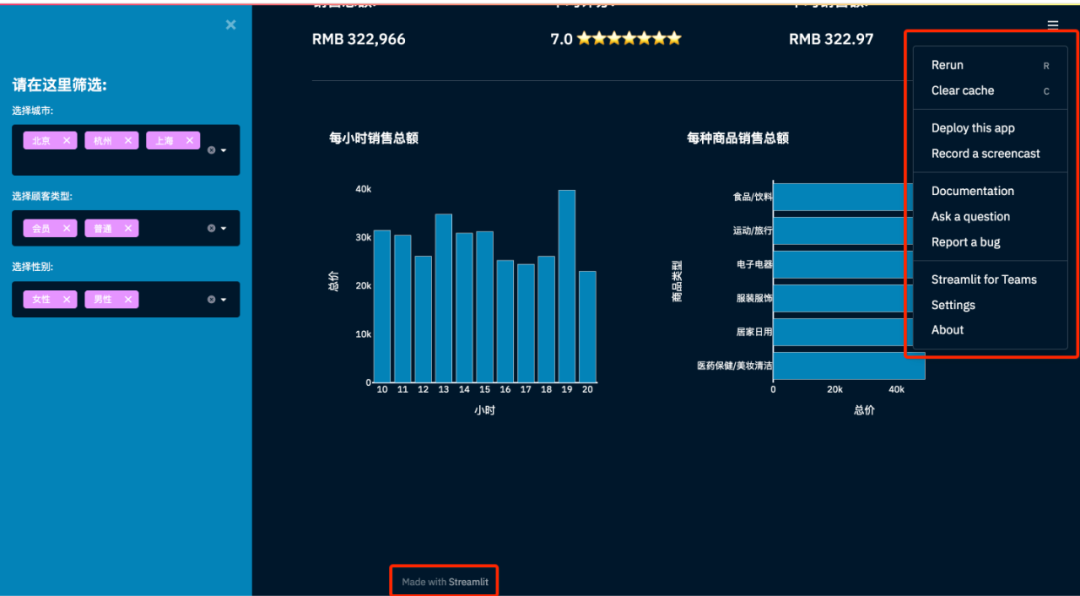
為了美觀,這里可以將它們都隱藏掉。
# 隱藏streamlit默認(rèn)格式信息
hide_st_style = """
            <style>
            #MainMenu {visibility: hidden;}
            footer {visibility: hidden;}
            header {visibility: hidden;}
            </style>
            """

st.markdown(hide_st_style, unsafe_allow_html=True)
這樣一個(gè)可交互的銷售數(shù)據(jù)看板,就完成搭建啦!
# 安裝依賴庫(kù)
pip install -i https://pypi.tuna.tsinghua.edu.cn/simple plotly==4.14.3
pip install -i https://pypi.tuna.tsinghua.edu.cn/simple pandas==1.1.0
pip install -i https://pypi.tuna.tsinghua.edu.cn/simple streamlit==0.86.0
pip install -i https://pypi.tuna.tsinghua.edu.cn/simple openpyxl==3.0.6

# 運(yùn)行
streamlit run app.py
安裝相關(guān)依賴,命令行終端運(yùn)行程序。
小伙伴們,快快用實(shí)踐一下吧!如果在學(xué)習(xí)過(guò)程中,有遇到任何問(wèn)題,歡迎加我好友,我拉你進(jìn)Python學(xué)習(xí)交流群共同探討學(xué)習(xí)。

小伙伴們,快快用實(shí)踐一下吧!如果在學(xué)習(xí)過(guò)程中,有遇到任何問(wèn)題,歡迎加我好友,我拉你進(jìn)Python學(xué)習(xí)交流群共同探討學(xué)習(xí)。
------------------- End -------------------
往期精彩文章推薦:

歡迎大家點(diǎn)贊,留言,轉(zhuǎn)發(fā),轉(zhuǎn)載,感謝大家的相伴與支持
想加入Python學(xué)習(xí)群請(qǐng)?jiān)诤笈_(tái)回復(fù)【入群】
萬(wàn)水千山總是情,點(diǎn)個(gè)【在看】行不行
/今日留言主題/
隨便說(shuō)一兩句吧~