
微前端 從 0到 1搭建
微前端
微前端
Single-SPA
?微服務是面向服務架構(gòu)(SOA)的一種變體,把應用程序設計成一系列松耦合的細粒度服務,并通過輕量級的通信協(xié)議組織起來 具體地,將應用構(gòu)建成一組小型服務。這些服務都能夠獨立部署、獨立擴展,每個服務都具有穩(wěn)固的模塊邊界,甚至允許使用不同的編程語言來編寫不同服務,也可以由不同的團隊來管理
?
概念
官網(wǎng) :
2018年 Single-SPA誕生了, single-spa是一個用于前端微服務化的JavaScript前端解決方案 ?(本身沒有處理樣式隔離、js執(zhí)行隔離) ?實現(xiàn)了路由劫持和應用加載;
Alibaba -
springboot
- sofaboot
Single-SPA 搞了個入口 ?--> ?qiankun
2019年 qiankun基于Single-SPA, 提供了更加開箱即用的 API ?(single-spa + sandbox + import-html-entry),它 做到了技術(shù)棧無關,并且接入簡單(有多簡單呢,像iframe一樣簡單)。
總結(jié):子應用可以獨立構(gòu)建,運行時動態(tài)加載,主子應用完全解耦,并且技術(shù)棧無關,靠的是協(xié)議接入(這里提前強調(diào)一下:子應用必須導出 bootstrap、mount、unmount三個方法)。
micro front ends single spot
應用量龐大,
實現(xiàn)上,關鍵問題在于:
多個 Bundle 如何集成?
子應用之間怎樣隔離影響?
公共資源如何復用?
子應用間怎樣通信?
如何測試?
當然,這種架構(gòu)模式并非百益而無一害,一些問題也隨之而來:
導致依賴項冗余,增加用戶的流量負擔
團隊自治程度的增加,可能會破壞協(xié)作
「.....」
簡單來講,微前端的理念類似于微服務:
?In short, micro frontends are all about slicing up big and scary things into smaller, more manageable pieces, and then being explicit about the dependencies between them.
?
將龐大的整體拆成可控的小塊,并明確它們之間的依賴關系。關鍵優(yōu)勢在于:
代碼庫更小,更內(nèi)聚、可維護性更高 松耦合、自治的團隊可擴展性更好 「漸進地升級、更新甚至重寫部分前端功能成為了可能」
「微前端」
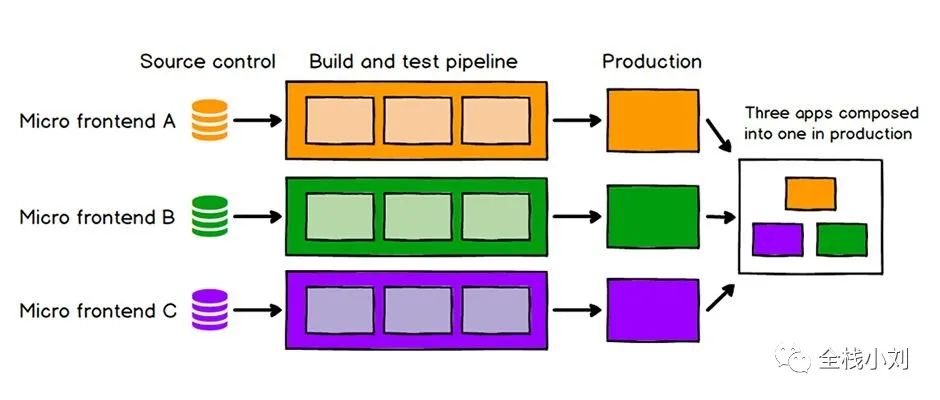

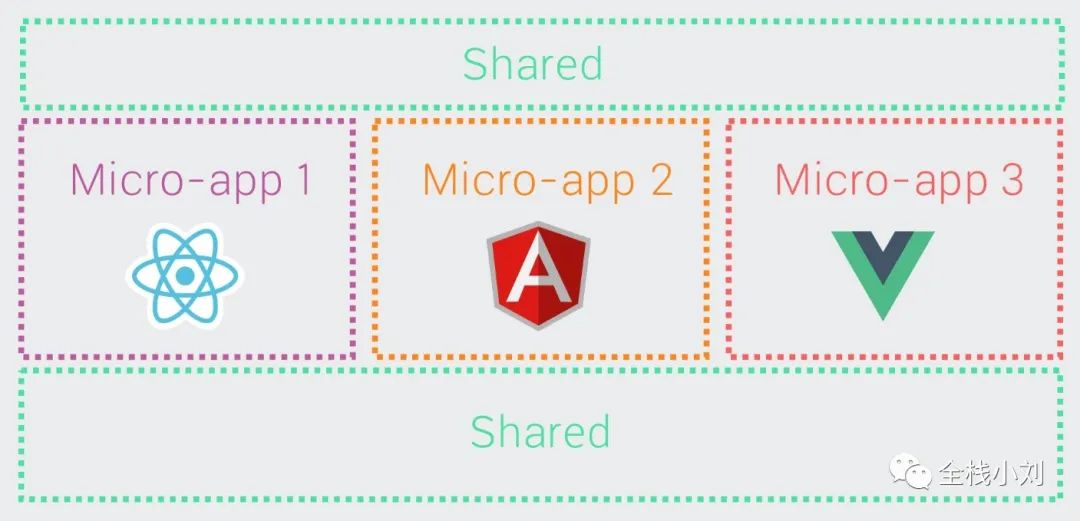

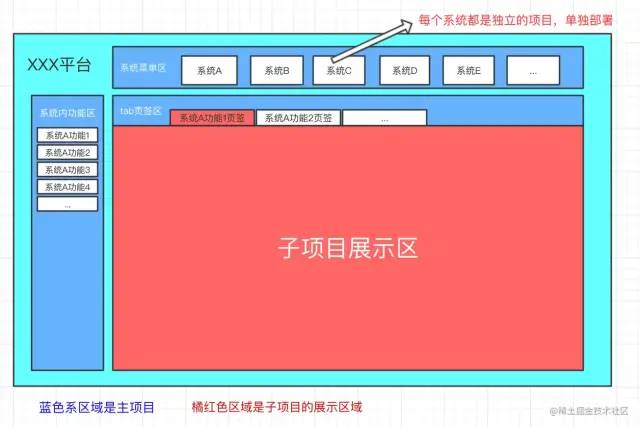
微前端就是將不同的功能按照不同的維度拆分成多個子應用。通過主應用來加載這些子應用。
微前端的核心在于「拆」, 拆完后再「合」!
今天來一塊聊聊微前端 技術(shù)
一門前端語言的基礎 Vue React
SingleSpa 實戰(zhàn)
構(gòu)建子應用
首先創(chuàng)建一個vue子應用,并通過single-spa-vue來導出必要的生命周期:
vue?create?spa-vue??
npm?install?single-spa-vue??
import?singleSpaVue?from?'single-spa-vue';
const?appOptions?=?{
???el:?'#vue',
???router,
???render:?h?=>?h(App)
}
//?在非子應用中正常掛載應用
if(!window.singleSpaNavigate){
?delete?appOptions.el;
?new?Vue(appOptions).$mount('#app');
}
const?vueLifeCycle?=?singleSpaVue({
???Vue,
???appOptions
});
//?子應用必須導出以下生命周期:bootstrap、mount、unmount
export?const?bootstrap?=?vueLifeCycle.bootstrap;
export?const?mount?=?vueLifeCycle.mount;
export?const?unmount?=?vueLifeCycle.unmount;
export?default?vueLifeCycle;
const?router?=?new?VueRouter({
??mode:?'history',
??base:?'/vue',???//改變路徑配置
??routes
})
配置庫打包
//vue.config.js
module.exports?=?{
????configureWebpack:?{
????????output:?{
????????????library:?'singleVue',
????????????libraryTarget:?'umd'
????????},
????????devServer:{
????????????port:10000
????????}
????}
}
主應用搭建
?將子應用掛載到
?id="vue"標簽中
import?Vue?from?'vue'
import?App?from?'./App.vue'
import?router?from?'./router'
import?ElementUI?from?'element-ui';
import?'element-ui/lib/theme-chalk/index.css';
Vue.use(ElementUI);
const?loadScript?=?async?(url)=>?{
??await?new?Promise((resolve,reject)=>{
????const?script?=?document.createElement('script');
????script.src?=?url;
????script.onload?=?resolve;
????script.onerror?=?reject;
????document.head.appendChild(script)
??});
}
import?{?registerApplication,?start?}?from?'single-spa';
registerApplication(
????'singleVue',
????async?()=>{
????????//這里通過協(xié)議來加載指定文件
????????await?loadScript('http://localhost:10000/js/chunk-vendors.js');
????????await?loadScript('http://localhost:10000/js/app.js');
????????return?window.singleVue
????},
????location?=>?location.pathname.startsWith('/vue')
)
start();
new?Vue({
??router,
??render:?h?=>?h(App)
}).$mount('#app')
?
動態(tài)設置子應用
if(window.singleSpaNavigate){
??__webpack_public_path__?=?'http://localhost:10000/'
}
前置條件
npm?install?-g?yarn
yarn?init
安裝 官方 React
Create React App是FaceBook的React團隊官方出的一個構(gòu)建React單頁面應用的腳手架工具。它本身集成了Webpack,并配置了一系列內(nèi)置的loader和默認的npm的腳本,可以很輕松的實現(xiàn)零配置就可以快速開發(fā)React的應用。
# 全局安裝
npm install -g create-react-app
# 構(gòu)建一個my-app的項目
npx create-react-app my-app
cd my-app

# 啟動編譯當前的React項目,并自動打開 http://localhost:3000/
npm start
構(gòu)建 React項目
npm
npm?init?react-app?my-appYarn
#?yarn?create?is?available?in?Yarn?0.25+
yarn?create?react-app?my-app
使用 qiankun 微前端構(gòu)建
官方文檔: https://qiankun.umijs.org/zh
?首先我們需要創(chuàng)建 3個 前端應用, 微前端 ,就是 代表 一個小型應用的獨立部署,獨立交互,需要 應用之間進行通信,這里我們使用qiankun來完成 微前端 應用
?
創(chuàng)建 ?3 個 react app
yarn?create?react-app?qiankun-base??--template?typescriptyarn?create?react-app?qiankun-micro-app1??--template?typescriptyarn?create?react-app?qiankun-micro-app2??--template?typescriptapp2 app1 基座 在 react app 應用中 ?安裝 qiankun ?依賴
$?yarn?add?qiankun??#?or?npm?i?qiankun?-S分別創(chuàng)建 .env 文件來指定 項目 運行的端口號
PORT=3010
PORT=3011
PORT=3012
在主應用中index.tsx ? 注冊子應用
import React from 'react';
import ReactDOM from 'react-dom';
import './index.css';
import App from './App';
import reportWebVitals from './reportWebVitals';
import { registerMicroApps, start } from 'qiankun';
registerMicroApps([
{
name: 'react app one', // app name registered
entry: '//localhost:3011',
container: '#micro-app2',
activeRule: '/micro-app2',
props:{
nickname: "全棧小劉",
age:19
}
},
{
name: 'react app two', // app name registered
entry: '//localhost:3012',
container: '#micro-app1',
activeRule: '/micro-app1',
props:{
nickname: "全棧小劉",
age:18
}
},
]);
start();
ReactDOM.render(
document.getElementById('root')
);
// If you want to start measuring performance in your app, pass a function
// to log results (for example: reportWebVitals(console.log))
// or send to an analytics endpoint. Learn more: https://bit.ly/CRA-vitals
reportWebVitals();
??
注:子應用加載進來 ,需要有主應用進行掛載,現(xiàn)在我們已經(jīng)將 子應用注冊在 了 主應用當中
name 應用名稱 entry ?端口號 container 掛載容器 activeRule 激活的規(guī)則 props: 父子屬性之間傳參
api文檔 : https://qiankun.umijs.org/zh/api
在 App.tsx 中創(chuàng)建掛載點
import React from 'react';
import logo from './logo.svg';
import './App.css';
function App() {
return (
);
}
export default App;
在「所有」應用中 添加 public-path.js 用于 加載靜態(tài) 資源
if?(window.__POWERED_BY_QIANKUN__)?{
????__webpack_public_path__?=?window.__INJECTED_PUBLIC_PATH_BY_QIANKUN__;
??}
在子應用中 添加 webpack 重寫項
添加
yarn?add?react-app-rewired??-D
「設置 子應用」啟動,在 scripts
??"scripts":?{
????"start":?"react-app-rewired?start",
????"build":?"react-scripts?build",
????"test":?"react-scripts?test",
????"eject":?"react-scripts?eject"
??},
在webpack 中 進行 overrides 重寫,重寫的 目的是 允許跨域
config-overrides.js
const?{?name?}?=?require('./package');

module.exports?=?{
??webpack:?(config)?=>?{
????config.output.library?=?`${name}-[name]`;
????config.output.libraryTarget?=?'umd';
????//?config.output.jsonpFunction?=?`webpackJsonp_${name}`;
????config.output.globalObject?=?'window';

????return?config;
??},

??devServer:?(_)?=>?{
????const?config?=?_;

????config.headers?=?{
??????'Access-Control-Allow-Origin':?'*',
????};
????config.historyApiFallback?=?true;
????config.hot?=?false;
????config.watchContentBase?=?false;
????config.liveReload?=?false;

????return?config;
??},
};
在不同的子應用當中 去加載 tsx 生命周期
app1 ?、app2 、 index.tsx
import React from 'react';
import ReactDOM from 'react-dom';
import './index.css';
import App from './App';
import reportWebVitals from './reportWebVitals';
export async function bootstrap() {
console.log('[react] react app bootstraped');
}
// @ts-ignore
export async function mount(props) {
console.log(props)
ReactDOM.render(
props.container
? props.container.querySelector('#root')
: document.getElementById('root'));
}
// @ts-ignore
export async function update(props){
console.log("update props",props)
}
// @ts-ignore
export async function unmount(props) {
ReactDOM.unmountComponentAtNode(
props.container
? props.container.querySelector('#root')
: document.getElementById('root'));
}
// @ts-ignore
if (!window.__POWERED_BY_QIANKUN__) {
ReactDOM.render(
}
// If you want to start measuring performance in your app, pass a function
// to log results (for example: reportWebVitals(console.log))
// or send to an analytics endpoint. Learn more: https://bit.ly/CRA-vitals
reportWebVitals();
在 index.tsx 引入 public-path.js 解決靜態(tài)資源
import './public-path.js'
在 主 應用 添加 訪問
import React from 'react';
import logo from './logo.svg';
import './App.css';
function App() {
return (
);
}
export default App;
在 主 應用 index.tsx 中 傳遞 數(shù)據(jù)
 props:{

    nickname: "全棧小劉",

    age:19

  }
在 子應用 ?周期中進行打印
export async function mount(props) {
console.log(props)
ReactDOM.render(
props.container
? props.container.querySelector('#root')
: document.getElementById('root'));
}
在 主應用中 監(jiān)聽事件改變
import { initGlobalState, MicroAppStateActions } from 'qiankun';

const state ={
  nickname: "全棧小劉"
}

// 初始化

const actions: MicroAppStateActions = initGlobalState(state);

actions.onGlobalStateChange((state,prev)=>{
    console.log(state,prev)
})
// 2秒鐘后 改變
setTimeout(()=>{
   actions.setGlobalState({...state,age:19})
},2000)
在子應用中 監(jiān)聽改變
export async function mount(props) {
console.log(props)
// @ts-ignore
props.onGlobalStateChange((state,prev)=>{
console.log(state,prev)
setTimeout(()=>{
props.setGlobalState({ ...state, age:20 });
},2000)
})
// @ts-ignore
ReactDOM.render(
props.container
? props.container.querySelector('#root')
: document.getElementById('root'));
}
安裝 NPM SCRIPT 插件 ,分別 啟動 運行
接入 Vue3
?通用 vue3
?
安裝最新的腳手架
npm?install?-g?@vue/cli
創(chuàng)建 項目 ?es6 js 模塊
vue?create?qiankun-vue-micro-app3
添加typescript ,轉(zhuǎn)換 ts ? ?-Y yes
vue?add?typescript
依次加入 public-path.js
/*?eslint-disable?*/?
if?(window.__POWERED_BY_QIANKUN__)?{
????__webpack_public_path__?=?window.__INJECTED_PUBLIC_PATH_BY_QIANKUN__;
??}
安裝 qiankun
?yarn?add?qiankun
參考qiankun官網(wǎng)的示例main.js ,完成生命周期的鉤子函數(shù)
base 中 進行注冊 ?index.tsx
vue-config.js 設置啟動端口
vue-config.js
/*?eslint-disable?*/?
const?{?name?}?=?require('./package');

module.exports?=?{
????devServer:{
???????port:?3013,
???????headers:{
????????'Access-Control-Allow-Origin':?'*',
???????}
????},
????configureWebpack:{
??????output:?{
????????library:?`${name}-[name]`,
????????libraryTarget:?'umd'
??????}
????}
??
};
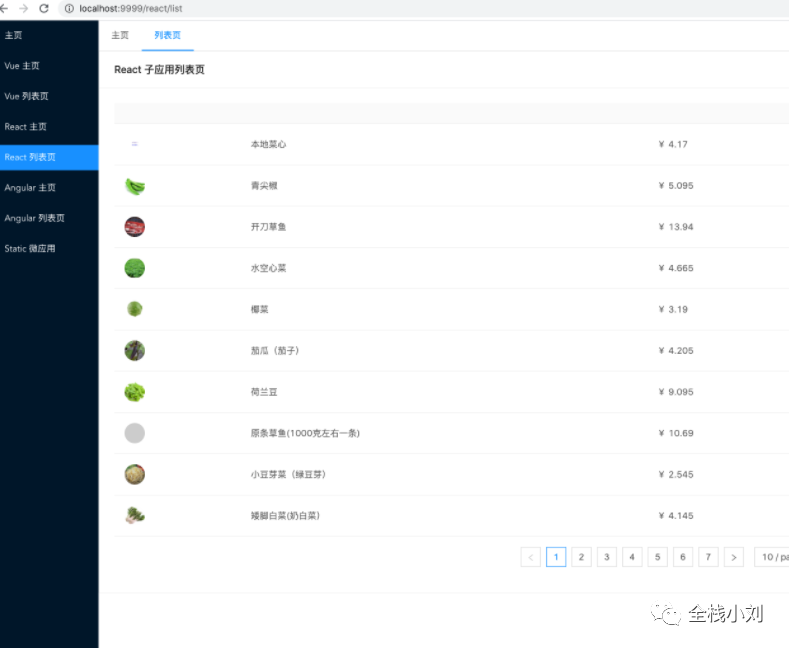
微前端項目 實戰(zhàn)
https://github.com/a1029563229/micro-front-template
Reference Document : https://juejin.cn/post/6844903943873675271 https://zhuanlan.zhihu.com/p/96464401 https://single-spa.js.org/