
Python爬蟲|微博熱搜定時(shí)爬取,堪稱摸魚神器
回復(fù)“書籍”即可獲贈(zèng)Python從入門到進(jìn)階共10本電子書
大家好,我是丁小杰。
不知道大家在工作無聊時(shí),有沒有一種沖動(dòng):總想掏出手機(jī),看看微博熱搜在討論什么有趣的話題,但又不方便直接打開微博瀏覽,今天就和大家分享一個(gè)有趣的小爬蟲,定時(shí)采集微博熱搜榜&熱評,下面讓我們來看看具體的實(shí)現(xiàn)方法。
頁面分析
熱搜頁
熱榜首頁:https://s.weibo.com/top/summary?cate=realtimehot
熱榜首頁的榜單中共五十條數(shù)據(jù),在這個(gè)頁面,我們需要獲取排行、熱度、標(biāo)題,以及詳情頁的鏈接。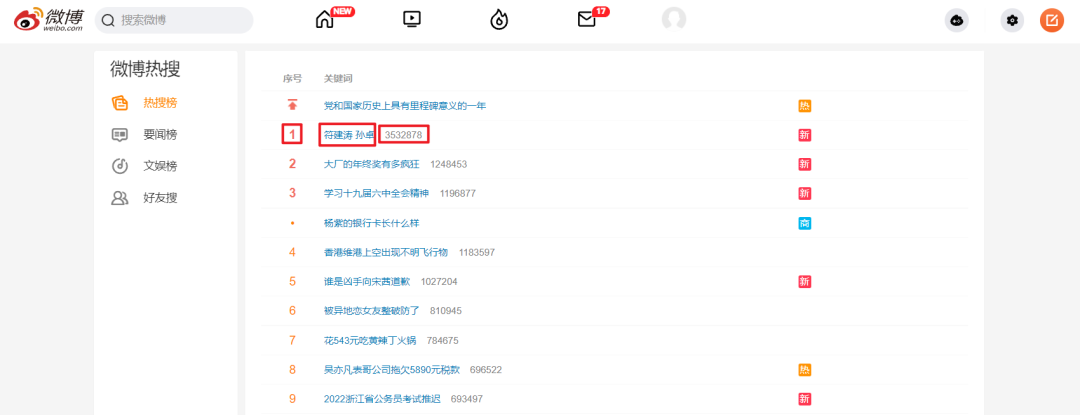 我們打開頁面后要先
 登錄,之后使用 F12 打開開發(fā)者工具,Ctrl + R 刷新頁面后找到第一條數(shù)據(jù)包。這里需要記錄一下自己的 Cookie 與 User-Agent。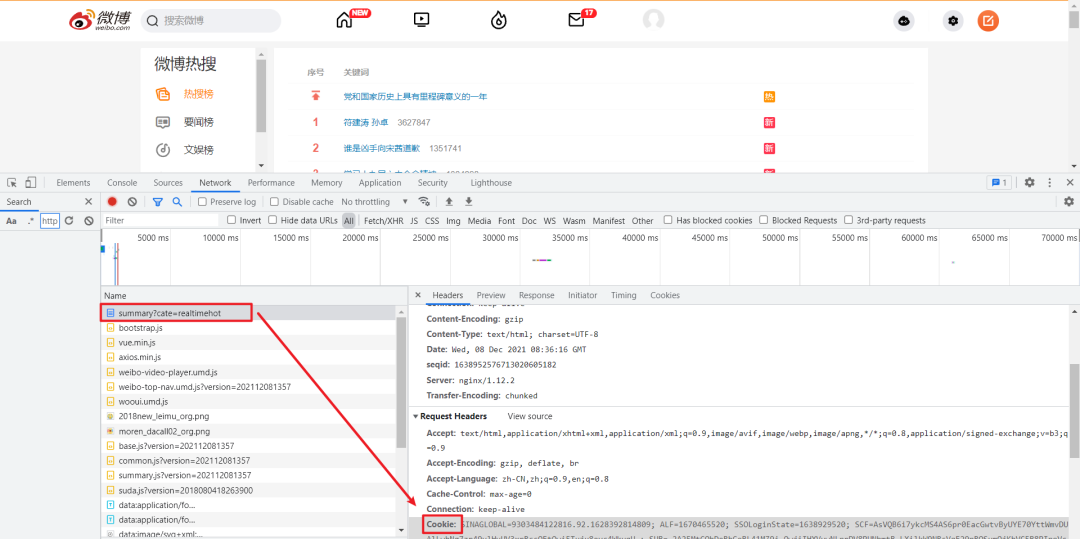 對于標(biāo)簽的定位,直接使用
 Google 工具獲取標(biāo)簽的 xpath 表達(dá)式即可。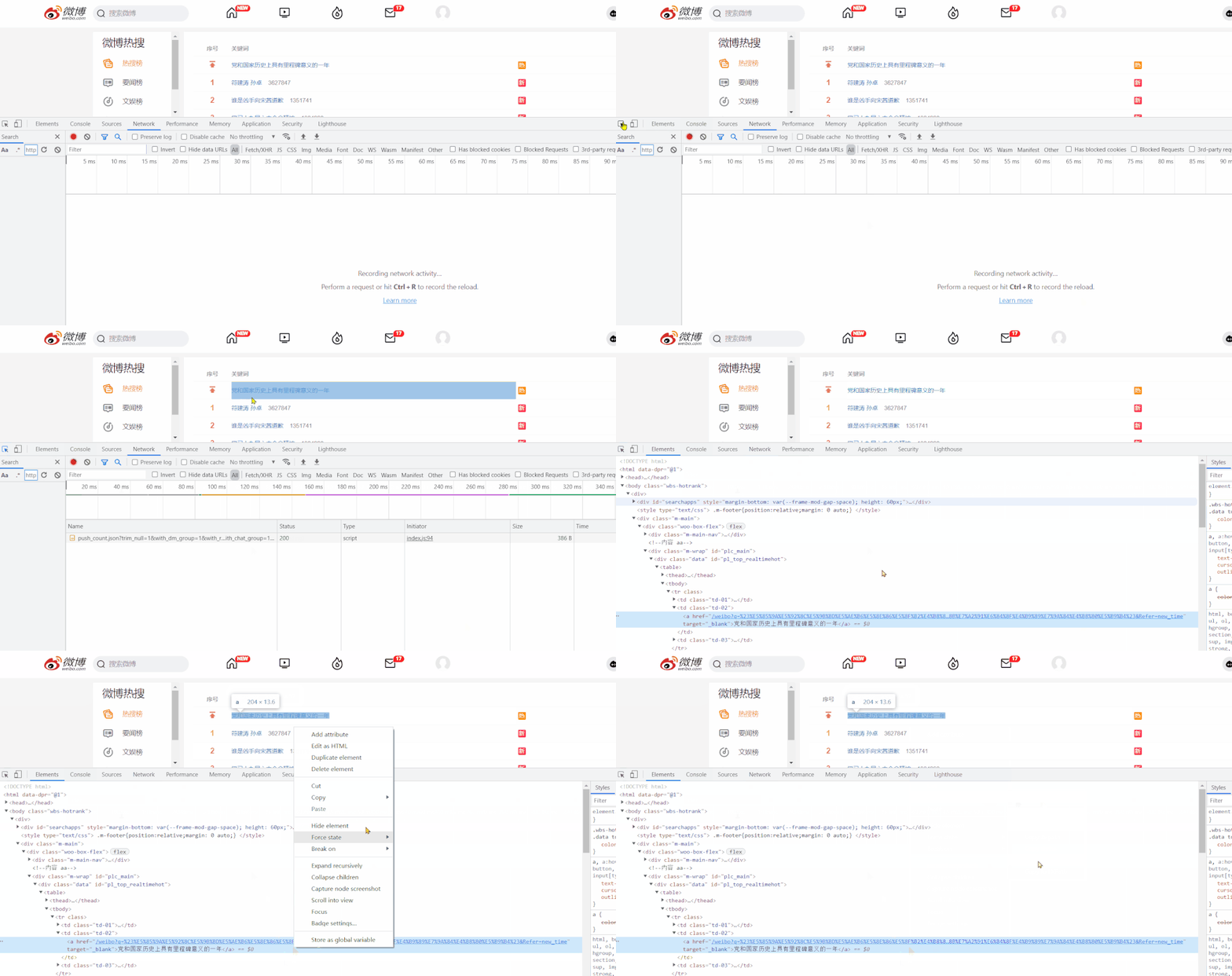
詳情頁
對于詳情頁,我們需要獲取評論時(shí)間、用戶名稱、轉(zhuǎn)發(fā)次數(shù)、評論次數(shù)、點(diǎn)贊次數(shù)、評論內(nèi)容這部分信息。 方法與熱搜頁采集方式基本相同,下面看看如何用代碼實(shí)現(xiàn)!
采集代碼
首先導(dǎo)入所需要的模塊。
import requests
from time import sleep
import pandas as pd
import numpy as np
from lxml import etree
import re
定義全局變量。
headers:請求頭all_df:DataFrame,保存采集的數(shù)據(jù)
headers = {
    'User-Agent': 'Mozilla/5.0 (Windows NT 10.0; Win64; x64) AppleWebKit/537.36 (KHTML, like Gecko) Chrome/94.0.4606.54 Safari/537.36',
    'Cookie': '''你的Cookie'''
}
all_df = pd.DataFrame(columns=['排行', '熱度', '標(biāo)題', '評論時(shí)間', '用戶名稱', '轉(zhuǎn)發(fā)次數(shù)', '評論次數(shù)', '點(diǎn)贊次數(shù)', '評論內(nèi)容'])
熱搜榜采集代碼,通過 requests 發(fā)起請求,獲取詳情頁鏈接后,跳轉(zhuǎn)進(jìn)入詳情頁采集 get_detail_page。
def get_hot_list(url):
    '''
    微博熱搜頁面采集,獲取詳情頁鏈接后,跳轉(zhuǎn)進(jìn)入詳情頁采集
    :param url: 微博熱搜頁鏈接
    :return: None
    '''
    page_text = requests.get(url=url, headers=headers).text
    tree = etree.HTML(page_text)
    tr_list = tree.xpath('//*[@id="pl_top_realtimehot"]/table/tbody/tr')
    for tr in tr_list:
        parse_url = tr.xpath('./td[2]/a/@href')[0]
        detail_url = 'https://s.weibo.com' + parse_url
        title = tr.xpath('./td[2]/a/text()')[0]
        try:
            rank = tr.xpath('./td[1]/text()')[0]
            hot = tr.xpath('./td[2]/span/text()')[0]
        except:
            rank = '置頂'
            hot = '置頂'
        get_detail_page(detail_url, title, rank, hot)
根據(jù)詳情頁鏈接,解析所需頁面數(shù)據(jù),并保存到全局變量 all_df 中,對于每個(gè)熱搜只采集熱評前三條,熱評不夠則跳過。
def get_detail_page(detail_url, title, rank, hot):
    '''
    根據(jù)詳情頁鏈接,解析所需頁面數(shù)據(jù),并保存到全局變量 all_df
    :param detail_url: 詳情頁鏈接
    :param title: 標(biāo)題
    :param rank: 排名
    :param hot: 熱度
    :return: None
    '''
    global all_df
    try:
        page_text = requests.get(url=detail_url, headers=headers).text
    except:
        return None
    tree = etree.HTML(page_text)
    result_df = pd.DataFrame(columns=np.array(all_df.columns))
    # 爬取3條熱門評論信息
    for i in range(1, 4):
        try:
            comment_time = tree.xpath(f'//*[@id="pl_feedlist_index"]/div[4]/div[{i}]/div[2]/div[1]/div[2]/p[1]/a/text()')[0]
            comment_time = re.sub('\s','',comment_time)
            user_name = tree.xpath(f'//*[@id="pl_feedlist_index"]/div[4]/div[{i}]/div[2]/div[1]/div[2]/p[2]/@nick-name')[0]
            forward_count = tree.xpath(f'//*[@id="pl_feedlist_index"]/div[4]/div[{i}]/div[2]/div[2]/ul/li[1]/a/text()')[1]
            forward_count = forward_count.strip()
            comment_count = tree.xpath(f'//*[@id="pl_feedlist_index"]/div[4]/div[{i}]/div[2]/div[2]/ul/li[2]/a/text()')[0]
            comment_count = comment_count.strip()
            like_count = tree.xpath(f'//*[@id="pl_feedlist_index"]/div[4]/div[{i}]/div[2]/div[2]/ul/li[3]/a/button/span[2]/text()')[0]
            comment = tree.xpath(f'//*[@id="pl_feedlist_index"]/div[4]/div[{i}]/div[2]/div[1]/div[2]/p[2]//text()')
            comment = ' '.join(comment).strip()
            result_df.loc[len(result_df), :] = [rank, hot, title, comment_time, user_name, forward_count, comment_count, like_count, comment]
        except Exception as e:
            print(e)
            continue
    print(detail_url, title)
    all_df = all_df.append(result_df, ignore_index=True)
調(diào)度代碼,向 get_hot_list 中傳入熱搜頁的 url ,最后進(jìn)行保存即可。
if __name__ == '__main__':
    url = 'https://s.weibo.com/top/summary?cate=realtimehot'
    get_hot_list(url)
    all_df.to_excel('工作文檔.xlsx', index=False)
對于采集過程中對于一些可能發(fā)生報(bào)錯(cuò)的地方,為保證程序的正常運(yùn)行,都通過異常處理給忽略掉了,整體影響不大!
工作文檔.xlsx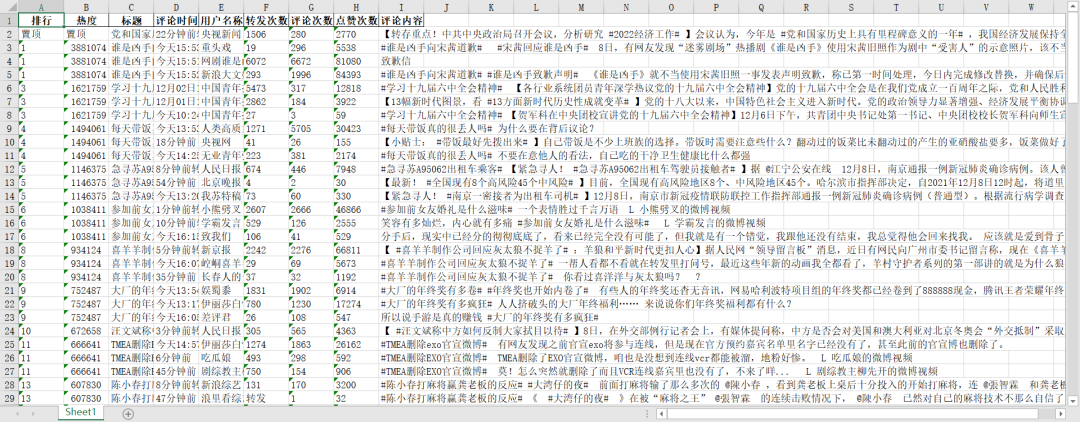
設(shè)置定時(shí)運(yùn)行
至此,采集代碼已經(jīng)完成,想要實(shí)現(xiàn)每小時(shí)自動(dòng)運(yùn)行代碼,可以使用「任務(wù)計(jì)劃程序」。
在此之前需要我們簡單修改一下上面代碼中的Cookie與最后文件的保存路徑(建議使用絕對路徑),如果在 Jupyter notebook 中運(yùn)行的需要導(dǎo)出一個(gè) .py 文件
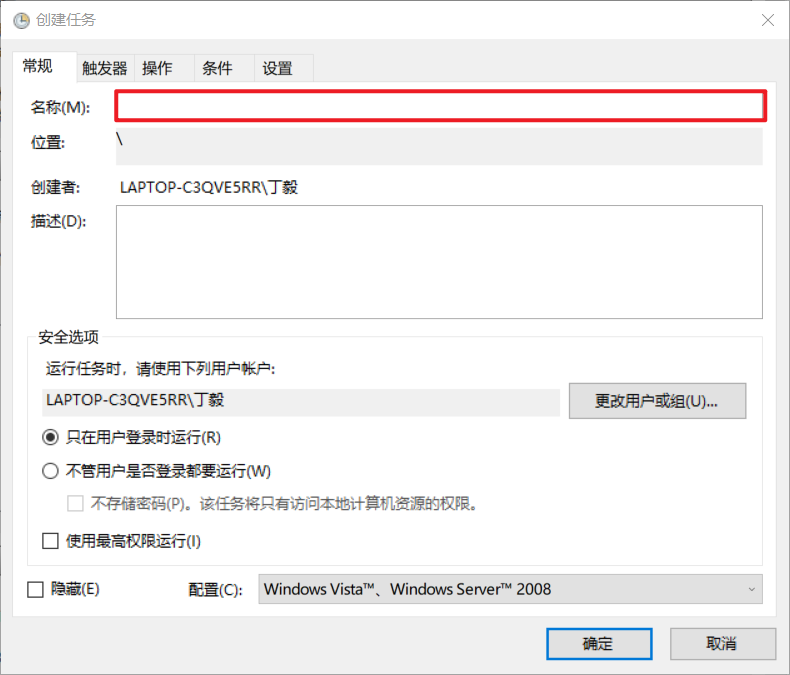
打開任務(wù)計(jì)劃程序,【創(chuàng)建任務(wù)】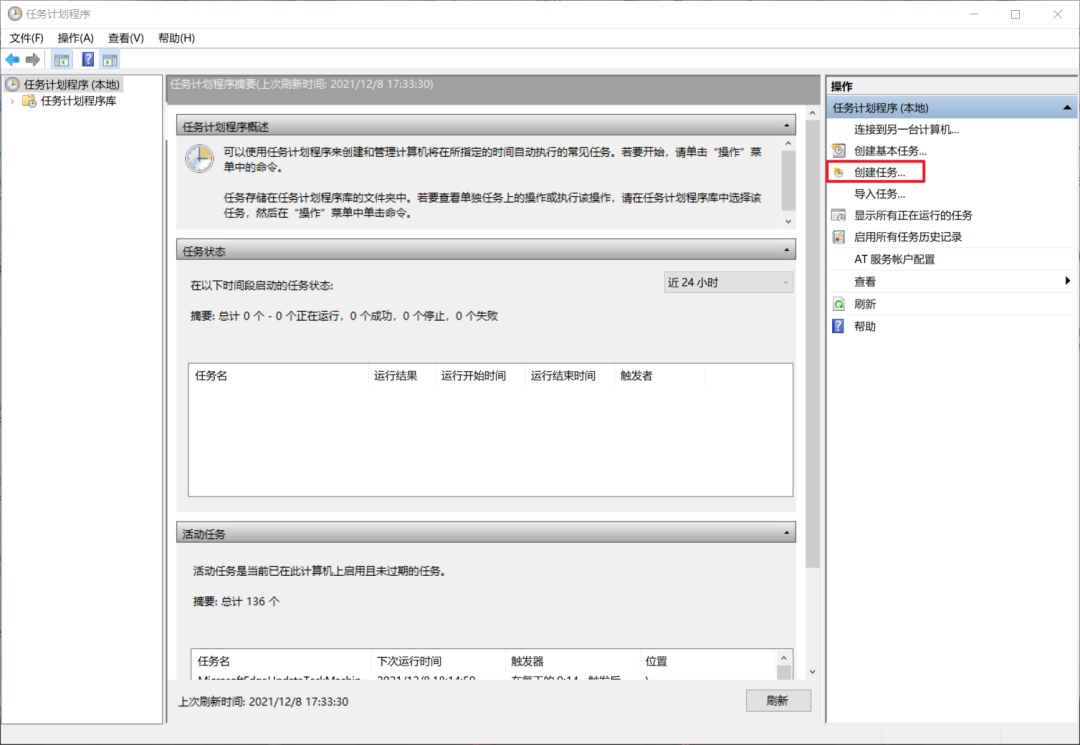 輸入名稱,名稱隨便起就好。
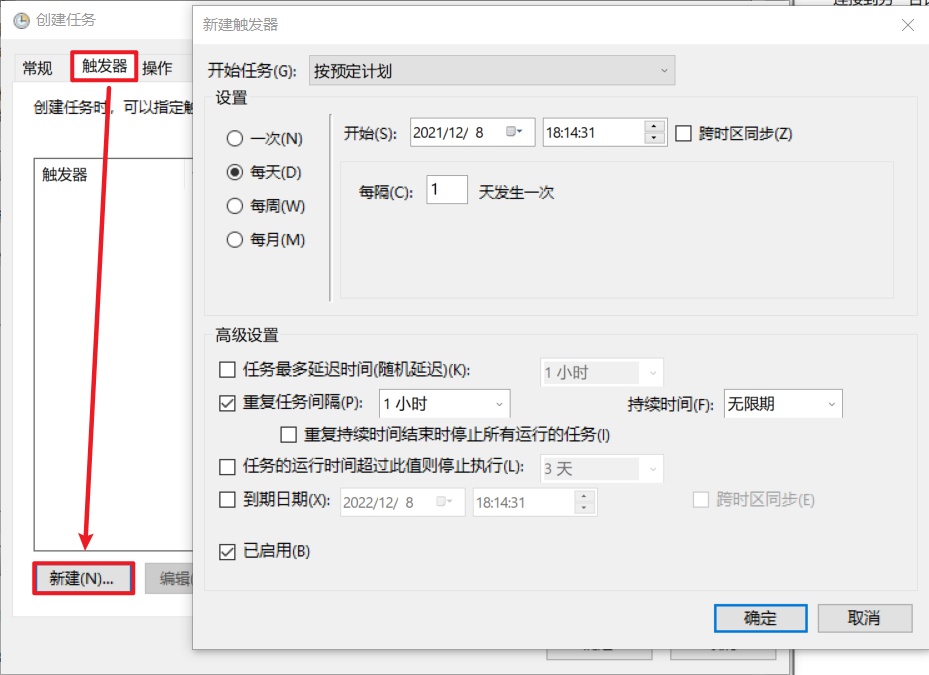
 選擇【觸發(fā)器】>>【新建】>>【設(shè)置觸發(fā)時(shí)間】
 選擇【操作】>>【新建】>>【選擇程序】
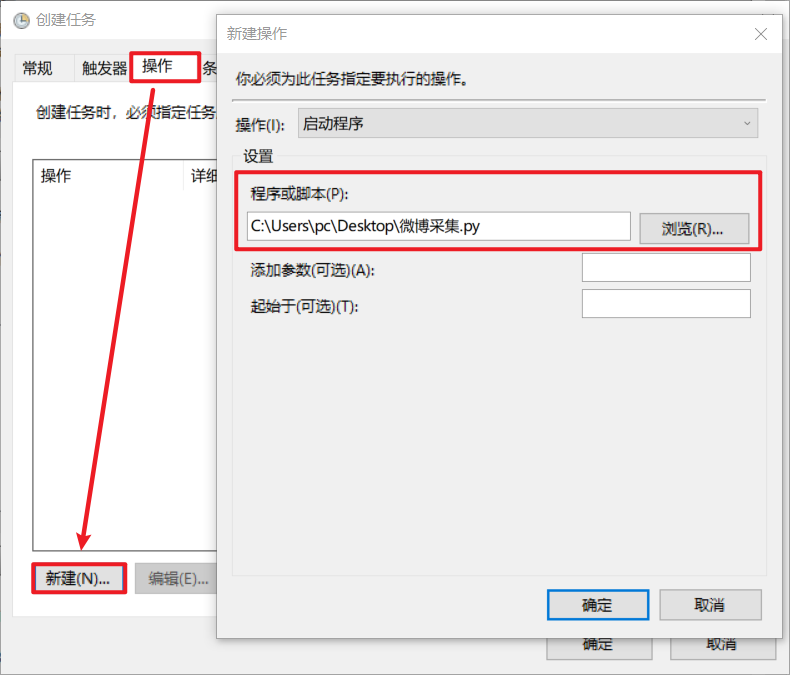 最后確認(rèn)即可。到時(shí)間就會(huì)自動(dòng)運(yùn)行,或者右鍵任務(wù)手動(dòng)運(yùn)行。
「運(yùn)行效果」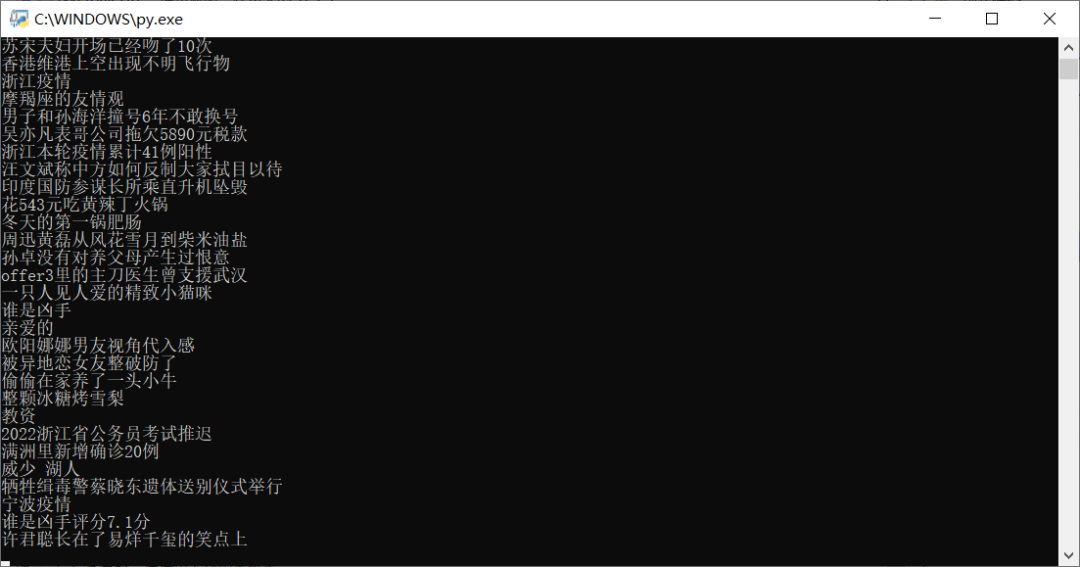
這就是今天要分享的內(nèi)容,整體難度不大,希望大家能夠有所收獲,文章中的代碼拼接起來就可以運(yùn)行,如果有什么問題可以通過微信聯(lián)系我哦!

小伙伴們,快快用實(shí)踐一下吧!如果在學(xué)習(xí)過程中,有遇到任何問題,歡迎加我好友,我拉你進(jìn)Python學(xué)習(xí)交流群共同探討學(xué)習(xí)。
------------------- End -------------------
往期精彩文章推薦:

歡迎大家點(diǎn)贊,留言,轉(zhuǎn)發(fā),轉(zhuǎn)載,感謝大家的相伴與支持
想加入Python學(xué)習(xí)群請?jiān)诤笈_(tái)回復(fù)【入群】
萬水千山總是情,點(diǎn)個(gè)【在看】行不行
/今日留言主題/
隨便說一兩句吧~