
用Python制作酷炫的可視化大屏,特簡(jiǎn)單!(實(shí)時(shí)更新數(shù)據(jù))
在數(shù)據(jù)時(shí)代,我們每個(gè)人既是數(shù)據(jù)的生產(chǎn)者,也是數(shù)據(jù)的使用者,然而初次獲取和存儲(chǔ)的原始數(shù)據(jù)雜亂無(wú)章、信息冗余、價(jià)值較低。
要想數(shù)據(jù)達(dá)到生動(dòng)有趣、讓人一目了然、豁然開(kāi)朗的效果,就需要借助數(shù)據(jù)可視化。
以前給大家介紹過(guò)使用Streamlit庫(kù)制作大屏,今天給大家?guī)?lái)一個(gè)新方法。
通過(guò)Python的Dash庫(kù),來(lái)制作一個(gè)酷炫的可視化大屏!
先來(lái)看一下整體效果,好像還不錯(cuò)哦。
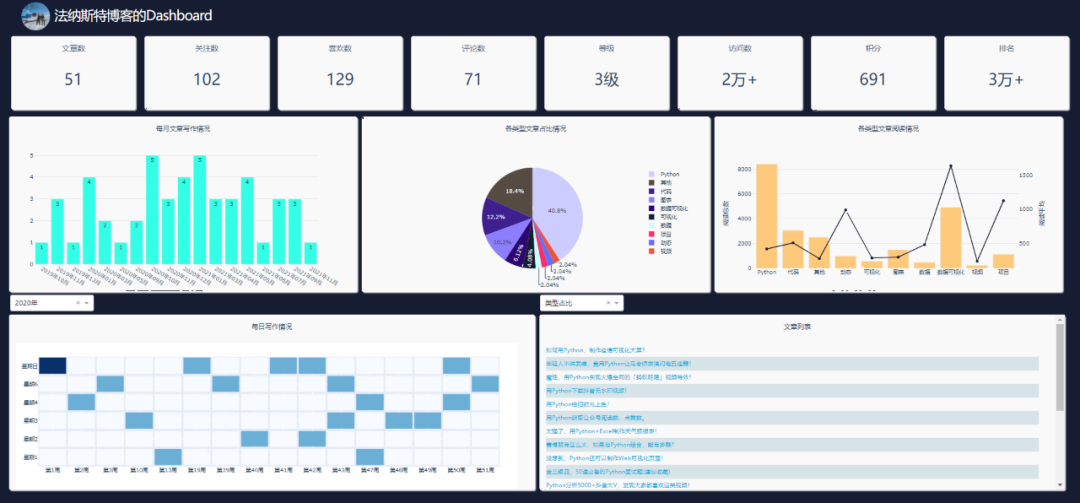
本文全部源碼獲取方法已分享到文末
記得點(diǎn)贊吶
主要使用Python的Dash庫(kù)、Plotly庫(kù)、Requests庫(kù)。
其中Requests爬取數(shù)據(jù),Plotly制作可視化圖表,Dash搭建可視化頁(yè)面。
原始數(shù)據(jù)是小F的博客數(shù)據(jù),數(shù)據(jù)存儲(chǔ)在MySqL數(shù)據(jù)庫(kù)中。
如此看來(lái),和Streamlit庫(kù)的搭建流程,所差不多。
關(guān)于Dash庫(kù),網(wǎng)上的資料不是很多,基本上只能看官方文檔和案例,下面小F簡(jiǎn)單介紹一下。
Dash是一個(gè)用于構(gòu)建Web應(yīng)用程序的高效Python框架,特別適合使用Python進(jìn)行數(shù)據(jù)分析的人。
Dash是建立在Flask,Plotly.js和React.js之上,非常適合在純Python中,使用高度自定義的用戶(hù)界面,構(gòu)建數(shù)據(jù)可視化應(yīng)用程序。
相關(guān)文檔
說(shuō)明:https://dash.plotly.com/introduction
案例:https://dash.gallery/Portal/
源碼:https://github.com/plotly/dash-sample-apps/
具體的大家可以去看文檔學(xué)習(xí),多動(dòng)手練習(xí)。
下面就給大家講解下如何通過(guò)Dash搭建可視化大屏~
01. 數(shù)據(jù)
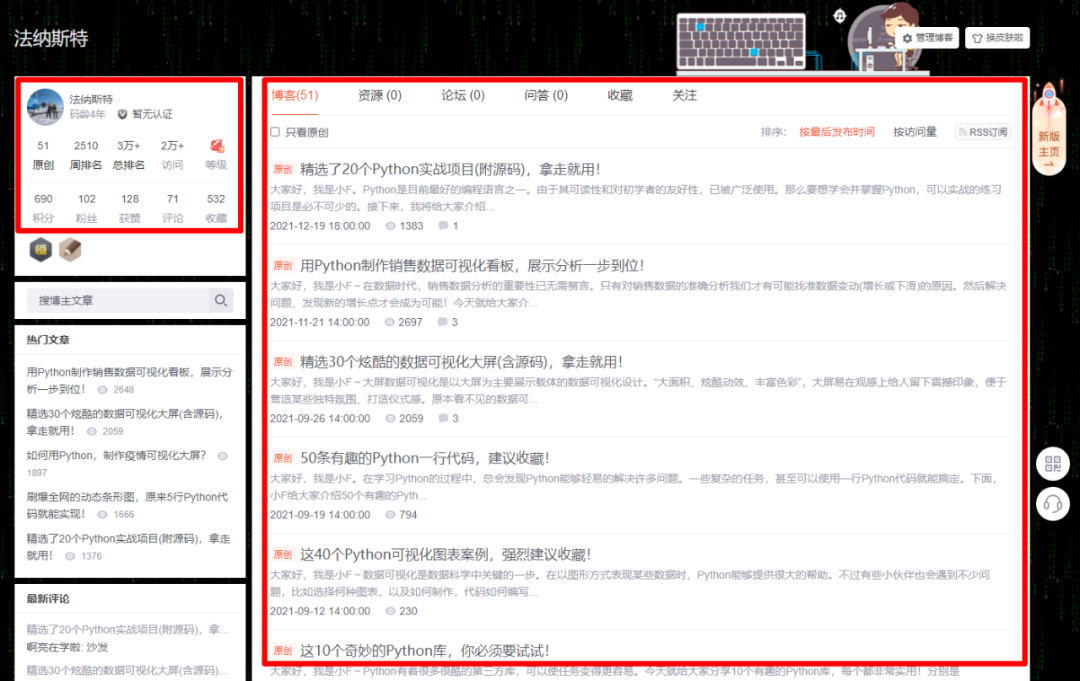
使用的數(shù)據(jù)是博客數(shù)據(jù),主要是下方兩處紅框的信息。
通過(guò)爬蟲(chóng)代碼爬取下來(lái),存儲(chǔ)在MySQL數(shù)據(jù)庫(kù)中。
其中MySQL的安裝,大家可以自行百度,都挺簡(jiǎn)單的。
安裝好后,進(jìn)行啟用,以及創(chuàng)建數(shù)據(jù)庫(kù)。
#?啟動(dòng)MySQL,?輸入密碼
mysql?-u?root?-p

#?創(chuàng)建名為my_database的數(shù)據(jù)庫(kù)
create?database?my_database;
其它相關(guān)的操作命令如下所示。
#?顯示MySQL中所有的數(shù)據(jù)庫(kù)
show?databases;

#?選擇my_database數(shù)據(jù)庫(kù)
use?my_database;

#?顯示my_database數(shù)據(jù)庫(kù)中所有的表
show?tables;

#?刪除表
drop?table?info;
drop?table?`2021-12-26`;

#?顯示表中的內(nèi)容,?執(zhí)行SQL查詢(xún)語(yǔ)句
select?*?from?info;
select?*?from?`2021-12-26`;
搞定上面的步驟后,就可以運(yùn)行爬蟲(chóng)代碼。
數(shù)據(jù)爬取代碼如下。這里使用到了pymysql這個(gè)庫(kù),需要pip安裝下。
import?requests
import?re
from?bs4?import?BeautifulSoup
import?time
import?random
import?pandas?as?pd
from?sqlalchemy?import?create_engine
import?datetime?as?dt


def?get_info():
????"""獲取大屏第一列信息數(shù)據(jù)"""
????headers?=?{
????????'User-Agent':?'Mozilla/5.0?(MSIE?10.0;?Windows?NT?6.1;?Trident/5.0)',
????????'referer':?'https:?//?passport.csdn.net?/?login',
????}
????#?我的博客地址
????url?=?'https://blog.csdn.net/river_star1/article/details/121463591'
????try:
????????resp?=?requests.get(url,?headers=headers)
????????now?=?dt.datetime.now().strftime("%Y-%m-%d?%X")
????????soup?=?BeautifulSoup(resp.text,?'lxml')
????????author_name?=?soup.find('div',?class_='user-info?d-flex?flex-column?profile-intro-name-box').find('a').get_text(strip=True)
????????head_img?=?soup.find('div',?class_='avatar-box?d-flex?justify-content-center?flex-column').find('a').find('img')['src']
????????row1_nums?=?soup.find_all('div',?class_='data-info?d-flex?item-tiling')[0].find_all('span',?class_='count')
????????row2_nums?=?soup.find_all('div',?class_='data-info?d-flex?item-tiling')[1].find_all('span',?class_='count')
????????level_mes?=?soup.find_all('div',?class_='data-info?d-flex?item-tiling')[0].find_all('dl')[-1]['title'].split(',')[0]
????????rank?=?soup.find('div',?class_='data-info?d-flex?item-tiling').find_all('dl')[-1]['title']
????????info?=?{
????????????'date':?now,#時(shí)間
????????????'head_img':?head_img,#頭像
????????????'author_name':?author_name,#用戶(hù)名
????????????'article_num':?str(row1_nums[0].get_text()),#文章數(shù)
????????????'fans_num':?str(row2_nums[1].get_text()),#粉絲數(shù)
????????????'like_num':?str(row2_nums[2].get_text()),#喜歡數(shù)
????????????'comment_num':?str(row2_nums[3].get_text()),#評(píng)論數(shù)
????????????'level':?level_mes,#等級(jí)
????????????'visit_num':?str(row1_nums[3].get_text()),#訪問(wèn)數(shù)
????????????'score':?str(row2_nums[0].get_text()),#積分
????????????'rank':?str(row1_nums[2].get_text()),#排名
????????}
????????df_info?=?pd.DataFrame([info.values()],?columns=info.keys())
????????return?df_info
????except?Exception?as?e:
????????print(e)
????????return?get_info()


def?get_type(title):
????"""設(shè)置文章類(lèi)型(依據(jù)文章名稱(chēng))"""
????the_type?=?'其他'
????article_types?=?['項(xiàng)目',?'數(shù)據(jù)可視化',?'代碼',?'圖表',?'Python',?'可視化',?'數(shù)據(jù)',?'面試',?'視頻',?'動(dòng)態(tài)',?'下載']
????for?article_type?in?article_types:
????????if?article_type?in?title:
????????????the_type?=?article_type
????????????break
????return?the_type


def?get_blog():
????"""獲取大屏第二、三列信息數(shù)據(jù)"""
????headers?=?{
????????'User-Agent':?'Mozilla/5.0?(MSIE?10.0;?Windows?NT?6.1;?Trident/5.0)',
????????'referer':?'https:?//?passport.csdn.net?/?login',
????}
????base_url?=?'https://blog.csdn.net/river_star1/article/list/'
????resp?=?requests.get(base_url+"1",?headers=headers,??timeout=3)
????max_page?=?int(re.findall(r'var?listTotal?=?(\d+);',?resp.text)[0])//40+1
????df?=?pd.DataFrame(columns=['url',?'title',?'date',?'read_num',?'comment_num',?'type'])
????count?=?0
????for?i?in?range(1,?max_page+1):
????????url?=?base_url?+?str(i)
????????resp?=?requests.get(url,?headers=headers)
????????soup?=?BeautifulSoup(resp.text,?'lxml')
????????articles?=?soup.find("div",?class_='article-list').find_all('div',?class_='article-item-box?csdn-tracking-statistics')
????????for?article?in?articles[1:]:
????????????a_url?=?article.find('h4').find('a')['href']
????????????title?=?article.find('h4').find('a').get_text(strip=True)[2:]
????????????issuing_time?=?article.find('span',?class_="date").get_text(strip=True)
????????????num_list?=?article.find_all('span',?class_="read-num")
????????????read_num?=?num_list[0].get_text(strip=True)
????????????if?len(num_list)?>?1:
????????????????comment_num?=?num_list[1].get_text(strip=True)
????????????else:
????????????????comment_num?=?0
????????????the_type?=?get_type(title)
????????????df.loc[count]?=?[a_url,?title,?issuing_time,?int(read_num),?int(comment_num),?the_type]
????????????count?+=?1
????????time.sleep(random.choice([1,?1.1,?1.3]))
????return?df


if?__name__?==?'__main__':
????#?今天的時(shí)間
????today?=?dt.datetime.today().strftime("%Y-%m-%d")
????#?連接mysql數(shù)據(jù)庫(kù)
????engine?=?create_engine('mysql+pymysql://root:123456@localhost/my_database?charset=utf8')

????#?獲取大屏第一列信息數(shù)據(jù),?并寫(xiě)入my_database數(shù)據(jù)庫(kù)的info表中,?如若表已存在,?刪除覆蓋
????df_info?=?get_info()
????print(df_info)
????df_info.to_sql("info",?con=engine,?if_exists='replace',?index=False)

????#?獲取大屏第二、三列信息數(shù)據(jù),?并寫(xiě)入my_database數(shù)據(jù)庫(kù)的日期表中,?如若表已存在,?刪除覆蓋
????df_article?=?get_blog()
????print(df_article)
????df_article.to_sql(today,?con=engine,?if_exists='replace',?index=True)
運(yùn)行成功后,就可以去數(shù)據(jù)庫(kù)查詢(xún)信息了。
info表,包含日期、頭圖、博客名、文章數(shù)、粉絲數(shù)、點(diǎn)贊數(shù)、評(píng)論數(shù)、等級(jí)數(shù)、訪問(wèn)數(shù)、積分?jǐn)?shù)、排名數(shù)。

日期表,包含文章地址、標(biāo)題、日期、閱讀數(shù)、評(píng)論數(shù)、類(lèi)型。
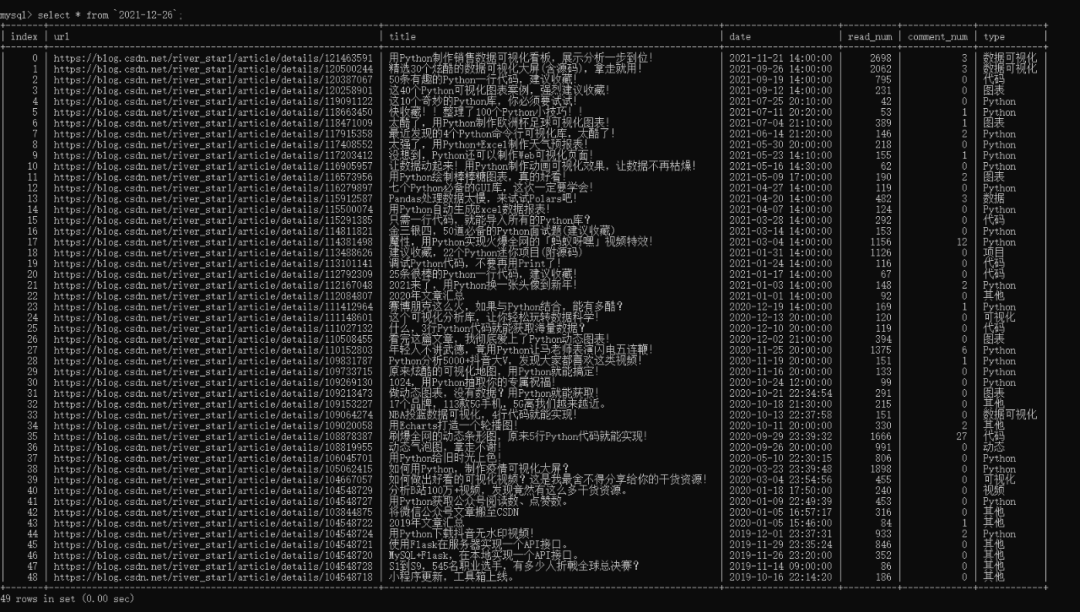
其中爬蟲(chóng)代碼可設(shè)置定時(shí)運(yùn)行,info表為60秒,日期表為60分鐘。
盡量不要太頻繁,容易被封IP,或者選擇使用代理池。
這樣便可以做到數(shù)據(jù)實(shí)時(shí)更新。
既然數(shù)據(jù)已經(jīng)有了,下面就可以來(lái)編寫(xiě)頁(yè)面了。
02. 大屏搭建
導(dǎo)入相關(guān)的Python庫(kù),同樣可以通過(guò)pip進(jìn)行安裝。
from?spider_py?import?get_info,?get_blog
from?dash?import?dcc
import?dash
from?dash?import?html
import?pandas?as?pd
import?plotly.graph_objs?as?go
from?dash.dependencies?import?Input,?Output
import?datetime?as?dt
from?sqlalchemy?import?create_engine
from?flask_caching?import?Cache
import?numpy?as?np
設(shè)置一些基本的配置參數(shù),如數(shù)據(jù)庫(kù)連接、網(wǎng)頁(yè)樣式、Dash實(shí)例、圖表顏色。
#?今天的時(shí)間
today?=?dt.datetime.today().strftime("%Y-%m-%d")

#?連接數(shù)據(jù)庫(kù)
engine?=?create_engine('mysql+pymysql://root:123456@localhost/my_database?charset=utf8')

#?導(dǎo)入css樣式
external_css?=?[
????"https://stackpath.bootstrapcdn.com/bootstrap/4.1.3/css/bootstrap.min.css",
????"https://cdnjs.cloudflare.com/ajax/libs/skeleton/2.0.4/skeleton.min.css"
]

#?創(chuàng)建一個(gè)實(shí)例
app?=?dash.Dash(__name__,?external_stylesheets=external_css)
server?=?app.server

#?可以選擇使用緩存,?減少頻繁的數(shù)據(jù)請(qǐng)求
#?cache?=?Cache(app.server,?config={
#?????'CACHE_TYPE':?'filesystem',
#?????'CACHE_DIR':?'cache-directory'
#?})

#?讀取info表的數(shù)據(jù)
info?=?pd.read_sql('info',?con=engine)

#?圖表顏色
color_scale?=?['#2c0772',?'#3d208e',?'#8D7DFF',?'#CDCCFF',?'#C7FFFB',?'#ff2c6d',?'#564b43',?'#161d33']
這里將緩存代碼注釋掉了,如有頻繁的頁(yè)面刷新請(qǐng)求,就可以選擇使用。
def?indicator(text,?id_value):
????"""第一列的文字及數(shù)字信息顯示"""
????return?html.Div([
????html.P(text,?className="twelve?columns?indicator_text"),
????html.P(id=id_value,?className="indicator_value"),
],?className="col?indicator")


def?get_news_table(data):
????"""獲取文章列表,?根據(jù)閱讀排序"""
????df?=?data.copy()
????df.sort_values('read_num',?inplace=True,?ascending=False)
????titles?=?df['title'].tolist()
????urls?=?df['url'].tolist()

????return?html.Table([html.Tbody([
????????html.Tr([
????????????html.Td(
????????????????html.A(titles[i],?href=urls[i],?target="_blank",))
????????],?style={'height':?'30px',?'fontSize':?'16'})for?i?in?range(min(len(df),?100))
????])],?style={"height":?"90%",?"width":?"98%"})


#[email protected](timeout=3590),?可選擇設(shè)置緩存,?我沒(méi)使用
def?get_df():
????"""獲取當(dāng)日最新的文章數(shù)據(jù)"""
????df?=?pd.read_sql(today,?con=engine)
????df['date_day']?=?df['date'].apply(lambda?x:?x.split('?')[0]).astype('datetime64[ns]')
????df['date_month']?=?df['date'].apply(lambda?x:?x[:7].split('-')[0]?+?"年"?+?x[:7].split('-')[-1]?+?"月")
????df['weekday']?=?df['date_day'].dt.weekday
????df['year']?=?df['date_day'].dt.year
????df['month']?=?df['date_day'].dt.month
????df['week']?=?df['date_day'].dt.isocalendar().week
????return?df


#?導(dǎo)航欄的圖片及標(biāo)題
head?=?html.Div([
????html.Div(html.Img(src='./assets/img.jpg',?height="100%"),?style={"float":?"left",?"height":?"90%",?"margin-top":?"5px",?"border-radius":?"50%",?"overflow":?"hidden"}),
????html.Span("{}博客的Dashboard".format(info['author_name'][0]),?className='app-title'),
],?className="row?header")

#?第一列的文字及數(shù)字信息
columns?=?info.columns[3:]
col_name?=?['文章數(shù)',?'關(guān)注數(shù)',?'喜歡數(shù)',?'評(píng)論數(shù)',?'等級(jí)',?'訪問(wèn)數(shù)',?'積分',?'排名']
row1?=?html.Div([
????indicator(col_name[i],?col)?for?i,?col?in?enumerate(columns)
],?className='row')

#?第二列
row2?=?html.Div([
????html.Div([
????????html.P("每月文章寫(xiě)作情況"),
????????dcc.Graph(id="bar",?style={"height":?"90%",?"width":?"98%"},?config=dict(displayModeBar=False),)
????],?className="col-4?chart_div",),
????html.Div([
????????html.P("各類(lèi)型文章占比情況"),
????????dcc.Graph(id="pie",?style={"height":?"90%",?"width":?"98%"},?config=dict(displayModeBar=False),)
????],?className="col-4?chart_div"),
????html.Div([
????????html.P("各類(lèi)型文章閱讀情況"),
????????dcc.Graph(id="mix",?style={"height":?"90%",?"width":?"98%"},?config=dict(displayModeBar=False),)
????],?className="col-4?chart_div",)
],?className='row')

#?年數(shù)統(tǒng)計(jì),?我的是2019?2020?2021
years?=?get_df()['year'].unique()
select_list?=?['每月文章',?'類(lèi)型占比',?'類(lèi)型閱讀量',?'每日情況']

#?兩個(gè)可交互的下拉選項(xiàng)
dropDowm1?=?html.Div([
????html.Div([
????????dcc.Dropdown(id='dropdown1',
?????????????????options=[{'label':?'{}年'.format(year),?'value':?year}?for?year?in?years],
?????????????????value=years[1],?style={'width':?'40%'})
????????],?className='col-6',?style={'padding':?'2px',?'margin':?'0px?5px?0px'}),
????html.Div([
????????dcc.Dropdown(id='dropdown2',
?????????????????options=[{'label':?select_list[i],?'value':?item}?for?i,?item?in?enumerate(['bar',?'pie',?'mix',?'heatmap'])],
?????????????????value='heatmap',?style={'width':?'40%'})
????????],?className='col-6',?style={'padding':?'2px',?'margin':?'0px?5px?0px'})
],?className='row')

#?第三列
row3?=?html.Div([
????html.Div([
????????html.P("每日寫(xiě)作情況"),
????????dcc.Graph(id="heatmap",?style={"height":?"90%",?"width":?"98%"},?config=dict(displayModeBar=False),)
????],?className="col-6?chart_div",),
????html.Div([
????????html.P("文章列表"),
????????html.Div(get_news_table(get_df()),?id='click-data'),
????],?className="col-6?chart_div",?style={"overflowY":?"scroll"})
],?className='row')

#?總體情況
app.layout?=?html.Div([
????#?定時(shí)器
????dcc.Interval(id="stream",?interval=1000*60,?n_intervals=0),
????dcc.Interval(id="river",?interval=1000*60*60,?n_intervals=0),
????html.Div(id="load_info",?style={"display":?"none"},),
????html.Div(id="load_click_data",?style={"display":?"none"},),
????head,
????html.Div([
????????row1,
????????row2,
????????dropDowm1,
????????row3,
????],?style={'margin':?'0%?30px'}),
])
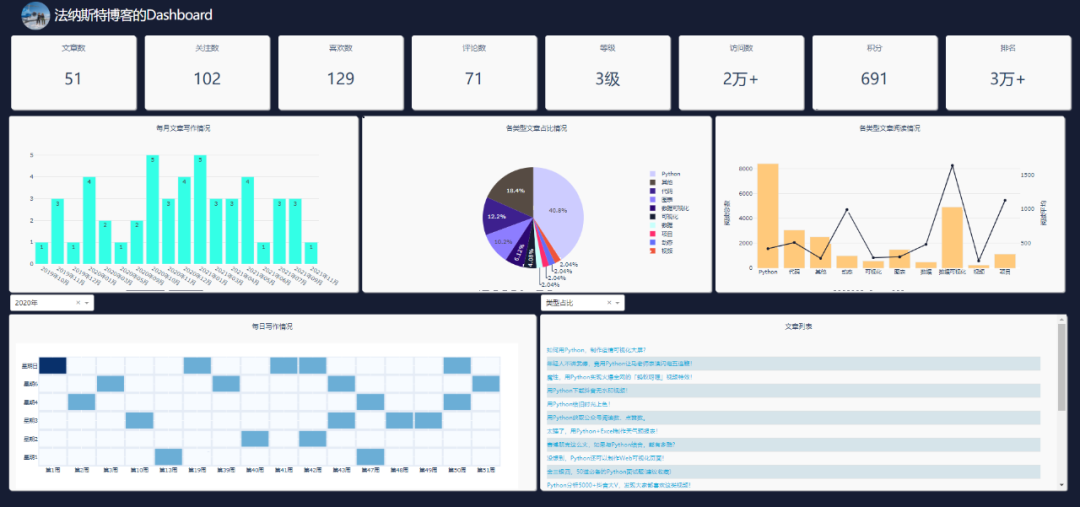
上面的代碼,就是網(wǎng)頁(yè)的布局,效果如下。
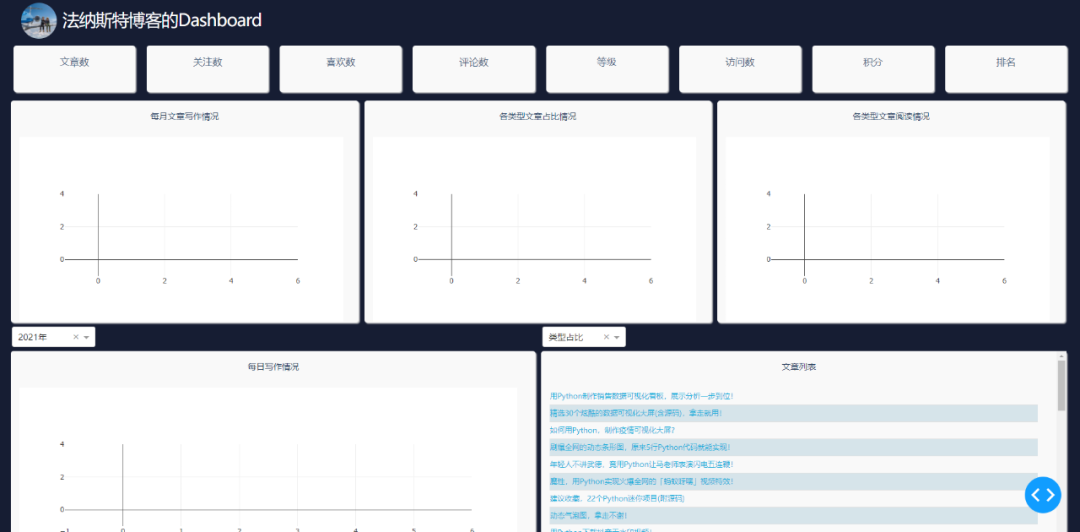
網(wǎng)頁(yè)可以劃分為三列。第一列為info表中的數(shù)據(jù)展示,第二、三列為博客文章的數(shù)據(jù)展示。
相關(guān)的數(shù)據(jù)需要通過(guò)回調(diào)函數(shù)進(jìn)行更新,這樣才能做到實(shí)時(shí)刷新。
各個(gè)數(shù)值及圖表的回調(diào)函數(shù)代碼如下所示。
#?回調(diào)函數(shù),?60秒刷新info數(shù)據(jù),?即第一列的數(shù)值實(shí)時(shí)刷新
@app.callback(Output('load_info',?'children'),?[Input("stream",?"n_intervals")])
def?load_info(n):
????try:
????????df?=?pd.read_sql('info',?con=engine)
????????return?df.to_json()
????except:
????????pass


#?回調(diào)函數(shù),?60分鐘刷新今日數(shù)據(jù),?即第二、三列的數(shù)值實(shí)時(shí)刷新(爬取文章數(shù)據(jù),?并寫(xiě)入數(shù)據(jù)庫(kù)中)
@app.callback(Output('load_click_data',?'children'),?[Input("river",?"n_intervals")])
def?cwarl_data(n):
????if?n?!=?0:
????????df_article?=?get_blog()
????????df_article.to_sql(today,?con=engine,?if_exists='replace',?index=True)


#?回調(diào)函數(shù),?第一個(gè)柱狀圖
@app.callback(Output('bar',?'figure'),?[Input("river",?"n_intervals")])
def?get_bar(n):
????df?=?get_df()
????df_date_month?=?pd.DataFrame(df['date_month'].value_counts(sort=False))
????df_date_month.sort_index(inplace=True)
????trace?=?go.Bar(
????????x=df_date_month.index,
????????y=df_date_month['date_month'],
????????text=df_date_month['date_month'],
????????textposition='auto',
????????marker=dict(color='#33ffe6')
????)
????layout?=?go.Layout(
????????margin=dict(l=40,?r=40,?t=10,?b=50),
????????yaxis=dict(gridcolor='#e2e2e2'),
????????paper_bgcolor='rgba(0,0,0,0)',
????????plot_bgcolor='rgba(0,0,0,0)',
????)
????return?go.Figure(data=[trace],?layout=layout)


#?回調(diào)函數(shù),?中間的餅圖
@app.callback(Output('pie',?'figure'),?[Input("river",?"n_intervals")])
def?get_pie(n):
????df?=?get_df()
????df_types?=?pd.DataFrame(df['type'].value_counts(sort=False))
????trace?=?go.Pie(
????????labels=df_types.index,
????????values=df_types['type'],
????????marker=dict(colors=color_scale[:len(df_types.index)])
????)
????layout?=?go.Layout(
????????margin=dict(l=50,?r=50,?t=50,?b=50),
????????paper_bgcolor='rgba(0,0,0,0)',
????????plot_bgcolor='rgba(0,0,0,0)',
????)
????return?go.Figure(data=[trace],?layout=layout)


#?回調(diào)函數(shù),?左下角熱力圖
@app.callback(Output('heatmap',?'figure'),
??????????????[Input("dropdown1",?"value"),?Input('river',?'n_intervals')])
def?get_heatmap(value,?n):
????df?=?get_df()
????grouped_by_year?=?df.groupby('year')
????data?=?grouped_by_year.get_group(value)
????cross?=?pd.crosstab(data['weekday'],?data['week'])
????cross.sort_index(inplace=True)
????trace?=?go.Heatmap(
????????x=['第{}周'.format(i)?for?i?in?cross.columns],
????????y=["星期{}".format(i+1)?if?i?!=?6?else?"星期日"?for?i?in?cross.index],
????????z=cross.values,
????????colorscale="Blues",
????????reversescale=False,
????????xgap=4,
????????ygap=5,
????????showscale=False
????)
????layout?=?go.Layout(
????????margin=dict(l=50,?r=40,?t=30,?b=50),
????)
????return?go.Figure(data=[trace],?layout=layout)


#?回調(diào)函數(shù),?第二個(gè)柱狀圖(柱狀圖+折線圖)
@app.callback(Output('mix',?'figure'),?[Input("river",?"n_intervals")])
def?get_mix(n):
????df?=?get_df()
????df_type_visit_sum?=?pd.DataFrame(df['read_num'].groupby(df['type']).sum())
????df['read_num']?=?df['read_num'].astype('float')
????df_type_visit_mean?=?pd.DataFrame(df['read_num'].groupby(df['type']).agg('mean').round(2))
????trace1?=?go.Bar(
????????x=df_type_visit_sum.index,
????????y=df_type_visit_sum['read_num'],
????????name='總閱讀',
????????marker=dict(color='#ffc97b'),
????????yaxis='y',
????)
????trace2?=?go.Scatter(
????????x=df_type_visit_mean.index,
????????y=df_type_visit_mean['read_num'],
????????name='平均閱讀',
????????yaxis='y2',
????????line=dict(color='#161D33')
????)
????layout?=?go.Layout(
????????margin=dict(l=60,?r=60,?t=30,?b=50),
????????showlegend=False,
????????yaxis=dict(
????????????side='left',
????????????title='閱讀總數(shù)',
????????????gridcolor='#e2e2e2'
????????),
????????yaxis2=dict(
????????????showgrid=False,??#?網(wǎng)格
????????????title='閱讀平均',
????????????anchor='x',
????????????overlaying='y',
????????????side='right'
????????),
????????paper_bgcolor='rgba(0,0,0,0)',
????????plot_bgcolor='rgba(0,0,0,0)',
????)
????return?go.Figure(data=[trace1,?trace2],?layout=layout)


#?點(diǎn)擊事件,?選擇兩個(gè)下拉選項(xiàng),?點(diǎn)擊對(duì)應(yīng)區(qū)域的圖表,?文章列表會(huì)刷新
@app.callback(Output('click-data',?'children'),
????????[Input('pie',?'clickData'),
?????????Input('bar',?'clickData'),
?????????Input('mix',?'clickData'),
?????????Input('heatmap',?'clickData'),
?????????Input('dropdown1',?'value'),
?????????Input('dropdown2',?'value'),
?????????])
def?display_click_data(pie,?bar,?mix,?heatmap,?d_value,?fig_type):
????try:
????????df?=?get_df()
????????if?fig_type?==?'pie':
????????????type_value?=?pie['points'][0]['label']
????????????#?date_month_value?=?clickdata['points'][0]['x']
????????????data?=?df[df['type']?==?type_value]
????????elif?fig_type?==?'bar':
????????????date_month_value?=?bar['points'][0]['x']
????????????data?=?df[df['date_month']?==?date_month_value]
????????elif?fig_type?==?'mix':
????????????type_value?=?mix['points'][0]['x']
????????????data?=?df[df['type']?==?type_value]
????????else:
????????????z?=?heatmap['points'][0]['z']
????????????if?z?==?0:
????????????????return?None
????????????else:
????????????????week?=?heatmap['points'][0]['x'][1:-1]
????????????????weekday?=?heatmap['points'][0]['y'][-1]
????????????????if?weekday?==?'日':
????????????????????weekday?=?7
????????????????year?=?d_value
????????????????data?=?df[(df['weekday']?==?int(weekday)-1)?&?(df['week']?==?int(week))?&?(df['year']?==?year)]
????????return?get_news_table(data)
????except:
????????return?None


#?第一列的數(shù)值
def?update_info(col):
????def?get_data(json,?n):
????????df?=?pd.read_json(json)
????????return?df[col][0]
????return?get_data


for?col?in?columns:
????app.callback(Output(col,?"children"),
?????????????????[Input('load_info',?'children'),?Input("stream",?"n_intervals")]
?????)(update_info(col))
圖表的數(shù)據(jù)和樣式全在這里設(shè)置,兩個(gè)下拉欄的數(shù)據(jù)交互也在這里完成。
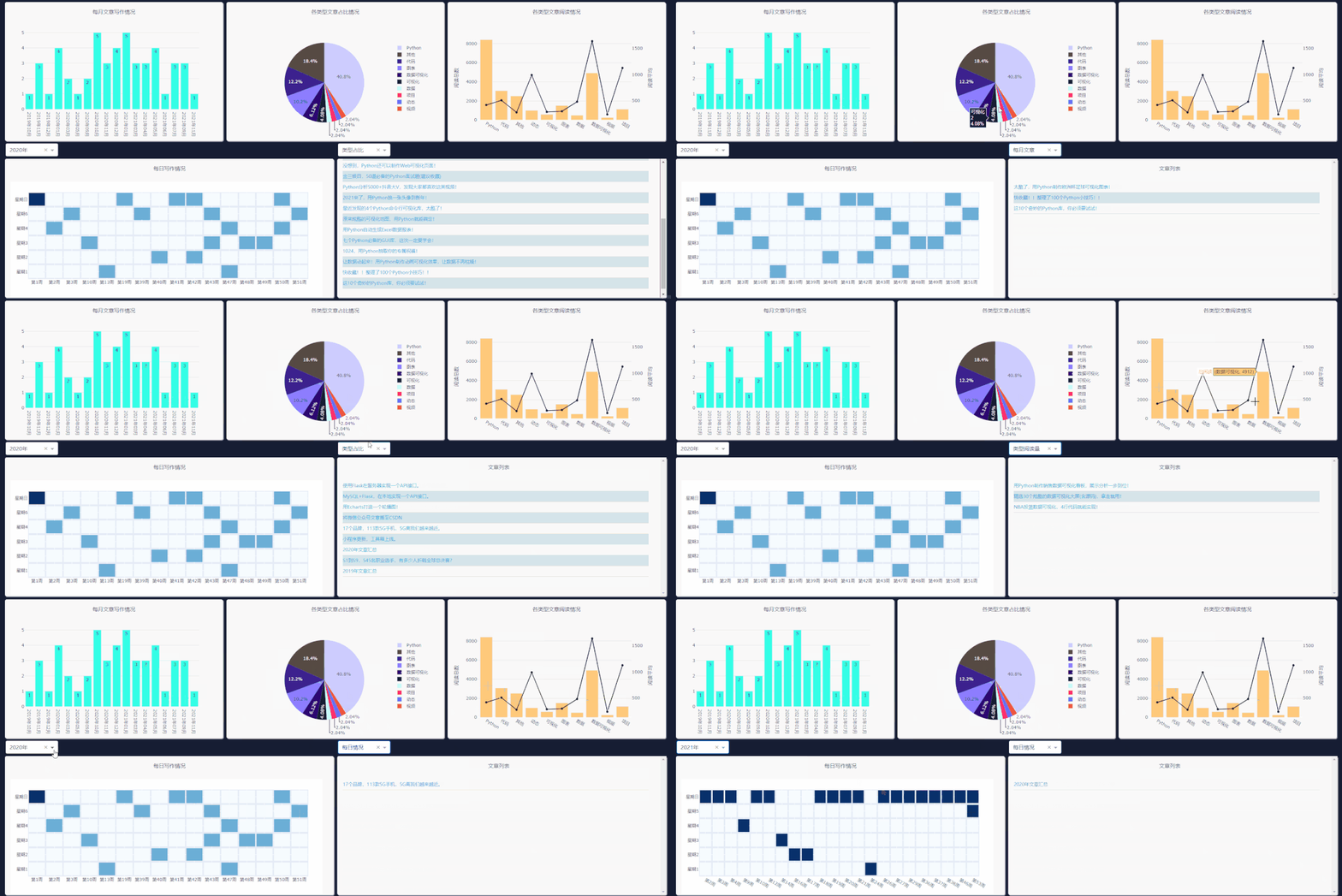
需要注意右側(cè)下拉欄的類(lèi)型,需和你所要點(diǎn)擊圖表類(lèi)型一致,這樣文章列表才會(huì)更新。
每日情況對(duì)應(yīng)熱力圖,類(lèi)型閱讀量對(duì)應(yīng)第二列第三個(gè)圖表,類(lèi)型占比對(duì)應(yīng)餅圖,每月文章對(duì)應(yīng)第一個(gè)柱狀圖的點(diǎn)擊事件。
最后啟動(dòng)程序代碼。
if?__name__?==?'__main__':
????#?debug模式,?端口7777
????app.run_server(debug=True,?threaded=True,?port=7777)
????#?正常模式,?網(wǎng)頁(yè)右下角的調(diào)試按鈕將不會(huì)出現(xiàn)
????#?app.run_server(port=7777)
這樣就能在本地看到可視化大屏頁(yè)面,瀏覽器打開(kāi)如下地址。
http://127.0.0.1:7777
對(duì)于網(wǎng)頁(yè)的布局、背景顏色等,主要通過(guò)CSS進(jìn)行設(shè)置。
這一部分可能是大家所要花費(fèi)時(shí)間去理解的。
body{
????margin:0;
????padding:?0;
????background-color:?#161D33;
????font-family:?'Open?Sans',?sans-serif;
????color:?#506784;
????-webkit-user-select:?none;??/*?Chrome?all?/?Safari?all?*/
????-moz-user-select:?none;?????/*?Firefox?all?*/
????-ms-user-select:?none;??????/*?IE?10+?*/
????user-select:?none;??????????/*?Likely?future?*/
}

.modal?{
????display:?block;??/*Hidden?by?default?*/
????position:?fixed;?/*?Stay?in?place?*/
????z-index:?1000;?/*?Sit?on?top?*/
????left:?0;
????top:?0;
????width:?100%;?/*?Full?width?*/
????height:?100%;?/*?Full?height?*/
????overflow:?auto;?/*?Enable?scroll?if?needed?*/
????background-color:?rgb(0,0,0);?/*?Fallback?color?*/
????background-color:?rgba(0,0,0,0.4);?/*?Black?w/?opacity?*/
}

.modal-content?{
????background-color:?white;
????margin:?5%?auto;?/*?15%?from?the?top?and?centered?*/
????padding:?20px;
????width:?30%;?/*?Could?be?more?or?less,?depending?on?screen?size?*/
????color:#506784;
}

._dash-undo-redo?{
??display:?none;
}

.app-title{
????color:white;
????font-size:3rem;
????letter-spacing:-.1rem;
????padding:10px;
????vertical-align:middle
}

.header{
????margin:0px;
????background-color:#161D33;
????height:70px;
????color:white;
????padding-right:2%;
????padding-left:2%
}

.indicator{
??border-radius:?5px;
??background-color:?#f9f9f9;
??margin:?10px;
??padding:?15px;
??position:?relative;
??box-shadow:?2px?2px?2px?lightgrey;
}

.indicator_text{
????text-align:?center;
????float:?left;
????font-size:?17px;
????}

.indicator_value{
????text-align:center;
????color:?#2a3f5f;
????font-size:?35px;
}

.add{
????height:?34px;
????background:?#119DFF;
????border:?1px?solid?#119DFF;
????color:?white;
}

.chart_div{
????background-color:?#f9f9f9;
????border-radius:?5px;
????height:?390px;
????margin:5px;
????padding:?15px;
????position:?relative;
????box-shadow:?2px?2px?2px?lightgrey;
}

.col-4?{
????flex:?0?0?32.65%;
????max-width:?33%;
}

.col-6?{
????flex:?0?0?49.3%;
????max-width:?50%;
}

.chart_div?p{
????color:?#2a3f5f;
????font-size:?15px;
????text-align:?center;
}

td{
????text-align:?left;
????padding:?0px;
}

table{
????border:?1px;
????font-size:1.3rem;
????width:100%;
????font-family:Ubuntu;
}

.tabs_div{
????margin:0px;
????height:30px;
????font-size:13px;
????margin-top:1px
}

tr:nth-child(even)?{
????background-color:?#d6e4ea;
????-webkit-print-color-adjust:?exact;
}
如今低代碼平臺(tái)的出現(xiàn),或許以后再也不用去寫(xiě)煩人的HTML、CSS等。拖拖拽拽,即可輕松完成一個(gè)大屏的制作。
好了,今天的分享到此結(jié)束,大家可以自行去動(dòng)手練習(xí)。
代碼下載
本篇文章的全部源碼可在公眾號(hào)「簡(jiǎn)說(shuō)編程」后臺(tái)回復(fù)【代碼】獲取
【注意??】由于本號(hào)自動(dòng)回復(fù)已經(jīng)設(shè)置滿(mǎn)了,所以本文源碼放在老表的小號(hào)「簡(jiǎn)說(shuō)編程」中,點(diǎn)擊下方卡片可直達(dá))
萬(wàn)水千山總是情,點(diǎn)個(gè)????行不行。
參考鏈接:
https://github.com/ffzs/dash_blog_dashboard
https://www.cnblogs.com/feffery/p/14826195.html
https://github.com/plotly/dash-sample-apps/tree/main/apps/dash-oil-and-gas