
在自定義數(shù)據(jù)集上實(shí)現(xiàn)OpenAI CLIP

         來源:DeepHub IMBA


        本文約2000字,建議閱讀10分鐘

         本文將使用PyTorch中從頭開始實(shí)現(xiàn)CLIP模型,以便對(duì)CLIP有一個(gè)更好的理解。
在2021年1月,OpenAI宣布了兩個(gè)新模型:DALL-E和CLIP,它們都是以某種方式連接文本和圖像的多模態(tài)模型。CLIP全稱是Contrastive Language–Image Pre-training,一種基于對(duì)比文本-圖像對(duì)的預(yù)訓(xùn)練方法。為什么要介紹CLIP呢?因?yàn)楝F(xiàn)在大火得Stable Diffusion 并不是單一模型,而是多個(gè)模型組成。其中會(huì)用到一個(gè) Text encoder 將用戶的文本輸入進(jìn)行編碼,這個(gè) text encoder 就是 CLIP 模型中 text encoder。
CLIP模型在訓(xùn)練時(shí),可以給它一個(gè)輸入句子,并提取最相關(guān)的圖像來配合它。CLIP學(xué)習(xí)了一個(gè)完整的句子和它所描述的圖像之間的關(guān)系。也就是說它是在完整的句子上訓(xùn)練的,而不是像“汽車”、“狗”等離散的分類,這一點(diǎn)對(duì)于應(yīng)用至關(guān)重要。當(dāng)訓(xùn)練完整的短語時(shí),模型可以學(xué)習(xí)更多的東西,并識(shí)別照片和文本之間的模式。他們還證明,當(dāng)在相當(dāng)大的照片和與之相對(duì)應(yīng)的句子數(shù)據(jù)集上進(jìn)行訓(xùn)練時(shí),該模型是可以作為分類器的。CLIP在發(fā)布的時(shí)候能在無任何微調(diào)的情況下(zero-shot ),在 ImageNet 數(shù)據(jù)集上的分類表現(xiàn)超 ResNets-50 微調(diào)后的效果,也就是說他是非常有用的。
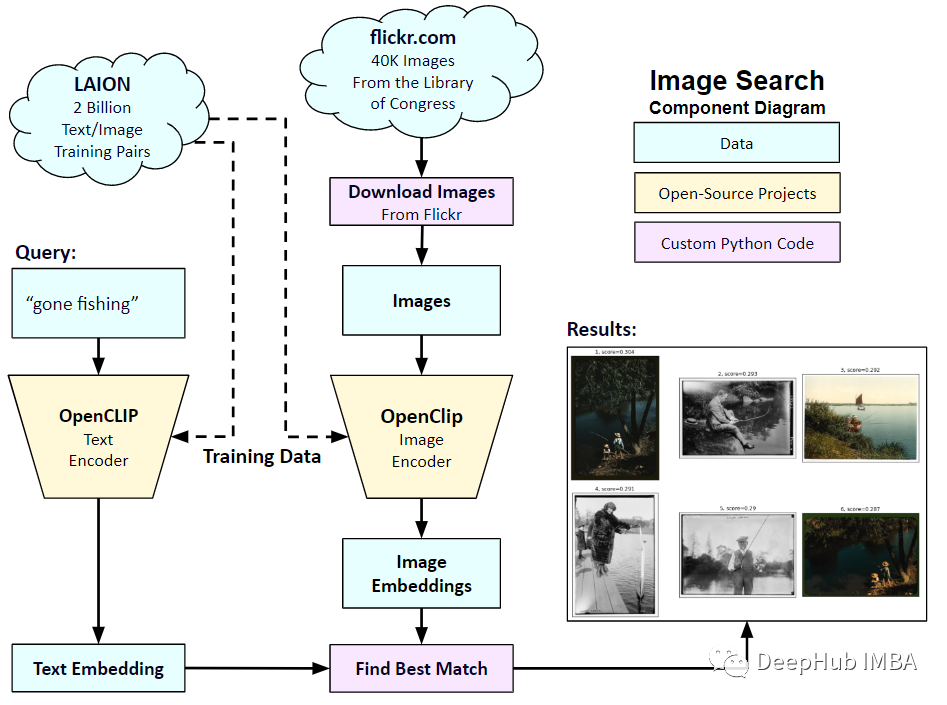
所以在本文中,我們將使用PyTorch中從頭開始實(shí)現(xiàn)CLIP模型,以便我們對(duì)CLIP有一個(gè)更好的理解
這里就需要用到2個(gè)庫:timm和transformers,我們先導(dǎo)入代碼
import osimport cv2import gcimport numpy as npimport pandas as pdimport itertoolsfrom tqdm.autonotebook import tqdmimport albumentations as Aimport matplotlib.pyplot as pltimport torchfrom torch import nnimport torch.nn.functional as Fimport timmfrom transformers import DistilBertModel, DistilBertConfig, DistilBertTokenizer
下一步就是預(yù)處理數(shù)據(jù)和通用配置config。config是一個(gè)普通的python文件,我們將所有的超參數(shù)放在里面,如果使用Jupyter Notebook的情況下,它是一個(gè)在Notebook開頭定義的類。
class CFG:debug = Falseimage_path = "../input/flickr-image-dataset/flickr30k_images/flickr30k_images"captions_path = "."batch_size = 32num_workers = 4head_lr = 1e-3image_encoder_lr = 1e-4text_encoder_lr = 1e-5weight_decay = 1e-3patience = 1factor = 0.8epochs = 2device = torch.device("cuda" if torch.cuda.is_available() else "cpu")model_name = 'resnet50'image_embedding = 2048text_encoder_model = "distilbert-base-uncased"text_embedding = 768text_tokenizer = "distilbert-base-uncased"max_length = 200pretrained = True # for both image encoder and text encodertrainable = True # for both image encoder and text encodertemperature = 1.0# image sizesize = 224# for projection head; used for both image and text encodersnum_projection_layers = 1projection_dim = 256dropout = 0.1
還有一些我們自定義指標(biāo)的輔助類:
class AvgMeter:def __init__(self, name="Metric"):self.name = nameself.reset()def reset(self):self.avg, self.sum, self.count = [0] * 3def update(self, val, count=1):self.count += countself.sum += val * countself.avg = self.sum / self.countdef __repr__(self):text = f"{self.name}: {self.avg:.4f}"return textdef get_lr(optimizer):for param_group in optimizer.param_groups:return param_group["lr"]
我們的目標(biāo)是描述圖像和句子。所以數(shù)據(jù)集必須同時(shí)返回句子和圖像。所以需要使用DistilBERT標(biāo)記器對(duì)句子(標(biāo)題)進(jìn)行標(biāo)記,然后將標(biāo)記id (input_ids)和注意掩碼提供給DistilBERT。DistilBERT比BERT 模型要小,但是模型的結(jié)果都差不多,所以我們選擇使用它。
下一步就是使用HuggingFace tokenizer進(jìn)行標(biāo)記化。在__init__中獲得的tokenizer對(duì)象,將在模型運(yùn)行時(shí)加載。標(biāo)題被填充并截?cái)嗟筋A(yù)定的最大長(zhǎng)度。在加載相關(guān)圖像之前,我們將在__getitem__中加載一個(gè)編碼的標(biāo)題,這是一個(gè)帶有鍵input_ids和attention_mask的字典,并對(duì)其進(jìn)行轉(zhuǎn)換和擴(kuò)充(如果有的話)。然后把它變成一個(gè)張量,并以“image”作為鍵存儲(chǔ)在字典中。最后我們將標(biāo)題的原始文本與關(guān)鍵字“標(biāo)題”一起輸入字典。
class CLIPDataset(torch.utils.data.Dataset):def __init__(self, image_filenames, captions, tokenizer, transforms):"""image_filenames and cpations must have the same length; so, if there aremultiple captions for each image, the image_filenames must have repetitivefile names"""self.image_filenames = image_filenamesself.captions = list(captions)self.encoded_captions = tokenizer(list(captions), padding=True, truncation=True, max_length=CFG.max_length)self.transforms = transformsdef __getitem__(self, idx):item = {key: torch.tensor(values[idx])for key, values in self.encoded_captions.items()}image = cv2.imread(f"{CFG.image_path}/{self.image_filenames[idx]}")image = cv2.cvtColor(image, cv2.COLOR_BGR2RGB)image = self.transforms(image=image)['image']item['image'] = torch.tensor(image).permute(2, 0, 1).float()item['caption'] = self.captions[idx]return itemdef __len__(self):return len(self.captions)def get_transforms(mode="train"):if mode == "train":return A.Compose([A.Resize(CFG.size, CFG.size, always_apply=True),A.Normalize(max_pixel_value=255.0, always_apply=True),])else:return A.Compose([A.Resize(CFG.size, CFG.size, always_apply=True),A.Normalize(max_pixel_value=255.0, always_apply=True),])
圖像和文本編碼器:我們將使用ResNet50作為圖像編碼器。
class ImageEncoder(nn.Module):"""Encode images to a fixed size vector"""def __init__(self, model_name=CFG.model_name, pretrained=CFG.pretrained, trainable=CFG.trainable):super().__init__()self.model = timm.create_model(model_name, pretrained, num_classes=0, global_pool="avg")for p in self.model.parameters():p.requires_grad = trainabledef forward(self, x):return self.model(x)
使用DistilBERT作為文本編碼器。使用CLS令牌的最終表示來獲得句子的整個(gè)表示。
class TextEncoder(nn.Module):def __init__(self, model_name=CFG.text_encoder_model, pretrained=CFG.pretrained, trainable=CFG.trainable):super().__init__()if pretrained:self.model = DistilBertModel.from_pretrained(model_name)else:self.model = DistilBertModel(config=DistilBertConfig())for p in self.model.parameters():p.requires_grad = trainable# we are using the CLS token hidden representation as the sentence's embeddingself.target_token_idx = 0def forward(self, input_ids, attention_mask):output = self.model(input_ids=input_ids, attention_mask=attention_mask)last_hidden_state = output.last_hidden_statereturn last_hidden_state[:, self.target_token_idx, :]
上面的代碼已經(jīng)將圖像和文本編碼為固定大小的向量(圖像2048,文本768),我們需要圖像和文本具有相似的尺寸,以便能夠比較它們,所以我們把2048維和768維向量投影到256維(projection_dim),只有維度相同我們才能比較它們。
class ProjectionHead(nn.Module):def __init__(self,embedding_dim,projection_dim=CFG.projection_dim,dropout=CFG.dropout):super().__init__()self.projection = nn.Linear(embedding_dim, projection_dim)self.gelu = nn.GELU()self.fc = nn.Linear(projection_dim, projection_dim)self.dropout = nn.Dropout(dropout)self.layer_norm = nn.LayerNorm(projection_dim)def forward(self, x):projected = self.projection(x)x = self.gelu(projected)x = self.fc(x)x = self.dropout(x)x = x + projectedx = self.layer_norm(x)return x
所以最后我們的CLIP模型就是這樣:
class CLIPModel(nn.Module):def __init__(self,temperature=CFG.temperature,image_embedding=CFG.image_embedding,text_embedding=CFG.text_embedding,):super().__init__()self.image_encoder = ImageEncoder()self.text_encoder = TextEncoder()self.image_projection = ProjectionHead(embedding_dim=image_embedding)self.text_projection = ProjectionHead(embedding_dim=text_embedding)self.temperature = temperaturedef forward(self, batch):# Getting Image and Text Featuresimage_features = self.image_encoder(batch["image"])text_features = self.text_encoder(input_ids=batch["input_ids"], attention_mask=batch["attention_mask"])# Getting Image and Text Embeddings (with same dimension)image_embeddings = self.image_projection(image_features)text_embeddings = self.text_projection(text_features)# Calculating the Losslogits = (text_embeddings @ image_embeddings.T) / self.temperatureimages_similarity = image_embeddings @ image_embeddings.Ttexts_similarity = text_embeddings @ text_embeddings.Ttargets = F.softmax((images_similarity + texts_similarity) / 2 * self.temperature, dim=-1)texts_loss = cross_entropy(logits, targets, reduction='none')images_loss = cross_entropy(logits.T, targets.T, reduction='none')loss = (images_loss + texts_loss) / 2.0 # shape: (batch_size)return loss.mean()#這里還加了一個(gè)交叉熵函數(shù)def cross_entropy(preds, targets, reduction='none'):log_softmax = nn.LogSoftmax(dim=-1)loss = (-targets * log_softmax(preds)).sum(1)if reduction == "none":return losselif reduction == "mean":return loss.mean()
這里需要說明下,CLIP使用 symmetric cross entropy 作為損失函數(shù),可以降低噪音影響,提高模型魯棒性,我們這里為了簡(jiǎn)單只是用cross entropy。
我們可以進(jìn)行測(cè)試:
# A simple Examplebatch_size = 4dim = 256embeddings = torch.randn(batch_size, dim)out = embeddings @ embeddings.Tdim=-1))
下一步就是訓(xùn)練了,有一些函數(shù)可以幫助我們加載訓(xùn)練和驗(yàn)證的dataloader:
def make_train_valid_dfs():dataframe = pd.read_csv(f"{CFG.captions_path}/captions.csv")max_id = dataframe["id"].max() + 1 if not CFG.debug else 100image_ids = np.arange(0, max_id)np.random.seed(42)valid_ids = np.random.choice(image_ids, size=int(0.2 * len(image_ids)), replace=False)train_ids = [id_ for id_ in image_ids if id_ not in valid_ids]train_dataframe = dataframe[dataframe["id"].isin(train_ids)].reset_index(drop=True)valid_dataframe = dataframe[dataframe["id"].isin(valid_ids)].reset_index(drop=True)return train_dataframe, valid_dataframedef build_loaders(dataframe, tokenizer, mode):transforms = get_transforms(mode=mode)dataset = CLIPDataset(dataframe["image"].values,dataframe["caption"].values,tokenizer=tokenizer,transforms=transforms,)dataloader = torch.utils.data.DataLoader(dataset,batch_size=CFG.batch_size,num_workers=CFG.num_workers,shuffle=True if mode == "train" else False,)return dataloader
然后就是訓(xùn)練和評(píng)估:
def train_epoch(model, train_loader, optimizer, lr_scheduler, step):loss_meter = AvgMeter()tqdm_object = tqdm(train_loader, total=len(train_loader))for batch in tqdm_object:batch = {k: v.to(CFG.device) for k, v in batch.items() if k != "caption"}loss = model(batch)optimizer.zero_grad()loss.backward()optimizer.step()if step == "batch":lr_scheduler.step()count = batch["image"].size(0)loss_meter.update(loss.item(), count)tqdm_object.set_postfix(train_loss=loss_meter.avg, lr=get_lr(optimizer))return loss_meterdef valid_epoch(model, valid_loader):loss_meter = AvgMeter()tqdm_object = tqdm(valid_loader, total=len(valid_loader))for batch in tqdm_object:batch = {k: v.to(CFG.device) for k, v in batch.items() if k != "caption"}loss = model(batch)count = batch["image"].size(0)loss_meter.update(loss.item(), count)tqdm_object.set_postfix(valid_loss=loss_meter.avg)return loss_meter
最后整合起來就是全部流程:
def main():train_df, valid_df = make_train_valid_dfs()tokenizer = DistilBertTokenizer.from_pretrained(CFG.text_tokenizer)train_loader = build_loaders(train_df, tokenizer, mode="train")valid_loader = build_loaders(valid_df, tokenizer, mode="valid")model = CLIPModel().to(CFG.device)params = [{"params": model.image_encoder.parameters(), "lr": CFG.image_encoder_lr},{"params": model.text_encoder.parameters(), "lr": CFG.text_encoder_lr},{"params": itertools.chain(model.image_projection.parameters(), model.text_projection.parameters()), "lr": CFG.head_lr, "weight_decay": CFG.weight_decay}]optimizer = torch.optim.AdamW(params, weight_decay=0.)lr_scheduler = torch.optim.lr_scheduler.ReduceLROnPlateau(optimizer, mode="min", patience=CFG.patience, factor=CFG.factor)step = "epoch"best_loss = float('inf')for epoch in range(CFG.epochs):print(f"Epoch: {epoch + 1}")model.train()train_loss = train_epoch(model, train_loader, optimizer, lr_scheduler, step)model.eval()with torch.no_grad():valid_loss = valid_epoch(model, valid_loader)if valid_loss.avg < best_loss:best_loss = valid_loss.avgtorch.save(model.state_dict(), "best.pt")print("Saved Best Model!")lr_scheduler.step(valid_loss.avg)
應(yīng)用:獲取圖像嵌入并找到匹配。
我們訓(xùn)練完成后如何實(shí)際應(yīng)用呢?我們需要編寫一個(gè)函數(shù)加載訓(xùn)練后的模型,為其提供驗(yàn)證集中的圖像,并返回形狀(valid_set_size, 256)和模型本身的image_embeddings。
def get_image_embeddings(valid_df, model_path):tokenizer = DistilBertTokenizer.from_pretrained(CFG.text_tokenizer)valid_loader = build_loaders(valid_df, tokenizer, mode="valid")model = CLIPModel().to(CFG.device)model.load_state_dict(torch.load(model_path, map_location=CFG.device))model.eval()valid_image_embeddings = []with torch.no_grad():for batch in tqdm(valid_loader):image_features = model.image_encoder(batch["image"].to(CFG.device))image_embeddings = model.image_projection(image_features)valid_image_embeddings.append(image_embeddings)return model, torch.cat(valid_image_embeddings)_, valid_df = make_train_valid_dfs()model, image_embeddings = get_image_embeddings(valid_df, "best.pt")def find_matches(model, image_embeddings, query, image_filenames, n=9):tokenizer = DistilBertTokenizer.from_pretrained(CFG.text_tokenizer)encoded_query = tokenizer([query])batch = {key: torch.tensor(values).to(CFG.device)for key, values in encoded_query.items()}with torch.no_grad():text_features = model.text_encoder(input_ids=batch["input_ids"], attention_mask=batch["attention_mask"])text_embeddings = model.text_projection(text_features)image_embeddings_n = F.normalize(image_embeddings, p=2, dim=-1)text_embeddings_n = F.normalize(text_embeddings, p=2, dim=-1)dot_similarity = text_embeddings_n @ image_embeddings_n.Tvalues, indices = torch.topk(dot_similarity.squeeze(0), n * 5)matches = [image_filenames[idx] for idx in indices[::5]]_, axes = plt.subplots(3, 3, figsize=(10, 10))for match, ax in zip(matches, axes.flatten()):image = cv2.imread(f"{CFG.image_path}/{match}")image = cv2.cvtColor(image, cv2.COLOR_BGR2RGB)ax.imshow(image)ax.axis("off")plt.show()
調(diào)用方法如下:
find_matches(model,image_embeddings,query="one dog sitting on the grass",image_filenames=valid_df['image'].values,n=9)
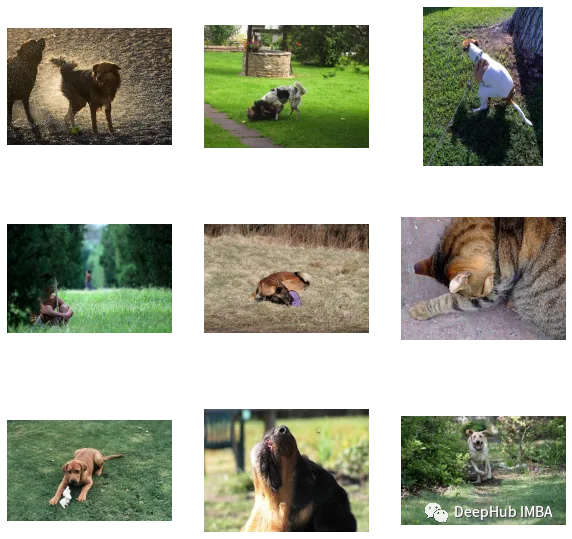
可以看到我們自定義效果還是不錯(cuò)的(但是圖里面有個(gè)貓,哈)。也就是說CLIP這種方法在小數(shù)據(jù)集上自定義也是可行的。
以下是本文的代碼和數(shù)據(jù)集:
https://www.kaggle.com/code/jyotidabas/simple-openai-clip-implementation
作者:Jyoti Dabass, Ph.D
編輯:黃繼彥