
妙啊!MMDetection 訓(xùn)練自定義數(shù)據(jù)集
點(diǎn)擊上方“AI算法與圖像處理”,選擇加"星標(biāo)"或“置頂”
重磅干貨,第一時(shí)間送達(dá)
導(dǎo)讀
?上一篇講到如何安裝MMDetection,今天要分享如何使用 MMDetection 訓(xùn)練自定義數(shù)據(jù)集,其實(shí)非常簡單!
前言
深度學(xué)習(xí)發(fā)展到現(xiàn)在已經(jīng)有很多優(yōu)秀的模型,同時(shí)很多大公司也會(huì)在內(nèi)部開發(fā)自己的框架,快速的實(shí)現(xiàn)業(yè)務(wù),從而產(chǎn)生實(shí)際價(jià)值。
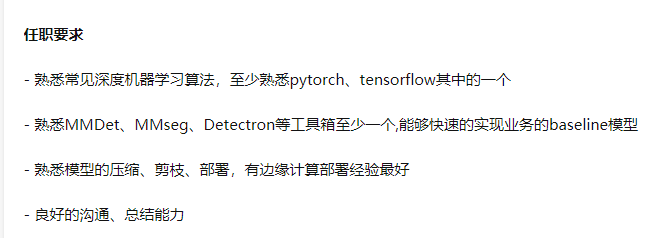
如下面的招聘要求一樣,市場需要這些能熟練使用現(xiàn)有工具快速實(shí)現(xiàn),MMDetection 是一個(gè)非常好的選擇。
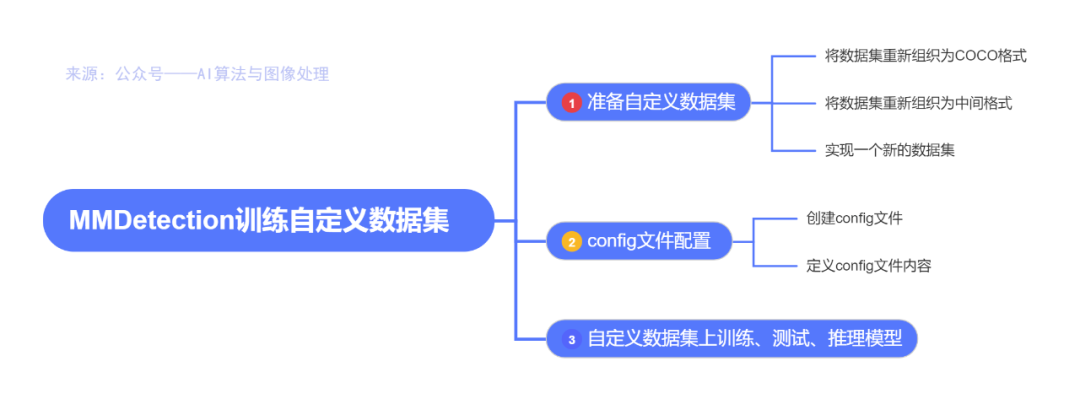
在本文中,你將知道如何使用定制的數(shù)據(jù)集推斷、測試和訓(xùn)練預(yù)定義的模型。我們以ballon數(shù)據(jù)集為例來描述整個(gè)過程。
氣球數(shù)據(jù)集:https://github.com/matterport/Mask_RCNN/tree/master/samples/balloon
https://github.com/matterport/Mask_RCNN/releases
1、準(zhǔn)備自定義數(shù)據(jù)集
官方教程:https://mmdetection.readthedocs.io/en/latest/2_new_data_model.html
有三種方法在MMDetection中支持新的數(shù)據(jù)集:
將數(shù)據(jù)集重新組織為COCO格式。
將數(shù)據(jù)集重新組織為中間格式。
實(shí)現(xiàn)一個(gè)新的數(shù)據(jù)集。
官方建議使用前兩種方法,這兩種方法通常比第三種方法簡單。
在本文中,我們給出了一個(gè)將數(shù)據(jù)轉(zhuǎn)換為COCO格式的示例。
注意:MMDetection目前只支持評(píng)估COCO格式數(shù)據(jù)集的mask AP。因此,例如實(shí)例分割任務(wù),用戶應(yīng)該將數(shù)據(jù)轉(zhuǎn)換為coco格式。
COCO 標(biāo)注格式
以下是實(shí)例分割所需的COCO格式所需的關(guān)鍵,完整的細(xì)節(jié)請(qǐng)參考這里。
https://cocodataset.org/#format-data
{
    "images": [image],
    "annotations": [annotation],
    "categories": [category]
}


image = {
    "id": int,
    "width": int,
    "height": int,
    "file_name": str,
}

annotation = {
    "id": int,
    "image_id": int,
    "category_id": int,
    "segmentation": RLE or [polygon],
    "area": float,
    "bbox": [x,y,width,height],
    "iscrowd": 0 or 1,
}

categories = [{
    "id": int,
    "name": str,
    "supercategory": str,
}]
假設(shè)我們使用ballon數(shù)據(jù)集。下載數(shù)據(jù)之后,我們需要實(shí)現(xiàn)一個(gè)函數(shù)來將注釋格式轉(zhuǎn)換為COCO格式。然后我們可以使用實(shí)現(xiàn)的COCODataset加載數(shù)據(jù),并執(zhí)行訓(xùn)練和評(píng)估。
如果你看一下數(shù)據(jù)集,你會(huì)發(fā)現(xiàn)數(shù)據(jù)集的格式如下:
{'base64_img_data': '','file_attributes': {},'filename': '34020010494_e5cb88e1c4_k.jpg','fileref': '','regions': {'0': {'region_attributes': {},'shape_attributes': {'all_points_x': [1020,1000,994,1003,1023,1050,1089,1134,1190,1265,1321,1361,1403,1428,1442,1445,1441,1427,1400,1361,1316,1269,1228,1198,1207,1210,1190,1177,1172,1174,1170,1153,1127,1104,1061,1032,1020],'all_points_y': [963,899,841,787,738,700,663,638,621,619,643,672,720,765,800,860,896,942,990,1035,1079,1112,1129,1134,1144,1153,1166,1166,1150,1136,1129,1122,1112,1084,1037,989,963],'name': 'polygon'}}},'size': 1115004}
annotation 是一個(gè)JSON文件,其中每個(gè) key 都表示圖像的所有注釋。將ballon數(shù)據(jù)集轉(zhuǎn)換為coco格式的代碼如下所示。
import os.path as ospimport mmcvdef convert_balloon_to_coco(ann_file, out_file, image_prefix):data_infos = mmcv.load(ann_file)annotations = []images = []obj_count = 0for idx, v in enumerate(mmcv.track_iter_progress(data_infos.values())):filename = v['filename']img_path = osp.join(image_prefix, filename)width = mmcv.imread(img_path).shape[:2]images.append(dict(id = idx,file_name = filename,height=height,width = width))bboxes = []labels = []masks = []for _, obj in v['regions'].items():assert not obj['region_attributes']obj = obj['shape_attributes']px = obj['all_points_x']py = obj['all_points_y']poly = [(x+0.5, y+0.5) for x,y in zip(px,py)]poly = [p for x in poly for p in x]y_min, x_max, y_max = (min(py), max(px),max(py))data_anno = dict(image_id = idx,id = obj_count,category_id = 0,bbox = [x_min, y_min, x_max-x_min, y_max-y_min],area = (x_max - x_min)*(y_max - y_min),segmentation = [poly],iscrowd =0)annotations.append(data_anno)obj_count += 1coco_format_json = dict(images = images,annotations = annotations,categories=[{'id':0, 'name':'balloon'}])out_file)# 對(duì)驗(yàn)證集數(shù)據(jù)進(jìn)行處理是,將下面路徑中的train 替換成val 即可# 注意數(shù)據(jù)集 balloon 的路徑自行調(diào)整ann_file = './balloon/train/via_region_data.json'=?'./balloon/train/annotation_coco.json'image_prefix = './balloon/train'out_file, image_prefix)
注釋:
# 可以加載 json, yaml, pkl 文件
import mmcv
mmcv.load('test.json')

# 刷新位置的進(jìn)度條方式
mmcv.track_iter_progress(tasks)
參考資料:https://zhuanlan.zhihu.com/p/126725557
https://mmcv.readthedocs.io/en/stable/
通過上面的函數(shù),用戶可以成功地將標(biāo)注文件轉(zhuǎn)換成json格式,然后我們可以使用CocoDataset對(duì)模型進(jìn)行訓(xùn)練和評(píng)估。
2、config文件配置
第二步是準(zhǔn)備一個(gè) config,這樣數(shù)據(jù)集就可以成功加載。假設(shè)我們想使用帶有FPN的Mask R-CNN,在balloon數(shù)據(jù)集上訓(xùn)練檢測器的配置如下。假設(shè)配置在configs/balloon/目錄下,命名為mask_rcnn_r50_caffe_fpn_mstrain-poly_1x_balloon.py。配置如下所示。
# The new config inherits a base config to highlight the necessary modification_base_ = '../mask_rcnn/mask_rcnn_r50_caffe_fpn_mstrain-poly_1x_coco.py'# We also need to change the num_classes in head to match the dataset's annotationmodel = dict(roi_head=dict(bbox_head=dict(num_classes=1),mask_head=dict(num_classes=1)))# Modify dataset related settingsdataset_type = 'COCODataset'classes = ('balloon',)data = dict(train=dict(img_prefix='balloon/train/',classes=classes,ann_file='balloon/train/annotation_coco.json'),val=dict(img_prefix='balloon/val/',classes=classes,ann_file='balloon/val/annotation_coco.json'),test=dict(img_prefix='balloon/val/',classes=classes,ann_file='balloon/val/annotation_coco.json'))# We can use the pre-trained Mask RCNN model to obtain higher performanceload_from = 'checkpoints/mask_rcnn_r50_caffe_fpn_mstrain-poly_3x_coco_bbox_mAP-0.408__segm_mAP-0.37_20200504_163245-42aa3d00.pth'
注意:
這里的_base_ 要修改成
_base_ = '../mask_rcnn/mask_rcnn_r50_caffe_fpn_mstrain-poly_1x_coco.py'
官方提供的路徑有一點(diǎn)問題
3、自定義數(shù)據(jù)集上訓(xùn)練、測試、推理模型
訓(xùn)練一個(gè)新模型
使用新的config 訓(xùn)練一個(gè)模型,直接運(yùn)行下面的代碼即可:
python tools/train.py configs/balloon/mask_rcnn_r50_caffe_fpn_mstrain-poly_1x_balloon.py
如果報(bào)錯(cuò)
 raise IOError(f'{filename} is not a checkpoint file')
OSError: checkpoints/mask_rcnn_r50_caffe_fpn_mstrain-poly_3x_coco_bbox_mAP-0.408__segm_mAP-0.37_20200504_163245-42aa3d00.pth is not a checkpoint file
建議去官方提供的預(yù)訓(xùn)練模型下載地址去下載,并放置在checkpoints?文件夾下
https://mmdetection.readthedocs.io/en/latest/model_zoo.html
直接下載:http://download.openmmlab.com/mmdetection/v2.0/mask_rcnn/mask_rcnn_r50_caffe_fpn_mstrain-poly_3x_coco/mask_rcnn_r50_caffe_fpn_mstrain-poly_3x_coco_bbox_mAP-0.408__segm_mAP-0.37_20200504_163245-42aa3d00.pth
注意:
大概需要 9 G 的現(xiàn)存才能跑的起來。。。
測試并推理
測試訓(xùn)練好的模型,直接運(yùn)行:
python tools/test.py configs/balloon/mask_rcnn_r50_caffe_fpn_mstrain-poly_1x_balloon.py work_dirs/mask_rcnn_r50_caffe_fpn_mstrain-poly_1x_balloon.py/latest.pth --eval bbox segm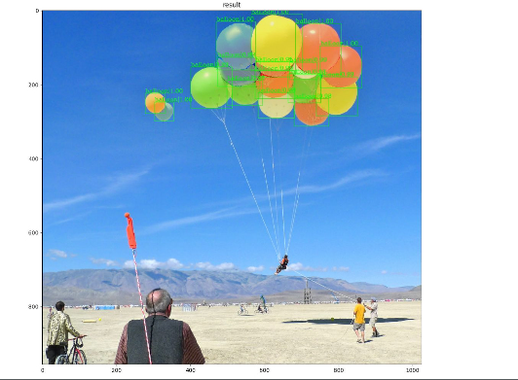
好的今天的分享就到這里,如果對(duì)你有所幫助,記得三連哈!筆芯,新年快樂

個(gè)人微信(如果沒有備注不拉群!) 請(qǐng)注明:地區(qū)+學(xué)校/企業(yè)+研究方向+昵稱
下載1:何愷明頂會(huì)分享
在「AI算法與圖像處理」公眾號(hào)后臺(tái)回復(fù):何愷明,即可下載。總共有6份PDF,涉及 ResNet、Mask RCNN等經(jīng)典工作的總結(jié)分析
下載2:終身受益的編程指南:Google編程風(fēng)格指南
在「AI算法與圖像處理」公眾號(hào)后臺(tái)回復(fù):c++,即可下載。歷經(jīng)十年考驗(yàn),最權(quán)威的編程規(guī)范!
下載3 CVPR2020 在「AI算法與圖像處理」公眾號(hào)后臺(tái)回復(fù):CVPR2020,即可下載1467篇CVPR?2020論文
覺得不錯(cuò)就點(diǎn)亮在看吧
