
Python 使用反射實(shí)現(xiàn) Excel 與對(duì)象之間的轉(zhuǎn)換
作者:萬(wàn)百入年許老
來(lái)源:SegmentFault 社區(qū)
場(chǎng)景
需要從Excel中加載到內(nèi)存中,轉(zhuǎn)換為class對(duì)象執(zhí)行操作
環(huán)境
Python3.8 openpyxl==3.0.5
前置知識(shí)
反射(僅介紹這個(gè)幫助類用到的幾個(gè)反射方法)
setattr、getattr
class Person():name = Nonedef __init__(self, name):self.name = namep = Person("laowang")n = getattr(p, "name")print(n)# 打印結(jié)果:laowangsetattr(p, "name", "laoxu")n2 = getattr(p, "name")print(n2)# 打印結(jié)果:laoxu
反射實(shí)例化對(duì)象
class?Person():name = Nonedef print_sth(self):print("測(cè)試實(shí)例化方法", self.name)def test(clazz):"""實(shí)例化對(duì)象:param clazz: 要實(shí)例化的類型"""x = clazz()setattr(x, "name", "老王")x.print_sth()# 打印:測(cè)試實(shí)例化方法 老王test(Person)
Excel操作類庫(kù) - openpyxl
創(chuàng)建Excel
from openpyxl import Workbookwb = Workbook()ws1 = wb.activews1.append(['name', 'age', 'isManager', 'remark'])ws1.append(['', '', '', ' '])ws1.append(['老王', '18', 'false', ' '])ws1.append(['laoxu', '28.4', 'TRUE', 'zaoricaifuziyou'])ws1.append(['', '', '', ' '])ws2 = wb.create_sheet("ws2")ws2.append(['name', 'age', 'isManager', 'remark'])ws2.append(['小李', '50', 'TRuE', 'fly knife'])ws2.append(['', '', '', ' '])ws2.append(['aaa', '11', 'false', 'hehehe'])wb.save("test_convert_2_class.xlsx")
讀取Excel
from openpyxl import Workbookdef print_row(arr):"""為了顯示方便,打印行"""for item in arr:print(item,end="\t\t|")print()# 讀取上一個(gè)代碼塊創(chuàng)建的Excel代碼work_book = load_workbook("test_convert_2_class.xlsx")result = []for sheet_name in work_book.sheetnames:print("-----------------",sheet_name,"-----------------")ws = work_book[sheet_name]# 獲取表頭table_heads = []for title_row in ws.iter_rows(max_row=1):for cell in title_row:table_heads.append(cell.value)print_row(table_heads)# 獲取表數(shù)據(jù)table = []for row in ws.iter_rows(min_row=2):row_data=[]for column_index in range(len(row)):row_data.append(row[column_index].value)print_row(row_data)# 打印結(jié)果如下:# ----------------- Sheet -----------------# name |age |isManager |remark |# None |None |None | |# 老王 |18 |false | |# laoxu |28.4 |TRUE |zaoricaifuziyou |# None |None |None | |# ----------------- ws2 -----------------# name |age |isManager |remark |# 小李 |50 |TRuE |fly knife |# None |None |None | |# aaa |11 |false |hehehe |
伸手黨代碼
excel_helper.py
import osimport refrom os.path import isfilefrom openpyxl import load_workbook, Workbookdef _convert_value(value):"""將單元格中數(shù)據(jù),區(qū)分基本類型類似"true"/"false"(不區(qū)分大小寫(xiě))轉(zhuǎn)換為bool值長(zhǎng)得像數(shù)字的轉(zhuǎn)換為float類型其他(空格、空行)轉(zhuǎn)換為None:param value: 單元格的值:return: 轉(zhuǎn)換后的類型"""value_str = str(value).lower()if value_str == 'true':return Trueelif value_str == 'false':return Falseelif re.match(r"^[+|-]?\d+.?\d*$", value_str):return float(value_str)elif re.match(r"^\s*$", value_str):return Noneelse:return valueclass ExcelHelper:"""Excel幫助類"""def convert_2_class(cls, file_path, clazz):"""轉(zhuǎn)換為class,可轉(zhuǎn)換多張sheet表,轉(zhuǎn)換為統(tǒng)一clazz對(duì)象過(guò)濾掉為空行:param file_path:Excel文件路徑:param clazz:結(jié)果轉(zhuǎn)換為clazz對(duì)象:return: 對(duì)象列表的列表,結(jié)構(gòu)為[[clazz(),clazz()],[clazz()]]"""if not file_path.endswith(".xlsx"):raise ValueError("文件必須為.xlsx結(jié)尾的Excel文件")if not isfile(file_path):raise FileNotFoundError("文件路徑 {0} 不存在".format(file_path))work_book = load_workbook(file_path)result = []for sheet_name in work_book.sheetnames:ws = work_book[sheet_name]# 獲取表頭table_heads = []for title_row in ws.iter_rows(max_row=1):for cell in title_row:table_heads.append(cell.value)# 獲取表數(shù)據(jù)table = []for row in ws.iter_rows(min_row=2):# 實(shí)例化對(duì)象instance = clazz()for column_index in range(len(row)):setattr(instance, table_heads[column_index], _convert_value(row[column_index].value))# 過(guò)濾空行(所有屬性均為None的對(duì)象)is_valid = Falsefor attr in instance.__dict__:if not attr.startswith("_") and instance.__dict__[attr] is not None:is_valid = Truebreakif is_valid:table.append(instance)result.append(table)return resultdef save(cls, file_path, tables):if not file_path.endswith(".xlsx"):raise ValueError("文件必須為.xlsx結(jié)尾的Excel文件")work_book = Workbook()is_first = Truefor table in tables:if is_first:ws = work_book.activeis_first = Falseelse:ws = work_book.create_sheet()# 添加表頭table_heads = []for attr in table[0].__dict__:# 過(guò)濾"_"開(kāi)頭的屬性if not attr.startswith("_"):table_heads.append(attr)ws.append(table_heads)# 添加數(shù)據(jù)for row in table:data = []for head in table_heads:data.append(getattr(row, head))ws.append(data)try:# 生成保存文件夾路徑folder_index = max(file_path.rfind("\\"), file_path.rfind("/"))if folder_index != -1:folder_path = file_path[0:folder_index]if not os.path.exists(folder_path):os.mkdir(folder_path)work_book.save(file_path)except Exception:raise OSError("創(chuàng)建Excel失敗")
使用方法
# 導(dǎo)入類from excel_helper import ExcelHelper# 示例對(duì)象class A:name=Noneage=NoneisManager=None# 讀取Excel文件,并轉(zhuǎn)換為指定類型對(duì)象列表tables = ExcelHelper.convert_2_class("123.xlsx", A)# 保存為Excela1=A()table=[a1]ExcelHelper.save("456.xls", [table])
注意
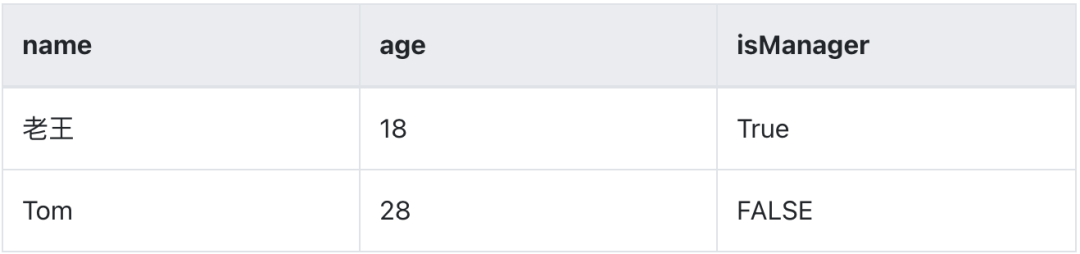
該幫助類均為@classmethod 該幫助類使用反射實(shí)現(xiàn),所以表頭名稱需要與對(duì)象的字段名一一對(duì)應(yīng)(如代碼中的class A 與 下表"表1-1") Excel中可以有多張表(sheet tab),所以參數(shù)為對(duì)象列表的列表,請(qǐng)注意對(duì)應(yīng)關(guān)系 當(dāng)前讀取Excel僅能轉(zhuǎn)換為一個(gè)class類型,所以多種表結(jié)構(gòu)請(qǐng)使用多張表
表1-1
參考資料
PYTHON里的反射(自學(xué)習(xí)):https://www.cnblogs.com/kongk/p/8645202.html
以上

評(píng)論
圖片
表情