
使用 Node.js + Vue 實現(xiàn) Excel 導(dǎo)出與保存的功能

我們的項目是前端用vue,服務(wù)端用node.js,這個excel導(dǎo)出我們已經(jīng)用了一年,我們目前用到的無非是圖片導(dǎo)出,文本導(dǎo)出,調(diào)調(diào)excel單元格距離等.
這個node端的封裝是經(jīng)過同事不斷的review(感謝同事),俺不斷的修改優(yōu)化后的代碼,當(dāng)時也是我第一次接觸node.js,只想告訴你,用它,穩(wěn)穩(wěn)的!
node.js服務(wù)端代碼
1.拿到需要導(dǎo)出的數(shù)據(jù)之后如何使用(假數(shù)據(jù)模擬,下面是頁面)

?constructor(prop)?{
????super(prop)
????//?定義excel頭部數(shù)據(jù)
????this.header?=?[
??????{?header:?'游戲',?key:?'gameInfo',?width:?30?},
??????{?header:?'宣傳圖片',?key:?'image',?width:?15?},
??????{?header:?'游戲詳情頁',?key:?'path',?width:?15?},
??????{?header:?'狀態(tài)',?key:?'activeStatus',?width:?30?},
??????{?header:?'排序權(quán)重',?key:?'sort',?width:?30?},
??????{?header:?'最近編輯時間',?key:?'updateTime',?width:?30?},
??????{?header:?'最近編輯人',?key:?'operatorName',?width:?30?},
????]
??}
?/**
???*?導(dǎo)出游戲管理數(shù)據(jù)
???*/
??async?exportGameEndGameManage()?{
????const?{?list?}?=?await?this.commonGameEndGameManage(true)
????console.log(list,?'list')
????const?baseExcelInfo?=?{
??????data:?list,
??????filename:?'gameManageList',
??????header:?this.header,
??????sheetName:?'游戲管理列表',
??????imageKeys:?[
????????{
??????????name:?'image',
??????????imgWidth:?'100',
??????????imgHeight:?'100',
????????},
??????],
????}
????await?this.service.common.exportFile.exportExcel(baseExcelInfo)
??}
復(fù)制代碼
list就是拿到的數(shù)據(jù),打印如下
baseExcelInfo用來定義基本的參數(shù)
data 表示的是excel的數(shù)據(jù)來源
filename 是文件名(但是前端的excel導(dǎo)出會進(jìn)行覆蓋)
header表示的是表格的頭部
sheetName表示的是excel的表名
imageKeys:圖片的信息:字段名稱,圖片的寬高,但是只要有圖片,name必須設(shè)
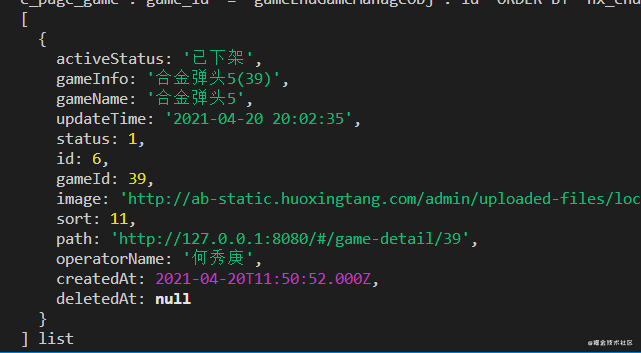
很重要的一點就是,假設(shè)從表里面的數(shù)據(jù)返回的status是1,那么我肯定導(dǎo)出的不能1,應(yīng)該是對應(yīng)的一個中文,所以在導(dǎo)出前,應(yīng)該進(jìn)行處理,這個處理應(yīng)該是在服務(wù)端來做,而不是前端做一遍,然后為了導(dǎo)出這個功能重新做一遍舉個例子
/**
???*??公共游戲管理數(shù)據(jù)
???*??@param?{?Boolean?}?isExport?是否導(dǎo)出
???*/
??async?commonGameEndGameManage(isExport)?{
????const?activeStatus?=?{?//?這個按道理寫在constructor里面哈
??????1:?'打開',
??????2:?'關(guān)閉',
????}
????const?{?ctx,?app?}?=?this
????const?{?limit,?offset?}?=?this.paginationDeal(ctx.request.query)
????const?isPagi?=?isExport???{}?:?{?limit,?offset?}
????const?{?list,?total?}?=?await?ctx.service.operateManage.gameEndPage.
????getGameEndGameManage({?isPagi?})
????const?data?=?list.map(node?=>?{
??????const?{?status,?...params?}?=?node.toJSON()
??????const?activeStatus?=?activeStatus[status]
??????return?{?activeStatus,?status,?...params?}
????})
????return?{?list:?data,?total?}
??}
復(fù)制代碼
2.exportExcel的封裝
首先安裝對應(yīng)的包 npm install exceljs --save
然后復(fù)制下面的代碼就好了
'use?strict'
const?Service?=?require('egg').Service
//?引入exceljs
const?Excel?=?require('exceljs')

//?導(dǎo)出文件相關(guān)服務(wù)
class?exportFileService?extends?Service?{
??constructor(prop)?{
????super(prop)
????this.defaultViews?=?[
??????{
????????x:?0,
????????y:?0,
????????width:?10000,
????????height:?20000,
????????firstSheet:?0,
????????activeTab:?1,
????????visibility:?'visible',
??????},
????]
????this.fontName?=?'Arial?Unicode?MS'
????this.font?=?{?name:?this.fontName,?family:?4,?size:?13?}
????this.fill?=?{?type:?'pattern',?pattern:?'solid',?fgColor:?{?argb:?'FF8DB4E2'?}?}
????this.border?=?{?style:?'thin',?color:?{?argb:?'cccccc'?}?}
??}
??/**
???*?導(dǎo)出excel
???*?@param?{?Object?}?config?傳入的excel對象
???*?@param?{?Array?}?config.data?excel的數(shù)據(jù)
???*?@param?{?String?}?config.filename?excel文件名
???*?@param?{?Array?}?config.header?excel的頭部
???*?@param?{?String?}?config.sheetName?表名
???*?@param?{?Array?}?config.imageKeys?需要轉(zhuǎn)化圖片的key
???*?@param?{?String?}?config.creator?創(chuàng)建表的人
???*?@param?{?String?}?config.lastModifiedBy?最后修改表的人
???*?@param?{?String?}?config.imageKeys.imgWidth?圖片的寬度
???*?@param?{?String?}?config.imageKeys.imgHeight?圖片的高度
???*?*/
??async?exportExcel({
????data?=?[],
????filename?=?'file',
????header,
????sheetName?=?'sheet1',
????imageKeys?=?[],
????creator?=?'me',
????lastModifiedBy?=?'her',
??})?{
????const?{?ctx?}?=?this
????const?workbook?=?new?Excel.Workbook()
????//?設(shè)置屬性?-創(chuàng)建著以及最后修改的人
????workbook.creator?=?creator
????workbook.lastModifiedBy?=?lastModifiedBy

????//?時間獲取一次就好
????const?now?=?new?Date()
????workbook.created?=?now
????workbook.modified?=?now
????workbook.lastPrinted?=?now
????const?worksheet?=?workbook.addWorksheet(sheetName)
????//?設(shè)置打開時候的視圖-設(shè)置位置
????workbook.views?=?this.defaultViews
????//?使工作表可見
????worksheet.state?=?'visible'
????worksheet.columns?=?header

????for?(let?i?=?1;?i?<=?header.length;?i++)?{
??????worksheet.getColumn(i).alignment?=?{?vertical:?'middle',?horizontal:?'center'?}
??????worksheet.getColumn(i).font?=?{?name:?'Arial?Unicode?MS'?}
????}
????worksheet.addRows(data)
????//?處理圖片
????const?imageList?=?this.getImageList(imageKeys,?data,?header)
????//?添加圖片到sheet
????await?this.addPicToSheet(imageList,?imageKeys,?workbook,?worksheet)
????//?多級表頭
????const?headerOPtion?=?header.filter((item,?index)?=>?{
??????if?(item.type?&&?item.type?===?'multi')?{
????????header.splice(index,?1)
????????return?item
??????}
??????return?item.type?&&?item.type?===?'multi'
????})
????//?多級表頭重置設(shè)置表頭
????if?(headerOPtion.length)?{
??????headerOPtion[0].headerText.forEach((text,?index)?=>?{
????????const?borderAttr?=?{?top:?this.border,?left:?
????????this.border,?bottom:?this.border,?right:?this.border,?index?}
????????const?headerAttr?=?[
??????????{
????????????attr:?'values',
????????????value:?text,
??????????},
??????????{
????????????attr:?'font',
????????????value:?this.font,
??????????},
??????????{
????????????attr:?'fill',
????????????value:?this.fill,
??????????},
??????????{
????????????attr:?'border',
????????????value:?borderAttr,
??????????},
????????]
????????headerAttr.map(item?=>?{
??????????worksheet.getRow(index?+?1)[item.attr]?=?item.value
??????????return?worksheet
????????})
??????})
??????headerOPtion[0].mergeOption.forEach(merge?=>?{
????????worksheet.mergeCells(merge)
??????})
????}?else?{
??????//?設(shè)置表頭樣式
??????worksheet.getRow(1).font?=?this.font
??????worksheet.getRow(1).fill?=?this.fill
????}
????const?bufferContent?=?await?workbook.xlsx.writeBuffer()

????//?設(shè)置
????ctx.set('Content-disposition',?`attachment;filename=${filename}.xlsx`)
????//?返回文件buffer
????ctx.body?=?bufferContent
??}
??//?設(shè)置圖片大小
??getImageList(imageKeys,?data,?header)?{
????return?imageKeys.map(
??????key?=>?data.map(
????????(item,?index)?=>?({
??????????key,
??????????url:?item[key.name],
??????????col:?this.app.utils.index.getIndexByKey(header,?key.name)?+?1,
??????????row:?index?+?2,
??????????width:?key.imgWidth,
??????????height:?key.imgHeight,
????????})
??????)
????)
??}
??//?添加圖片到sheet
??async?addPicToSheet(imageList,?imageKeys,?workbook,?worksheet)?{
????if?(imageKeys.length?>?0)?{
??????await?Promise.all(imageList.map(async?imgArr?=>?{
????????return?await?Promise.all(imgArr.map(item?=>?{
??????????const?{?url,?width,?height,?row,?col?}?=?item
??????????//?因為有的圖片是不存在的需要判斷
??????????if?(url)?{
????????????return?this.app.utils.index.getBase64(url,?this.ctx).then(res?=>?{
??????????????if?(!url)?return
??????????????const?imgType?=?url.split('?')[0].substring(url.split('?')[0].
??????????????lastIndexOf('.')?+?1).toLowerCase()
??????????????const?id?=?workbook.addImage({
????????????????base64:?res,
????????????????extension:?imgType,
??????????????})
??????????????worksheet.addImage(id,?{
????????????????tl:?{?col:?col?-?1,?row:?row?-?1?},
????????????????ext:?{?width,?height?},
??????????????})
??????????????worksheet.getRow(row).height?=?height
??????????????//?//?去掉背景鏈接
??????????????worksheet.getRow(row).getCell(item.key.name).value?=?''
????????????})
??????????}
??????????return?item
????????}))
??????}))
????}
??}
}

module.exports?=?exportFileService
復(fù)制代碼
3.調(diào)用下載接口后node.js返回的信息
前端看到的就是一個二進(jìn)制文件流
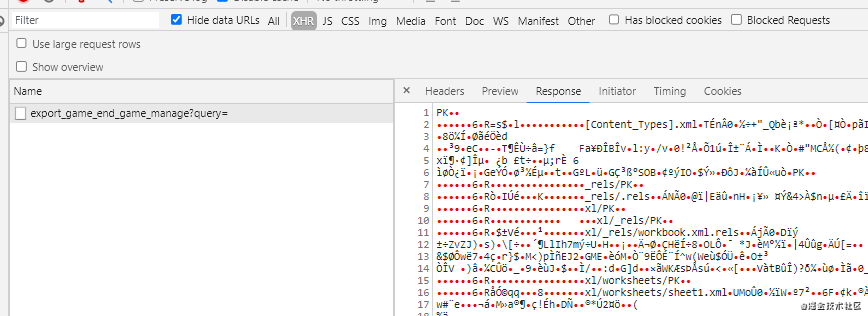
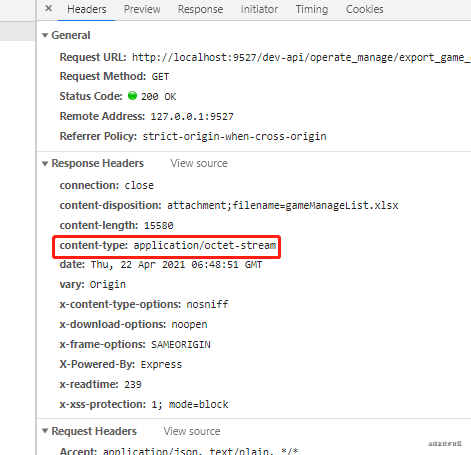
推薦了解 content-type: application/octet-stream
前端代碼
接口
//?文件導(dǎo)出
export?function?exportFile(url,?params)?{
??return?request({
????responseType:?'blob',
????headers:?{
??????'Content-Type':?'application/json',
????},
????timeout:?1000?*?60,
????url:?url,
????method:?'get',
????params:?{
??????query:?qs.stringify(params),
????},
??})
}
復(fù)制代碼
utils
/**
?*?本地保存文件并導(dǎo)出
?*?@param?{?Object?}?Obj?導(dǎo)出文件參數(shù)對象
?*?@param?{?Blob?}?file?文件資源
?*?@param?{?String?}?fileName 文件名稱(注意:包含后綴)
?*/
export?function?loacalSaveFile({?file,?fileName,?option?=?{?type:?'application/vnd.ms-excel'?}})?{
??const?ieKit?=?judgeBrowser('ie')
??const?blobData?=?new?Blob([file],?option)?//?生成?Blob文件
??if?(ieKit?&&?navigator.msSaveBlob)?{
????navigator.msSaveBlob?&&?navigator.msSaveBlob(blobData,?fileName)
??}?else?{
????//?其他
????const?save_link?=?document.createElement('a')
????const?url?=?URL.createObjectURL(file)?//?創(chuàng)建url
????save_link.href?=?url
????save_link.download?=?fileName
????document.body.appendChild(save_link)
????save_link.click()
????setTimeout(()?=>?{
??????document.body.removeChild(save_link)
??????window.URL.revokeObjectURL(url)?//?回收url
????},?0)
??}
}
復(fù)制代碼
調(diào)用
const?file?=?await?exportFile(this.exportItem.apiUrl,?data)
loacalSaveFile({?file,?fileName:?`${this.exportItem.fileName}.xlsx`?})
復(fù)制代碼
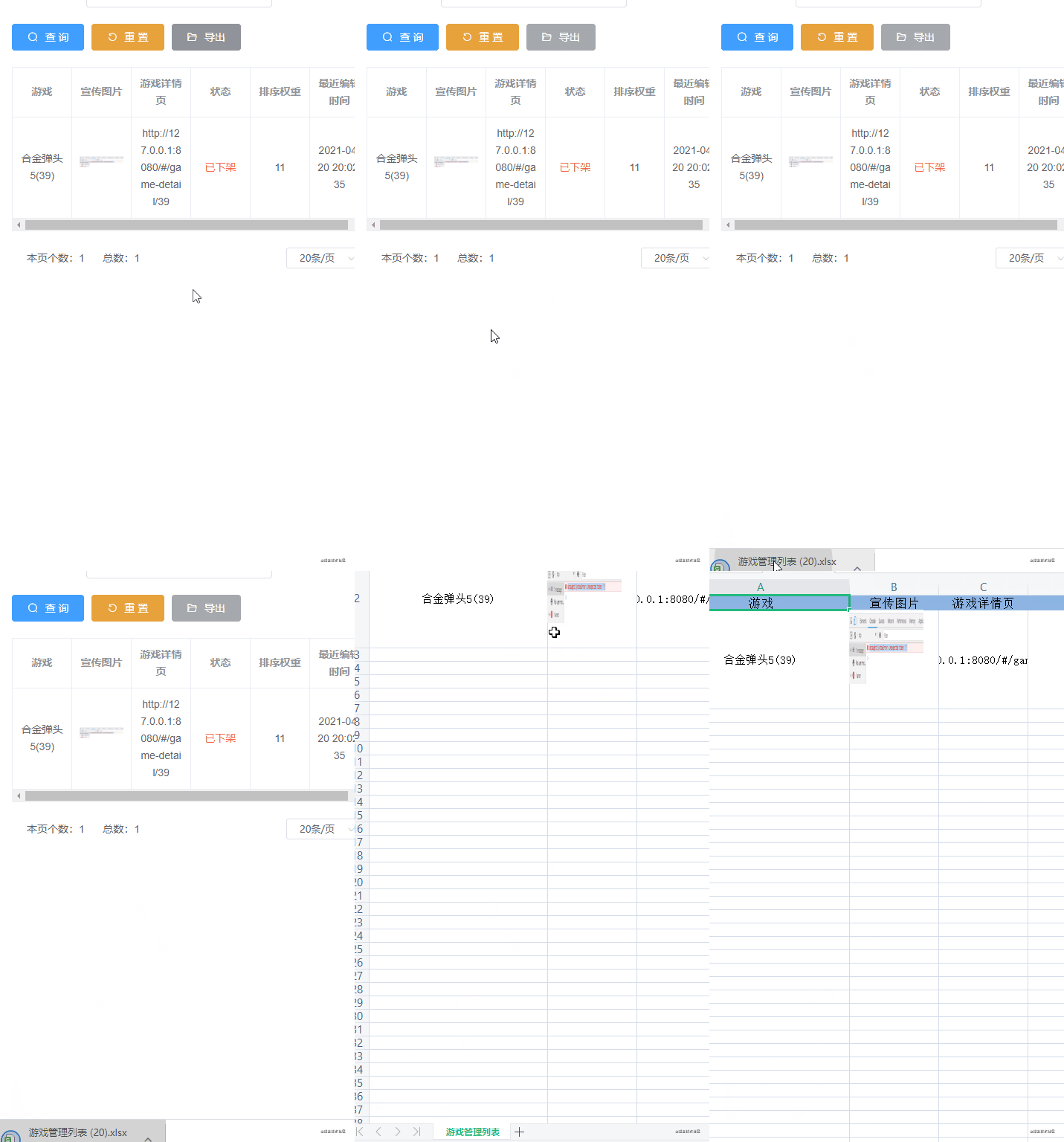
效果
- EOF -
評論
圖片
表情