
Android仿新版酷狗滑動(dòng)側(cè)滑欄效果
1、緩慢滑動(dòng)手指離開屏幕時(shí)判斷左右滑;
2、快速滑動(dòng)時(shí)判斷屏幕左右滑;
3、菜單頁打開時(shí),點(diǎn)擊內(nèi)容頁關(guān)閉菜單并且攔截觸摸事件;
4、打開菜單頁時(shí),內(nèi)容頁增加一層陰影;
我們先來看看效果圖:
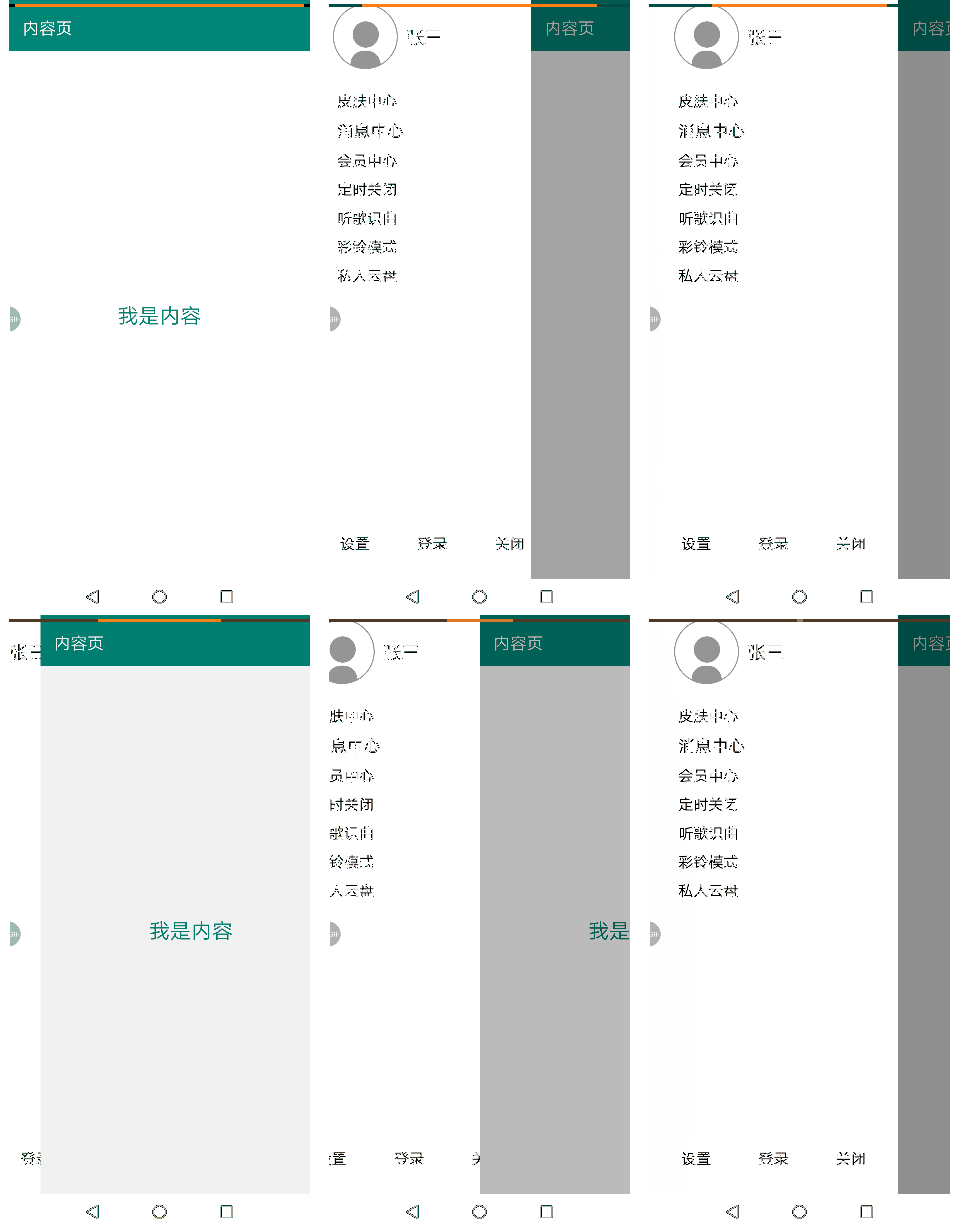
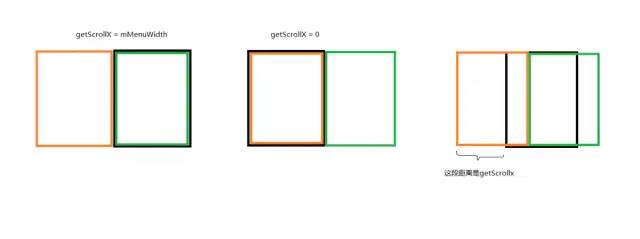
圖2中,黑色是手機(jī)屏幕,黃色是菜單頁,綠色是內(nèi)容頁,getScrollX就是我們待會(huì)需要求的一個(gè)距離,照例,下面貼出完整的代碼(配上詳細(xì)注釋)
自定義KGNewSlidingMenu控件:
public class KGNewSlidingMenu extends HorizontalScrollView {private View mMenuView, mContentView, mShadow;private int mMenuWidth;private Context mContext;private GestureDetector mDetector;//系統(tǒng)自帶手勢處理類private boolean mMenuIsOpen = false;//菜單頁是否已經(jīng)打開private boolean mIntercept = false;//是否攔截事件private float startX, startY, offsetX, offsetY;public KGNewSlidingMenu(Context context) {this(context, null);}public KGNewSlidingMenu(Context context, AttributeSet attrs) {this(context, attrs, 0);}public KGNewSlidingMenu(Context context, AttributeSet attrs, int defStyleAttr) {super(context, attrs, defStyleAttr);this.mContext = context;TypedArray array = context.obtainStyledAttributes(attrs, R.styleable.KGSlidingMenu);float rightMargin = array.getDimension(R.styleable.KGSlidingMenu_rightMargin, dip2px(50));mMenuWidth = (int) (getScreenWidth(context) - rightMargin);array.recycle();//用于處理快速滑動(dòng)時(shí),進(jìn)行打開或者關(guān)閉菜單頁mDetector = new GestureDetector(context, new GestureDetector.SimpleOnGestureListener() {public boolean onFling(MotionEvent e1, MotionEvent e2, float velocityX, float velocityY) {//快速滑動(dòng)時(shí)就會(huì)回調(diào),打開菜單頁時(shí)往右滑動(dòng),關(guān)閉的時(shí)候往左快速滑動(dòng)//快速往左滑velocityX是負(fù)數(shù),快速往右滑velocityX是正數(shù)if (mMenuIsOpen) {if (Math.abs(velocityX) > Math.abs(velocityY)) {//橫向滑動(dòng)大于縱向滑動(dòng)再響應(yīng),增加用戶體驗(yàn)if (velocityX < 0) {close();return true;}}} else {if (Math.abs(velocityX) > Math.abs(velocityY)) {//橫向滑動(dòng)大于縱向滑動(dòng)再響應(yīng),增加用戶體驗(yàn)if (velocityX > 0) {open();return true;}}}return super.onFling(e1, e2, velocityX, velocityY);}});}protected void onFinishInflate() {//xml布局文件解析完畢后調(diào)用super.onFinishInflate();//1、內(nèi)容頁指定寬高,就是屏幕的寬度//2、菜單頁指定寬度,就是屏幕寬度減去 - 自定義寬度ViewGroup container = (ViewGroup) getChildAt(0);//外層LinearLayoutif (container.getChildCount() != 2) {throw new RuntimeException("只能且必須放置兩個(gè)子View!");}mMenuView = container.getChildAt(0);//菜單頁//設(shè)置寬高ViewGroup.LayoutParams menuParams = mMenuView.getLayoutParams();menuParams.width = mMenuWidth;mMenuView.setLayoutParams(menuParams);//7.0以下的手機(jī)必須加這句//給內(nèi)容頁添加一層陰影:先從父布局取出內(nèi)容頁,然后放進(jìn)另一個(gè)容器,// 同時(shí)在該容器添加一層陰影(用View設(shè)置背景顏色即可),然后再把該容器放回父布局。mContentView = container.getChildAt(1);//內(nèi)容頁//設(shè)置寬高container.removeView(mContentView);//從父布局取出內(nèi)容頁RelativeLayout outContainer = new RelativeLayout(mContext);//創(chuàng)建新容器outContainer.addView(mContentView);//把內(nèi)容頁加入新容器mShadow = new View(mContext);//創(chuàng)建陰影層mShadow.setBackgroundColor(Color.parseColor("#70000000"));//陰影層設(shè)置背景顏色outContainer.addView(mShadow);//在新容器加入陰影層ViewGroup.LayoutParams contentParams = mContentView.getLayoutParams();contentParams.width = getScreenWidth(mContext);outContainer.setLayoutParams(contentParams);//7.0以下的手機(jī)必須加這句container.addView(outContainer);//把新容器加入父布局mShadow.setAlpha(0.0f);//初始化陰影層為不透明}public boolean onInterceptTouchEvent(MotionEvent ev) {if (ev.getAction() == MotionEvent.ACTION_DOWN){//記錄按下屏幕的初始位置startX = ev.getX();startY = ev.getY();}mIntercept = false;//處理當(dāng)菜單頁打開的時(shí)候,觸摸內(nèi)容頁部門時(shí)關(guān)閉菜單頁,并且攔截事件if (mMenuIsOpen) {float currentX = ev.getX();if (currentX > mMenuWidth) {close();//返回true :攔截子View的事件,但是會(huì)執(zhí)行自己的onTouchEvent方法mIntercept = true;return true;}}return super.onInterceptTouchEvent(ev);}protected void onLayout(boolean changed, int l, int t, int r, int b) {super.onLayout(changed, l, t, r, b);//要在onLayout執(zhí)行后再調(diào)用scrollTo,否則無效果//初始化的時(shí)候是關(guān)閉的,注意,此時(shí)的getScrollX = mMenuWidthclose();}public boolean onTouchEvent(MotionEvent ev) {if (mIntercept) {//如果攔截子View的事件,同時(shí)不執(zhí)行自己的onTouchEventreturn true;}if (mDetector.onTouchEvent(ev)) {//假如快速滑動(dòng)執(zhí)行了,以下代碼就不執(zhí)行return true;}switch (ev.getAction()) {case MotionEvent.ACTION_MOVE:offsetX = ev.getX() - startX;offsetY = ev.getY() - startY;//與按下屏幕的初始位置相比,當(dāng)縱向滑動(dòng)大于橫向滑動(dòng)時(shí)攔截滑動(dòng)事件(橫向滑動(dòng)為主時(shí)才進(jìn)行滑動(dòng),增加用戶體驗(yàn))if (Math.abs(offsetX) < Math.abs(offsetY)) {return false;}break;case MotionEvent.ACTION_UP://根據(jù)手指抬起時(shí)的滾動(dòng)距離判斷,要么關(guān)閉,要么打開int currentScrollX = getScrollX();if (currentScrollX > mMenuWidth / 2) {//關(guān)閉菜單close();} else {//打開菜單open();}return true;}return super.onTouchEvent(ev);}//關(guān)閉菜單private void close() {mMenuIsOpen = false;smoothScrollTo(mMenuWidth, 0);}//打開菜單private void open() {mMenuIsOpen = true;smoothScrollTo(0, 0);}//處理左右滑時(shí)的縮放protected void onScrollChanged(int l, int t, int oldl, int oldt) {super.onScrollChanged(l, t, oldl, oldt);float scale = 1f * l / mMenuWidth;//scale從 1 - 0//滑動(dòng)時(shí)改變內(nèi)容頁的陰影程度,最大1f,最小0fmShadow.setAlpha(1 - scale);//滑動(dòng)時(shí)菜單頁平移,抽屜效果ViewCompat.setTranslationX(mMenuView, l * 0.55f);}//獲取屏幕寬度private static int getScreenWidth(Context context) {WindowManager wm = (WindowManager) context.getSystemService(Context.WINDOW_SERVICE);DisplayMetrics displayMetrics = new DisplayMetrics();wm.getDefaultDisplay().getMetrics(displayMetrics);return displayMetrics.widthPixels;}private int dip2px(float dp) {final float scale = mContext.getResources().getDisplayMetrics().density;return (int) (dp * scale + 0.5f);}}
activity_newkg.xml
<util.KGNewSlidingMenu xmlns:android="http://schemas.android.com/apk/res/android"android:id="@+id/slidingmenu"xmlns:app="http://schemas.android.com/apk/res-auto"xmlns:tools="http://schemas.android.com/tools"android:layout_width="match_parent"android:layout_height="match_parent"android:background="#fff"app:rightMargin="62dp"><LinearLayoutandroid:layout_width="match_parent"android:layout_height="match_parent"android:orientation="horizontal"><include layout="@layout/layout_home_menu2"/><include layout="@layout/layout_home_content"/></LinearLayout></util.KGNewSlidingMenu>
layout_home_menu2.xml
<RelativeLayoutxmlns:android="http://schemas.android.com/apk/res/android"android:layout_width="match_parent"android:layout_height="match_parent"android:orientation="vertical"android:background="#fff"android:paddingTop="30dp"android:padding="10dp"><LinearLayoutandroid:id="@+id/layout1"android:layout_width="match_parent"android:layout_height="wrap_content"android:padding="20dp"android:orientation="horizontal"><ImageViewandroid:layout_width="wrap_content"android:layout_height="wrap_content"android:src="@drawable/default_avatar"/><TextViewandroid:layout_width="wrap_content"android:layout_height="wrap_content"android:textSize="22dp"android:textColor="#000"android:padding="10dp"android:layout_gravity="center_vertical"android:text="張三"/></LinearLayout><LinearLayoutandroid:layout_below="@+id/layout1"android:layout_width="match_parent"android:layout_height="wrap_content"android:paddingLeft="20dp"android:orientation="vertical"><TextViewandroid:layout_width="match_parent"android:layout_height="wrap_content"android:textSize="18dp"android:textColor="#000"android:padding="5dp"android:text="皮膚中心"/><TextViewandroid:layout_width="match_parent"android:layout_height="wrap_content"android:textSize="20dp"android:textColor="#000"android:padding="5dp"android:text="消息中心"/><TextViewandroid:layout_width="match_parent"android:layout_height="wrap_content"android:textSize="18dp"android:textColor="#000"android:padding="5dp"android:text="會(huì)員中心"/><TextViewandroid:layout_width="match_parent"android:layout_height="wrap_content"android:textSize="18dp"android:textColor="#000"android:padding="5dp"android:text="定時(shí)關(guān)閉"/><TextViewandroid:layout_width="match_parent"android:layout_height="wrap_content"android:textSize="18dp"android:textColor="#000"android:padding="5dp"android:text="聽歌識(shí)曲"/><TextViewandroid:layout_width="match_parent"android:layout_height="wrap_content"android:textSize="18dp"android:textColor="#000"android:padding="5dp"android:text="彩鈴模式"/><TextViewandroid:layout_width="match_parent"android:layout_height="wrap_content"android:textSize="18dp"android:textColor="#000"android:padding="5dp"android:text="私人云盤"/></LinearLayout><LinearLayoutandroid:layout_alignParentBottom="true"android:layout_width="match_parent"android:layout_height="50dp"android:orientation="horizontal"><TextViewandroid:layout_weight="1"android:layout_width="0dp"android:layout_height="wrap_content"android:textSize="18dp"android:textColor="#000"android:gravity="center"android:padding="5dp"android:text="設(shè)置"/><TextViewandroid:layout_weight="1"android:layout_width="0dp"android:layout_height="wrap_content"android:textSize="18dp"android:textColor="#000"android:gravity="center"android:padding="5dp"android:text="登錄"/><TextViewandroid:layout_weight="1"android:layout_width="0dp"android:layout_height="wrap_content"android:textSize="18dp"android:textColor="#000"android:gravity="center"android:padding="5dp"android:text="關(guān)閉"/></LinearLayout></RelativeLayout>
layout_home_content.xml
<LinearLayoutxmlns:android="http://schemas.android.com/apk/res/android" android:layout_width="match_parent"android:background="@color/colorPrimary"android:orientation="vertical"android:paddingTop="30dp"android:layout_height="match_parent"><android.support.v7.widget.Toolbarandroid:layout_width="match_parent"android:layout_height="wrap_content"android:background="@color/colorPrimary"><TextViewandroid:layout_width="wrap_content"android:layout_height="wrap_content"android:text="內(nèi)容頁"android:textColor="#fff"android:textSize="20sp"/></android.support.v7.widget.Toolbar><TextViewandroid:layout_width="match_parent"android:layout_height="match_parent"android:textSize="25sp"android:text="我是內(nèi)容"android:background="#fff"android:textColor="@color/colorPrimary"android:gravity="center"/></LinearLayout>
attrs.xml
<resources><declare-styleable name="SlidingMenu"><attr name="rightMargin" format="dimension"/></declare-styleable></resources>
NEWKGActivity.java
public class NEWKGActivity extends AppCompatActivity {protected void onCreate(Bundle savedInstanceState) {super.onCreate(savedInstanceState);setContentView(R.layout.activity_newkg);}}
以上為完整代碼,可以直接使用。
到這里就結(jié)束啦。
評(píng)論
圖片
表情