
使用Pytorch從頭實(shí)現(xiàn)Canny邊緣檢測(cè)
編譯:ronghuaiyang | AI公園
Canny邊緣檢測(cè)器的詳細(xì)介紹以及Pytorch實(shí)現(xiàn)。
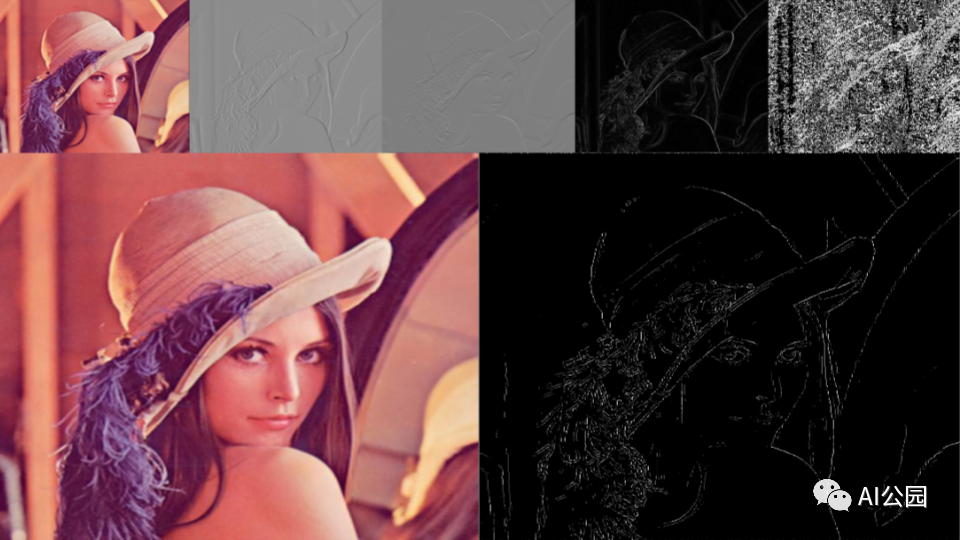
Canny濾波器當(dāng)然是最著名和最常用的邊緣檢測(cè)濾波器。我會(huì)逐步解釋用于輪廓檢測(cè)的canny濾波器。因?yàn)閏anny濾波器是一個(gè)多級(jí)濾波器。Canny過(guò)濾器很少被集成到深度學(xué)習(xí)模型中。所以我將描述不同的部分,同時(shí)使用Pytorch實(shí)現(xiàn)它。它可以幾乎沒(méi)有限制的進(jìn)行定制,我允許自己一些偏差。
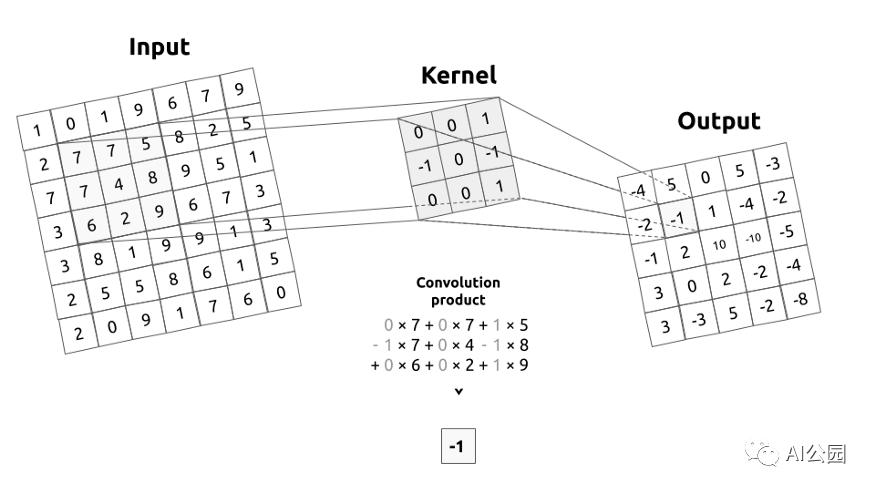
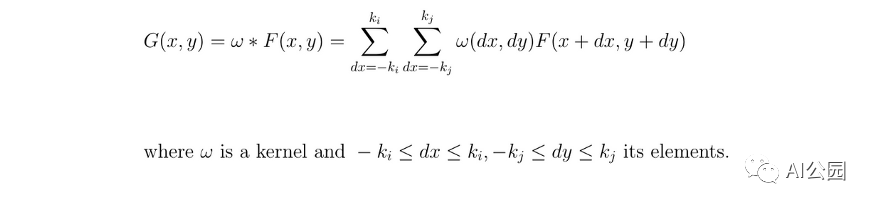
我來(lái)介紹一下什么是卷積矩陣,或者說(shuō)核。卷積矩陣描述了我們要傳遞給輸入圖像的一個(gè)濾波器。為了簡(jiǎn)單起見(jiàn),kernel將通過(guò)應(yīng)用一個(gè)卷積,從左到右,從上到下移動(dòng)整個(gè)圖像。這個(gè)操作的輸出稱為圖像濾波。
高斯濾波器
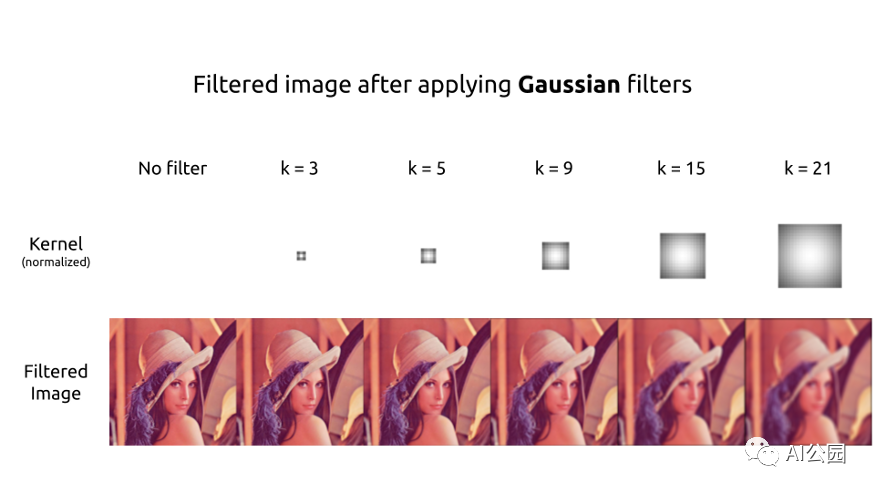
首先,我們通常通過(guò)應(yīng)用一個(gè)模糊濾波器來(lái)消除輸入圖像中的噪聲。這個(gè)濾波器的選擇取決于你,但我們通常使用一個(gè)高斯濾波器。

def get_gaussian_kernel(k=3, mu=0, sigma=1, normalize=True):
    # compute 1 dimension gaussian
    gaussian_1D = np.linspace(-1, 1, k)
    # compute a grid distance from center
    x, y = np.meshgrid(gaussian_1D, gaussian_1D)
    distance = (x ** 2 + y ** 2) ** 0.5

    # compute the 2 dimension gaussian
    gaussian_2D = np.exp(-(distance - mu) ** 2 / (2 * sigma ** 2))
    gaussian_2D = gaussian_2D / (2 * np.pi *sigma **2)

    # normalize part (mathematically)
    if normalize:
        gaussian_2D = gaussian_2D / np.sum(gaussian_2D)
    return gaussian_2D
可以制作不同大小的高斯核,或多或少都是居中或扁平的。顯然,kernel越大,輸出的圖像越容易模糊。
Sobel 濾波
為了檢測(cè)邊緣,必須對(duì)圖像應(yīng)用一個(gè)濾波器來(lái)提取梯度。

def get_sobel_kernel(k=3):
    # get range
    range = np.linspace(-(k // 2), k // 2, k)
    # compute a grid the numerator and the axis-distances
    x, y = np.meshgrid(range, range)
    sobel_2D_numerator = x
    sobel_2D_denominator = (x ** 2 + y ** 2)
    sobel_2D_denominator[:, k // 2] = 1  # avoid division by zero
    sobel_2D = sobel_2D_numerator / sobel_2D_denominator
    return sobel_2D
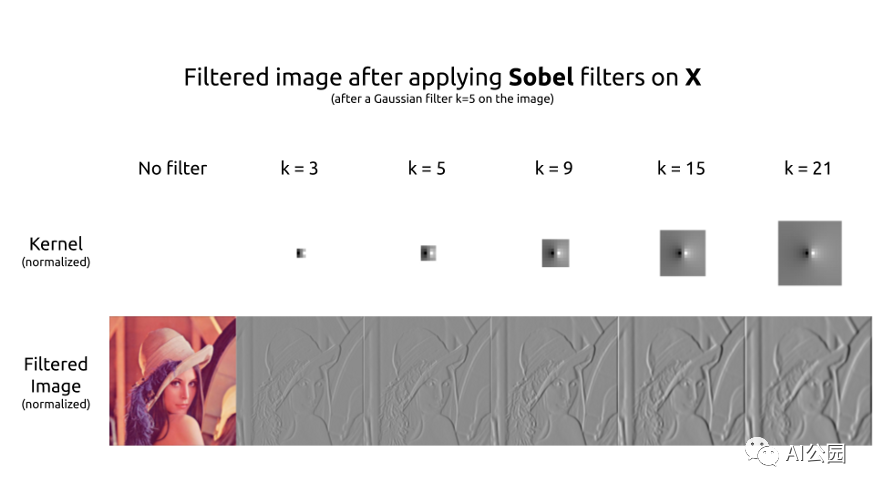
最常用的濾波器是Sobel濾波器。分解成兩個(gè)濾波器,第一個(gè)核用于提取水平梯度。粗略地說(shuō),右邊的像素比左邊的像素越亮,過(guò)濾后的圖像的結(jié)果就越高。反之亦然。這在Lena帽子的左邊可以清楚地看到。

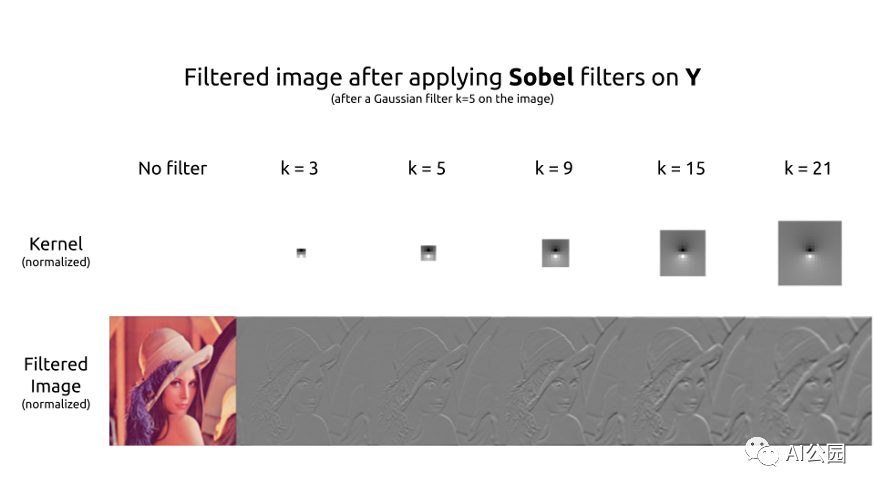
第二個(gè)核用于提取垂直的梯度。這個(gè)kernel是另一個(gè)的轉(zhuǎn)置。這兩個(gè)kernel具有相同的作用,但在不同的軸上。
計(jì)算梯度
現(xiàn)在,我們?cè)趫D像的兩個(gè)軸上都有了梯度。為了檢測(cè)輪廓,我們需要梯度的大小。我們可以使用絕對(duì)值范數(shù)或歐幾里得范數(shù)。

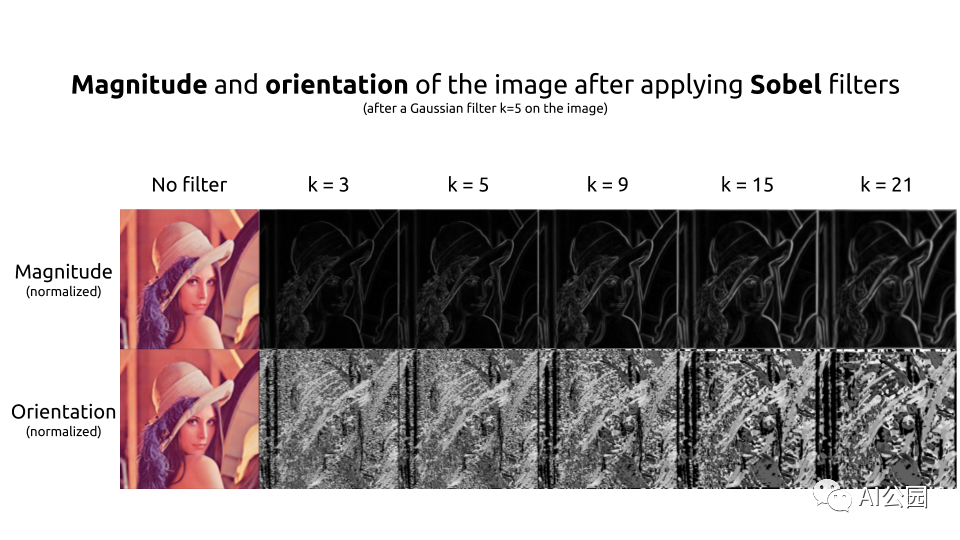
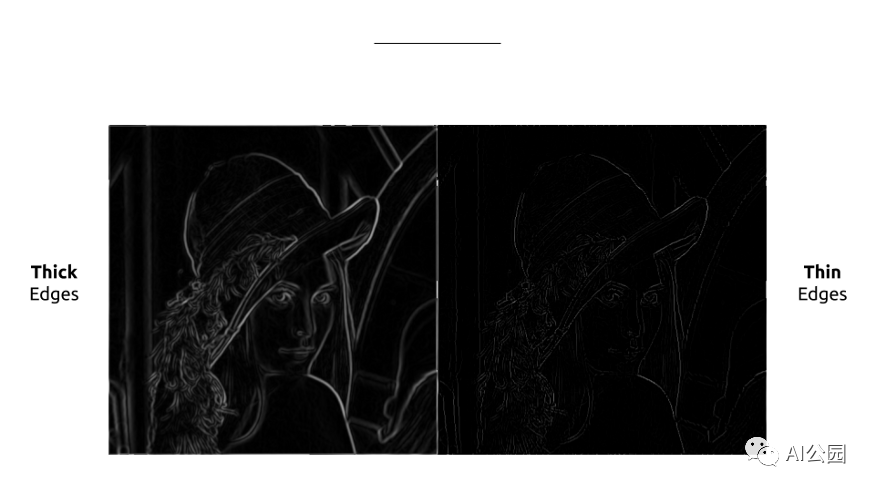
邊緣現(xiàn)在使用我們的梯度的大小被完美地檢測(cè),但是很厚。如果我們能只保留輪廓的細(xì)線就好了。因此,我們同時(shí)計(jì)算我們的梯度的方向,這將用于保持這些細(xì)線。在Lena的圖像中,梯度是由強(qiáng)度表示的,因?yàn)樘荻鹊慕嵌确浅V匾?/span>
非極大值抑制
為了細(xì)化邊緣,可以使用非最大抑制方法。在此之前,我們需要?jiǎng)?chuàng)建45°× 45°方向的kernel。
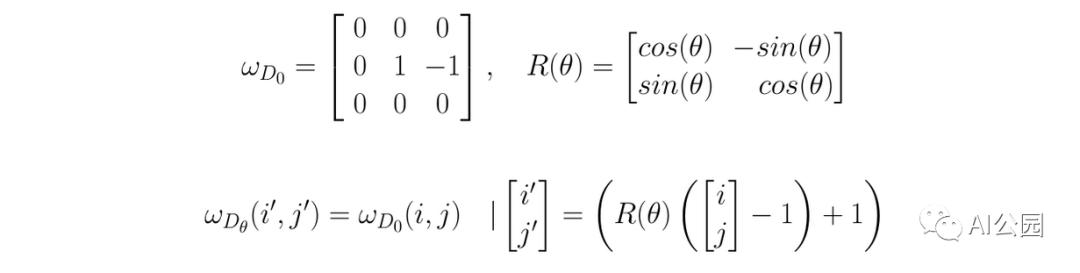
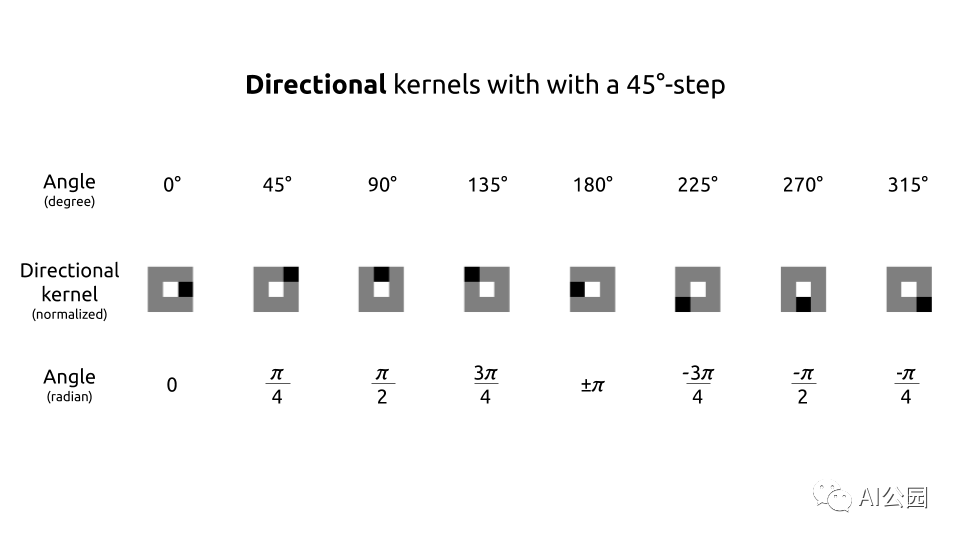
def get_thin_kernels(start=0, end=360, step=45):
        k_thin = 3  # actual size of the directional kernel
        # increase for a while to avoid interpolation when rotating
        k_increased = k_thin + 2

        # get 0° angle directional kernel
        thin_kernel_0 = np.zeros((k_increased, k_increased))
        thin_kernel_0[k_increased // 2, k_increased // 2] = 1
        thin_kernel_0[k_increased // 2, k_increased // 2 + 1:] = -1

        # rotate the 0° angle directional kernel to get the other ones
        thin_kernels = []
        for angle in range(start, end, step):
            (h, w) = thin_kernel_0.shape
            # get the center to not rotate around the (0, 0) coord point
            center = (w // 2, h // 2)
            # apply rotation
            rotation_matrix = cv2.getRotationMatrix2D(center, angle, 1)
            kernel_angle_increased = cv2.warpAffine(thin_kernel_0, rotation_matrix, (w, h), cv2.INTER_NEAREST)

            # get the k=3 kerne
            kernel_angle = kernel_angle_increased[1:-1, 1:-1]
            is_diag = (abs(kernel_angle) == 1)      # because of the interpolation
            kernel_angle = kernel_angle * is_diag   # because of the interpolation
            thin_kernels.append(kernel_angle)
        return thin_kernels
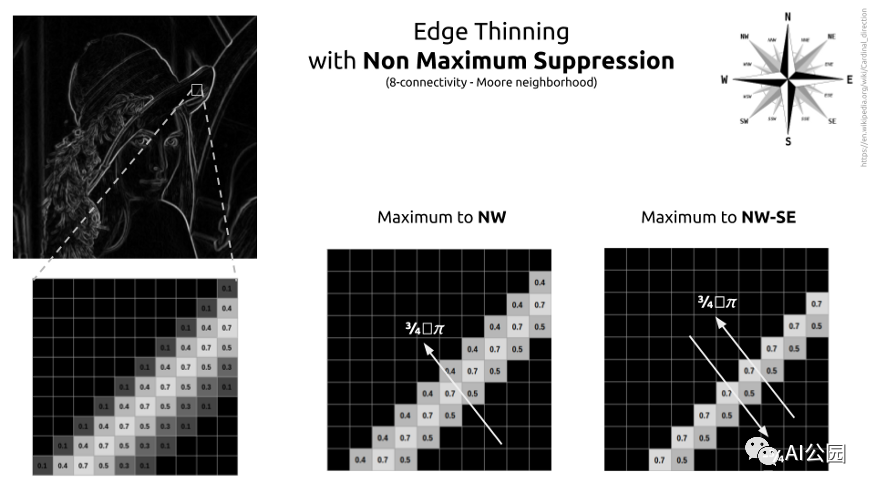
因此,該過(guò)程要求檢查8鄰域(或稱為Moore的鄰域)。這個(gè)概念很容易理解。對(duì)于每個(gè)像素,我們將檢查方向。我們要看看這個(gè)像素是否比它的鄰居的梯度方向更強(qiáng)。如果是,那么我們將其與相反方向的相鄰像素進(jìn)行比較。如果這個(gè)像素與它的雙向鄰居相比具有最大強(qiáng)度,那么它是局部最大。這個(gè)像素將被保存。在所有其他情況下,它不是一個(gè)局部最大值,像素被刪除。
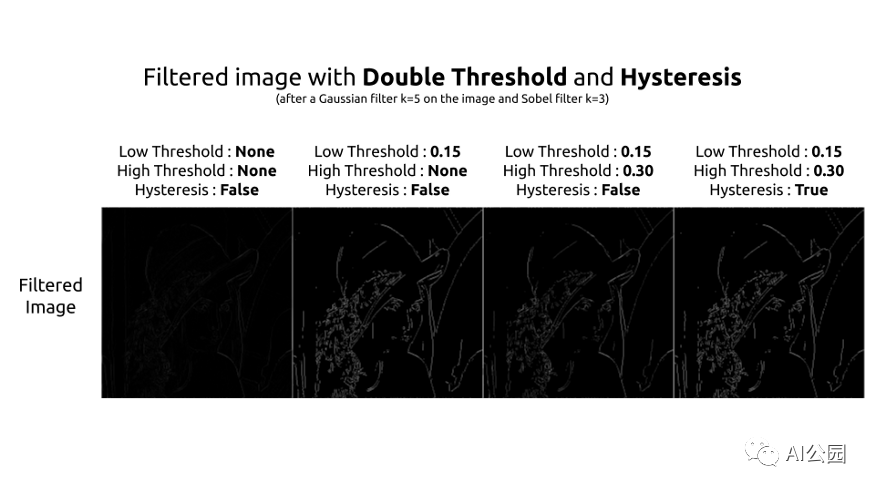
閾值和滯后
最后,只需要應(yīng)用閾值。有三種方法可以做到這一點(diǎn):
低-高閾值:將亮度高于閾值的像素設(shè)為1,其他設(shè)為0。 低-弱和弱-高閾值:我們?cè)O(shè)置高強(qiáng)度像素為1,低強(qiáng)度像素為0,介于兩個(gè)閾值之間,我們?cè)O(shè)置它們?yōu)?.5,并被認(rèn)為是弱像素。 低-弱和弱-高與滯后:同上,弱像素滯后進(jìn)行評(píng)估,并重新分配為高或低。
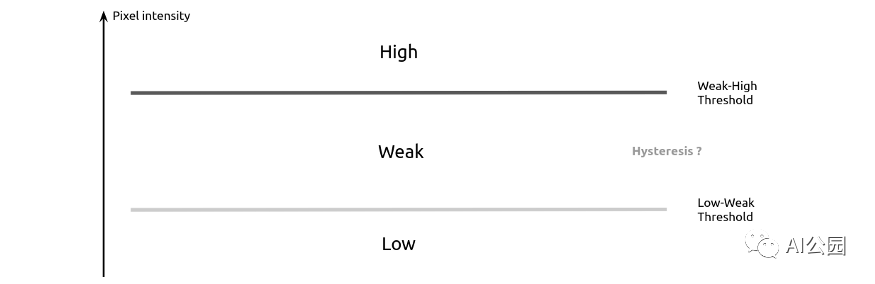
“滯后是系統(tǒng)狀態(tài)對(duì)其歷史的依賴。”—— 維基百科
在我們的例子中,滯后可以理解為一個(gè)像素對(duì)其相鄰像素的依賴。在Canny濾波器的滯后步驟中,我們說(shuō)如果一個(gè)弱像素在它的8個(gè)鄰居中有一個(gè)高強(qiáng)度的鄰居,那么它將被歸類為高。
我喜歡使用不同的方法,我最后使用一個(gè)濾波器對(duì)弱像素進(jìn)行分類。如果它的卷積乘積大于1那么我把它歸為High。

你說(shuō)過(guò)用PyTorch的
是的,現(xiàn)在可以看看Pytorch代碼了。所有的東西都被組合成一個(gè)nn.Module。我不能保證實(shí)現(xiàn)會(huì)得到優(yōu)化。使用OpenCV的特性可以加快處理速度。但是這種實(shí)現(xiàn)至少具有靈活、可參數(shù)化和根據(jù)需要容易修改的優(yōu)點(diǎn)。
class CannyFilter(nn.Module):
def __init__(self,
k_gaussian=3,
mu=0,
sigma=1,
k_sobel=3,
use_cuda=False):
super(CannyFilter, self).__init__()
# device
self.device = 'cuda' if use_cuda else 'cpu'
# gaussian
gaussian_2D = get_gaussian_kernel(k_gaussian, mu, sigma)
self.gaussian_filter = nn.Conv2d(in_channels=1,
out_channels=1,
kernel_size=k_gaussian,
padding=k_gaussian // 2,
bias=False)
self.gaussian_filter.weight[:] = torch.from_numpy(gaussian_2D)
# sobel
sobel_2D = get_sobel_kernel(k_sobel)
self.sobel_filter_x = nn.Conv2d(in_channels=1,
out_channels=1,
kernel_size=k_sobel,
padding=k_sobel // 2,
bias=False)
self.sobel_filter_x.weight[:] = torch.from_numpy(sobel_2D)
self.sobel_filter_y = nn.Conv2d(in_channels=1,
out_channels=1,
kernel_size=k_sobel,
padding=k_sobel // 2,
bias=False)
self.sobel_filter_y.weight[:] = torch.from_numpy(sobel_2D.T)
# thin
thin_kernels = get_thin_kernels()
directional_kernels = np.stack(thin_kernels)
self.directional_filter = nn.Conv2d(in_channels=1,
out_channels=8,
kernel_size=thin_kernels[0].shape,
padding=thin_kernels[0].shape[-1] // 2,
bias=False)
self.directional_filter.weight[:, 0] = torch.from_numpy(directional_kernels)
# hysteresis
hysteresis = np.ones((3, 3)) + 0.25
self.hysteresis = nn.Conv2d(in_channels=1,
out_channels=1,
kernel_size=3,
padding=1,
bias=False)
self.hysteresis.weight[:] = torch.from_numpy(hysteresis)
def forward(self, img, low_threshold=None, high_threshold=None, hysteresis=False):
# set the setps tensors
B, C, H, W = img.shape
blurred = torch.zeros((B, C, H, W)).to(self.device)
grad_x = torch.zeros((B, 1, H, W)).to(self.device)
grad_y = torch.zeros((B, 1, H, W)).to(self.device)
grad_magnitude = torch.zeros((B, 1, H, W)).to(self.device)
grad_orientation = torch.zeros((B, 1, H, W)).to(self.device)
# gaussian
for c in range(C):
blurred[:, c:c+1] = self.gaussian_filter(img[:, c:c+1])
grad_x = grad_x + self.sobel_filter_x(blurred[:, c:c+1])
grad_y = grad_y + self.sobel_filter_y(blurred[:, c:c+1])
# thick edges
grad_x, grad_y = grad_x / C, grad_y / C
grad_magnitude = (grad_x ** 2 + grad_y ** 2) ** 0.5
grad_orientation = torch.atan(grad_y / grad_x)
grad_orientation = grad_orientation * (360 / np.pi) + 180 # convert to degree
grad_orientation = torch.round(grad_orientation / 45) * 45 # keep a split by 45
# thin edges
directional = self.directional_filter(grad_magnitude)
# get indices of positive and negative directions
positive_idx = (grad_orientation / 45) % 8
negative_idx = ((grad_orientation / 45) + 4) % 8
thin_edges = grad_magnitude.clone()
# non maximum suppression direction by direction
for pos_i in range(4):
neg_i = pos_i + 4
# get the oriented grad for the angle
is_oriented_i = (positive_idx == pos_i) * 1
is_oriented_i = is_oriented_i + (positive_idx == neg_i) * 1
pos_directional = directional[:, pos_i]
neg_directional = directional[:, neg_i]
selected_direction = torch.stack([pos_directional, neg_directional])
# get the local maximum pixels for the angle
is_max = selected_direction.min(dim=0)[0] > 0.0
is_max = torch.unsqueeze(is_max, dim=1)
# apply non maximum suppression
to_remove = (is_max == 0) * 1 * (is_oriented_i) > 0
thin_edges[to_remove] = 0.0
# thresholds
if low_threshold is not None:
low = thin_edges > low_threshold
if high_threshold is not None:
high = thin_edges > high_threshold
# get black/gray/white only
thin_edges = low * 0.5 + high * 0.5
if hysteresis:
# get weaks and check if they are high or not
weak = (thin_edges == 0.5) * 1
weak_is_high = (self.hysteresis(thin_edges) > 1) * weak
thin_edges = high * 1 + weak_is_high * 1
else:
thin_edges = low * 1
return blurred, grad_x, grad_y, grad_magnitude, grad_orientation, thin_edges End
End
聲明:部分內(nèi)容來(lái)源于網(wǎng)絡(luò),僅供讀者學(xué)術(shù)交流之目的。文章版權(quán)歸原作者所有。如有不妥,請(qǐng)聯(lián)系刪除。
