使用POI操作word文檔的時候,怎么在一行插入2張圖片?



Java使用POI操作Word文檔
在工作中,我們有時候需要使用POI操作word文檔,那么,怎么在一行插入2張或者多張圖片呢?
下面凱哥(凱哥Java。宮中 號:凱哥Java),就來講講怎么使用POI在一行中插入2個張圖片。
前提知識:
需要知道,使用Java操作POI的時候的一些知識點:
文檔對象:XWPFDocument對象
段落對象:XWPFParagraph對象
圖片對象
步驟:
在Java中,使用POI給Word文檔中插入圖片的時候,我們需要一下幾個步驟。下面的流程圖是通過POI創(chuàng)建Word文檔并向里面插入圖片的步驟:
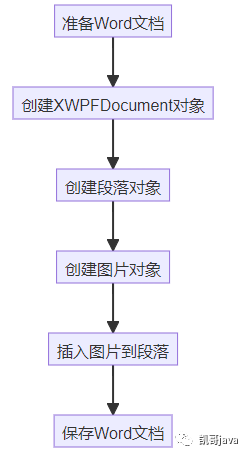
Java向Word插入圖片步驟
具體步驟及代碼實現(xiàn)
步驟1:創(chuàng)建XWPFDocument對象
在Java代碼中,我們使用Apache POI庫的XWPFDocument類來表示W(wǎng)ord文檔。我們需要創(chuàng)建一個XWPFDocument對象,將其與我們準備的Word文檔文件關聯(lián)起來。以下是創(chuàng)建XWPFDocument對象的代碼:
// 創(chuàng)建一個新的Word文檔
XWPFDocument document = new XWPFDocument();
步驟2:創(chuàng)建段落對象
在Word中,文本和圖片通常都是通過段落來管理的。我們需要創(chuàng)建一個段落對象,用于插入圖片。以下是創(chuàng)建段落對象的代碼:
XWPFParagraph paragraph = document.createParagraph();
步驟3:創(chuàng)建圖片對象
要在Word中插入圖片,我們需要使用Apache POI庫的XWPFRun類創(chuàng)建一個運行對象,并將其與我們準備的圖片文件關聯(lián)起來。以下是創(chuàng)建圖片對象的代碼:
XWPFRun run = paragraph.createRun();
String imgFile = "path/to/image/image.jpg";
int imgFormat = XWPFDocument.PICTURE_TYPE_JPEG;
run.addPicture(new FileInputStream(imgFile), imgFormat, "image description", Units.toEMU(200), Units.toEMU(200));
在上面的代碼中,我們需要指定圖片文件的路徑和格式,以及圖片的描述。Units.toEMU(200)是將圖片尺寸轉(zhuǎn)換為EMUs(英制單位)。
步驟4:保存Word文檔
最后,我們需要保存修改后的Word文檔。以下是保存Word文檔的代碼:
// 保存文檔
FileOutputStream out = new FileOutputStream("D:\\files\\test\\zipFile\\zip_picture\\"+"output1.docx");
document.write(out);
out.close();
下面是完整的代碼:
import org.apache.poi.util.Units;
import org.apache.poi.xwpf.usermodel.*;
import org.apache.xmlbeans.XmlCursor;
import java.io.FileInputStream;
import java.io.FileOutputStream;
public class InsertTwoImagesInOnePage {
public static void main(String[] args) {
try {
// 創(chuàng)建一個新的Word文檔
XWPFDocument document = new XWPFDocument();
// 1個段落插入兩張圖片
insertTwoImages(document,
"D:\\files\\test\\zipFile\\zip_picture\\202310041006522\\2d233778e74746538b2ea629435bc145\\cut\\1#施工圖片-1.jpg",
"D:\\files\\test\\zipFile\\zip_picture\\202310041006522\\2d233778e74746538b2ea629435bc145\\cut\\1#施工圖片-2.png");
// 保存文檔
FileOutputStream out = new FileOutputStream("D:\\files\\test\\zipFile\\zip_picture\\"+"output1.docx");
document.write(out);
out.close();
System.out.println("Word文檔已創(chuàng)建并圖片已插入成功。");
} catch (Exception e) {
e.printStackTrace();
}
}
/**
* 一個段落多個圖片
* @param document 文檔對象
* @param imagePath1 圖片1的路徑
* @param imagePath2 圖片2的路徑
* @throws Exception 拋出異常
*/
private static void insertTwoImages(XWPFDocument document, String imagePath1, String imagePath2) throws Exception {
XWPFParagraph paragraph = document.createParagraph();
// 插入第一張圖片
XWPFRun run1 = paragraph.createRun();
run1.addPicture(new FileInputStream(imagePath1), XWPFDocument.PICTURE_TYPE_JPEG, imagePath1, Units.toEMU(200), Units.toEMU(150));
// 在同一個段落中插入第二張圖片,可以使用XmlCursor來控制插入位置
XmlCursor cursor = paragraph.getCTP().newCursor();
cursor.selectPath("./*");
cursor.toEndToken(); // 移動到段落的末尾
// 插入第二張圖片
XWPFRun run2 = paragraph.insertNewRun(cursor.getSelectionCount());
run2.addPicture(new FileInputStream(imagePath2), XWPFDocument.PICTURE_TYPE_PNG, imagePath2, Units.toEMU(200), Units.toEMU(150));
}
}
注意:
1.請將圖片路徑修改成自己的
2.Units.toEMU(200)請根據(jù)自己實際情況進行修改
運行后的結(jié)果:
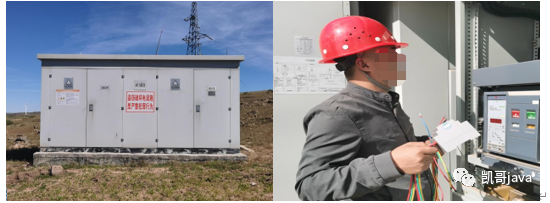
在一行插入2張圖片后效果圖
通過上面我們可以知道,其核心就是向一個段落對象中插入多個圖片。那么如果一頁A4紙張怎么豎著插入2張圖片呢?
在下一篇文章中,凱哥(宮中 號:凱哥Java)將介紹,怎么在一張A4紙中插入2張豎著的圖片。