
Shell文本處理三劍客:grep、sed、awk
點上方關(guān)注“SQL數(shù)據(jù)庫開發(fā)”,
設為“置頂或星標”,第一時間送達干貨
來源:https://blog.csdn.net/Z_Date/article/details/107829161
點上方關(guān)注“SQL數(shù)據(jù)庫開發(fā)”,
設為“置頂或星標”,第一時間送達干貨
來源:https://blog.csdn.net/Z_Date/article/details/107829161
grep、sed、awk我們叫他們?nèi)齽停莆账鼈兛梢愿玫倪\維,提升工作效率,即使不是運維,對我們處理數(shù)據(jù)都是非常方便的~就很多數(shù)據(jù)處理來講,寫程序肯定是也能處理的,但是遠沒有已經(jīng)存在特定功能的命令更高效,我們只需要操作命令即可。通過本文可以講解三劍客的一些基礎知識和實用,希望大家可以自己動手敲,畢竟自己體會過的印象更深刻,后面還會持續(xù)更新。。。
grep
簡介
grep是一款強大的文本搜索工具,支持正則表達式。
全稱( global search regular expression(RE) and print out the line)
語法:grep [option]... PATTERN [FILE]...
常用:
usage: grep [-abcDEFGHhIiJLlmnOoqRSsUVvwxZ] [-A num] [-B num] [-C[num]]
 [-e pattern] [-f file] [--binary-files=value] [--color=when]
 [--context[=num]] [--directories=action] [--label] [--line-buffered]
 [--null] [pattern] [file ...]
常用參數(shù):
            -v        取反
            -i        忽略大小寫
            -c        符合條件的行數(shù)
            -n        輸出的同時打印行號
            ^*        以*開頭
            *$         以*結(jié)尾
            ^$         空行
實際使用
準備好一個小故事txt:
[root@iz2ze76ybn73dvwmdij06zz ~]# cat monkey
One day,a little monkey is playing by the well.一天,有只小猴子在井邊玩兒.
He looks in the well and shouts :它往井里一瞧,高喊道:
“Oh!My god!The moon has fallen into the well!” “噢!我的天!月亮掉到井里頭啦!”
An older monkeys runs over,takes a look,and says,一只大猴子跑來一看,說,
“Goodness me!The moon is really in the water!” “糟啦!月亮掉在井里頭啦!”
And olderly monkey comes over.老猴子也跑過來.
He is very surprised as well and cries out:他也非常驚奇,喊道:
“The moon is in the well.” “糟了,月亮掉在井里頭了!”
A group of monkeys run over to the well .一群猴子跑到井邊來,
They look at the moon in the well and shout:他們看到井里的月亮,喊道:
“The moon did fall into the well!Come on!Let’get it out!”
“月亮掉在井里頭啦!快來!讓我們把它撈起來!”
Then,the oldest monkey hangs on the tree up side down ,with his feet on the branch .
然后,老猴子倒掛在大樹上,
And he pulls the next monkey’s feet with his hands.拉住大猴子的腳,
All the other monkeys follow his suit,其他的猴子一個個跟著,
And they join each other one by one down to the moon in the well.
它們一只連著一只直到井里.
Just before they reach the moon,the oldest monkey raises his head and happens to see the moon in the sky,正好他們摸到月亮的時候,老猴子抬頭發(fā)現(xiàn)月亮掛在天上呢
He yells excitedly “Don’t be so foolish!The moon is still in the sky!”
它興奮地大叫:“別蠢了!月亮還好好地掛在天上呢!
直接查找符合條件的行
[root@iz2ze76ybn73dvwmdij06zz ~]# grep moon monkey
“Oh!My god!The moon has fallen into the well!” “噢!我的天!月亮掉到井里頭啦!”
“Goodness me!The moon is really in the water!” “糟啦!月亮掉在井里頭啦!”
“The moon is in the well.” “糟了,月亮掉在井里頭了!”
They look at the moon in the well and shout:他們看到井里的月亮,喊道:
“The moon did fall into the well!Come on!Let’get it out!”
And they join each other one by one down to the moon in the well.
Just before they reach the moon,the oldest monkey raises his head and happens to see the moon in the sky,正好他們摸到月亮的時候,老猴子抬頭發(fā)現(xiàn)月亮掛在天上呢
He yells excitedly “Don’t be so foolish!The moon is still in the sky!”
查找反向符合條件的行
[root@iz2ze76ybn73dvwmdij06zz ~]# grep -v  moon monkey
One day,a little monkey is playing by the well.一天,有只小猴子在井邊玩兒.
He looks in the well and shouts :它往井里一瞧,高喊道:
An older monkeys runs over,takes a look,and says,一只大猴子跑來一看,說,
And olderly monkey comes over.老猴子也跑過來.
He is very surprised as well and cries out:他也非常驚奇,喊道:
A group of monkeys run over to the well .一群猴子跑到井邊來,
“月亮掉在井里頭啦!快來!讓我們把它撈起來!”
Then,the oldest monkey hangs on the tree up side down ,with his feet on the branch .
然后,老猴子倒掛在大樹上,
And he pulls the next monkey’s feet with his hands.拉住大猴子的腳,
All the other monkeys follow his suit,其他的猴子一個個跟著,
它們一只連著一只直到井里.
它興奮地大叫:“別蠢了!月亮還好好地掛在天上呢!”
直接查找符合條件的行數(shù)
[root@iz2ze76ybn73dvwmdij06zz ~]# grep -c  moon monkey
8
忽略大小寫查找符合條件的行數(shù)
先來看一下直接查找的結(jié)果
[root@iz2ze76ybn73dvwmdij06zz ~]# grep my monkey
忽略大小寫查看
[root@iz2ze76ybn73dvwmdij06zz ~]# grep -i my monkey
“Oh!My god!The moon has fallen into the well!” “噢!我的天!月亮掉到井里頭啦!”
查找符合條件的行并輸出行號
[root@iz2ze76ybn73dvwmdij06zz ~]# grep -n monkey monkey
1:One day,a little monkey is playing by the well.一天,有只小猴子在井邊玩兒.
4:An older monkeys runs over,takes a look,and says,一只大猴子跑來一看,說,
6:And olderly monkey comes over.老猴子也跑過來.
9:A group of monkeys run over to the well .一群猴子跑到井邊來,
13:Then,the oldest monkey hangs on the tree up side down ,with his feet on the branch .
15:And he pulls the next monkey’s feet with his hands.拉住大猴子的腳,
16:All the other monkeys follow his suit,其他的猴子一個個跟著,
19:Just before they reach the moon,the oldest monkey raises his head and happens to see the moon in the sky,正好他們摸到月亮的時候,老猴子抬頭發(fā)現(xiàn)月亮掛在天上呢
查找開頭是J的行
[root@iz2ze76ybn73dvwmdij06zz ~]# grep '^J' monkey
Just before they reach the moon,the oldest monkey raises his head and happens to see the moon in the sky,正好他們摸到月亮的時候,老猴子抬頭發(fā)現(xiàn)月亮掛在天上呢
查找結(jié)尾是呢的行
[root@iz2ze76ybn73dvwmdij06zz ~]# grep "呢$" monkey
Just before they reach the moon,the oldest monkey raises his head and happens to see the moon in the sky,正好他們摸到月亮的時候,老猴子抬頭發(fā)現(xiàn)月亮掛在天上呢
大家可以grep --help,查看更多相關(guān)的命令,這里就不一一演示了。
小結(jié)
有了強大的網(wǎng)絡以后,很多東西都可以在網(wǎng)上找到,但是基礎的一定要自己 熟練掌握,才回在遇到事情的時候不慌。
sed
sed是一種流編輯器,是一款處理文本比較優(yōu)秀的工具,可以結(jié)合正則表達式一起使用。
sed執(zhí)行過程
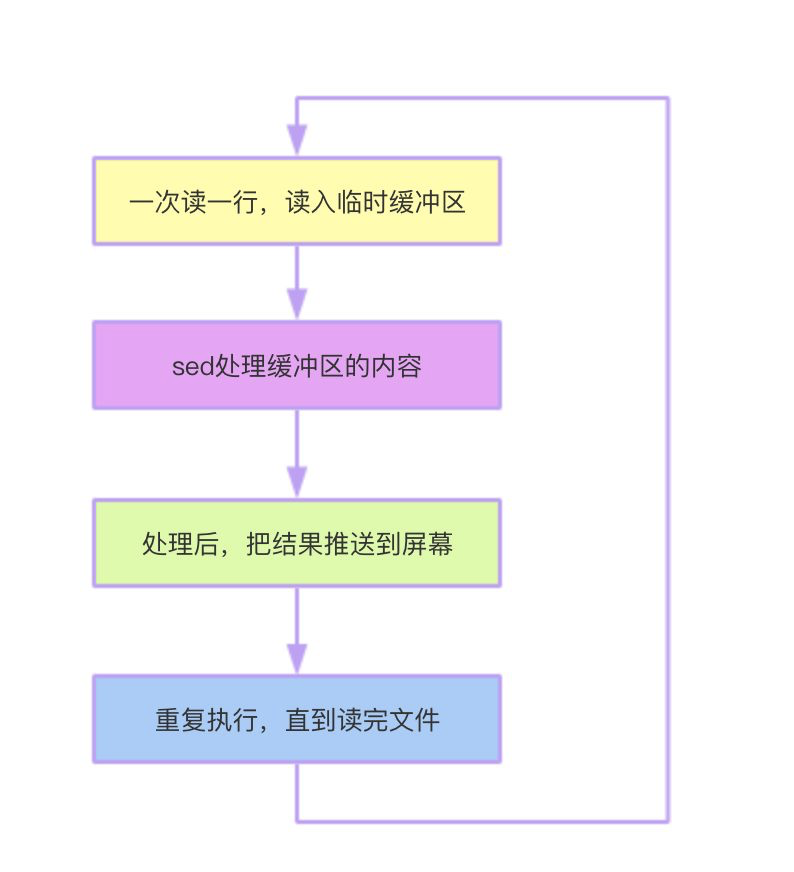
sed命令
命令: sed
語法 : sed [選項]... {命令集} [輸入文件]...
常用命令:
            d  刪除選擇的行
            s   查找
            y  替換
            i   當前行前面插入一行
            a  當前行后面插入一行
            p  打印行
            q  退出

 替換符:

            數(shù)字 :替換第幾處
            g :  全局替換
            \1:  子串匹配標記,前面搜索可以用元字符集\(..\)
            &:  保留搜索刀的字符用來替換其他字符
操作:
替換
查看文件:
?  happy cat word
Twinkle, twinkle, little star
How I wonder what you are
Up above the world so high
Like a diamond in the sky
When the blazing sun is gone
替換:
?  happy sed 's/little/big/' word
Twinkle, twinkle, big star
How I wonder what you are
Up above the world so high
Like a diamond in the sky
When the blazing sun is gone
查看文本:
?  happy cat word1
Oh if there's one thing to be taught
it's dreams are made to be caught
and friends can never be bought
Doesn't matter how long it's been
I know you'll always jump in
'Cause we don't know how to quit
全局替換:
?  happy sed 's/to/can/g' word1
Oh if there's one thing can be taught
it's dreams are made can be caught
and friends can never be bought
Doesn't matter how long it's been
I know you'll always jump in
'Cause we don't know how can quit
按行替換(替換2到最后一行)
?  happy sed '2,$s/to/can/' word1
Oh if there's one thing to be taught
it's dreams are made can be caught
and friends can never be bought
Doesn't matter how long it's been
I know you'll always jump in
'Cause we don't know how can quit
刪除:
查看文本:
?  happy cat word
Twinkle, twinkle, little star
How I wonder what you are
Up above the world so high
Like a diamond in the sky
When the blazing sun is gone
刪除:
?  happy sed '2d' word
Twinkle, twinkle, little star
Up above the world so high
Like a diamond in the sky
When the blazing sun is gone
顯示行號:
?  happy sed '=;2d' word
1
Twinkle, twinkle, little star
2
3
Up above the world so high
4
Like a diamond in the sky
5
When the blazing sun is gone
刪除第2行到第四行:
?  happy sed '=;2,4d' word
1
Twinkle, twinkle, little star
2
3
4
5
When the blazing sun is gone
添加行:
向前插入:
?  happy echo "hello" | sed 'i\kitty'
kitty
hello
向后插入:
?  happy echo "kitty" | sed 'i\hello'
hello
kitty
修改行:
替換第二行為hello kitty
?  happy sed '2c\hello kitty' word
Twinkle, twinkle, little star
hello kitty
Up above the world so high
Like a diamond in the sky
When the blazing sun is gone
替換第二行到最后一行為hello kitty
?  happy sed '2,$c\hello kitty' word
Twinkle, twinkle, little star
hello kitty
寫入行
把帶star的行寫入c文件中,c提前創(chuàng)建
?  happy sed -n '/star/w c' word
?  happy cat c
Twinkle, twinkle, little star
退出
打印3行后,退出sed
?  happy sed '3q' word
Twinkle, twinkle, little star
How I wonder what you are
Up above the world so high
awk
名字由來
創(chuàng)始人 Alfred Aho 、Peter Weinberger 和 Brian Kernighan 姓氏的首個字母。
強大的文本處理工具
比起sed和grep,awk不僅僅是一個小工具,也可以算得上一種小型的編程語言了,支持if判斷分支和while循環(huán)語句還有它的內(nèi)置函數(shù)等,是一個要比grep和sed更強大的文本處理工具,但也就意味著要學習的東西更多了。
下面來說一下awk的一些基礎概念以及實際操作。
語法
常用
Usage: awk [POSIX or GNU style options] -f progfile [--] file ...
Usage: awk [POSIX or GNU style options] [--] 'program' file ...
域
類似數(shù)據(jù)庫列的概念,但它是按照序號來指定的,比如我要第一個列就是2,依此類推。$0就是輸出整個文本的內(nèi)容。默認用空格作為分隔符,當然你可以自己通過-F設置適合自己情況的分隔符。
提前自己編了一段數(shù)據(jù),學生以及學生成績數(shù)據(jù)表。
| 列數(shù) | 名稱 | 描述 |
|---|---|---|
| 1 | Name | 姓名 |
| 2 | Math | 數(shù)學 |
| 3 | Chinese | 語文 |
| 4 | English | 英語 |
| 5 | History | 歷史 |
| 6 | Sport | 體育 |
| 8 | Grade | 班級 |
"Name Math Chinese English History Sport grade 輸出整個文本
[root@iz2ze76ybn73dvwmdij06zz ~]# awk '{print $0}' students_store
Xiaoka          60   80    40    90   77  class-1
Yizhihua        70    66   50    80   90  class-1
kerwin          80    90   60    70   60  class-2
Fengzheng       90    78    62   40   62  class-2
輸出第一列(姓名列)
[root@iz2ze76ybn73dvwmdij06zz ~]# awk '{print $1}' students_store
Xiaoka
Yizhihua
kerwin
Fengzheng
模式&動作
awk '{[pattern] action}' {filenames}
模式
pattern 可以是
條件語句 正則
模式的兩個特殊字段 BEGIN 和 END (不指定時匹配或打印行數(shù))
BEGIN :一般用來打印列名稱。
END : 一般用來打印總結(jié)性質(zhì)的字符。
動作
action 在{}內(nèi)指定,一般用來打印,也可以是一個代碼段。
示例
給上面的文本加入標題頭:
[root@iz2ze76ybn73dvwmdij06zz ~]#  awk 'BEGIN {print "Name     Math  Chinese  English History  Sport grade\n----------------------------------------------"} {print $0}' students_store

Name         Math  Chinese  English History  Sport  grade
----------------------------------------------------------
Xiaoka       60    80       40      90     77    class-1
Yizhihua     70    66       50      80     90    class-1
kerwin       80    90       60      70     60    class-2
Fengzheng    90    78       62      40     62    class-2
僅打印姓名、數(shù)學成績、班級信息,再加一個文尾(再接再厲):
[root@iz2ze76ybn73dvwmdij06zz ~]# awk 'BEGIN {print "Name   Math  grade\n---------------------"} {print $1 2 "\t" $7} END {print "continue to exert oneself"}' students_store

Name     Math  grade
---------------------
Xiaoka   60   class-1
Yizhihua 70   class-1
kerwin   80   class-2
Fengzheng 90  class-2
continue to exert oneself
結(jié)合正則
像grep和sed也是支持正則表達式的。這邊就不介紹正則表達式了,如果有興趣,我單出一個文章。
使用方法:
符號 ~ 后接正則表達式
此時我們再加入一條后來的新同學,并且沒有分班。
先來看下現(xiàn)在的數(shù)據(jù)
[root@iz2ze76ybn73dvwmdij06zz ~]# cat students_store
Xiaoka       60   80    40    90   77  class-1
Yizhihua     70    66   50    80   90  class-1
kerwin       80    90   60    70   60  class-2
Fengzheng    90    78   62    40   62  class-2
xman         -     -     -     -   -    -
模糊匹配|查詢已經(jīng)分班的學生
[root@iz2ze76ybn73dvwmdij06zz ~]# awk '$0 ~/class/' students_store
Xiaoka       60   80    40    90   77  class-1
Yizhihua     70    66   50    80   90  class-1
kerwin       80    90   60     70  60  class-2
Fengzheng    90    78   62     40  62  class-2
精準匹配|查詢1班的學生
[root@iz2ze76ybn73dvwmdij06zz ~]# awk '$7=="class-1" {print $0}'  students_store
Xiaoka       60   80    40    90   77  class-1
Yizhihua     70    66   50    80   90  class-1
反向匹配|查詢不是1班的學生
[root@iz2ze76ybn73dvwmdij06zz ~]# awk '$7!="class-1" {print $0}'  students_store
kerwin       80    90   60     70   60  class-2
Fengzheng    90    78    62     40  62 class-2
xman         -     -     -     -   -    -
比較操作
查詢數(shù)學大于80的
[root@iz2ze76ybn73dvwmdij06zz ~]# awk '$2>60 {print $0}'  students_store
Yizhihua     70    66   50    80   90  class-1
kerwin       80    90   60     70   60  class-2
Fengzheng    90    78    62     40  62 class-2
查詢數(shù)學大于英語成績的
[root@iz2ze76ybn73dvwmdij06zz ~]# awk '$2 > $4  {print $0}'  students_store
Xiaoka       60   80    40    90   77  class-1
Yizhihua     70    66   50    80   90  class-1
kerwin       80    90   60    70   60  class-2
Fengzheng    90    78    62   40   62  class-2
匹配指定字符中的任意字符
在加一列專業(yè),讓我們來看看憨憨們的專業(yè),順便給最后一個新來的同學分個班吧。
然后再來看下此時的數(shù)據(jù)。
[root@iz2ze76ybn73dvwmdij06zz ~]# cat students_store
Xiaoka       60   80    40    90   77  class-1  Java
Yizhihua     70    66   50    80   90  class-1  java
kerwin       80    90   60     70   60  class-2 Java
Fengzheng    90    78    62     40  62 class-2  java
xman         -     -     -     -   -    class-3 php
或關(guān)系匹配|查詢1班和3班的學生
root@iz2ze76ybn73dvwmdij06zz ~]# awk '$0 ~/(class-1|class-3)/' students_store
Xiaoka       60   80    40    90   77  class-1  Java
Yizhihua     70    66   50    80   90  class-1  java
xman         -     -     -     -   -   class-3 php
任意字符匹配|名字第二個字母是
字符解釋:
^ : 字段或記錄的開頭。
. : 任意字符。
root@iz2ze76ybn73dvwmdij06zz ~]# awk '$0 ~/(class-1|class-3)/' students_store
Xiaoka       60   80    40    90   77  class-1  Java
Yizhihua     70    66   50    80   90  class-1  java
xman         -     -     -     -   -    class-3 php
復合表達式
&& AND
的關(guān)系,必同時滿足才行哦~
查詢數(shù)學成績大于60并且語文成績也大于60的童鞋。
[root@iz2ze76ybn73dvwmdij06zz ~]# awk '{ if ($2 > 60 && $3 > 60) print $0}' students_store
Yizhihua     70    66   50    80   90  class-1  java
kerwin       80    90   60    70   60  class-2  Java
Fengzheng    90    78    62   40   62  class-2  java
|| OR
查詢數(shù)學大于80或者語文大于80的童鞋。
[root@iz2ze76ybn73dvwmdij06zz ~]#  awk '{ if ($2 > 80 || $4 > 80) print $0}' students_store
Fengzheng    90    78    62     40  62 class-2  java
printf 格式化輸出
除了能達到功能以外,一個好看的格式也是必不可少的,因此格式化的輸出看起來會更舒服哦~
語法
printf ([格式],參數(shù))
printf %x(格式) 具體參數(shù) x代表具體格式
| 符號 | 說明 |
|---|---|
| - | 左對齊 |
| Width | 域的步長 |
| .prec | 最大字符串長度或小數(shù)點右邊位數(shù) |
格式轉(zhuǎn)化符
其實和其他語言大同小異的
常用格式
| 符號 | 描述 |
|---|---|
| %c | ASCII |
| %d | 整數(shù) |
| %o | 八進制 |
| %x | 十六進制數(shù) |
| %f | 浮點數(shù) |
| %e | 浮點數(shù)(科學記數(shù)法) |
| % s | 字符串 |
| %g | 決定使用浮點轉(zhuǎn)化e/f |
具體操作示例
ASCII碼??
[root@iz2ze76ybn73dvwmdij06zz ~]# echo "66" | awk '{printf "%c\n",$0}'
B
浮點數(shù)
[root@iz2ze76ybn73dvwmdij06zz ~]# awk 'BEGIN {printf "%f\n",100}'
100.000000
16進制數(shù)
[root@iz2ze76ybn73dvwmdij06zz ~]# awk 'BEGIN {printf "%x",996}'
3e4
更多操作,小伙伴有興趣可以挨個試試~
內(nèi)置變量
頻率較高常用內(nèi)置變量
NF :記錄瀏覽域的個數(shù),在記錄被讀后設置。
NR :已讀的記錄數(shù)。
FS : 設置輸入域分隔符
A R G C :命令行參數(shù)個數(shù),支持命令行傳入。
RS : 控制記錄分隔符
FIlENAME : awk當前讀文件的名稱
操作
輸出學生成績表和域個數(shù)以及已讀記錄數(shù)。
[root@iz2ze76ybn73dvwmdij06zz ~]# awk '{print $0, NF , NR}' students_store
Xiaoka       60   80    40    90   77  class-1  Java 8 1
Yizhihua     70    66   50    80   90  class-1  java 8 2
kerwin       80    90   60     70  60  class-2  Java 8 3
Fengzheng    90    78   62     40  62  class-2  java 8 4
xman         -     -     -     -   -   class-3  php  8 5
內(nèi)置函數(shù)
常用函數(shù)
length(s) 返回s長度
index(s,t) 返回s中字符串t第一次出現(xiàn)的位置
match (s,r) s中是否包含r字符串
split(s,a,fs) 在fs上將s分成序列a
gsub(r,s) 用s代替r,范圍全文本
gsub(r,s,t) 范圍t中,s代替r
substr(s,p) 返回字符串s從第p個位置開始后面的部分(下標是從1 開始算的,大家可以自己試試)
substr(s,p,n) 返回字符串s從第p個位置開始后面n個字符串的部分
操作
length
[root@iz2ze76ybn73dvwmdij06zz ~]# awk 'BEGIN {print length(" hello,im xiaoka")}'
16
index
[root@iz2ze76ybn73dvwmdij06zz ~]# awk 'BEGIN {print index("xiaoka","ok")}'
4
match
[root@iz2ze76ybn73dvwmdij06zz ~]# awk 'BEGIN {print match("Java小咖秀","va小")}'
3
gsub
[root@iz2ze76ybn73dvwmdij06zz ~]# awk 'gsub("Xiaoka","xk") {print $0}' students_store
xk       60   80    40    90   77  class-1  Java
substr(s,p)
[root@iz2ze76ybn73dvwmdij06zz ~]# awk 'BEGIN {print substr("xiaoka",3)}'
aoka
substr(s,p,n)
[root@iz2ze76ybn73dvwmdij06zz ~]# awk 'BEGIN {print substr("xiaoka",3,2)}'
ao
split
[root@iz2ze76ybn73dvwmdij06zz ~]# str="java,xiao,ka,xiu"
[root@iz2ze76ybn73dvwmdij06zz ~]# awk 'BEGIN{split('"\"$str\""',ary,","); for(i in ary) {if(ary[i]>1) print ary[i]}}'
xiu
java
xiao
ka
awk腳本
前面說過awk是可以說是一個小型編程語言。如果命令比較短我們可以直接在命令行執(zhí)行,當命令行比較長的時候,可以使用腳本來處理,比命令行的可讀性更高,還可以加上注釋。
寫一個完整的awk腳本并執(zhí)行步驟
1.先創(chuàng)建一個awk文件
[root@iz2ze76ybn73dvwmdij06zz ~]# vim printname.awk
2.腳本第一行要指定解釋器
#!/usr/bin/awk -f
3.編寫腳本內(nèi)容,打印一下名稱
[root@iz2ze76ybn73dvwmdij06zz ~]# cat printname.awk
#!/usr/bin/awk -f
#可以加注釋了,哈哈
BEGIN { print "my name is Java小咖秀"}
4.既然是腳本,必不可少的可執(zhí)行權(quán)限安排上~
[root@iz2ze76ybn73dvwmdij06zz ~]# chmod +x printname.awk
[root@iz2ze76ybn73dvwmdij06zz ~]# ll printname.awk
-rwxr-xr-x 1 root root 60 7月   1 15:23 printname.awk
5.有了可執(zhí)行權(quán)限,我們來執(zhí)行下看結(jié)果
[root@iz2ze76ybn73dvwmdij06zz ~]# ./printname.awk
my name is Java小咖秀
了解了寫awk腳本的步驟以后大家就可以自己去寫一波了~
點擊右下角「在看」和轉(zhuǎn)發(fā)
是對我們最大的支持
最后給大家分享我寫的SQL兩件套:《SQL基礎知識第二版》和《SQL高級知識第二版》的PDF電子版。里面有各個語法的解釋、大量的實例講解和批注等等,非常通俗易懂,方便大家跟著一起來實操。
有需要的讀者可以下載學習,在下面的公眾號「數(shù)據(jù)前線」(非本號)后臺回復關(guān)鍵字:SQL,就行
數(shù)據(jù)前線
后臺回復關(guān)鍵字:1024,獲取一份精心整理的技術(shù)干貨
后臺回復關(guān)鍵字:進群,帶你進入高手如云的交流群。
