
【W(wǎng)eb技術(shù)】前端水印實(shí)現(xiàn)方案
一、問題背景
為了防止信息泄露或知識(shí)產(chǎn)權(quán)被侵犯,在web的世界里,對(duì)于頁(yè)面和圖片等增加水印處理是十分有必要的,水印的添加根據(jù)環(huán)境可以分為兩大類,前端瀏覽器環(huán)境添加和后端服務(wù)環(huán)境添加,簡(jiǎn)單對(duì)比一下這兩種方式的特點(diǎn):
前端瀏覽器加水印:
減輕服務(wù)端的壓力,快速反應(yīng)
安全系數(shù)較低,對(duì)于掌握一定前端知識(shí)的人來(lái)說(shuō)可以通過各種騷操作跳過水印獲取到源文件
適用場(chǎng)景:
資源不跟某一個(gè)單獨(dú)的用戶綁定,而是一份資源,多個(gè)用戶查看,需要在每一個(gè)用戶查看的時(shí)候添加用戶特有的水印,多用于某些機(jī)密文檔或者展示機(jī)密信息的頁(yè)面,水印的目的在于文檔外流的時(shí)候可以追究到責(zé)任人
當(dāng)遇到大文件密集水印,或是復(fù)雜水印,占用服務(wù)器內(nèi)存、運(yùn)算量,請(qǐng)求時(shí)間過長(zhǎng) 安全性高,無(wú)法獲取到加水印前的源文件 適用場(chǎng)景:資源為某個(gè)用戶獨(dú)有,一份原始資源只需要做一次處理,將其存儲(chǔ)之后就無(wú)需再次處理,水印的目的在于標(biāo)示資源的歸屬人 這里我們討論前端瀏覽器環(huán)境添加
二、收益分析
簡(jiǎn)單介紹一下目前主流的前端加水印的方法,以后其他同學(xué)在用到的時(shí)候可以作為參考。
回復(fù)“8”加入面試題分享群
三、實(shí)現(xiàn)方案
1. 重復(fù)的dom元素覆蓋實(shí)現(xiàn)
從效果開始,要實(shí)現(xiàn)的效果是「在頁(yè)面上充滿透明度較低的重復(fù)的代表身份的信息」,第一時(shí)間想到的方案是在頁(yè)面上覆蓋一個(gè)position:fixed的div盒子,盒子透明度設(shè)置較低,設(shè)置pointer-events: none;樣式實(shí)現(xiàn)點(diǎn)擊穿透,在這個(gè)盒子內(nèi)通過js循環(huán)生成小的水印div,每個(gè)水印div內(nèi)展示一個(gè)要顯示的水印內(nèi)容,簡(jiǎn)單實(shí)現(xiàn)了一下
<!DOCTYPE html>
<html>
    <head>
        <meta charset="utf-8">
        <title></title>
        <style>
            #watermark-box {
                position: fixed;
                top: 0;
                bottom: 0;
                left: 0;
                right: 0;
                font-size: 24px;
                font-weight: 700;
                display: flex;
                flex-wrap: wrap;
                overflow: hidden;
                user-select: none;
                pointer-events: none;
                opacity: 0.1;
                z-index: 999;
            }
            .watermark {
                text-align: center;
            }
        </style>
    </head>
    <body>
        <div>
            <h2> 機(jī)密內(nèi)容- 機(jī)密內(nèi)容- 機(jī)密內(nèi)容- 機(jī)密內(nèi)容- 機(jī)密內(nèi)容- 機(jī)密內(nèi)容- </h2>
            <br />
            <h2> 機(jī)密內(nèi)容- 機(jī)密內(nèi)容- 機(jī)密內(nèi)容- 機(jī)密內(nèi)容- 機(jī)密內(nèi)容- 機(jī)密內(nèi)容- </h2>
            <br />
            <h2 onclick="alert(1)"> 機(jī)密內(nèi)容- 機(jī)密內(nèi)容- 機(jī)密內(nèi)容- 機(jī)密內(nèi)容- 機(jī)密內(nèi)容- 機(jī)密內(nèi)容- 機(jī)密內(nèi)容- </h2>
            <br />
        </div>
        <div id="watermark-box">
        </div>
        <script>
            function doWaterMark(width, height, content) {
                let box = document.getElementById("watermark-box");
                let boxWidth = box.clientWidth,
                    boxHeight = box.clientHeight;
                for (let i = 0; i < Math.floor(boxHeight / height); i++) {
                    for (let j = 0; j < Math.floor(boxWidth / width); j++) {
                        let next = document.createElement("div")
                        next.setAttribute("class", "watermark")
                        next.style.width = width + 'px'
                        next.style.height = height + 'px'
                        next.innerText = content
                        box.appendChild(next)
                    }
                }
            }
            window.onload = doWaterMark(300, 100, '水印123')
        </script>
    </body>
</html>
頁(yè)面效果是有了,但是這種方案需要要在js內(nèi)循環(huán)創(chuàng)建多個(gè)dom元素,既不優(yōu)雅也影響性能,于是考慮可不可以不生成這么多個(gè)元素。
2. canvas輸出背景圖
第一步還是在頁(yè)面上覆蓋一個(gè)固定定位的盒子,然后創(chuàng)建一個(gè)canvas畫布,繪制出一個(gè)水印區(qū)域,將這個(gè)水印通過toDataURL方法輸出為一個(gè)圖片,將這個(gè)圖片設(shè)置為盒子的背景圖,通過backgroud-repeat:repeat;樣式實(shí)現(xiàn)填滿整個(gè)屏幕的效果,簡(jiǎn)單實(shí)現(xiàn)的代碼。
 <!DOCTYPE html>
<html>
    <head>
        <meta charset="utf-8">
        <title></title>
    </head>
    <body>
        <div id="info" onclick="alert(1)" >
            123
        </div>
        <script>
           (function () {
              function __canvasWM({
                container = document.body,
                width = '300px',
                height = '200px',
                textAlign = 'center',
                textBaseline = 'middle',
                font = "20px Microsoft Yahei",
                fillStyle = 'rgba(184, 184, 184, 0.6)',
                content = '水印',
                rotate = '45',
                zIndex = 10000
              } = {}) {
                const args = arguments[0];
                const canvas = document.createElement('canvas');

                canvas.setAttribute('width', width);
                canvas.setAttribute('height', height);
                const ctx = canvas.getContext("2d");

                ctx.textAlign = textAlign;
                ctx.textBaseline = textBaseline;
                ctx.font = font;
                ctx.fillStyle = fillStyle;
                ctx.rotate(Math.PI / 180 * rotate);
                ctx.fillText(content, parseFloat(width) / 2, parseFloat(height) / 2);

                const base64Url = canvas.toDataURL();
                const __wm = document.querySelector('.__wm');

                const watermarkDiv = __wm || document.createElement("div");
                const styleStr = `
                  position:fixed;
                  top:0;
                  left:0;
                  bottom:0;
                  right:0;
                  width:100%;
                  height:100%;
                  z-index:${zIndex};
                  pointer-events:none;
                  background-repeat:repeat;
                  background-image:url('${base64Url}')`;

                watermarkDiv.setAttribute('style', styleStr);
                watermarkDiv.classList.add('__wm');

                if (!__wm) {
                  container.insertBefore(watermarkDiv, container.firstChild);
                }

                if (typeof module != 'undefined' && module.exports) {  //CMD
                    module.exports = __canvasWM;
                } else if (typeof define == 'function' && define.amd) { // AMD
                    define(function () {
                      return __canvasWM;
                    });
                } else {
                    window.__canvasWM = __canvasWM;
                }
              })();

            // 調(diào)用
            __canvasWM({
              content: '水印123'
            });
        </script>
    </body>
</html>
3. svg實(shí)現(xiàn)背景圖
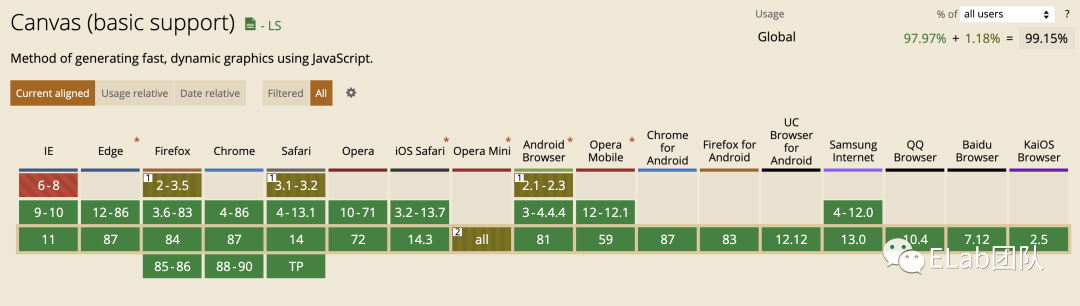
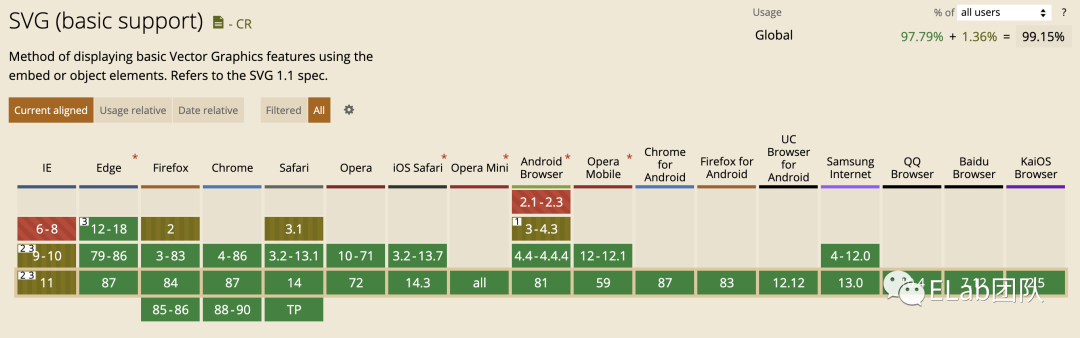
與canvas生成背景圖的方法類似,只不過是生成背景圖的方法換成了通過svg生成,canvas的兼容性略好于svg。兼容性對(duì)比:
canvas
svg
<!DOCTYPE html>
<html>
    <head>
        <meta charset="utf-8">
        <title></title>
    </head>
    <body>
        <div id="info" onclick="alert(1)">
            123
        </div>
        <script>
           (function () {
              function __canvasWM({
                container = document.body,
                width = '300px',
                height = '200px',
                textAlign = 'center',
                textBaseline = 'middle',
                font = "20px Microsoft Yahei",
                fillStyle = 'rgba(184, 184, 184, 0.6)',
                content = '水印',
                rotate = '45',
                zIndex = 10000,
                        opacity = 0.3
              } = {}) {
                const args = arguments[0];
                  const svgStr = `<svg xmlns="http://www.w3.org/2000/svg" width="${width}" height="${width}">
                  <text x="50%" y="50%" dy="12px"
                    text-anchor="middle"
                    stroke="#000000"
                    stroke-width="1"
                    stroke-opacity="${opacity}"
                    fill="none"
                    transform="rotate(-45, 120 120)"
                    style="font-size: ${font};">
                    ${content}
                  </text>
                </svg>`;
                const base64Url = `data:image/svg+xml;base64,${window.btoa(unescape(encodeURIComponent(svgStr)))}`;
                const __wm = document.querySelector('.__wm');

                const watermarkDiv = __wm || document.createElement("div");

                const styleStr = `
                  position:fixed;
                  top:0;
                  left:0;
                  bottom:0;
                  right:0;
                  width:100%;
                  height:100%;
                  z-index:${zIndex};
                  pointer-events:none;
                  background-repeat:repeat;
                  background-image:url('${base64Url}')`;

                watermarkDiv.setAttribute('style', styleStr);
                watermarkDiv.classList.add('__wm');

                if (!__wm) {
                  container.style.position = 'relative';
                  container.insertBefore(watermarkDiv, container.firstChild);
                }
              if (typeof module != 'undefined' && module.exports) {  //CMD
                module.exports = __canvasWM;
              } else if (typeof define == 'function' && define.amd) { // AMD
                define(function () {
                  return __canvasWM;
                });
              } else {
                window.__canvasWM = __canvasWM;
              }
            })();

            // 調(diào)用
            __canvasWM({
              content: '水印123'
            });
        </script>
    </body>
</html>
但是,以上三種方法存在一個(gè)共同的問題,由于是前端生成dom元素覆蓋到頁(yè)面上的,對(duì)于有些前端知識(shí)的人來(lái)說(shuō),可以在開發(fā)者工具中找到水印所在的元素,將元素整個(gè)刪掉,以達(dá)到刪除頁(yè)面上的水印的目的,針對(duì)這個(gè)問題,我想到了一個(gè)很笨的辦法:設(shè)置定時(shí)器,每隔幾秒檢驗(yàn)一次我們的水印元素還在不在,有沒有被修改,如果發(fā)生了變化則再執(zhí)行一次覆蓋水印的方法。網(wǎng)上看到了另一種解決方法:使用MutationObserver
MutationObserver是變動(dòng)觀察器,字面上就可以理解這是用來(lái)觀察節(jié)點(diǎn)變化的。Mutation Observer API 用來(lái)監(jiān)視 DOM 變動(dòng),DOM 的任何變動(dòng),比如子節(jié)點(diǎn)的增減、屬性的變動(dòng)、文本內(nèi)容的變動(dòng),這個(gè) API 都可以得到通知。
但是MutationObserver只能監(jiān)測(cè)到諸如屬性改變、子結(jié)點(diǎn)變化等,對(duì)于自己本身被刪除,是沒有辦法監(jiān)聽的,這里可以通過監(jiān)測(cè)父結(jié)點(diǎn)來(lái)達(dá)到要求。監(jiān)測(cè)代碼的實(shí)現(xiàn):
const MutationObserver = window.MutationObserver || window.WebKitMutationObserver;
if (MutationObserver) {
  let mo = new MutationObserver(function () {
    const __wm = document.querySelector('.__wm');
    // 只在__wm元素變動(dòng)才重新調(diào)用 __canvasWM
    if ((__wm && __wm.getAttribute('style') !== styleStr) || !__wm) {
      // 避免一直觸發(fā)
      mo.disconnect();
      mo = null;
    __canvasWM(JSON.parse(JSON.stringify(args)));
    }
  });

  mo.observe(container, {
    attributes: true,
    subtree: true,
    childList: true
  })
}

}
整體代碼
<!DOCTYPE html>
<html>
    <head>
        <meta charset="utf-8">
        <title></title>
    </head>
    <body>
        <div id="info" onclick="alert(1)">
                123
        </div>
        <script>
           (function () {
              function __canvasWM({
                container = document.body,
                width = '300px',
                height = '200px',
                textAlign = 'center',
                textBaseline = 'middle',
                font = "20px Microsoft Yahei",
                fillStyle = 'rgba(184, 184, 184, 0.6)',
                content = '水印',
                rotate = '45',
                zIndex = 10000
              } = {}) {
                const args = arguments[0];
                const canvas = document.createElement('canvas');

                canvas.setAttribute('width', width);
                canvas.setAttribute('height', height);
                const ctx = canvas.getContext("2d");

                ctx.textAlign = textAlign;
                ctx.textBaseline = textBaseline;
                ctx.font = font;
                ctx.fillStyle = fillStyle;
                ctx.rotate(Math.PI / 180 * rotate);
                ctx.fillText(content, parseFloat(width) / 2, parseFloat(height) / 2);

                const base64Url = canvas.toDataURL();
                const __wm = document.querySelector('.__wm');

                const watermarkDiv = __wm || document.createElement("div");
                const styleStr = `
                  position:fixed;
                  top:0;
                  left:0;
                  bottom:0;
                  right:0;
                  width:100%;
                  height:100%;
                  z-index:${zIndex};
                  pointer-events:none;
                  background-repeat:repeat;
                  background-image:url('${base64Url}')`;

                watermarkDiv.setAttribute('style', styleStr);
                watermarkDiv.classList.add('__wm');

                if (!__wm) {
                  container.style.position = 'relative';
                  container.insertBefore(watermarkDiv, container.firstChild);
                }

                const MutationObserver = window.MutationObserver || window.WebKitMutationObserver;
                if (MutationObserver) {
                  let mo = new MutationObserver(function () {
                    const __wm = document.querySelector('.__wm');
                    // 只在__wm元素變動(dòng)才重新調(diào)用 __canvasWM
                    if ((__wm && __wm.getAttribute('style') !== styleStr) || !__wm) {
                      // 避免一直觸發(fā)
                      mo.disconnect();
                      mo = null;
                    __canvasWM(JSON.parse(JSON.stringify(args)));
                    }
                  });

                  mo.observe(container, {
                    attributes: true,
                    subtree: true,
                    childList: true
                  })
                }

              }

              if (typeof module != 'undefined' && module.exports) {  //CMD
                module.exports = __canvasWM;
              } else if (typeof define == 'function' && define.amd) { // AMD
                define(function () {
                  return __canvasWM;
                });
              } else {
                window.__canvasWM = __canvasWM;
              }
            })();

            // 調(diào)用
            __canvasWM({
              content: '水印123'
            });
        </script>
    </body>
</html>
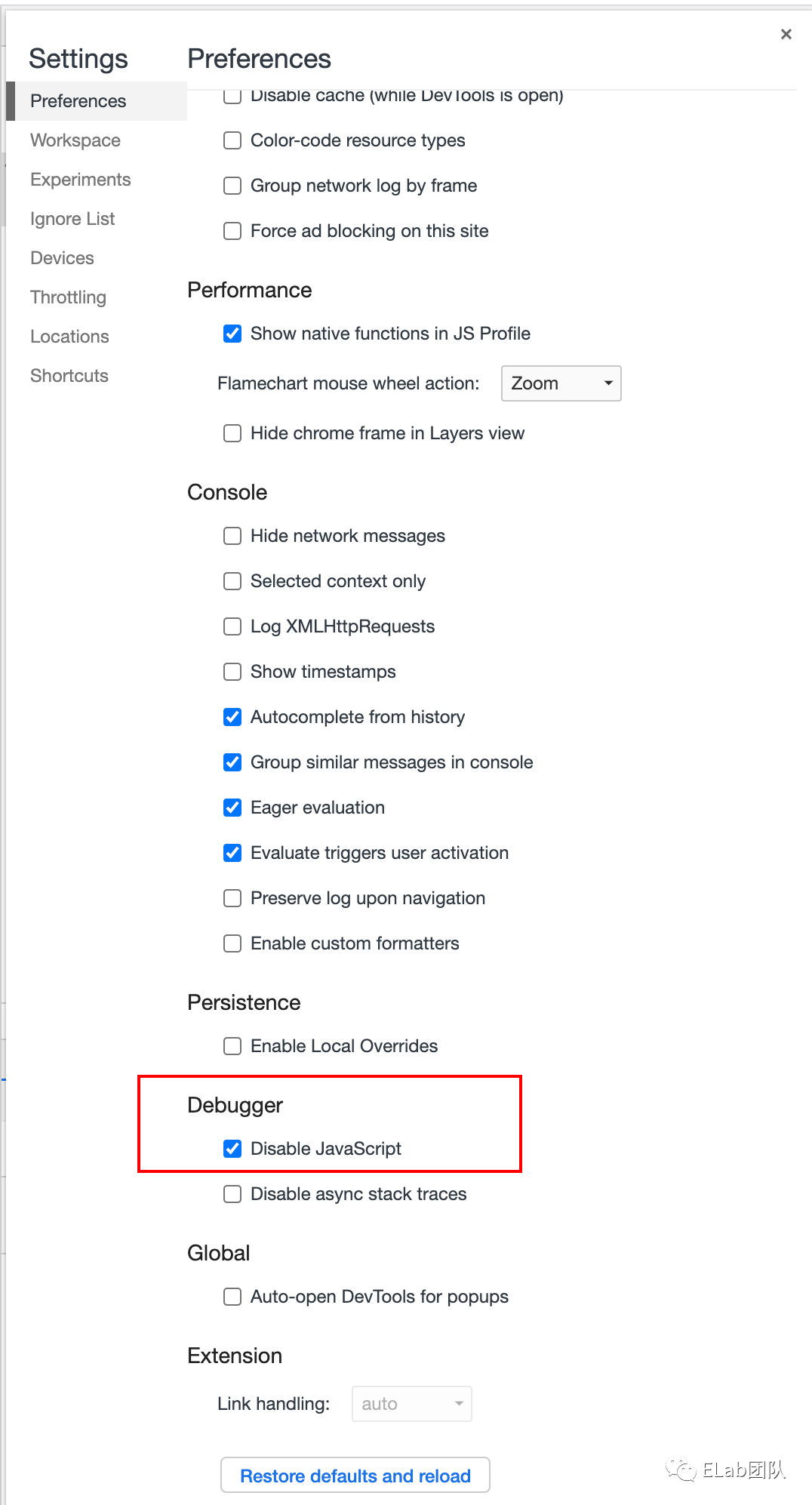
當(dāng)然,設(shè)置了MutationObserver之后也只是相對(duì)安全了一些,還是可以通過控制臺(tái)禁用js來(lái)跳過我們的監(jiān)聽,總體來(lái)說(shuō)在單純的在前端頁(yè)面上加水印總是可以通過一些騷操作來(lái)跳過的,防君子不防小人,防外行不防內(nèi)行
4. 圖片加水印
有時(shí)我們需要在圖片上加水印用來(lái)標(biāo)示歸屬或者其他信息,在圖片上加水印的實(shí)現(xiàn)思路是,圖片加載成功后畫到canvas中,隨后在canvas中繪制水印,完成后通過canvas.toDataUrl()方法獲得base64并替換原來(lái)的圖片路徑
代碼實(shí)現(xiàn):
<!DOCTYPE html>
<html>
    <head>
        <meta charset="utf-8">
        <title></title>
    </head>
    <body>
    <div id="info" onclick="alert(1)">
        <img />
    </div>
    <script>
       (function() {
         function __picWM({
           url = '',
           textAlign = 'center',
           textBaseline = 'middle',
           font = "20px Microsoft Yahei",
           fillStyle = 'rgba(184, 184, 184, 0.8)',
           content = '水印',
           cb = null,
           textX = 100,
           textY = 30
         } = {}) {
           const img = new Image();
           img.src = url;
           img.crossOrigin = 'anonymous';
           img.onload = function() {
                 const canvas = document.createElement('canvas');
                 canvas.width = img.width;
                 canvas.height = img.height;
                 const ctx = canvas.getContext('2d');

                 ctx.drawImage(img, 0, 0);
                 ctx.textAlign = textAlign;
                 ctx.textBaseline = textBaseline;
                 ctx.font = font;
                 ctx.fillStyle = fillStyle;
                 ctx.fillText(content, img.width - textX, img.height - textY);

                 const base64Url = canvas.toDataURL();
                 cb && cb(base64Url);
           }
         }

        if (typeof module != 'undefined' && module.exports) {  //CMD
           module.exports = __picWM;
         } else if (typeof define == 'function' && define.amd) { // AMD
           define(function () {
                 return __picWM;
           });
         } else {
           window.__picWM = __picWM;
         }

       })();

       // 調(diào)用
       __picWM({
           url: './a.png',
           content: '水印水印',
           cb: (base64Url) => {
                 document.querySelector('img').src = base64Url
           },
       });

    </script>
    </body>
</html>
5. 拓展:圖片的隱性水印
對(duì)于圖片資源來(lái)說(shuō),顯性水印會(huì)破壞圖片的完整性,有些情況下我們想要在保留圖片原本樣式,這時(shí)可以添加隱藏水印。
簡(jiǎn)單實(shí)現(xiàn)思路是:圖片的像素信息里存儲(chǔ)著 RGB 的色值,對(duì)于RGB 分量值的小量變動(dòng),是肉眼無(wú)法分辨的,不會(huì)影響對(duì)圖片的識(shí)別,我們可以對(duì)圖片的RGB以一種特殊規(guī)則進(jìn)行小量的改動(dòng)。
通過canvas.getImageData()可以獲取到圖片的像素?cái)?shù)據(jù),首先在canvas中繪制出水印圖,獲取到其像素?cái)?shù)據(jù),然后通過canvas獲取到原圖片的像素?cái)?shù)據(jù),選定R、G、B其中一個(gè)如G,遍歷原圖片像素,將對(duì)應(yīng)水印像素有信息的像素的G都轉(zhuǎn)成奇數(shù),對(duì)應(yīng)水印像素沒有信息的像素都轉(zhuǎn)成偶數(shù),處理完后轉(zhuǎn)成base64并替換到頁(yè)面上,這時(shí)隱形水印就加好了,正常情況下看這個(gè)圖片是沒有水印的,但是經(jīng)過對(duì)應(yīng)規(guī)則(上邊例子對(duì)應(yīng)的解密規(guī)則是:遍歷圖片的像素?cái)?shù)據(jù)中對(duì)應(yīng)的G,奇數(shù)則將其rgba設(shè)置為0,255,0,偶數(shù)則設(shè)置為0,0,0)的解密處理后就可以看到水印了。
這種方式下,當(dāng)用戶采用截圖、保存圖片后轉(zhuǎn)換格式等方法獲得圖片后,圖片的色值可能是會(huì)變化的,會(huì)影響水印效果 加水印代碼實(shí)現(xiàn):
<!DOCTYPE html>
<html>
    <head>
        <meta charset="utf-8">
        <title></title>
    </head>
    <body>
        <canvas id="canvasText" width="256" height="256"></canvas>
        <canvas id="canvas" width="256" height="256"></canvas>

        <script>
            var ctx = document.getElementById('canvas').getContext('2d');
            var ctxText = document.getElementById('canvasText').getContext('2d');

            var textData;
            ctxText.font = '30px Microsoft Yahei';
            ctxText.fillText('水印', 60, 130);
            textData = ctxText.getImageData(0, 0, ctxText.canvas.width, ctxText.canvas.height).data;

            var img = new Image();
            var originalData;
            img.onload = function() {
                ctx.drawImage(img, 0, 0);
                // 獲取指定區(qū)域的canvas像素信息
                originalData = ctx.getImageData(0, 0, ctx.canvas.width, ctx.canvas.height);
                console.log(originalData);
                    mergeData(textData,'G')
                    console.log(document.getElementById('canvas').toDataURL())
            };
            img.src = './aa.jpeg';

            var mergeData = function(newData, color){
                var oData = originalData.data;
                var bit, offset;

                switch(color){
                    case 'R':
                        bit = 0;
                        offset = 3;
                        break;
                    case 'G':
                        bit = 1;
                        offset = 2;
                        break;
                    case 'B':
                        bit = 2;
                        offset = 1;
                        break;
                }

                for(var i = 0; i < oData.length; i++){
                    if(i % 4 == bit){
                        // 只處理目標(biāo)通道
                        if(newData[i + offset] === 0 && (oData[i] % 2 === 1)){
                            // 沒有水印信息的像素,將其對(duì)應(yīng)通道的值設(shè)置為偶數(shù)
                            if(oData[i] === 255){
                                oData[i]--;
                            } else {
                                oData[i]++;
                            }
                        } else if (newData[i + offset] !== 0 && (oData[i] % 2 === 0)){
                            // 有水印信息的像素,將其對(duì)應(yīng)通道的值設(shè)置為奇數(shù)
                            if(oData[i] === 255){
                                oData[i]--;
                            } else {
                                oData[i]++;
                            }
                        }
                    }
                }
                ctx.putImageData(originalData, 0, 0);
            }

        </script>
    </body>
</html>
顯示水印代碼實(shí)現(xiàn):
<!DOCTYPE html>
<html>
    <head>
        <meta charset="utf-8">
        <title></title>
    </head>
    <body>
        <canvas id="canvas" width="256" height="256"></canvas>

        <script>
            var ctx = document.getElementById('canvas').getContext('2d');
            var img = new Image();
            var originalData;
            img.onload = function() {
                ctx.drawImage(img, 0, 0);
                // 獲取指定區(qū)域的canvas像素信息
                originalData = ctx.getImageData(0, 0, ctx.canvas.width, ctx.canvas.height);
                console.log(originalData);
                    processData(originalData)
            };
            img.src = './a.jpg';

            var processData = function(originalData){
                var data = originalData.data;
                for(var i = 0; i < data.length; i++){
                    if(i % 4 == 1){
                        if(data[i] % 2 === 0){
                            data[i] = 0;
                        } else {
                            data[i] = 255;
                        }
                    } else if(i % 4 === 3){
                        // alpha通道不做處理
                        continue;
                    } else {
                        // 關(guān)閉其他分量,不關(guān)閉也不影響答案,甚至更美觀 o(^▽^)o
                        data[i] = 0;
                    }
                }
                // 將結(jié)果繪制到畫布
                ctx.putImageData(originalData, 0, 0);
            }

        </script>
    </body>
</html>
這是一種比較簡(jiǎn)單的實(shí)現(xiàn)方式,有興趣想要了解更多的可以參看https://juejin.cn/post/6917934964202242061
四、參考文檔
1.盲水印和圖片隱寫術(shù):https://juejin.cn/post/6917934964202242061
2.不能說(shuō)的秘密-前端也能玩的圖片隱寫術(shù):http://www.alloyteam.com/2016/03/image-steganography/
3.前端水印生成方案(網(wǎng)頁(yè)水印+圖片水印):https://juejin.cn/post/6844903645155164174

回復(fù)“加群”與大佬們一起交流學(xué)習(xí)~
點(diǎn)擊“閱讀原文”查看 120+ 篇原創(chuàng)文章