
Cocos Creator實現(xiàn)FPS經(jīng)典瞄準鏡+監(jiān)視器
引言:前兩周,「Cocos Star Writer」Nowpaper 在《籠中窺夢》視錯覺效果的實現(xiàn)中使用了 RenderToTexture 技術(shù),本次 Nowpaper 將繼續(xù)拓展 RenderToTexture 的使用法。
RenderToTexture 是個非常有趣的技術(shù),它能夠?qū)⒁粋€攝像機畫面渲染成紋理,然后和材質(zhì)結(jié)合,讓某一個 Mesh 顯示成指定的畫面。在游戲開發(fā)中,它被廣泛用于實現(xiàn)鏡子、監(jiān)視器畫面、瞄準鏡、傳送門,甚至用戶界面顯示、動態(tài)紋理噴涂等。
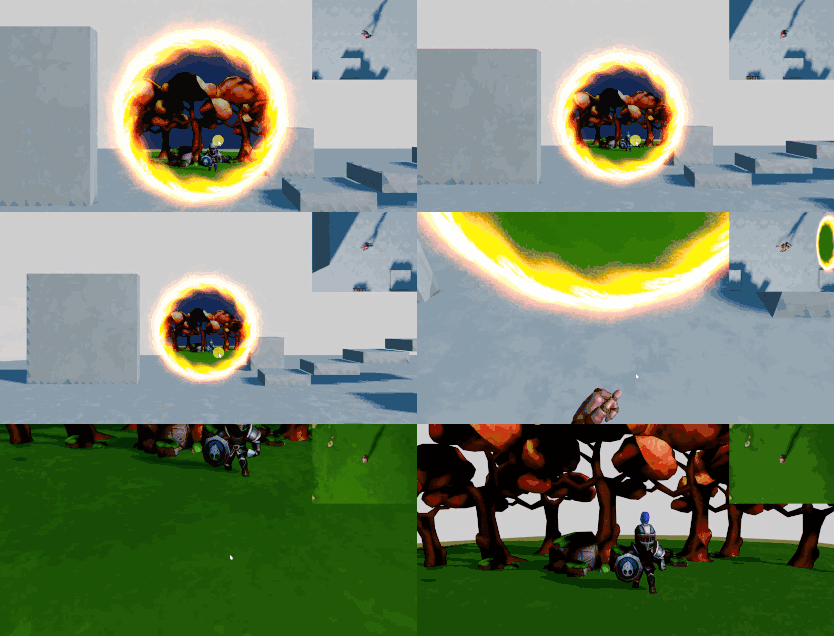
在 Cocos Creator 3.4 以后的版本中,RenderToTexture 技術(shù)已經(jīng)相對完善,使用起來也更加方便。在我之前的傳送門分享中,傳送門里的畫面就使用了這個技術(shù)來實現(xiàn),當時還得寫一些代碼,而現(xiàn)在只需要在編輯器中編輯,就可以輕松實現(xiàn)可渲染紋理了。
今天我們將繼續(xù)拓展一下,使用 RenderToTexture 做一個瞄準鏡以及顯示指定攝像機的畫面監(jiān)視器。
PS.源碼和視頻教程見文末。本次使用的是 v3.5。
準備
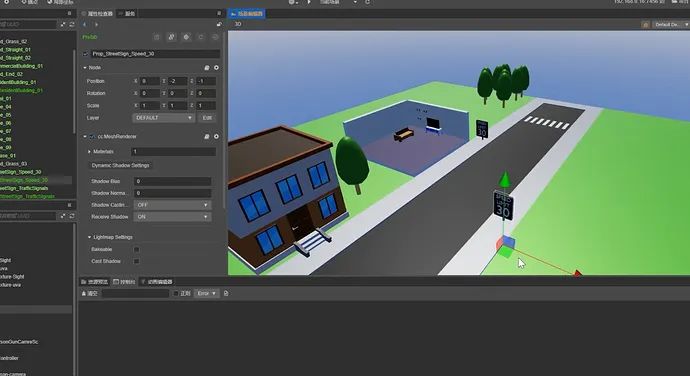
首先新建一個項目并搭建游戲場景。我這里就搭建一個簡單的街道,包含一些物體,讓場景看起來稍微不那么單調(diào)。
瞄準鏡
一般來說當角色瞄準的時候,我們可以看到在鏡頭中,顯示的畫面被放大,視覺更加前向。
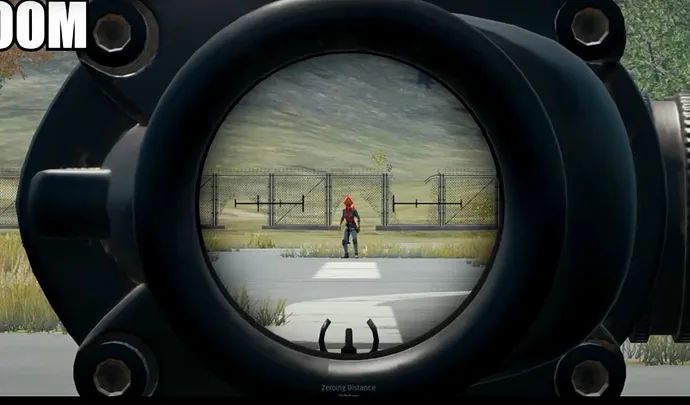
這個效果的原理其實就是:在槍械的瞄準位置增加一個攝像機,然后將攝像機的畫面渲染到一個紋理上。
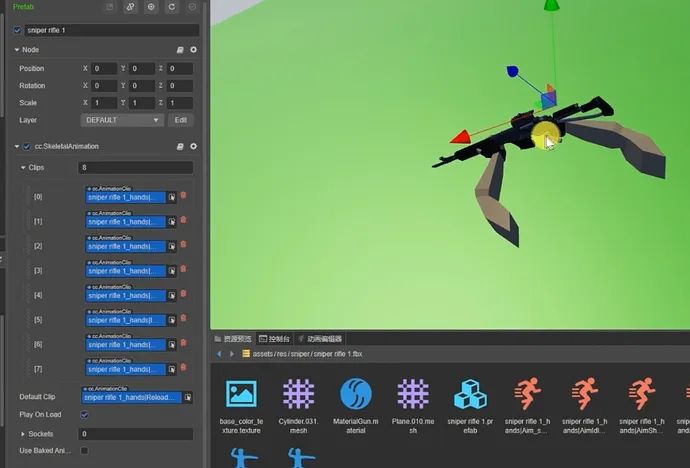
這樣的話事情就簡單了。我準備了一個槍械,它帶有瞄準動畫,現(xiàn)在為他增加一個第一人稱攝像機,通過調(diào)整讓它看起來比較合適。
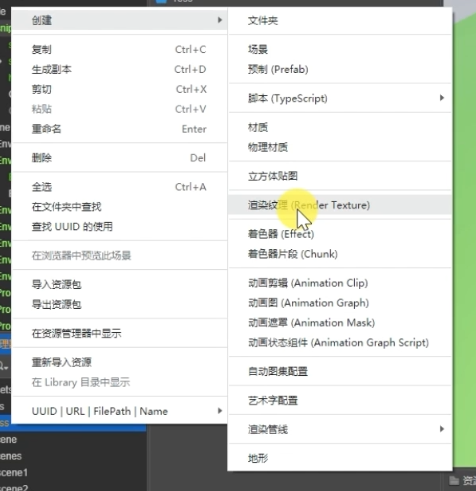
現(xiàn)在新建一個可渲染紋理:
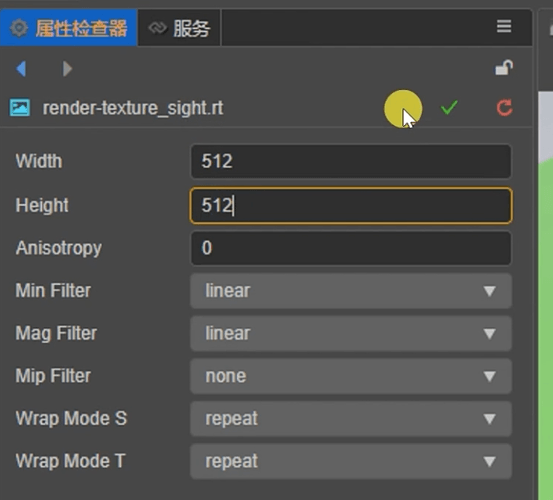
圖像寬高數(shù)值默認都是1,這個需要我們依據(jù)自己的情況作修改,通常是按照視口的大小比例來調(diào)整。如果要想完美適配的話,最好是代碼中作一些控制,在這里我們就直接使用 512x512:
現(xiàn)在再創(chuàng)建一個材質(zhì):
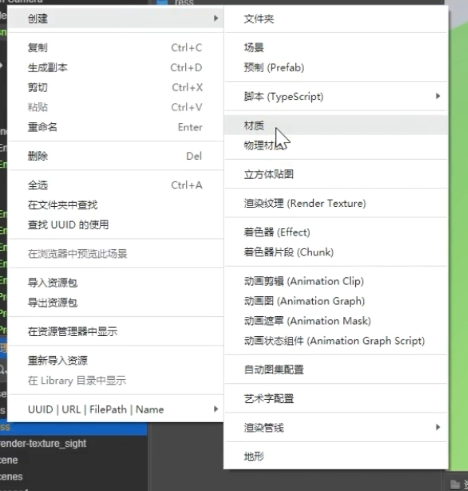
著色器選擇為內(nèi)置-unlit:
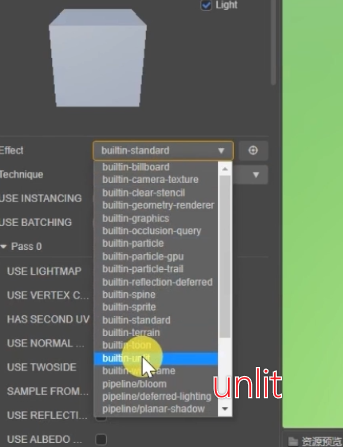
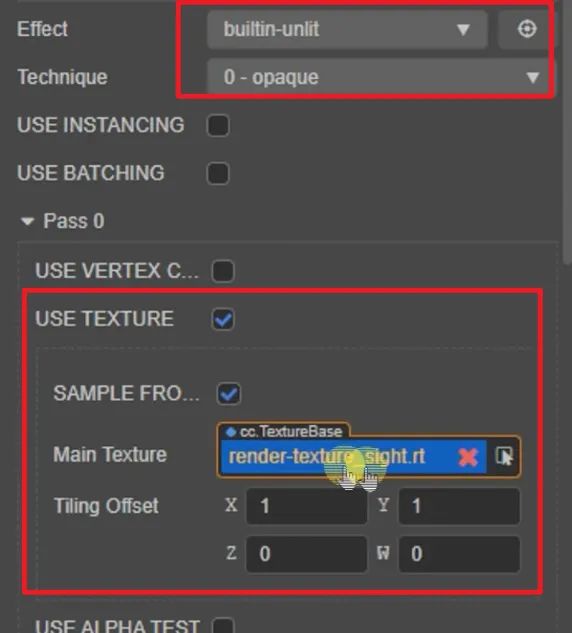
開啟 UseTexture,勾選 RTTexture 選項,將剛剛新建的可渲染紋理拖動進下面的引用中:
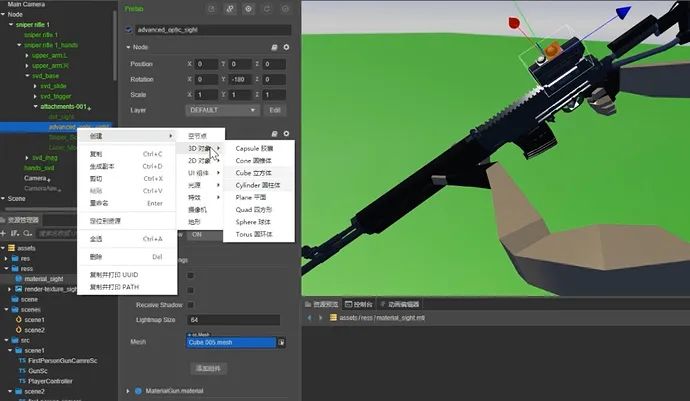
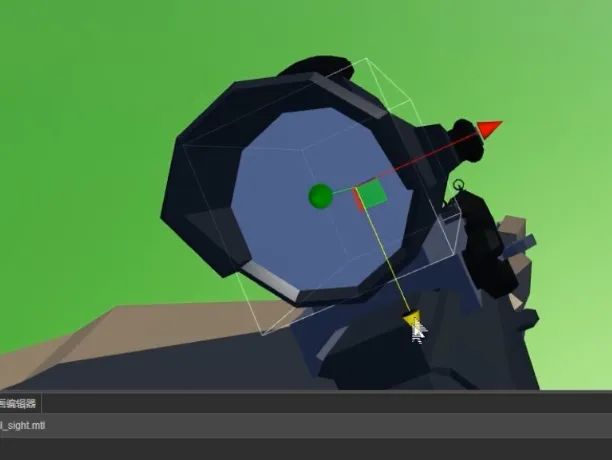
現(xiàn)在為瞄準鏡建立一個圓形面片。一般來說建模師會提供一個,在這里我們就直接自己放個圓柱形,通過節(jié)點調(diào)整到對應(yīng)的 Node 中:
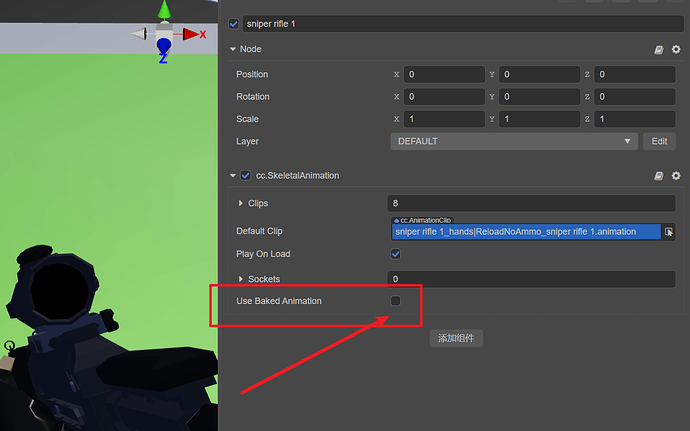
現(xiàn)在選擇槍械的動畫,去掉動畫預(yù)烘培:
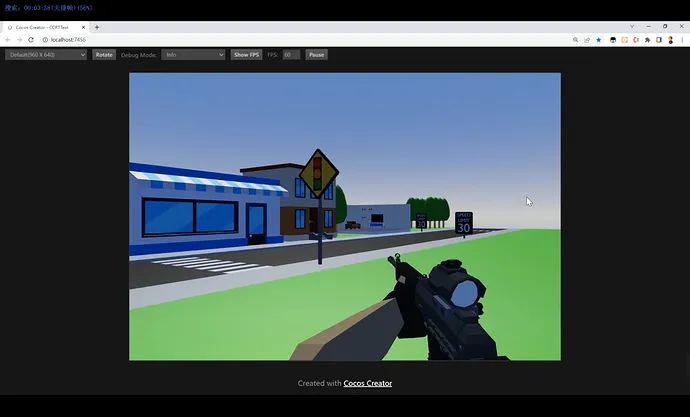
關(guān)于動畫控制腳本,在這里就不提供了,播放 Animation 的指定動畫即可:
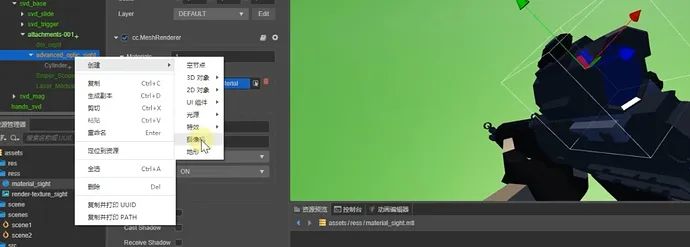
選擇這個圓柱,將它的材質(zhì)更換為剛剛創(chuàng)建的瞄準鏡材質(zhì):
接下來在瞄準組件中添加一個攝像機,并且調(diào)整好位置,拍攝倍率直接修改 Fov 數(shù)值即可:
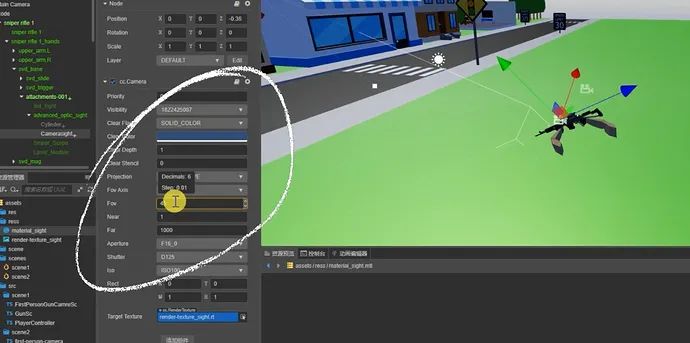
根據(jù)攝像機預(yù)覽畫面,調(diào)整好數(shù)值以后,往下拉到最下面,在 RenderToTexture 中,將之前建立的名為「瞄準鏡」的可渲染紋理,拖進其中:
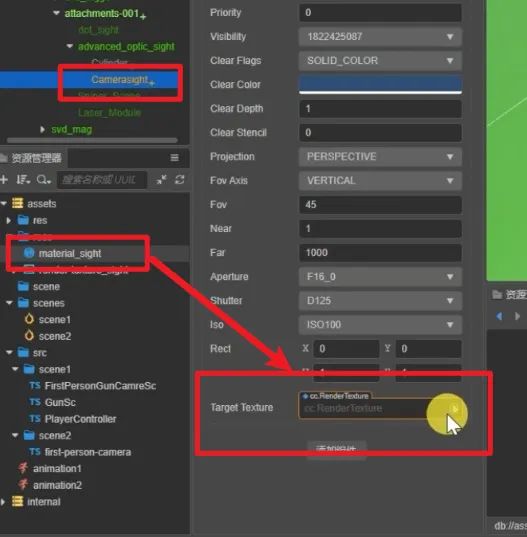
如果一切順利,我們可能直接就在編輯器中看到效果。現(xiàn)在運行一下(我這里使用了自定義腳本,讓瞄準的動作看起來更加準確),你可以看到在瞄準鏡中已經(jīng)有了放大的畫面,我們再走動一下瞄準不同的地方試試:
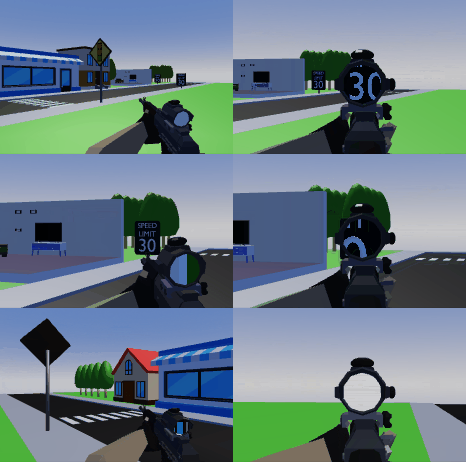
到此為止,瞄準鏡的實現(xiàn)就已經(jīng)搞定了,是不是很簡單呢,下面我們試一下監(jiān)視器效果。
監(jiān)視器
在很多游戲中,玩家可以通過監(jiān)視器屏幕看到攝像頭傳來的數(shù)據(jù),這類效果同樣也是使用 RenderToTexture 實現(xiàn)。本次我們將做一個無人機控制板+一個街頭的攝像機。
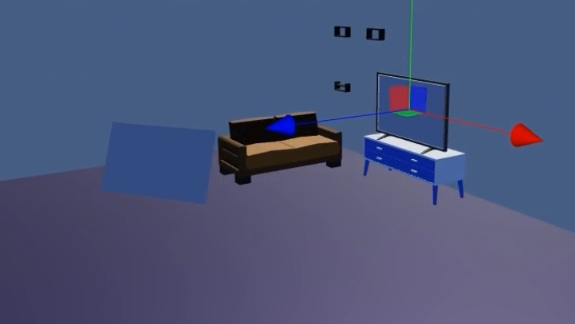
同樣也是使用前面搭建的街景,在這個房間場景中,我們用一個框框來表示無人機控制板;而監(jiān)視器的畫面則直接投射到電視中。完成了這兩個后,將空間中的面片放置到準確位置,并且放置一個攝像機觀察場景:
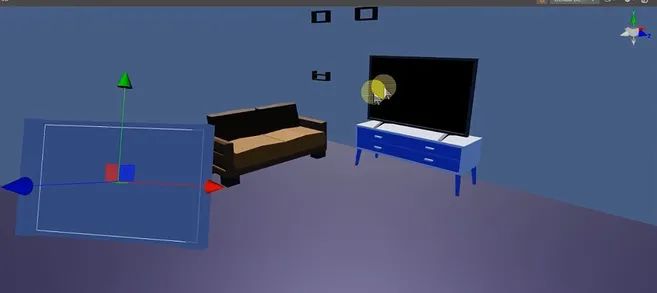
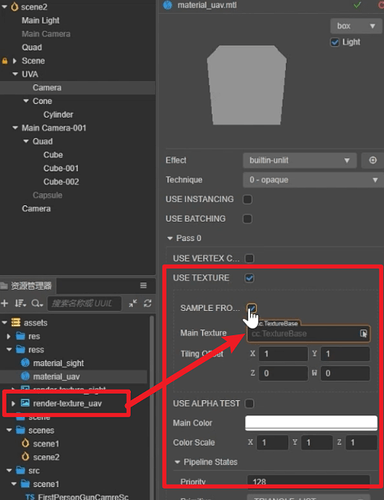
新建一個可渲染紋理,命名為「無人機」,同樣建立一個材質(zhì),著色器選內(nèi)置-unlit,然后選擇 UseTexture,勾選 RT,下面選擇對應(yīng)的可渲染紋理。這里我們就不新建監(jiān)視器的渲染紋理和材質(zhì)了,直接使用之前瞄準鏡的即可:
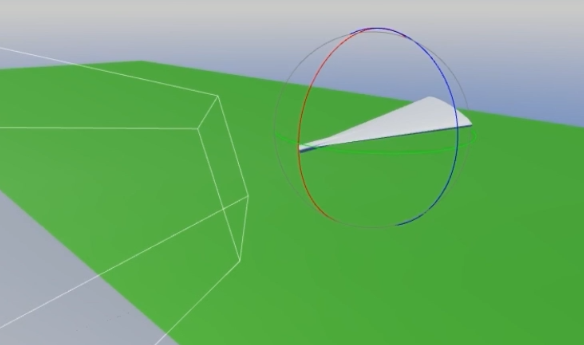
現(xiàn)在分別建立兩個攝像機,為方便觀察將無人機簡單做成一個小飛機的樣子:
然后將街頭攝像機擺好俯視即可,適當?shù)刈饕恍┠_本完成控制,這些腳本如下:
first-person-camera.ts 來自官方例子工程:
import?{?_decorator,?Component,?math,?systemEvent,?SystemEvent,?KeyCode,?game,?cclegacy,?Touch,?EventKeyboard,?EventMouse?}?from?"cc";
const?{?ccclass,?property,?menu?}?=?_decorator;
const?v2_1?=?new?math.Vec2();
const?v2_2?=?new?math.Vec2();
const?v3_1?=?new?math.Vec3();
const?qt_1?=?new?math.Quat();
const?id_forward?=?new?math.Vec3(0,?0,?1);
const?KEYCODE?=?{
?W:?'W'.charCodeAt(0),
?S:?'S'.charCodeAt(0),
?A:?'A'.charCodeAt(0),
?D:?'D'.charCodeAt(0),
?Q:?'Q'.charCodeAt(0),
?E:?'E'.charCodeAt(0),
?w:?'w'.charCodeAt(0),
?s:?'s'.charCodeAt(0),
?a:?'a'.charCodeAt(0),
?d:?'d'.charCodeAt(0),
?q:?'q'.charCodeAt(0),
?e:?'e'.charCodeAt(0),
?SHIFT:?KeyCode.SHIFT_LEFT?,
};

@ccclass("COMMON.FirstPersonCamera")
@menu("common/FirstPersonCamera")
export?class?FirstPersonCamera?extends?Component?{

?@property
?moveSpeed?=?1;

?@property
?moveSpeedShiftScale?=?5;

?@property({?slide:?true,?range:?[0.05,?0.5,?0.01]?})
?damp?=?0.2;

?@property
?rotateSpeed?=?1;

?_euler?=?new?math.Vec3();
?_velocity?=?new?math.Vec3();
?_position?=?new?math.Vec3();
?_speedScale?=?1;

?onLoad()?{
??math.Vec3.copy(this._euler,?this.node.eulerAngles);
??math.Vec3.copy(this._position,?this.node.position);
?}

?onDestroy()?{
??this._removeEvents();
?}

?onEnable()?{
??this._addEvents();
?}

?onDisable()?{
??this._removeEvents();
?}
?update(dt:?number)?{
??//?position
??math.Vec3.transformQuat(v3_1,?this._velocity,?this.node.rotation);
??math.Vec3.scaleAndAdd(this._position,?this._position,?v3_1,?this.moveSpeed?*?this._speedScale);
??math.Vec3.lerp(v3_1,?this.node.position,?this._position,?dt?/?this.damp);
??this.node.setPosition(v3_1);
??//?rotation
??math.Quat.fromEuler(qt_1,?this._euler.x,?this._euler.y,?this._euler.z);
??math.Quat.slerp(qt_1,?this.node.rotation,?qt_1,?dt?/?this.damp);
??this.node.setRotation(qt_1);
?}

?private?_addEvents()?{
??systemEvent.on(SystemEvent.EventType.MOUSE_WHEEL,?this.onMouseWheel,?this);
??systemEvent.on(SystemEvent.EventType.KEY_DOWN,?this.onKeyDown,?this);
??systemEvent.on(SystemEvent.EventType.KEY_UP,?this.onKeyUp,?this);
??systemEvent.on(SystemEvent.EventType.TOUCH_MOVE,?this.onTouchMove,?this);
??systemEvent.on(SystemEvent.EventType.TOUCH_END,?this.onTouchEnd,?this);
?}

?private?_removeEvents()?{
??systemEvent.off(SystemEvent.EventType.MOUSE_WHEEL,?this.onMouseWheel,?this);
??systemEvent.off(SystemEvent.EventType.KEY_DOWN,?this.onKeyDown,?this);
??systemEvent.off(SystemEvent.EventType.KEY_UP,?this.onKeyUp,?this);
??systemEvent.off(SystemEvent.EventType.TOUCH_MOVE,?this.onTouchMove,?this);
??systemEvent.off(SystemEvent.EventType.TOUCH_END,?this.onTouchEnd,?this);
?}

?onMouseWheel(e:?EventMouse)?{
??const?delta?=?-e.getScrollY()?*?this.moveSpeed?/?24;?//?delta?is?positive?when?scroll?down
??math.Vec3.transformQuat(v3_1,?id_forward,?this.node.rotation);
??math.Vec3.scaleAndAdd(v3_1,?this.node.position,?v3_1,?delta);
??this.node.setPosition(v3_1);
?}

?onKeyDown(e:?EventKeyboard)?{
??const?v?=?this._velocity;
??if?(e.keyCode?===?KEYCODE.SHIFT)?{?this._speedScale?=?this.moveSpeedShiftScale;?}
??else?if?(e.keyCode?===?KEYCODE.W?||?e.keyCode?===?KEYCODE.w)?{?if?(v.z?===?0)?{?v.z?=?-1;?}?}
??else?if?(e.keyCode?===?KEYCODE.S?||?e.keyCode?===?KEYCODE.s)?{?if?(v.z?===?0)?{?v.z?=?1;?}?}
??else?if?(e.keyCode?===?KEYCODE.A?||?e.keyCode?===?KEYCODE.a)?{?if?(v.x?===?0)?{?v.x?=?-1;?}?}
??else?if?(e.keyCode?===?KEYCODE.D?||?e.keyCode?===?KEYCODE.d)?{?if?(v.x?===?0)?{?v.x?=?1;?}?}
??else?if?(e.keyCode?===?KEYCODE.Q?||?e.keyCode?===?KEYCODE.q)?{?if?(v.y?===?0)?{?v.y?=?-1;?}?}
??else?if?(e.keyCode?===?KEYCODE.E?||?e.keyCode?===?KEYCODE.e)?{?if?(v.y?===?0)?{?v.y?=?1;?}?}
?}

?onKeyUp(e:?EventKeyboard)?{
??const?v?=?this._velocity;
??if?(e.keyCode?===?KEYCODE.SHIFT)?{?this._speedScale?=?1;?}
??else?if?(e.keyCode?===?KEYCODE.W?||?e.keyCode?===?KEYCODE.w)?{?if?(v.z?0)?{?v.z?=?0;?}?}
??else?if?(e.keyCode?===?KEYCODE.S?||?e.keyCode?===?KEYCODE.s)?{?if?(v.z?>?0)?{?v.z?=?0;?}?}
??else?if?(e.keyCode?===?KEYCODE.A?||?e.keyCode?===?KEYCODE.a)?{?if?(v.x?0)?{?v.x?=?0;?}?}
??else?if?(e.keyCode?===?KEYCODE.D?||?e.keyCode?===?KEYCODE.d)?{?if?(v.x?>?0)?{?v.x?=?0;?}?}
??else?if?(e.keyCode?===?KEYCODE.Q?||?e.keyCode?===?KEYCODE.q)?{?if?(v.y?0)?{?v.y?=?0;?}?}
??else?if?(e.keyCode?===?KEYCODE.E?||?e.keyCode?===?KEYCODE.e)?{?if?(v.y?>?0)?{?v.y?=?0;?}?}
?}

?onTouchMove(e:?Touch)?{
??e.getStartLocation(v2_1);
??if?(v2_1.x?>?cclegacy.winSize.width?*?0.4)?{?//?rotation
???e.getDelta(v2_2);
???this._euler.y?-=?v2_2.x?*?0.5;
???this._euler.x?+=?v2_2.y?*?0.5;
??}?else?{?//?position
???e.getLocation(v2_2);
???math.Vec2.subtract(v2_2,?v2_2,?v2_1);
???this._velocity.x?=?v2_2.x?*?0.01;
???this._velocity.z?=?-v2_2.y?*?0.01;
??}
?}

?onTouchEnd(e:?Touch)?{
??e.getStartLocation(v2_1);
??if?(v2_1.x?0.4)?{?//?position
???this._velocity.x?=?0;
???this._velocity.z?=?0;
??}
?}

?changeEnable()?{
??this.enabled?=?!this.enabled;
?}
}
PlayerController.ts:
import?{?_decorator,?Component,?Node,?KeyCode,?EventKeyboard,?RigidBody,?Vec3,?v3,?input,?Input?}?from?'cc';
const?{?ccclass,?property?}?=?_decorator;


@ccclass('PlayerController')
export?class?PlayerController?extends?Component?{
????@property
????moveSpeed?=?10;
????@property
????rotSpeed?=?90;
????private?keyMap?=?{};
????start()?{
????????
????????input.on(Input.EventType.KEY_DOWN,this.onKeyDown,this);
????????input.on(Input.EventType.KEY_UP,this.onKeyUp,this);
????}
????setRotSpeed(value){
????????this.rotSpeed?=?value;
????}
????private?onKeyDown(e:?EventKeyboard)?{
????????this.keyMap[e.keyCode]?=?true;
????}
????private?onKeyUp(e:?EventKeyboard)?{
????????this.keyMap[e.keyCode]?=?false;
????}
????private?vec3:Vec3?=?v3();
????update(deltaTime:?number)?{????????
????????if?(this.keyMap[KeyCode.KEY_W])?{
????????????Vec3.add(this.vec3,this.node.position,this.node.forward.clone().multiplyScalar(-this.moveSpeed?*?deltaTime));
????????????this.node.position?=?this.vec3;?
????????}?else?if?(this.keyMap[KeyCode.KEY_S])?{
????????????Vec3.add(this.vec3,this.node.position,this.node.forward.clone().multiplyScalar(this.moveSpeed?*?deltaTime));
????????????this.node.position?=?this.vec3;?
????????}else?{
????????}
????????if?(this.keyMap[KeyCode.KEY_A])?{
????????????this.node.setRotationFromEuler(0,this.node.eulerAngles.y?+?deltaTime?*?this.rotSpeed,0);
????????}else?if?(this.keyMap[KeyCode.KEY_D])?{
????????????this.node.setRotationFromEuler(0,this.node.eulerAngles.y?+?deltaTime?*?-this.rotSpeed,0);
????????}
????}
}
FirstPersonGunCamreSc.ts:
import?{?_decorator,?Component,?Node,?CCObject,?Vec3,?Quat,?tween,?Camera?}?from?'cc';
const?{?ccclass,?property?}?=?_decorator;

@ccclass('FirstPersonGunCamreSc')
export?class?FirstPersonGunCamreSc?extends?Component?{
????private?original_position:Vec3;
????@property(Camera)
????aniCamera:Camera?=?null;
????start()?{
????????this.original_position?=?this.node.position.clone();
????}
????aim(){
????????tween(this.node).to(0.3,{position:this.aniCamera.node.position}).start();
????????tween(this.getComponent(Camera)).to(0.3,{fov:this.aniCamera.fov}).start();
????}
????unAim(){
????????tween(this.node).to(0.3,{position:this.original_position}).start();
????????tween(this.getComponent(Camera)).to(0.3,{fov:45}).start();
????}
????update(deltaTime:?number)?{
????????
????}
}
GunSc.ts:
import?{?_decorator,?Component,?Node,?SkeletalAnimation,?input,?Input,?EventKeyboard,?misc,?KeyCode?}?from?'cc';
import?{?FirstPersonGunCamreSc?}?from?'./FirstPersonGunCamreSc';
import?{?PlayerController?}?from?'./PlayerController';
const?{?ccclass,?property?}?=?_decorator;

@ccclass('GunSc')
export?class?GunSc?extends?Component?{

????@property(SkeletalAnimation)
????gunSA:SkeletalAnimation?=?null;
????@property(FirstPersonGunCamreSc)
????FirstPersonGunCam:FirstPersonGunCamreSc?=?null;
????
????start()?{
????????this.playIndex(5);
????????input.on(Input.EventType.KEY_DOWN,this.onKeyDown,this);
????}
????private?_isaim?=?false;
????private?onKeyDown(e:EventKeyboard){
????????if(e.keyCode?==?KeyCode.SPACE){
????????????this._isaim?=?!this._isaim;
????????????if(this._isaim){
????????????????this.aim();
????????????}else{
????????????????this.unAim();
????????????}
????????}
????}
????
????update(deltaTime:?number)?{
????????
????}
????private?playIndex(index)?{
????????const?animatname?=?this.gunSA.clips[index].name;
????????this.gunSA.play(animatname);
????????this.gunSA.crossFade(animatname);
????????
????}
????aim(){
????????this.FirstPersonGunCam.aim();
????????this.playIndex(1);
????????this.getComponent(PlayerController)?.setRotSpeed(30);
????}
????unAim(){
????????this.playIndex(5);
????????this.FirstPersonGunCam.unAim();
????????this.getComponent(PlayerController)?.setRotSpeed(90);
????}
}
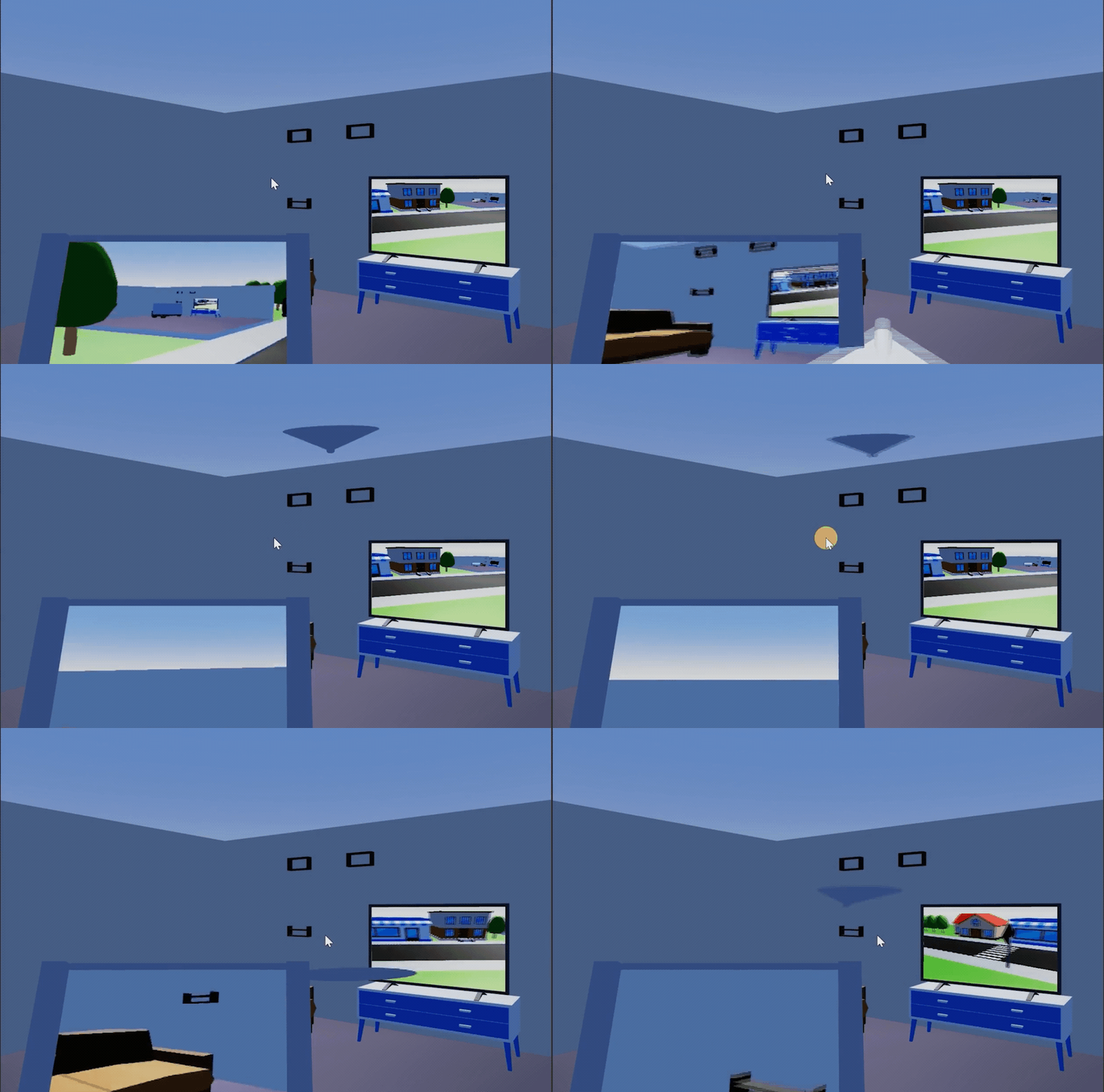
現(xiàn)在給攝像機上添加渲染紋理,為監(jiān)視器添加對應(yīng)的材質(zhì)。如此一來,我們在電視上看到了街頭監(jiān)視器畫面,而屏幕左邊則投射了無人機畫面。由于有控制腳本,我們可以控制它到處飛行一下,看看效果:
資源鏈接
源碼下載丨Cocos Store:
https://store.cocos.com/app/detail/3803
視頻教程(UP 主:Nowpaper)
https://www.bilibili.com/video/BV1S34y1j7Ha
論壇討論帖:
https://forum.cocos.org/t/topic/136021
今天的文章就到這里,我是 Nowpaper,一個混跡游戲行業(yè)的老爸,如果您喜歡我的分享,不妨多多點贊留言,也歡迎關(guān)注我的 B 站,您的支持是我更新的動力,下次再見!
Nowpaper 往期分享
Cocos Store 正在舉辦618大促活動,超低優(yōu)惠
還有Cocos周邊實物禮品贈送!