
NLP(五十五)LangChain入門
LangChain簡介
背景
??由于ChatGPT的發(fā)行,大模型(Large Language Model, LLM)已經(jīng)變得非常流行了。也許你可能沒有足夠的資金和計算資源從頭開始訓(xùn)練大模型,但你仍然可以使用大模型來做一些比較酷的事情,比如:
個人助理:能基于你的數(shù)據(jù)與外部世界進行互動交流
對話機器人:適合你個人使用偏好的對話機器人
分析總結(jié):對文檔或代碼進行分析和總結(jié)
??通過各式各樣的API和提示工程(Prompt Engineering),大模型正在改變我們創(chuàng)建基于AI開發(fā)的產(chǎn)品的方式。這正是為什么在LLM背景下,現(xiàn)在到處都在出現(xiàn)新的開發(fā)者工具,這就有了一個新的專業(yè)術(shù)語:LLMOps(類似的專業(yè)術(shù)語為DevOps)。
??其中的一個新工具就是LangChain。
LangChain介紹
??LangChain是一個基于語言模型的應(yīng)用開發(fā)框架。它在提升應(yīng)用方面的作用為:
數(shù)據(jù)感知:可以使用其它數(shù)據(jù)資源來連接一個語言模型
代理式的:允許一個語言模型與它的環(huán)境進行互動
??LangChain的主要道具為:
分支(Components):對如何使用語言模型來進行工作的摘要,每個摘要都有一個執(zhí)行操作的集合。分支是模塊化的,容易使用的,不管你是否在使用LangChain框架的剩余部分。
現(xiàn)成的鏈(Chains):用于完成特定更高階任務(wù)的分支的結(jié)構(gòu)化組裝
現(xiàn)成的鏈使得它容易上手。對于更復(fù)雜的應(yīng)用和細致的使用案例,分支使得它容易去適應(yīng)現(xiàn)有的鏈或創(chuàng)建新的鏈。
LangChain能做什么
??LangChain 提供了六個主要模塊的支持,這些模塊按照逐漸增加的復(fù)雜性排列如下:
模型(models) : LangChain 支持的各種模型類型和模型集成。
提示(prompts) : 包括提示管理、提示優(yōu)化和提示序列化。
內(nèi)存(memory) : 內(nèi)存是在鏈/代理調(diào)用之間保持狀態(tài)的概念。LangChain 提供了一個標準的內(nèi)存接口、一組內(nèi)存實現(xiàn)及使用內(nèi)存的鏈/代理示例。
索引(indexes) : 與您自己的文本數(shù)據(jù)結(jié)合使用時,語言模型往往更加強大——此模塊涵蓋了執(zhí)行此操作的最佳實踐。
鏈(chains) : 鏈不僅僅是單個 LLM 調(diào)用,還包括一系列調(diào)用(無論是調(diào)用 LLM 還是不同的使用工具)。LangChain 提供了一種標準的鏈接口、許多與其它工具的集成。LangChain 提供了用于常見應(yīng)用程序的端到端的鏈調(diào)用。
代理(agents) : 代理涉及 LLM 做出行動決策、執(zhí)行該行動、查看一個觀察結(jié)果,并重復(fù)該過程直到完成。LangChain 提供了一個標準的代理接口,一系列可供選擇的代理,以及端到端代理的示例。
LangChain快速入門
??LangChain是一個由Harrison Chase開源的項目,Github訪問網(wǎng)址為:https://github.com/hwchase17/langchain .
??LangChain提供了對應(yīng)的Python第三方模塊,在安裝前,需確保你的Python版本大于等于3.8.1,小于4.0,安裝方式如下:
pip?install?langchain
??本文使用的langchain的版本為0.0.201。在開始介紹LangChain的使用前,你還需要有相關(guān)大模型的API key,比如OpenAI key等。
模型支持
??LangChain提供了一系列大模型的支持,但首先你需要這些大模型的API key。LangChain支持的大模型如下圖:
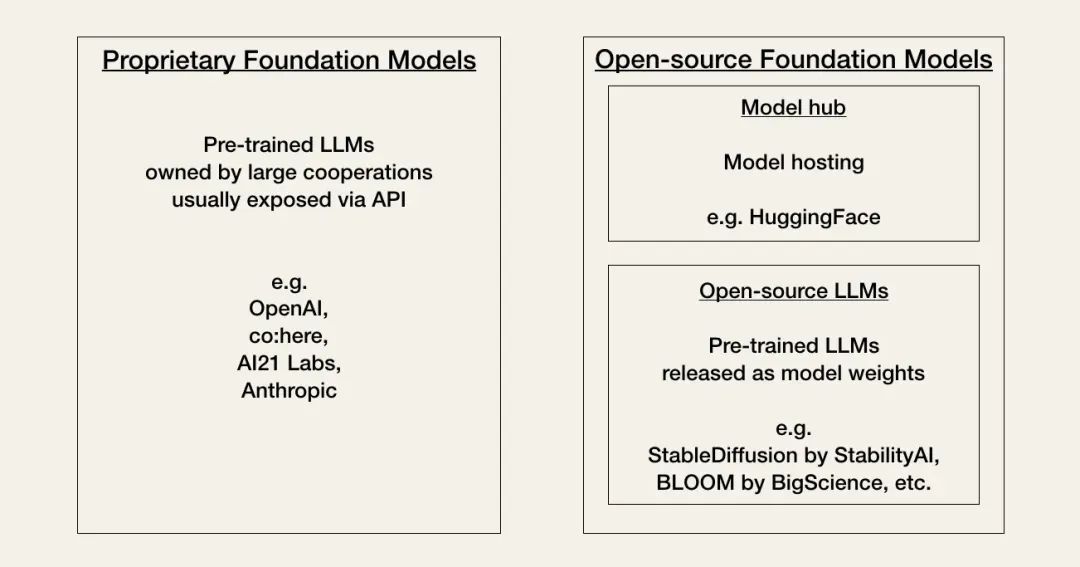
Proprietary models(私有模型):由擁有大型專業(yè)團隊和大額AI預(yù)算的公司研發(fā)的閉源模型,它們通常會比開源模型更大,且表現(xiàn)更好,但API調(diào)用較為昂貴。私有模型的提供商有OpenAI, co\:here, AI21 Labs,Anthropic等。
Open-source LLMS(開源模型):比私有模型尺寸更小,能力較差,但它們比私有模型更節(jié)省花費。開源模型的代表有BLOOM, LLaMA, Flan-T5, GPT-J等。許多開源模型已由Hugging Face提供了良好的支持。
Model Hub(模型倉庫):模型儲存的倉庫,比如Hugging Face等。
下面為langchain加載不同模型的示例代碼:
#?Proprietary?LLM?from?e.g.?OpenAI
#?pip?install?openai
from?langchain.llms?import?OpenAI
llm?=?OpenAI(model_name="text-davinci-003")

#?Alternatively,?open-source?LLM?hosted?on?Hugging?Face
#?pip?install?huggingface_hub
from?langchain?import?HuggingFaceHub
llm?=?HuggingFaceHub(repo_id="google/flan-t5-xl")
本文主要基于OpenAI進行演示,因此,如果你有OpenAI key,你將會有更好的使用langchain的體驗。
Prompt管理
??大模型的表現(xiàn)取決于Prompt(提示),一個好的Prompt可以使大模型的表現(xiàn)良好,反之,大模型的表現(xiàn)可能會不如人意。
??langchain提供了PromptTemplates, 幫助你更好地為不同的分支創(chuàng)建合理的Prompt。比如創(chuàng)建一個普通的Prompt(零樣本問題Prompt模板),Python代碼如下:
#?-*-?coding:?utf-8?-*-
from?langchain?import?PromptTemplate

template?=?"What?is?a?good?name?for?a?company?that?makes?{product}?"

prompt?=?PromptTemplate(
????input_variables=["product"],
????template=template,
)

print(prompt.format(product="colorful?socks"))
輸出結(jié)果如下:
What?is?a?good?name?for?a?company?that?makes?colorful?socks?
同樣地,langchain還提供了few-shot(少樣本)文本的Prompt模板,Python示例代碼如下:
#?-*-?coding:?utf-8?-*-
from?langchain?import?PromptTemplate,?FewShotPromptTemplate

examples?=?[
????{"word":?"happy",?"antonym":?"sad"},
????{"word":?"tall",?"antonym":?"short"},
????{"word":?"fat",?"antonym":?"thin"},
]

example_template?=?"""
->?Word:?{word}
->?Antonym:?{antonym}
"""

example_prompt?=?PromptTemplate(
????input_variables=["word",?"antonym"],
????template=example_template,
)

few_shot_prompt?=?FewShotPromptTemplate(
????examples=examples,
????example_prompt=example_prompt,
????prefix="Give?the?antonym?of?every?input",
????suffix="\n->Word:?{input}\n->Antonym:",
????input_variables=["input"],
????example_separator="\n",
)

print(few_shot_prompt.format(input="big"))
輸出結(jié)果如下:
Give?the?antonym?of?every?input

->?Word:?happy
->?Antonym:?sad


->?Word:?tall
->?Antonym:?short


->?Word:?fat
->?Antonym:?thin


->Word:?big
->Antonym:
鏈(Chains)
??langchain中的鏈描述了將大模型與其它分支組合起來創(chuàng)建一個應(yīng)用的過程。比如,LLMChain允許我們對創(chuàng)建的Prompt使用大模型,Python示例代碼(需安裝openai模塊,使用pip install openai)如下:
#?-*-?coding:?utf-8?-*-
from?langchain.llms?import?OpenAI
from?langchain.chains?import?LLMChain
from?langchain?import?PromptTemplate

#?set?api?key
import?os
os.environ["OPENAI_API_KEY"]?=?'sk-xxx'

#?install?openai?and?choose?model
llm?=?OpenAI(model_name='gpt-3.5-turbo')

#?make?prompt
template?=?"What?is?a?good?name?for?a?company?that?makes?{product}?"

prompt?=?PromptTemplate(
????input_variables=["product"],
????template=template,
)

#?chain
chain?=?LLMChain(llm=llm,?prompt=prompt)

#?Run?the?chain?only?specifying?the?input?variable.
print(chain.run("colorful?socks"))
輸出結(jié)果如下:
Rainbow?Socks?Co.
??對少樣本提示,Python示例代碼如下:
#?-*-?coding:?utf-8?-*-
from?langchain.llms?import?OpenAI
from?langchain.chains?import?LLMChain
from?langchain?import?PromptTemplate,?FewShotPromptTemplate

#?set?api?key
import?os
os.environ["OPENAI_API_KEY"]?=?'sk-xxx'

#?install?openai?and?choose?model
llm?=?OpenAI(model_name='gpt-3.5-turbo')

#?make?few-shot?prompt
examples?=?[
????{"word":?"happy",?"antonym":?"sad"},
????{"word":?"tall",?"antonym":?"short"},
????{"word":?"fat",?"antonym":?"thin"},
]

example_template?=?"""
->?Word:?{word}
->?Antonym:?{antonym}
"""

example_prompt?=?PromptTemplate(
????input_variables=["word",?"antonym"],
????template=example_template,
)

few_shot_prompt?=?FewShotPromptTemplate(
????examples=examples,
????example_prompt=example_prompt,
????prefix="Give?the?antonym?of?every?input",
????suffix="\n->Word:?{input}\n->Antonym:",
????input_variables=["input"],
????example_separator="\n",
)

#?chain
chain?=?LLMChain(llm=llm,?prompt=few_shot_prompt)

#?Run?the?chain?only?specifying?the?input?variable.
print(chain.run("big"))
輸出結(jié)果如下:
small
??如果我們想要使用之前的LLM的輸出作為當前LLM的輸入,我們可以使用SimpleSequentialChain,示例Python代碼如下:
#?-*-?coding:?utf-8?-*-
from?langchain.llms?import?OpenAI
from?langchain?import?PromptTemplate
from?langchain.chains?import?LLMChain,?SimpleSequentialChain

#?set?api?key
import?os
os.environ["OPENAI_API_KEY"]?=?'sk-xxx'

#?install?openai?and?choose?model
llm?=?OpenAI(model_name='gpt-3.5-turbo')

#?Define?the?first?chain?as?in?the?previous?code?example
template?=?"What?is?a?good?name?for?a?company?that?makes?{product}?"

prompt?=?PromptTemplate(
????input_variables=["product"],
????template=template,
)

chain?=?LLMChain(llm=llm,?prompt=prompt)

#?Create?a?second?chain?with?a?prompt?template?and?an?LLM
second_prompt?=?PromptTemplate(
????input_variables=["company_name"],
????template="Write?a?catchphrase?for?the?following?company:?{company_name}",
)

chain_two?=?LLMChain(llm=llm,?prompt=second_prompt)

#?Combine?the?first?and?the?second?chain
overall_chain?=?SimpleSequentialChain(chains=[chain,?chain_two],?verbose=True)

#?Run?the?chain?specifying?only?the?input?variable?for?the?first?chain.
catchphrase?=?overall_chain.run("colorful?socks")
print(catchphrase)
輸出結(jié)果如下:
>?Entering?new??chain...
Rainbow?Sox?Co.
"Step?up?your?sock?game?with?Rainbow?Sox?Co."

>?Finished?chain.
"Step?up?your?sock?game?with?Rainbow?Sox?Co."
LangChain高階使用
??langchain還支持更多有趣的高階使用(通過插件實現(xiàn)),比如文檔問答,天氣查詢,數(shù)學(xué)計算,基于WikaPedia的問答等等,詳細的應(yīng)用介紹的訪問網(wǎng)址為:https://python.langchain.com/docs/modules/agents/tools。本文將介紹文檔問答,天氣查詢,數(shù)學(xué)計算這三個插件應(yīng)用。
文檔問答
??眾所周知,ChatGPT的知識庫截至2021年9月,因此,ChatGPT無法回答這以后的問題,比如我們詢問ChatGPT“2022年的諾貝爾文學(xué)獎獲得者是誰?”,結(jié)果如下圖:
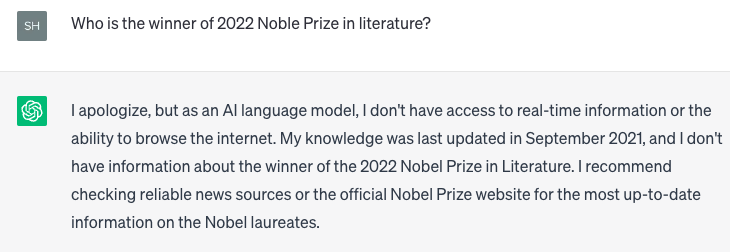
langchain的文檔閱讀允許我們將大模型與外部文檔結(jié)合起來,對文檔內(nèi)容進行回答。我們在網(wǎng)上尋找有關(guān)于2022年的諾貝爾文學(xué)獎獲得者的信息,比如網(wǎng)址:https://www.theguardian.com/books/2022/oct/06/annie-ernaux-wins-the-2022-nobel-prize-in-literature , 保存為Annie Ernaux.txt,作為ChatGPT的外部輸入文檔。
??langchain使用文檔加載器將數(shù)據(jù)加載為Document. 一個Document是一系列文本片段和相關(guān)的元數(shù)據(jù)。加載文件后有三個主要步驟:
將文檔分割成塊
為每個文檔創(chuàng)建嵌入向量
在向量庫中存儲文檔和嵌入向量
默認情況下,LangChain 使用 Chroma 作為向量存儲來索引和搜索嵌入。因此我們需要先安裝chromadb,命令為:`pip install chromadb`.
??基于此,我們可以對外部文檔進行問答,Python示例代碼:
#?-*-?coding:?utf-8?-*-
from?langchain.llms?import?OpenAI
from?langchain.document_loaders?import?TextLoader
from?langchain.indexes?import?VectorstoreIndexCreator

#?set?api?key
import?os
os.environ["OPENAI_API_KEY"]?=?'sk-xxx'

#?install?openai?and?choose?model
llm?=?OpenAI(model_name='gpt-3.5-turbo')

#?prompt?with?no?answer
prompt?=?"Who?is?the?winner?of?2022?Noble?Prize?in?literature?"
completion?=?llm(prompt)
print(completion)

#?load?other?source?data
loader?=?TextLoader('Annie?Ernaux.txt')
index?=?VectorstoreIndexCreator().from_loaders([loader])
print('index?the?document.')

#?prompt?with?answer
query?=?"Who?is?the?winner?of?2022?Noble?Prize?in?literature?"
print(index.query_with_sources(query))
輸出結(jié)果如下:
As?an?AI?language?model,?I?do?not?have?the?ability?to?predict?future?events?or?outcomes?such?as?the?winner?of?the?2022?Nobel?Prize?in?Literature.?Only?the?Nobel?Committee?can?make?such?announcements.
index?the?document.
{'question':?'Who?is?the?winner?of?2022?Noble?Prize?in?literature?',?'answer':?'?Annie?Ernaux?is?the?winner?of?the?2022?Nobel?Prize?in?Literature.\n',?'sources':?'Annie?Ernaux.txt'}
可以看到,原始的ChatGPT對于問題“Who is the winner of 2022 Noble Prize in literature?”無法給出準確答案,而加入了外部數(shù)據(jù)后,再使用文檔問答,可以準確地回答出該問題。
天氣查詢
??ChatGPT無法查詢實時信息,比如天氣、股票信息等,以下為ChatGPT回答“上海今天天氣如何?”的示例,如下圖:
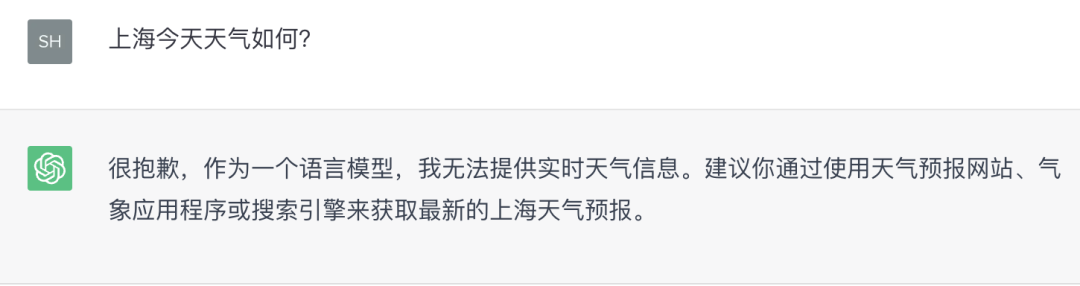
??因此,我們需要用到代理(Agents)工具
OpenWeatherMap API來獲取天氣信息。OpenWeatherMap可以獲取全世界各地的天氣信息,但首先你需要在它的官網(wǎng)上注冊并獲取OPENWEATHERMAP_API_KEY。以下為使用代理工具OpenWeatherMap API來回答天氣的Python示例代碼:
      #?-*-?coding:?utf-8?-*-
from?langchain.llms?import?OpenAI
from?langchain.agents?import?load_tools,?initialize_agent,?AgentType
from?langchain.utilities?import?OpenWeatherMapAPIWrapper
import?os

os.environ["OPENWEATHERMAP_API_KEY"]?=?"xxx"
os.environ["OPENAI_API_KEY"]?=?"sk-xxx"

#?direct?get?weather?info
weather?=?OpenWeatherMapAPIWrapper()
weather_data?=?weather.run("shanghai")
print(weather_data)

#?use?LLM?to?do?NLU
llm?=?OpenAI(temperature=0)
tools?=?load_tools(["openweathermap-api"],?llm)

agent_chain?=?initialize_agent(
????tools=tools,
????llm=llm,
????agent=AgentType.ZERO_SHOT_REACT_DESCRIPTION,
????verbose=True
)

#?get?weather?info?by?natural?language
print(agent_chain.run("今天上海天氣如何?"))
輸出結(jié)果如下:
      In?shanghai,?the?current?weather?is?as?follows:
Detailed?status:?light?rain
Wind?speed:?5?m/s,?direction:?300°
Humidity:?77%
Temperature:?
??-?Current:?28.6°C
??-?High:?29.92°C
??-?Low:?27.71°C
??-?Feels?like:?33.09°C
Rain:?{'1h':?0.69}
Heat?index:?None
Cloud?cover:?75%


>?Entering?new??chain...
?我需要查詢上海的天氣信息。
Action:?OpenWeatherMap
Action?Input:?Shanghai,CN
Observation:?In?Shanghai,CN,?the?current?weather?is?as?follows:
Detailed?status:?light?rain
Wind?speed:?5?m/s,?direction:?300°
Humidity:?77%
Temperature:?
??-?Current:?28.6°C
??-?High:?29.92°C
??-?Low:?27.71°C
??-?Feels?like:?33.09°C
Rain:?{'1h':?0.65}
Heat?index:?None
Cloud?cover:?75%
Thought:?根據(jù)上海的天氣信息,我可以得出結(jié)論。
Final Answer:?今天上海有輕度降雨,風(fēng)速為5米/秒,濕度為77%,溫度為28.6°C,最高溫度為29.92°C,最低溫度為27.71°C,體感溫度為33.09°C,降雨量為0.65毫米,云量為75%。

>?Finished?chain.
今天上海有輕度降雨,風(fēng)速為5米/秒,濕度為77%,溫度為28.6°C,最高溫度為29.92°C,最低溫度為27.71°C,體感溫度為33.09°C,降雨量為0.65毫米,云量為75%。
數(shù)學(xué)計算
??langchain提供了代理工具Wolfram Alpha來更好地進行數(shù)學(xué)計算,首先你需要在Wolfram Alpha官網(wǎng)上注冊并獲取WOLFRAM_ALPHA_APPID,然后安裝wolframalpha模塊,命令為:pip install wolframalpha.示例Python代碼如下:
      #?-*-?coding:?utf-8?-*-
import?os
import?ssl
ssl._create_default_https_context?=?ssl._create_unverified_context

os.environ["WOLFRAM_ALPHA_APPID"]?=?"xxx"

from?langchain.utilities.wolfram_alpha?import?WolframAlphaAPIWrapper

wolfram?=?WolframAlphaAPIWrapper()

#?一元一次方程
print(wolfram.run("What?is?2x+5?=?-3x+7?"))

#?一元二次方程
print(wolfram.run("What?is?x^2-5x+4=0?"))

#?多項式展開
print(wolfram.run("Expand?(x+y)^3?"))
輸出結(jié)果如下:
      Assumption:?2?x?+?5?=?-3?x?+?7?
Answer:?x?=?2/5
Assumption:?x^2?-?5?x?+?4?=?0?
Answer:?x?=?1
Assumption:?expand?|?(x?+?y)^3?
Answer:?x^3?+?3?x^2?y?+?3?x?y^2?+?y^3
總結(jié)
??本文主要介紹了LangChain,以及LangChain的模型支持、Prompt管理、鏈,并在此基礎(chǔ)上介紹了三個有趣的工具使用。
??后續(xù)筆者將會進一步介紹LangChain的使用,歡迎大家的關(guān)注~
參考文獻
-
Getting Started with LangChain: A Beginner’s Guide to Building LLM-Powered Applications: https://towardsdatascience.com/getting-started-with-langchain-a-beginners-guide-to-building-llm-powered-applications-95fc8898732c
-
LangChain Document in Python: https://python.langchain.com/docs/get_started/introduction.html
-
LangChain Agents: https://python.langchain.com/docs/modules/agents/