
Python自帶爬蟲庫urllib使用大全
回復(fù)“書籍”即可獲贈Python從入門到進(jìn)階共10本電子書
一、什么是urllib
它是一個(gè)http請求的Python自帶的標(biāo)準(zhǔn)庫,無需安裝,直接可以用。并且提供了如下功能:網(wǎng)頁請求、響應(yīng)獲取、代理和cookie設(shè)置、異常處理、URL解析,可以說是一個(gè)比較強(qiáng)大的模塊。
二、urllib模塊
可分為以下模塊:
urllib.request 請求模塊urllib.error 異常處理模塊urllib.parse 解析模塊urllib.robotparser 解析模塊
那么,我們先從第一個(gè)模塊開始說起吧,首先說一下它的大致用法:
urllib.request.urlopen(url, data=None, [timeout, ]*, cafile=None, capath=None, cadefault=False, context=None) #里面有很多方法,類似與requests模塊中的renquest方法request里包含了很多方法,如果我們要發(fā)送一個(gè)請求并讀取請求內(nèi)容,可以發(fā)送get請求。
請求格式:
urllib.request.urlopen(url,data,timeout)url :請求地址
data:請求數(shù)據(jù)
timeout:請求超時(shí)時(shí)間
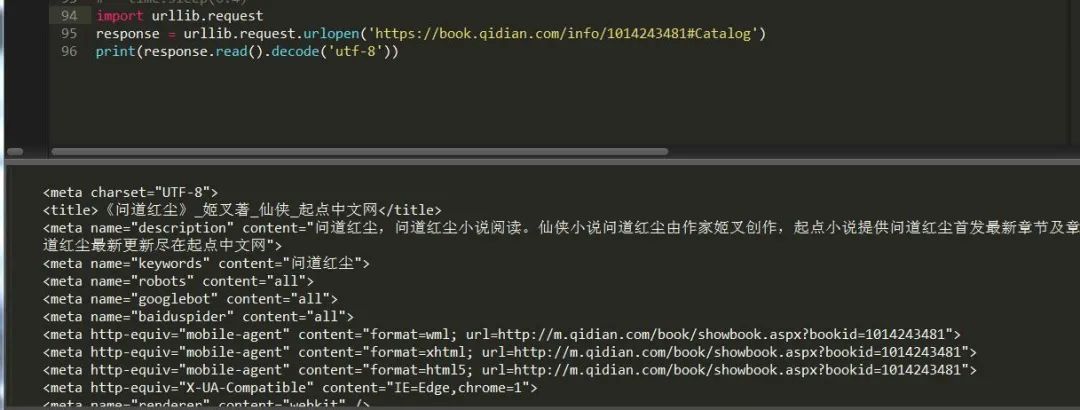
這里采用的是get請求,如果想要進(jìn)行post請求,只需給data方法傳參數(shù)即可,這里有個(gè)問題需要注意,因?yàn)閭鬟f參數(shù)必須是字節(jié),所以得先編碼成bytes才能讀取。
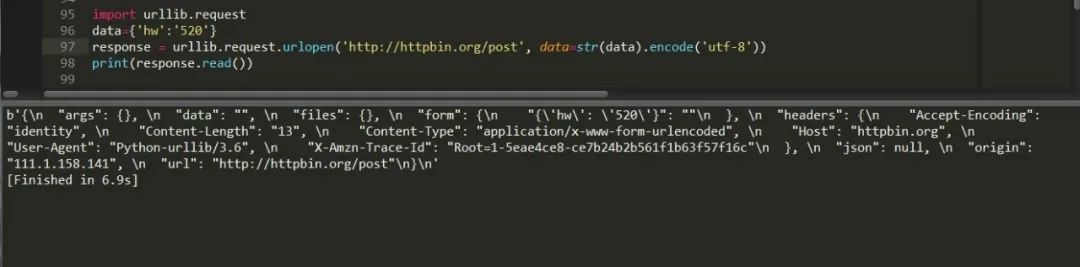
也可以這樣寫:
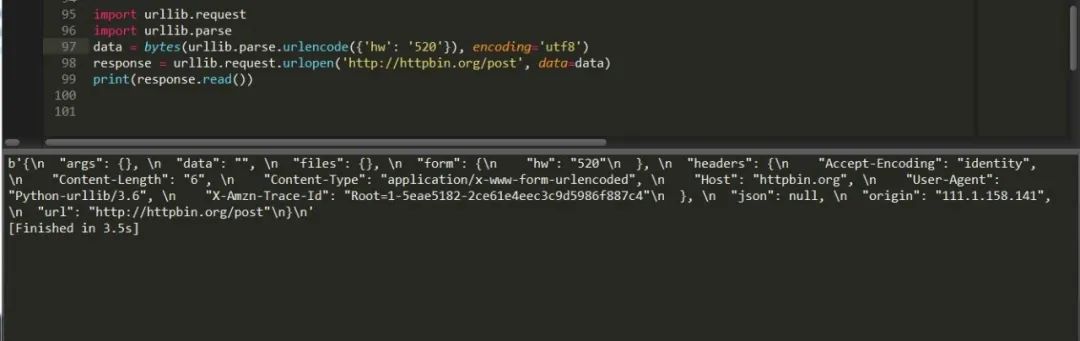
通過解析模塊先將它解析為byte格式然后讀取,同樣行之有效,這樣就完成了一次post請求。
通過上面例子我們找到了request模塊的使用方法,我們使用response.read()獲取的是響應(yīng)體的內(nèi)容,我們還可以通過response.status、response.getheaders().response.getheader("server"),獲取狀態(tài)碼以及頭部信息,如果我們要給請求的網(wǎng)址添加頭部信息的話了,就要使用urllib.request.Request方法了。
它的用法為:
urllib.request.Request(url,data,headers,timeout,method)url:請求地址
data:請求數(shù)據(jù)
headers:請求頭
timeout:請求超時(shí)時(shí)間
method:請求方法,如get post
大致了解下我們可以先來訪問下起點(diǎn)網(wǎng):
from urllib import request, parseurl = 'https://book.qidian.com/info/1014243481#Catalog'headers = {'User-Agent': 'Mozilla/5.0 (Windows NT 6.1; WOW64) AppleWebKit/537.36 (KHTML, like Gecko) Chrome/78.0.3904.108 Safari/537.36','Host': 'book.qidian.com'}data = {'hw': 'hw'}data = bytes(parse.urlencode(data), encoding='utf8')req = request.Request(url=url, data=data,timeout=2,headers=headers, method='POST')response = request.urlopen(req)print(response.read().decode('utf-8'))
可以看出這是個(gè)post請求,因?yàn)閙ethod設(shè)置為post,data傳了參數(shù)。
這里補(bǔ)充說明下有個(gè)urlencode方法,它的作用是將字典轉(zhuǎn)換為url,例子如下:
from urllib.parse import urlencodedata = {"name":"hw","age":25,}url = "https://www.baidu.com?"page_url = url+urlencode(data)print(page_url)
添加請求頭其實(shí)還有一種方法,請看:
from urllib import request, parseurl = 'https://book.qidian.com/info/1014243481#Catalog'data = {'hw': 'hw'}data = bytes(parse.urlencode(data), encoding='utf8')req = request.Request(url=url, data=data,method='POST')req.add_header('User-Agent','Mozilla/5.0 (Windows NT 6.1; WOW64) AppleWebKit/537.36 (KHTML, like Gecko) Chrom/78.0.3904.108 Safari/537.36') #添加請求頭response = request.urlopen(req)print(response.read().decode('utf-8'))
這種添加方式有個(gè)好處是自己可以定義一個(gè)請求頭字典,然后循環(huán)進(jìn)行添加,偽造多個(gè)瀏覽器頭。
urllib.request 還可以設(shè)置代理,用法如下,
urllib.request.ProxyHandler({'http':'http://fsdfffs.com','https':'https://fsdfwe.com'})這樣就可以避免同一個(gè)IP訪問網(wǎng)站多次被封的尷尬局面了。
import urllib.requestproxy_handler = urllib.request.ProxyHandler({'http': 'http://127.0.0.1:8000','https': 'https://127.0.0.1:8000'})opener = urllib.request.build_opener(proxy_handler) #構(gòu)建代理池response = opener.open('https://book.qidian.com/info/1014243481#Catalog') #代理訪問網(wǎng)站print(response.read())
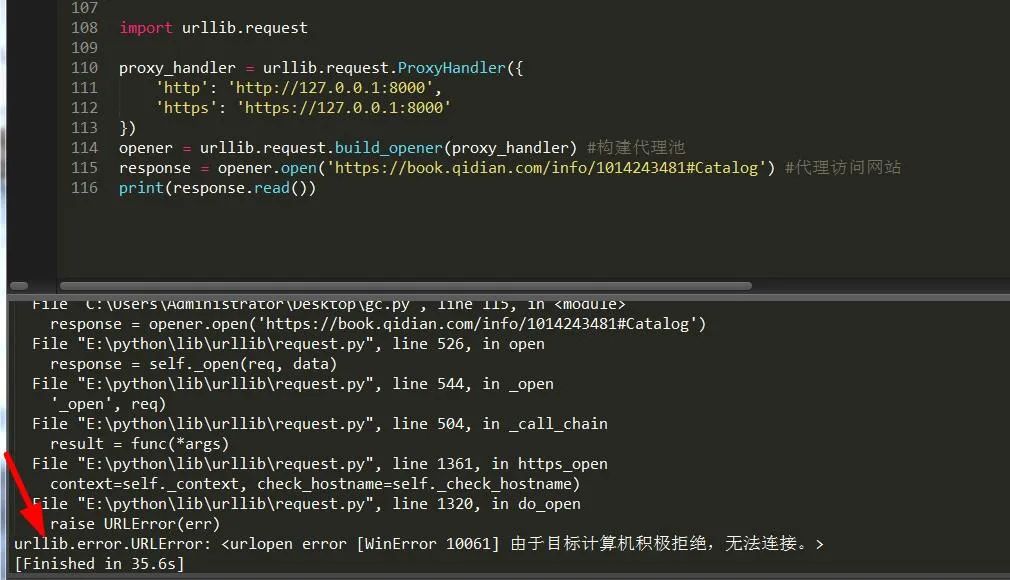
可以看出,由于本人使用無用的IP導(dǎo)致鏈接錯(cuò)誤,所以此時(shí)應(yīng)該處理異常。
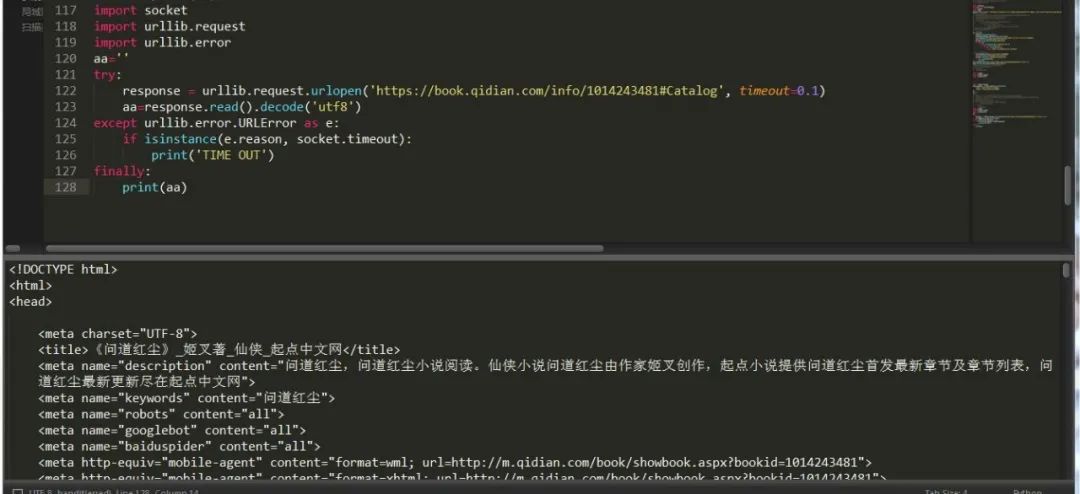
換了種處理異常的方式,不過總的來說還是比較全面的。異常模塊中有兩個(gè)異常錯(cuò)誤:
URLError,HTTPError,其中HTTPError是URLError的子類,URLError 里只有一個(gè)屬性:reason,即抓異常的時(shí)候只能打印錯(cuò)誤信息,類似上面的例子。
HTTPError 里有三個(gè)屬性:code,reason,headers,即抓異常的時(shí)候可以獲得code,reson,headers三個(gè)信息,
import socketimport urllib.requestimport urllib.erroraa=''try:response = urllib.request.urlopen('https://book.qidian.com/info/1014243481#Catalog', timeout=0.1)aa=response.read().decode('utf8')except urllib.error.URLError as e:print(e.reason)if isinstance(e.reason,socket.timeout):print("time out")except urllib.error.HTTPError as e:print(e.reason,e.code)finally:print(aa)
除此之外,它還可以處理cookie數(shù)據(jù),不過要借助另一個(gè)模塊 http。
import http.cookiejar, urllib.requestcookie = http.cookiejar.CookieJar() #創(chuàng)建cookiejar對象handler = urllib.request.HTTPCookieProcessor(cookie) 建立cookie請求opener = urllib.request.build_opener(handler) #構(gòu)建請求response = opener.open('https://www.baidu.com') #發(fā)送請求for item in cookie:print(item.name+"="+item.value) #打印cookie信息
同時(shí)cookie可以寫入到文件中保存,有兩種方式http.cookiejar.MozillaCookieJar和http.cookiejar.LWPCookieJar(),想用哪種自己決定。
http.cookiejar.MozillaCookieJar()方式
import http.cookiejar, urllib.requestfilename = "cookie.txt"cookie = http.cookiejar.MozillaCookieJar(file_name)handler = urllib.request.HTTPCookieProcessor(cookie)opener = urllib.request.build_opener(handler)response = opener.open('https://www.baidu.com')cookie.save(ignore_discard=True, ignore_expires=True)#保存信息
http.cookiejar.LWPCookieJar()方式
import http.cookiejar, urllib.requestfilename = 'cookie.txt'cookie = http.cookiejar.LWPCookieJar(file_name)handler = urllib.request.HTTPCookieProcessor(cookie)opener = urllib.request.build_opener(handler)response = opener.open('https://www.baidu.com')cookie.save(ignore_discard=True, ignore_expires=True)
如果想要通過獲取文件中的cookie獲取的話可以通過load方式,它也有兩種方式,http.cookiejar.MozillaCookieJar和http.cookiejar.LWPCookieJar(),想用哪種自己決定。
http.cookiejar.MozillaCookieJar()方式
import http.cookiejar, urllib.requestcookie = http.cookiejar.MozillaCookieJar()cookie.load('cookie.txt', ignore_discard=True, ignore_expires=True)handler = urllib.request.HTTPCookieProcessor(cookie)opener = urllib.request.build_opener(handler)response = opener.open('https://www.baidu.com')print(response.read().decode('utf-8'))
http.cookiejar.LWPCookieJar()方式
import http.cookiejar, urllib.requestcookie = http.cookiejar.LWPCookieJar()cookie.load('cookie.txt', ignore_discard=True, ignore_expires=True)handler = urllib.request.HTTPCookieProcessor(cookie)opener = urllib.request.build_opener(handler)response = opener.open('https://www.baidu.com')print(response.read().decode('utf-8'))
urllib parse模塊
它是負(fù)責(zé)解析頁面內(nèi)容,模塊下有一個(gè)urlparse方法用于拆分解析內(nèi)容,具體用法如下:
urllib.parse.urlparse(url,scheme)URL:頁面地址
scheme: 協(xié)議類型 ,比如 http https

有拆分當(dāng)然也會有拼接,我們可以看到上面返回的有六個(gè)值,所以我們在做拼接時(shí)一定要填寫六個(gè)參數(shù),否則它會報(bào)沒有足夠的值用來解包的錯(cuò)誤。
urllib.parse.urlunpars(url,scheme)
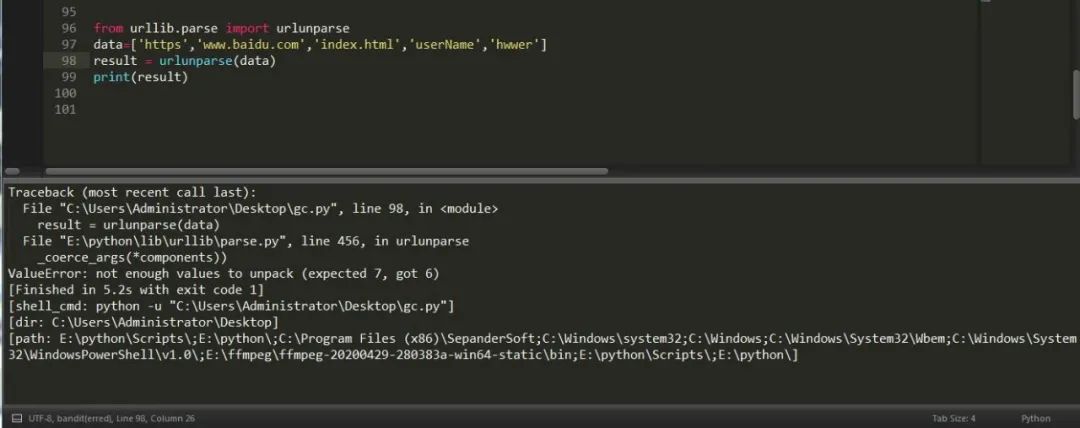

類似的拼接方法其實(shí)還有,比如說urljoin,例子如下:

urllib.robotparser 它也是一個(gè)解析模塊,從它的字面意思看,應(yīng)該是一個(gè)機(jī)器人解析模塊。
而且它還與機(jī)器人協(xié)議有關(guān)聯(lián),它的存在就是為了解析每個(gè)網(wǎng)站中機(jī)器人協(xié)議,判斷這個(gè)網(wǎng)站是否可以抓取。
每個(gè)網(wǎng)站中都會有一個(gè)robots.txt文件,我們要做的就是先解析它,然后在對要下載的網(wǎng)頁數(shù)據(jù)進(jìn)行判斷是否可以抓取。

可以通過直接輸入url的方式來判斷:
from urllib import robotparserrb = robotparser.RobotFileParser('https://www.baidu.com/robots.txt')print(rb.read())url = 'https://www.baidu.com'user_agent = 'BadCrawler'aa=rb.can_fetch(user_agent, url) #確定指定的用戶代理是否允許訪問網(wǎng)頁print(aa) #禁止使用的用戶代理 falseuser_agent = 'Googlebot'bb=rb.can_fetch(user_agent, url)print(bb)#允許使用的用戶代理 true
也可以通過間接設(shè)置url的方式來判斷:
from urllib import robotparserrb = robotparser.RobotFileParser()rb.set_url('https://www.baidu.com/robots.txt')rb.read() #讀取url = 'https://www.baidu.com'user_agent = 'BadCrawler'aa=rb.can_fetch(user_agent, url) #確定指定的用戶代理是否允許訪問網(wǎng)頁print(aa) #禁止使用的用戶代理 falseuser_agent = 'Googlebot'bb=rb.can_fetch(user_agent, url)print(bb)#允許使用的用戶代理 trueprint(rb.mtime()) #返回抓取分析robots協(xié)議的時(shí)間rb.modified() #將當(dāng)前時(shí)間設(shè)置為上次抓取和分析 robots.txt 的時(shí)間print(rb.mtime())# 返回 robots.txt 文件對請求速率限制的值print(rb.request_rate('Googlebot'))print(rb.request_rate('MSNBot'))# 返回 robotx.txt 文件對抓取延遲限制的值print(rb.crawl_delay('Googlebot'))print(rb.crawl_delay('MSNBot'))
三、應(yīng)用案例:爬取起點(diǎn)小說名
老樣子,按下鍵盤快捷鍵F12,進(jìn)行網(wǎng)頁分析,這次我們采用lxml,我們得知只需要將這個(gè)頁面中的某一個(gè)部分的數(shù)據(jù)變動(dòng)一下就可以抓取到所有數(shù)據(jù)。如圖:
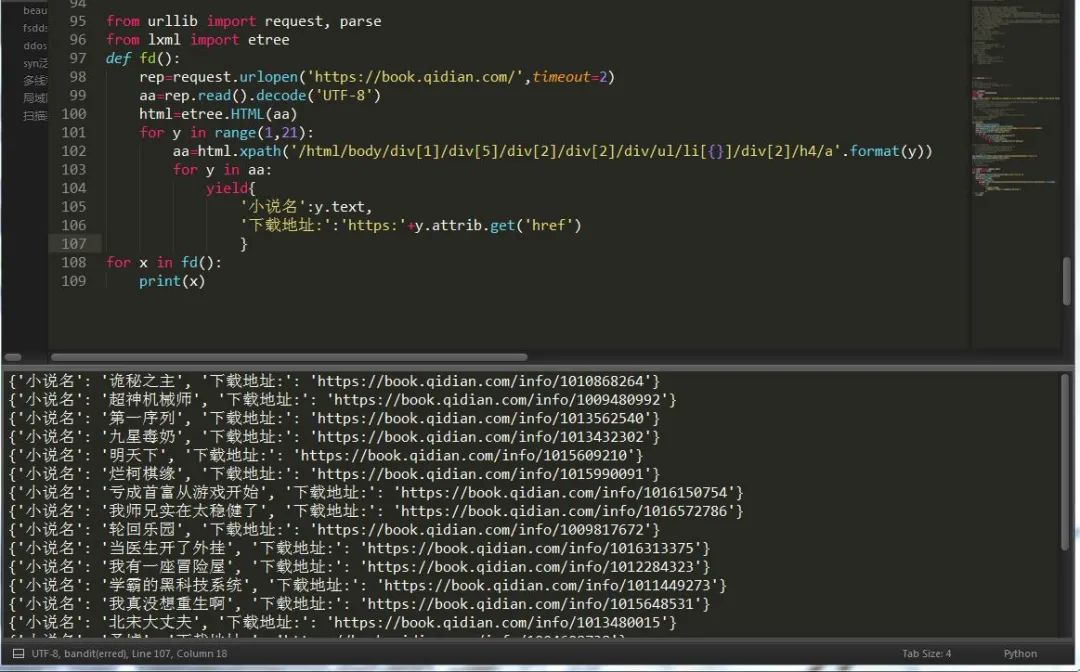
下次我們來講lxml和xpath語法,以便于大家更好的爬取數(shù)據(jù),urllib內(nèi)容就這么多,并不復(fù)雜,requests更為簡單易學(xué)。
最后想學(xué)習(xí)更多關(guān)于Python的知識,可以參考學(xué)習(xí)網(wǎng)址:http://pdcfighting.com/,點(diǎn)擊閱讀原文,可以直達(dá)噢~
------------------- End -------------------
往期精彩文章推薦:

歡迎大家點(diǎn)贊,留言,轉(zhuǎn)發(fā),轉(zhuǎn)載,感謝大家的相伴與支持
想加入Python學(xué)習(xí)群請?jiān)诤笈_回復(fù)【入群】
萬水千山總是情,點(diǎn)個(gè)【在看】行不行
/今日留言主題/
隨便說一兩句吧~~