
SpringBoot中如何在實(shí)現(xiàn)快速導(dǎo)出Excel ?
點(diǎn)擊上方"Java后端編程",?右上角“設(shè)為星標(biāo)”
精品技術(shù)文章準(zhǔn)時(shí)送上!
工作中經(jīng)常遇到導(dǎo)出Ecxel功能,這里就給出完整示例代碼,可以直接使用。
1.引入依賴
<dependency>
?<groupId>org.apache.poigroupId>
?<artifactId>poi-ooxmlartifactId>
?<version>3.17version>
dependency>
2. ExcelSheetSettingEnum
定義Excel的一些配置信息
public?enum?ExcelSheetSettingEnum {
?REPORT_TEST("report_test",?"Excel文件名稱",?new?String[]{"Sheet名稱1",?"Sheet名稱2"},?new?String[]{"標(biāo)題1",?"標(biāo)題2"},?new?String[][]{
?{"字段名稱A",?"字段名稱B",?"字段名稱C",?"字段名稱D"},
?{"字段名稱A",?"字段名稱B",?"字段名稱C",?"字段名稱D"}
?}),
?REPORT_TEST2("report_test2",?"Excel文件名稱",?new?String[]{"標(biāo)題1",?"標(biāo)題2"}),
?REPORT_TEST3("report_test3",?"Excel文件名稱")
?;
?ExcelSheetSettingEnum(String?code,?String?filename) {
?this.code = code;
?this.filename = filename;
?}
?ExcelSheetSettingEnum(String?code,?String?filename,?String[] titles) {
?this.code = code;
?this.filename = filename;
?this.titles = titles;
?}
?ExcelSheetSettingEnum(String?code,?String?filename,?String[] sheetnames,?String[] titles,?String[][] headers) {
?this.code = code;
?this.filename = filename;
?this.sheetnames = sheetnames;
?this.titles = titles;
?this.headers = headers;
?}
?/** 代碼標(biāo)識(shí)(必選) */
?private?String?code;
?/** 代碼標(biāo)識(shí)(必選) */
?private?String?filename;
?/** Sheet名稱(可選) */
?private?String[] sheetnames;
?/** Sheet標(biāo)題(可選) */
?private?String[] titles;
?/** 表頭名稱(可選) */
?private?String[][] headers;
?// Getter & Setter
}
3. ExcelView
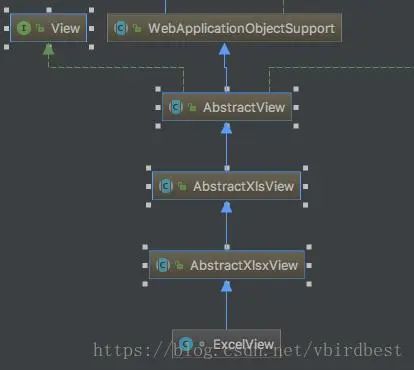
定義Excel視圖,繼承自AbstractXlsxView或者AbstractXlsView, 需要實(shí)現(xiàn)一個(gè)abstract方法buildExcelDocument用于創(chuàng)建Sheet,構(gòu)造Excel數(shù)據(jù)。
繼承關(guān)系如下:
/**
?* Excel視圖
?*
?* 支持多個(gè)Sheet, Sheet名稱、標(biāo)題和表頭不是必須的
?* AbstractPdfView和AbstractXlsxView原理大致相同
?*
?*?@author?mengday zhang
?*/
public?class?ExcelView?extends?AbstractXlsxView?{
?@Override
?protected?void buildExcelDocument(Map map, Workbook workbook, HttpServletRequest request, HttpServletResponse response) throws?Exception?{
?ExcelSheetSettingEnum setting = (ExcelSheetSettingEnum) map.get("ExcelSheetSetting");
?// 設(shè)置文件名稱
?String filename = setting.getFilename();
?filename =?new?String(filename.getBytes("UTF-8"),"ISO8859-1");
?response.setHeader(HttpHeaders.CONTENT_DISPOSITION,"attachment;filename="?+ filename +?".xlsx");
?List<List<List>> sheets = (List<List<List>>) map.get("data");
?for?(int i =?0; i < sheets.size(); i++) {
?// 創(chuàng)建sheet
?String[] sheetNames = setting.getSheetnames();
?String sheetName =?"Sheet"?+ (i +?1);
?if?(sheetNames !=?null?&& sheetNames.length >?0) {
?sheetName = sheetNames[i];
?}
?Sheet sheet = workbook.createSheet(sheetName);
?// 如果標(biāo)題不為空的話,將表格的第一行作為標(biāo)題行,并合并第一行的N個(gè)單元格
?int index =?0;
?String[] titles = setting.getTitles();
?String[][] headerss = setting.getHeaders();
?List<List> rowsForTable = sheets.get(i);
?if?(titles !=?null?&& titles.length >?0) {
?// 合并標(biāo)題單元格 下標(biāo)從0開始 起始行號(hào),終止行號(hào), 起始列號(hào),終止列號(hào)
?CellRangeAddress region =?new?CellRangeAddress(0,?0,?0, rowsForTable.get(0).size() -?1);
?sheet.addMergedRegion(region);
?Row titleRow = sheet.createRow(index++);
?Cell titleCell = titleRow.createCell(0);
?CellStyle cellStyle = workbook.createCellStyle();
?cellStyle.setAlignment(HorizontalAlignment.CENTER);
?Font font = workbook.createFont();
?font.setFontName("黑體");
?font.setBold(true);
?font.setFontHeightInPoints((short)?15);
?cellStyle.setFont(font);
?titleCell.setCellStyle(cellStyle);
?titleCell.setCellValue(titles[i]);
?}
?// 創(chuàng)建表頭行
?if?(headerss !=?null?&& headerss.length >?0) {
?Row headerRow = sheet.createRow(index++);
?String[] headers = headerss[i];
?for(int j =?0; j < headers.length; j++) {
?headerRow.createCell(j).setCellValue(headers[j]);
?}
?}
?// 創(chuàng)建數(shù)據(jù)行
?AtomicInteger rowIndex =?new?AtomicInteger(index);
?rowsForTable.forEach(rowList -> {
?Row row = sheet.createRow(rowIndex.getAndIncrement());
?AtomicInteger x =?new?AtomicInteger();
?rowList.forEach(cell ->
?row.createCell(x.getAndIncrement()).setCellValue(cell)
?);
?});
?}
?}
}
4.controller
mvc方法中方法的返回值是ModelAndView, 當(dāng)代碼執(zhí)行new ModelAndView(excelView, map)時(shí)會(huì)執(zhí)行ExcelView#buildExcelDocument的方法
@RestController
@RequestMapping("/excel")
public?class?ExcelController {
?@RequestMapping("/export")
?public?ModelAndView?export(){
?ListString>> sheet1 = Arrays.asList(
?Arrays.asList("1",?"11",?"111",?"1111"),
?Arrays.asList("2",?"22",?"222",?"2222"),
?Arrays.asList("3",?"33",?"333",?"3333")
?);
?ListString>> sheet2 = Arrays.asList(
?Arrays.asList("4",?"44",?"444",?"4444"),
?Arrays.asList("5",?"55",?"555",?"5555"),
?Arrays.asList("6",?"66",?"666",?"6666")
?);
?ListString>>> sheets = Arrays.asList(sheet1, sheet2);
?Map<String,?Object> map =?new?HashMap<>();
?map.put("ExcelSheetSetting", ExcelSheetSettingEnum.REPORT_TEST2);
?map.put("data", sheets);
?ExcelView excelView =?new?ExcelView();
?return?new?ModelAndView(excelView, map);
?}
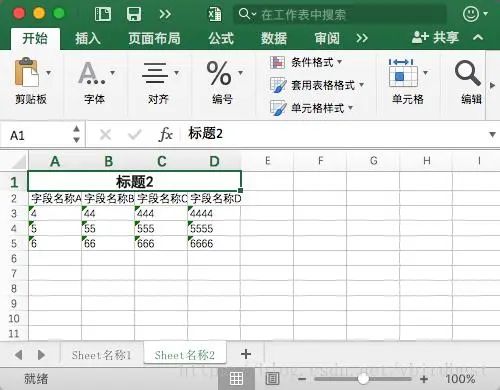
} 
推薦閱讀:
最近面試BAT,整理一份面試資料《Java面試BAT通關(guān)手冊(cè)》,覆蓋了Java核心技術(shù)、JVM、Java并發(fā)、SSM、微服務(wù)、數(shù)據(jù)庫(kù)、數(shù)據(jù)結(jié)構(gòu)等等。
獲取方式:點(diǎn)“在看”,關(guān)注公眾號(hào)并回復(fù)?666?領(lǐng)取,更多內(nèi)容陸續(xù)奉上。
明天見(jiàn)(??ω??)??
評(píng)論
圖片
表情